


Albato is a no-code integration platform that helps you automate routine tasks by connecting your favorite apps like Google Sheets, Slack, Gmail, Shopify, and more, without writing a single line of code.
In this review, I’ll break down everything you need to know, including what Albato does, where it works best, where it falls short, and how it compares to a more powerful automation platform like Lindy.
What Is Albato?
Albato is an integration and automation platform (iPaaS) built for small businesses, marketers, and startups that want to automate their day-to-day workflows without hiring a developer.
You use a drag-and-drop builder to connect apps like Gmail, Slack, Notion, and HubSpot. It also lets you build custom integrations using APIs or webhooks if the app isn’t natively supported.
Some real-world examples of Albato in action:
- Automatically send new Facebook Ads leads to Google Sheets and notify your sales rep on Slack.
- Sync order details from Shopify to QuickBooks and send confirmation emails.
- Archive all incoming Gmail emails to Airtable automatically.

How Much Does Albato Cost?
Albato’s pricing starts with a free plan that includes 100 monthly transactions, then moves to paid plans billed annually. The pricing plans can be a bit confusing, so here's a quick overview.
Albato pricing plans include:
- Basic ($13/month for 1,000 transactions)
- Standard ($37/month for 5,000 transactions)
- Pro ($91/month for 15,000 transactions)
- Enterprise ($141/month for 30,000 transactions)
- Embedded ($840+/month for 750,000+ transactions)
Extra transactions cost $0.02 each on Standard and Pro plans, and $0.01 on Enterprise.
What I Like About Albato
1. Simple, No-Code Builder for Beginners
Albato’s builder lets you set up workflows with just a few clicks. You pick a trigger (like a new form submission) and then define actions (like sending an email or adding a row in Google Sheets). You don’t need to write any code or learn technical terms.
The layout is step-by-step, so you always know what to do next. Each block comes with a plain-language explanation. This helps you avoid setup mistakes and speeds up automation.
When I tested Albato, I connected Gmail and Airtable to log all new emails into a spreadsheet. The whole setup took about 6 minutes. I didn’t need to open a help doc or video. If you’ve never used automation tools, this platform makes it easy to start and see quick wins.
Albato works well if you want to save time and replace manual work without depending on developers.
2. Wide App Compatibility
Albato supports 800+ apps, covering CRM, marketing, e-commerce, databases, and communication tools. You can build workflows between apps like Slack, Trello, Facebook Ads, Shopify, and Notion. This means you won’t need new software to make automation work.
For example, a Shopify user can trigger a Slack alert on every order, update customer records in Airtable, and email an invoice in Gmail. Everything runs automatically once you set the flow.
I integrated Slack, Typeform, and Google Sheets to log new survey submissions. It worked right away, and I didn’t run into missing fields or data mismatches.
If you already use popular tools, Albato likely supports them. This saves time during setup and avoids switching platforms.
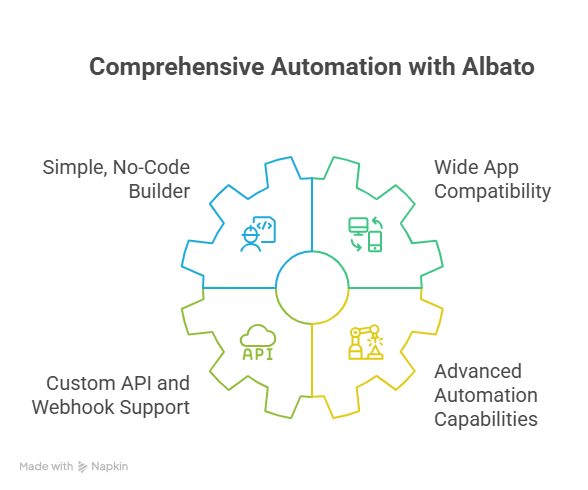
3. Custom API and Webhook Support
Albato lets you connect any tool with an API. You don’t have to wait for native integration. You can send and receive data using custom requests, headers, tokens, and JSON formatting.
This is useful if you use internal systems or niche tools that big-name platforms don’t support. You can build your own connection and trigger workflows just like any other app.
I used the App Integrator to link a private CRM via API. It took a few tries, but I managed to send lead data automatically into the system. Albato walked me through the setup with field mapping and request testing.
If you need flexibility or deal with apps that other automation tools ignore, Albato gives you control.
4. Advanced Automation Capabilities
Albato includes filters, conditions, data formatting, time delays, and batch processing. You can build detailed workflows that follow business logic. For example, you can:
- Add a delay between steps
- Run actions only if a value matches a rule
- Format names, dates, and numbers before saving
These tools help you avoid cluttered workflows made of duplicate steps. You can add more intelligence to your automation.
I used batch processing to sync hundreds of Airtable rows into Google Sheets. Instead of running the workflow once per row, Albato handled them all in one go. That saved me time and reduced my task count.
If you want more than just basic triggers and actions, Albato gives you enough power without needing code.
What Could Albato Improve?
1. Limited Workflow Visualization
Albato shows each step in a long, single-column list. This layout works fine when your flow has 2 or 3 steps. But as soon as you add conditions or branches, it becomes hard to follow.
You can’t see the full picture without scrolling. You also can’t move or group steps easily. This makes reviewing or updating workflows harder, especially with lots of logic involved.
I built a campaign workflow that filtered leads by type and sent different emails. Keeping track of which branch did what took extra time because I had to scroll through every detail.
If you build multi-step automations, you’ll likely want a better visual layout to manage complexity.
2. Steep Learning Curve for Complex Tasks
Albato is easy for basic use, but once you start adding webhooks, custom headers, or advanced conditions, it gets technical. The interface doesn’t hide complexity well in these cases.
You’ll need to read API docs and understand JSON. You’ll also need to manually test requests, which can slow you down if you don’t have experience.
I connected a data enrichment tool that needed authentication and nested payloads. I had to retry the setup a few times to get the data right.
If your team doesn’t include someone technical, it might be hard to unlock Albato’s full feature set.
Albato Pricing: What You Get and When It Stops Being Worth It
Albato offers multiple plans, starting from a free tier and scaling up based on usage. Each plan includes a set number of monthly transactions (i.e., automation tasks), a fixed update interval, and limits on active automations.
Here’s a quick look at all available plans:
The Albato lifetime deal is no longer on offer, so all plans are now billed on a subscription basis.
Is Albato's Pricing Worth It?
Albato’s pricing looks affordable, especially when compared to tools like Zapier or Make. But the real cost depends on how many tasks you run each month.
Each plan includes a transaction cap. When you go over that cap, Albato charges extra per task, typically $0.02 on the Standard and Pro plans, and $0.01 on Enterprise. These overages can add up fast if your workflows:
- Log hundreds of leads from forms or ads
- Sync CRM or email data in bulk
- Process daily customer support tickets
When I used Albato to build a marketing workflow that synced ad leads with our CRM and sent Slack alerts, I hit the 5,000 task limit on the Standard plan in under a week. I didn’t need more features, just more volume. That meant I had to upgrade earlier than expected.
If you only need light or occasional automation, the Free or Basic plan may be enough. But if you rely on automations daily or run multi-step workflows at scale, the costs can rise quickly.
Before choosing a plan, look closely at your monthly transaction volume and how many workflows you plan to run. If you scale your automations later, expect to move up a pricing tier or pay overage fees.
{{templates}}
Apps You Can Automate with Albato
Albato supports a wide library of tools across categories. Here are some useful examples:
Albato also allows connecting custom apps using APIs or Webhooks.
Who Should Use Albato (and Who Shouldn’t)?
Albato isn’t built for everyone. It works well for certain teams and use cases, but it also comes with limitations that may not suit more advanced needs.
Who Should Use Albato?
1. Small teams without technical resources
If you don’t have developers or IT support, Albato gives you an easy way to connect apps and automate tasks with a no-code interface. You can set up workflows for marketing, sales, and customer service without writing any code.
2. Freelancers, consultants, and solo founders
Albato is a great fit if you’re a one-person operation juggling tools like Google Sheets, Slack, Airtable, or Trello. It helps you eliminate routine tasks, respond faster, and stay organized.
3. Teams that use mainstream tools
Albato supports 800+ popular apps. If your stack includes tools like Gmail, Shopify, Notion, Facebook Ads, or HubSpot, you’ll be able to set up useful automations quickly using pre-built templates.
4. SaaS platforms needing white-labeled integrations
Albato’s Embedded plan lets software providers offer built-in integrations to their users without building from scratch. If you’re a SaaS company, this can save you months of dev time.
When I set up Albato for a client using Shopify, Airtable, and Slack, it worked smoothly and saved hours every week without needing any backend work.
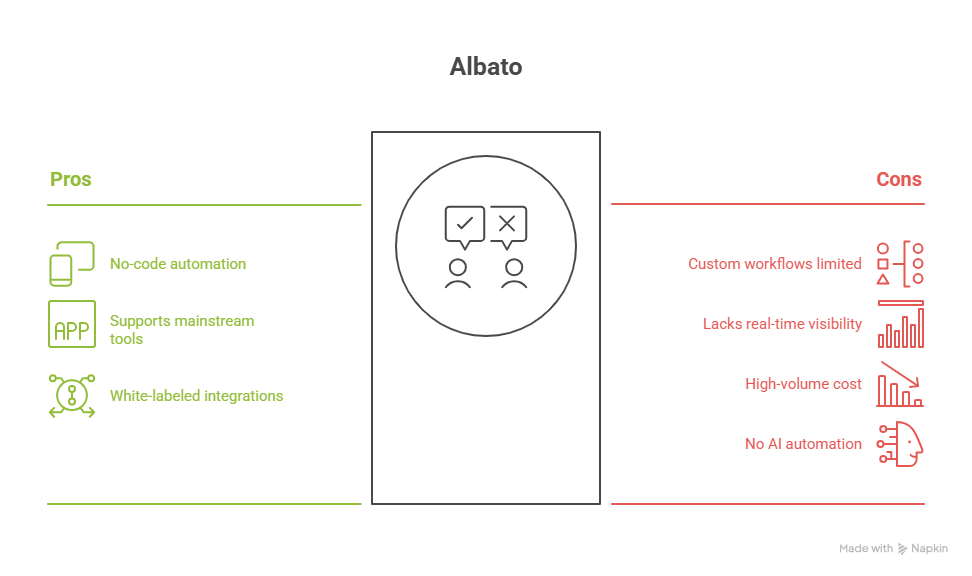
Who Shouldn’t Use Albato?
1. Businesses with highly custom workflows
If your operations rely on internal systems or niche software that require deep customization, Albato might fall short. While it supports API and Webhooks, setting them up gets technical and may require outside help.
2. Teams that need real-time visibility across complex workflows
Albato uses a single-column layout. If your automation has multiple branches or complex conditions, it becomes hard to visualize and manage. Tools with drag-and-drop visual builders are better suited for advanced mapping and debugging.
3. Companies running high-volume automation daily
Albato’s pricing is tied to task volume. If your business processes thousands of records daily (like leads, support tickets, or reports), you may hit the task limit quickly and face overage fees or forced upgrades. This adds cost unpredictability.
4. Users expecting AI-driven automation
Albato is great for rule-based flows. But if you want your automations to use natural language, analyze customer messages, or make smart decisions (like classifying support tickets or enriching leads), you’ll need something more advanced like Lindy.
{{cta}}
Looking for More Than Just App Connections?
Lindy is built for moving faster, automating full workflows, and using natural language instead of dropdown menus. Albato works if you want simple, rule-based automations. Lindy does a lot more.
Just describe what you want, like “Check this sheet, enrich the lead, send an email, update HubSpot” and Lindy handles it.
Here’s how Lindy gives you more power and flexibility than Albato:
- Automates entire workflows, not just task chains between apps
- Understands plain English so you don’t need to set conditions manually
- Handles multi-step logic and decisions without overwhelming interfaces
- Uses AI to adapt to context, not just rules you set once
- Scales easily with usage, using a flexible credit system instead of hard task limits
No complex setups. No rigid limits. Just real automation that grows with you.
Frequently Asked Questions
1. Is Albato better than Zapier or Make?
Albato is more affordable than Zapier and simpler than Make, especially for beginners. But it lacks the visual workflow builder of Make and the advanced polish of Zapier. If you need basic automations between common tools and want to save money, Albato is a strong option. For complex logic, others may be better.
2. Can Albato handle AI tasks like summarizing emails or qualifying leads?
Albato supports basic AI tasks by connecting to OpenAI or ChatGPT via API. But it doesn’t have built-in AI logic or natural language support. If you want automations that understand context, analyze text, or adapt dynamically, a platform like Lindy that’s built for AI workflows will give you more control and flexibility.
3. How hard is it to set up a workflow in Albato?
If you're connecting common apps like Gmail, Slack, or Google Sheets, setup is simple and takes minutes. But if you’re using APIs, custom headers, or filters, it gets technical fast. Some parts require understanding JSON or testing API calls. Albato has guides, but you may still need support for advanced tasks.
4. Can Albato be used by non-technical users?
Yes, non-technical users can use Albato to build basic automations. The drag-and-drop interface is beginner-friendly for simple flows like logging emails or syncing leads. But things like webhook connections or custom integrations might be too complex without help. It’s best for users with basic digital skills and some patience for testing.
5. What happens if I exceed my plan’s transaction limit?
Once you hit your plan’s transaction cap, Albato charges extra per task. On Standard and Pro plans, it’s $0.02 per extra task. This can add up quickly if you process high volumes. You’ll either need to pay overages or upgrade to a higher plan. Always check your task usage regularly to avoid surprise costs.
6. Does Albato support real-time automations?
Albato’s update times depend on your plan. The Free and Basic plans refresh every 15 minutes. Standard and Pro plans run every 5 minutes. Enterprise plans go as fast as every minute. If you need true real-time responses, like live chat alerts or urgent task triggers, this might not be fast enough.
7. When should I choose Lindy instead of Albato?
Choose Lindy if you want to automate full workflows using plain English, integrate AI into decision-making, or avoid setting complex rules manually. Lindy works better for teams who want smarter automation that adapts to context, not just triggers. If your needs go beyond task linking, Lindy gives you more power and speed.








.png)
.avif)
%20(1).png)
.png)


.png)


