


The Complete Knowledge Management Strategy Guide for 2026
Everett walked through building a knowledge management strategy in eight steps, from auditing existing knowledge and mapping flows to setting governance policies and measuring impact.


A knowledge management strategy is a structured way to collect, organize, store, and share knowledge across an organization. It ensures valuable information isn’t lost and is used to improve performance, collaboration, and innovation.
It includes both tacit knowledge (undocumented experience and insights in people’s heads) and explicit knowledge (documents, manuals, processes, reports).
Why is KM Strategy Important?
A good KM strategy can help your organization:
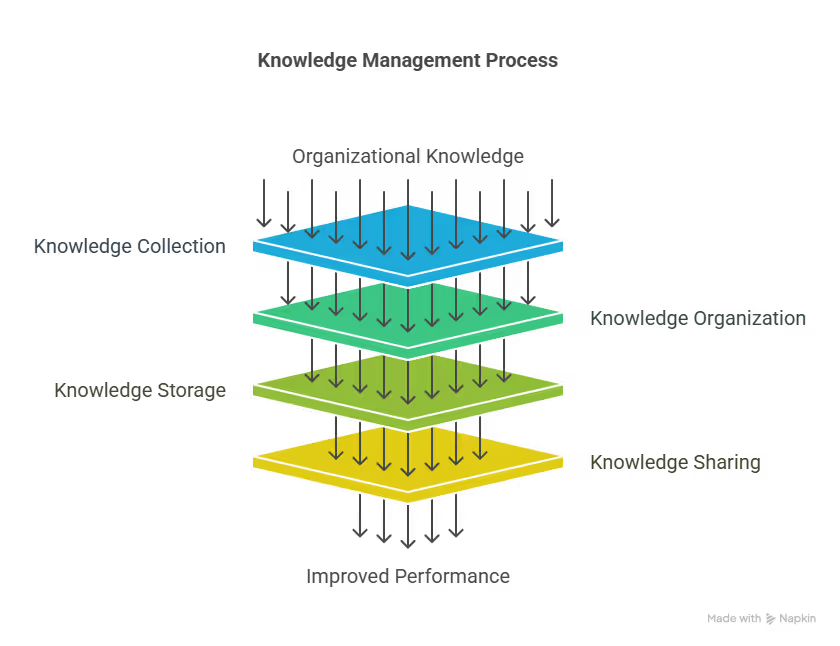
- Reduce repeated mistakes
- Improve onboarding and training
- Make better decisions with past learnings
- Avoid knowledge loss when employees leave
- Enable faster innovation and R&D
- Improve customer service and product development
How to Develop a Knowledge Management Strategy (Step-by-Step)
A successful knowledge management strategy isn’t built overnight. It takes planning, alignment, and consistent follow-through. Here's how to do it right, from the ground up.
Step 1: Define Your Goals
Why do you want knowledge management? What is the end goal? It’s something you need to be very clear about before you create a strategy. To find that you, ask yourself questions like:
- What kind of knowledge is most valuable to our business?
- Where are we losing time or efficiency due to poor knowledge access?
- What do we want to achieve– faster onboarding, fewer repeated mistakes, better customer service?
Your goals should be tied to tangible business outcomes. It could be something like:
- Reducing support ticket resolution time by 30%
- Cutting onboarding time for new hires in half
- Centralizing all SOPs and removing duplicate documentation
Don’t just define goals, rank them by priority and assign measurable KPIs from the start. This gives your strategy focus and direction.
Step 2: Audit Existing Knowledge
Before you build anything new, map what you already have. To understand and analyze the existing knowledge and assets, ask yourself these questions:
- What knowledge assets exist today? (Documents, spreadsheets, training videos, email threads?)
- Where are they stored? (Google Drive, individual desktops, chat threads?)
- How easy are they to find and use?
- What’s missing or outdated?
- Who are our go-to experts or knowledge holders in each department?
Document everything. Then categorize knowledge by:
- Team or department
- Format (written, visual, verbal)
- Frequency of use
This gives you a baseline inventory to build on, and helps you spot immediate wins (like consolidating redundant files).
Step 3: Map Knowledge Flows
How does the knowledge flow in your organization? Where it comes from and where it goes– you need to figure all that out. To map out the flow of knowledge, find answers for these questions:
- Who typically creates knowledge?
- Who consumes it?
- Where does knowledge get lost or siloed? (For example, Slack channels, individual emails, or tribal knowledge stuck in someone’s head.)
Use visual tools like flowcharts or whiteboards to chart knowledge movement across teams. This helps you identify bottlenecks, silos, and breakpoints that need to be fixed.
Step 4: Choose the Right Tools & Systems (& Integrate with Lindy)
Now that you know what you have and what’s missing, it’s time to pick the right tools. These tools should have:
- A centralized knowledge base where everyone can find and contribute
- Powerful search and tagging functionality so nothing gets buried
- AI-powered suggestions to surface relevant content based on user behavior
- Role-based access to control who can view, edit, or manage specific content
I suggest choosing tools that integrate with your current workflow like Slack, Google Workspace, CRM (Salesforce, HubSpot), and project management tools. That’s why Lindy is the best option.
Step 5: Establish Governance Policies
A strategy without structure falls apart fast. So, set up clear rules for:
- Ownership: Who’s responsible for updating each knowledge area?
- Review cycles: How often should content be reviewed (monthly, quarterly)?
- Version control: How are changes tracked? Can you roll back?
- Access rights: Who can contribute, approve, or archive content?
Assign ownership early. Without it, your knowledge base will get outdated quickly, and people will stop trusting it.
Step 6: Build a Knowledge-Sharing Culture
Tools alone won’t work if people aren’t motivated to share. You need to make knowledge-sharing a habit. Here’s how you can encourage that in your organization:
- Peer learning sessions (team members teaching others what they know)
- Lunch & Learn events (informal, quick knowledge drops)
- Recognition programs (shoutouts or rewards for top contributors)
- Embedding knowledge updates into daily standups, retros, or project reviews
And most importantly, leaders should lead by example. When managers actively contribute and reference shared knowledge, the rest of the team follows.
Step 7: Train and Onboard
Even the best system fails if people don’t know how to use it. Train every team member on:
- How to search for knowledge
- How to contribute or update content
- Why it benefits them personally (faster answers, easier onboarding, less context-switching)
I suggest using bite-sized training videos, step-by-step walkthroughs, tool tips, or inline guides and gamified milestones (e.g., "add your first knowledge card").
Don’t make this a one-time thing. Include KM in onboarding for all new hires going forward, and plan refreshers for your team regularly.
Step 8: Monitor, Measure, Improve
A KM strategy is never “done.” You need to keep it alive and useful. To do so, keep tracking:
- Usage stats: Are page views, searches, and content contributions growing?
- Time saved: Are there reduced support queries and faster onboarding?
- Content health: How often is knowledge updated, flagged, or used?
- Impact: Are teams actually making better decisions or reducing errors?
Use surveys or quick feedback forms to ask users: Was this helpful? Could you find what you needed?
Create a feedback loop so insights from users are used to improve tagging, structure, and content quality regularly.
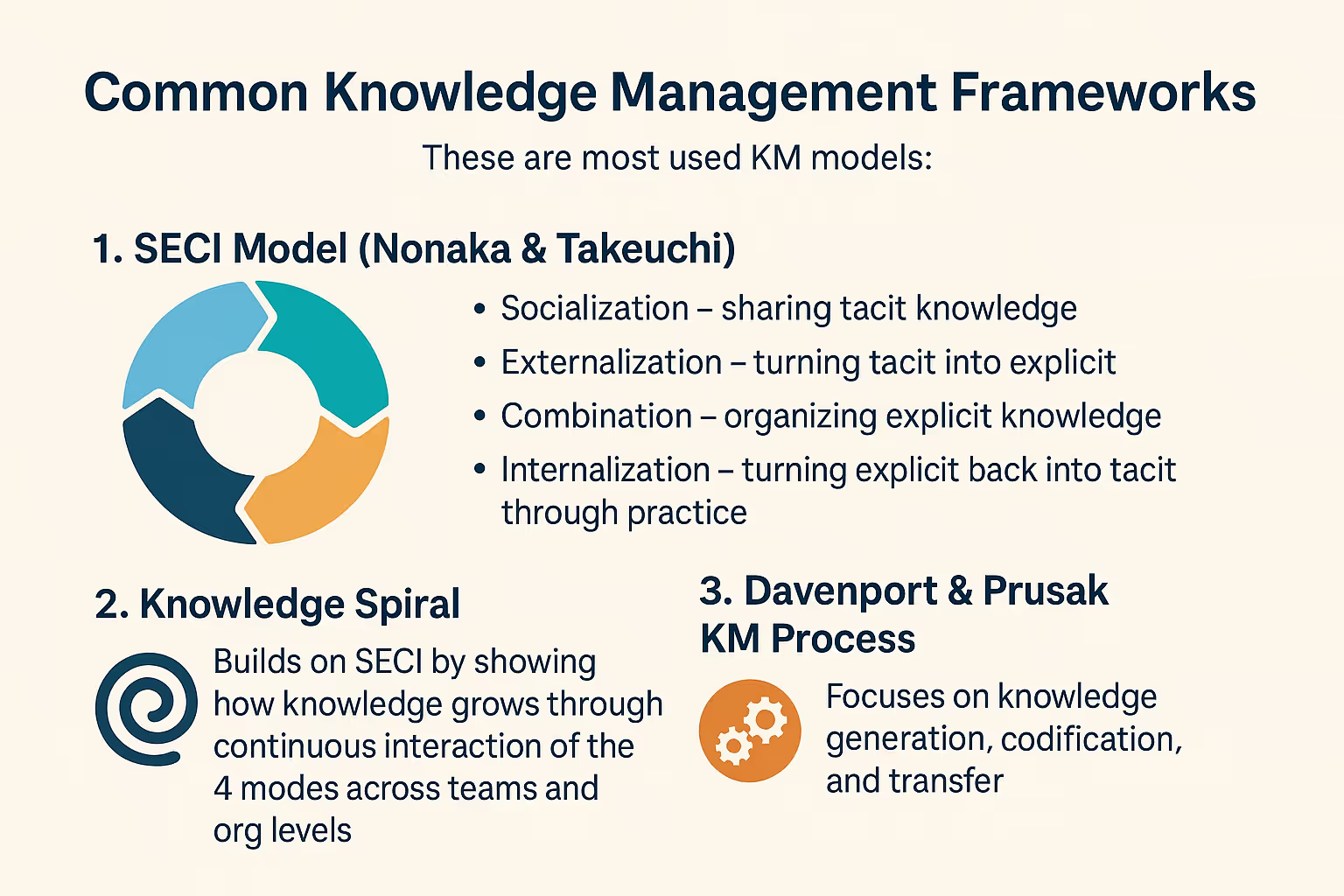
{{templates}}
Types of Knowledge (and Why They Matter)
Before you start building a knowledge management system, it’s important to understand what kind of knowledge you’re actually dealing with. Not all knowledge is the same, and how you capture and share it depends on the type.
Let’s break it down into three main types: explicit, tacit, and implicit.
1. Explicit Knowledge: The Easy-to-Share Stuff
This is the most straightforward type. Explicit knowledge is everything that’s already written down, clearly structured, and easy to pass along. Think of it as the “documented” side of your organization.
You’ll find it in:
- SOPs and process checklists
- Training manuals
- Reports, whitepapers, and guides
- Product documentation
It’s the kind of knowledge you can drop into a shared folder or upload to a wiki without much explanation.
Store it in a centralized, searchable place like a knowledge base or document management system. Make sure it’s organized, version-controlled, and easy to update.
2. Tacit Knowledge: The Know-How in People’s Heads
Tacit knowledge is trickier. It’s the deep, experience-based know-how that people pick up over time, but struggle to put into words. This is the stuff that makes your experts valuable.
You’ll find it in:
- Intuition developed from years of doing the job
- Customer or product insights gained through hands-on work
- Quick thinking during emergencies that others might miss
- Unspoken best practices that aren’t in any manual
This knowledge is powerful but fragile. If that person leaves, it often goes with them.
You can’t just “document” tacit knowledge, but you can bring it to the surface. Use interviews, mentoring programs, recorded demos, or peer learning sessions. The goal is to make this knowledge visible and transferable, at least in part.
3. Implicit Knowledge: The Unwritten Rules
Now, this one sits in between explicit and tacit. Implicit knowledge is stuff that could be documented, but just hasn’t been yet. It lives in your team’s habits, workflows, and unspoken routines.
You’ll see it in:
- How certain teams always handle retros or project handoffs
- Internal shortcuts that aren’t written down but everyone uses
- The way someone prioritizes tasks or handles tricky clients
It’s often taken for granted until a new team member comes in and doesn’t know “how things are usually done.”
Watch for these repeated patterns, then work with teams to capture them. Turn them into playbooks, templates, or internal guides. Often, just asking someone to explain why they do things a certain way is enough to start converting implicit knowledge into something usable.
Building Blocks of a Solid KM Strategy
Here’s what makes KM strategy actually work in practice:
1. Knowledge Capture: Getting Information Out of Heads and Systems
The first step is collecting knowledge, whether it’s locked inside someone’s experience or buried in spreadsheets and tools. This includes everything from interviewing subject matter experts to pulling insights from CRM data, support tickets, project notes, or even meeting recordings.
The goal is to stop knowledge from getting lost or walking out the door when someone leaves.
2. Knowledge Organization: Making It Easy to Navigate
Once captured, knowledge needs structure. Without it, you’ll just end up with a digital junk drawer. Here’s how to organize it:
- Tag content by topic, team, or use case
- Categorize by type (how-to guides, FAQs, processes)
- Create clear hierarchies and links between related content
This makes it easier for people to find what they need without digging through folders or messages.
3. Knowledge Storage: Centralizing Everything in One Place
Now that your content is structured, it needs a reliable home. This typically means:
- A cloud-based knowledge base
- Internal wiki systems
- Centralized databases with access control
The key here is accessibility. Your team should never have to guess where information lives.
4. Knowledge Sharing: Making Knowledge Flow Across Teams
Knowledge is only useful if it’s shared. Your strategy should make it easy for people to access and contribute knowledge as part of their daily work. This includes:
- Integrating KM tools with Slack, Teams, or project management systems
- Enabling peer-to-peer sharing
- Creating low-friction ways for employees to add or update content
The easier it is to share, the more knowledge gets reused instead of recreated.
5. Knowledge Application: Turning Insight into Action
Knowledge management isn’t just about storing information; it’s about using it effectively. A successful strategy helps teams apply knowledge where it matters:
- Making faster, more informed decisions
- Avoiding repeated mistakes
- Improving customer support and training
- Enhancing product development and innovation
The goal is to turn information into impact.
6. Governance: Keeping Knowledge Accurate and Trusted
Without clear ownership, knowledge quickly becomes outdated or inconsistent. Governance helps you make sure that:
- Assigning ownership for each content area
- Scheduling regular content reviews and updates
- Setting up robust version control
- Defining clear permissions and access rights based on roles
This keeps your knowledge base reliable and relevant, so people trust what they find.
7. Measurement: Tracking What Works and What Doesn’t
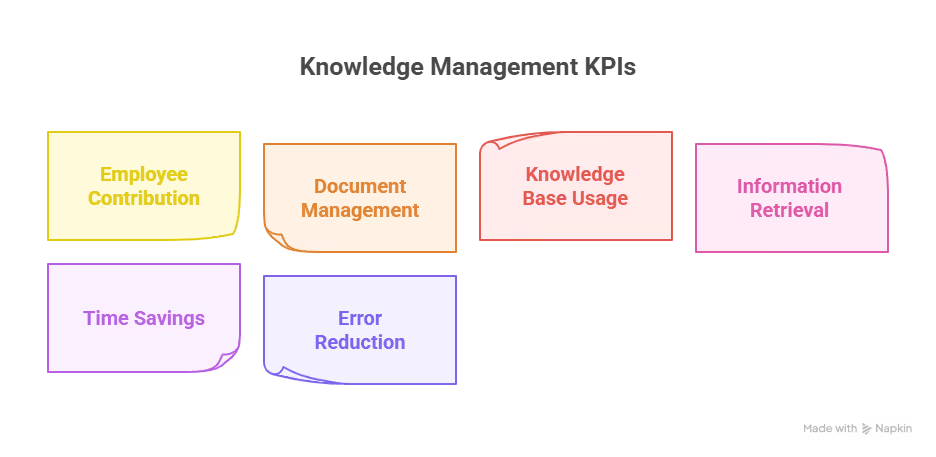
Finally, measure the impact of your KM efforts. Don’t just assume it’s working; track it. These are the metrics you want to track:
- Number of articles viewed or updated
- Average time to find key information
- Reduction in repeated questions or support tickets
- Time saved in onboarding or project execution
Regular reviews help you adjust your strategy and improve over time.
Together, these components make your KM strategy practical, scalable, and actually usable.
Common Knowledge Management Challenges (and How to Fix Them)
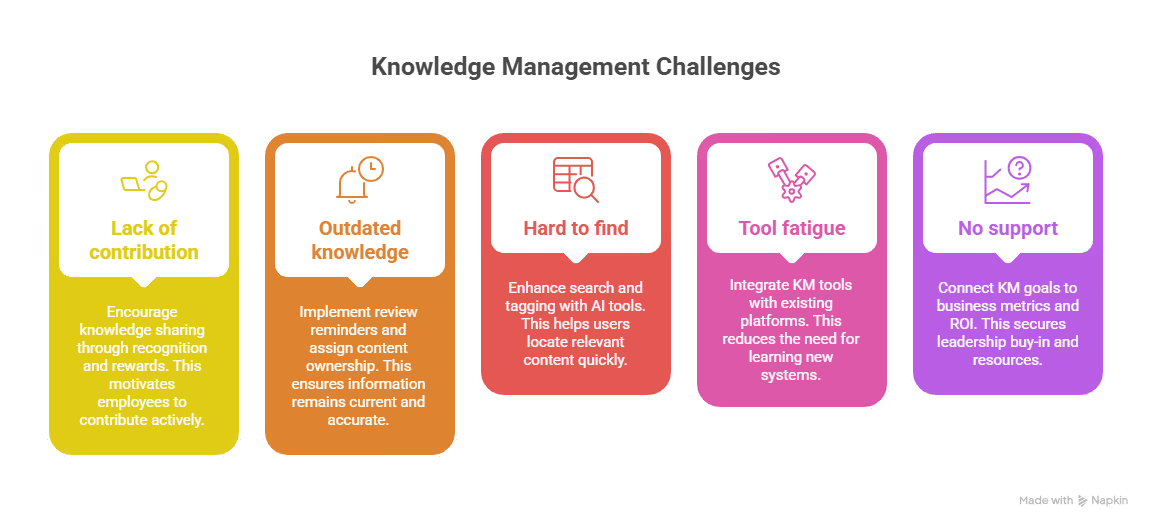
- Lack of contribution: Build knowledge sharing into performance reviews and recognize top contributors with rewards or shoutouts.
- Outdated knowledge: Set automatic review reminders and assign clear ownership for each content area to keep things updated.
- Hard to find information: Improve search functionality and tagging. Use AI-powered tools to surface relevant content faster.
- Tool fatigue: Choose KM tools that integrate with platforms your team already uses, like Slack, CRM systems, or project management tools.
- No leadership support: Align KM goals with business metrics (like faster onboarding or better support) and show clear ROI to win leadership buy-in.
Real-World Examples of Knowledge Management in Action
To see how knowledge management actually plays out, here are real examples from different industries showing how organizations put KM strategies to work, and the impact it has.
1. A Consulting Firm Streamlines Project Knowledge
Imagine a mid-sized consulting firm where consultants often recreate slide decks, frameworks, and research because they don’t know what’s already been done.
To solve this, the firm sets up a centralized knowledge portal where every project team uploads final deliverables, client insights, lessons learned, and reusable templates. Content is tagged by industry, project type, and region, making it easy for future teams to find relevant materials.
As a result:
- Junior consultants can search for past projects to understand best practices
- New proposals are built faster using previous successful templates
- Subject-matter experts are linked to each entry, so others can reach out for clarification
2. A SaaS Company Builds an AI-Powered Internal Assistant
Consider a fast-growing SaaS company where employees frequently ask repeat questions, everything from product feature details to HR processes. Slack is flooded with the same queries, and team leads are constantly interrupted.
The company builds an internal AI assistant trained on its knowledge base, which includes onboarding guides, SOPs, support workflows, and product specs. Now, anyone can ask the bot a question like, “How do I reset customer data?” and get a direct, accurate answer within seconds.
This means:
- Support agents solve internal issues without waiting for Slack replies
- Engineers and product teams update the knowledge base regularly
- The assistant flags outdated content for review when confidence scores drop
3. A Healthcare Provider Improves Diagnostic Accuracy
Picture a hospital system where doctors treat hundreds of unique cases every year, but there's no formal process to capture learnings from unusual or high-risk patient situations.
The hospital introduces a KM practice where after-action reviews are conducted for complex cases. These insights are documented in a structured case library with anonymized data, treatment steps, what worked, and what didn’t. It becomes part of the internal learning platform used by clinicians.
When KM is implemented:
- New doctors and residents can learn from real, in-house cases
- Similar future cases are resolved faster using proven approaches
- Cross-department knowledge is shared more effectively during morning huddles or review boards
Bring Your KM Strategy to Life with Lindy
If you're serious about building a knowledge management strategy that actually works, you need more than just a knowledge base; you need a system that makes knowledge easy to access, use, and maintain.
That’s exactly what Lindy does:
- Centralizes your SOPs, docs, and insights in one intelligent workspace
- Integrates with your tools like Slack, Notion, Google Docs, HubSpot, and more
- Answers team questions instantly with an AI assistant trained on your knowledge base
- Keeps knowledge fresh by auto-flagging outdated content and unused docs
- Boosts productivity by reducing repetitive questions and siloed information
Whether you're trying to scale onboarding, improve internal support, or just stop losing key knowledge, Lindy makes it effortless.
Frequently Asked Questions
1. How to develop a knowledge management strategy?
Start by identifying your goals and the type of knowledge you need to manage. Audit what knowledge exists, map how it flows, and identify gaps. Choose the right tools, assign ownership, and set governance rules. Promote a sharing culture and continuously measure usage, relevance, and impact to refine the strategy over time.
2. How to manage knowledge?
Managing knowledge involves capturing valuable information, organizing it with proper structure and tagging, storing it in a centralized system, and making it easy to access and update. You also need to set clear ownership, ensure regular content reviews, and foster a culture of knowledge sharing across teams to keep it effective.
3. How does knowledge management enhance the decision-making process?
Knowledge management improves decision-making by giving teams easy access to historical data, expert insights, and proven processes. Instead of starting from scratch, employees can learn from past successes and failures, leading to faster, more informed, and lower-risk decisions that align better with business goals and operational context.
4. What’s the difference between knowledge management and information management?
Information management focuses on organizing and storing raw data, documents, and records. Knowledge management goes a step further by turning that information into usable, actionable insights. It emphasizes sharing, collaboration, and application of knowledge in real-world contexts to improve outcomes and support smarter business decisions.
5. Can small businesses benefit from KM?
Yes, small businesses benefit by documenting processes, customer feedback, and internal learnings early. This prevents repeated mistakes, shortens onboarding, and enables faster growth. Even simple KM practices like using shared folders or wikis can reduce knowledge silos and help teams operate more efficiently without extra overhead.
6. How often should you review knowledge assets?
Review cycles depend on content type. Fast-changing content like product updates or support workflows should be reviewed every 3 to 6 months. More stable content, such as policies or evergreen guides, can be reviewed annually. Set automated reminders and assign content owners to keep knowledge accurate and relevant.
7. What’s the role of AI in KM?
AI enhances KM by automatically tagging and categorizing content, identifying outdated documents, answering employee questions in real time, and suggesting relevant materials based on context. It reduces manual effort, improves discoverability, and ensures that the right knowledge surfaces when and where it’s needed most.
8. How do you measure the success of a KM strategy?
Measure success by tracking knowledge usage, contribution rates, time saved finding information, reduction in duplicated work, onboarding speed, and employee satisfaction. You can also monitor the impact on support volume and decision-making efficiency. Combine analytics with user feedback to continuously improve and fine-tune your KM system.
9. Who should be responsible for managing knowledge in a company?
Knowledge management works best when it’s a shared responsibility. Assign ownership by department or topic area, typically team leads, operations managers, or subject matter experts. Larger organizations may appoint a dedicated knowledge manager or KM team to oversee governance, training, content quality, and system maintenance.
10. What tools do I need to get started with knowledge management?
Start with a knowledge base or wiki tool like Notion, Confluence, or Guru. Choose tools that integrate with your workflow (Slack, Google Drive, CRM) and allow search, tagging, and user access control. If you want advanced support, use an AI-powered assistant like Lindy to automate search and sharing.
11. How do I get buy-in for a knowledge management initiative?
Tie your KM goals to clear business outcomes, like faster onboarding, fewer repeated mistakes, or reduced support load. Use data to show how much time or effort is wasted due to poor knowledge access. Run a pilot in one team to demonstrate impact before expanding company-wide.
12. How long does it take to build an effective KM system?
It depends on company size and complexity, but most organizations can launch a basic KM system in 30–60 days. Start small, capture key SOPs, FAQs, and project learnings, then scale. The key is consistency: continuous updates, ownership, and usage tracking will grow value over time.
13. What if my team resists using the knowledge management system?
Start by making the system useful. Ensure it answers real questions, integrates into daily tools, and is easy to use. Offer quick training, reward contributions, and lead by example. When people see that it saves time and prevents repetitive work, adoption improves naturally.
14. Is it worth using AI for knowledge management if we’re a small team?
Yes. AI can save small teams a lot of time by automatically tagging content, flagging outdated material, and answering routine questions instantly. With tools like Lindy, even lean teams can run efficient KM processes without needing to manage everything manually.
15. When is the right time to invest in a KM strategy?
The best time is before things start slipping, like repeated mistakes, delayed onboarding, or growing information silos. But even if you're already facing those problems, it’s not too late. The sooner you start capturing and organizing knowledge, the easier it becomes to scale your operations effectively.











Blog
Related Articles
.png)

.png)

%20(1).png)
.avif)
%20(1).png)
.png)
The AI assistant that runs your work life
Lindy saves you two hours a day by proactively managing your inbox, meetings, and calendar, so you can focus on what actually matters.
