engineering / agents · memory
How we built the memory system at the core of Lindy Teammate
We tore out Lindy's RAG stack and replaced it with a plain file system that a memory agent rewrites every 12 hours from Slack, Gmail, meetings and tasks. Here's how it works.
tl;dr
- We replaced Lindy's RAG stack with one file system per team and one per user, rebuilt every 12 hours from Slack, Gmail, meetings and Lindy tasks.
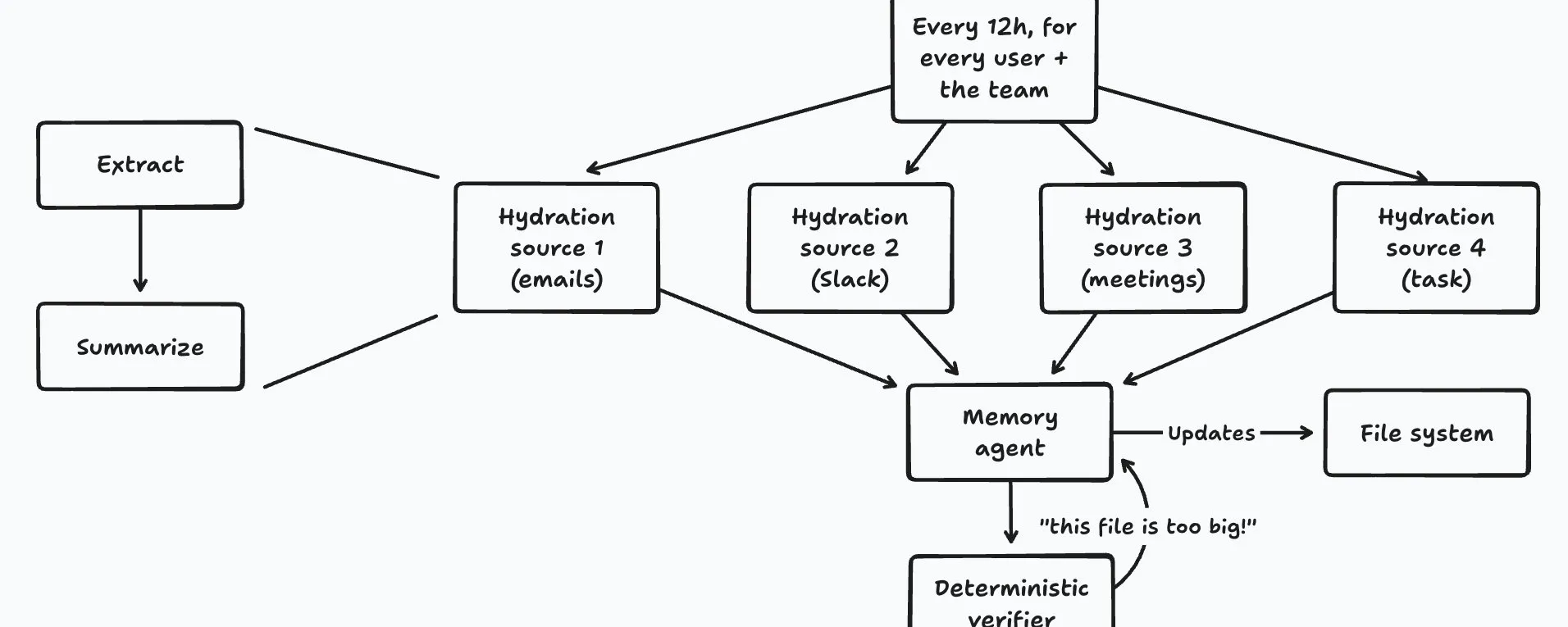
- A summarizer condenses each source, and a memory agent creates, updates, reorganizes and deletes files. An index file and a master memory file stay in context at all times.
- A deterministic verifier checks that every file fits in the context window and is linked from the index or the master file.
On this page
In the long term, memory is what’s going to make the difference between dumb chatbots and real AI employees. The ability to remember people’s names, facts about projects, action items, and internal policies is what’s going to make Lindy an “expert” in your business — as opposed to a very smart intern who’s starting their first day, every day, forever.
One of the most important pieces to our newly-released Lindy Teammate was rebuilding memory at Lindy from the ground up. We had spent months before then working on Lindy’s RAG stack, and reached the conclusion that it was 1/ not super effective, 2/ complex and hard to maintain, and 3/ getting worse than the alternative by the month, as LLMs’ context windows grew larger and larger.
So we tore it all out, and built the simplest thing that could possibly work instead. So far, in our experience, it’s been working better than the RAG pipeline it replaced. Here’s how it works.
One file system per team, one per user
Every team in Lindy has a shared “file system.” We also maintain a separate file system per user.
Both systems start out as a single empty file. Every 12 hours, one job runs for each user, and one for the team.
Hydration sources
Both of these jobs pull from what we call “hydration sources.” They all expose the same simple interface, and it’s easy to add new ones. Currently, the hydration sources we have are:
- Slack. For the user’s file system, we pull from their private channels; for the team, from all public channels. In both cases, we only pull from channels to which Lindy was explicitly added, so the user always remains in control of what it sees.
- Gmail. Only for the user, for obvious reasons.
- Meetings. For the user, every meeting they own and the ones that have been shared with them; for the team, every meeting in the “public meeting library.” This is a new product we’re super pumped about, and I hope to get to write about in more depth later. But basically: Lindy joins every meeting you’ve recorded, takes notes, and lets you search across all of your notes in a centralized place. I’m very bullish on it.
- Lindy tasks. For the user, every task they’ve performed on Lindy; for the team, all public tasks (i.e. those that have been made visible to the entire team by their creator).
Summarize everything, keep the rules
All of these sources are asked the same simple question: “what has happened since the last time we ran you?” The job simply lumps all the answers together, and asks a “summarizer model” to summarize them.
We used to worry about context windows, and have built entire products on top of the constraints imposed by small context windows. But today, the largest context windows go up to 1 million tokens, and we’ve found they’re more than enough for the summaries we’re generating.
Two notes here. First, we’ve found that one of the most important instructions to give the summarizer model is to not lose the “procedural memory.” You want the system to extract and maintain, with the utmost attention, every rule, every thing you’ve learned about how you do things. “You always send the weekly report on Friday at 9am, and Sarah wants you to include the revenue numbers first” is worth 100 summarized status updates.
Second, you can think of the memories as coming in 3 broad categories, lifted straight from cognitive science:
- Episodic. What happened. “We shipped the new onboarding flow on Tuesday.”
- Procedural. How things are done. “We always deploy to staging before we deploy to prod.”
- Semantic. Facts about the world. “Acme Corp is our biggest customer; their CTO is Jane.”
The memory agent
Once all these facts were extracted and summarized from each hydration source, a “memory agent” takes over. Its job is to decide what to do with all these summaries, and to update the file system accordingly — creating new files, updating them, reorganizing them, and deleting them.
Two files are special, in that we include them in the context window at all times (for both the memory agent and for Lindy): an “index memory file,” and a “master memory file.” You can think of them as the spine of the entire system.
The index is a list of all the files in the file system, and a description of what they’re about. The master memory file is the canonical source of truth about the company / the user: who everyone is, what the product is, what the business model is, how the company is organized…
The verifier
After the memory agent is done, we run the file system through a deterministic “verifier.” It checks that every file:
- Still fits in the LLM’s context window. If that’s not the case, it sends a request back to the memory agent asking it to cut or reorganize content.
- Is linked from the index memory file or the master memory file. An unlinked file is a dead memory — Lindy will never even know it’s there.
Keep it simple
That’s it! I can’t stress enough how important it is to keep things as simple as possible when you’re building agentic systems. This is a major reason why we ended up moving away from RAG systems, which we found overly complex and brittle. This is more token-hungry, but in the end, infinitely easier to reason about. And most importantly, it rides the smooth exponential improvement curve of the models.

Flo is the founder and CEO of Lindy. Before that, he founded Teamflow and was a product manager at Uber.
Hire Lindy. Or get hired by Lindy.
Everything in this post runs every time Lindy works for you. If you'd rather build it, we're hiring engineers.
$50 in free credits • No credit card required