7 Best AI Applicant Tracking Systems in 2026: Tested by HRs
Lindy tested seven AI applicant tracking systems, including Zappyhire, Eightfold, and Greenhouse, comparing sourcing, screening accuracy, and hiring workflow automation.


I tested multiple AI applicant tracking systems to see which ones handle screening, sourcing, and candidate management without extra setup. These 7 tools offered the best results and the cleanest workflows.
Top 7 AI applicant tracking systems: TL;DR
These 7 tools topped my testing because they offer speed, accuracy, and control to the recruiters while being fair and just to the candidates. Here’s how they compare and what they do best:
| Tool | Best for | Starting price | Key strength |
|---|---|---|---|
| Lindy | Customizable hiring workflows | $29.99/user/month | AI teammate in Slack that runs multi-step work across sourcing, screening, and other hiring tasks |
| Zappyhire | Enterprise recruitment automation | Custom pricing | End-to-end hiring with video interviews and AI assessments |
| Eightfold | Talent intelligence and workforce planning | Custom pricing | Great skills mapping for hiring and internal mobility |
| hireEZ | Candidate sourcing and outreach | $494/month (solo recruiters) | Strong outbound sourcing with adaptive outreach tools |
| Manatal | Candidate scoring and job board posting | $19/user/month | Fast ranking and broad multiposting coverage |
| Zoho Recruit | SMBs needing HR integrations | $30/user/month | ATS + CRM in one platform for agencies and teams |
| Greenhouse | Data-driven hiring and DEI analytics | Custom pricing | Structured hiring with strong analytics and fairness tools |
Best AI applicant tracking system for customizable hiring workflows
Lindy
Lindy is an AI teammate that lives in Slack and can run entire recruiting workflows, beyond tracking candidates. It acts as a business ops agent that can screen applicants, manage follow-ups, schedule interviews, and update your tools in one connected flow.

Lindy lets you add AI to your hiring workflows without building everything from scratch. I tested it using a prebuilt Recruiting Screener that transcribed interviews, reviewed candidate answers, and automatically logged results into my CRM.
The agent applied the rules I set, kept context across steps, and handled repeatable work with no friction. I could add approval points to review a message or a decision. That made the automation feel reliable rather than risky.
You set Lindy up in plain English, so there’s no visual workflow builder to learn. I could handle more complex hiring scenarios, like large applicant volumes or multi-stage interviews, without changing tools or making technical configurations.
Lindy includes ready-made templates for hiring workflows, like recruitment outreach, scheduling, and candidate evaluation, so you can start fast. You can customize every step later if your workflow grows. Understanding how modern tools transform talent acquisition can help you implement ai recruiting more effectively across your organization.
You can choose a model for each task with Lindy. I used GPT-5.2 to handle long-form writing tasks like personalized candidate messages and Gemini Flash 3.0 for fast tasks like summarizing resumes or handling phone calls. This made it easy to balance speed and accuracy without increasing cost.
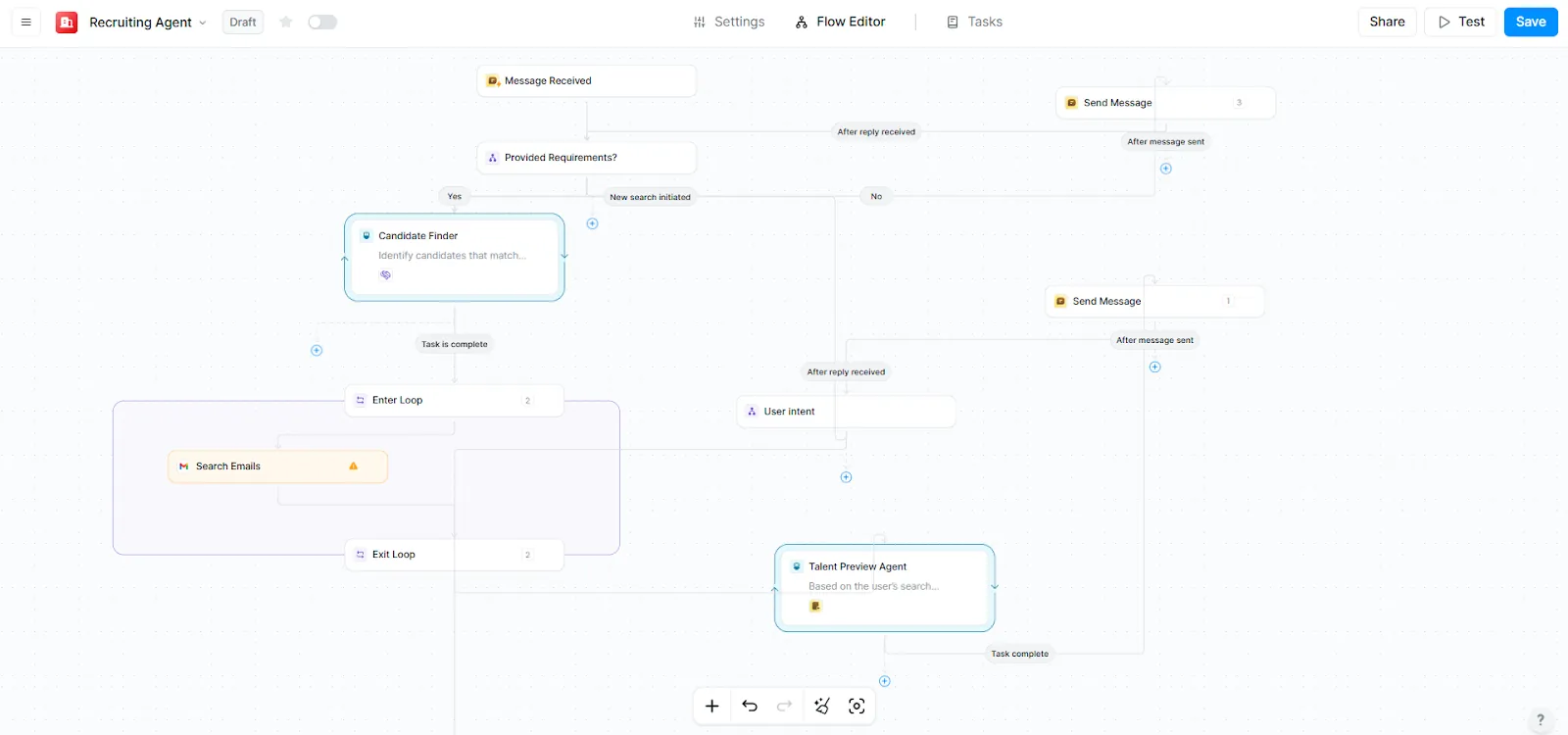
I connected Lindy with Slack, Gmail, and my CRM using native integrations. Lindy also works with 1,000+ external apps through connectors and APIs. This makes it easy to pair it with whichever ATS you already use. For broader administrative support beyond standard recruiting, many teams evaluate athena executive assistant alternatives software to handle executive tasks.
Its phone agents can call candidates, answer questions, and schedule interviews while logging every detail back into your system. They also work as AI receptionists, handling inbound calls, screening candidates, and answering requests, helping small teams manage applicants. To explore conversational AI tools for handling automated applicant interactions, you can review our guide on the best hr chatbots.
Lindy works across devices and supports more than 30 languages. You can run workflows, send follow-ups, or check candidate progress from your phone through Slack or iMessage. The Free plan’s $50 in credits (good for 7 days) is enough to test real workflows before upgrading.
Key features
- AI agents for screening, outreach, interview analysis, and scheduling
- Plain-English setup to create complex hiring workflows without technical knowledge
- SOC 2 and HIPAA compliance for regulated industries (HIPAA with a signed BAA on Enterprise)
- Ready-to-use and customizable templates for hiring workflows
- Multi-agent workflows where AI agents can collaborate for complex tasks
- Human-in-the-loop control to have an oversight on recruiting agents
Pros
- Simple, no-code interface for non-technical users
- Creates AI agents based on your natural language description
- Lindy docs with quickstart guides and in-depth tutorials
- Fast setup in Slack in about two minutes
- Works with your current applicant tracking systems and CRM
Cons
- Advanced workflows take some time to fine-tune
- Not a traditional ATS tool, which may feel unfamiliar to teams
Pricing
- Free plan with $50 in credits that last 7 days, no credit card required
- Team plan from $29.99/user/month, billed monthly, for 3,000 credits pooled across the team
Bottom line
Lindy stands out when your hiring process involves many touchpoints that demand consistency. You can have AI agents to automate screenings, analyze interviews, send timely follow-ups, and update records across tools without switching platforms.
It helps teams create a repeatable hiring engine that improves accuracy and reduces manual work.
{{templates}}
Best AI applicant tracking system for enterprise recruitment automation
Zappyhire
Zappyhire supports end-to-end hiring for large teams with AI-driven screening, assessments, video interviews, and pre-onboarding tools.

Zappyhire handles every step of high-volume recruiting. I tested its workflow by moving a large batch of applicants through posting, screening, and scheduling. The platform organized each stage in a clear sequence that made it easy to track progress across departments. Its modular setup helped me tailor hiring flows to different roles without adding complexity. You can see how it compares against other leading platforms in our review of top ai hiring software.
ZappyVue lets candidates record asynchronous video interviews. It helped my team review responses without coordinating calendars. Each submission came with AI analysis and traits reports.
The system also ranked resumes instantly through its contextual parser. I could see the top matches within minutes, shortening the early screening.
Zappyhire includes gamified assessments that mimic real-world tasks, like email writing, sales calls, or logic puzzles. In my tests, these helped surface how candidates approach problems, communicate under pressure, and prioritize information.
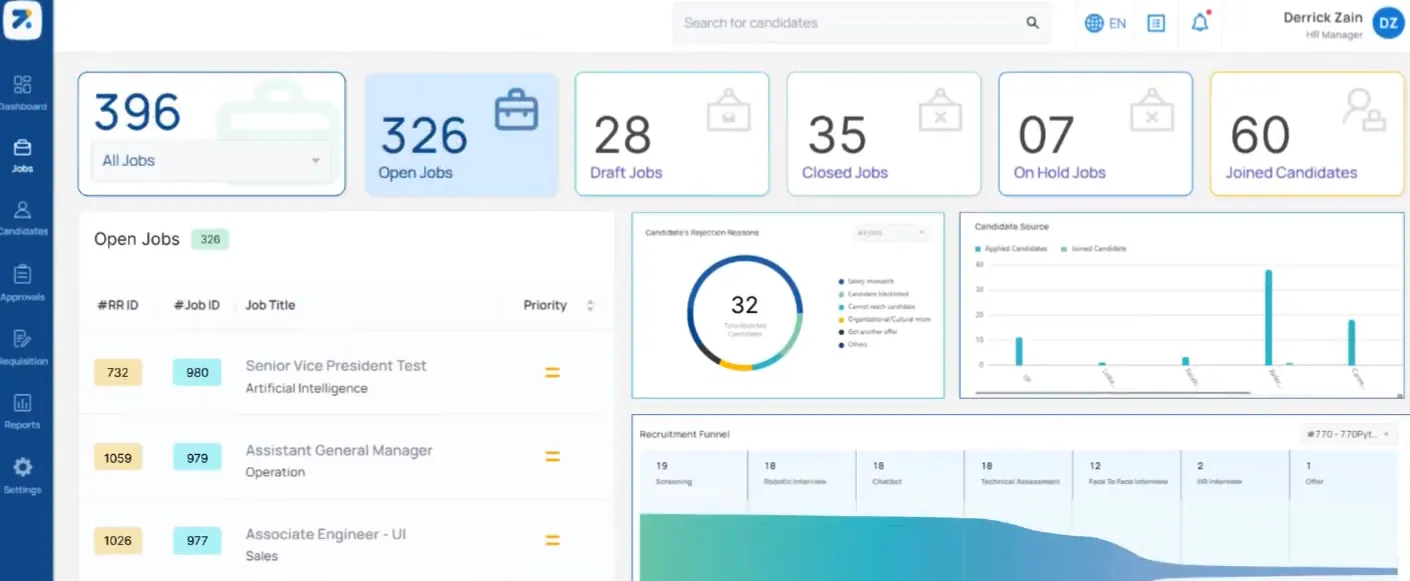
It also comes with background verification partners that saved me some time. Zappyhire suits large hiring teams that want one platform for sourcing, screening, interviewing, and onboarding without building custom automation.
Key features
- Asynchronous video interviews with AI insights
- Contextual resume parsing and candidate ranking
- Gamified assessments that measure applied skills
- Multilingual recruiting chatbot
- Pre-onboarding workflows with offer and verification tools
Pros
- Video interviews help teams review candidates on their own time
- Strong screening and assessment capabilities
- Predictive analytics for hiring trends
- Integrations across enterprise tools
Cons
- Setup and onboarding take time for smaller teams
- Feature depth may overwhelm lightweight hiring needs
Pricing
- No public pricing
- Custom quote, need to contact the sales team
Bottom line
Zappyhire fits large organizations that want a single platform to manage the full lifecycle of hiring. It offers depth across screening, assessments, and pre-onboarding with enough structure to support distributed teams.
Best AI ATS for talent intelligence and workforce planning
Eightfold
Eightfold uses AI to match candidates to open roles, support internal mobility, and map workforce skills across an organization.

Eightfold focuses on skills rather than job titles. I tested its platform by importing role requirements and sample profiles from an existing team.
The system created a detailed view of the skills involved in each job and flagged gaps across the workforce. That helped me see which candidates had potential, not just direct experience.
Eightfold uses AI to continuously analyze skills, experience, and career paths to match candidates to roles and surface workforce insights over time. I could see how a hiring decision affected future staffing needs, which helped with long-term planning.
Eightfold also supports global hiring. It works across 155 countries and 24 languages. Compliance features, including its FedRAMP Moderate authorization, suit regulated environments.
During testing, I used Eightfold’s bias-minimizing tools to compare candidate pools. It removed non-relevant signals and helped me focus on actual skills.
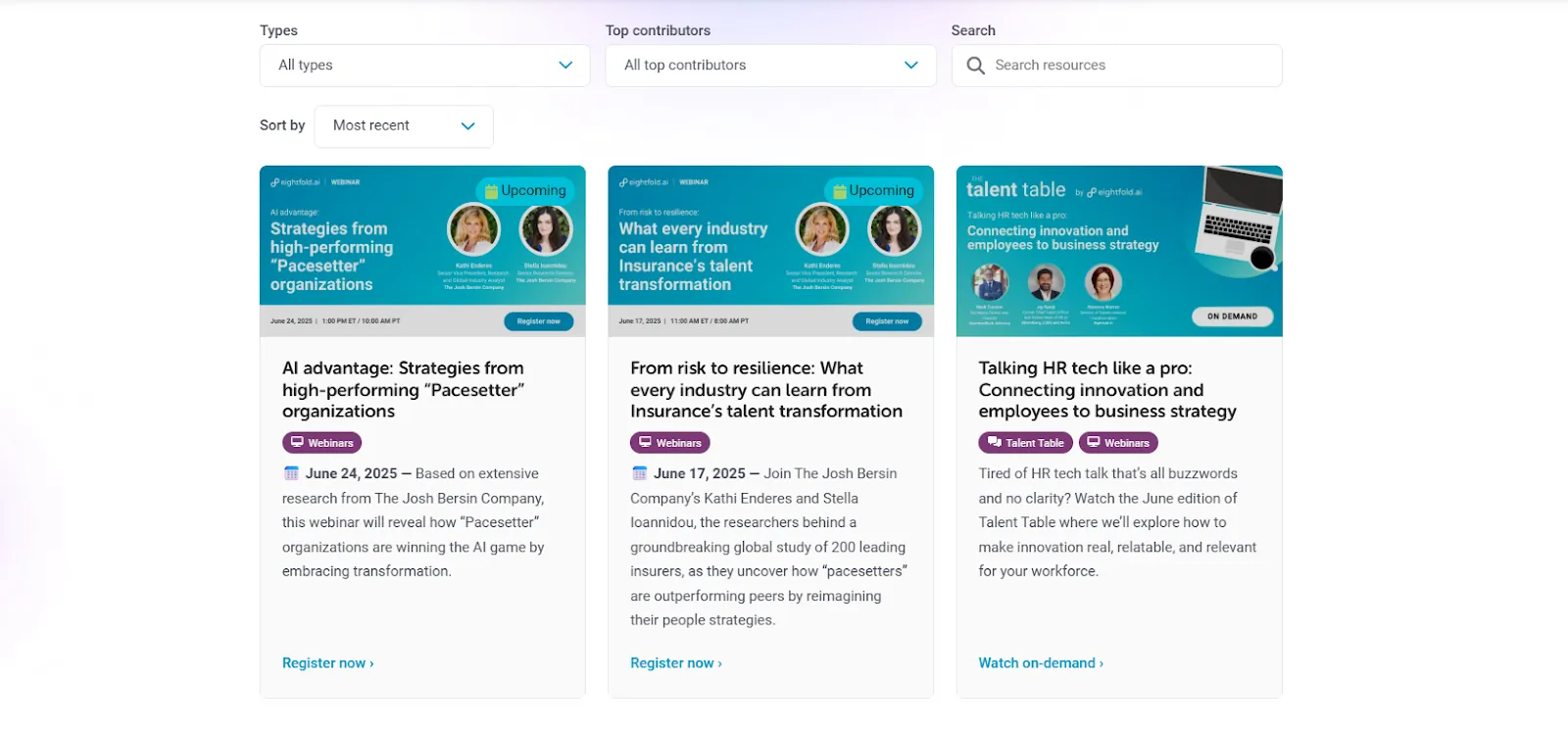
The platform gives teams one place to manage hiring and internal movement by covering recruiting, talent management, workforce exchange, and resource allocation.
I found the interface intuitive once I knew where to look. The setup took time, but the insights made the effort worthwhile. Educational resources like the talent intelligence library and guided tours gave me context for interpreting results and building stronger hiring plans.
Key features
- Talent intelligence that maps skills across roles and teams
- Agentic AI that recommends candidates and internal mobility paths
- Bias-minimizing models that support fair hiring
- Workforce planning tools that adjust as priorities shift
Pros
- Clear insights into skills, potential, and workforce gaps
- Smart recommendations that support long-term planning
- Global language and compliance coverage
Cons
- Requires onboarding time for teams new to talent intelligence
- Pricing and scope suit enterprise buyers, not small teams
Pricing
- Need to request a demo for a custom quote
Bottom line
Eightfold fits organizations that want skill-based hiring and workforce insights on one platform. It works well when recruiting and internal mobility sit under the same strategy.
Best AI applicant tracking system for candidate sourcing and outreach
hireEZ
hireEZ helps recruiters find candidates across the web, rank applicants, and run personalized outreach at scale.

hireEZ is a powerful platform that integrates sourcing, candidate relationship management (CRM), applicant tracking (ATS), analytics, and internal mobility tools, all driven by advanced AI.
For example, its AI Sourcing Hub scours multiple databases, including social media and job boards, to quickly surface top candidates matching your job criteria. This drastically cuts down the hours you’d spend manually searching for talent.
Once candidates enter your funnel, the Applicant Review feature automatically screens and ranks resumes, helping you zero in on the best fits. Plus, Rediscovery digs through your existing ATS to find hidden gems you might have missed before, saving you from sourcing from scratch.
On the engagement side, hireEZ shines with AI-powered outreach tools. You can run personalized email campaigns at scale or send timely text messages that feel one-to-one. Scheduling interviews is easier, too, as AI coordinates availability and books slots automatically, reducing back-and-forth.
The EZ Agent mode takes this further by running multi-step workflows that adapt as it learns from your hiring outcomes, improving candidate matches over time. Your talent pool stays well-organized with tagging, notes, and filters, while collaboration features let your team share candidate profiles and assign next steps smoothly.
With built-in diversity and inclusion analytics, you get actionable insights to keep hiring fair and balanced. Overall, hireEZ frees recruiters from tedious tasks so they can focus on building relationships and making strategic hiring decisions.

hireEZ brings sourcing, CRM, ATS, analytics, and mobility tools into one platform. I tested its sourcing hub by running multiple searches across social sites, job boards, and open web data. The system returned qualified candidates fast.
The filters helped me narrow results by skills, experience, and location without extra steps. That speed made a noticeable difference when searching for hard-to-fill roles.
Applicant Review ranked new applicants for me and surfaced people I would have missed in a normal scan. Rediscovery was also helpful. It pulled strong candidates from an existing ATS database and matched them to new roles. This saved the time I would normally spend rebuilding a pipeline from scratch.
Outreach features are one of hireEZ’s strengths. I set up a short email sequence and a few SMS messages. The platform personalized each message and adjusted timing based on candidate activity.
It kept engagement high without more manual work. The scheduler booked interviews based on availability from both sides. hireEZ reduced the back-and-forth that usually slows hiring.
The EZ Agent mode automates multi-step workflows. It adapts based on hiring outcomes and improves recommendations as you work with it. I used it to run sourcing, outreach, and follow-up tasks in one flow. It helped reduce busywork for repeat roles.
Tagging, notes, and filters kept candidate pools organized. Collaboration tools let my team share profiles and assign next steps. hireEZ also includes diversity and inclusion analytics, which helped me spot representation gaps in sourcing.
Key features
- AI Sourcing Hub for fast, targeted searches across multiple platforms
- Applicant Review and Rediscovery for ranking and resurfacing candidates
- Email and SMS outreach sequences that adjust in real time
- EZ Agent automations for multi-step recruiting workflows
Pros
- Strong sourcing depth across databases and social sites
- Helpful rediscovery for teams with large legacy ATS data
- Effective outreach tools that feel personalized
Cons
- Setup takes time for smaller teams
- Feature-rich interface can feel heavy at first
Pricing
- Solo recruiter plan from $494/month, with a 7-day free trial
- Custom pricing for teams, so you need to request a quote based on size and usage
Bottom line
hireEZ suits recruiters who live in the sourcing stage. It works well for teams that want faster discovery, better outreach, and automation that improves with use.
Best AI ATS for candidate scoring and job board posting
Manatal
Manatal helps teams score candidates, manage pipelines, and publish jobs across global boards from one platform.

Manatal focuses on practical hiring tasks. I tested it by importing a batch of applicants and reviewing how its AI Engine matched them to open roles. The scoring system analyzed resumes, job descriptions, and skills.
It ranked candidates clearly so I could see who to review first. The automatic profile enrichment helped me get more context. It pulled data from platforms like LinkedIn and GitHub, which saved me time I usually spend researching candidates manually.
Job posting is one of Manatal’s strongest features. It connects with more than 2,500 job boards. I posted a role to multiple boards at once and tracked candidates from each source inside the dashboard.
The ATS offers customizable pipelines with a simple Kanban-style view. This made it easy to move candidates between stages and keep track of progress for each hiring team.
Collaboration tools allow shared notes, role-based permissions, and coordinated communication. Interviewers can submit scorecards through custom forms, which helps keep evaluations consistent across roles.
Analytics offered time-to-hire, job performance, and channel effectiveness. The mobile app kept everything accessible when I was away from my laptop. Data privacy standards include SOC 2 Type II, which suits teams that need compliance.
Key features
- AI candidate scoring with profile enrichment
- Job posting across 2,500+ boards
- Customizable pipelines with Kanban tracking
- Collaboration tools with shared notes and scorecards
- Reporting on hiring performance and sourcing effectiveness
Pros
- Fast resume ranking with helpful enrichment
- Broad job board coverage for global sourcing
- Clear pipelines that support multiple teams
Cons
- Free trial doesn’t offer much
- Advanced features require setup time
Pricing
- No free plan, only a free trial
- Paid plans from $19/user/month, billed monthly
Bottom line
Manatal works well if you want AI scoring, multiposting, and an ATS that stays easy to manage. It fits teams that rely on structured pipelines and clear ranking to move fast.
Best AI applicant tracking system for SMBs needing HR integrations
Zoho Recruit
Zoho Recruit brings ATS and CRM capabilities together so teams can manage sourcing, screening, and onboarding from one platform.

Zoho Recruit covers a wide range of hiring tasks without feeling heavy. I set up a sample pipeline for a sales role and shared it with a few of my teammates to see how the workflow behaved from posting to inbound applicants.
The platform offers templates for job descriptions, and posting across 75 or more boards took only a few clicks.
The system tracks each candidate from application to offer. I used its AI Assist tool to draft a clearer job description and optimize phrasing. It saved time, especially when I needed multiple versions for different boards.
The timeline view helped me see every interaction with a candidate, including notes from hiring managers and interview feedback. Collaboration felt organized rather than scattered.
Workflow automation handled resume parsing, interview scheduling, and reminders. This reduced manual tasks without extra configuration. Staffing agencies can use the client portal to share progress with clients. I tested this feature by sending a short list of screened candidates.
The platform supports virtual interviews, background checks, and e-signatures. It also integrates with Slack, LinkedIn, and Zoho’s HR tools, strengthening the system for teams already using the ecosystem.
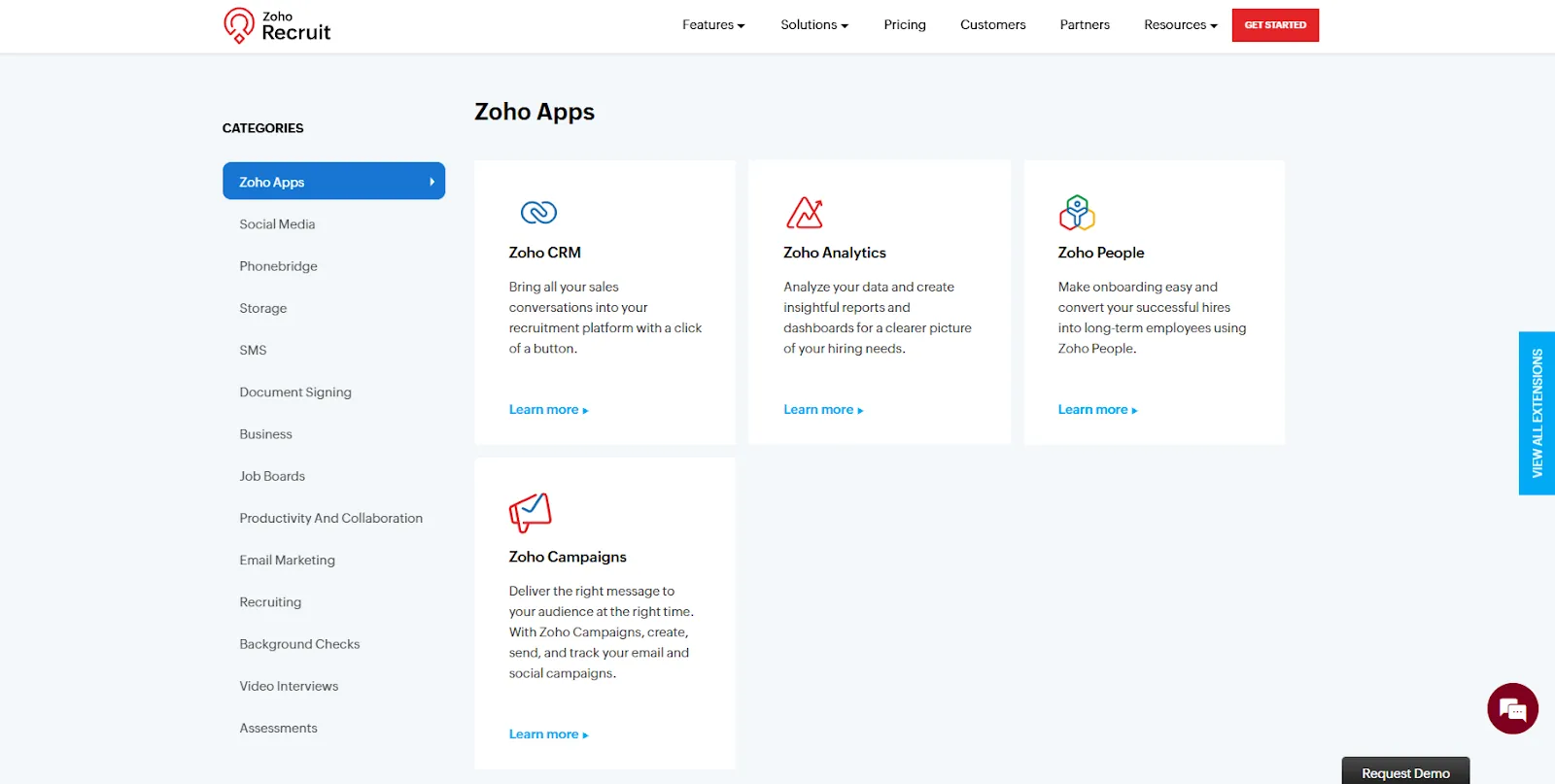
Zoho Recruit also offers a mobile app for managing candidates on the go. The free plan supports one active job, making it best for light testing or very small teams.
Key features
- ATS and CRM combined for stronger candidate management
- Job posting across 75+ boards
- Workflow automation for parsing, scheduling, and follow-up
- Client portal for agencies
- Reporting on performance and diversity metrics
Pros
- Strong fit for teams that use Zoho apps
- Clear pipelines with detailed candidate timelines
- Helpful automation for repetitive hiring tasks
Cons
- Limited active job postings on the free plan
- Advanced setups require onboarding support
Pricing
- Free plan that offers one active job
- Paid plans start from $30/user/month, billed monthly
Bottom line
Zoho Recruit fits teams that want an ATS linked to CRM-style tools. It works well for SMBs and agencies that value customization and simple automation without adding complexity.
Best AI applicant tracking system for data-driven hiring and DEI analytics
Greenhouse
Greenhouse helps teams run structured hiring processes with strong analytics and built-in tools that support inclusive recruiting.

I tested Greenhouse by setting up a sample pipeline for a product role and creating interview kits for each stage. Even with mock candidates, the shared scorecards and question sets made evaluations more consistent and easier to compare.
Real-time dashboards showed the health of the pipeline, including bottlenecks and drop-off points. I could see time-to-hire, pass-through rates, and sourcing performance without creating custom reports.
Diversity, Equity, and Inclusion (DEI) features stand out. Greenhouse supports anonymized applications and take-home tests. These tools help teams minimize unconscious bias.
I tried its behavioral nudges, which prompted interviewers to slow down, take structured notes, and score criteria before moving ahead. The platform also supports candidate pronouns and name pronunciation. This helps create a respectful experience from the first interaction.
For teams with advanced data needs, Greenhouse offers a Business Intelligence (BI) Connector in its Plus and Pro plans. I tested sample reports that combined ATS data with external tools. These integrations helped me see patterns across roles, departments, and regions.

Greenhouse integrates with calendars, background check partners, sourcing tools, and HR systems. Automated actions move candidates between stages and notify team members. These automations kept tasks organized when multiple people were involved.
Key features
- Structured interview kits with scorecards and guides
- Real-time dashboards and customizable reporting
- DEI tools like anonymized applications and behavioral nudges
- BI Connector for advanced analytics
- Broad integrations with recruiting and HR systems
Pros
- Strong analytics that support data-driven hiring
- Clear structure that keeps evaluations consistent
- Helpful DEI tools that improve fairness
Cons
- No free plan
- Setup takes time for teams new to structured hiring
Pricing
- Custom quote after you request a demo
Bottom line
Greenhouse fits teams that want a structured hiring approach with strong analytics. It works well for companies that care about consistent interviewing, clear reporting, and stronger DEI practices.
{{cta}}
How I tested these AI applicant tracking systems
I tested each AI applicant tracking system across hiring workflows to see how well the tools handled sourcing, screening, scheduling, and candidate engagement. I focused on what improves day-to-day recruiting rather than what looks impressive on a feature list.
I created sample roles and uploaded mock resumes to see how the system handled sourcing and tracking. I tested features like candidate search, outreach templates, and interview scheduling to simulate how a recruiter might move someone through the funnel.
This helped me see where each tool excelled and where it slowed down. These are the criteria I considered:
- AI sourcing and discovery: I tested how quickly each system could surface relevant candidates from job boards, social profiles, and internal databases using sample roles and mock candidate data. I focused on accuracy, relevance, and whether the tool uncovered profiles that might normally be missed.
- Automated screening and ranking: I uploaded mock resumes to evaluate how well each tool parsed skills, matched qualifications, and ranked candidates. I gave extra points to platforms that explained why someone was a strong fit, rather than just matching keywords.
- Interview scheduling: I ran basic scheduling tests using synced calendars and dummy interviews. Some tools made it easier to coordinate across teams and time zones, which helps reduce back-and-forth.
- Candidate engagement: I tested prebuilt email and SMS workflows using sample templates. The best tools kept messages personalized and context-aware, even with minimal setup.
- Reporting and analytics: I reviewed reporting dashboards and sample funnels to check for visibility into hiring stages, DEI metrics, and predictive insights.
- Integrations and workflow setup: I tested how easily each tool connected with CRMs, calendars, and job boards. I also explored how much effort it took to build a functioning workflow from scratch.
I also considered a few additional factors. They were:
- Learning curve for recruiters
- Pricing fit for different team sizes
- Flexibility for niche hiring workflows
Which AI ATS should you choose?
The right AI applicant tracking system depends on your hiring volume, workflow complexity, and how much automation you want to build into your process. Here are a few scenarios and use cases to help you pick the right tool:
Choose Lindy if you:
- Want custom AI workflows that handle screening, outreach, and scheduling
- Need AI agents that can connect and adapt to your existing ATS or CRM
- Prefer complete control over how each hiring step runs
- Belong to a regulated industry like finance or healthcare and need SOC 2 and HIPAA compliance (HIPAA with a signed BAA on Enterprise)
Choose Zappyhire if you:
- Run enterprise hiring with structured processes
- Need built-in video interviews and assessments
Choose Eightfold if you:
- Prioritize skills and growth potential over job titles and resumes
- Need insights for internal mobility and workforce planning
Choose hireEZ if you:
- Spend most of your time sourcing candidates
- Want stronger search, rediscovery, and outbound engagement
Choose Manatal if you:
- Need fast AI scoring and global job postings
- Want an ATS that stays simple and affordable
Choose Zoho Recruit if you:
- Work inside the Zoho ecosystem
- Need CRM-style tools with customizable pipelines
Choose Greenhouse if you:
- Value structured hiring, analytics, and DEI tooling
- Need consistent interview practices across teams
Avoid AI ATS tools if you:
- Hire rarely and can manage candidates manually
- Don’t need automation or structured workflows yet
My final verdict
After testing all seven, Lindy stood out for how you can customize each step of the hiring flow. I built an agent that transcribed interviews, scored candidates using predefined rules, and updated my CRM without needing code or switching tabs.
Greenhouse fits companies that want structured hiring and analytics. hireEZ works better when sourcing is your main bottleneck.
Eightfold is the right pick when you need talent intelligence and internal mobility insights. Manatal and Zoho Recruit keep things simple for SMBs, while Zappyhire fits enterprise hiring from sourcing to onboarding.
If you want AI that supports your hiring process end-to-end, Lindy is the strongest overall choice.
Try Lindy, your AI applicant tracking system + workflow automation tool
Lindy can function as your AI applicant tracking system, especially if your hiring process doesn’t fit into rigid templates. It comes with ready-made agents for sourcing, screening, interview analysis, and scheduling.
If you need more control, you can customize or chain them together to handle niche workflows. Here’s why Lindy beats the other applicant tracking systems:
- Plain-English setup for non-coders: You don’t need any technical skills to build workflows with Lindy. You tell it what you need in Slack, and it works through the steps.
- Create AI agents for your use cases: You can automate hiring tasks using simple instructions. For example, you can set up an agent to review inbound candidates, enrich profiles from resumes or forms, and draft personalized outreach emails.
- Free to start, affordable to scale: Build your first few automations with Lindy’s Free plan and $50 in credits that last 7 days. The Team plan starts at $29.99/user/month for 3,000 credits pooled across your team, which offers much more value than Lindy’s competitors.
Frequently asked questions
What is an AI applicant tracking software?
An AI applicant tracking software uses artificial intelligence to automate sourcing, screening, and scheduling. It sorts applicants faster, ranks candidates by fit, and keeps communication steady.
How does AI applicant tracking software improve hiring?
AI applicant tracking software improves hiring by helping recruiters save time. The system handles routine work, which leads to faster decisions and a more consistent hiring process.
How does AI enhance candidate screening in ATS AI systems?
AI enhances candidate screening by reading resumes, extracting skills, and comparing them to job requirements. It ranks candidates based on relevance and flags strong matches early. Recruiters move faster because the system filters out unqualified applicants and highlights people who fit the role.
Can AI ATS platforms integrate with existing HR tools?
Yes, most AI ATS platforms integrate with existing HR tools, including CRMs, calendars, job boards, and communication tools. Integrations reduce manual data entry and keep hiring steps connected.
What are the benefits of AI-powered candidate engagement?
The benefits of AI-powered candidate engagement include automated outreach with timely emails, chatbot replies, and follow-up reminders. AI keeps communication active without extra effort from recruiters. Candidates stay informed and respond faster because the messages feel relevant and arrive when they matter.
How do AI-powered ATS tools support diversity and inclusion?
Many AI ATS platforms support diversity and inclusion by offering features like anonymized applications, structured interviews, and diversity analytics. These tools help teams reduce bias and measure representation across pipelines. Recruiters make fairer decisions because they focus on skills and evidence rather than subjective cues.
What makes Lindy a standout AI ATS system?
Lindy stands out among AI ATS tools by offering both prebuilt and fully customizable AI agents for sourcing, screening, scheduling, and candidate follow-ups. You can tweak existing templates or build your own from scratch. You can also assign the right AI model to each step based on speed, accuracy, or cost.









