9 Best AI Business Tools in 2026: Tested Manually
Marvin tested nine AI business tools, including ThoughtSpot, Microsoft Copilot, and Zapier, in real workflows, weighing setup speed, integration quality, and time saved.


Most AI tools talk big. Few actually help you run a business more efficiently.
I didn’t rely on marketing pages or review sites. I tested these tools inside real operations, not just in controlled demos.
In this list, you’ll find the 9 best AI tools for business operations in 2026. Each one solves real problems like task management, team coordination, or process automation without adding more complexity.
Building your AI toolkit?
What is AI for Business Operations?
AI for business operations refers to the use of artificial intelligence technologies to automate tasks, analyze data, and enhance decision-making within a business context. This includes using AI to optimize processes, improve efficiency, reduce costs, and enhance customer experience.
By integrating AI tools into operations management, businesses can streamline workflows, reduce human error, and free up valuable time for teams to focus on higher-impact work. To achieve these operational gains, many organizations implement specialized automation software to handle repetitive tasks. To see which autonomous tools offer the highest efficiency, companies can review the best ai agents currently available.
From automating routine communications to generating insights from complex data, AI is becoming a key driver of smarter, faster business operations. Deploying a dedicated chatbot for small business operations can help automate these customer communications seamlessly. Exploring top-performing ai agents for business helps smaller organizations choose the right software for their daily tasks.
Tailored AI solutions for business operations can adapt to specific industry needs and company sizes, helping executives make better decisions with real-time data and predictive analytics. Implementing a dedicated ai business assistant can further help organizations adapt workflows to fit specific company needs. To find tools that suit these requirements, organizations can evaluate the best ai chatbots for businesses.
As AI continues to evolve, its role in operations management will only grow, making it essential for businesses to explore and adopt the right AI tools for their unique challenges.
AI Solutions for Business Operations: TL;DR
- Lindy: Best AI business tool for running day-to-day operations
- ThoughtSpot: Best AI business tool for data analytics
- Microsoft Copilot: Best AI business tool for Microsoft 365 productivity
- Zapier AI: Best AI business tool for workflow automation across apps
- Workstatus: Best AI business tool for workforce productivity tracking
- Spinach AI: Best AI business tool for meeting summaries and action items
- Clay: Best AI business tool for sales and marketing data enrichment
- Tidio AI: Best AI business tool for customer chat and engagement
- DataRobot: Best AI business tool for automated machine learning
Top 9 AI Business Tools
1. Best AI Business Tool for Running Day-to-Day Operations
Lindy: What is it?
What does it do? Lindy is an AI teammate that lives in your company's Slack. You can ask it in natural language to automate tedious business operations tasks to save time and reduce manual work.
Who is it for? Founders, CEOs, and operations leaders of small to medium businesses looking for tailored AI solutions for business operations.

At Lindy, we built our AI assistant to act like the smart, reliable teammate every business needs, but without the limits of human bandwidth. Whether it’s taking meeting notes, routing leads, booking meetings, or handling customer support emails, Lindy runs these operations 24/7 so your team can focus on growth instead of busywork. By acting as a digital ai employee, Lindy handles routine workflows around the clock.
Lindy connects with the tools you already use, like Gmail, Slack, Google Calendar, CRMs, and even industry-specific platforms like EMRs for MedTech.
One of the biggest wins our users see is how Lindy takes on complex workflows that usually require juggling multiple apps or hiring extra staff.
For example, an agency owner told us that Lindy freed up their team to focus more on strategy instead of constant lead intake. A SaaS founder scaled outbound sales calls without hiring another SDR because Lindy manages outreach, follow-ups, and bookings automatically.
Designed for non-technical users, Lindy requires no scripting or coding. Just tell it what you want automated in plain English, and Lindy takes care of the rest with precision and speed.

Lindy gives you the flexibility to choose from different AI models like ChatGPT, Gemini, and Claude, for each specific task, whether it’s natural language understanding, document processing, or customer interaction. This adaptability ensures you’re always using the smartest, most efficient AI available without being locked into a single provider.
We also know that adopting AI is a journey, so we offer live onboarding and 40+ built-in skills you can customize for your business. This way, you get started fast, see value quickly, and keep scaling with confidence.
Pros
- Ask Lindy to seek approval for sensitive tasks for complete control
- Reliable 24/7 availability without fatigue
- Lindy Docs for basic guides and tutorials
- Supports multi-modal workflows (meetings, email, docs)
Cons
- Initial setup has a bit of a learning curve
- Some users need time to adapt to workflows
Pricing
- Free plan with $50 in credits that last 7 days, no credit card required
- Team plan from $29.99/user/month for 3,000 credits, billed monthly, with larger credit tiers available
- Enterprise pricing is custom
{{templates}}
2. Best AI Business Tool for Data Analytics
ThoughtSpot: What is it?
What does it do? ThoughtSpot is an AI-powered analytics platform that delivers automated business insights through natural language search and interactive visualizations.
Who is it for? Business analysts, data teams, and executives looking for AI-driven business analytics with easy-to-use, scalable tools.

ThoughtSpot caught me off guard with how user-friendly it makes business analytics. I expected a complex, technical tool that only data pros could handle. But instead, it lets you ask questions in natural language and get back clear, relevant answers almost instantly.
Their AI assistant, Spotter, is smart enough to cut through the noise and highlight what actually matters, without forcing you to learn SQL or dig through endless reports.
What impressed me was how ThoughtSpot doesn’t just deliver static dashboards. It actively looks for anomalies in your data and surfaces predictive insights that help you catch problems early or spot trends before they fully develop.
The Liveboards feature lets you dive into live, interactive data visualizations, making team discussions way more productive. It also integrates well with popular cloud data warehouses like Snowflake and Databricks, so your data stays fresh and reliable.

That said, ThoughtSpot’s pricing puts it on the higher end, so it’s not the most budget-friendly for small teams.
But if you want to embed AI-powered analytics into your business operations and give everyone on your team quick access to smart insights, ThoughtSpot is a strong contender. Just be prepared for a bit of a learning curve if your team isn’t used to advanced analytics tools.
Pros
- Natural language search lowers the learning curve
- Automated insights reduce manual data digging
- Supports large-scale data with advanced security
Cons
- High entry cost for Essentials and above
- Custom pricing limits upfront cost clarity
Pricing
- Paid plans from $25/user/month, billed yearly
3. Best AI Business Tool for Microsoft 365 Productivity
Microsoft Copilot: What is it?
What does it do? Microsoft Copilot is an AI-powered productivity assistant embedded within Microsoft 365 apps that automates workflows, enhances collaboration, and accelerates content creation.
Who is it for? Microsoft 365 users and teams seeking AI tools tightly integrated into their daily productivity software for smarter, faster work.

Microsoft Copilot has positioned itself as the central AI assistant across Microsoft 365 apps. The new “Chat” interface and “Create” module improve how you interact with AI, making it easier than ever to generate documents, analyze data, and manage communication without leaving your usual workspace.
What stood out to me were the new reasoning agents, “Researcher” and “Analyst”, which perform deep data analysis, automate complex workflows, and generate actionable insights.
These features take productivity automation to a new level, especially when paired with the Copilot Notebooks and Create experience that lets you organize and generate AI-powered content all in one place.
Collaboration also gets a major upgrade. Now, you can upload larger files, embed images directly into Office apps, and use AI to prioritize your inbox and summarize meetings in Teams.
For organizations, the Copilot Studio provides tools to build and customize AI agents tailored to their workflows with low-code orchestration. Plus, IT admins get better control and security features to manage AI use across teams.

If your work revolves around Microsoft 365, Copilot can drastically cut down repetitive tasks, helping you focus on strategy and creativity instead of busywork. It's one of the most accessible AI tools for business operations, especially for teams already using Microsoft 365. Just know that some advanced features may require time to explore and get comfortable with.
Pros
- Integration across Microsoft 365 apps
- Powerful AI agents for research and analysis
- Enhanced collaboration with smarter file and meeting tools
Cons
- Requires a Microsoft 365 subscription
- Advanced features are still rolling out gradually
Pricing
- Free to use with your Microsoft account for individuals
- Business plans from $25.20/user/month, billed monthly.
- Billed yearly, Copilot Business is $21/user/month, or a promotional $18/user/month for the first year (offer runs July 1 to December 31, 2026)
4. Best AI Business Tool for Workflow Automation Across Apps
Zapier: What is it?
What does it do? Zapier automates workflows by connecting apps and using AI to streamline repetitive business operations.
Who is it for? Small to medium teams looking to automate routine tasks without coding, across multiple apps.

Zapier takes the automation you already know and adds a powerful AI twist to it. Instead of setting up each step manually, you can now describe what you want in plain language. Like “Summarize Slack messages every Friday and send me a recap”, and Zapier drafts the workflow for you. This AI-powered Zap Builder really lowers the barrier for non-technical users and speeds up setup.
I found the Zapier Copilot handy too. It acts like an assistant inside your workflow, offering real-time tips, troubleshooting help, and guiding you through complex automations.
Plus, if you want to get more technical, Code by Zapier lets you add custom JavaScript or Python steps right into your Zaps, giving you fine-grained control.
Zapier AI also supports no-code AI chatbots trained on your docs or internal data. These bots can handle customer questions, escalate issues, and integrate with your CRM or website for smoother support and onboarding. The platform’s multi-channel capabilities mean you can extend your automation beyond the dashboard to desktop or third-party apps.
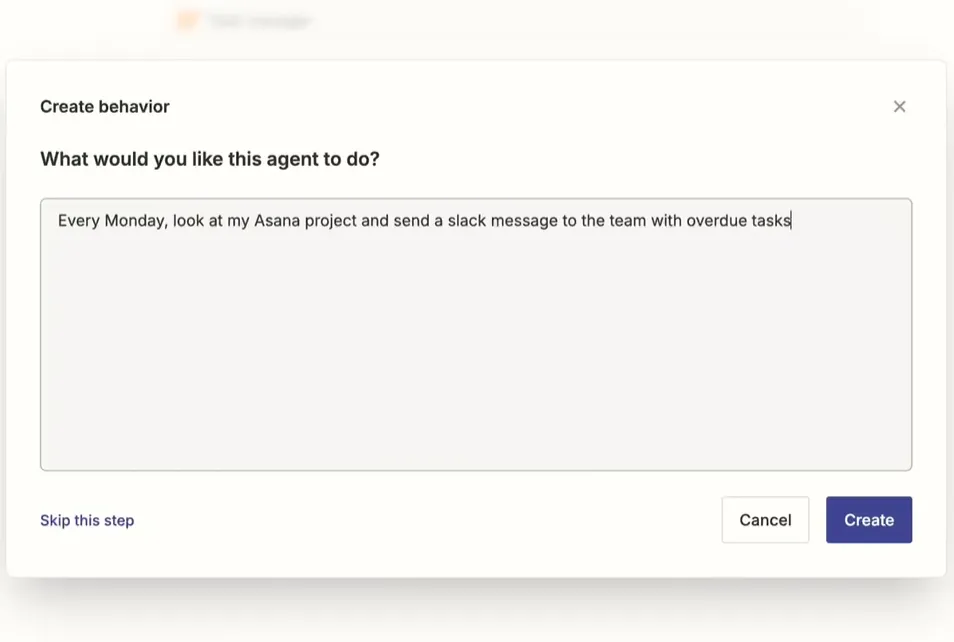
There’s a lot packed in, with modular add-ons like Tables and Interfaces, so you can tailor automation exactly how you want.
If your team spends more time in Slack than spreadsheets, Zapier AI offers one of the fastest ways to automate everything without writing a line of code.
Pros
- Supports thousands of app integrations
- AI adds flexibility beyond basic automation
- Easy start with prebuilt workflow templates
Cons
- It can get expensive at higher usage levels
- Complex workflows sometimes need manual fixes
Pricing
- Free plan with only 2-step Zaps and 100 tasks/month
- Paid plans from $29.99/month, billed monthly
5. Best AI Business Tool for Workforce Productivity Tracking
Workstatus: What is it?
What does it do? Workstatus uses AI to track and improve workforce productivity through time tracking, activity monitoring, and detailed reports.
Who is it for? Managers and business owners looking to optimize remote or hybrid team performance with easy productivity insights.
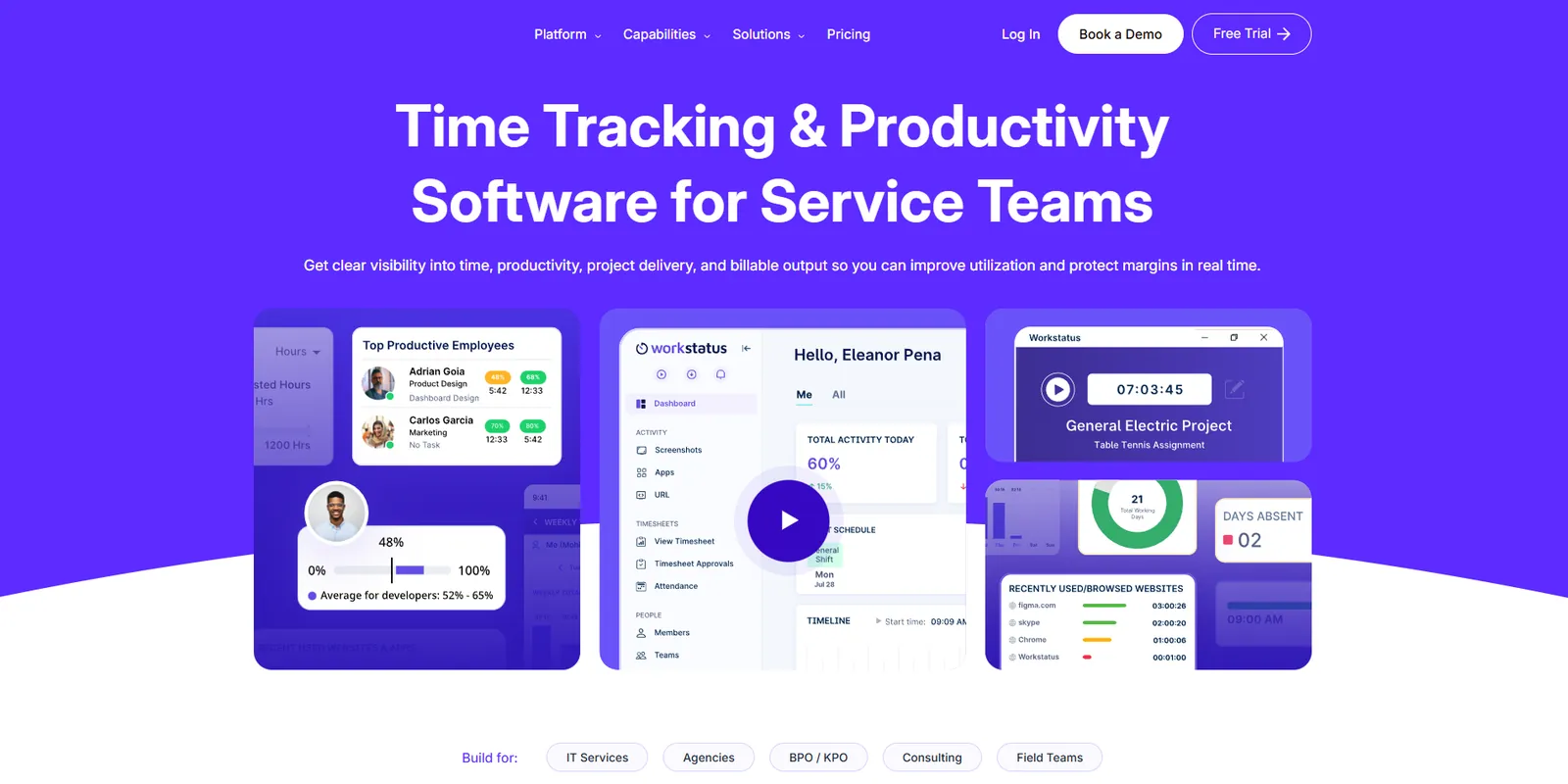
Managing remote or hybrid teams can feel like a guessing game, but Workstatus brings clarity with its AI-powered productivity tracking. I was impressed by how it quietly monitors time spent on tasks and projects while identifying unproductive activities, helping you understand where your team’s time really goes.
Workstatus’s real-time productivity scores and detailed reports make spotting trends and bottlenecks easier, so you can act before small issues turn into bigger problems.
One feature that stood out is the real-time monitoring with alerts. Workstatus notifies managers instantly about late arrivals, idle time, or unusual activity. That kind of visibility can be an asset for keeping projects on track without hovering.
Since it integrates with tools like Zoho, Trello, and Jira, you don’t have to change your existing workflows to make it fit. The mobile app adds flexibility for remote and field teams, with GPS and geofencing for accurate location tracking.
That said, the battery did drain faster than usual during longer field sessions, so it’s worth flagging for teams constantly on the move. The interface can also feel a bit cluttered at first, especially with all the built-in features.
And while the tracking is useful, some team members might feel uneasy about the level of monitoring, so it helps to set expectations clearly from the start.
For managers tracking distributed teams across time zones, Workstatus delivers the most actionable insights I’ve seen without adding micromanagement fatigue.
Pros
- Real-time alerts on attendance
- AI-generated productivity reports
- Mobile app supports remote teams
Cons
- Privacy concerns for some users
- The interface can feel overwhelming initially
Pricing
- No free plan, only a 7-day free trial of the two paid plans, Proof and Profit
- Proof starts from $9/user/month, billed monthly ($7/user/month billed annually)
6. Best AI Business Tool for Meeting Summaries and Action Items
Spinach AI: What is it?
What does it do? Spinach AI automatically generates meeting summaries and action items to keep teams aligned and reduce follow-up work.
Who is it for? Teams and project managers who want concise, accurate meeting recaps without spending extra time on note-taking.

Spinach AI impressed me with how it handles meetings by automatically joining calls on Zoom, Google Meet, Microsoft Teams, and even Slack to capture key decisions, action items, and concise summaries.
Instead of slogging through full transcripts or play-by-play notes, Spinach delivers clear, outcome-focused recaps designed to boost meeting productivity and keep everyone engaged without the distraction of note-taking.
Supporting 100 languages, Spinach integrates with major project management and CRM tools like Jira, Slack, Notion, Salesforce, and Google Calendar. This means your notes and tasks sync automatically, and tickets or action items get created based on the discussion, cutting down manual follow-ups.
What’s cool is the AI agent can even answer questions live during meetings, help manage agendas, and send summaries directly to Slack or email, so your team stays aligned in real time.

Customization is strong too. Spinach offers tailored meeting templates for standups, sprint planning, retrospectives, and user research.
Security isn’t overlooked either, with enterprise-grade encryption, version history for notes, and multiple export formats like PDF and DOC. You can review and edit summaries before sharing, giving you full control over meeting records.
Users report that Spinach saves hours on note-taking and follow-ups, making meetings more efficient and less draining. If meetings take up a big chunk of your day, Spinach AI could be a practical tool to lighten the load.
Pros
- Live AI assistance during meetings
- Extensive integrations with PM and CRM tools
- Customizable templates for diverse meeting types
Cons
- Limited customization options in some plans
- Summaries may need review for complex topics
Pricing
- Free plan for a limited number of meetings per month
- Pay-as-you-go Pro plan costs $2.90/meeting hour
- Business plan from $29/user/month, billed monthly ($19/user/month billed annually)
7. Best AI Business Tool for Sales and Marketing Data Enrichment
Clay: What is it?
What does it do? Clay enriches lead and company data using AI, turning raw lists into personalized, actionable insights for sales and growth teams.
Who is it for? Outbound teams and marketers who want deeper lead context, faster personalization, and automated data workflows.

Clay is what happens when lead research meets serious automation. I imported a basic company list, and within minutes, Clay enriched it with founder bios, job titles, verified emails, hiring trends, tech stack, and even scraped funding headlines, without any manual research.
Clay pulls data using waterfall enrichment logic, cycling through dozens of premium sources until it finds the most complete and reliable info. You can layer in your APIs or scraping rules, too.
I especially liked how Clay let me trigger downstream actions, like creating Notion pages or updating HubSpot contacts, directly from inside the table.
What makes it stand out is how everything’s built around personalization and targeting. Claygent, the AI assistant, can generate custom intros and emails using enriched data. And if you want to get strategic, you can build lead scoring models that highlight only high-potential accounts, like those hiring SDRs or recently raising funding.
The interface feels like Google Sheets but smarter, with real-time collaboration and automation built in.

For teams that rely on up-to-date prospect data but can’t afford to burn hours enriching it manually, Clay turns the whole process into a scalable workflow. It’s not just enrichment, it’s a full system for keeping outreach accurate and personalized at scale.
Pros
- Built-in lead scoring based on real-world triggers
- Direct actions: push enriched data into CRMs or workflows
- Email and message personalization with zero manual drafting
Cons
- No control over the exact enrichment source used
- Phone number and social enrichments are locked behind higher tiers
Pricing
- Free plan with up to 500 actions/month
- Paid plans from $185/month, billed monthly ($167/month billed annually)
8. Best AI Business Tool for Customer Chat and Engagement
Tidio: What is it?
What does it do? Tidio combines live chat, automation, and AI chatbots to help businesses engage customers in real time and resolve issues faster.
Who is it for? E-commerce brands and support teams looking to improve customer experience across chat, email, and messaging channels.

I tested Tidio on a growing e-commerce store that was starting to miss customer chats during peak hours. Within minutes, it had live chat running on the homepage, and Lyro, its AI agent, handled basic questions automatically.
From tracking orders to answering return policy queries, Lyro responded clearly without needing any manual input from our support team.
Lyro uses natural language processing and live context to resolve up to 67 percent of queries. It scans your help center and surfaces real answers without defaulting to generic replies. Customers get responses that help, not just “please rephrase” loops.
The real highlight for me was the flow builder. I set up a cart recovery chat that triggered based on visit history, included a discount code, and offered personalized product suggestions, all without touching a line of code.
You can manage live chats across your website, Messenger, Instagram, and email from a single dashboard, which keeps the experience smooth for both agents and customers.

Tidio is a good fit if you’re running a high-volume business where support speed affects revenue. Just keep in mind that plan limits are based on billable conversations, and Lyro’s performance depends heavily on how strong and structured your existing help content is.
Pros
- Lyro AI runs on Anthropic’s Claude plus Tidio’s in-house models
- Visual chatbot builder with no-code setup
- Real-time chat across websites and social channels
Cons
- Entry plans limit billable conversations
- Lyro resolution accuracy can vary by domain
Pricing
- Free plan with up to 50 billable conversations/month
- Paid plans from $29/month, billed monthly ($24.17/month billed annually)
9. Best AI Business Tool for Automated Machine Learning
DataRobot: What is it?
What does it do? DataRobot helps businesses automate machine learning workflows and deploy AI models for real-time insights and decision-making.
Who is it for? Enterprise data teams, analysts, and developers who need fast, production-ready ML models without building everything from scratch.

DataRobot is for teams who want to stop spending months getting machine learning models into production. I tried their trial to build a usable model on customer churn prediction, and within an afternoon, I had an end-to-end workflow running, from data ingestion to scoring.
The platform offers both GUI-based workflows and code-first tools, so whether you’re using notebooks or drag-and-drop setups, it’s flexible.
I could clone prebuilt apps and tweak them using their hosted components, then deploy as a testable AI agent with just a few clicks. The real draw here is how fast you can go from raw data to production-ready pipelines, without needing to engineer every layer yourself.
You can connect to your existing systems of record, pull in data, and use agentic workflows to layer on automation or decision logic.

If you’re shipping a proof of concept or AI app, DataRobot claims you can get there in 14 days, and based on the tools I saw, that’s realistic for well-scoped use cases.
DataRobot feels built for enterprise scale but is still approachable for lean teams. It’s a strong fit if you're looking for reliable AI for operations management around model deployment, insights, and performance monitoring, all without spinning up your infrastructure.
Pros
- Open-source syftr framework for flexible agent tuning
- RPA support for automating decisions, not just tasks
- Secure AI deployment through NVIDIA Enterprise AI Factory partnerships
Cons
- No transparent pricing for smaller teams
- Initial setup may require onboarding for enterprise data tools
Pricing
- A 30-day free trial is available
- Paid plans require a sales call for a custom quote
{{cta}}
How I Tested AI Tools for Operations
When testing AI tools for operations, the focus was on how well they handle real operational tasks, not just prebuilt demos or surface-level features. Each tool was evaluated in practical scenarios like lead enrichment, meeting automation, internal workflow coordination, and data-driven decision support.
The goal was to assess whether these AI solutions improve efficiency and reduce manual effort across business operations.
Here’s what I looked for:
1. Set up speed and ease
If it took me more than 20 minutes to get to a working output, I flagged it. I’m not expecting instant magic, but tools that walk you through use cases or offer solid templates make a better first impression. Bonus points if onboarding included real examples instead of vague tooltips.
2. Workflow depth
I tested whether the AI could support real ops work, not just one-off tasks. Things like syncing with CRMs, automating recurring actions, or assigning follow-ups were key. Tools that could handle branching logic or multi-step ops tasks without breaking stood out.
3. Integration quality
Half the battle in operations is stitching tools together. I looked for native integrations, webhook flexibility, or plug-and-play setups with Slack, Google Workspace, Notion, or Asana. If the tool made it easier to unify tasks across departments, it got a bump.
4. Transparency and handoff
Good AI doesn’t just automate, it shows its work. I checked how well each tool handed off to a human when needed, and whether it logged what it did clearly for teammates to follow. Contextual logs, change histories, or explainability features helped build trust.
5. Actual time saved
I gave extra points if I could feel the difference, fewer tabs, less manual cleanup, or clearer visibility into a workflow. If the tool made day-to-day operations less chaotic without constant adjustment, it earned its place.
That’s how I separated tools that just sounded impressive from ones that actually made my ops workflow better. If you're leading operations, managing cross-functional projects, or just trying to reduce repetitive work, these tools can take real load off your plate. Some are better for solo use, others shine in larger teams. But each one earned its place here by proving it can handle real work, not just marketing copy.
What’s the Best AI in Operations?
If you want an AI that doesn’t just automate surface-level tasks but actually runs operations end-to-end, Lindy is built for you.
Whether it's qualifying leads, routing emails, scheduling meetings, processing documents, or handling customer support, Lindy acts like a reliable teammate who works across your tools, 24/7.
Just ask Lindy what you want it to do, or get started quickly with dozens of prebuilt templates for sales, support, recruiting, and more. Lindy adapts to the way your team works, not the other way around. You can even choose from different AI models built by OpenAI, Anthropic, or Google.
For founders, ops leaders, and growing teams, Lindy is the fastest way to scale without hiring.
Try Lindy for free and start automating your business tasks.
Frequently Asked Questions
1. Can AI really manage day-to-day business operations?
Yes, many modern AI tools for business operations can now go beyond task automation and support real-time decision-making, follow-ups, and even customer interaction. Tools like Lindy, Tidio, and Clay allow you to delegate scheduling, email replies, lead enrichment, and internal coordination.
They’re especially useful for lean ops teams who need to move fast without hiring more people. While human oversight is still important, these tools help create an AI-driven operations management layer that saves time and reduces manual friction.
2. How do AI tools for operations integrate with my existing tech stack?
Most AI tools built for operations today offer plug-and-play integrations with popular platforms like Slack, Google Workspace, Notion, Salesforce, and HubSpot. Tools like Zapier or Lindy can connect thousands of apps and automate workflows end-to-end.
Many platforms also offer API access, webhooks, or native integrations to support more complex setups. If an AI tool doesn’t play well with your current systems, it’s probably not ready for real-world business ops yet.
3. What’s the difference between AI automation and workflow automation?
Workflow automation connects tools to execute predefined steps, like sending emails or updating spreadsheets. AI automation takes it further by understanding context, analyzing data, and making decisions. For example, instead of just sending a thank-you message, an AI tool for operations might check lead quality, personalize the message, and schedule a follow-up. AI also learns from past interactions, making it more adaptive.
4. Are these AI operations tools secure for handling customer or internal data?
Yes, many of the top AI tools for business operations prioritize enterprise-grade security. Platforms like Lindy and DataRobot offer encryption, audit logs, access control, and compliance with standards like SOC 2 or GDPR. However, how secure your setup is also depends on your internal usage, who has access, how data is stored, and how workflows are managed.
Always check for features like SSO, role-based permissions, and on-prem deployment options if security is a concern.
5. Can small teams or startups benefit from AI-driven operations management?
Absolutely. Small teams often get the most immediate value from AI tools for operations because they’re juggling a lot with limited headcount.
Tools like Clay or Zapier can eliminate repetitive research and data entry, while platforms like Lindy can manage outreach, scheduling, and document handling without hiring another ops assistant. You don’t need a dedicated engineering team to get started; most of these tools are designed to be no-code or low-code friendly.
6. How much technical skill is needed to use AI for business operations?
Not much. Most modern AI tools for business operations are designed for non-technical users. Platforms like Lindy and Zapier offer drag-and-drop builders, prebuilt templates, and natural language commands to build workflows. That said, having a general understanding of your own processes, what happens when, and where, is helpful.
The more clearly you define your workflows, the more effective these tools will be. And if you’re technical, you’ll find most platforms also support custom logic or API integrations.










