


Conversational AI for Customer Service: Features & Use Cases
Marvin broke down how conversational AI handles customer service, explaining NLP intent detection, real industry use cases, and best practices for accuracy and human handoff.


Customer support is changing fast.
People don’t want to wait on hold or repeat their issue to five different reps. They want fast, accurate, and natural-sounding help, on their schedule, not yours.
That’s exactly what conversational AI does.
In this guide, I’ll break down what conversational AI is, how it works, why it’s better than traditional chatbots, where it fits in your support stack, and how to roll it out the right way.
What Is Conversational AI for Customer Service?
Conversational AI for customer service helps businesses talk to customers through chat or voice, just like a human would.
It understands what people say, gives clear answers, and keeps the conversation flowing. It doesn’t follow a fixed script. Instead, it learns from past chats and improves over time.
This kind of AI helps support teams work faster, handle more requests, and stay available 24/7 without burning out.
Here’s what it can do:
- Answer common questions instantly
- Help customers on websites, apps, or WhatsApp
- Understand typos, casual language, and slang
- Route complex issues to human agents
- Save time and cut support costs
It’s a simple way to make support smarter and faster.
The Market Is Exploding
According to Fortune Business Insights, the conversational AI market will grow from $12.24B in 2024 to $61.69B by 2032– a 22.4% CAGR. It’s no longer just a trend. It’s becoming the foundation of modern support.
How Conversational AI Works in Customer Service
Conversational AI mimics how humans communicate, but behind the scenes, it’s powered by several technologies working together in real time.
Let’s walk through what actually happens when a customer asks a question like:
“Where’s my refund?”
1. Input Received (Text or Voice)
The user types or speaks their question on your website, app, or IVR system. The AI immediately captures this input and begins processing it.
2. Natural Language Processing (NLP) & Intent Detection
The AI breaks down the input using Natural Language Processing (NLP) and identifies:
- The intent (e.g., checking refund status)
- Relevant entities (like “refund” or a transaction ID)
- The urgency or sentiment (e.g., frustrated tone, multiple question marks)
3. Backend System Integration
Based on the intent, the AI queries integrated systems like:
- CRM (customer profile and history)
- Order management system (order/refund status)
- Knowledge base (refund policies)
It pulls real-time data needed to answer the query accurately.
4. Response Generation (NLG)
Using Natural Language Generation (NLG), the AI constructs a clear, human-like response:
“I found your refund. It was processed on July 5 and should appear in your account within 3–5 business days.”
This reply isn’t scripted. It’s dynamically generated based on the context and data retrieved.
5. Follow-up Actions or Clarifications
The AI may offer helpful next steps:
“Would you like me to email you the refund confirmation?”
Or ask clarifying questions if the request was vague:
“Are you referring to your most recent order or an earlier one?”
All of this happens in seconds, across any channel, without a human agent. The result: fast, personalized answers that feel natural to the customer, and scalable for your team.
Chatbot vs Conversational AI: What’s the Difference?
Every chatbot doesn’t use conversational AI. Here are the main differences between the two:
| Feature | Traditional Chatbot | Conversational AI |
|---|---|---|
| Input understanding | Keyword matching | NLP + intent detection |
| Response style | Predefined | Generated, dynamic |
| Flexibility | Rigid flows | Adaptive |
| Memory | Stateless | Remembers context |
| Channels | Mostly web | Chat, voice, email, WhatsApp, SMS |
| Learning ability | None | Improves over time |
Legacy chatbots frustrate users. Conversational AI learns from every interaction.
How Different Businesses Use Conversational AI in Customer Service
If you're wondering how your business can actually use conversational AI in the real world, here's how different industries are already doing it. These examples can help you find the right use case for your own team.
1. E-commerce: Reducing Manual Load and Increasing Sales
Online stores often deal with a high volume of customer queries. Many of these are repetitive, such as "Where is my order?", "How can I return this item?", or "Do you have this in another size?".
Instead of routing these to a live agent, AI chatbots are used to handle them instantly. For example:
- Customers can track orders in real time by just entering an order ID.
- AI can manage returns or exchanges by guiding users through company policies and generating return labels.
- Bots can recommend similar products based on previous purchases or browsing behavior. This helps increase average order value without any human involvement.
If you're running an online store, try using a chatbot for delivery updates, size guides, or product recommendations. Customers get fast answers, and your support team gets fewer repetitive questions.
2. SaaS (Software-as-a-Service): Automating Onboarding and Troubleshooting
SaaS companies often receive support requests related to login issues, billing confusion, or how to use specific features.
Conversational AI is used to:
- Guide users through account setup during onboarding
- Explain how certain features work using tooltips or step-by-step walkthroughs
- Reset passwords or manage subscriptions without needing an agent
Some companies also use AI to detect account issues early. For example, if a user repeatedly runs into a login error, the bot can recognize the pattern and suggest help before the user even submits a ticket.
If you sell digital products or software, consider adding a chatbot that walks users through setup or helps troubleshoot common issues. This reduces churn and improves the onboarding experience.
3. Telecom: Handling High-Volume Queries with AI
Telecom companies often face thousands of incoming queries every day. Many of them are related to SIM activation, internet outages, and data balance or top-up.
AI voice bots and chatbots are used to:
- Diagnose service interruptions in specific areas using the customer’s location
- Provide real-time updates about outages and resolutions
- Help customers activate new SIMs by guiding them through the process step-by-step
If your business deals with recurring service-related issues, AI can help reduce wait times by offering automatic responses. This keeps customers informed and reduces pressure on your phone support team.
4. Banking & Finance: Delivering Secure, Fast Help
Banks are using conversational AI to support customers without compromising security. Some examples include:
- Balance checks after verifying identity
- Credit card blocking in case of theft or loss
- Transaction summaries or recent activity reports
AI is also used in loan servicing or onboarding. A bot might help a user apply for a loan, showing eligibility and walking them through required documents. AI tools are used to monitor for fraud by flagging unusual chat activity or spending patterns.
If you work in finance or fintech, you can use AI for secure self-service. It keeps the experience fast and personal, while freeing up time for your human agents to focus on complex financial advice.
5. Travel & Hospitality: Managing Bookings and Delighting Guests
In this industry, timing and personalization are everything. AI helps companies change flight dates or hotel bookings without long hold times, answer refund questions for cancellations or delays, or share boarding passes, directions, or check-in info directly through chat.
AI is also used to send proactive alerts:
- If a flight is delayed, the bot might inform the customer and ask if they want help rebooking
- If a hotel guest has a question about room service, the bot can answer immediately or notify staff
If your business deals with bookings or reservations, AI can improve guest satisfaction by offering fast, self-service options around the clock.
Why Businesses Use Conversational AI in Customer Service [Benefits]
If you're exploring conversational AI for your support team, here’s what you stand to gain. These benefits apply whether you’re running a startup, an enterprise, or something in between.
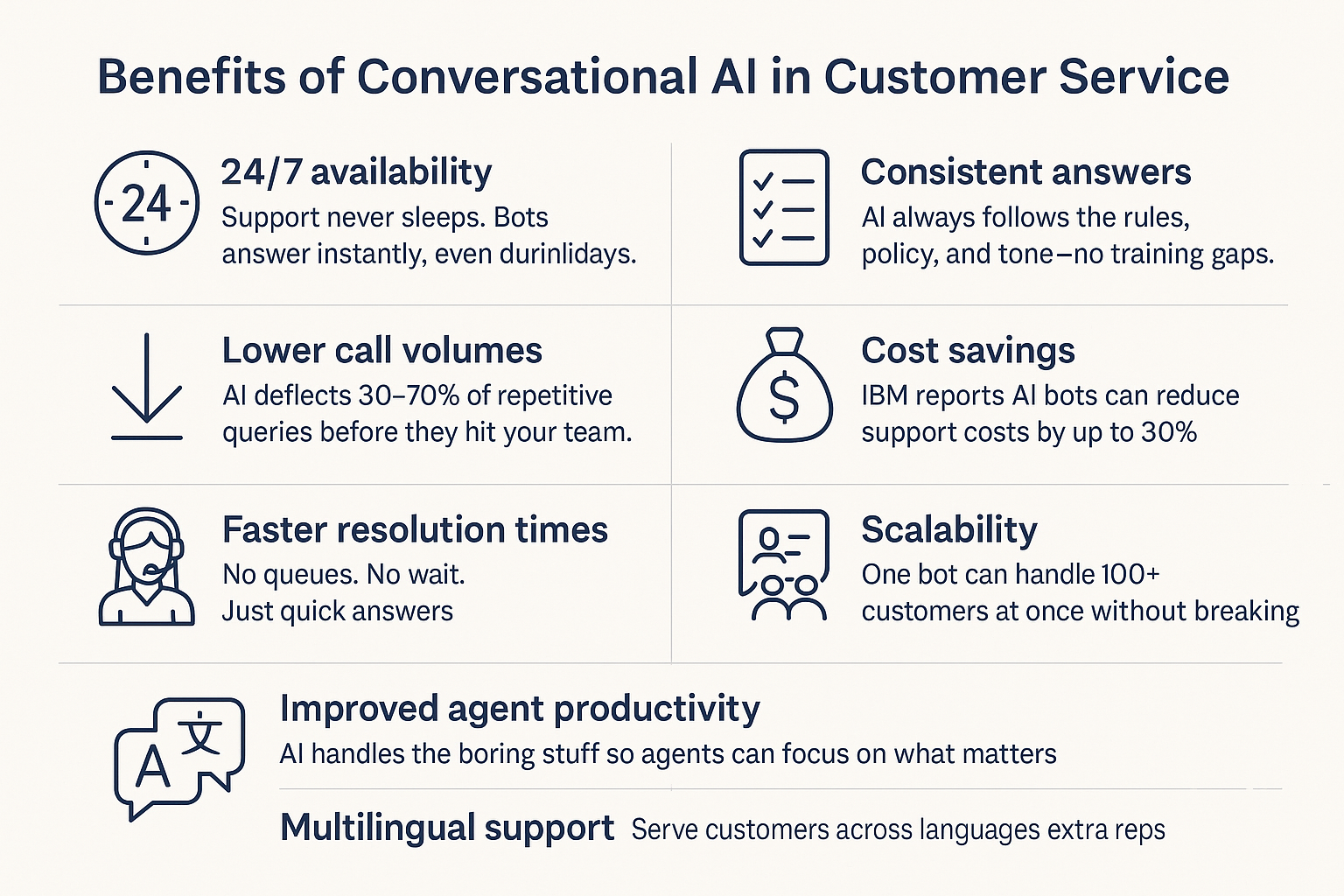
1. 24/7 Availability
Your customers don’t always reach out during business hours. They might have questions late at night, early in the morning, or during holidays.
Conversational AI allows you to stay available all the time. It responds instantly, even when your human team is offline. That creates a better experience and builds trust with customers who value quick help.
2. Lower Call and Ticket Volumes
Many support teams feel overwhelmed by repetitive questions like "How do I reset my password?" or "Where is my order?" You don’t need agents to handle those.
AI can take care of them automatically. Most businesses see a 30 to 70 percent drop in ticket volume when they start using a well-trained chatbot or voice bot. This gives your team more time to focus on the problems that actually need a human touch.
3. Faster Resolution Times
Nobody likes waiting in a queue. When AI handles questions immediately, customers get answers right away. There’s no need to wait for a ticket to be assigned or for an agent to become available.
That kind of speed improves customer satisfaction and sets you apart from slower competitors.
4. Improved Agent Productivity
Your team does not need to spend time answering the same questions every day. AI can take over those repetitive tasks.
This gives your agents more time and energy to solve complex issues, coach customers, or handle escalations. When agents feel more useful and less drained, they work better and stay longer.
5. Consistent and Accurate Answers
Different agents sometimes explain things in different ways. That can confuse customers or lead to errors. Conversational AI always follows the same logic, tone, and policy. It pulls from approved content and never forgets how something should be phrased.
This helps you maintain a consistent customer experience, no matter when or where someone reaches out.
6. Significant Cost Savings
Hiring more agents gets expensive quickly. Training, salaries, tools, and management all add up. According to IBM, AI bots can reduce support costs by up to 30 percent.
You get more done with fewer people, and you keep your support team lean while still growing your customer base.
7. Easy to Scale Without Growing Your Team
Your human agents can only handle a few conversations at a time. AI does not have that limit. One chatbot can manage hundreds of chats at once.
Whether your traffic grows gradually or spikes during a sale or campaign, AI helps you keep up without lowering your response quality.
8. Multilingual Support for Global Customers
If you serve customers across regions, you already know how hard it is to support multiple languages. Hiring reps for each language is expensive and hard to scale.
AI can switch languages automatically or respond in a customer’s preferred language. You can provide global support without building separate teams in every country.
{{templates}}
AI Voice Bots & Agent Assist: The Other Side of Conversational AI
Conversational AI isn’t just for chat. It also powers voice-based systems and tools that assist your agents behind the scenes, both of which are critical for modern customer service.
Let’s break down how these work and why they matter.
1. AI Voice Bots: Automating Inbound Calls
AI voice bots use a combination of ASR (Automatic Speech Recognition) to understand what customers say, TTS (Text-to-Speech) to respond verbally in a human-like voice, and NLP (Natural Language Processing) to detect intent and respond intelligently.
These bots are perfect for inbound call handling, call deflection, and smarter IVR.
What AI Voice Bots Can Do:
- Answer simple spoken queries: “What’s my account balance?” or “When will my order arrive?”
- Route calls with context: Transfer to a live agent with a full transcript of what’s already been discussed
- Handle routine tasks over the phone: Reset passwords, schedule appointments, update contact details
Voice bots allow customers to speak naturally (no menu pressing required) and still get immediate, accurate help.
2. Agent Assist Tools: Superpowers for Live Agents
While AI chatbots and voice bots handle front-end automation, agent assist tools work in the background to support your human agents in real time.
Here’s how they help:
- Suggest relevant responses live: The AI analyzes the ongoing conversation and suggests the most accurate reply, reducing typing and hesitation.
- Summarize conversations instantly: After a chat or call, it generates a quick, actionable summary with key points and next steps, no manual note-taking needed.
- Surface key info automatically: Need a customer’s plan details or return policy? The AI pulls that from your CRM or help center without agents needing to search.
Agent assist doesn’t replace your team but makes them faster, sharper, and less overwhelmed. It directly improves AHT (Average Handle Time), FCR (First Contact Resolution) and CSAT (Customer Satisfaction Score).
It also reduces burnout by removing tedious tasks, letting your agents focus on what they do best: solving complex issues and delivering a great experience.
Together, AI voice bots and agent assist tools unlock the full potential of conversational AI by combining automation with human expertise for a support operation that runs smarter and scales faster.
Generative AI vs Conversational AI
Conversational AI is the umbrella term.
Generative AI is the engine that powers it.
Generative AI uses large language models (like GPT) to generate:
- Natural replies
- Clarifying questions
- Summaries and knowledge suggestions
It enables bots to handle nuanced, context-rich conversations that go far beyond rule-based flows.
Getting Started with Conversational AI: Step-by-Step
If you're new to conversational AI, don’t try to automate everything at once. Start small, prove value, and scale with confidence. Here’s a clear 5-step process, and how Lindy makes each part easier.
Step 1: Decide What to Automate
Start by identifying simple tasks that come up repeatedly and don’t need human judgment. These are low-risk, high-volume requests that take up too much of your team’s time, like:
- Order tracking
- Appointment booking
- Password resets
- Basic product or policy FAQs
Lindy lets you build separate AI agents for each of these use cases. You can train an agent specifically for order updates, another for appointments, and another for FAQ responses. Each one uses only the data you give it, so answers stay focused and accurate.
Step 2: Choose the Right Tool
You want a tool that lets you build fast, integrate deeply, and scale without developer support.
Look for:
- A no-code builder
- Integration with your CRM or helpdesk
- Support for both chat and voice
- Secure handling of sensitive customer data
Lindy checks all these boxes. You don’t need to write code. You can connect Lindy with platforms like Gmail, HubSpot, Notion, or Slack. It works across chat, voice, and email. Your data stays protected, and every agent is customizable to your brand and workflows.
Step 3: Connect to Verified Content
Your AI should only use approved and accurate information. If it guesses answers or pulls from the open web, it can confuse or mislead customers.
Best content sources:
- Help center articles
- Internal SOPs and playbooks
- CRM data and conversation history
- Uploaded PDFs and trusted URLs
With Lindy, you can upload any document, link to specific web pages, or connect directly to your knowledge base. You can also assign different content to each AI agent, so one agent handles orders while another sticks to policies or support guides.
Step 4: Test Internally Before Launch
You don’t want your AI to go live without testing. Internal testing helps you spot mistakes, edge cases, or confusing replies before customers see them.
What to test:
- Common and uncommon customer questions
- Response clarity and tone
- Handoffs to human support
- Behavior when information is missing
Lindy gives you a private testing sandbox for every agent. You can test real queries, preview replies, and see exactly what sources the AI uses. You can also update training data in seconds if something’s off.
Step 5: Launch and Monitor Performance
After launching, keep a close eye on how your AI performs. You’ll want to improve it continuously based on customer interactions.
Track these key metrics:
- Deflection rate
- Escalation rate
- CSAT (customer satisfaction score)
- Bounce rate (users who leave without getting help)
Lindy shows you live analytics for every AI agent. You can see how many queries it’s resolving, how often it escalates, and how customers respond. You can retrain your agent instantly if something isn’t working, so you keep improving without friction.
Start with one use case. Get results. Then expand. With Lindy, you don’t need engineers, consultants, or a big budget.
Best Practices for Using Conversational AI
If you want your AI assistant to work well and keep customers happy, you need more than just a good setup; you need to manage it with intention.
These best practices will help you build trust, avoid common mistakes, and get better results over time.
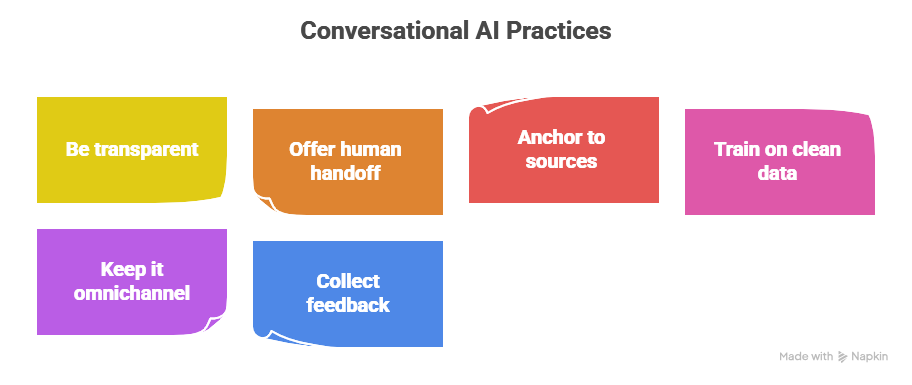
1. Be transparent with your users
Always let customers know they’re interacting with AI. Don’t try to pass the bot off as a human. People are more accepting of AI when they know what to expect. If they discover later that they weren’t talking to a real person, it can hurt your credibility.
Start the conversation with a simple line like:
"Hi, I’m Alex, your AI assistant. I can help with quick questions or guide you to the right person."
If you use Lindy, you can easily customize the welcome message for each AI agent, so this is baked in from the start.
2. Always offer a path to a human
No one likes getting stuck in a dead-end loop. Sometimes customers need to speak with a real person, especially if their issue is emotional, complex, or urgent. Your AI should know its limits and step aside when needed.
Set clear escalation rules. If a customer asks to speak to a person, hits a fallback twice, or types "human," the AI should route the request.
In Lindy, you can create automated handoff conditions that alert a human rep or forward the thread to your live support team.
3. Train your AI on trusted sources only
To keep your answers accurate, don’t let your bot pull from random public content or unverified materials. AI can only be as reliable as the information it’s given.
Feed your assistant structured content like help center articles, internal guides, and verified policies.
With Lindy, you can upload PDFs, link to web pages, or connect it directly to your help docs, CRM, or shared folders. You can even assign specific sources to specific agents.
4. Keep your training data clean
Don’t overload the AI with outdated, vague, or conflicting information. Poor-quality data leads to poor-quality responses. Keep your input organized, relevant, and easy for the AI to interpret.
Audit your support docs before uploading. Use clear headers, short paragraphs, and remove anything outdated.
Lindy reads structured content well, so if you format your docs clearly, the agent will answer clearly too.
5. Support multiple channels, not just one
Your customers reach out through many platforms like web chat, mobile apps, email, WhatsApp, and even voice. Your AI should meet them wherever they are.
Choose a tool that works across platforms and keeps the experience consistent.
Lindy lets you deploy the same AI agents across email, Slack, WhatsApp, your website, and even inside your CRM, so you don’t have to rebuild flows for every channel.
6. Collect feedback and improve continuously
Your AI will make mistakes, especially early on. The best results come when you treat it like a living system, one that learns from feedback and gets better over time.
Add simple thumbs-up/down buttons or short surveys after each interaction. Review failed conversations regularly to see what went wrong.
Lindy includes conversation logs and feedback tracking so you can see where the assistant got confused and update the training content right away.
Final tip: Don’t just set it and forget it. Treat your AI assistant like a new team member. Train it, test it, coach it, and improve it regularly. That’s how you get a system that feels helpful, not robotic.
What to Look for in a Conversational AI Platform
- ✅ Omnichannel coverage
- ✅ Multilingual support
- ✅ No-code workflow builder
- ✅ API access for integration
- ✅ Custom branding & tone control
- ✅ Advanced reporting & analytics
- ✅ Secure cloud infrastructure
- ✅ Built-in fallback to human agents
Human Support vs AI: What’s the Future?
AI is not replacing human reps.
It’s enhancing them.
AI handles repetitive tasks. Humans solve complex, emotional, and high-impact problems.
The future of support is collaborative—AI + humans working together.
Support reps evolve into:
- Conversation designers
- Chatbot trainers
- AI performance analysts
{{cta}}
FAQs
1. Can conversational AI replace human agents?
No. It automates repetitive queries but escalates complex or emotional ones to human agents. AI augments support—not replaces it.
2. How accurate is conversational AI?
When trained on trusted data, bots resolve 70–90% of routine queries. Accuracy improves over time through feedback and retraining.
3. Can it support multiple languages?
Yes. Most platforms support 10+ languages. Some detect user language automatically and respond accordingly.
4. How do I prevent AI hallucinations?
Only connect the bot to verified internal sources like your knowledge base or CRM—not the open web.
5. What should I measure?
Track: deflection rate, CSAT, time-to-resolution, bounce rate, and fallback %. Use these to refine your AI.
6. Is it expensive to implement?
Not anymore. Tools like Lindy and Intercom Fin offer flexible pricing. Compared to hiring more agents, it's cost-effective.
Final Take
Conversational AI is more than just a chatbot. It’s your 24/7 support assistant, sales rep, agent trainer, and automation engine—rolled into one.
If you’re still relying on manual ticketing and fixed flows, you’re behind.
Now’s the time to level up your support stack — and AI is how you do it.
Try Lindy: Build Your Own AI Support Agent
Lindy makes it easy to launch fully conversational support agents trained on your docs, help center, and CRM. No code. Just results.
👉 Start building with Lindy











Blog
Related Articles
.png)
.png)

%20(1).png)
.avif)

%20(1).png)
.png)
The AI assistant that runs your work life
Lindy saves you two hours a day by proactively managing your inbox, meetings, and calendar, so you can focus on what actually matters.
