What Is a 24-Hour Virtual Receptionist Service?
Lindy explained how 24-hour virtual receptionist services work, comparing them against answering services and AI receptionists, with real costs and the questions to ask before signing up.


I started looking into 24-hour virtual receptionist services after a client mentioned, almost in passing, that they had lost three HVAC jobs in a single weekend to a competitor who picked up calls at 2 AM. They had no idea until a customer told them: "I called you first, but no one answered, so I had to go to someone else."
That sent me down a rabbit hole. I tested both AI and human virtual receptionist services, covering scheduling requests, after-hours emergencies, lead capture, and basic service inquiries.
I called trial numbers myself during off-hours, signed up for accounts, and went through pricing terms line by line, looking for the surcharges most services don't put on the pricing page.
The category is messier than it looks from the outside. Real 24/7 coverage and advertised 24/7 coverage are often two different things, and the gap usually comes down to questions most buyers never think to ask before signing.
What is a 24-hour virtual receptionist service?
A 24-hour virtual receptionist service is a remote, around-the-clock solution that handles your business calls, appointments, and customer inquiries at any hour of the day, any day of the week.
The "virtual" part just means the receptionist isn't sitting at a desk in your office. They're either a live person working remotely or AI software that handles the call automatically. From the caller's side, neither is visible. They dial your number, and someone answers.
What "someone" handles varies by service, but the core functions are consistent across the category. They answer calls with your business name and greeting, take messages, book appointments, route calls to the right person, and collect lead information from new callers.
The main difference between services is who (or what) picks up and when. Some services are available 24/7. Others advertise round-the-clock coverage but quietly route overnight calls to voicemail or send them to an offshore call center with zero context about your business.
How 24-hour virtual receptionist services work
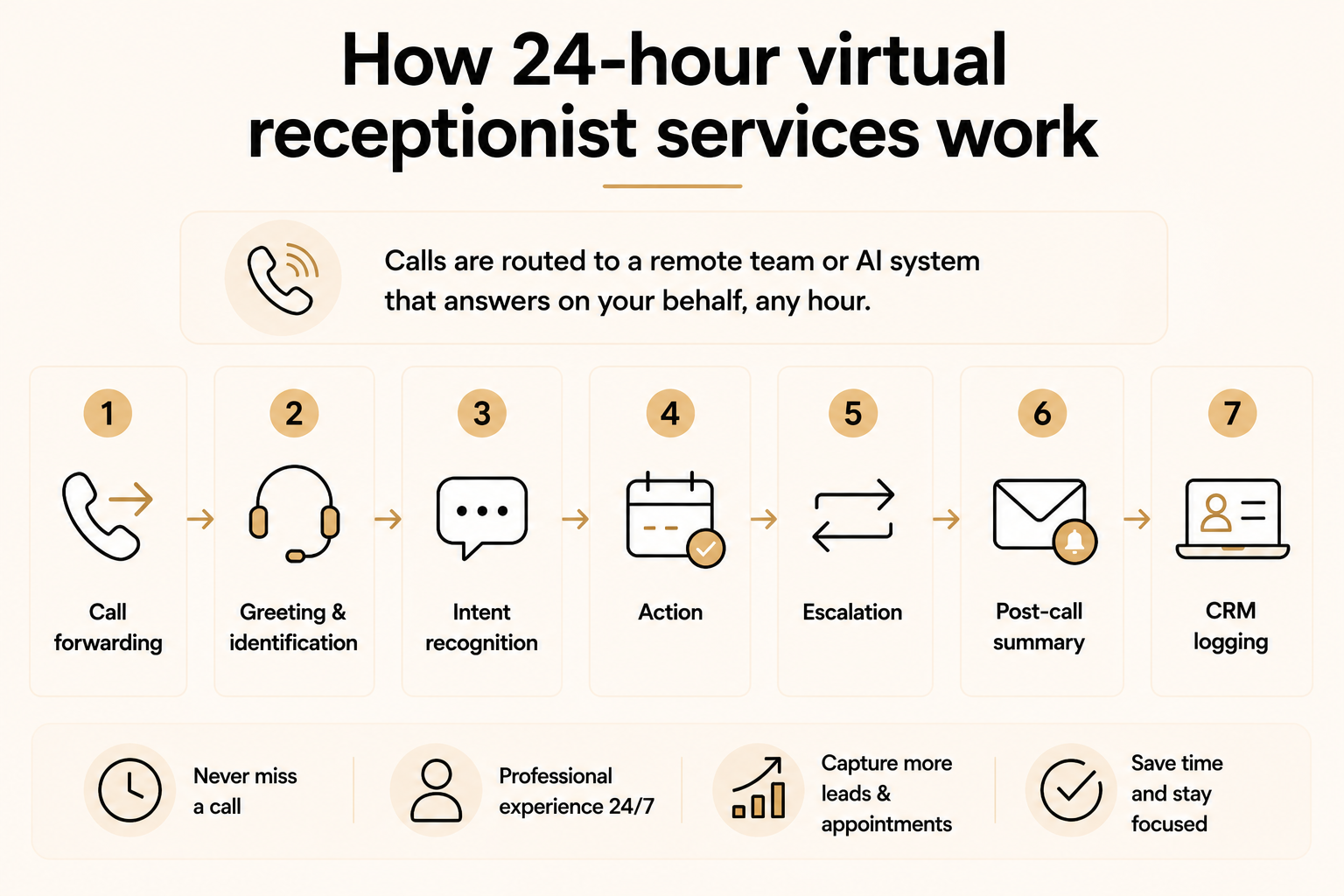
24-hour virtual receptionist services work by forwarding your calls to a remote team or AI system. It answers using your business name around the clock and handles each request before escalating to you only when needed.
Here's the full sequence, from the moment someone dials your number:
- Call forwarding: You point your business number to the service, either always or only when you don't pick up. Most services offer full forwarding, overflow forwarding (only when you miss a call), and after-hours-only forwarding, so you stay in control of when the service kicks in.
- Greeting and identification: The receptionist, human or AI, answers using your business name and a custom script you provide. To the caller, it sounds like your own front desk. They have no idea the call is being handled by an outside service, which is exactly the point.
- Intent recognition: From there, the service identifies what the caller needs. A new appointment, a question about your services, an urgent problem, or a specific person on your team. This step is where AI and human services start to diverge in how naturally they handle unexpected requests.
- Action: Once intent is clear, the service handles the request. Better services book directly into your calendar, answer service-specific FAQs from a knowledge base you provide, and flag strong leads for fast follow-up. Basic services stop at taking a name and a number and leaving you to do the rest.
- Escalation: If the call is urgent or the caller asks for a live person, it transfers to you or your on-call contact. Good services pass the caller's details along so they don't have to explain the situation twice once they reach you.
- Post-call summary: After the call ends, you get a summary by SMS, email, or app within minutes, which matters when your next move depends on what the caller just said. AI services typically deliver full transcripts alongside the summary.
- CRM logging: If the service connects to your scheduling software or CRM, call details are logged automatically. No manual entry or sticky notes on your desk. Worth confirming before you sign up, since not every service includes this in the base plan.
Virtual receptionist vs. answering service vs. AI receptionist
Answering service, virtual receptionist, and AI receptionist are used interchangeably in most sales pages. In reality, they describe different products with different availability and capabilities. Getting this right before you start comparing options saves a lot of confusion later.
Here's how the three types stack up across the factors that matter:
Core features to look for in a 24-hour virtual receptionist service
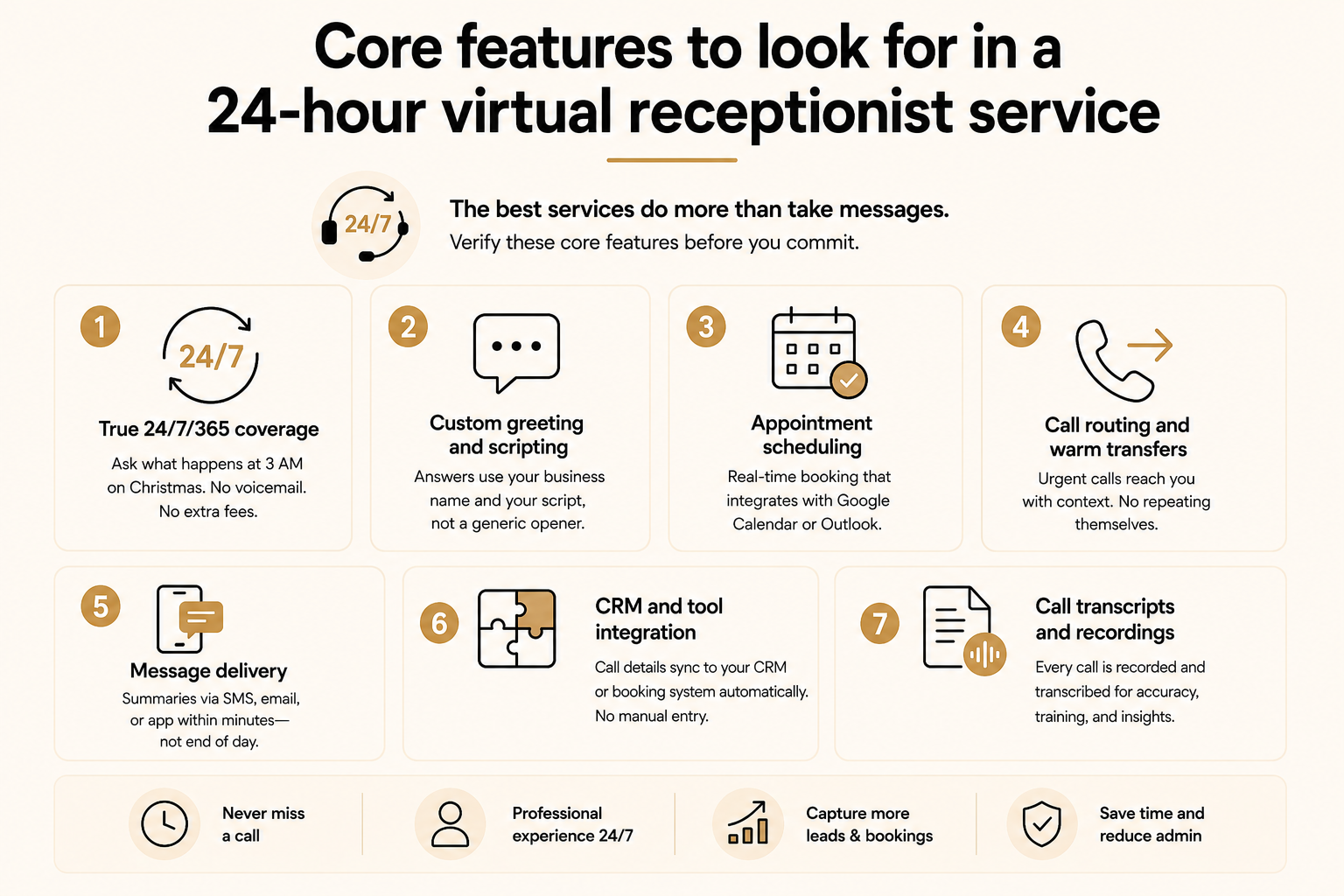
The best 24-hour virtual receptionist services share a set of core features that separate useful coverage from a glorified message-taking service. Before you sign up for anything, know which of these are included in the base plan and which ones cost extra.
Here's what to verify before you commit:
- True 24/7/365 coverage: Ask one question before signing: "What happens if someone calls at 3 AM on Christmas Day?" If the answer involves voicemail, a callback, or extra fees, that is extended hours, not 24/7. Also check whether holiday calls carry a surcharge. Some services advertise flat monthly pricing but quietly bill at a premium rate for after-hours and weekends.
- Custom greeting and scripting: The receptionist should answer using your business name, not a generic opener. A quick test call during a free trial tells you everything. If you hear "Thank you for calling, how can I help?" without your company name, the service is answering calls generically instead of speaking for your business.
- Appointment scheduling: Real-time calendar booking is listed as a feature by most services but is included in the base plan by far fewer. Confirm whether scheduling integrates directly with Google Calendar or Outlook, and whether it costs extra. A service that can only take a message and ask you to call back defeats the purpose.
- Call routing and warm transfers: Urgent calls need to reach you or your on-call contact without the caller having to repeat themselves. Ask how escalation is triggered, what counts as urgent, and whether caller details carry over during the transfer. A warm transfer where the caller retells their whole situation signals poor setup.
- Message delivery: Summaries should arrive by SMS, email, or app within minutes of the call ending. A service that batches messages at the end of the day is not fit for 24-hour coverage. If a client calls at 11 PM about an urgent matter, you need to know at 11 PM, not at 9 AM the following morning.
- CRM and tool integration: Call details should be logged to your CRM or booking system automatically. If the service does not connect to HubSpot, Salesforce, or whatever you use, someone on your team ends up doing manual data entry after every call, which recreates the admin overhead you were trying to eliminate.
- Call transcripts and recordings: Every call should be recorded and transcribed, not just summarized. Transcripts let you verify accuracy, catch recurring questions your website should be answering, and train new staff on real interactions. Services that deliver only a summary leave gaps you will not notice until something goes wrong.
{{templates}}
The industries that benefit most from 24-hour coverage
24-hour virtual receptionist coverage pays off most in industries where customer needs are time-sensitive and the first business to answer typically gets the job. Across these sectors, the math is consistent: one after-hours capture often covers the full cost of the service for the month.
Here's where the ROI case is clearest:
- Home services (HVAC, plumbing, roofing, electrical): It is 3 AM and a pipe has just burst. The homeowner searches Google, finds three plumbers, and calls all three. The first one to answer gets the job, and the others never hear back. In those situations, customers just call whoever picks up first and stop shopping around.
- Legal: Arrests happen at 11 PM on a Friday. DUI calls, domestic disputes, and criminal matters do not follow business hours. In legal, whoever answers first usually gets the case. The firm that runs intake and books the consultation at 11 PM is the one that gets retained.
- Healthcare and wellness: Patients reschedule, cancel, and book new appointments in the evenings, when they have time to make calls. A 24-hour receptionist captures those requests, handles after-hours questions, and keeps your calendar full without front-desk staff working overtime.
- Real estate: Property inquiries peak in the evenings and on weekends, when buyers are browsing listings and have time to call. An after-hours receptionist can answer questions, capture contact details, and book showings before a competitor returns the call the next morning. In a fast-moving market, the agent who responds first has a real advantage.
- Property management: Tenant emergencies are structurally after-hours events. A heating failure in January, a leak on a Sunday morning, a lockout at midnight. These are the calls that arrive when your office is closed. A service that triages calls, dispatches maintenance for real emergencies, and logs everything else for morning follow-up keeps tenants satisfied and properties protected.
- Professional services (consulting, accounting, finance): Emergencies are less frequent here, but client value is higher. A key client who calls on a Friday evening and reaches voicemail draws a conclusion about how much you value that relationship. After-hours coverage in professional services signals responsiveness and builds trust that retains high-fee clients over the long term.
The real cost of 24/7 phone coverage
In-house staffing costs the most. True 24/7 coverage requires three or four full-time employees in shifts, which puts annual costs at $150,000 to $200,000 once you include salary, benefits, and turnover.
Human virtual receptionist services cost less, but per-minute and per-call billing makes the final number unpredictable.
Ruby starts at $250/month for 50 receptionist minutes, PATLive starts at $75/month pay-as-you-go at $2.60/minute with no included minutes, and Smith.ai's human tier is $300/month for 30 calls. Overage fees kick in once you exceed your plan, and a busy month can push the real cost well above the advertised price.
AI virtual receptionist services charge a flat rate regardless of call volume. Rosie starts at $49/month, Goodcall at $79/month, and Smith.ai's AI Receptionist at $150/month for a standard paid plan. No overage fees, no holiday surcharges, same bill every month.
Questions to ask a virtual receptionist service before you sign up
Most 24-hour virtual receptionist services look identical on a pricing page. These questions surface what the page does not show: coverage that is not truly around the clock, surcharges that inflate the monthly bill, and contract terms that make switching costly once you are in.
Here are the questions worth asking before you commit:
- "What happens if someone calls on a holiday or at 2 AM?" If the answer involves voicemail, a callback, or extra charges, the coverage has gaps, even if the page says 24/7.
- "Are there holiday or after-hours surcharges?" This charge is common and rarely visible on the pricing page. Some flat-rate services quietly apply premium rates for evenings, weekends, and public holidays. Ask to see the full billing terms before signing anything.
- "What is the per-minute overage rate if I exceed my plan?" The main cost trap in human-staffed services. Overage rates of $1.50 per minute add up fast in a busy month. Flat-rate AI services do not carry this risk.
- "How is an urgent call defined, and what happens when one comes in?" Vague answers signal vague outcomes. A good service tells you exactly what triggers an escalation, how fast the call reaches you, and what happens if you do not pick up.
- "Can I update my script or instructions myself, and how quickly does the change take effect?" Script changes should take minutes. If you need to submit a support ticket and wait days for an update, your service information will drift out of date, and callers will notice.
- "What calendar and CRM systems do you integrate with natively?" Native integrations mean call details are logged automatically. If the answer is Zapier-only or manual export, someone on your team is still doing data entry after every call.
- "What is the minimum contract length, and is there an early termination fee?" Some services require 12-month commitments with exit fees of $500 or more. AI receptionist services are typically month-to-month. Confirm this before you are locked in.
- "Do you offer a free trial, and does it require a credit card?" Providers confident in their service offer trials without friction. If a card is required upfront, put a cancellation reminder in your calendar before the trial period ends.
- "Where is my data stored, and are you HIPAA-compliant?" Non-negotiable for healthcare. Important for legal and finance. Any service handling sensitive client information should point you to documentation without being asked twice.
- "How do you handle incorrect transfers or errors?" Every service makes mistakes. What matters is whether there is a documented process for catching and correcting them. No clear answer usually means no accountability when something goes wrong.
What Lindy handles after the call
Text Lindy or @mention it in Slack to follow up with leads from missed or after-hours calls. Say "follow up with last night's callers," and it drafts a message for your review and books the callback. Lindy logs contact details in your CRM and schedules follow-up meetings automatically. It works across your inbox, calendar, and hundreds of integrations, so nothing falls through once a call ends.
{{cta}}
FAQs
What is the difference between a virtual receptionist and an answering service?
A virtual receptionist handles appointment scheduling, lead intake, brand-aligned call handling, and live transfers. An answering service primarily takes messages and routes calls using a shared pool of agents. AI receptionists deliver the same capabilities as virtual receptionists but operate automatically, with no per-minute fees and no gaps in after-hours coverage.
Will callers know they are talking to an AI?
No, modern AI receptionists are designed to sound natural, and most callers cannot reliably tell the difference. What callers care about is whether their question gets answered and their request gets handled. AI delivers that consistently on every call, without the variability of a human having an off day.
Is a virtual receptionist worth it for a small business?
Yes, for most small businesses, a virtual receptionist works. If you are missing calls outside business hours and your average customer is worth more than the monthly cost of coverage, the service pays for itself quickly. Home services, legal, healthcare, and real estate see the clearest return because their customers have time-sensitive needs that will not wait until morning.
What industries benefit most from 24-hour virtual receptionist services?
Home services, legal, healthcare, real estate, and property management see the strongest return. These industries share one trait: their customers have time-sensitive needs and call the first business that picks up. In these sectors, customers call down the list until someone picks up, so answering first is often what wins the job.
What is the difference between a 24-hour virtual receptionist and an AI receptionist?
A 24-hour virtual receptionist is typically a remote human who answers calls during set hours or with extended coverage. An AI receptionist is software that handles calls automatically, 24/7, without a human agent involved. Many providers now use both terms for their AI products, so ask directly which type handles your calls before you sign up.









