1. Add Lindy to Slack
One click from the Slack marketplace. The whole team gets Lindy at once.



Connect Salesforce and start asking Lindy to take work off your plate. No workflows to build, just tell Lindy what you need in plain language.
Actions
Explore all the actions Lindy can perform in Salesforce. Just describe what you need in plain language, and Lindy handles the rest.
Add an existing contact to an existing campaign
Add an existing lead to an existing campaign
Convert Salesforce SOAP XML data to JSON format.
Create a new account record in Salesforce with basic contact information.
Create multiple Accounts in Salesforce using Bulk API 2.0.
Create a contact
Create a lead in Salesforce
Create a task in Salesforce.
Create and attach files to Salesforce records.
Create a new marketing campaign in Salesforce with specified details and settings.
Create a new case record in Salesforce with basic details.
Add a comment to an existing Salesforce case.
Create and manage content notes in Salesforce with customizable permissions and visibility settings.
Create and schedule events in Salesforce with customizable details and invitees.
Create a new note and associate it with a Salesforce record.
Create multiple Opportunities in Salesforce using Bulk API 2.0.
Create a new sales opportunity in Salesforce with basic details and stage.
Create a new record in Salesforce for a specified object type.
Create a new task with priority, due date, and optional recurring settings in Salesforce.
Create new Salesforce users with specified details and permissions.
Delete a note or content note from a Salesforce record.
Delete a Salesforce opportunity record using its ID.
Delete a record from Salesforce by specifying the object type and ID.
Find and retrieve Salesforce records based on object type and specified fields.
Get all accounts
Get all contacts
Get an account
Retrieves a case by its ID.
Get a page of online articles for the given language and category through either search or query.
Fetch data category groups visible to the current user.
Retrieves a record by its ID.
Retrieves a user by their ID.
Insert binary data and attachments into Salesforce objects.
Lists all comments for a case.
Lists all email messages for a case.
Lists all email templates.
Lists all knowledge articles.
Lists all fields for a given object type.
Post messages to Salesforce Chatter feeds for specific records.
Search for a specific contact
Search for a specific opportunity
Search Salesforce records across specified object types using a search term.
Sends an email.
Execute custom SOQL queries against your Salesforce data.
Execute custom SOQL queries against your Salesforce data.
Search Salesforce records using SOSL query syntax.
Search Salesforce records using SOSL query syntax.
Update account details in Salesforce with new information.
Update multiple Accounts in Salesforce using Bulk API 2.0.
Update an existing contact
Update an existing lead in Salesforce
Updates an enhanced Salesforce content note, which can include formatted text and is part of Salesforce Files.
Updates an email template.
Updates a classic Salesforce note, which can contain up to 32 KB of text and is associated with a parent record.
Update multiple Opportunities in Salesforce using Bulk API 2.0.
Update details and properties of a Salesforce opportunity record.
Update a record in Salesforce.
Create or update a Salesforce record based on an external identifier.













Easy as one, two, three
One click from the Slack marketplace. The whole team gets Lindy at once.
Lindy works with 1,500+ apps and any MCP server.
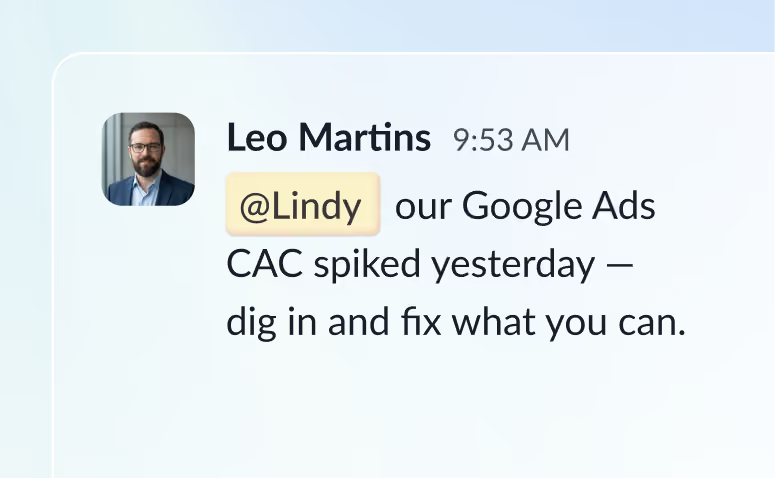
@mention Lindy in any channel and it starts working. Minutes, not a weekend.
Blog
Lindy is an AI assistant that lives in your Slack. Connect your apps, ask for what you need in plain language, and Lindy takes the work off your plate.
Sign up to Lindy, ask Lindy to connect to Salesforce, and approve the connection when prompted. From then on you can ask Lindy to do things in Salesforce whenever you need.
No. There's nothing to build or configure. You ask Lindy in Slack the same way you'd ask a colleague, and Lindy handles the rest.
Yes. Ask once and tell Lindy when to repeat it, like every Monday at 9am, and it becomes a routine that runs without you.
Read and act on data in Salesforce, and trigger workflows when something changes there. Tell Lindy the outcome you want and it handles the rest.
Yes. Lindy connects to 1,500+ apps and any MCP server, so you can ask for tasks that span Salesforce and the rest of your stack in a single request.