What is an After-Hours Virtual Receptionist (And How It Works)?
Lindy explained what an after-hours virtual receptionist does, covering the three types available, the setup steps, and which businesses need overnight coverage.


A potential client called me at 8:43 PM on a Tuesday. I was done for the day, so it went to voicemail. I called back at 9:15 the next morning. He'd already signed with someone else. That one stung because the whole thing was avoidable.
I spent the next few weeks testing after-hours virtual receptionist services for my own business and for three clients. An HVAC company, a solo attorney, and an e-commerce brand. I ran test calls during evenings and weekends, checked how fast each service picked up, and tracked whether call details landed in my CRM or just piled up in an inbox I'd forget to check.
Here's what you need to know about how these services work and whether your business needs one.
What is an after-hours virtual receptionist?
An after-hours virtual receptionist answers your business calls when your office is closed. It can be a live person working remotely, an AI voice system, or a mix of both. The caller dials your usual number. Instead of voicemail, they reach someone who greets them with your business name.
Depending on your setup, that person takes a message, answers common questions, books an appointment, or escalates the call as an emergency. It runs on call forwarding.
At the end of your business day, calls automatically redirect to the service. Your phone number stays the same. Your callers never know anything has changed.
Picture it in practice. It's 11 PM, and a homeowner's heat has gone out. They call your HVAC company. Without an after-hours service, that call dies in voicemail. With one in place, a receptionist picks up, confirms it's an emergency, and connects you to your on-call technician. The customer gets help, and the job gets booked. That's the whole idea.
How an after-hours virtual receptionist works
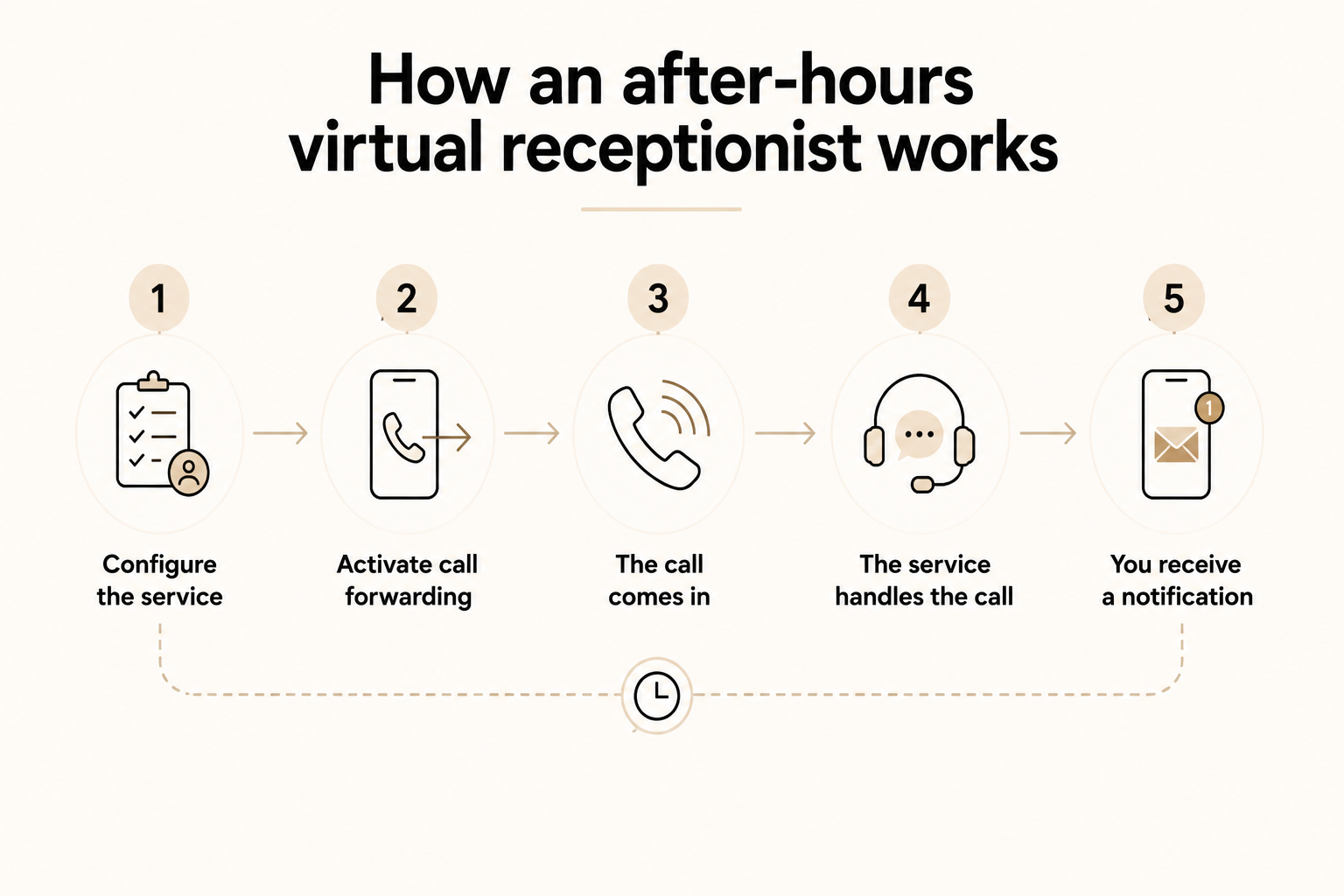
The mechanics are simpler than most people expect. You sign up with a service, give them your call script and instructions, and forward your business number to them when your day ends. Any call that comes in after hours goes to them instead of your voicemail. They handle it, and you get a message.
The steps break down like this:
- You configure the service: Tell the service your business name, how you want callers greeted, and what to do in different situations. Should they take a message and text you? Book directly into your calendar? Page your on-call staff if someone says it's urgent? This setup conversation shapes every call that comes in afterward.
- You activate call forwarding: At the end of each day, you forward your business number to the service. You can do this manually in about 10 seconds, or configure your phone system to reroute calls automatically at a set time so you never have to think about it again.
- The call comes in: Someone calls your business number at 9 PM. They hear your business name, spoken by a live receptionist or a well-configured AI, and get handled exactly as you specified. No hold music or voicemail prompt.
- The service handles the call: Depending on your instructions, the receptionist takes a message, answers a common question, books an appointment, or transfers the call to your on-call staff. Most services also flag the call type so you know whether it was a general inquiry, a new lead, or something urgent.
- You receive a notification: Right after the call ends, you get a message by SMS or email with the caller's name, number, and reason for calling. If your service connects to your CRM, that information goes straight into the system without you copying anything manually.
The three types of after-hours virtual receptionists
Three types of after-hours virtual receptionists include live human, AI, and hybrid. Each option varies in how it manages calls, what it costs, and the specific type of business it suits.
1. Live human receptionists
Real people working remotely who answer calls on your behalf. They follow your script, use your business name, and handle the calls AI genuinely can't. For example, they can handle upset customers, sensitive intake, and tricky situations where tone matters as much as the answer.
- Best for: Law firms, medical offices, and businesses where a bad phone experience directly loses a client.
- Trade-off: The most expensive option by far. Live services start around $250/month and can exceed $2,000/month at volume. If five people call at once, someone waits.
2. AI voice receptionists
Software that answers your calls using conversational AI. Good AI services sound natural, handle FAQs, book appointments, and route calls based on what the caller says, not which button they press. They also scale easily: 50 simultaneous calls cost the same as one.
- Best for: Businesses with mostly routine after-hours inquiries and budgets under $150/month.
- Trade-off: Anything off-script is a problem. An angry caller, an unusual request, a moment of real confusion, and the experience falls apart.
3. Hybrid services
AI answers first and handles the routine stuff: a question, a booking, a message. When the call gets complicated or the caller flags something urgent, it escalates to a live person. The caller gets a fast response. The edge cases still reach a human.
- Best for: Most small and growing businesses. Better call quality than pure AI, lower cost than a full live team.
- Trade-off: More moving parts to configure, and the handoff quality from AI to human varies a lot between providers.
What a good after-hours virtual receptionist does
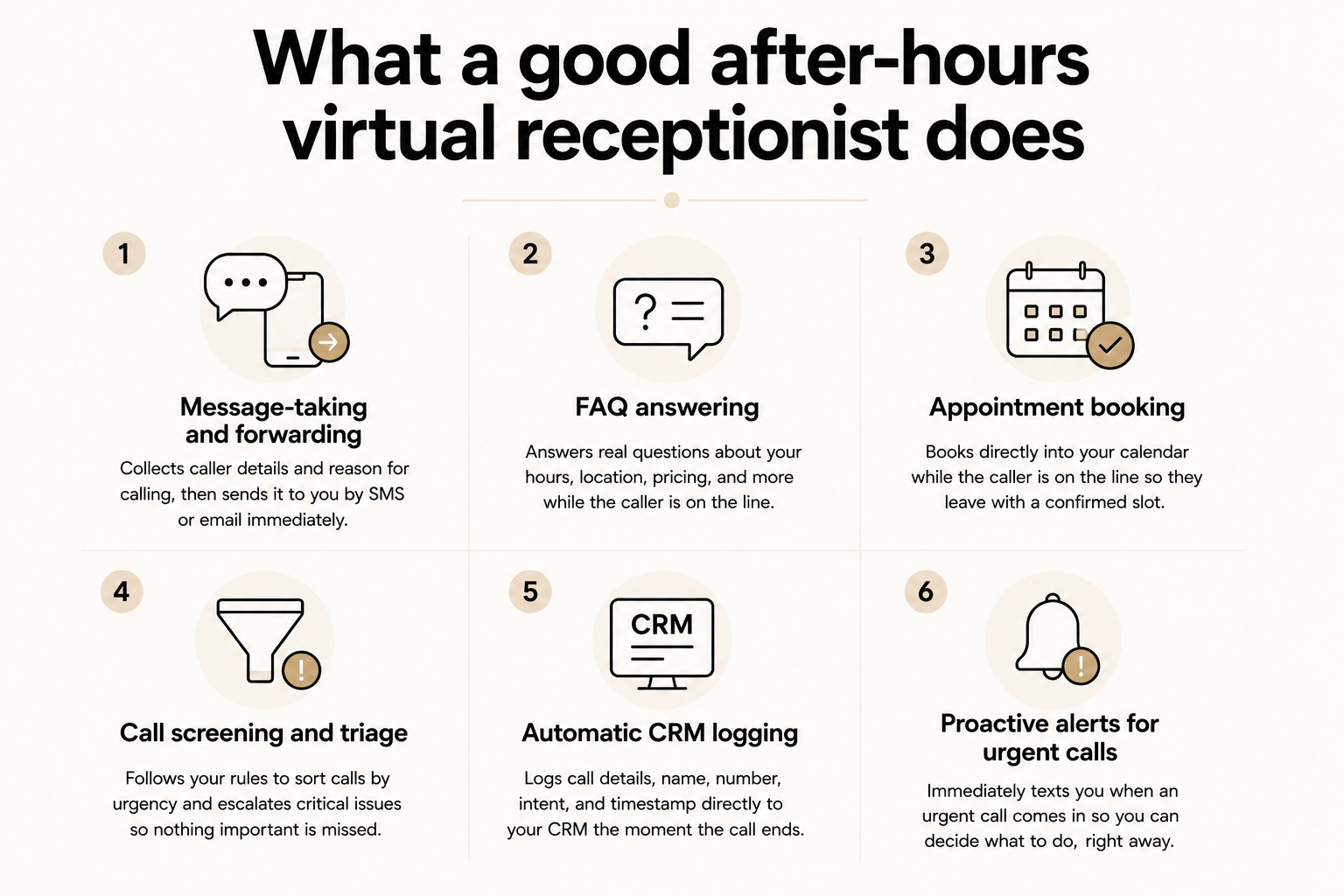
Taking a name and number is the floor, not the standard. A good after-hours virtual receptionist goes further: it answers your specific FAQs, books directly into your calendar, screens calls by urgency, and logs everything to your CRM before your morning starts.
In practice, that looks like this:
- Message-taking and forwarding: Every service should collect the caller's name, number, and reason for calling, then send it to you immediately by SMS or email. If a service can't do this reliably within 60 seconds of the call ending, it's not worth the subscription.
- FAQ answering: The good services answer real questions: your hours, your location, your pricing, how long a job takes. When I tested this, I asked each service the same five questions I'd expect a real client to ask. The answers varied a lot.
- Appointment booking: A receptionist that books directly into your Google Calendar, Outlook, or Calendly while the caller is still on the line captures a lead that a message-taker loses. The caller hangs up with a confirmed slot instead of a promise to be called back.
- Call screening and triage: Not every after-hours call is equal. A general inquiry can wait until morning. A burst pipe, a medical question, a locked-out tenant. Those can't wait. A good service uses your instructions to tell the difference and escalate accordingly.
- Automatic CRM logging: Top-tier services push call details directly into your CRM the moment the call ends: caller name, number, intent, timestamp. Your team starts the morning with a full picture, not a pile of forwarded emails to sort through.
- Proactive alerts for urgent calls: Instead of waiting for you to check your messages in the morning, the service texts you immediately when something urgent comes in. You decide whether to act on it tonight or let it wait. But you know.
Who needs an after-hours virtual receptionist?
Most businesses that miss after-hours calls don't realize how much it costs them. A caller who hits voicemail rarely tries again. They move to the next result on Google, sign with whoever picks up, and you never know you lost them.
A few types of business feel this harder than others:
How to set up an after-hours virtual receptionist
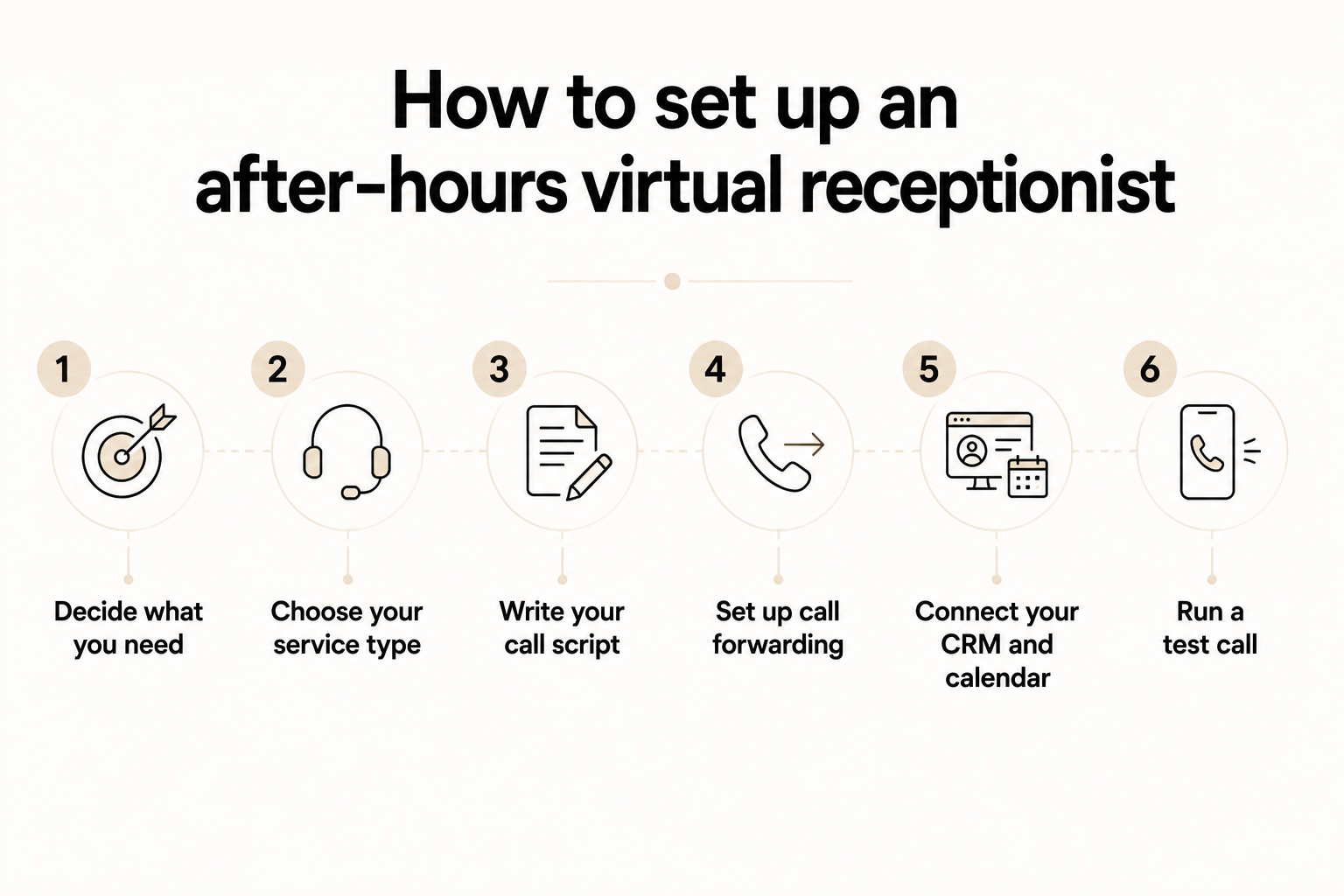
Most services take under 30 minutes to go live. The setup itself is straightforward. What trips people up is skipping the decisions they should make before they even sign up.
Here's the right order:
- Decide what you need: After-hours only, or 24/7? Just messages, or full appointment booking and emergency dispatch? Get clear on this before looking at pricing. The plan that covers everything you need is rarely the cheapest one on the homepage.
- Choose your service type: Live human for complex or sensitive calls, AI for routine high-volume ones, hybrid if you need both. This decision drives the cost more than anything else. Don't pay for live agents if 90% of your after-hours calls are appointment requests.
- Write your call script: Your business name, the greeting callers hear, what information to collect, and what counts as an emergency worth escalating. The more specific this is, the better every call goes. If your service supports conditional logic (example: "if the caller mentions flooding, page the on-call manager"), use it.
- Set up call forwarding: Forward your business number to the service at the end of each day, or configure a time-of-day rule in your phone system so calls reroute automatically. Most carriers and VoIP systems support this out of the box.
- Connect your CRM and calendar: This is the step most people skip. Don't. If call details aren't going directly into your CRM and available slots aren't syncing with your calendar, you're still doing manual work every morning. Connect the integrations before you go live.
- Run a test call: Call your own number at 9 PM the night before launch. Listen to how the service handles it. Check whether the message arrived in your CRM correctly. Fix anything that feels off before real callers experience it.
{{templates}}
My verdict
An after-hours virtual receptionist solves a problem most businesses don't notice until they've already lost someone to it. The setup takes under 30 minutes. The cost usually clears in the first captured job.
If you want something that handles more than just the call, text Lindy to follow up with callers, book meetings, and update your CRM before you start your day. Lindy works across hundreds of integrations including Gmail, Salesforce, HubSpot, and Google Calendar. Just tell it what you need.
{{cta}}
FAQs
What is an after-hours virtual receptionist?
An after-hours virtual receptionist is a service that answers your business calls when your office is closed. It can be a live person working remotely, an AI voice system, or a hybrid of both. Callers reach a real response instead of voicemail. The service takes messages, answers FAQs, books appointments, or escalates emergencies based on your instructions.
How much does an after-hours virtual receptionist cost?
The cost of an after-hours virtual receptionist depends on the type. AI-only services start as low as $25 to $99 per month. Hybrid services typically run $95 to $500 per month. Live human services start around $250 per month and can exceed $2,000 at high call volumes. Beyond the headline price, check for after-hours surcharges, setup fees, and per-minute billing increments.
What's the difference between a virtual receptionist and an answering service?
An answering service takes a message and passes it to you, whereas a virtual receptionist answers your FAQs, books appointments, screens calls by urgency, and acts as a proper extension of your business rather than just a message relay. The line has blurred with AI, but generally a virtual receptionist handles the full front-desk experience.
Can an after-hours receptionist book appointments?
Yes, an after-hours receptionist can book appointments. Most AI services connect directly to Google Calendar, Outlook, or Calendly and book confirmed appointments while the caller is still on the line. Live services typically need a dedicated scheduling plan for this. Confirm before signing up, as basic message-taking plans often exclude calendar access entirely.
Which businesses need an after-hours virtual receptionist most?
The highest-impact cases are home services and HVAC, where emergency calls happen nights and weekends; legal and medical practices, where clients often call during a crisis; real estate, where buyers call after work hours; and any business where a competitor answers after hours and you don't. If missing a call costs you a job, you need one.









