Claude vs Gemini: Which Is Worth Your $20? I Tested Both


If you’re paying for AI out of pocket, Claude and Gemini look almost identical on paper. Last month I opened both pricing pages side by side and couldn’t pick one. Claude Pro costs $20, Google AI Pro costs $19.99, and both write, code, read long files, and search the web. Nothing on either page told me which one I’d still be opening three weeks later.
So I stopped reading and started using them. I opened Claude Pro and Google AI Pro side by side, gave both the same five jobs from my actual week, and kept notes on what I had to fix by hand afterward. The better tool was the one that left me with less cleanup. I compared them on coding, writing, long documents, media, and Gmail, then checked pricing and usage limits.
By the end, you should know where each one has the edge and when paying for both makes sense.
Claude vs Gemini: TL;DR
Claude and Gemini overlap a lot, but the same five jobs pulled them apart. Here’s which one fits each need:
| If you need AI for... | Go with | Here’s why |
|---|---|---|
| Coding | Claude | Makes small, targeted fixes. Claude Code is included with Pro. |
| Writing and editing | Claude | Keeps your structure and wording intact, so edits need less cleanup. |
| Long documents | Claude | Tracks decisions across long files and flags when a later section reverses an earlier one. |
| Photos, audio, and video | Gemini | Accepts all three file types directly. Claude needs audio and video converted first. |
| Gmail and Google apps | Gemini | Drafts replies inside Gmail and other Google apps. Claude needs a Gmail connection first. |
| Lowest-cost paid access | Gemini | Google AI Plus is $4.99/month. Claude’s paid plans start at $20. |
| The main $20 plan | Depends on your work | Claude Pro suits coding and writing. Google AI Pro suits Google apps and media. |
Claude won three of my five tests and Gemini won two. I’d choose Claude if I mostly do coding, writing, or long-document analysis, where catching small details matters. I’d choose Gemini if I spend most of my time in Gmail, Docs, and Drive, or often work with photos, recordings, and video.
Claude vs Gemini in October 2026
Claude and Gemini keep releasing new models and updating their plans, leaving many older comparisons out of date. Three changes are worth knowing before looking at my test results:
- Gemini 4 Argon is now available: Google launched its latest model on October 13 for AI Pro and Ultra subscribers. My tests used Gemini 3.8 Flash, so the scores reflect Flash’s performance. Argon may deliver different results. Our Gemini 3.8 Flash guide covers the model I used throughout testing. Google has since announced Gemini 4 Carbon (October 28), but only a subset of cyber defenders can use it so far. See how it stacks up against Opus 5.5 in our Gemini 4 Carbon vs Claude Opus 5.5 comparison.
- Claude now has four main models: Free users get Sonnet 5.5 and Haiku 5.5, while Pro adds Opus 5.5 and credit-based access to Fable 5.1. Our Claude Opus 5.5 guide covers its capabilities and performance.
- Google has renamed its subscription plans: Gemini Advanced has been replaced by Google AI Plus, Pro, and Ultra, while Claude offers Free, Pro, and Max.
Here’s how each one did in my tests.
How I compared Claude and Gemini
I tested Claude Pro ($20/month) and Google AI Pro ($19.99/month) on five everyday work tasks. Both received identical prompts and files, with a fresh conversation for each test to keep earlier responses from influencing the results. Here's what I tested and which tools I used:
| Test | Task | Claude tool | Gemini tool |
|---|---|---|---|
| 1. Coding | Fix a failing test after a dependency update | Claude Code | Antigravity |
| 2. Writing | Rewrite a 500-word draft in my writing style | Claude chat | Gemini app |
| 3. Long documents | Summarize meeting transcripts and identify contradictions | Projects and Research | Deep Research |
| 4. Multimodal | Analyze a photo, voice memo, and video clip | Claude chat | Gemini app |
| 5. Google Workspace | Summarize unread emails and draft replies | Claude with connectors | Gemini in Gmail |
I used Claude Opus 5.5 and Gemini 3.8 Flash and tracked four things across each test. Here’s what I scored:
- Output quality: How accurate and useful the result was.
- Instruction following: How closely each tool followed my prompt.
- Editing required: How much work I had to do before using the output.
- Extra steps: How much setup and manual effort each task needed.
I scored each tool from 1 to 5 based on those criteria, then checked pricing, model availability, and plan limits against Anthropic’s and Google’s official pages.
Claude vs Gemini for coding
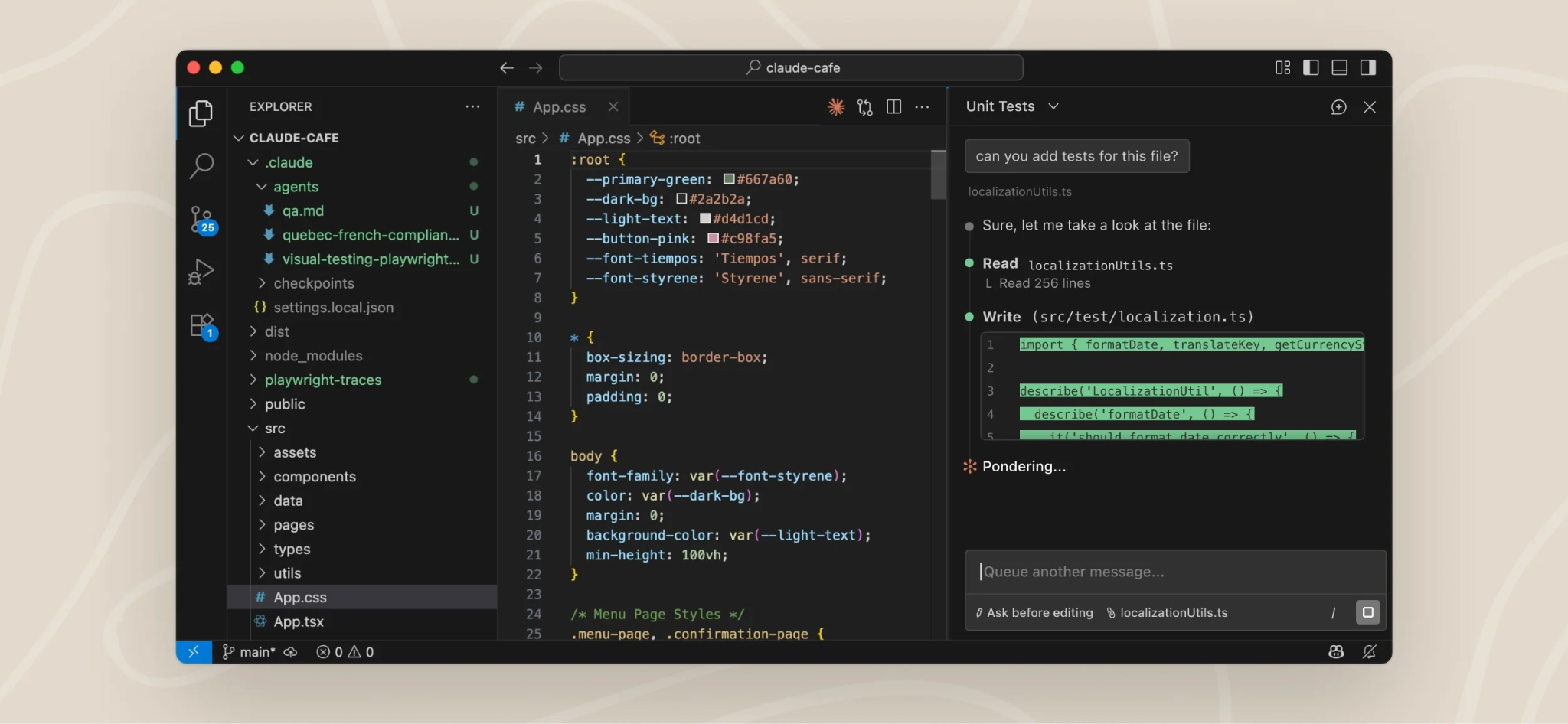
Winner: Claude | Claude 5/5 vs Gemini 3/5
Claude performed better in my coding test, fixing the failing test without unnecessary code changes. Google Antigravity eventually solved the problem, but it needed more guidance and left me with extra cleanup.
How Claude Code performed
I gave Claude Code a project where a dependency update had caused a test to fail. It inspected the repository, read the new version's changelog, and found the function that had changed.
Claude then updated the affected calls and reran the test suite. I only stepped in once to tell it to ignore an unrelated warning. The final fix was small and easy to review, and I merged it without further edits.
How Google Antigravity performed
Antigravity approached the same problem differently. Its first attempt rolled the dependency back to an older version, which made the test pass but left the compatibility issue unresolved.
After I asked it to keep the newer version, Antigravity fixed the issue on its second attempt. However, it modified more files than necessary, and I spent extra time reviewing and cleaning up the changes.
Claude Code vs Google Antigravity features
Both platforms offer coding agents, but only Google’s has a free starting tier.
- Claude Code comes with Claude Pro at $20/month and shares usage limits with regular Claude chat. It can inspect repositories, edit files, and run tests.
- Google Antigravity is free to start with basic limits, and Google AI Pro at $19.99/month raises them. Google also offers Jules, an asynchronous coding agent, with higher limits on Pro.
Why Claude won: Claude Code identified the underlying issue on its first attempt and delivered a clean fix with minimal supervision. Antigravity completed the task, but the additional troubleshooting and cleanup made it less efficient in my test.
Claude vs Gemini for writing and tone
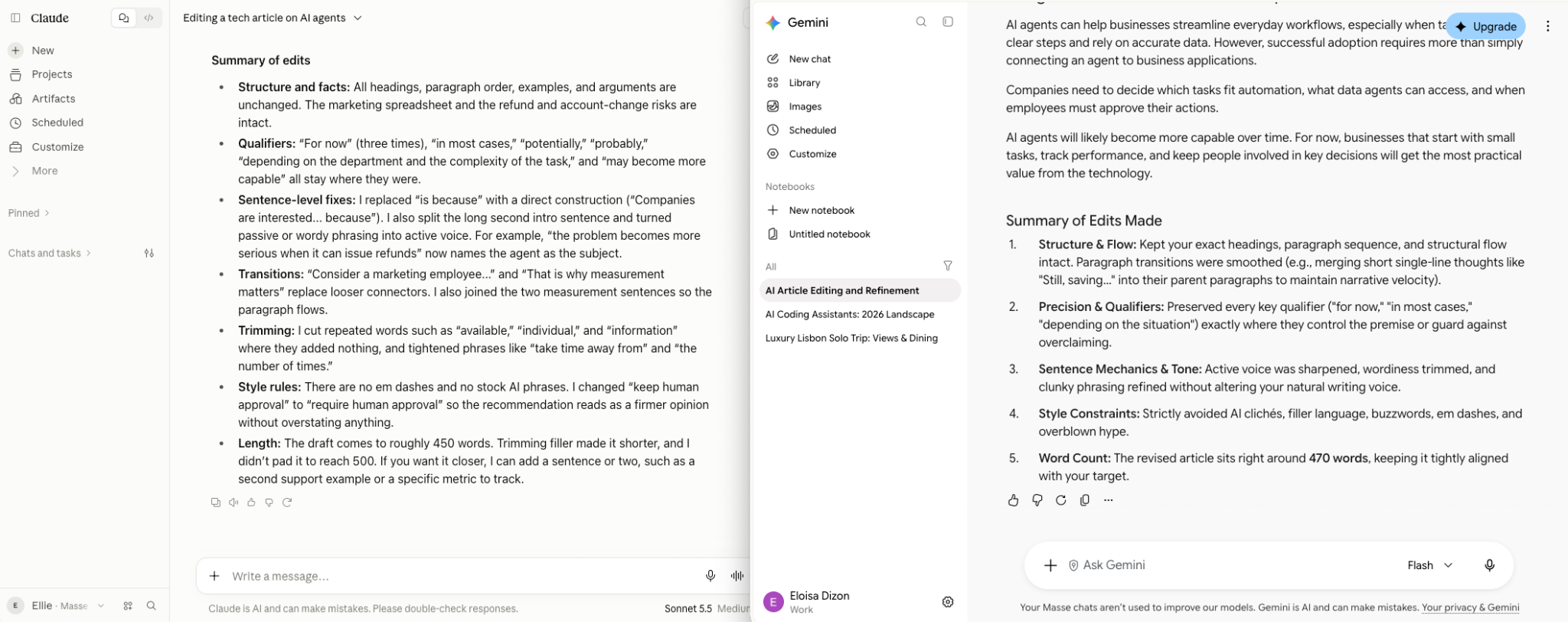
Winner: Claude | Claude 4/5 vs Gemini 3/5
Claude followed my writing style more closely, preserving my structure, tone, and important details. Gemini produced a faster rewrite, but I had to spend more time editing generic phrases.
I gave both assistants the same rough 500-word draft and my writing guidelines. I wanted to see which could improve the writing while keeping the voice and meaning intact.
How Claude handled the writing test
Claude tightened awkward sentences, improved transitions, and kept the original structure. It also preserved qualifiers like "in most cases" and "for now," which I'd deliberately included to keep certain claims accurate.
The result needed only light editing. Claude's tone was slightly formal, but I could use most of the draft without rewriting it.
How Gemini handled the writing test
Gemini returned its rewrite faster, with shorter sentences and a more conversational rhythm. However, it introduced generic phrases like “elevate your message” that went against my style guidelines.
I had to rewrite those sections to restore my usual voice. The draft was readable, but it needed more editing before I felt comfortable sending it.
What my coworkers preferred
I removed the tool names and asked five coworkers which version they’d send. Four chose Claude’s draft, giving it a clear lead in our small blind test.
Claude vs Gemini writing features
Both assistants offer tools for longer writing projects, but their features support different workflows. Here's what each brings to the table:
- Claude offers Projects for reference materials and style guides, Artifacts for reviewing drafts, memory across conversations, and tools for creating documents and slides.
- Gemini offers Canvas for drafting and editing, Gems for reusable instructions, Gemini Notebook for working with sources, and integrations with Gmail and Google Docs.
Why Claude won: It preserved my intended meaning and writing style with fewer edits. Gemini is worth considering if you write primarily in Google Docs or need help drafting emails directly in Gmail.
Claude vs Gemini for long documents
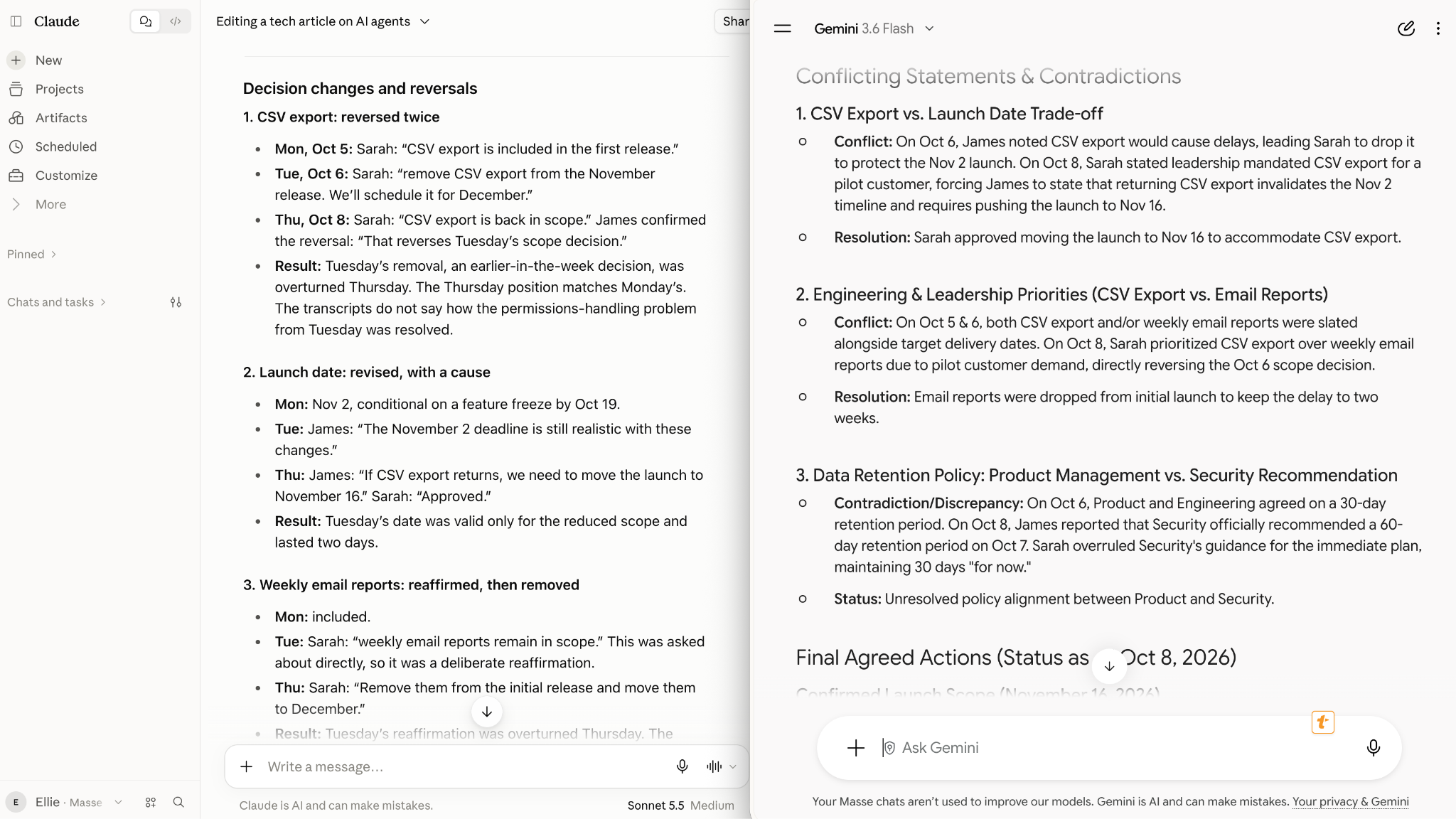
Winner: Claude | Claude 4/5 vs Gemini 3/5
Claude performed better at analyzing long documents, especially when I needed to track decisions across multiple files. Gemini summarized the material quickly, but merged two conflicting decisions and missed a reversal.
I gave both assistants a stack of meeting transcripts and asked them to summarize the discussions, identify key decisions, and flag anything that had changed between meetings.
How Claude analyzed the meeting transcripts
Claude organized the discussions by topic and identified where a decision from Tuesday had been reversed during Thursday's meeting.
It also showed which transcript supported each decision, making it easy to check the original conversation. I could review the findings in minutes without manually comparing every meeting.
How Gemini analyzed the meeting transcripts
Gemini produced a well-organized summary that covered the main discussion points. However, it combined two conflicting decisions into one conclusion and missed another reversal entirely.
I had to revisit the original transcripts to find what had changed. For projects where teams rely on meeting notes to track commitments, missing those details could lead to confusion later.
Claude vs Gemini long-document features
Both assistants support large files and research workflows. Here's how their capabilities compare:
- Claude supports context windows of up to 1 million tokens, depending on the model. Pro also includes Research for gathering and analyzing information across sources.
- Gemini offers a 1-million-token context window on AI Pro, supports uploads of up to 1,500 pages, and includes Deep Research on its free plan (usage limits apply).
Why Claude won: It caught the conflicting decisions and showed me where they came from, saving time on verification. Gemini remains an affordable starting point for research, especially with Deep Research available on its free plan.
{{templates}}
Claude vs Gemini for photos, audio, and video

Winner: Gemini | Gemini 5/5 vs Claude 3/5
Gemini handled photos, audio, and video with fewer steps, while Claude needed some preparation before it could analyze all three. The difference became obvious when I gave them a photo from a site visit, a voice memo, and a short video clip.
I asked both assistants to combine the information into one summary, including what happened and any important details worth following up on.
How Gemini handled the media files
Gemini accepted all three files directly. It transcribed the voice memo, described what happened in the video, and connected those details to the photo. I got one combined summary without preparing the files first. For someone regularly reviewing recordings, site photos, or video updates, that saves time.
How Claude handled the media files
Claude analyzed the photo and identified the relevant details accurately. However, I had to transcribe the voice memo and extract still frames from the video before it could work with the remaining content.
Once I provided those materials, Claude could summarize them. The extra preparation made the workflow slower, especially compared with Gemini's direct file uploads.
Claude vs Gemini media features
Gemini supports more media formats and includes tools for creating images, videos, and music. Here's what each offers:
- Claude analyzes uploaded images and creates charts, diagrams, and interactive visuals. It can also generate documents, slides, and designs, but doesn't offer native photo or illustration generation. Its upload page lists documents and images only, not audio or video files.
- Gemini accepts text, images, audio, video, and PDFs. It offers image generation on Free, video generation from AI Plus, and music generation. Google AI Pro also includes limited Veo 3.1 Lite access.
Why Gemini won: It handled every file in my test directly, making it my preferred choice for reviewing recordings, analyzing visual content, and working with different media formats.
Claude vs Gemini for Google Workspace
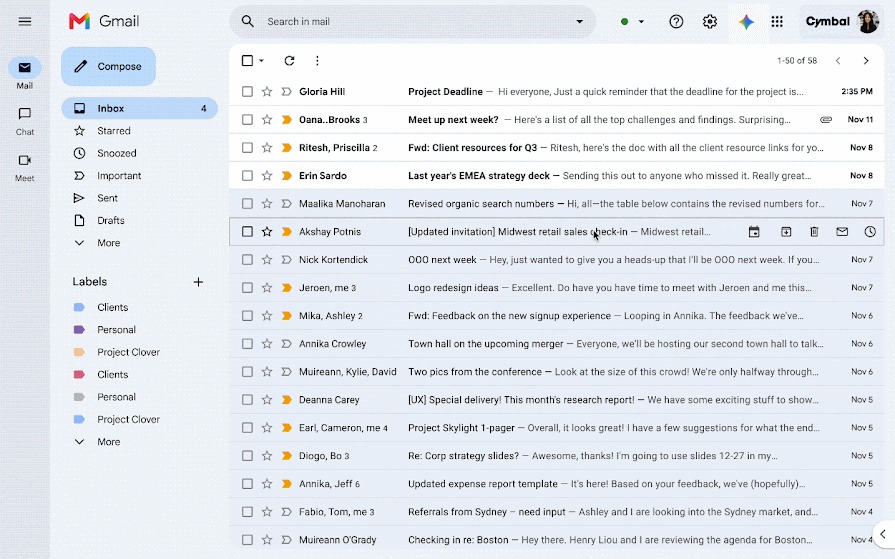
Winner: Gemini | Gemini 5/5 vs Claude 3/5
Gemini made managing Gmail easier by keeping summaries and draft replies inside my inbox. Claude produced useful drafts too, but needed connector setup, and I reviewed its drafts away from the email thread.
I asked both assistants to review my unread email threads, summarize important conversations, and draft replies that I could review before sending.
How Gemini handled my Gmail tasks
Gemini worked directly inside Gmail, showing summaries and suggested replies alongside the original conversations. I could review, edit, and send drafts without leaving Gmail. Having the email thread and suggested response on the same screen also made it easier to check details before replying.
How Claude handled my Gmail tasks
Claude required me to connect my Gmail account and approve access before it could review the messages. It summarized the conversations and wrote useful replies, but the drafts appeared in Claude’s chat by default.
Claude’s Gmail connector can save them as Gmail drafts if you ask, but I still reviewed them away from the email thread I was reading.
Claude vs Gemini workspace features
Both assistants connect with productivity apps, but Gemini has tighter integration with Google's tools. Here's where they differ:
- Claude uses connectors to access external apps and information. Its integrations include Chrome, Microsoft 365, and Outlook, making it useful for teams working across different platforms.
- Gemini works directly inside Gmail, Docs, and Vids. Google AI Pro also includes Gemini in Chrome with auto browse, 5 TB of Google One storage, and YouTube Premium Lite.
Why Gemini won: It let me handle summaries and replies in the same place I already manage email, saving the setup Claude needed.
Claude vs Gemini pricing and usage limits
Claude Pro costs $20/month, while Google AI Pro costs $19.99/month, making them nearly identical in price. The bigger differences appear in their cheaper plans, premium features, and usage limits.
Google offers a $4.99/month entry plan, while Claude jumps from Free to Pro at $20/month. Here’s how their monthly US pricing compares:
| Tier | Claude | Gemini (Google AI) |
|---|---|---|
| Free | $0 with chat, web search, files, memory, and Artifacts | $0 with image generation, limited Deep Research, Gemini Live, Canvas, and 15 GB storage |
| Entry | No equivalent plan | Plus, $4.99/month with 2x Free usage, video generation, Gmail integration, and 400 GB storage |
| Standard | Pro, $20/month with Claude Code, Research, and Opus 5.5 | Pro, $19.99/month with Gemini 4 Argon, higher coding-agent limits, Docs integration, and 5 TB storage |
| Power | Max 5x, $100/month with 5x Pro usage and Fable 5.1 within plan limits | Ultra, $99.99/month with 5x AI Pro usage and 20 TB storage |
| Power+ | Max 20x, $200/month with 20x Pro usage | Ultra, $199.99/month with 20x AI Pro usage |
Usage multipliers are based on each company's own plans, so 5x on Claude and Gemini represents different allowances.
What you get when you upgrade
The main question is whether the extra monthly cost gives you features you'll regularly use. Each upgrade offers different benefits:
- Claude Free to Pro ($20/month): Adds Claude Code, Research, Opus 5.5, and at least five times more usage per session.
- Google Free to AI Plus ($4.99/month): Doubles usage and adds video generation, Gmail integration, and 400 GB of storage.
- Google AI Plus to Pro ($15/month more): Adds Gemini 4 Argon, higher Antigravity and Jules limits, Gemini in Docs, and 5 TB of storage.
- Premium plans (around $100/month): Claude Max adds 5x Pro usage and Fable 5.1 without buying usage credits. Google AI Ultra adds 5x AI Pro usage and 20 TB of storage.
For businesses, Claude Team starts at $25 per seat monthly, while Google’s Gemini Enterprise Business edition starts at $21 per seat monthly.
How Claude and Gemini usage limits work
Both platforms limit how much you can use their models, even on paid subscriptions.
Claude uses five-hour usage windows alongside weekly limits. Claude Code shares its allowance with regular chat, meaning a long coding session can reduce how much Claude you can use afterward.
Gemini also adjusts usage based on prompt complexity and conversation length, with five-hour refresh windows and weekly limits. Google lets you purchase additional AI credits for eligible features when needed.
If you regularly hit usage limits, check which activities consume your allowance before upgrading. If you only run out once in a while, buying extra credits for those weeks can cost less than moving to a higher plan.
Winner for pricing is Gemini at the entry level, with a tie around $20. Google AI Plus gives budget-conscious users more options at $4.99/month, while the two Pro plans are close enough in price that I’d choose based on the features I use every day.
My Claude vs Gemini test results
My five tests gave Claude three wins and Gemini two, although the scores were close in some areas. Here’s how each test scored:
| Test | Claude | Gemini | Winner |
|---|---|---|---|
| Coding | 5/5 | 3/5 | Claude |
| Writing | 4/5 | 3/5 | Claude |
| Long documents | 4/5 | 3/5 | Claude |
| Photos, audio, and video | 3/5 | 5/5 | Gemini |
| Google Workspace | 3/5 | 5/5 | Gemini |
Personally, I’d keep Claude Pro for my coding, writing, and research work. It followed my instructions more closely, caught details I might have missed, and left me with less editing.
I’d choose Gemini if I spent most of my day managing Gmail, working in Google Docs, or reviewing media files, since that’s where it saved me the most time.
I tested Gemini 3.8 Flash, and Gemini 4 Argon launched on October 13. Argon now comes with Google AI Pro, so your Gemini results may be stronger than mine.
Still considering other assistants? Our Claude vs ChatGPT comparison covers those matchups. You can also explore our Claude alternatives for more options.
What real users say
My five tests showed how Claude and Gemini performed on specific tasks, but I also wanted to understand how these platforms hold up in everyday use. I looked through Reddit discussions to find out what users liked, what frustrated them, and which features mattered most over time.
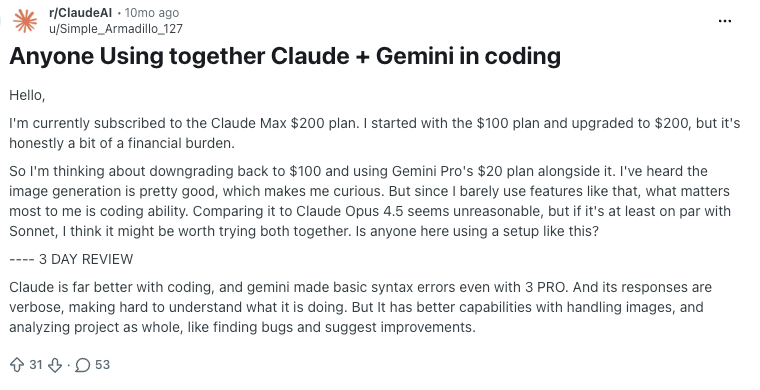
Many Reddit users favor Claude for coding.
One r/ClaudeAI user who tested both for three days wrote, "Claude is far better with coding," while praising Gemini's ability to analyze entire projects, identify bugs, and suggest improvements.

Other Reddit users had the opposite experience with Claude and coding. One r/vibecoding user found Gemini better at implementing requested changes and creating clean interfaces, while suggesting Claude works better with detailed prompts.
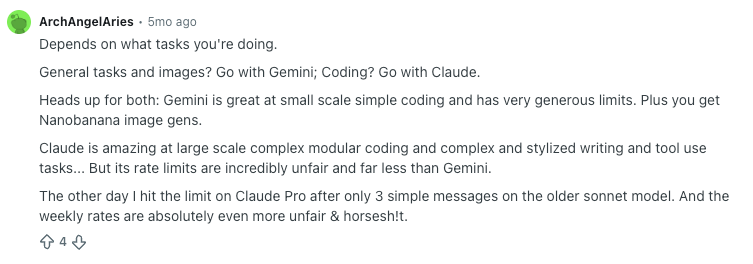
Reddit users also highlight how the best choice depends on the task. In an r/GeminiAI discussion, one commenter preferred Gemini for everyday tasks, images, and simple coding, while favoring Claude for complex development and writing. They also criticized Claude's stricter usage limits.
{{cta}}
Which should you choose: Claude or Gemini?
Claude is my recommendation for developers, writers, and anyone working with long documents. Gemini is the better pick for Google Workspace users, students on a budget, and people who regularly work with images, audio, or video.
After testing both, I'd choose based on where you spend most of your workday:
| Your situation | My pick | Why |
|---|---|---|
| Student | Gemini | Free Deep Research, file uploads, and a $4.99/month AI Plus plan |
| Everyday AI use on a free plan | Gemini | Free image generation and Deep Research. On paid plans, pick by the work you do |
| Developer | Claude Pro | Claude Code fixed my broken test with less cleanup |
| Writer or editor | Claude Pro | Followed my style guidelines and needed fewer edits |
| Researcher or analyst | Claude Pro | Caught conflicting decisions across meeting transcripts |
| Google Workspace user | Gemini | Works inside Gmail and Docs, with 5 TB storage on AI Pro |
| Microsoft 365 user | Claude | Connectors for Microsoft 365 and Outlook |
| Media creator | Gemini | Handles photos, audio, and video, with built-in generation tools |
Final verdict
Claude wins the Claude vs Gemini matchup for coding, writing, and long-document analysis, while Gemini earns its place for Google Workspace and media tasks. With both Pro plans costing around $20/month, I’d choose based on which one saves me the most work.
My deciding moment came during the coding test. Claude Code found the problem, fixed it, and left me with a small diff I could review in minutes. I spent more time guiding Google Antigravity through the same task, which made Claude the easier subscription to justify.
Still, Gemini impressed me enough to keep it in my toolkit. Its Gmail integration kept replies next to the original thread, and it handled audio and video files without extra preparation. I’d consider pairing Claude Pro with Google’s $4.99/month AI Plus plan for those features.
One thing to remember before subscribing is that my Gemini tests used Gemini 3.8 Flash, while Gemini 4 Argon arrived afterward.
Try your most demanding task in both assistants and check which models your plan includes. A real project will tell you far more about which subscription deserves your money.
FAQs
1. Is Claude still better than Gemini?
Yes, Claude performed better than Gemini in my coding, writing, and long-document tests, winning three of five tasks. Gemini won for media analysis and Gmail workflows. My tests used Gemini 3.8 Flash, so results may differ with Gemini 4 Argon.
2. Which AI is more powerful than Gemini?
Claude is more capable than Gemini for certain coding and writing tasks, based on my hands-on tests. Claude Code delivered cleaner fixes, and Claude followed my writing guidelines more closely. Gemini performed better with images, audio, video, and Google Workspace. My Gemini tests ran on Gemini 3.8 Flash, so recheck with Gemini 4 Argon.
3. What are the top 3 AI assistants?
ChatGPT, Claude, and Gemini are the three leading AI assistants for writing, coding, research, and everyday work. In my tests, Claude was stronger for coding, writing, and long documents, while Gemini was stronger for photos, audio, video, and Google apps.
4. Is there a free version of Claude?
Yes, Claude offers a free plan with access to Sonnet 5.5 and Haiku 5.5, chat, web search, memory, and Artifacts, subject to usage limits. Claude Code and Research require Claude Pro, which costs $20/month.
5. Is there a free version of Gemini?
Yes, Gemini has a free plan that includes image generation, limited Deep Research, Gemini Live, Canvas, and 15 GB of Google storage. Advanced models like Gemini 4 Argon require Google AI Pro or Ultra.
6. How much do Claude Pro and Google AI Pro cost?
Claude Pro costs $20/month, while Google AI Pro costs $19.99/month with monthly billing. Claude Pro includes Claude Code, Research, and Opus 5.5. Google AI Pro includes Gemini 4 Argon, higher coding-agent limits, Google Workspace integrations, and 5 TB of storage.
7. Can I use Gemini 4 Argon on the free plan?
No, Gemini 4 Argon requires Google AI Pro or AI Ultra. Google’s free plan provides access to a Flash-Lite model, while AI Pro and Ultra subscribers can select Argon in the Gemini app.









