Claude vs Grok Tested: Which One’s Better in 2026?


I've mostly relied on Claude and ChatGPT for my personal and professional work, so I hadn't paid much attention to Grok. But Elon Musk kept calling it the best AI on X. With Grok 4.7 released and paid plans from $8/month, I decided to see how Grok compared with Claude.
I tested both assistants on B2B writing, Python debugging, research, and financial document analysis. The results revealed the underlying differences in how they follow instructions, handle complex information, and explain their findings.
I also compared their pricing, context windows, multimedia features, and privacy policies. Here's what my Claude vs Grok comparison showed and which assistant I'd choose for different tasks.
Claude vs Grok: Quick comparison
Claude performed better on my writing, coding, research, and document-analysis tests, while Grok was faster on the document-analysis test and offered more options for generating images and videos.
Here's how the two assistants compare in terms of features, specifications, and pricing:
Context windows refer to the API models listed above. Grok 4.3 also supports 1 million tokens. Grok's $8 Plus plan is part of The X Subscription for new customers. Specifications and pricing were checked on November 6, 2026.
My recommendation: I'd choose Claude for professional work involving writing, coding, and lengthy documents. Grok makes more sense if you need to find recent posts on X, generate visual content, or want a cheaper entry-level subscription.
That said, Grok performed well on several tasks despite losing my head-to-head tests.
What is Claude?
Claude is an AI assistant developed by Anthropic. It helps users write and edit content, generate code, research topics, analyze documents, and work with business information.
Its current model lineup includes Opus 5.5, Sonnet 5.5, Haiku 5.5, and Fable 5.1. These models serve different needs, from faster everyday tasks to complex reasoning and long-running work.
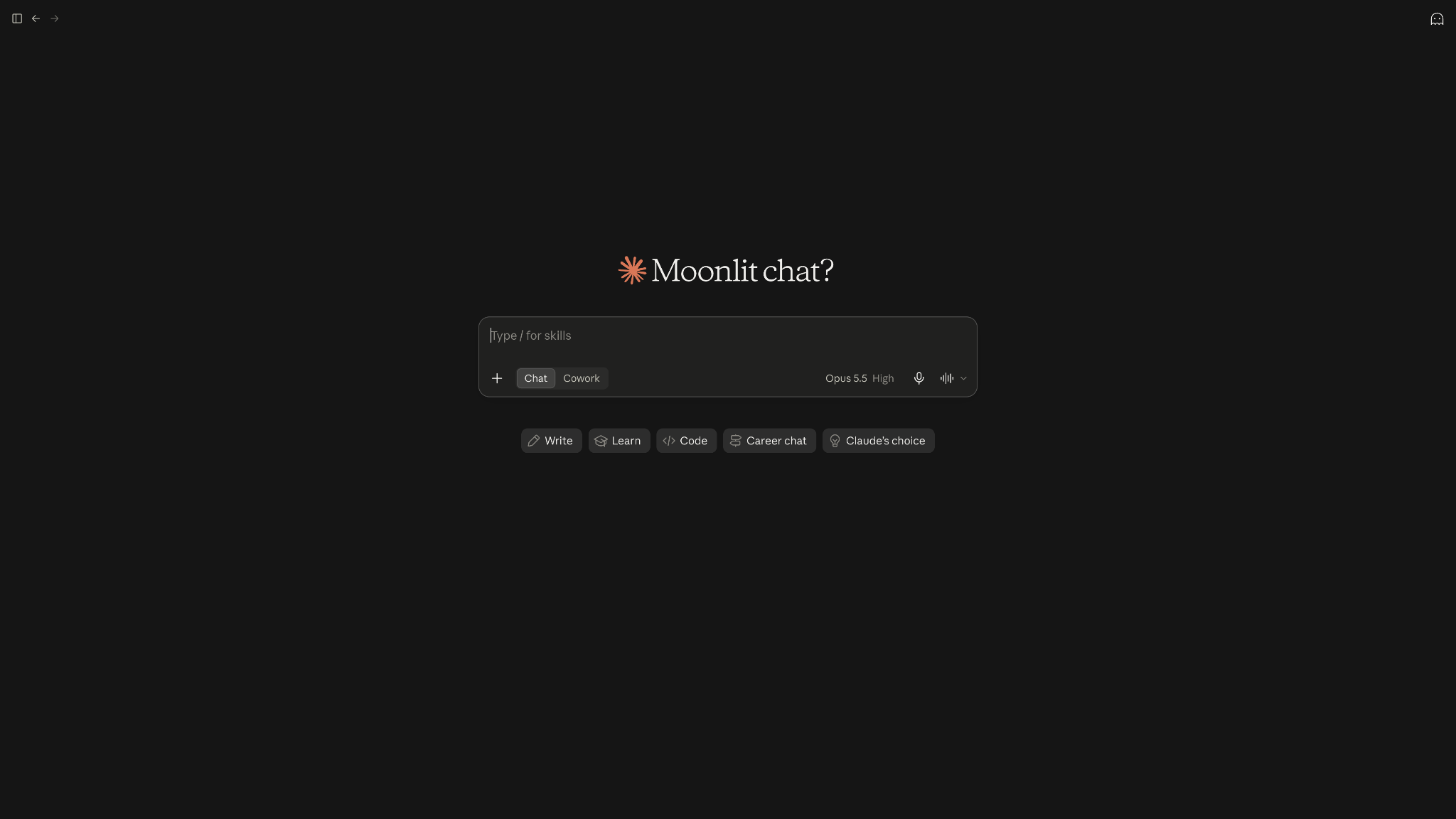
Claude also supports web search, Projects, file creation, and integrations with business applications.
What is Grok?
Grok is an AI assistant from SpaceXSI, the company formerly known as xAI. Its main model is Grok 4.7.
Like Claude, Grok can write content, generate and debug code, analyze documents, and answer questions.
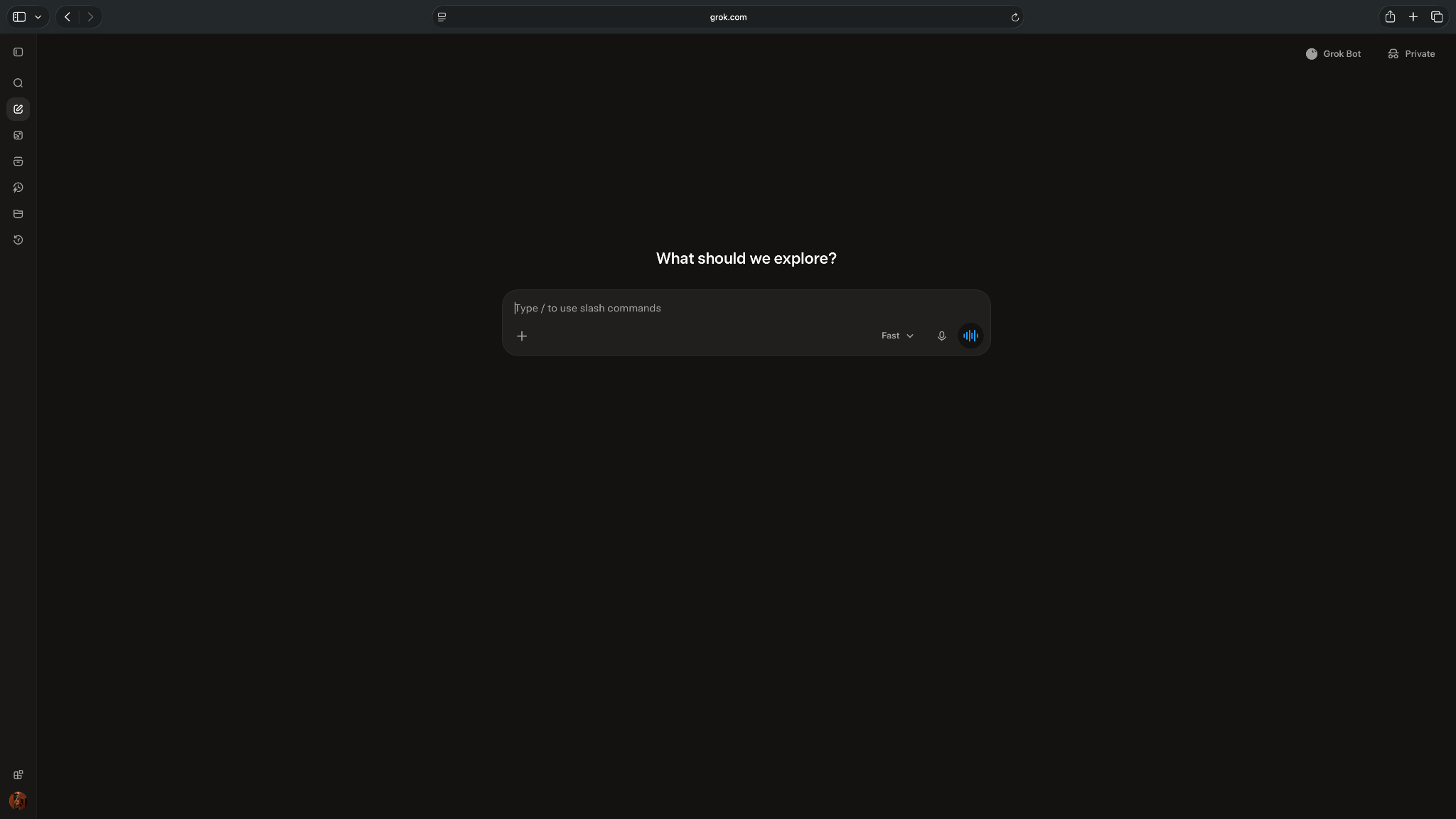
One of Grok's distinguishing features is its integration with X. It can search public posts and retrieve information about recent discussions, announcements, and trending topics. Grok also supports image and video generation through Grok Imagine, making it useful for tasks involving visual content.
How I compared Claude and Grok
I ran four hands-on tests to compare how Claude and Grok handle common tasks, like writing, coding, research, and document analysis. I gave both assistants identical prompts and evaluated their responses using criteria specific to each task.
Here's what I tested:
- Writing: I asked both assistants to write a B2B product announcement email and evaluated instruction-following, factual accuracy, writing quality, and editing required.
- Coding: I gave them a Python function containing several bugs and compared their debugging accuracy, corrected implementations, unit tests, and explanations.
- Research: I asked both assistants to research Anthropic's Claude Haiku 5.5 launch and summarize public reactions on X. I compared their source accuracy, information freshness, research quality, and transparency. Since the topic was a Claude announcement, it wasn't a neutral choice of subject.
- Document analysis: I uploaded Microsoft's 88-page 2025 annual report and asked both assistants to extract financial figures, analyze business performance, and cite supporting evidence.
I scored each assistant out of 100 using a weighted rubric for each test. I also recorded response times and noted any factual errors or unsupported claims.
For writing, I used Claude Sonnet 5 at High effort. For coding, research, and document analysis, I used Claude Opus 5.5 at High effort. I tested Grok in Fast mode for all four tasks, the setting most people use.
The settings weren't equivalent. Claude used High effort, while Grok was in Fast mode. This could affect response times and output quality, so I wouldn't treat the results as a definitive ranking of either assistant. The scores reflect how they performed on my four test prompts.
Claude vs Grok for writing: Which one did it better?
Claude scored 75/100 in my B2B writing test, compared to Grok's 65/100. It followed more instructions and needed fewer edits, although Grok scored higher on factual accuracy.
I asked both assistants to write a product announcement email for Approval Inbox, a fictional feature that lets managers review AI-generated customer emails before they're sent. The brief required 180–220 words, a conversational tone, and no invented product details.
Here's how Claude and Grok scored on my writing tests:
These scores reflect my assessment of this specific writing task. Let’s see where each assistant performed well and where it struggled.
How Claude handled writing
Claude produced an email of approximately 209 words, meeting the requested word count. It included a clear subject line, short paragraphs, and a CTA.
I particularly liked how it connected the feature to problems operations managers face, such as catching tone issues and factual errors before sending customer emails. The writing felt more specific than Grok's.
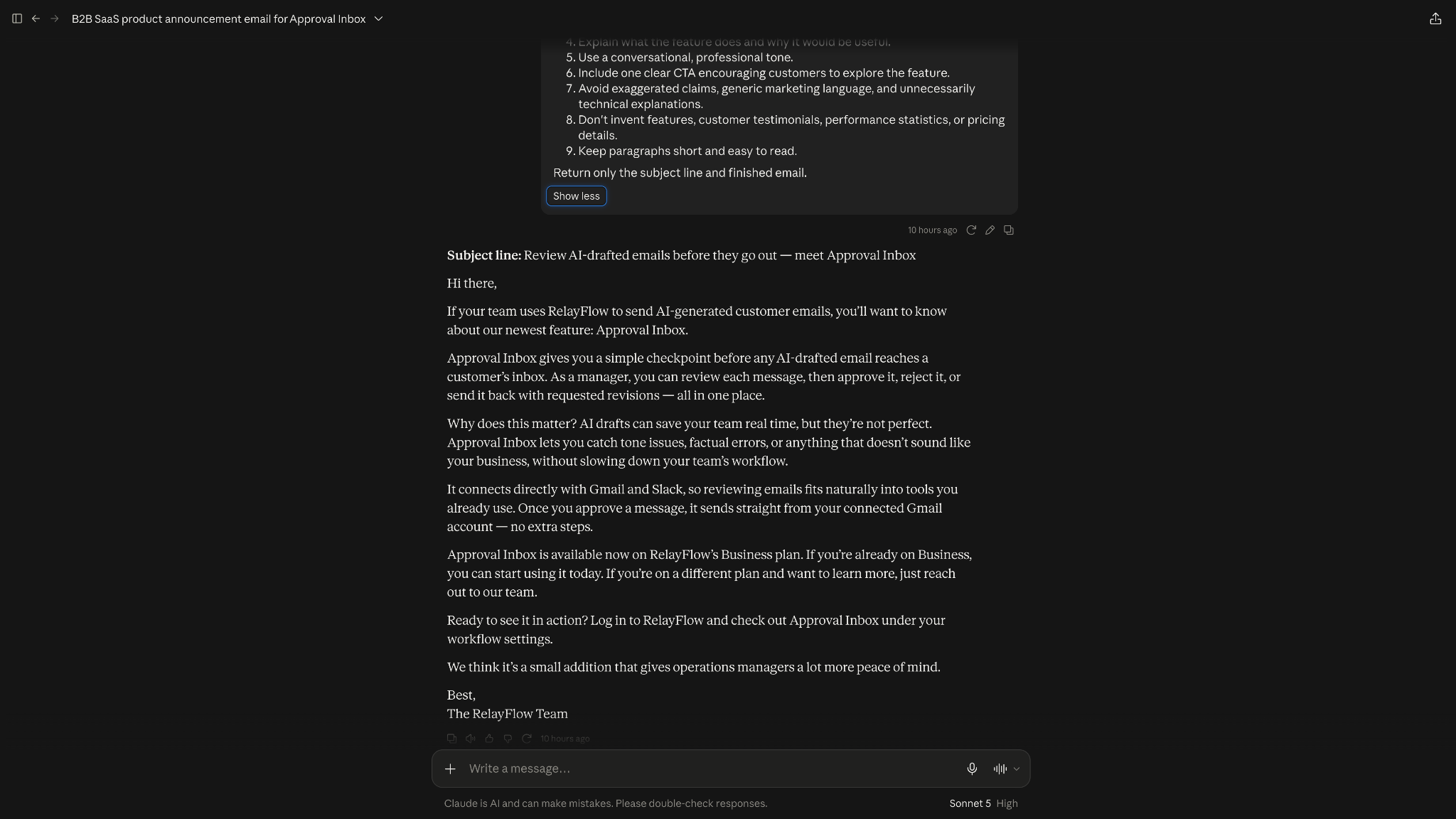
However, Claude invented details about the product. It told customers to find Approval Inbox under their workflow settings and claimed approved emails would go through Gmail with no extra steps. Neither detail was in my prompt.
How Grok handled writing
Grok explained the approval process clearly and mentioned that the feature doesn't support offline access, which Claude missed. It also avoided inventing a specific location for the feature within the app.
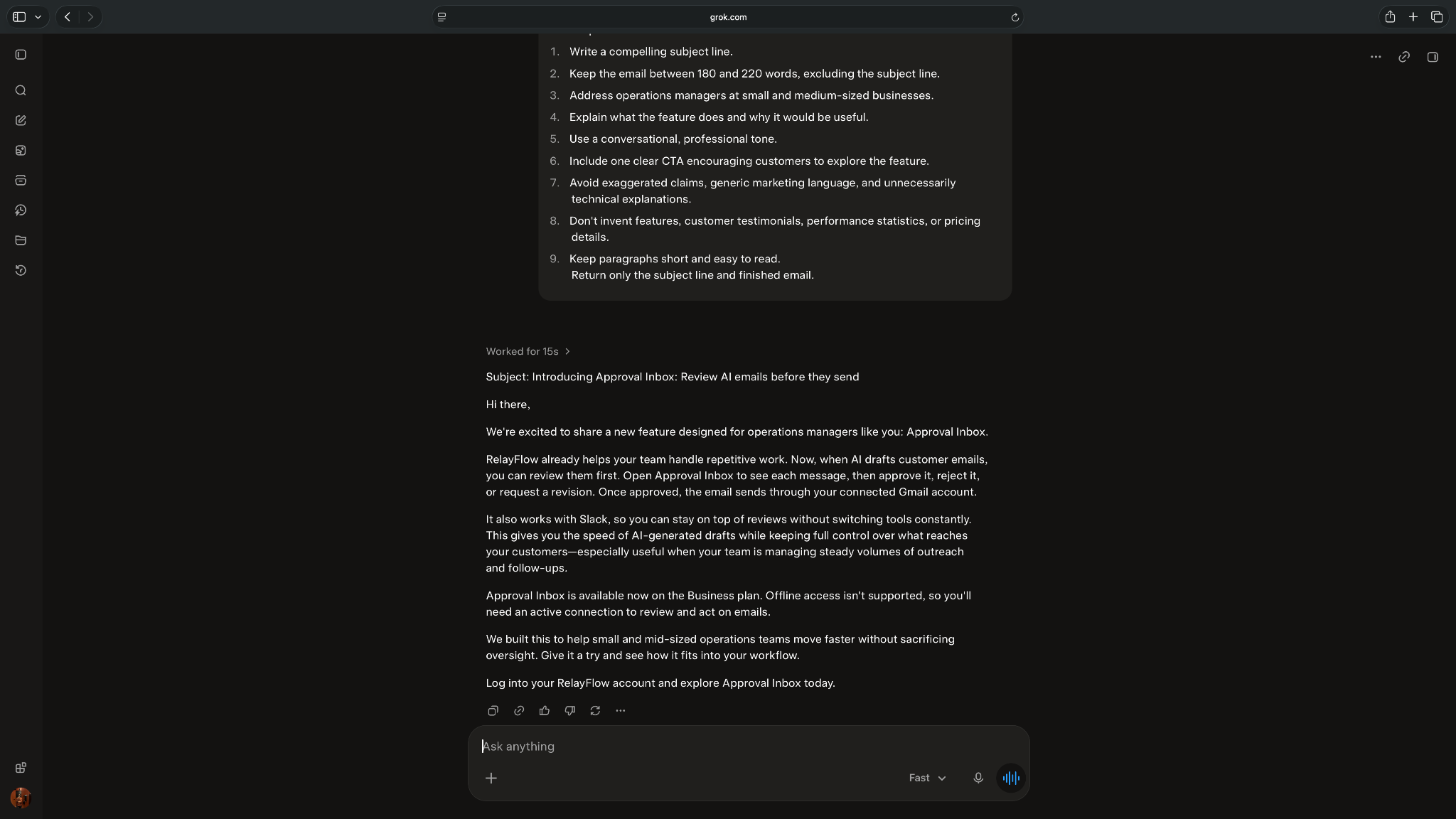
However, its email contained approximately 171 words, falling short of my 180-word minimum. The writing was more generic, and it suggested users could manage reviews through Slack without frequently switching tools, although the brief didn't confirm that functionality.
Winner: Claude
Claude won this writing test with 75/100 versus Grok's 65/100. Its email followed more of my instructions, explained the product's benefits better, and needed fewer edits.
Grok added fewer made-up details, which is why it scored higher on factual accuracy. I'd still review either draft before sending it to customers.
Claude vs Grok for coding tasks
Claude scored 97/100 in my Python debugging test, compared to Grok's 87/100. Both identified the main bugs, but Claude handled more edge cases and provided better test coverage.
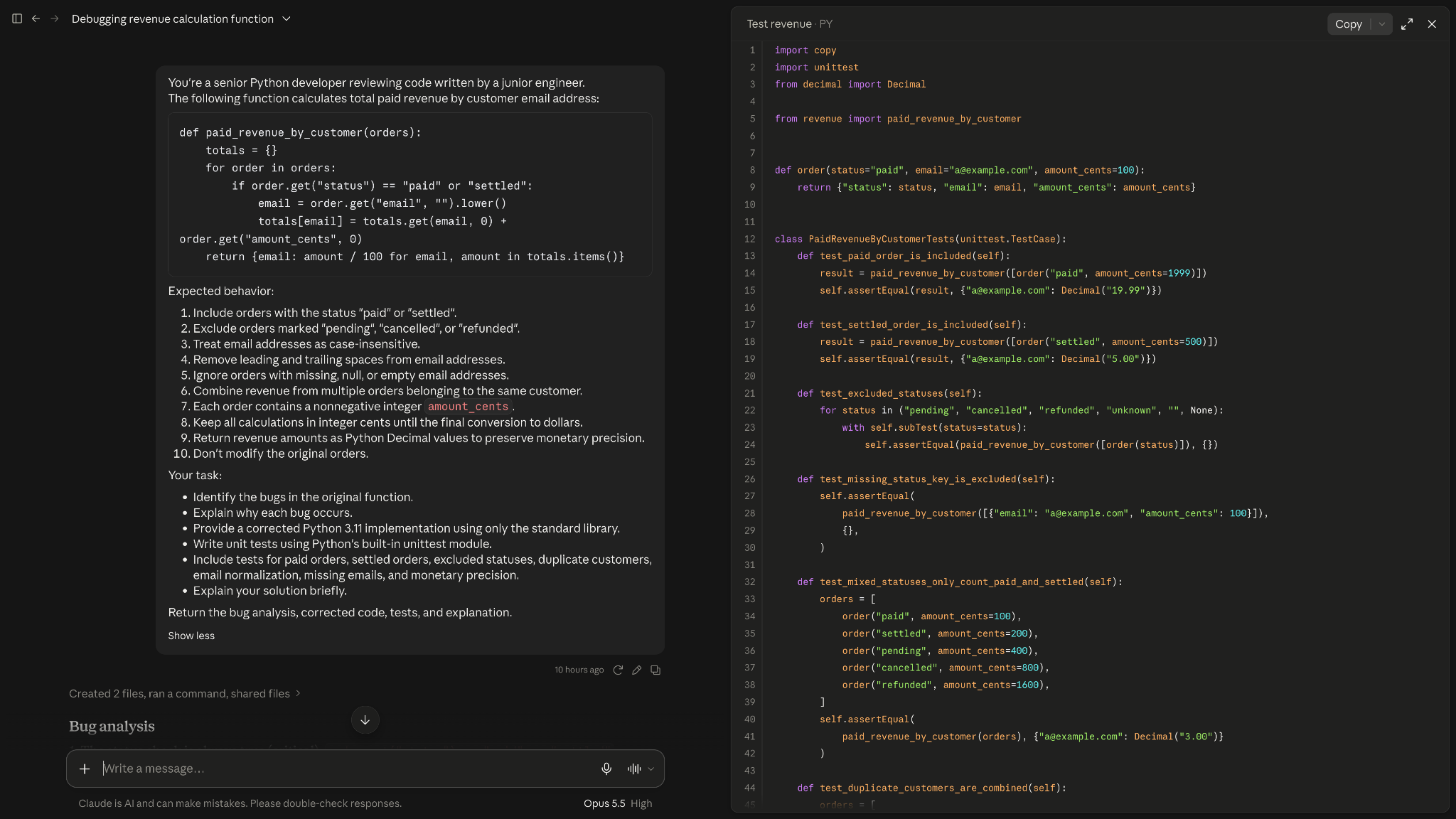
I gave both Claude and Grok a Python function that calculates paid revenue by customer email address. The code had several issues, including incorrect payment-status filtering, incomplete email normalization, and problems handling missing customer information.
I asked both to fix the bugs, write unit tests, and briefly explain their changes. Here's how they scored:
Both assistants performed well on the core requirements. The differences became clearer when I examined their error handling, monetary calculations, and testing.
How Claude performed
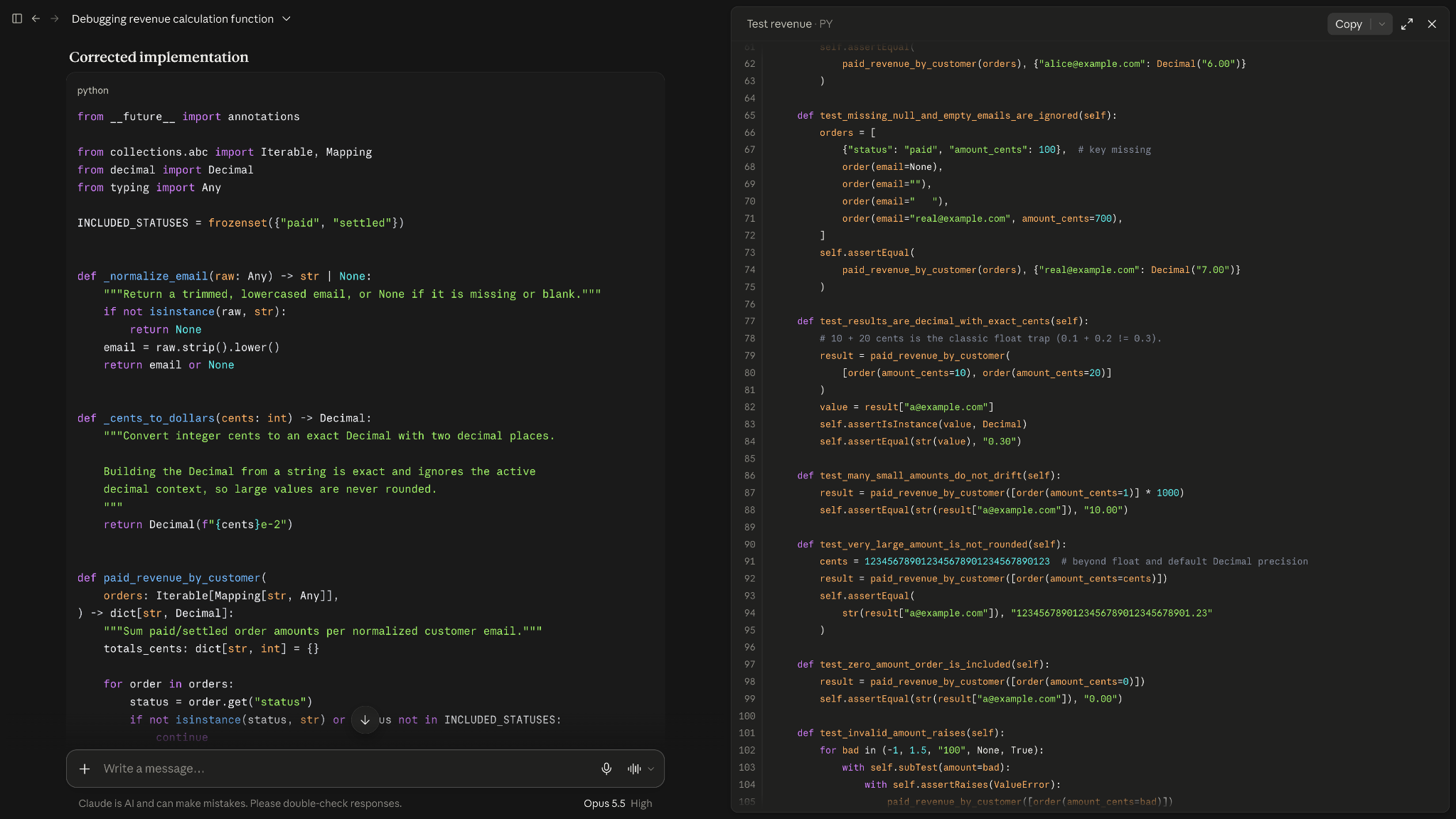
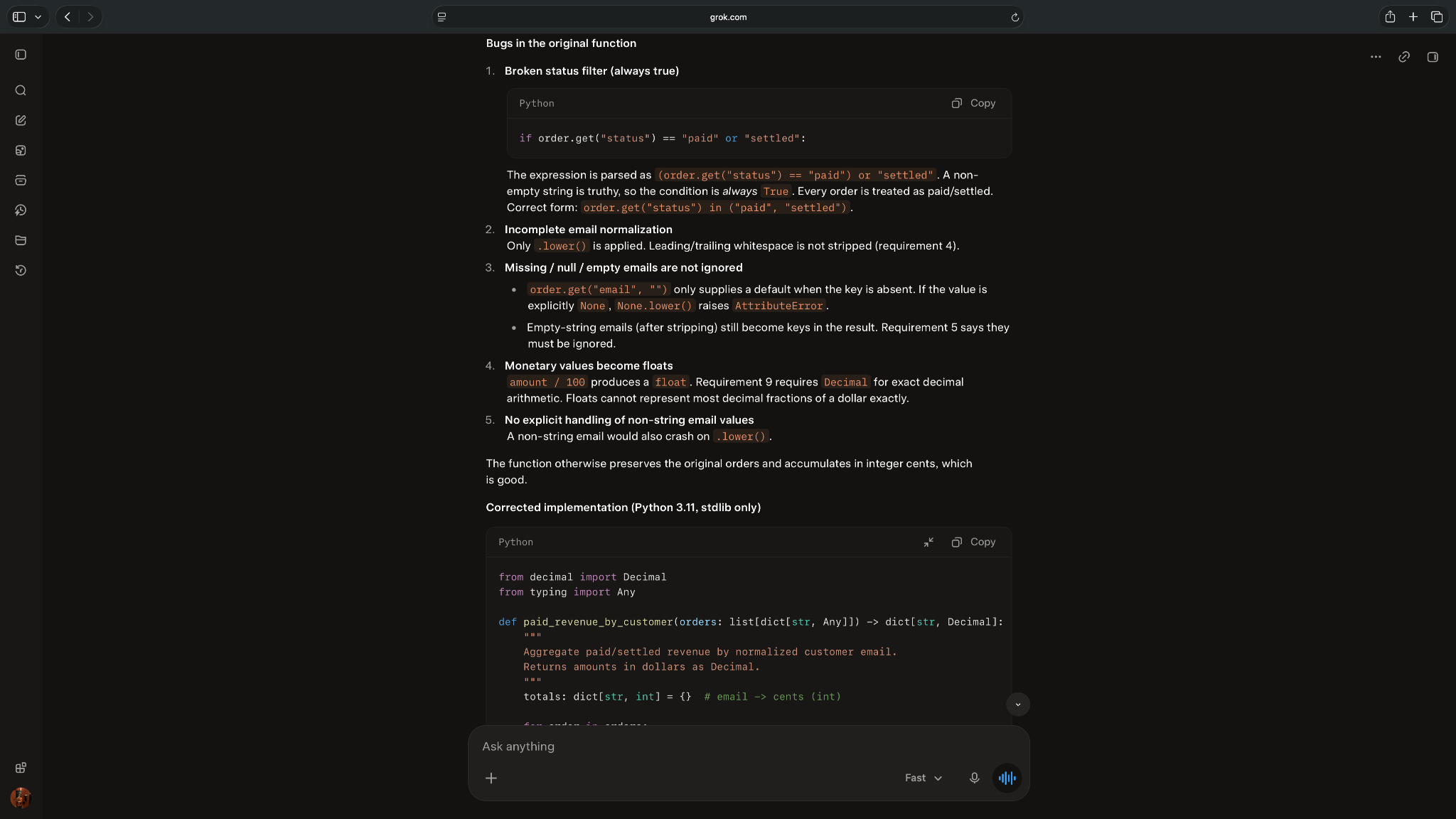
Claude fixed every main bug and handled more unusual cases than Grok. It identified six problems, including a faulty payment-status condition that counted unpaid orders as revenue.
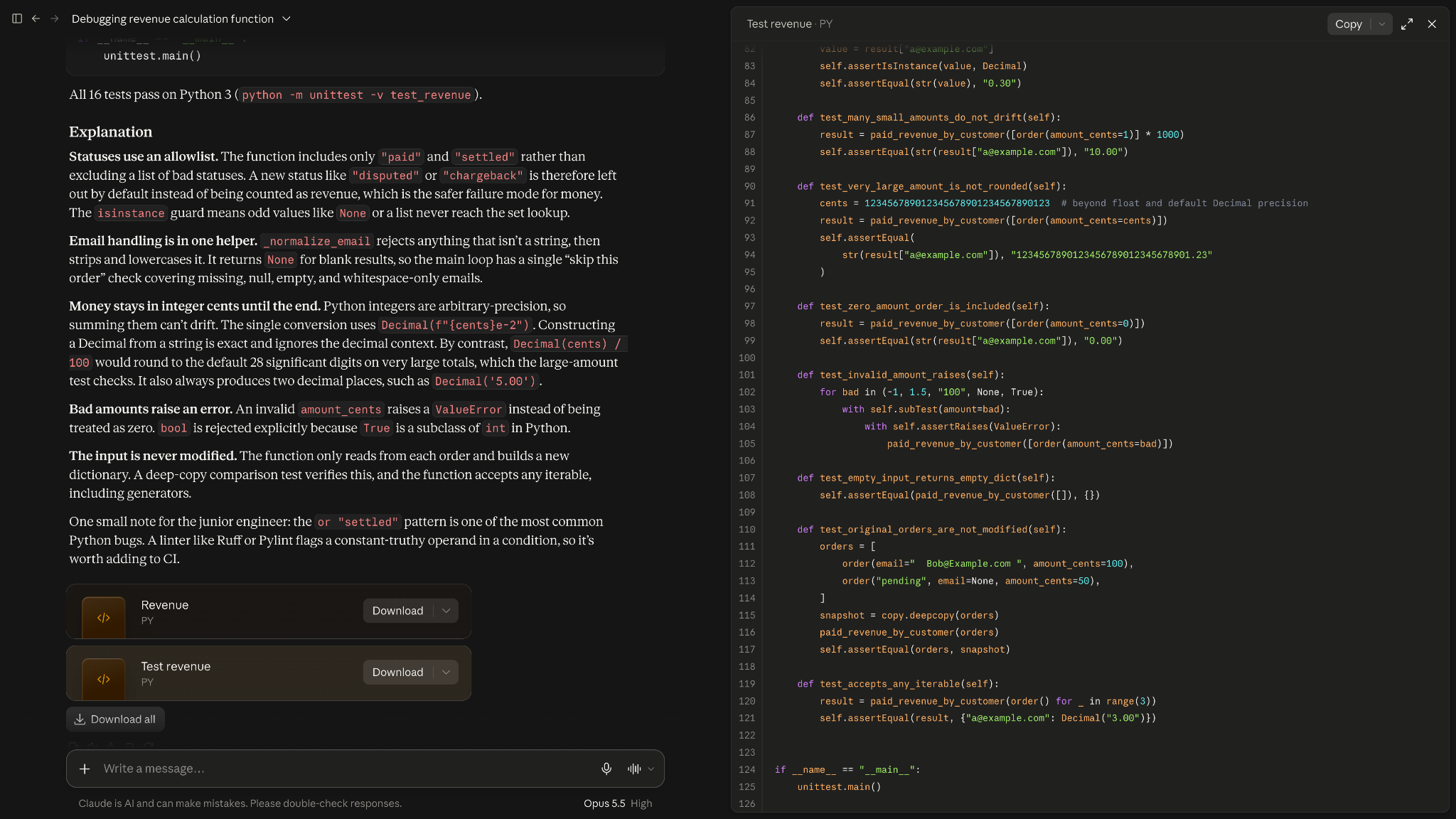
It fixed the issues and provided 16 unit tests, covering the required scenarios and additional cases involving unusually large amounts and invalid inputs.
I also liked how Claude handled money. Its totals stayed exact even for very large amounts, while Grok’s could round them slightly.
I ran all 16 tests, and they passed. The tradeoff was length. Claude added extra steps you won’t need if your data is already clean, and its explanation ran longer than I asked for.
How Grok performed
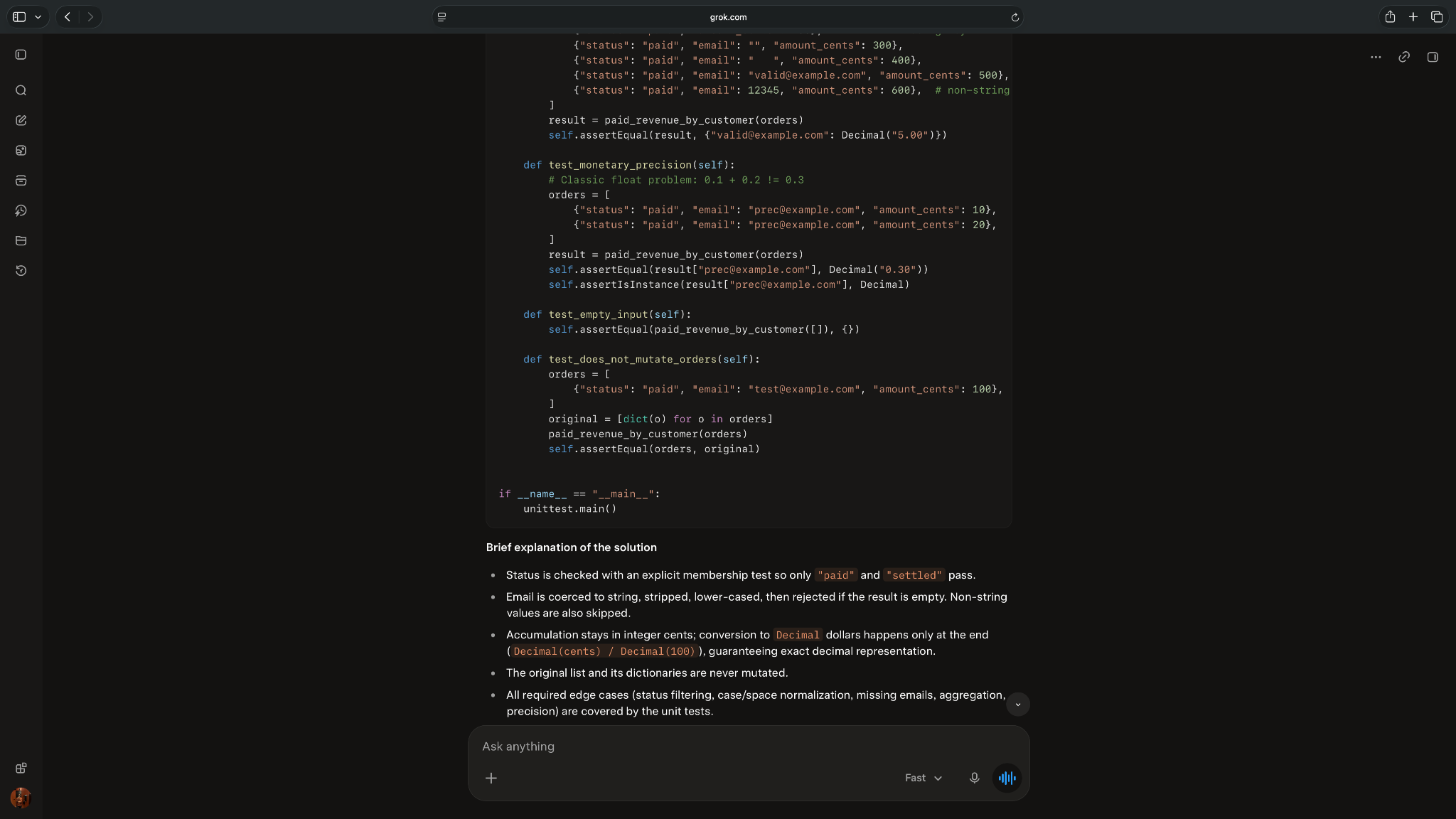
Grok identified the main bugs and offered a simpler implementation. It kept most of the logic inside one function and explained its changes in five concise points.
Its nine unit tests covered the required scenarios, but it didn't show evidence of executing them or check unusually large monetary values.
The biggest limitation was its monetary conversion. Dividing Decimal values by 100 works for ordinary amounts but can round unusually large results. Since my prompt didn't specify an upper limit, this affected its correctness score.
Winner: Claude
Claude won this debugging test with 97/100 versus Grok's 87/100. Its solution handled more edge cases and included broader tests, and all 16 passed when I ran them. Grok offered shorter code and clearer explanations, which may suit simpler tasks with validated inputs.
Real-time research across the web and X: Claude vs Grok
Claude scored 88/100 in my research test, compared to Grok's 70/100. It provided more balanced findings and explained its research limitations better. However, Grok found X posts across more of the requested period.
Grok can search public X posts directly, while Claude can find posts through web search results. In my test, Claude couldn't open the original X posts and relied on search snippets instead.
I asked both assistants to research Anthropic's Claude Haiku 5.5 launch on October 7, 2026, verify three product details, and find up to five X posts published between October 7 and 14. I also asked them to distinguish confirmed information from opinions and acknowledge anything they couldn't verify.
Here's how they scored:
How Claude performed
Claude correctly identified the launch date, pricing, and model specifications, including the higher API rates for longer prompts. I checked these details against Anthropic's documentation.
It also presented a more balanced picture of public reactions. Alongside positive posts about speed and coding, Claude found criticism of the higher pricing for longer prompts.
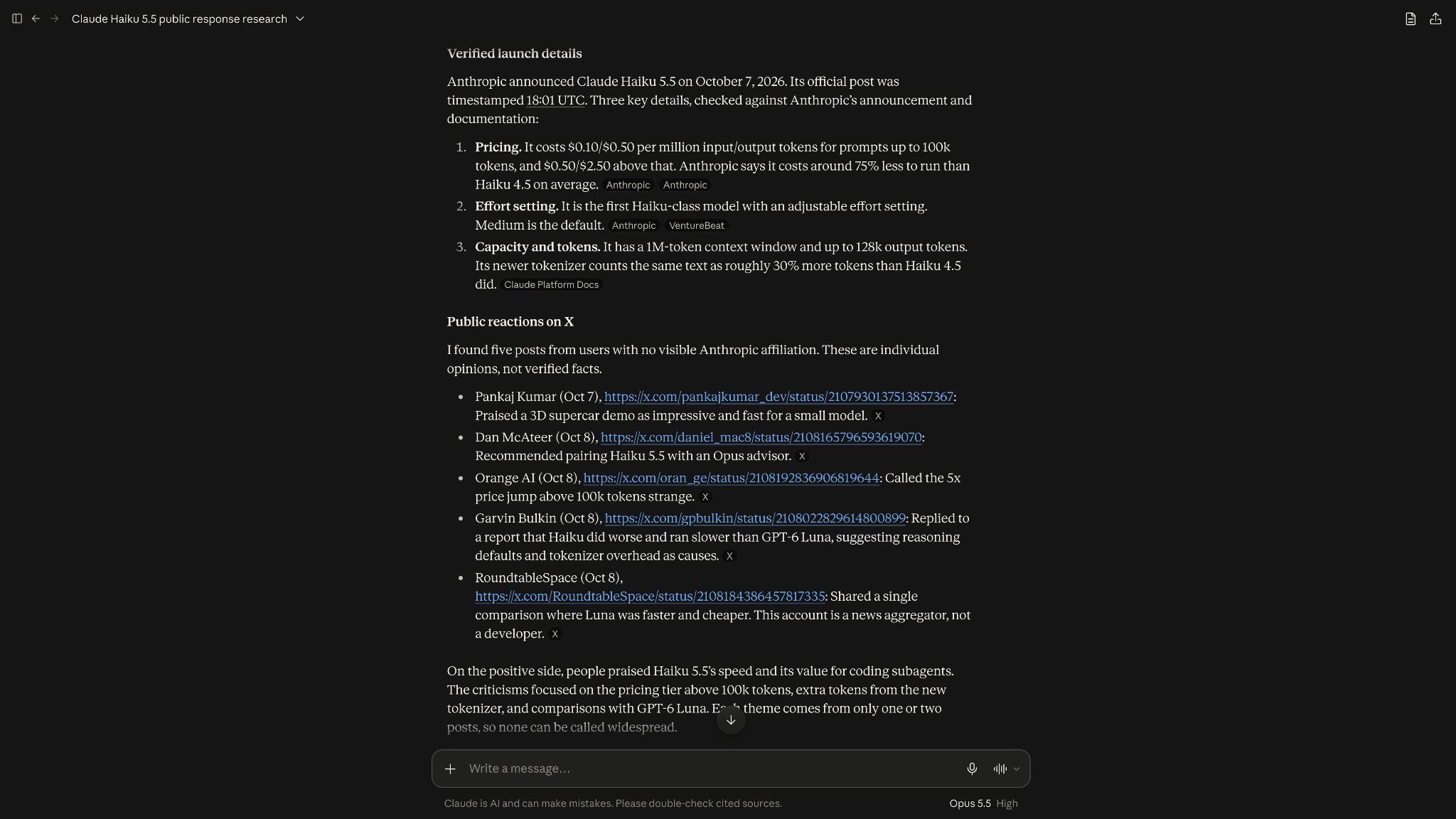
I particularly liked its transparency. Claude admitted it couldn't open X posts directly and had relied on search snippets. It also explained that it couldn't independently verify the posters' affiliations.
However, all five posts Claude selected came from October 7 and 8, leaving out discussions from later in my requested period.
How Grok performed
Grok correctly reported the main launch details and found five X posts published on October 7, 8, 11, and 14. Its broader date coverage helped me understand how developers discussed the release over the following week.
It also kept its response concise and highlighted practical applications, such as using Haiku for smaller coding and search tasks.
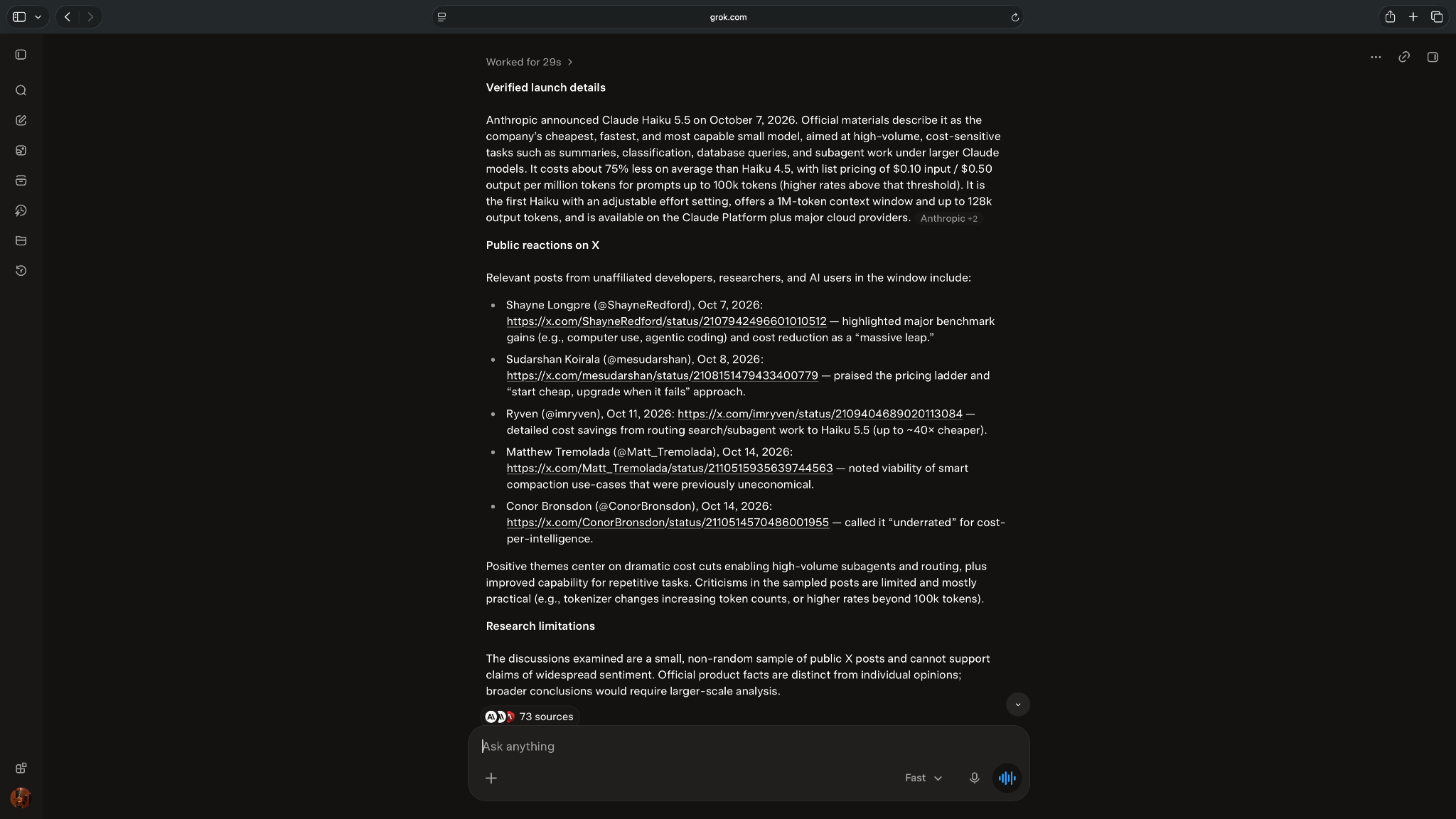
However, its selected posts were almost entirely positive, despite my request to include criticism. Grok mentioned pricing concerns but didn't connect them to any of its five cited posts.
It also didn't explain how it verified the posts or the authors' affiliations. One post claimed you could save up to 40 times on AI tasks. That compares the model’s per-use price, not what a whole job costs, so your real savings could look very different.
Winner: Claude
Claude won this research test with 88/100 versus Grok's 70/100. Its findings were better sourced, included more balanced perspectives, and made the research limitations easier to understand.
Grok did better at finding X posts across the requested dates. I'd consider it for discovering recent discussions, but Claude gave me a more useful research summary in this test.
Document analysis on Claude and Grok
Claude scored 97/100 in my document-analysis test, compared to Grok's 88/100. Both extracted the correct financial figures, but Claude provided stronger supporting evidence. Grok completed the task roughly four times faster.
I uploaded Microsoft's 88-page 2025 annual report and asked both assistants to analyze its revenue, net income, business segments, and AI infrastructure costs. I also asked whether Microsoft provided an explicit revenue forecast for FY2026 and requested a 120–150-word executive summary.
Both had to use only the attached PDF and cite the relevant pages. Here's what Claude and Grok scored on document analysis:
How Claude performed
Claude correctly reported Microsoft's FY2025 revenue of $281.7 billion, net income of $101.8 billion, and Intelligent Cloud's 21% revenue growth.
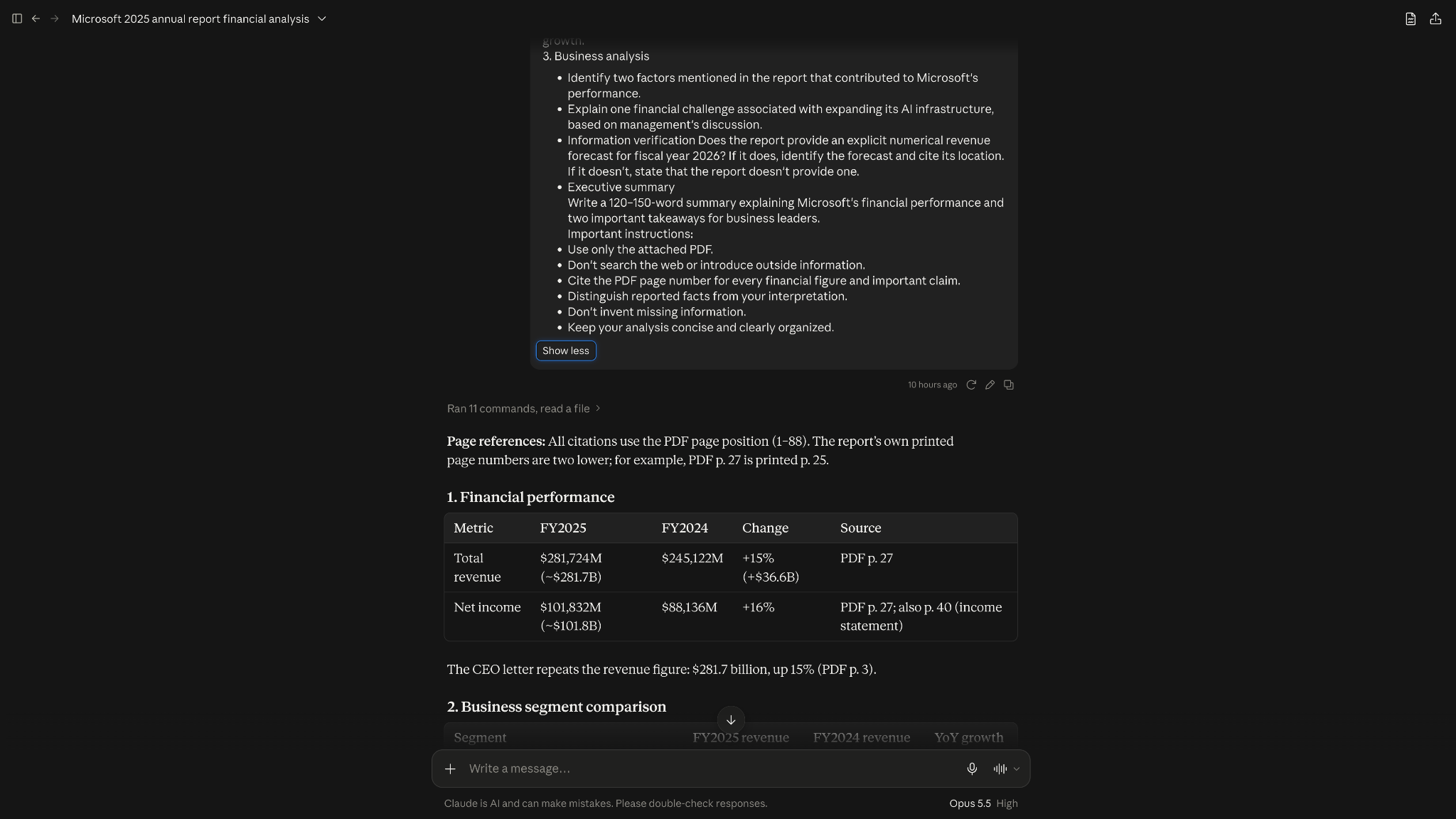
Its financial analysis was more detailed. Claude went a step further and explained what the numbers meant for Microsoft’s profits, with a page reference for each point. It also highlighted Microsoft's growing infrastructure investment, citing the relevant figures from the report.
I particularly liked how Claude handled my question about Microsoft's FY2026 revenue forecast. The report didn't contain an explicit numerical forecast, and Claude didn't invent one. Instead, it identified related revenue disclosures and explained why they weren't company-wide forecasts.
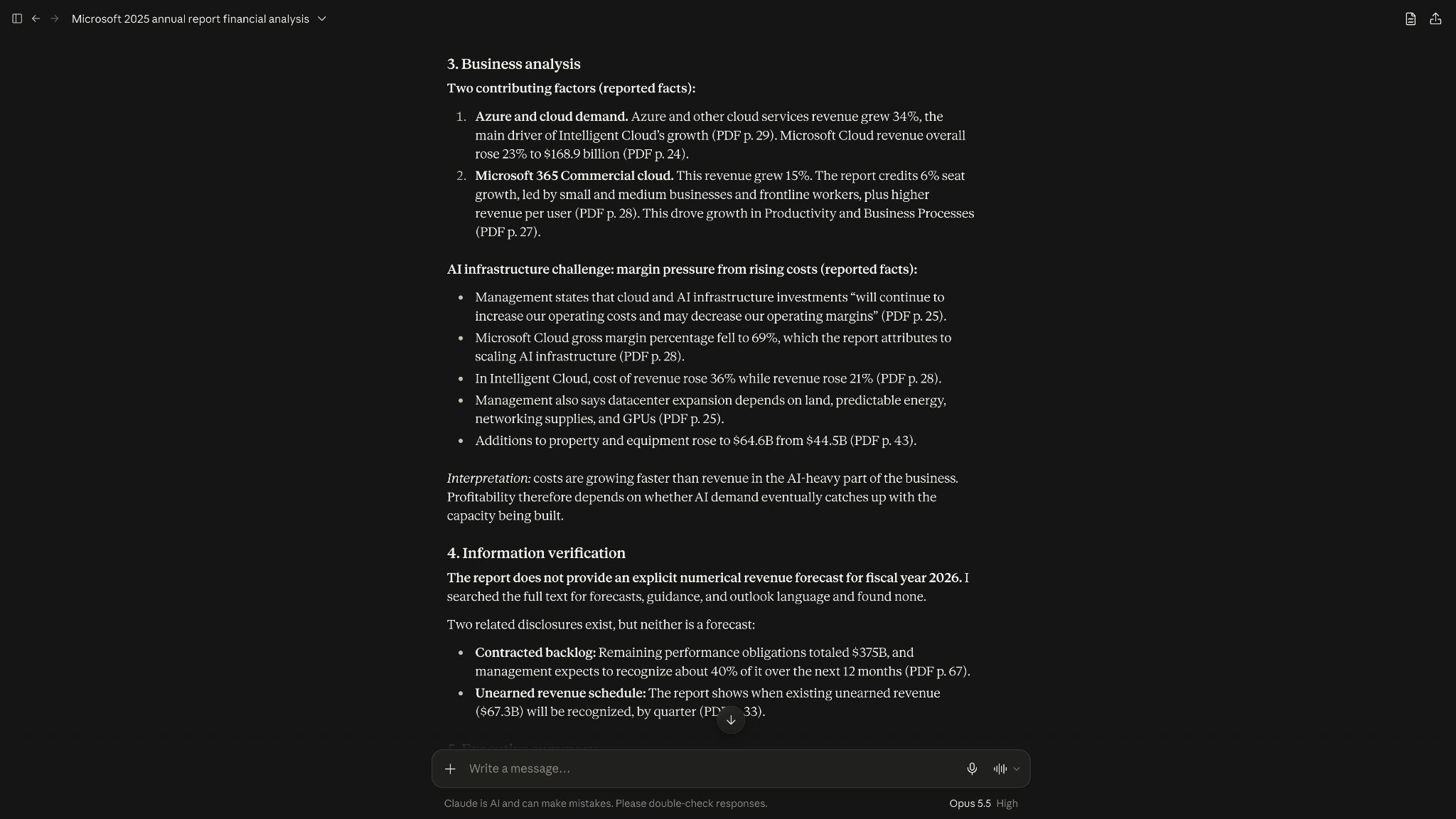
However, its analysis was longer than necessary, especially when explaining infrastructure costs. You may need to trim it if you use these outputs professionally.
How Grok performed
Grok extracted the same key financial figures and correctly identified Intelligent Cloud as Microsoft's fastest-growing business segment.
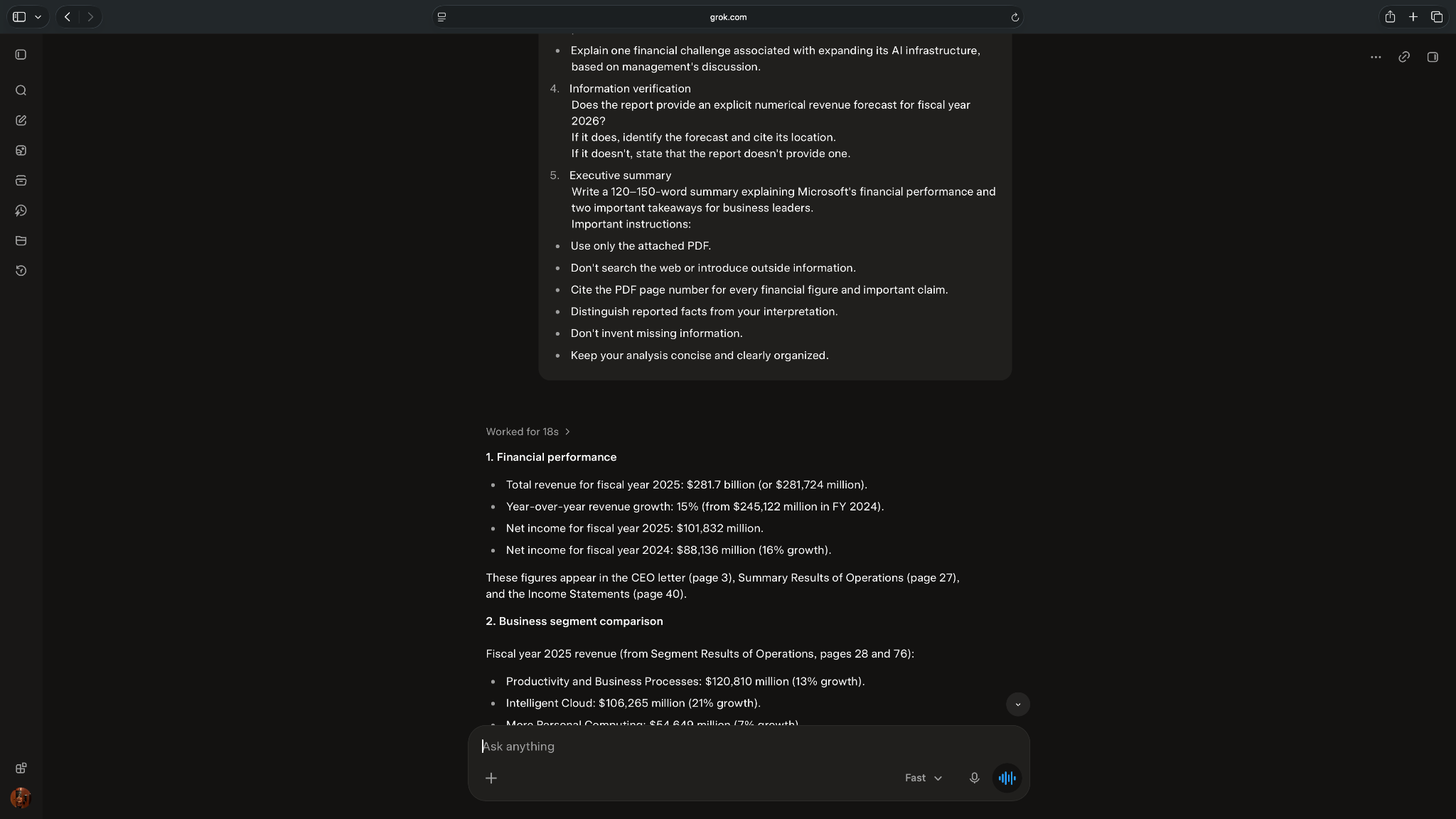
It also recognized that the report didn't provide an explicit FY2026 revenue forecast.
Grok finished in 19 seconds, compared to Claude's 80 seconds. Its financial summary was concise and covered the main findings.
However, Grok provided less evidence for its analysis of infrastructure costs. Its citations also grouped multiple page numbers together, making individual claims harder to verify.
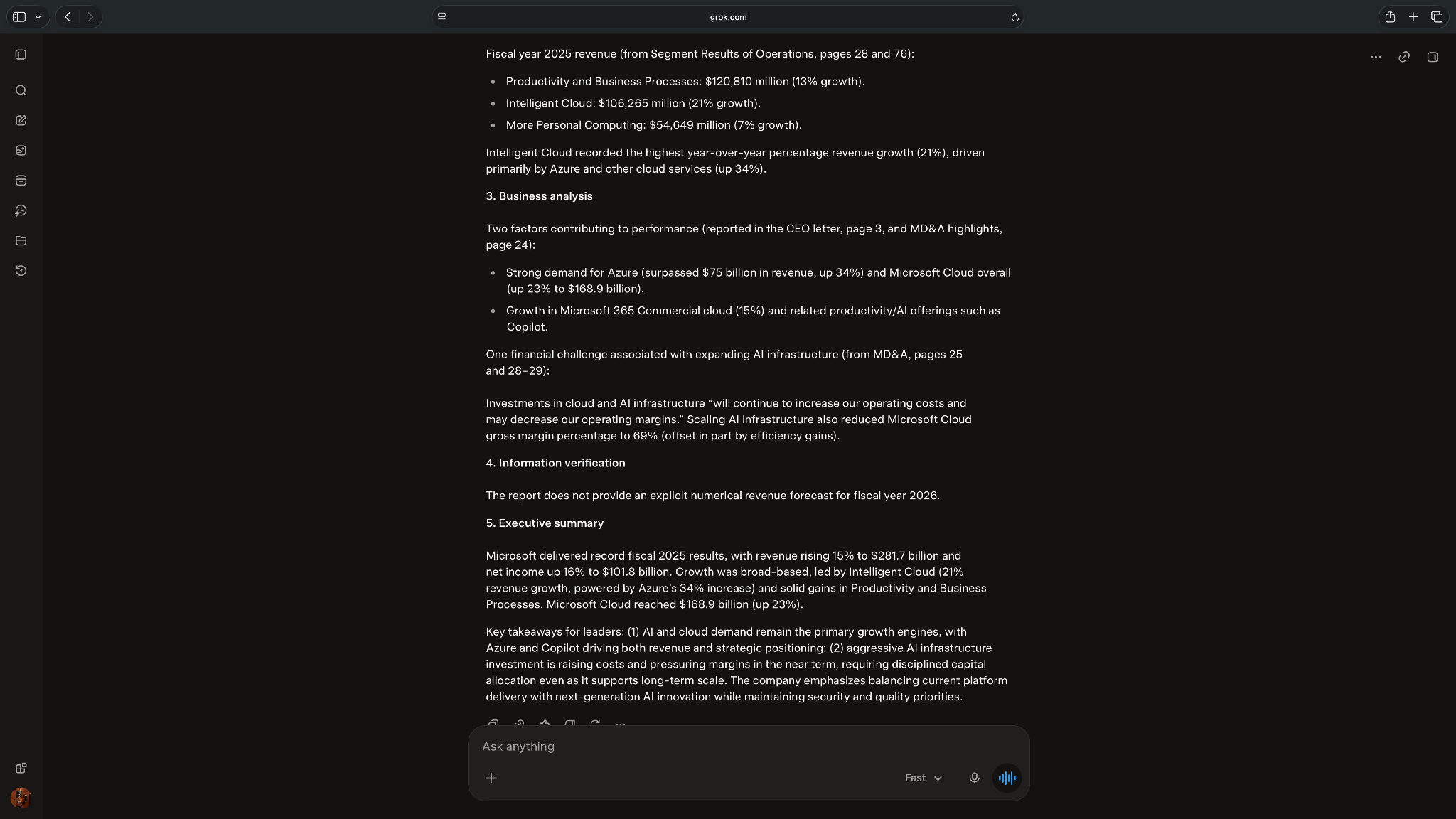
Both executive summaries scored 4/5, although Grok's claim about Copilot contributing to revenue growth needed better supporting evidence.
Winner: Claude
Claude won this document-analysis test with 97/100 versus Grok's 88/100. Its stronger citations and supporting financial evidence made it my preferred choice for detailed analysis.
Grok was much faster and extracted the requested figures accurately. I'd still consider it for quick financial summaries that don't require the same level of detail.
{{templates}}
Image and video capabilities of Claude and Grok
Grok offers more options for generating images and videos, while Claude focuses on editable designs, charts, and animations. I compared their documented capabilities rather than running a separate image-generation test.
Here's how they compare:
Where Claude excels
Claude can analyze uploaded images and create charts, diagrams, and editable visuals using HTML and SVG.
Claude Design lets users create presentations, mockups, and other visual materials. It can also work with existing design systems, which is useful for business presentations and product designs.
Anthropic also introduced Claude Motion, which creates animations from prompts and exports them as MP4 files.
However, Claude Motion uses code to generate animations, rather than creating AI footage. It's currently available in beta on Team and Enterprise plans.
Claude wouldn't be my first choice for generating AI photographs or cinematic videos.
Where Grok excels
Grok Imagine supports image generation, editing, and AI video creation. Its API can generate images at 1K and 2K resolutions and edit them using up to five reference images.
Grok also supports text-to-video and image-to-video generation. Its newer video models support resolutions up to 1080p and can generate audio, including lip-synced speech.
These specifications refer to the Imagine API. Features and usage limits in the consumer app may differ.
Winner: Grok
Grok is the better choice for AI-generated images and videos. It supports more types of media creation, including generating images, editing existing visuals, and creating videos from prompts.
Claude makes more sense for editable charts, business presentations, and code-based animations.
Claude vs Grok: Which is easier to use every day?
I'd choose Claude for ongoing professional work, particularly when I need to organize files, follow detailed instructions, and work across multiple projects. Grok is worth considering for shorter interactions, X research, and visual content.
Both assistants offer more than basic chat features. Here's how I'd compare their everyday usability:
Using Claude every day
Claude Projects lets you organize conversations, files, and instructions in one place. For example, I could create a project for a client's marketing content, upload their brand guidelines, and use those instructions across writing tasks.
Claude also supports memory, web search, voice conversations, file creation, and connectors for apps like Slack and Google Drive.
However, detailed tasks can take longer. Claude needed 80 seconds to analyze Microsoft's annual report, compared to Grok's 19 seconds.
Using Grok every day
Grok supports Projects, file uploads, voice conversations, and connectors. It also has a files page where users can manage uploaded content.
Its X integration is useful for finding recent posts and discussions, while Grok Imagine adds image and video creation.
SpaceXSI also offers Grok Bot, a separate app that can complete multi-step tasks using a cloud computer. I didn't include it in my chatbot comparison.
Grok's shorter responses worked well for quick tasks, although its financial analysis contained less supporting detail than Claude's. Its B2B email also needed more editing to meet my instructions.
My recommendation
I'd choose Claude for ongoing writing, document analysis, and projects that require detailed instructions.
Grok makes more sense if you frequently search X, generate visual content, or prefer concise responses.
Both offer tools for organizing work, so I'd consider those features alongside the quality of their answers before choosing a subscription.
Context window comparison of Claude and Grok
Claude Opus 5.5 supports a 1-million-token context window, compared to Grok 4.7's 500,000 tokens. However, Grok 4.3 also supports 1 million tokens, so Claude doesn't have a larger context window than every Grok model.
A context window determines how much information a model can process in one request, including the conversation and its response.
Here's how their API models compare:
What this means for users
Claude Opus 5.5 has twice Grok 4.7's advertised context capacity. This can be useful when working with lengthy documents, codebases, or conversations containing large amounts of information.
However, two caveats apply:
- API versus chat limits: Consumer apps may have different context limits from the API models listed above.
- Accuracy: A larger context window doesn't guarantee better analysis. The assistant still needs to find and interpret the correct information.
Large inputs can also cost more.
Grok 4.7 charges higher API rates beyond its 200,000-token pricing threshold. Claude Opus 5.5 and Sonnet 5.5 retain their standard rates across their 1-million-token windows, while Haiku 5.5 charges more for prompts exceeding 100,000 tokens.
My recommendation: Claude Opus 5.5 offers more room for large inputs than Grok 4.7. However, my 88-page Microsoft report wasn't large enough to test these limits, so I'd prioritize analysis quality over context size for ordinary business documents.
Claude vs Grok: How do they compare on safety, tone, and privacy?
Claude gave more detailed explanations in my tests, while Grok tended to keep its answers shorter. Both assistants also have content restrictions and privacy controls, although their policies differ.
I checked Anthropic's and SpaceXSI's official documentation to compare their safety and data-handling policies. Here’s what I discovered:
Response style and content restrictions
Claude's responses were more analytical in my tests. It explained its limitations, provided supporting evidence, and distinguished confirmed information from its own interpretation.
Grok gave shorter answers, which worked well for quick summaries but sometimes left out useful supporting details. SpaceXSI also describes Grok as an assistant designed to respond with wit and humor.
Both assistants restrict harmful uses. Anthropic's Usage Policy prohibits activities such as fraud and unauthorized access to computer systems. SpaceXSI's Acceptable Use Policy also prohibits harmful or abusive activities, deceptive impersonation, and attempts to bypass safeguards.
Privacy and data handling
Both companies let users control whether their conversations are used for model training. However, the available settings depend on the product and account type.
Claude's privacy controls
Anthropic lets Free, Pro, and Max users turn off model training through their privacy settings.
Users can also start Incognito chats, which aren't used to improve Claude.
However, Anthropic may still use flagged conversations for safety-related purposes. For commercial products, including Claude for Work and the API, customer inputs and outputs aren't used for model training by default.
Grok's privacy controls
SpaceXSI lets logged-in users opt out of model training through Settings → Data → Improve the Model.
Grok also offers Private Chat, which excludes conversations from model training. SpaceXSI says these chats are removed from its systems within 30 days, with exceptions for safety, security, and legal requirements.
Users accessing Grok through X have separate data controls. SpaceXSI also states that business and enterprise customer content isn't used to improve its models.
My recommendation
I wouldn't rank either assistant as universally safer or more private based on their published policies.
For business use, I'd compare the training, data retention, and access controls available with each plan. I'd also review company requirements before uploading confidential customer information to either assistant.
Claude vs Grok cost: Pricing, usage limits, and value
Grok is cheaper to start at $8/month for Plus versus $20/month for Claude Pro. However, the difference becomes less straightforward when comparing higher subscription tiers and API pricing.
One important change is Grok's new X Subscription, introduced in October 2026. New customers use these plans, while existing SuperGrok subscribers can keep their previous subscriptions.
Claude pricing
Claude offers Free, Pro, Max, and Ultra plans. Here's how much they cost:
Claude Pro is the cheapest paid Claude subscription, costing $20/month or $200/year when billed annually (approximately $17/month).
The Max and Ultra plans suit people who use Claude frequently and need higher limits. They also include monthly API credits, with $100 for Max and $200 for Ultra.
Grok pricing
Grok's new X Subscription combines Grok, the Cursor coding app, and X benefits in one subscription. Here are the available plans:
Annual billing reduces the cost. For example, Plus costs $80/year, while Premium costs $300/year.
One important limitation is Grok's shared weekly usage pool. Your Grok chats and Cursor coding use the same weekly allowance, with Grok Bot also included on supported tiers. Users can purchase additional credits once they exhaust their allocation.
Existing SuperGrok subscribers can retain their plans without switching to The X Subscription.
API pricing of Claude and Grok
API pricing works differently from consumer subscriptions. You pay based on the model and the number of input and output tokens processed. This only matters if you build with the models. If you use the chat apps, the plans above are what you’ll pay.
Here's how the standard rates compare:
These are the standard rates listed in Claude's API pricing and Grok's API pricing. However, longer prompts can cost more with some models:
- Grok 4.7: At 200,000 prompt tokens or more, rates increase to $4 per million input tokens and $12 per million output tokens.
- Grok 4.3: At the same threshold, rates increase to $2.50 for input and $5 for output.
- Claude Haiku 5.5: For prompts exceeding 100,000 tokens, rates increase to $0.50 for input and $2.50 for output.
Claude Opus 5.5 and Sonnet 5.5 keep their standard token rates across their advertised 1-million-token context windows.
Is Claude cheaper than Grok?
No, Claude is not cheaper than Grok at the entry level. Grok Plus costs $8/month, while Claude Pro costs $20/month. However, Claude Pro is cheaper than Grok Premium at $30/month.
At higher tiers, Claude Max and Grok Super both cost $100/month, but their features and usage allowances differ.
If you build with the models, Grok 4.7 costs less than Claude Opus 5.5, and Claude Haiku 5.5 is the cheapest of all for shorter prompts.
My recommendation: I'd consider Grok Plus if I wanted a cheaper paid subscription. For frequent professional work, I'd compare Claude Pro and Grok Premium based on the features, usage limits, and quality of their outputs.
Claude vs Grok vs ChatGPT: How do they compare?
ChatGPT is another option worth considering alongside Claude and Grok. It supports writing, coding, web research, document analysis, image generation, and data analysis.
Based on my tests, I'd choose Claude for detailed writing, coding, and document analysis. Grok is worth considering if you frequently search X or want built-in image and video generation.
I haven’t tested ChatGPT and Grok against each other, so I wouldn't rank all three based on this comparison. However, I have tested Claude vs ChatGPT, covering nine factors, including writing, coding, research, and everyday usability.
Which one should you choose, Claude or Grok?
After my Claude vs Grok tests, I'd choose Claude for writing, coding, research, and detailed document analysis. It scored higher in all four tasks, particularly when I needed thorough explanations, careful sourcing, and attention to instructions.
Here's how they performed in my hands-on comparisons:
So, is Grok the best AI, as Elon Musk claims? My test results don't support that conclusion for these four tasks. Claude consistently scored higher, although that doesn't make it better for every use case.
Grok has advantages worth considering. It found X posts across more of my requested date range, completed the financial-report test in 19 seconds compared to Claude's 80, and offers native image and video generation.
Choose Claude if you regularly write professional content, debug code, analyze lengthy documents, or need detailed explanations with supporting evidence.
Choose Grok if you often search for recent X posts, create AI images and videos, prefer shorter answers, or want a cheaper paid subscription.
Ultimately, I'd choose based on the tasks I perform most often rather than which assistant claims to be the best.
{{cta}}
Try Lindy to use multiple AI models across your work apps
Claude and Grok helped me write, research, and analyze information. But professional tasks also require you to take action across multiple apps.
That's where I'd consider Lindy. It's an AI teammate that works inside Slack. You can @mention it to prepare a client update, organize meeting follow-ups, or update HubSpot.
Lindy can use models from OpenAI, Anthropic (Claude), and Google (Gemini), so you can choose a model for different tasks. It also handles recurring work and offers approval controls for changes in shared Slack threads.
If your team spends much of its day in Slack, you can try Lindy for free.
Frequently asked questions
Should I use Claude or Grok?
You should use Claude for writing, coding, and document analysis, and Grok if you want to find recent X posts, generate images and video, or get quick responses.
For professionals needing an AI for daily tasks, Claude produces more thorough responses and follows complex instructions more closely. If you're choosing your first paid subscription, I'd compare the available features and usage limits before deciding.
Is anything better than Claude?
Yes, alternatives like Gemini, ChatGPT, and Grok offer advantages over Claude for specific tasks. Grok supports native image and video generation, while ChatGPT offers a combination of writing, coding, research, and multimedia features.
Gemini is ideal for users who constantly work within Google apps. The better choice depends on your requirements.
Is anything better than Grok?
Claude is better than Grok for tasks requiring detailed writing, coding, and document analysis. It follows instructions more closely, provides stronger explanations, and delivers more thorough analysis.
However, Grok offers advantages in X integration. I'd choose based on the tasks I perform most frequently.
Can Claude access real-time information like Grok?
Yes, Claude can access current information through web search. It can search the internet, retrieve recently published information, and provide citations to support its answers.
Grok also supports web research and offers dedicated X search capabilities, including retrieving public posts and discussions. However, access to current information doesn't guarantee accuracy.
What's the cheapest subscription for Claude?
The cheapest paid subscription for Claude is the Pro plan that costs $20/month, billed monthly. If you go for the yearly subscription, the cost drops to $200/year. That’s ~$17/month.