engineering / agents · infra
9 lessons from rebuilding our AI teammate to run faster at half the cost
Lindy is an AI teammate that does real work in Slack, email and text, using the tools your team already has. This fall we rewrote the engine behind it. This is what we took out, what broke, and what you can copy.
tl;dr
- We took out the AI calls that were checking our AI, and we stopped sending the model every tool's full instructions. Today's models rarely need either.
- Our Postgres database turned out to be the only job queue we needed, and lessons 4 to 6 are the problems that came with that.
- Agents wrote nearly all of the code. Strict automatic checks kept it safe, and an agent whose only job is deleting code kept it small.
On this page
- 1. We removed the AI that was checking our AI
- 2. We stopped sending the AI every tool’s instructions
- 3. Our database was the only job queue we needed
- 4. One database restart made every worker drop its work
- 5. One busy customer could block everyone else
- 6. Saving progress was filling up our database
- 7. If we’re not sure an email went out, we ask Gmail
- 8. AI wrote the code, and we built the checks
- 9. AI writes too much code, so we made an AI that deletes it
- The boring stuff still wins
When we started this project in August, the first thing on our planning board was a photo of SpaceX’s Raptor engine.
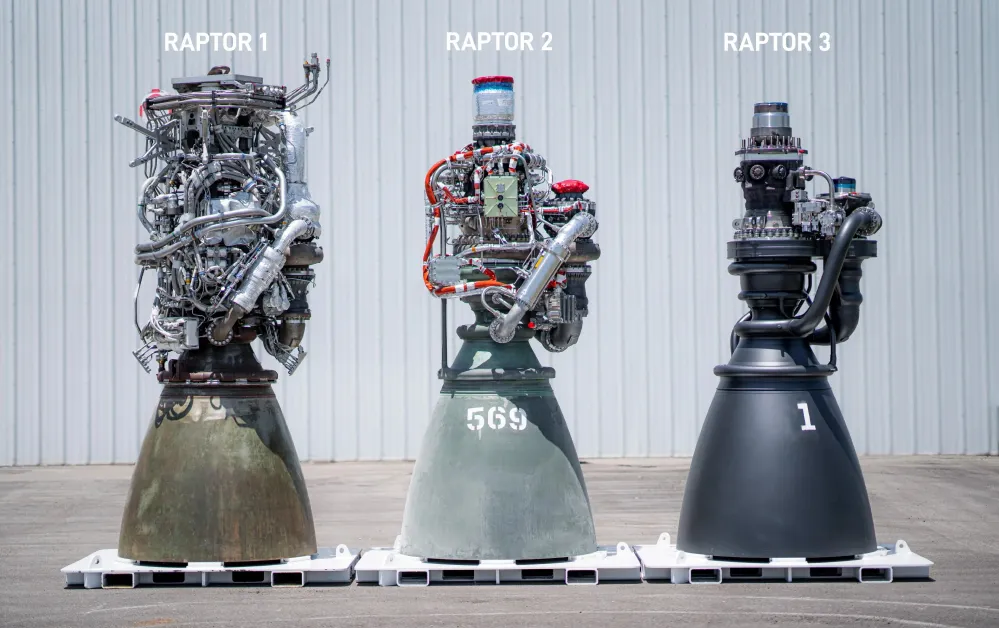
Raptor 1, 2 and 3. Photo: SpaceX.
Each version makes more thrust than the last and carries less on the outside. Raptor 1 is wrapped in pipes, wiring and sensors, and by Raptor 3 most of that is gone. That was our goal too.
You ask Lindy something like “what did Maria say about the launch date on yesterday’s call?” and it goes and finds out, using the apps you’ve connected. The model is only one part of that. The code around it runs the model, uses your apps, saves progress and sends the answer back, and people call that code the harness. We had home-rolled ours over three years, and it looked a lot like Raptor 1. A single message went through a 12,944-line file and 35 add-ons, and nobody could really predict what a message would do.
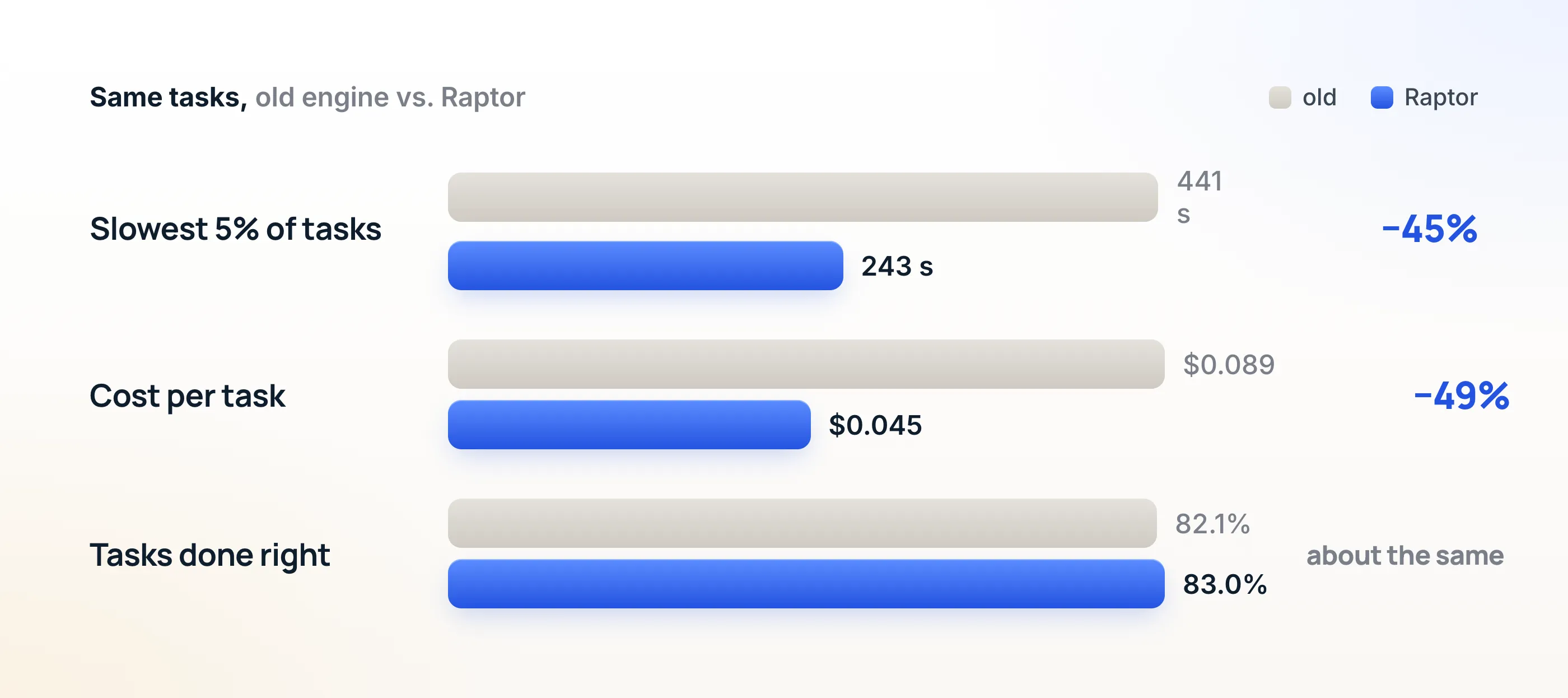
So we rebuilt it, and called the project Raptor. Sign-in, billing and the apps Lindy connects to stayed where they were and plug into the new engine, so it was essentially swapping out the engine of a car while it’s driving. On the same tasks, the new engine gets things right just as often, the slowest tasks finish almost twice as fast, and it costs half as much.
1. We removed the AI that was checking our AI
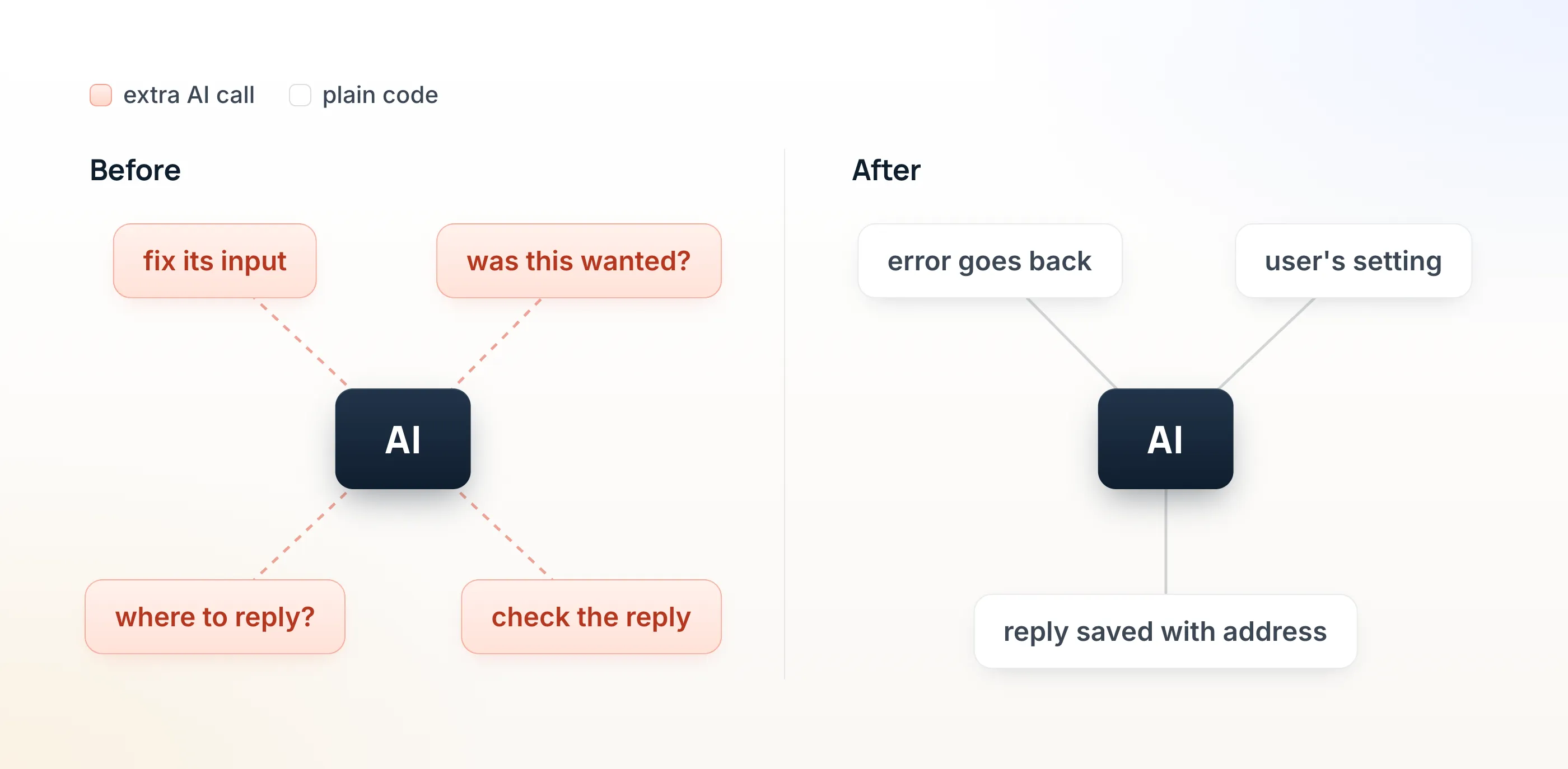
The old system ran extra AI calls around the main one. One fixed mistakes in what the model typed into an action. One asked “did the person really want this?”, which we added after an early version sent our CEO a dozen calendar invites nobody had asked for. Another decided whether the reply went to Slack, text or email.
Each of those made replies slower and more expensive, and newer models rarely make the mistakes they were there to catch. So if the model fills in an action wrong, it gets the error back and fixes it itself, and “ask me before sending” is a setting the user picks.
Try this: list every extra AI call you make per message, and check whether each one still catches anything with today’s model. The ones that don’t can go.
2. We stopped sending the AI every tool’s instructions
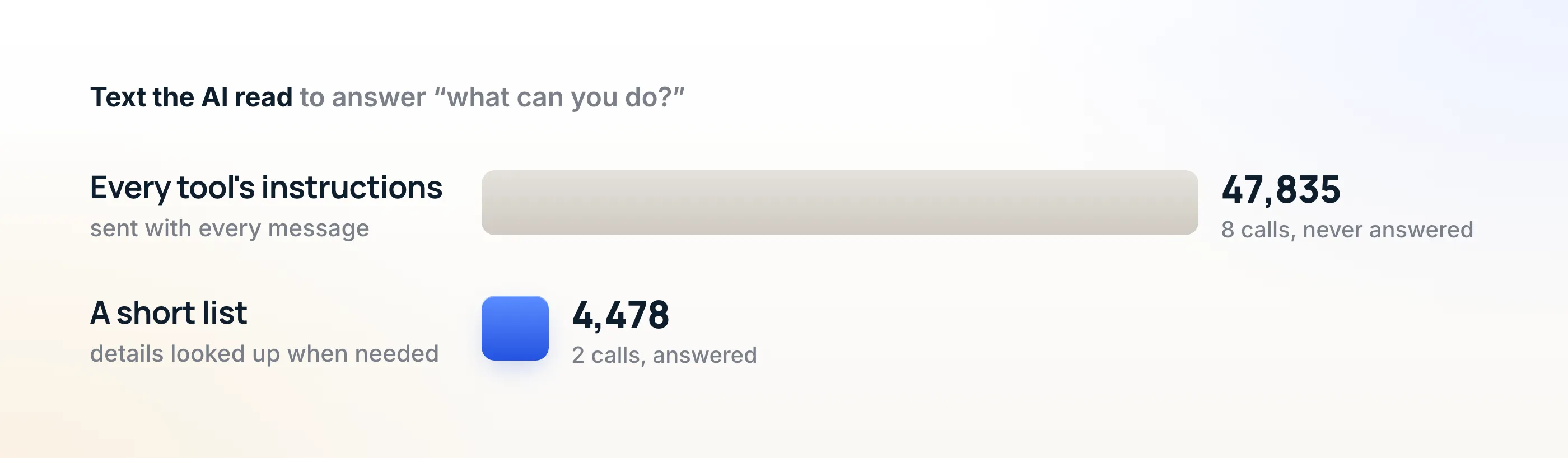
Lindy can use hundreds of apps, and every action comes with instructions telling the model how to use it. We used to send all of them with every message. Asked “what can you do?”, the model read 47,835 tokens, made 8 calls and never answered.
These days it gets a short list, one line per action, and looks up the full instructions only for the ones it needs. Same question: 4,478 tokens, 2 calls, and an answer.
Try this: if your agent has a lot of tools, give it the short list and let it look up the details.
3. Our database was the only job queue we needed
We planned to use Temporal, a popular tool for running long jobs, and took it out after nine days. Each request to Lindy is a short job, and our AI framework, Mastra, already saves progress after every step. All we needed was a to-do list for our workers, and our Postgres database could be that list.
The one trick is saving the message and pinging a worker in the same step. If the save fails, the ping never goes out, so a worker never wakes up for a message that doesn’t exist. A slow backup check catches any ping a worker missed.
The downside is that everything a job tool would have handled is our problem now, and the next three lessons are those problems.
Try this: before adding a job tool, check whether the database you already have can be the to-do list.
4. One database restart made every worker drop its work
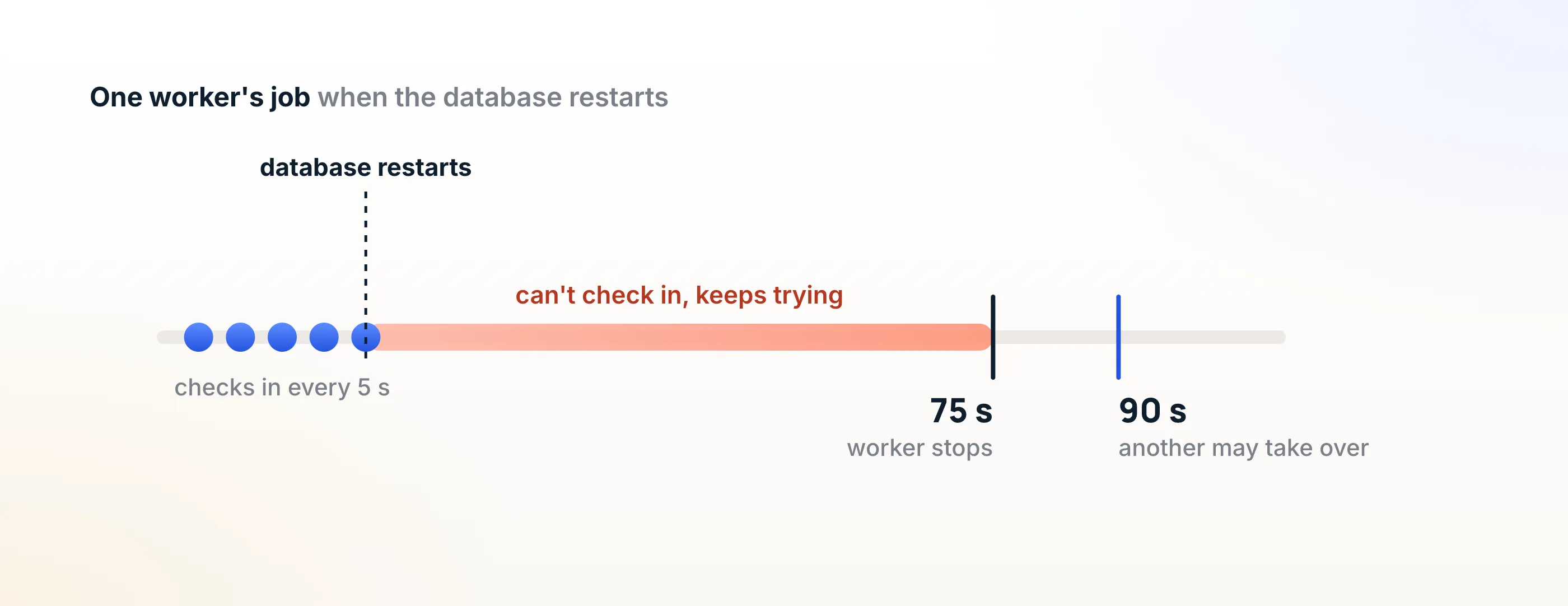
Our workers marked a job as “mine” in a way that only lasted as long as their connection to the database. On October 29 the database restarted twice for planned upgrades, every connection dropped, and every worker dropped every job at the same moment.
A worker now checks in on its job every 5 seconds, a bit like feeding a parking meter. If it can’t check in for 75 seconds it stops, and after 90 seconds another worker may take the job. That gap is what keeps two workers off the same job, and a short database hiccup just pauses the check-ins. The price is that when a worker really does crash, its job waits up to 90 seconds.
Try this: have workers keep checking in on their jobs instead of relying on an open connection, and make a worker give up before anyone else is allowed to take its job.
5. One busy customer could block everyone else
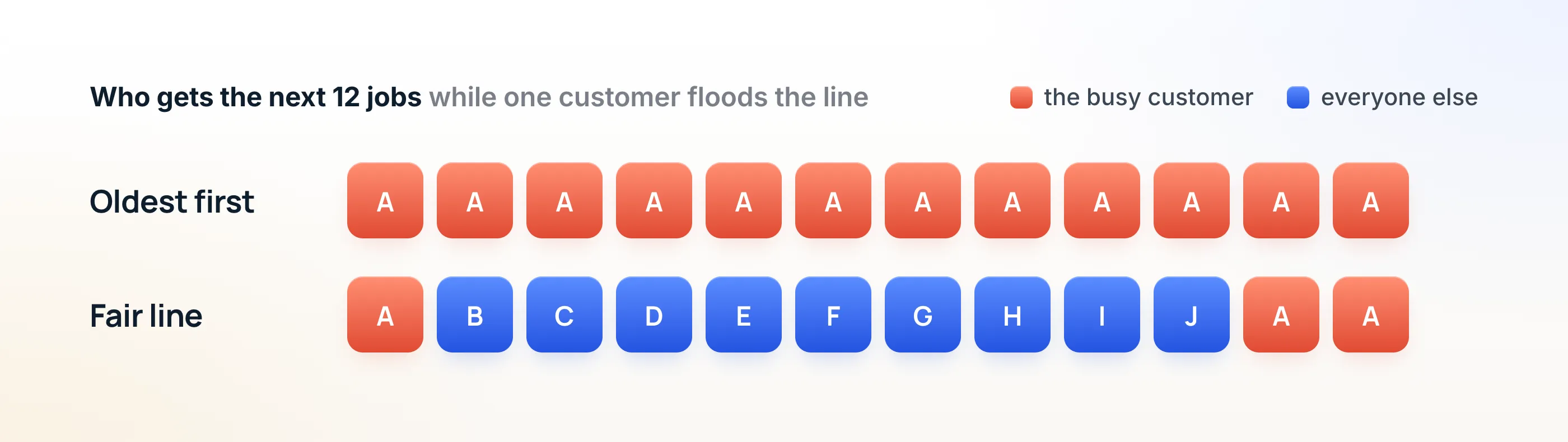
Workers used to take the oldest job first. In a test, one customer sent 3,000 requests at once, and nine other customers got nothing for the next 400 jobs.
Customers who already have work running go to the back of the line now, and each conversation runs one request at a time so replies stay in order. In the same test, all nine got a turn within the next 11 jobs.
More workers didn’t always mean more speed, either. Every worker uses some of the database’s limited connections, so past a point, adding workers just crowds the database.
Try this: test your queue with one customer flooding it, and watch what everyone else gets.
6. Saving progress was filling up our database
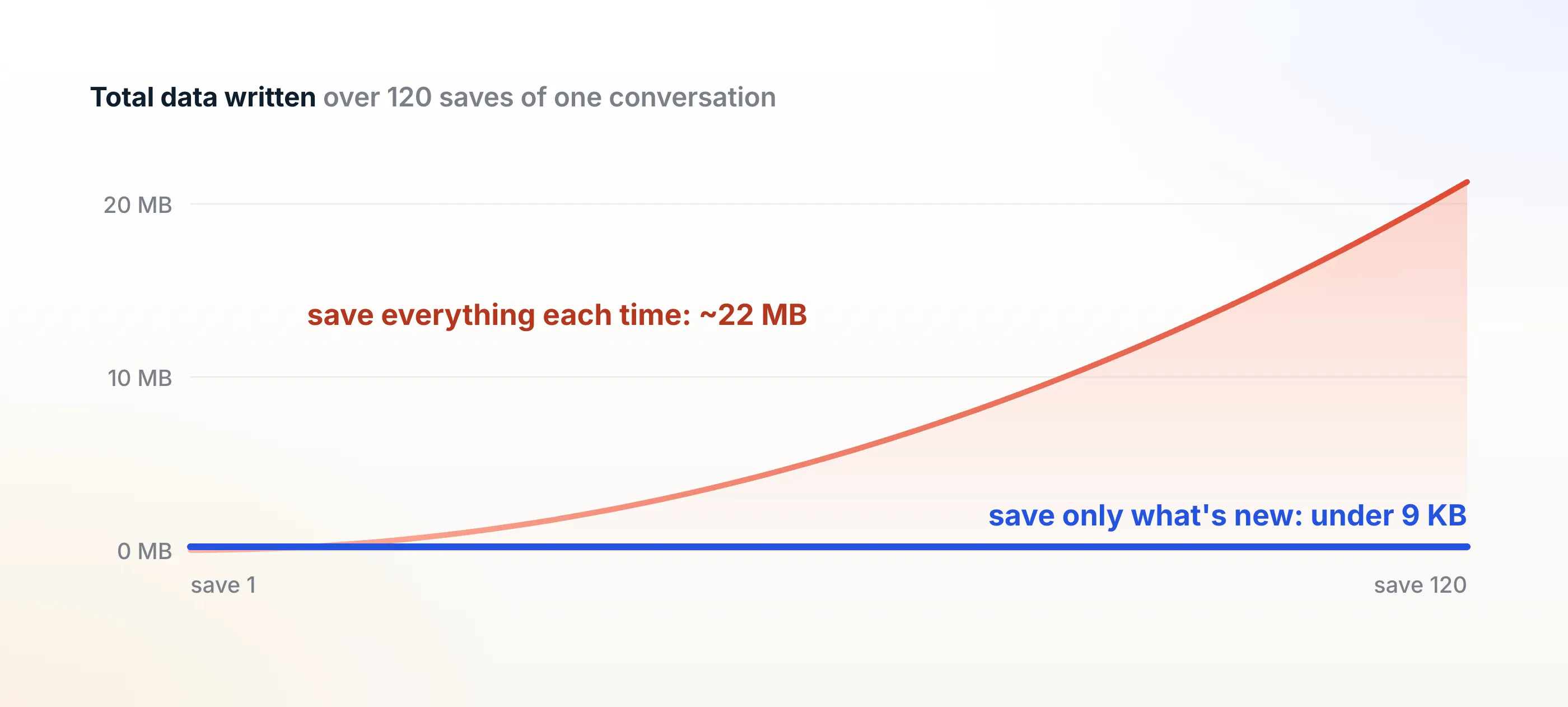
After every step, the agent saved the whole conversation so far, so step 100 saved steps 1 to 99 all over again. Those saves turned out to be 99% of all the new data in our database.
Each piece is saved once now, and a new save only writes what’s new, the way git stores your code. Over 120 saves of one long conversation, that’s under 9 KB written instead of about 22 MB.
Try this: run one long conversation and watch how much each save writes. If it keeps growing, save only the new part.
7. If we’re not sure an email went out, we ask Gmail
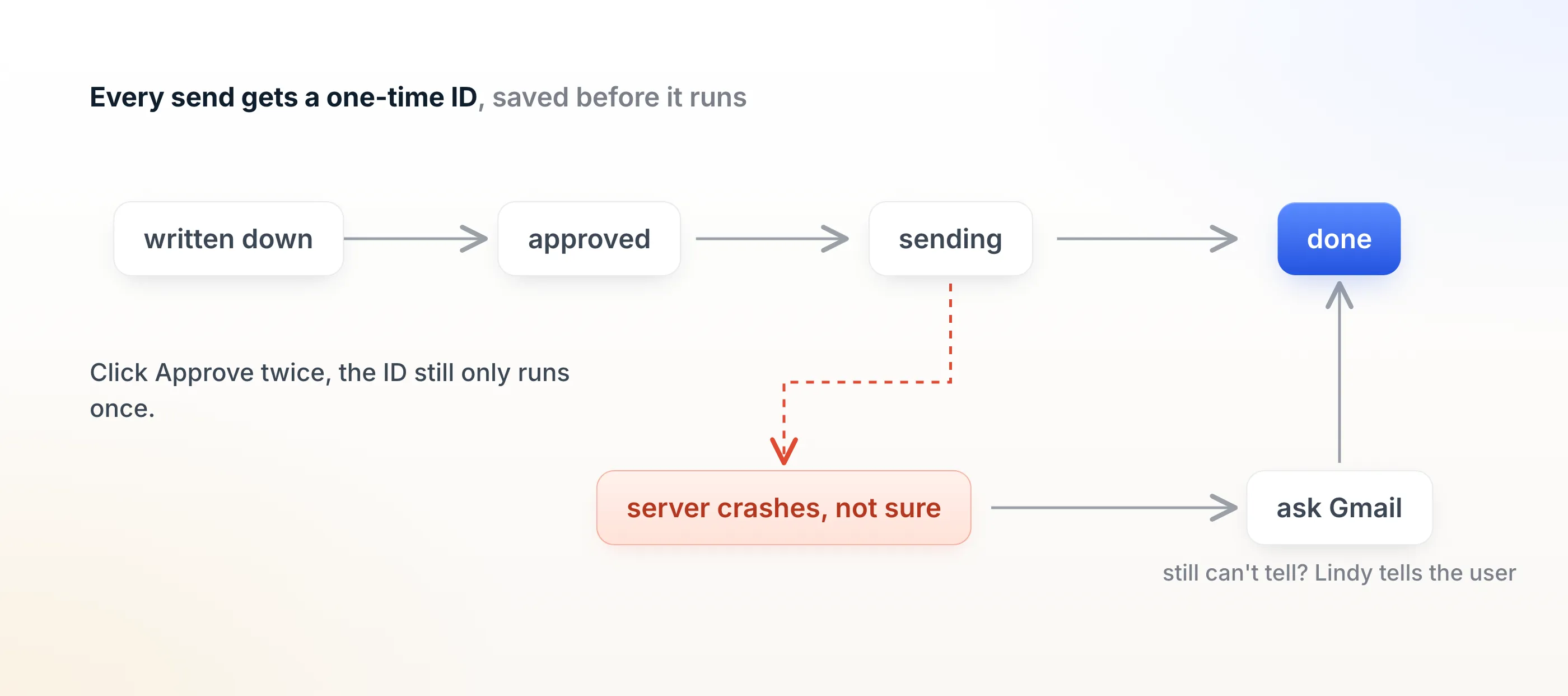
Reading is safe to repeat, and sending isn’t. So before Lindy sends an email or changes a file, it writes down exactly what it’s about to do and gives it a one-time ID. That ID can only run once, so double-clicking Approve can’t send anything twice.
The tricky case is a server crashing in the middle of sending. Resend, and the person might get the email twice. Skip it, and it might be lost. So the next worker asks Gmail first, and if it still can’t tell, Lindy tells the user it stopped and didn’t redo anything. Payment apps have worked this way for years, and most AI agents still don’t.
Try this: give every send, payment or delete a one-time ID that’s saved before it runs, and if you’re not sure it happened, check with the app instead of redoing it.
8. AI wrote the code, and we built the checks
We barely wrote any code ourselves. Coding agents did, and our job was planning the work, splitting it into small tasks, running several agents at once (often overnight), watching what they did and correcting them when they went wrong.
They made about 2,700 pull requests. In a recent sample, the typical one was merged 37 minutes after it was opened, and on the busiest day we merged 128. That’s far too many for people to review, so every change goes through automatic checks, and any one of them can block it. An AI reviewer reads every change, but plain code makes the final call, and that code can only make things stricter. A second reviewer from a different company reads it too (we use Grok and GPT), because models tend to like their own code. Tests have to pass on the exact latest version, and some checks were broken on purpose so an agent couldn’t fake a pass.
The checks caught real bugs, like a chart that would have stayed empty because of a typo in a name, internal debug details showing up for regular users, and a “thinking…” indicator that could get stuck forever. They also cost us. In a sample of 200 recent changes, half needed two or more rounds of review, and one needed 16. Reviewers nitpick on every update, and sometimes two of them asked for opposite things. Checking changes one at a time also misses bugs between them: reviewing 18 related changes together found 3 serious bugs that every single review had missed. And one change passed every check and still broke 20 to 30% of scheduled jobs for nine hours, which is why every new AI check runs in watch-only mode first, logging what it would have blocked without blocking anything.
Try this: spend your time planning and building checks, and let simple rules make the final call. Have a different AI review the code than the one that wrote it, and run any new AI check in watch-only mode first.
9. AI writes too much code, so we made an AI that deletes it
Coding agents add a lot: tests that don’t really test anything, copied code, and old code left behind after they build the new version. So we built the Minimalist, an agent whose only job is deleting code. It runs every 30 minutes on Lindy’s main codebase, looking for code nothing uses and tests that check nothing real.
Before it deletes anything, it proves nothing will change. It writes a test for how things should behave, checks that the test passes today, then breaks the code on purpose to make sure the test notices. After that, reviewers, tests and a person check the change, and it never merges its own work. If deleting something is really a product decision, it asks whoever wrote that code.
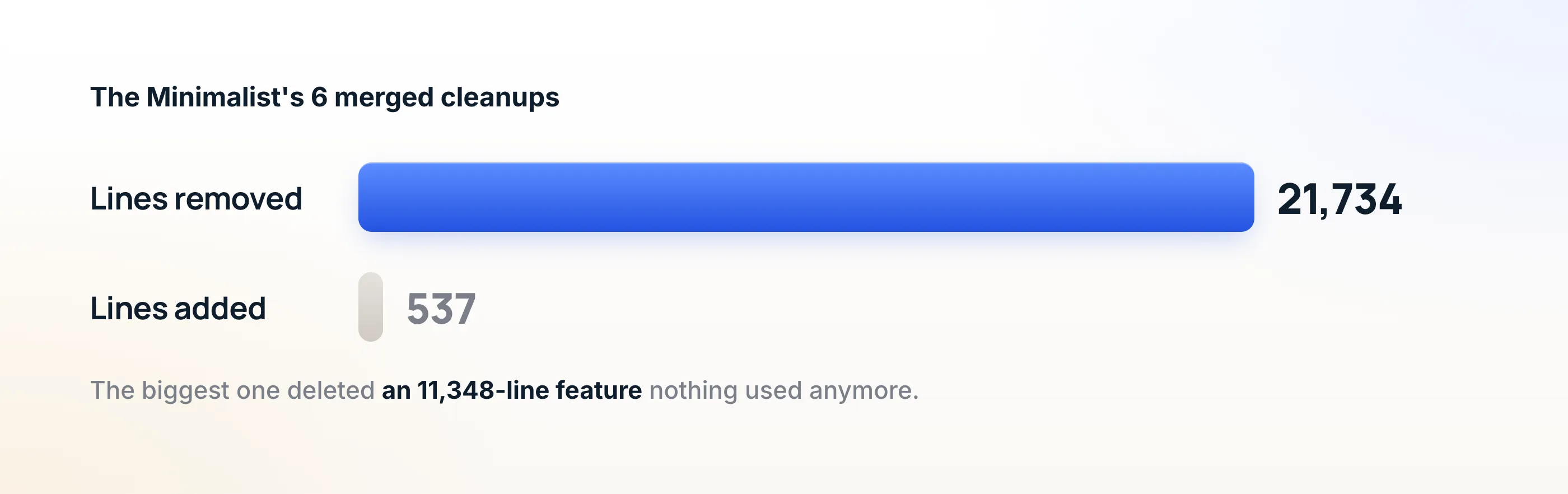
It took some fixing. Our first idea of “unused” was “nothing imports it”, but unused code is usually still imported somewhere, so for three days it found nothing. And when its logins expired, it went quiet without telling anyone. It says so now.
Try this: if AI writes your code, run an AI that only deletes. Make it prove every deletion, and never let it merge on its own.
The boring stuff still wins
Write it down before you act, check in regularly, save only what changed, and give risky actions a one-time ID. None of it is new. Newer models need a lot less babysitting, and what’s left is the boring stuff every reliable system needs.
If you want to try two things this week, remove one AI check and see whether anything gets worse. Then restart your database while your agent is working, and see what breaks.

Bruno enjoys working on cutting edge tech and putting himself out of a job with agents. He also likes SCUBA diving. He lives in Croatia in a family of 4.5.

Yassin is a senior software engineer at Lindy, working on Raptor and on the agents that keep Lindy's code small.
Hire Lindy. Or get hired by Lindy.
Everything in this post runs every time Lindy works for you. If you'd rather build it, we're hiring engineers.
$50 in free credits • Set up in 2 minutes