ChatGPT dots vs Lindy: Which AI Teammate Fits Your Team?


On September 29, OpenAI launched dots, an always-on AI agent inside ChatGPT powered by GPT-6 Astra and equipped with its own cloud computer. If you run a team, you probably had two reactions within a minute: “This sounds useful,” followed by, “Will it work for everyone, or only for me?”
I had the same question, so I gave dots and Lindy, an AI teammate for Slack, the same assignment and source material, using requests from sales, support, and product to see how easily each result moved between those teams.
The short verdict on who should pick ChatGPT dots vs Lindy
Choose based on where the agent's context needs to live. A dot centers on one person's work, while Lindy centers on knowledge and tasks shared across a team.
Here's how I'd split it:
- I'd pick a dot for my own work. It felt most useful when I handed over the objection review, left it running, and came back to a finished report. If ChatGPT is already where you think, write, and build, a dot fits naturally.
- I'd pick Lindy for the team. It felt most useful in Slack, where I asked the question and Lindy answered with sources. Anyone else in the channel could see the answer and pick up the work from the same thread.
- I'd use both for different jobs. A founder, researcher, or engineer could keep a dot for private projects, while the rest of the company uses Lindy for shared meetings, company knowledge, and recurring work.
The pricing follows the same divide. Dots come with eligible ChatGPT plans, with Pro starting at $100/month. Lindy's paid plans start at $29.99/user/month.
ChatGPT dots vs Lindy at a glance
The biggest difference appears when someone else needs to pick up the work. ChatGPT dots carry one person's context across projects, while Lindy keeps the sources, discussion, and next steps available to the team in Slack.
The table below compares access, memory, integrations, pricing, availability, and controls:
What is a ChatGPT dot?
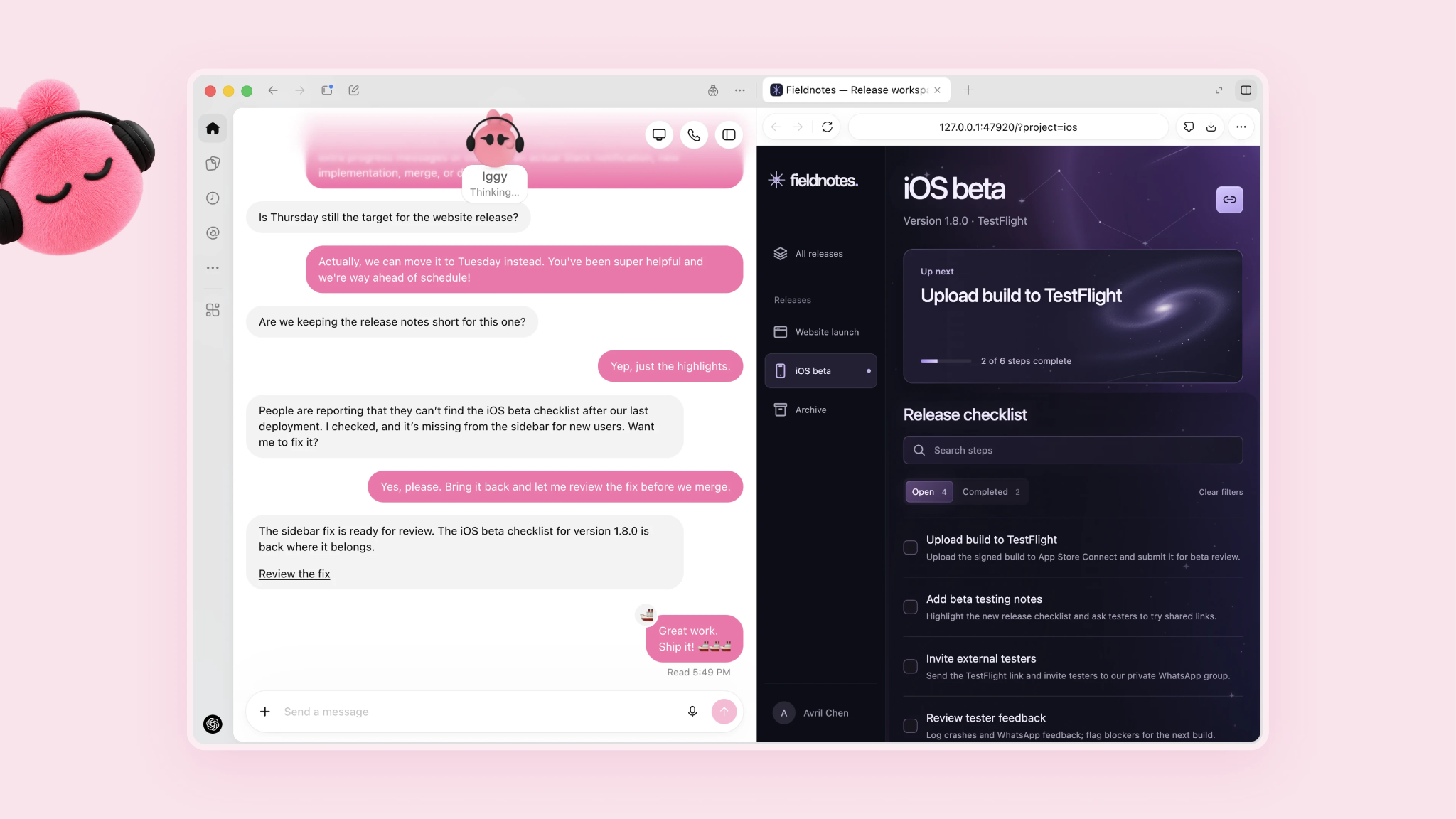
A dot is a ChatGPT agent you hand a job to, and it keeps working on its own cloud computer after you close the window. It uses your connected apps, remembers your preferences, and asks for approval before sensitive actions. Each dot belongs to one person, and your first one comes with ChatGPT Pro or a Business Premium seat.
You'll need the desktop app or a desktop browser to create your first dot. Once it's set up, you can talk to it through ChatGPT, Slack, Microsoft Teams, and the mobile app once mobile access reaches your account.
Rollout is gradual, so access can take several days to appear. Pro users must be 18 or older, and regional limits are in the table above. Enterprise teams have one extra step because an administrator must switch dots on for the workspace.
What is Lindy?
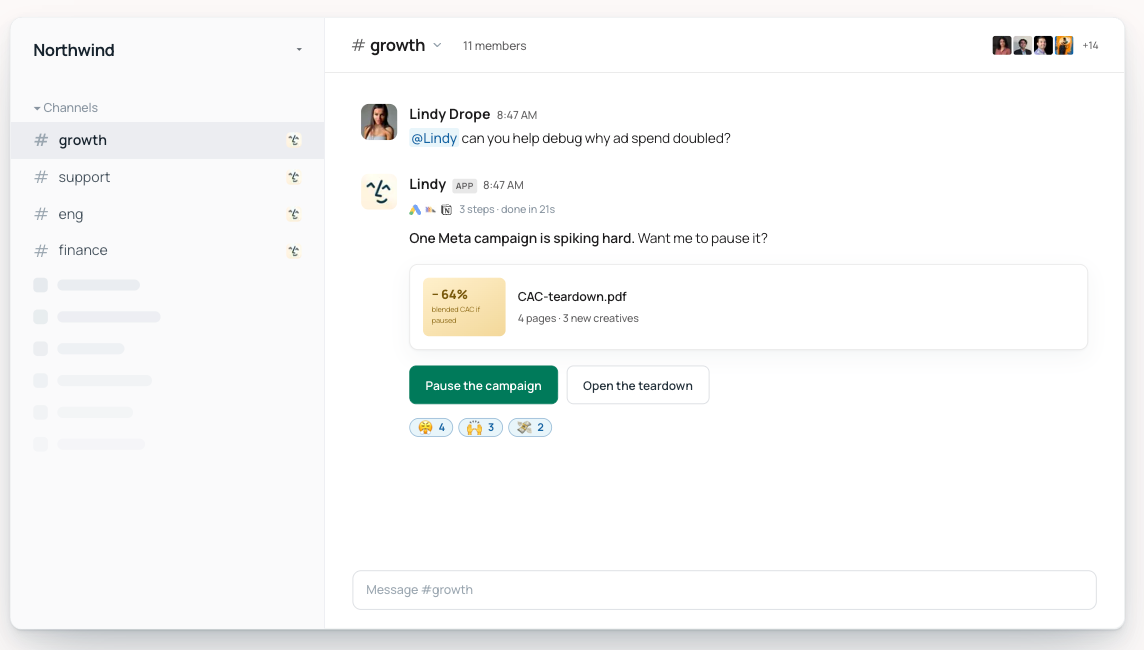
Lindy is a shared AI coworker inside Slack. One admin connects the company’s approved sources, and anyone can @mention Lindy in a channel to ask a question or hand over work.
In a channel, Lindy answers from shared meetings, Slack history, Notion, Google Drive, Gmail, and company files, with citations attached. In a DM, Lindy becomes a private assistant connected to the user’s email, calendar, and personal memory.
{{templates}}
How I tested ChatGPT dots against Lindy
I gave both tools the same Monday morning assignment.
Review last month's sales calls, emails, support conversations, and product notes. Identify the three objections hurting deals, prepare a report with supporting evidence, update the pipeline brief, and share the findings with the product team.
I ran the test myself and used requests from sales, support, and product to see how each tool would support a ten-person workflow. Both tools produced the objection report. The dot also revised files, while Lindy posted the summary to the product channel and scheduled the Monday brief. I compared setup, source coverage, finished work, approvals, and how easily another user could pick up the result.
I ran it alone, so I can only judge how each tool is set up for sharing. How a full team uses it would take a longer ten-person trial. Pricing gets its own section below.
How the dot handled the assignment
I assigned the project to my dot inside ChatGPT, working as the sales lead. It used connected apps and its cloud computer to research account history, analyze the material, and create the report, and it kept working while I focused elsewhere.
The finding that caught me off guard was in the support emails: prospects kept asking about a missing integration, yet nobody had mentioned it on a single sales call.
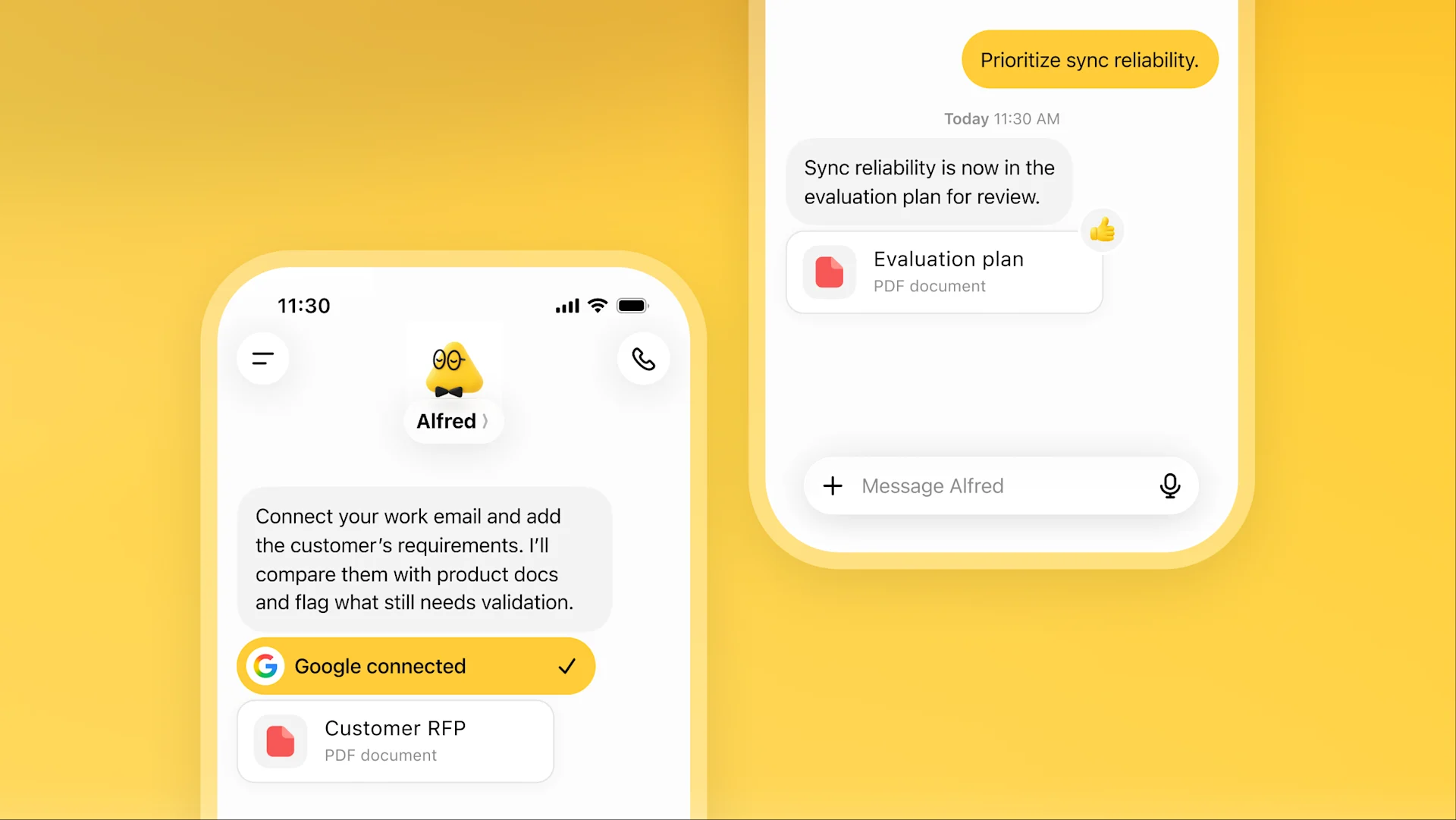
Dots had an advantage in independent project execution. Its cloud computer, browser, Codex access, and knowledge of the owner's preferences suited a project with several open-ended steps. I could step away, inspect the dot's activity later, and review the completed files.
I also shared the dot's work in Slack and checked what another user could receive. They could read the report, but the dot's memory, preferences, and project history stayed with its owner. OpenAI is testing specialist dots for shared company roles, though access currently comes through selected enterprise pilots.
How Lindy handled the assignment
I asked Lindy from the sales channel in Slack. It searched approved meetings, messages, files, and connected tools, then returned the three objections with citations for review.
The three were pricing, the implementation timeline, and a missing integration, and each one linked back to the call, email, or ticket it came from.
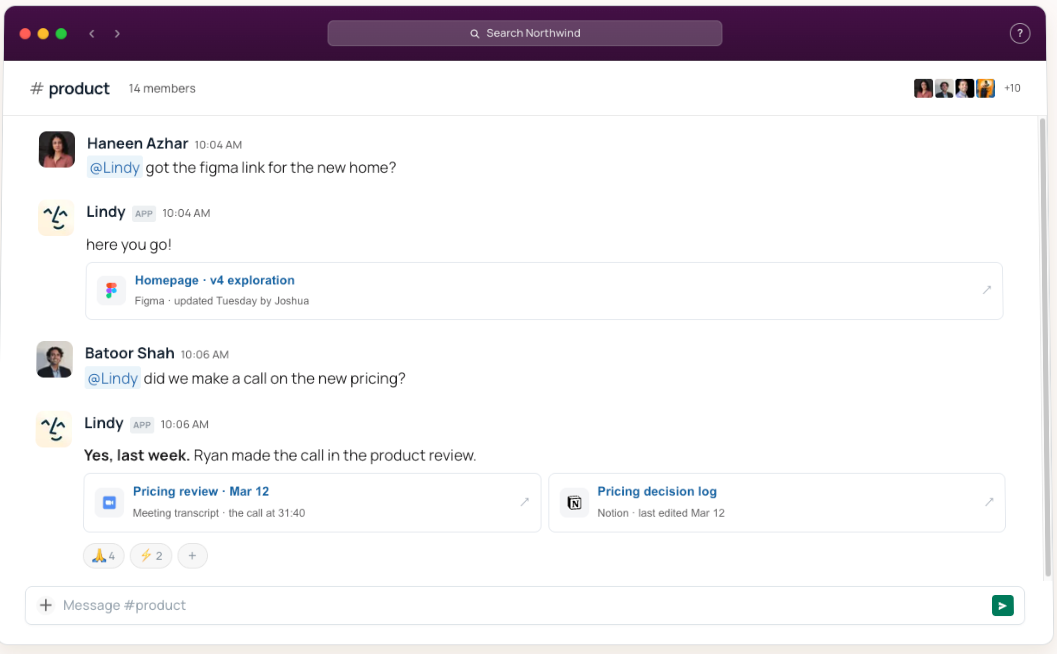
From the same thread, I asked Lindy to create the report, post a summary in the product channel, and schedule an updated pipeline brief for Monday morning. I asked follow-up questions without leaving Slack or starting a separate conversation.
Lindy had an advantage in shared team context. It worked from shared company knowledge, cited sources, the meeting library, routines, and permission rules, and the report stayed visible in the channel for anyone who needed it.
Lindy listed the missing integration too, but only the dot noticed the pattern: it came up in support emails and never on sales calls.
What each tool did in the test
Both tools got the same assignment, and the real difference showed up afterward, when someone else had to pick up the work. Here's what each tool did on the assignment:
My takeaway from the test
I came away wanting a dot for my own research-heavy projects. I handed it the objection review, left it working on its cloud computer, and returned to a finished report.
Lindy felt more useful once the work had to move between teams. The sales question, the product summary, and the follow-up questions all stayed in one Slack thread with their sources attached, so anyone joining the thread could see how the answer was built.
For this sales-objection assignment, I'd pick Lindy for the team and a dot for one person handing off a large project.
I left model quality out of the verdict. Dots run on GPT-6 Astra, while Lindy lets you choose a model for each task. Comparing their raw reasoning and output quality would need a separate set of prompts and scoring.
One person vs the whole team
The sales-objection test showed the split clearly. My dot built the report from my connected apps and memory. Four product choices shaped how each tool felt:
- Ownership: A primary dot belongs to one eligible ChatGPT user. OpenAI plans to support additional dots, while teams of dots remain a future direction.
- Shared context: Lindy connects teammates to the same approved company sources and shared credit pool. Admins choose which actions run automatically, require approval, or remain unavailable.
- Private work: Lindy keeps email, calendar details, and personal memory inside DMs. Personal context does not carry into public Slack channels.
- Following several tasks: One dot can manage multiple projects for its owner inside ChatGPT. Lindy gives each Slack request its own thread, keeping the question, sources, and follow-up work together.
A dot is built around one person's context, and Lindy is built around the team's. Which one fits depends on how many people need to pick up the same work.
Where dots win
Dots felt strongest when I treated one as my own project partner. OpenAI built the product around personal memory, independent work, and access to a full computer.
- GPT-6 Astra comes built in: Dots run on GPT-6 Astra, which OpenAI describes as its most aligned model. Anyone buying for model capability will care about this first.
- Your history comes with you: A dot starts with ChatGPT memory and keeps learning from feedback and connected apps. Long-time ChatGPT users begin with more context than a new assistant would have on day one.
- More apps are available: OpenAI lists over 4,000 apps through ChatGPT plugins. Check that your must-have tools are on the list before you choose.
- Every dot gets a cloud computer: It can browse, work across websites, and continue after you leave. You can inspect its computer, redirect the task, or allow access to your laptop when needed.
- Voice and Microsoft Teams broaden access: You can message or call a dot through ChatGPT, and OpenAI supports Slack and Teams. A dot cannot call you first at launch.
A few launch limits are worth knowing. Mobile web is unsupported, and texting is a limited beta for US Pro users. Dots can use a personal email account but can't have their own email address yet.
Where Lindy wins
Lindy became more useful once the work had to reach other people. Questions, sources, and follow-up tasks stayed visible in Slack, giving everyone in the channel the same starting point.
- Anyone on the team can pick up the thread: Mention Lindy in a channel and it answers with shared company context. Send a DM and it works privately with your email, calendar, and personal memory.
- Meetings become shared knowledge: Lindy records and summarizes team meetings, then lets coworkers ask questions about them later. Personal meetings remain private. OpenAI's launch material does not describe a comparable shared meeting library for primary dots.
- Work can continue away from Slack: Lindy's 24/7 iMessage access lets you ask a follow-up, check a calendar detail, or hand over a task from your phone without opening the workspace.
- Slack stays at the center: One admin connects Lindy, and teammates keep working in the same channels and DMs they already use.
- Admins control each action: A tool can be always allowed, placed behind approval, or left unavailable. Lindy is SOC 2 and GDPR compliant, while Enterprise supports HIPAA with a signed BAA.
ChatGPT dots vs Lindy: Pricing
Your first dot is included with ChatGPT Pro at $100/month or a Business Premium seat at $125/user/month, discounted to $100 with annual billing. ChatGPT Plus does not include dots.
Eligible Enterprise, Edu, and Healthcare workspaces can also try the beta when an administrator enables it. Our ChatGPT pricing guide explains how the plans compare.
Lindy's paid plans start at $29.99/user/month. Every active teammate needs a seat, and everyone can use Lindy through Slack.
Here's what each option costs by team size, with dots on annual billing:
Most teams won't need a dot for every employee. A Business workspace can mix Premium seats ($100/user/month) with Standard seats ($20/user/month), which don't include a dot, though it needs at least two seats.
Usage works differently on each product. Talking with a dot doesn't count toward regular ChatGPT limits, but tasks involving Codex or ChatGPT Work use the allowances attached to those products. Eligible plans also include deeper-work capacity, with higher limits during the first month after launch.
Each Lindy seat adds 3,000 monthly credits to one shared pool. A quick question uses 2 to 250 credits, research uses 250 to 1,000, and large builds use 1,000 to 2,500. Seat credits reset monthly, and extra credits cost $10 per 1,000 and don't expire. Lindy pauses and alerts the team if the pool runs out.
{{cta}}
ChatGPT dots vs Lindy: Which should you choose?
Pick a dot if the work is yours alone, and Lindy if a team needs to share it. Find your situation below to see which fits:
Final verdict
After this ChatGPT dots vs Lindy test, I'd treat dots as an early product with unusual potential and Lindy as the more practical option for work already running through Slack. Dots give you a cloud computer and GPT-6 Astra, though rollout limits and Premium-seat requirements deserve attention.
Lindy costs less per seat across a company. Its published credit ranges run from 2 to 2,500 per task, so teams running large builds should watch the shared pool. Test your heaviest recurring task before signing either contract.
FAQs
1. What is a ChatGPT dot?
A dot is a ChatGPT agent that keeps working on its own cloud computer after you close the window. Each dot belongs to one person and comes with ChatGPT Pro or a Business Premium seat.
2. Which plans include dots?
Pro and Business Premium. Free, Go, Plus, and Business Standard don't get one. Enterprise, Edu, and Healthcare workspaces can try a beta, which stays off until an admin turns it on.
3. Are dots free, and which is cheaper?
No. Your first dot comes with ChatGPT Pro (from $100 a month) or Business Premium, and deeper-work limits are higher for the first month after launch. Lindy's paid plans start at $29.99 per user per month, so ten people cost $299.90 a month, against $1,000 if all ten get a dot billed annually.
4. Is Lindy like ChatGPT dots?
Partly. Both take work off your plate and ask before sensitive actions. A dot is one person's agent on its own cloud computer inside ChatGPT, starting at $100/month with Pro. Lindy is a shared teammate in Slack that answers from company sources with citations, from $29.99/user/month.
5. Can I use ChatGPT dots in Slack?
Yes. You set up the Slack connection from ChatGPT on desktop, then message your dot there. Each dot serves one person, so ten dot owners means ten dots.
6. Can I use dots and Lindy together?
Yes. Plenty of people already keep more than one AI tool, a habit our Claude vs ChatGPT comparison covers. A reasonable split is a personal dot for your own projects and Lindy for questions, meetings, and routines the whole company shares.
7. Is Lindy available where dots aren't?
Dots on Pro are currently unavailable in the EEA, Switzerland, and the UK, though Business Premium seats work in all supported ChatGPT regions. Lindy is GDPR compliant. Check both vendors' pages for your country before you buy.









