
I tested Lindy and Viktor on the same three work tasks. The comparison came down to missed meeting details, duplicate tickets, and a $6,000 discrepancy, and which tool I would trust for each job.
I tested Lindy vs Viktor to find out which one gets my weekly busywork done fast without costing much. That meant the Slack update, the CRM changes, and the meeting prep, so I ran both on three assignments from my actual workweek.
I narrowed it down to these two because both work in Slack and connect to the same business tools, including HubSpot, Linear, and Google Drive, and both have Team plans a small group can afford. Since this is Lindy’s own blog, I gave Viktor the same assignments, the same core tools, and a fair shot.
The biggest difference was who acts first. Viktor made changes without waiting for my approval, while Lindy let me review updates before they went through. That changed which tasks I’d trust each tool to handle.
Lindy vs Viktor: The quick verdict
I’d choose Viktor for routine updates across your tools, like creating Linear tickets, moving HubSpot deals, and cross-checking records, and Lindy for customer prep and account reviews, where the answer is spread across calls, Slack, email, and your CRM and you want to approve changes first.
Both handled my three assignments, but the amount of involvement they needed was different. Viktor made changes without waiting for my approval, while Lindy showed me proposed changes first.
Here’s where I’d use each:
- Choose Viktor for routine updates: It created six Linear tickets, moved the Acme deal to Contract sent in HubSpot, and spotted a $6,000 mismatch between HubSpot and Stripe, all without waiting for my approval. Two of the tickets were duplicates I had to close.
- Choose Lindy for customer prep and account reviews: It pulled together what we’d told Northwind across calls, emails, and HubSpot, and flagged a security questionnaire we’d promised by Friday that wasn’t in any ticket or email. I could also fix its proposed tickets and CRM updates before anything was made.
- Consider your team’s existing tools: Viktor works in Slack and Microsoft Teams. Lindy works in Slack and connects your recorded meetings, email, and CRM in one place.
Viktor Team starts at $50/month for 20,000 shared credits, while Lindy starts at $49.99 per active user/month for 5,000 credits each. For a five-person team, that’s $50 versus $249.95.
Lindy vs Viktor: Key differences
Viktor and Lindy both connect to business systems, create files, and handle recurring work. The table covers how independently each one acts, what company information it can access, and what it costs as your team grows. Here are the key differences:
| Comparison | Viktor | Lindy |
|---|---|---|
| Best for | Completes tasks across your connected tools on its own | Answers questions from your meetings, Slack, and email, and waits for your approval |
| Where it works | Works in Slack, Microsoft Teams, Discord, and a web app | Works in Slack, iMessage, email, and Chrome |
| Meeting recordings | Reads supported Teams transcripts; no dedicated recording library confirmed | Records and searches Meet, Zoom, and Teams calls |
| Company memory | Remembers context for the whole workspace | Keeps shared context in files your admins can edit |
| Finished work | Builds Viktor Docs and Spaces | Creates reports, dashboards, and internal tools |
| Automation | Learns skills from screen recordings and runs scheduled work | Offers 40+ skills and runs scheduled routines |
| Approvals | Asks for approval on sensitive actions, with configurable tool permissions | Asks for approval on actions with external impact |
| Integrations | Connects to 9,800+ integrations | Connects to 3,000+ integrations and MCP |
| Credit model | Pools credits across the whole workspace | Pools credits from active paid seats |
| Team starting price | Starts at $50/month per workspace | Starts at $49.99/user/month |
| Free access | Gives up to $100 in credits, no expiration | Gives $50 in credits valid for seven days |
| Compliance | Holds SOC 2 Type I and is GDPR aligned and CCPA-compliant, with SOC 2 Type II and ISO 27001 in progress | Holds SOC 2 Type II and is GDPR compliant, with HIPAA support and a signed BAA on Enterprise |
Viktor advertises more integrations, but I’d check the tools my team uses before treating the larger number as an advantage. A tool with access to our CRM and project tracker is more useful than one with thousands of connections we never touch.
What is Viktor?
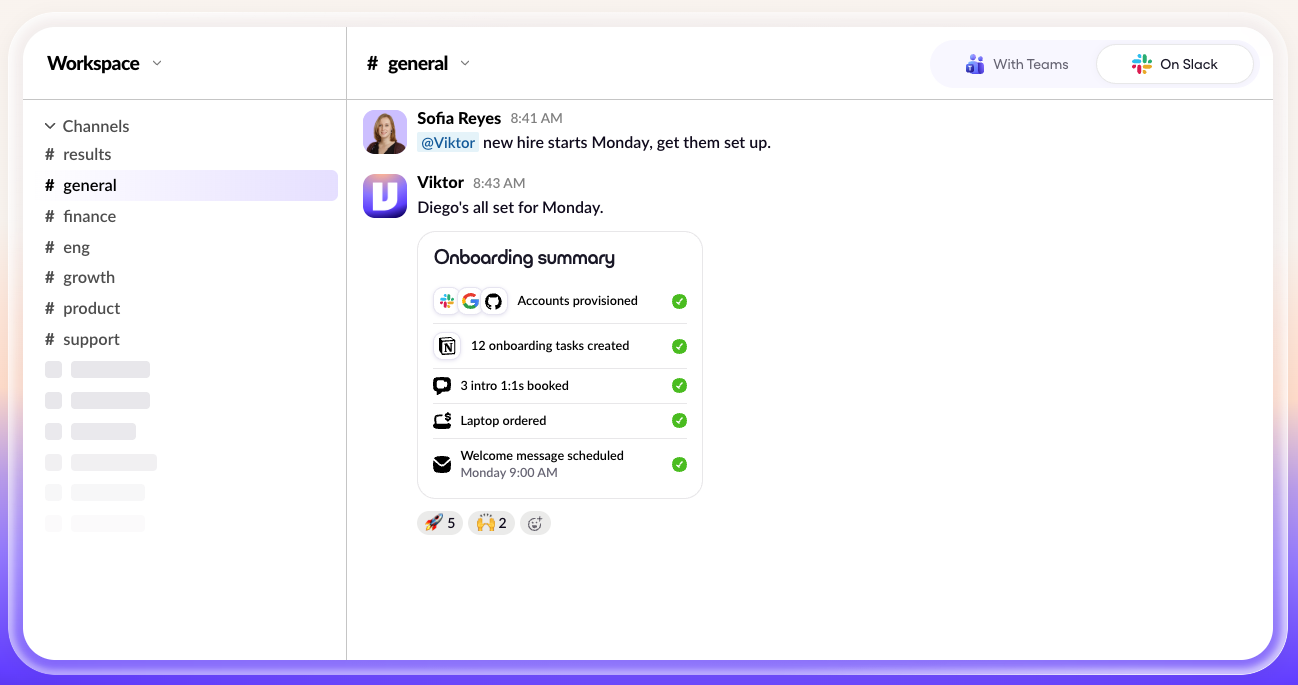
Viktor is an AI coworker that works through Slack and Microsoft Teams. It connects to company applications and uses its own cloud computer to research information, write code, update records, and create finished work.
Anyone on the team can assign Viktor a task through a conversation. It works with the accounts you've connected and returns results where the request originated.
Some of Viktor's more useful capabilities include:
- Viktor Docs: Creates documents, reports, and dashboards that you can share through a link.
- Viktor Spaces: Builds internal applications with their own interfaces, such as deal trackers or order-management tools.
- Skills from recordings: Turns a screen recording of an existing process into reusable instructions that you can review and edit.
- Scheduled work: Runs reports and operational assignments at specified times.
- Model presets: Offers Ultra, Smart, Balanced, and Cheap presets to control how much processing a task receives.
- Workspace memory: Gives teammates access to shared context when working with the same assistant.
The feature I'd investigate first is how Viktor decides which changes it can make without permission. For repetitive tasks such as updating records or creating tickets, fewer approval steps could save time. I'd still want to know which actions require review.
What is Lindy?
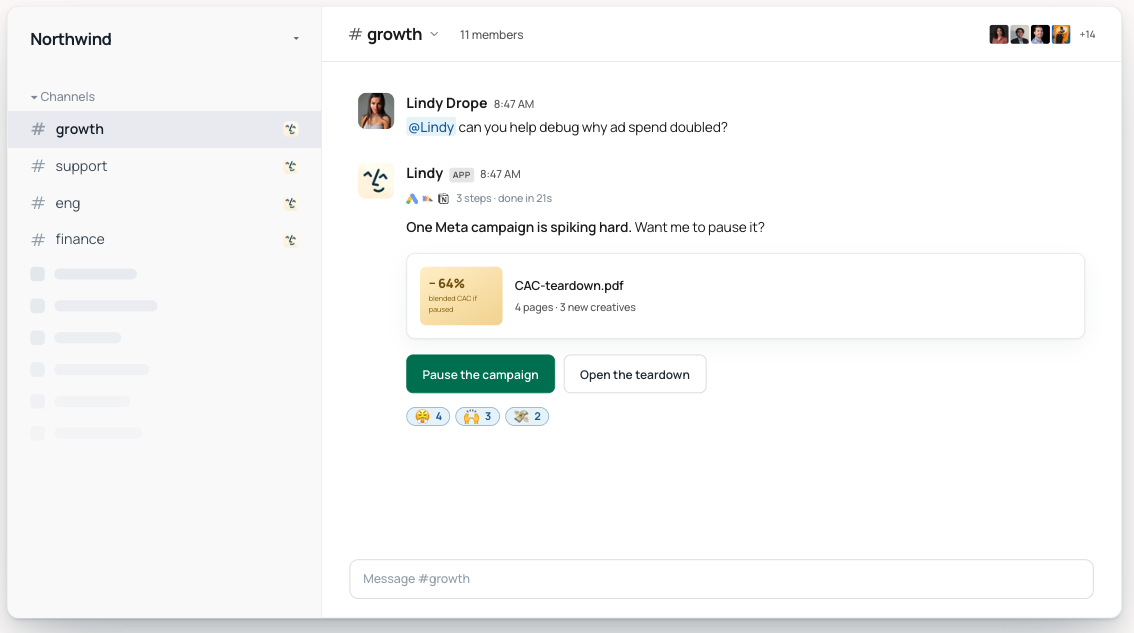
Lindy is an AI teammate for company work across Slack, meetings, email, and connected applications. You can ask Lindy to prepare reports, find information from earlier discussions, update business records, or follow up on assigned work.
Teammates can mention Lindy in a Slack channel, while direct messages provide access to personal information such as email and calendar events.
Its main capabilities include:
- Shared meeting library: Records supported video meetings and lets employees search past decisions, commitments, and action items.
- Source-backed answers: Links information to the original meeting, message, or company document.
- Finished deliverables: Creates reports, presentations, and dashboards, hosted on a link your team can open.
- Action controls: Lets teams set, for each connected app, whether Lindy acts automatically, asks for approval, or never acts.
- Scheduled routines: Prepares recurring summaries, reminders, and other assignments.
- Reusable skills: Provides more than 40 skills and lets teams create their own.
- Editable memory: Stores shared context in files the whole team can read, and admins can update.
For our weekly assignments, I was particularly interested in whether Lindy could find information we hadn't written down in Slack or HubSpot. Our meetings often contain decisions that never become formal notes, which can make preparing for the next customer conversation harder than it should be.
How I tested Viktor against Lindy
I tested Viktor and Lindy over one week using the same Slack workspace, HubSpot, Linear, Google Drive, and Gmail connections.
I gave Lindy the meeting recordings because I wanted to see whether it could find decisions we hadn’t written down, and I connected Stripe to Viktor so it could check our deal amounts against invoices.
I gave both tools three assignments from my workweek:
- Slack recap: Summarize last week's #launch discussions and create follow-up tasks with owners.
- CRM update: Move Acme to Contract sent in HubSpot, add a note, and flag inactive deals.
- Meeting prep: Prepare a brief for tomorrow's Northwind call, including previous customer commitments.
I used both tools' Team plans and had a coworker check the results in Slack. I compared task completion, information accuracy, approval steps, and manual corrections. The findings reflect this one-week test and the tools I connected.
1. Slack recap: Six tickets, two duplicates
I asked Viktor to catch me up on the previous week's #launch discussions and turn outstanding work into Linear tickets. It posted a recap, created a Viktor Doc, and opened six tickets with assigned owners before I even reviewed the results.
At first, I was pleased to see the follow-ups already in Linear. Then I opened the tracker and recognized two issues we'd already logged. Viktor had created duplicates, so I had to close them and check the remaining four.
Viktor saved me the trouble of creating tickets manually, but it also gave me some cleanup work. For a weekly recap, I'd want it to check existing issues first. Otherwise, I'd end up reviewing the tracker every time to make sure the same work hadn't been assigned twice.
2. CRM update: Viktor caught a $6,000 discrepancy
The HubSpot assignment went much better. I asked Viktor to move the Acme deal to Contract sent, log a note, and flag opportunities that had gone quiet. It completed the changes and found three deals with no activity in 14 days.
What caught my attention was something I hadn't requested. HubSpot valued the Acme deal at $48,000, but the latest Stripe invoice showed $42,000. Viktor flagged the $6,000 difference while checking the account.
I'd missed it myself. Since Viktor could access both systems, I didn't have to open Stripe or compare the records manually.
Finding the discrepancy was more valuable than the CRM update itself. I could have changed the deal stage in a few clicks, but I might have carried the wrong amount into our next report without noticing.
3. Meeting prep: A good brief with one important omission
For the final task, I asked Viktor to prepare me for tomorrow's Northwind call. I wanted the account history, outstanding issues, and anything we'd promised during our last conversation.
Viktor pulled together the emails, HubSpot notes, and Linear tickets into a well-organized Doc. I could have forwarded the brief without editing it, which was a relief after the earlier ticket cleanup.
But when I looked for our previous meeting commitments, I found a problem. Viktor had clearly stated that it couldn't access the last Northwind call, so the brief only covered what was documented elsewhere.
I appreciated that Viktor acknowledged the missing information instead of filling in the blanks. Still, knowing what we'd promised the customer was one of my main reasons for requesting the brief. I'd need to find the recording or check with a coworker before the call.
What I learned from Viktor
What stood out was how little direction Viktor needed once I assigned the work. It followed through on tasks across several tools and even checked information beyond what I'd requested.
But I wouldn't leave every workflow running unchecked. I'd start with a few routine assignments, see how often I needed to step in, and decide from there which tasks were safe to automate.
How Lindy handled the three jobs
I gave Lindy the same assignments in Slack, with access to our connected tools and shared meeting recordings. I was particularly interested in whether it could find details we'd missed and handle the follow-ups without creating more work for me.
1. Slack recap: A decision we'd missed
I expected Lindy to summarize the #launch conversations and identify outstanding tasks. It did both, but it also found a decision from Tuesday's meeting that nobody had documented in Slack or Linear.
I'd already reviewed the channel and missed it myself. Lindy pulled the decision from the meeting recording, included it in the recap, and linked the source so I could check the original discussion.
It then proposed six Linear tickets for my approval. Four were ready to go, while two duplicated issues we’d already logged. I removed those before approving the tickets.
I appreciated being able to catch the issues before they reached Linear. The review took a few minutes, but I didn't have to go back afterward to close duplicates or explain incorrect assignments to the team.
2. CRM update: The missing Stripe connection
For the Acme deal, Lindy showed me the proposed HubSpot changes before making them. I checked the details, approved the update, and it moved the opportunity to Contract sent, added the note, and identified three deals with no activity in 14 days.
Lindy missed the $6,000 discrepancy Viktor had found because I hadn’t connected Stripe to Lindy for this test.
I couldn't expect it to catch a mismatch without access to both records. Still, I'd want to discover a missing connection during setup rather than assume an account review covered every relevant system.
3. Meeting prep: A promise I'd completely forgotten
The Northwind meeting prep was where Lindy impressed me most. It gathered the account history from our emails, HubSpot notes, and Linear tickets, then checked the recording of our previous customer call.
Buried at 22:15 in the recording was a promise to send Northwind a security questionnaire by Friday. I'd forgotten we'd agreed to it, and there was no mention of the commitment in our emails or open tickets.
Lindy included the promise in my prep document and linked the exact moment in the call. I opened the recording to confirm what we'd said, then knew I needed to check whether the questionnaire had been sent before tomorrow's meeting.
I could easily have walked into that call prepared to discuss the open tickets while overlooking something the customer was still expecting from us. Having the original conversation available made the brief much more useful.
What I learned from Lindy
I'd be comfortable assigning Lindy work that involves several people's conversations and records, especially when a missed detail could affect the next customer interaction.
I still needed to approve changes and make sure the right applications were connected. But once those were in place, I could spend my time checking the decisions that mattered instead of searching through old meetings and messages myself.
Viktor vs Lindy: What each tool completed
I gave Viktor and Lindy the same three assignments, but I ended up spending my time differently with each one. Viktor completed more actions on its own, while Lindy gave me opportunities to check the work before changes reached our tools.
The results from my one-week test:
| Test area | Viktor | Lindy |
|---|---|---|
| Slack recap | Created a Doc and six Linear tickets | Posted a sourced recap and proposed six tickets |
| Ticket review | Two duplicates needed closing | I removed two duplicates before creation |
| HubSpot update | Updated the deal directly | Updated the deal after approval |
| Additional finding | Flagged a $6,000 invoice discrepancy | Retrieved an undocumented meeting decision |
| Meeting prep | Created a Doc without the previous call record | Found a customer promise at 22:15 |
| Credits consumed | 2,060 | 835 |
Each platform calculates credits differently, so usage counts aren't directly comparable.
The amount of work left for me was the deciding factor. With Viktor, I could move on while it completed routine updates, then check for errors afterward. With Lindy, I spent more time reviewing proposed actions but had better access to the conversations behind our team's decisions.
For recurring work, I'd pay attention to when that human review happens and how much time it takes each week.
Where Viktor wins
I'd shortlist Viktor for an operations team that wants to assign work in Slack or Microsoft Teams and have it completed across several applications.
Beyond the tasks I tested, Viktor offers several capabilities worth considering:
- Viktor Docs and Spaces: Turn requests into shareable documents, dashboards, and working internal applications, including trackers with their own interfaces.
- Microsoft Teams support: Assign work directly in Teams conversations, useful for companies that don't use Slack.
- Skills from recordings: Demonstrate an existing process on screen and turn it into instructions the team can reuse.
- Flexible integrations: Connect business applications and extend Viktor's access to tools outside its existing catalog.
- Model presets: Choose Ultra, Smart, Balanced, or Cheap depending on the task’s complexity and credit budget.
- Workspace-wide pricing: Team plans start at $50/month for 20,000 shared credits, with no per-seat fees.
- Credit controls: Unused monthly credits roll over, and teams can configure top-ups and spending limits.
I find the screen-recording approach particularly useful for repetitive processes. An operations manager could demonstrate how to review a pipeline, update a tracker, and prepare a weekly report, then reuse those instructions instead of explaining the process every Monday.
Viktor's flat workspace pricing makes it appealing for larger teams. Five or ten employees can share the same plan. More users won't increase the subscription price, but their combined usage may require a larger credit package.
What to watch for
I'd test Viktor on a small set of routine assignments before expanding its permissions. Start with tasks where mistakes are easy to correct, then check how consistently it follows your team's existing processes.
I'd also pay attention to scheduled jobs. A report that runs every morning may consume considerably more credits over a month than a task employees request occasionally.
Where Lindy wins
I’d choose Lindy for teams whose work depends on conversations scattered across meetings, Slack threads, email, and CRM records.
For sales and customer success teams, a useful assistant needs to know what someone promised during a call, whether the next action was completed, and where to find the original discussion.
Here’s where Lindy earned its place in my test:
- Customer call prep: It pulled what we’d told Northwind from calls, emails, and HubSpot, and flagged a security questionnaire we’d promised by Friday that wasn’t in any ticket or email.
- Weekly recaps: It summarized #launch and surfaced a decision from Tuesday’s meeting that nobody had written down.
- Checking the answer: Every answer linked back to the original call, message, or document, so I could verify it before acting.
- Team follow-ups: My coworker asked about paid accounts in the same Slack thread and got an answer with sources, without going through me.
- Changes I control: I removed two duplicate tickets before anything reached Linear. Teams set, app by app, whether Lindy acts automatically, asks for approval, or never acts.
I’d use Lindy for recurring account reviews. Instead of asking someone to collect meeting notes, support issues, and customer updates every Friday, the team could receive a report with links to the underlying records.
Coworkers could then ask questions in Slack and check the information themselves. I wouldn’t need to be the person who remembers where every decision was documented.
Lindy is SOC 2 Type II certified and GDPR compliant. Enterprise adds SSO, SCIM, audit logs, and HIPAA support with a signed BAA.
What to watch for
Lindy's usefulness depends on the information your team connects. Before relying on an account report, I'd check whether the relevant email, CRM, meeting, and financial systems are available to it.
I'd also budget for active users. Lindy Team starts at $49.99 per user/month for 5,000 credits each, pooled across the workspace. Five active users would pay $249.95/month and share 25,000 credits.
Monthly credits don't roll over, although teams can purchase additional credits at $10 per 1,000. I'd monitor usage during the first few recurring assignments before choosing a larger allowance.
Lindy vs Viktor pricing
Viktor starts at $50/month for the workspace, while Lindy starts at $49.99/month per active user. For five employees, that's $50 versus $249.95 at the entry level.
Viktor includes 20,000 shared credits, while Lindy provides 25,000 pooled credits for five users. Each platform calculates usage differently, so I'd compare the cost of our recurring tasks before choosing a package.
Viktor pricing
Viktor starts at $50/month for 20,000 shared credits. Its Team plan charges per workspace, so adding employees doesn’t increase the subscription price. Everyone draws from the same credit pool.
Viktor's pricing options:
| Monthly credits | Workspace price/month |
|---|---|
| 20,000 | $50 |
| 30,000 | $75 |
| 40,000 | $100 |
| 80,000 | $200 |
| 125,000 | $300 |
| 200,000 | $500 |
Other pricing details:
- Free: Up to $100 in credits that never expire, with no credit card required.
- Enterprise: Custom pricing, volume discounts, spending controls, and dedicated onboarding.
- Automatic top-ups: $25 per 10,000 additional credits, with configurable purchase amounts and monthly spending caps.
- Credit rollover: Unused monthly credits carry over for one billing cycle. Purchased top-up credits never expire.
Viktor also offers Ultra, Smart, Balanced, and Cheap model presets. Viktor describes Balanced as the lower-cost option for routine work, which helps teams control spending on simpler assignments.
I'd start with the smaller credit packages for occasional requests and check how much scheduled reports and larger builds consume before increasing the allowance.
Lindy pricing
Lindy starts at $49.99 per active user per month for 5,000 credits. Each paid seat contributes to a shared team pool, and you can choose a higher monthly allowance based on your workload.
Lindy Team credit options, from the entry package up:
| Credits per user/month | Price per user/month |
|---|---|
| 5,000 | $49.99 |
| 6,000 | $59.99 |
| 7,000 | $69.99 |
| 8,000 | $79.99 |
| 15,000 | $99.99 |
| 20,000 | $149.99 |
| 35,000 | $199.99 |
Other pricing details:
- Free: $50 in credits valid for seven days, with no credit card required.
- Enterprise: Custom credits and billing, SSO, SCIM, audit logs, and HIPAA support with a signed BAA.
- Top-ups: $10 per 1,000 additional credits.
- Credit rollover: Monthly credits expire at the end of the billing cycle, but purchased top-ups remain available until used.
Lindy pauses credit-consuming work when the balance runs out, so there are no automatic overage charges.
For five employees, Lindy starts at $249.95/month with 25,000 pooled credits. A team running larger reports or frequent automations can choose a higher allowance or purchase credits at $10 per 1,000.
How much would a five-person team pay?
I estimated the cost of 100 quick requests, 20 multi-step tasks, and two large builds per month. Using each company's published credit ranges, Viktor would need 24,000–70,000 credits, while Lindy would need 7,200–50,000.
Here's what those workloads could cost:
| Five-person team | Viktor | Lindy |
|---|---|---|
| Starting subscription | $50/month | $249.95/month |
| Credits at starting price | 20,000 | 25,000 |
| Estimated monthly usage | 24,000-70,000 | 7,200-50,000 |
| Package covering lowest usage | $75/month | $249.95/month |
| Package covering highest usage | $200/month | $499.95/month |
Estimates use published credit ranges, not actual usage measurements. Viktor's available minimum plan can vary by workspace. Credits from the two platforms aren't directly comparable.
Viktor costs less across these estimates. Its $75 package covers the lower workload with 30,000 credits, while the $200 package provides 80,000 credits for heavier use. The subscription covers the entire workspace.
Lindy starts at $249.95/month for five users sharing 25,000 credits. At the highest estimated usage, the team could choose five 15,000-credit packages for $499.95/month or purchase additional credits as needed.
In my test, Viktor consumed 2,060 credits and Lindy used 835. I'd use those results as a starting point, then track several weeks of recurring work before choosing a monthly allowance.
Lindy vs Viktor: Which should you choose?
After testing both, I'd put Viktor on operational tasks that follow a clear process and Lindy on work that requires knowledge of past conversations.
Viktor is a good fit when you want an AI coworker to take an assignment and finish it with minimal involvement. Lindy is worth considering when several people need to check the findings, approve changes, or pick up where someone else left off.
I'd narrow down the choice based on how your team works:
| Your situation | My pick | Why |
|---|---|---|
| Most of your team works in Microsoft Teams | Viktor | Employees can assign work directly in Teams chat |
| You're tired of manually updating several tools | Viktor | It can complete supported changes across connected apps |
| You need custom trackers or internal applications | Viktor | Spaces can turn requests into working tools |
| Several employees need occasional AI assistance | Viktor | Workspace plans from $50/month, with no per-seat fees |
| Important customer details get buried in meetings | Lindy | Its meeting library keeps past discussions searchable |
| Managers need to review changes before they happen | Lindy | Configurable approvals for external actions |
| Your team often asks where a decision came from | Lindy | Answers link back to the original sources |
| You need HIPAA support with a signed BAA | Lindy Enterprise | Enterprise supports those requirements |
One thing I'd consider is who will actually use the finished work. A solo operations manager might appreciate Viktor completing a batch of updates without interruption. A customer success team may get more use from Lindy when several people need to reference the same meeting history and follow up in Slack.
Final verdict
I’d choose Viktor for teams that want to get more work done across their tools, and Lindy for teams that want to review changes before they happen and need answers pulled from past customer calls.
Viktor impressed me with how independently it worked, especially when it caught an issue I hadn't asked it to investigate. Its ability to complete tasks across connected apps and build finished deliverables makes it a strong choice for busy operations teams.
Lindy earned its place through meeting context and source-backed answers. I'd lean toward it for our weekly account reviews, where knowing what happened in earlier customer conversations matters.
If you’re still weighing Lindy vs Viktor, test both on your most frequent assignment. Compare how much work they finish, what you need to check, and what each task costs in credits. If neither fits, see our list of Viktor alternatives.
FAQs
1. What is the main difference between Lindy and Viktor?
The main difference between Lindy and Viktor is when you check the work. Viktor focuses on completing tasks across connected apps with fewer interruptions, while Lindy emphasizes searchable meeting history, source-backed answers, and approval controls.
If you’re also weighing a general chat assistant, our ChatGPT dots vs Lindy comparison covers where it fits.
2. Is Viktor better than Lindy?
Viktor is better for routine updates across your tools, like creating Linear tickets and moving HubSpot deals. Lindy is better for customer prep and account reviews, where you want to approve changes first.
3. Which works in Microsoft Teams, Lindy or Viktor?
Both work with Microsoft Teams, but only Viktor takes assignments in Teams chat. Lindy connects to Teams to send channel and chat messages, create channels, and record Teams calls, while you assign work in Slack, iMessage, email, and Chrome.
4. Can Viktor record and summarize meetings like Lindy?
Not on its own. Viktor works from transcripts and notes in the meeting tools you connect, and Teams transcripts only work once an admin turns them on. Lindy offers a dedicated meeting library for recording, searching, and reviewing conversations across Zoom, Google Meet, and Microsoft Teams.
5. Does Viktor need approval before taking actions?
No, Viktor doesn’t ask for approval on every action. For each connected tool, an admin sets Viktor to either act automatically or ask first. Viktor also asks before high-stakes actions, like sending an email.
6. How much does Viktor cost compared to Lindy?
Viktor starts at $50/month per workspace for 20,000 credits, with a $100/month option offering 40,000 credits. Lindy starts at $49.99 per active user/month for 5,000 credits each. For five employees, the starting cost is $50/month for Viktor versus $249.95/month for Lindy.
7. Is Viktor AI free to use?
Yes, Viktor offers up to $100 in free credits with no credit card required. The credits never expire, and all features and integrations are available. Paid Team packages start at $50/month for 20,000 shared credits.
8. Can I move from Viktor to Lindy?
Yes, you can move from Viktor to Lindy, but you’ll set Lindy up from scratch, because Lindy’s docs don’t list a Viktor import. An admin installs Lindy in Slack from the Integrations page, and each teammate links their account the first time they message it. Then you reconnect your tools, like HubSpot and Linear, from Integrations.
About the editorial team

Lindy leads GTM at Lindy and is the team’s most prolific automation builder. She publishes weekly educational videos and articles on building AI assistants – And yes, she’s a real person!

Flo Crivello is the founder and CEO of Lindy. Before that, he founded Teamflow and was a product manager at Uber. He writes about technology, startups, and the future of work on his blog.
