AI Agent Orchestration: How It Works in 5 Simple Steps


A customer requests a $240 refund, and three AI agents get to work. One checks the order, another reviews the refund policy, and a third starts drafting a response. But the refund needs a manager's approval, and none of the AI agents have asked for it yet.
That's the kind of problem AI agent orchestration solves. It coordinates multiple AI agents, assigns tasks, manages handoffs, and makes sure everyone is working toward the same goal.
Without proper coordination, agents can duplicate work, miss important details, or act on outdated information. And adding more agents to the mix can make these problems harder to catch.
By the end, you’ll know how the five steps work, which setup fits your team, which tools to look at, and the frameworks that help you manage them.
What is AI agent orchestration?
AI agent orchestration coordinates multiple AI agents to complete a shared goal. It manages how tasks are divided, which agents handle them, and how information moves between agents.
When a workflow involves several agents, someone or something needs to coordinate their work. That's where an AI orchestration layer comes in. Depending on the setup, a central orchestrator may coordinate everything, or AI agents may communicate directly.
How AI agent orchestration works
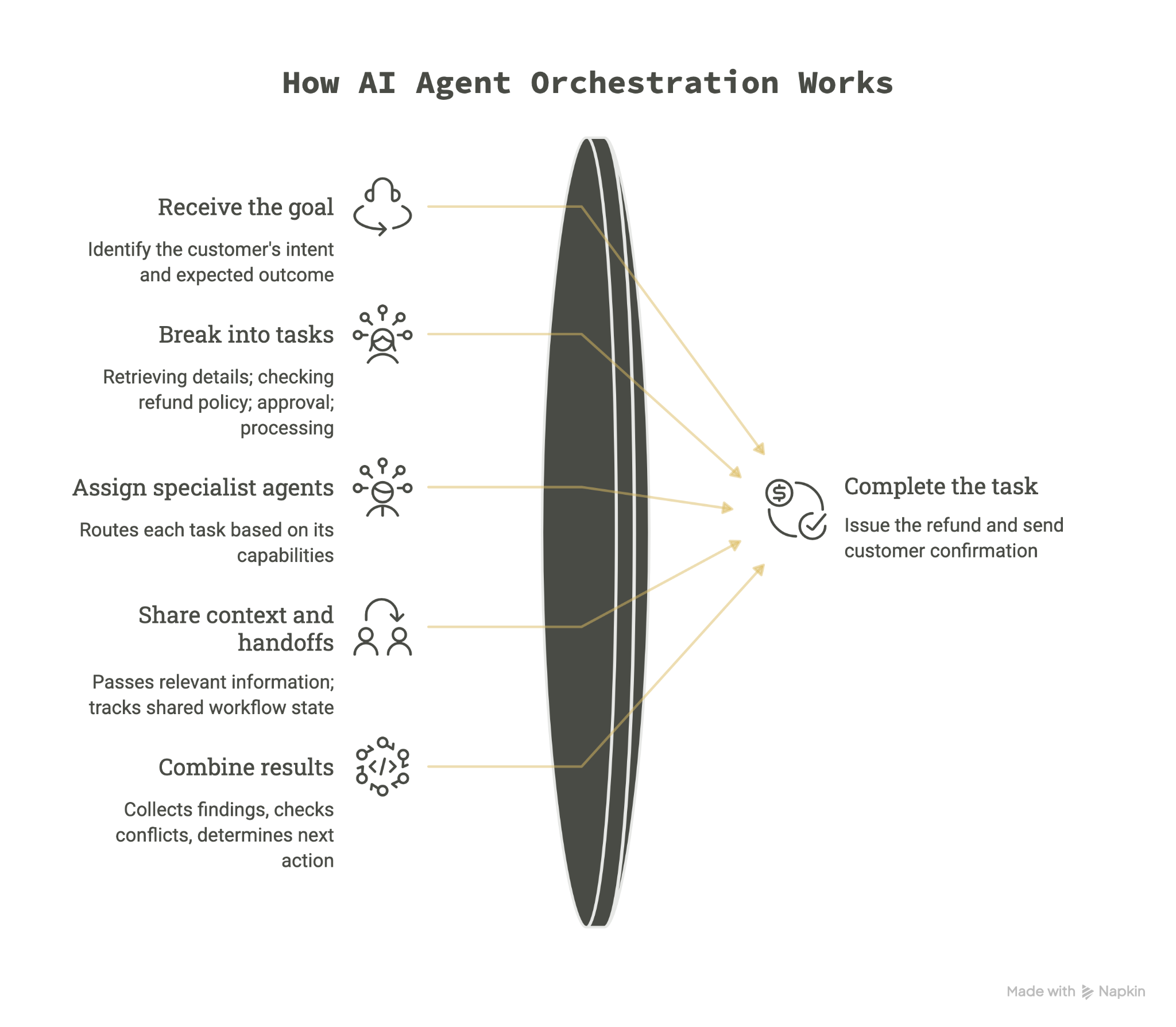
AI agent orchestration follows five main steps, from understanding a request to completing the task. Let's use a customer refund request to see how multiple agents work together.
Step 1: Receive the goal
The process begins when an AI agent receives a task or an event triggers the workflow.
For example, a customer emails an electronics store requesting a $240 refund for faulty headphones. The orchestrator receives the request, identifies the customer's intent, and determines the expected outcome.
In this case, the goal is to verify the purchase, check refund eligibility, and process the refund if approved.
Step 2: Break the goal into smaller tasks
The orchestrator divides the request into tasks that specialized agents can handle. For the refund request, these include:
- Retrieving the customer's order and payment details
- Checking whether the purchase meets the refund policy
- Getting manager approval if required
- Processing the refund and notifying the customer
It also identifies task dependencies. For example, the system needs verified purchase details before determining refund eligibility.
Step 3: Assign tasks to specialist agents
The orchestrator routes each task to an agent based on its capabilities and available tools.
An order lookup agent retrieves the purchase details, while a refund policy agent reviews the store's return conditions. A customer communication agent handles the final response.
Some tasks can run simultaneously. Others must wait for earlier results.
If the purchase date is missing, the orchestrator can assign another task to retrieve the invoice before continuing the eligibility check.
Step 4: Share context and manage handoffs
As agents finish their tasks, the orchestration system passes relevant information to the next agent.
For example, the order lookup agent confirms that the headphones were purchased 12 days ago. The policy agent uses this information to assess eligibility under the store's 30-day refund policy.
The system tracks these findings in shared workflow state, so agents can access the information they need.
Since the refund exceeds $200, the orchestrator requests manager approval before processing payment.
Step 5: Combine results and complete the task
Finally, the orchestrator collects the agents' findings, checks for conflicting information, and determines the next action.
If the refund is eligible and the manager approves it, the system uses an authorized payment tool to issue the refund. The communication agent then sends the customer a confirmation once the transaction succeeds.
If approval is denied or information conflicts, the system can pause the process and request human review. This coordination helps multiple agents complete a shared task without losing context or skipping required checks.
Core components of AI agent orchestration
An orchestration system needs a group of AI agents, a way to assign work, share information, and control what agents can do. Here are the five core components:
- Orchestrator: Coordinates tasks, assigns them to suitable agents, tracks progress, and manages dependencies. In our refund example, it oversees the entire request.
- Specialist agents: Handle specific responsibilities, such as retrieving order details, checking refund eligibility, or communicating with customers.
- Tools and integrations: Connect agents to external systems like CRMs, databases, payment platforms, and APIs to retrieve information or perform actions.
- Memory and state: Track relevant information, previous results, and task status so agents can continue working without losing context.
- Guardrails and human approval: Restrict agent permissions, check outputs, and require human approval for sensitive actions, such as issuing a $240 refund.
In multi-AI agent orchestration, shared memory and task tracking help specialist agents stay updated on each other's progress. These five parts form an agentic AI orchestration layer that manages how multiple agents work together.
Types of AI agent orchestration
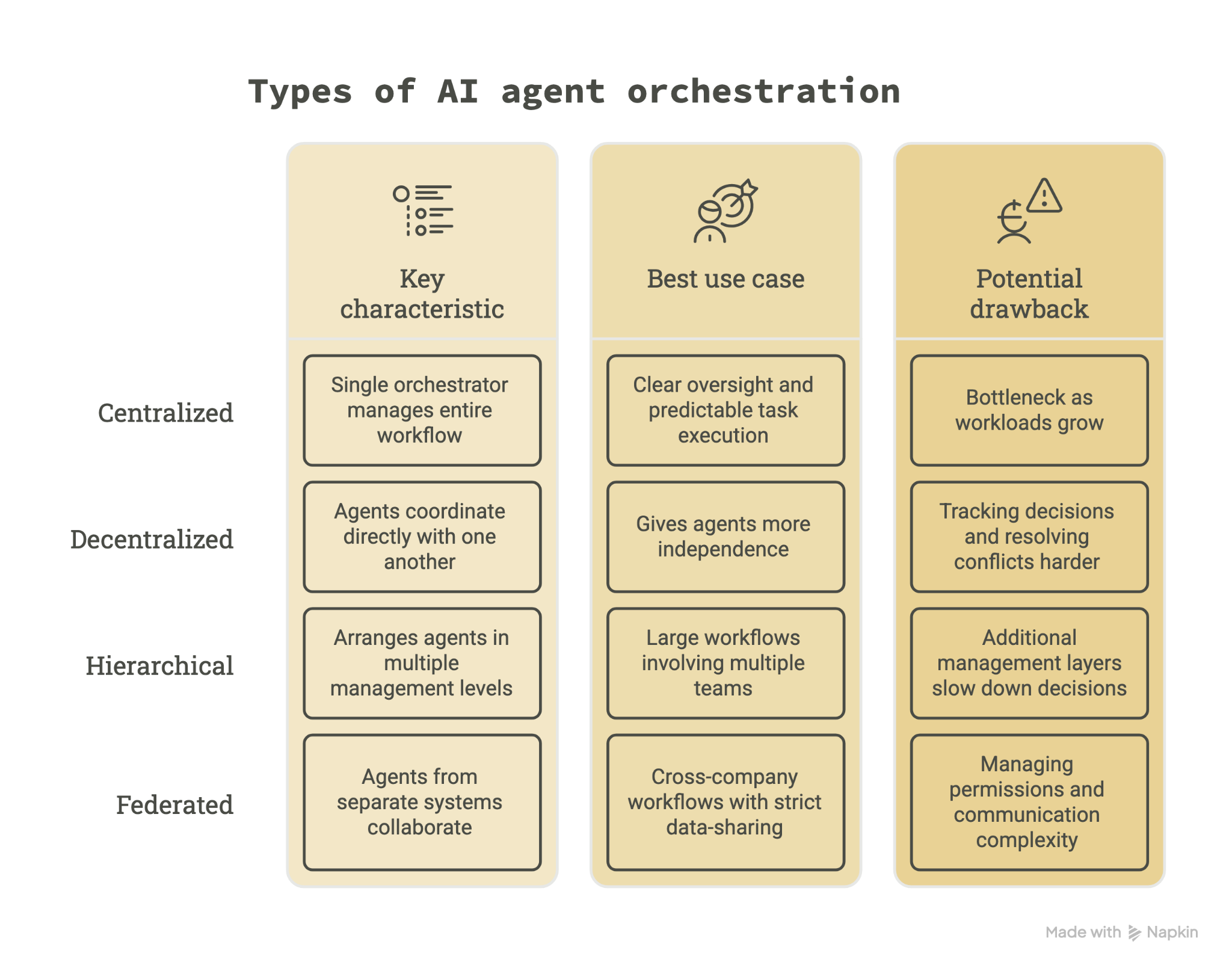
Centralized, decentralized, hierarchical, and federated are the popular AI agent orchestration methods. Let’s see how they differ in assigning tasks and coordinating agents:
Centralized orchestration
A single orchestrator manages the entire workflow. It assigns tasks to specialist agents, tracks their progress, and decides what happens next.
Centralized orchestration works well when businesses need clear oversight and predictable task execution. However, the central orchestrator can become a bottleneck as workloads grow.
Decentralized orchestration
In decentralized orchestration, agents coordinate directly with one another instead of relying on a central controller.
For example, a support agent might contact a billing agent for payment information and then coordinate with another agent to resolve a customer's issue.
This approach gives agents more independence and avoids relying on one controller. With this approach, tracking decisions and resolving conflicts can become harder.
Hierarchical orchestration
Hierarchical orchestration arranges agents in multiple management levels. A lead orchestrator delegates work to smaller groups, each managed by another agent.
For example, an e-commerce company might have separate lead agents for sales, support, and billing. Each coordinates specialist agents within its department.
This works well for large workflows involving multiple teams. The drawback is that additional management layers can slow down decisions.
Federated orchestration
Federated orchestration allows agents from separate systems or organizations to collaborate while retaining control over their own data and operations.
For example, a retailer's support agent could coordinate with a shipping company's agent to investigate a missing delivery without giving either organization unrestricted access to the other's systems.
This approach suits cross-company workflows with strict data-sharing requirements. However, managing permissions and communication between independent systems adds complexity.
Common AI agent orchestration patterns include sequential execution, parallel processing, and agent handoffs. These patterns determine how tasks move between agents.
AI agent orchestration vs traditional workflow automation
Traditional workflow automation follows predefined steps and rules, while AI agent orchestration coordinates agents that can interpret information, make decisions, and adapt their actions as tasks progress.
For example, a traditional refund workflow might check the purchase date and route missing information to a human. An orchestrated system could assign another agent to retrieve the missing invoice before continuing.
Here's how they compare:
Both approaches can work together. Businesses can use fixed rules for approvals and payments while agents handle tasks that require interpretation.
Benefits of AI agent orchestration
Coordinating specialist agents can help businesses manage tasks that would otherwise require several tools or manual handoffs. The main benefits include:
- Better task delegation: Assign research, data retrieval, and decision-making to agents suited to each task instead of relying on one agent for everything.
- More flexibility: Agents can respond to missing information, unexpected requests, or changing conditions without following a rigid sequence.
- Fewer manual handoffs: Shared context lets agents pass findings to one another without employees repeatedly transferring information.
- Easier workflow expansion: Businesses can add specialist agents as their processes grow without rebuilding every part of the system.
These benefits depend on how well the agents are coordinated. Adding more agents can also create problems.
{{templates}}
Challenges of AI agent orchestration
Multi-agent systems introduce dependencies, communication issues, and additional oversight requirements. Here are five challenges to consider:
- Agent dependencies: Some agents need another agent's output before starting their work. Poor task sequencing can create delays or incorrect decisions. Set clear prerequisites for dependent tasks.
- Coordination failures: Agents may duplicate work, miss handoffs, or produce conflicting results. Assign clear responsibilities and define how the system handles disagreements.
- State consistency: Agents working with outdated information may make conflicting decisions. Use shared workflow state and track updates as tasks progress.
- Debugging difficulties: When several agents contribute to one outcome, identifying the source of an error becomes harder. Log agent actions, tool calls, and handoffs to trace failures.
- Governance and security: Agents may access sensitive information or perform actions with business consequences. Restrict permissions, monitor activity, and require human approval for high-risk decisions.
To reduce these risks, you need a thorough understanding of AI agent architecture. Start with a small number of agents and clear responsibilities. Add complexity only when the workflow needs it.
Popular AI agent orchestration tools and frameworks
AI agent orchestration tools help you build, connect, and coordinate multiple agents. Some offer developer frameworks with detailed control, while others provide visual builders or enterprise management features.
Here are the main options worth knowing:
Developer frameworks
These AI agent orchestration frameworks give developers control over agent behavior, task execution, and communication. Popular picks include:
- LangGraph: Builds stateful, graph-based workflows with agent handoffs, memory, and human approval steps.
- CrewAI: Organizes specialist agents into teams that complete tasks through sequential or hierarchical processes.
- Pydantic AI: Supports multi-agent workflows with structured outputs, validation, and typed dependencies.
- LlamaIndex: Supports multi-agent workflows that can include document retrieval (RAG) pipelines and other services.
- Microsoft Agent Framework: Combines agent development with graph-based orchestration. It's the successor to AutoGen and Semantic Kernel.
- OpenAI Agents SDK: Supports agent handoffs, tool use, guardrails, and tracing. It replaces the earlier OpenAI Swarm project.
Enterprise platforms
These platforms focus on coordinating agents across business systems while providing oversight and governance. Businesses mainly use:
- IBM watsonx Orchestrate: Coordinates agents, tools, and business workflows with centralized monitoring and governance.
- UiPath Maestro: Coordinates AI agents, automation robots, and employees across enterprise processes.
No-code options
- n8n: Uses a visual workflow builder to connect AI agents, external tools, and business applications. It's useful for teams that prefer configuring workflows over building them entirely through code.
Two communication standards also matter. MCP connects agents to external tools and data sources, while A2A helps independent agents communicate across different systems.
Both support agent orchestration, but neither replaces the orchestration framework itself.
{{cta}}
Try Lindy if AI agent orchestration is too technical
You don't need to build a complex multi-agent system to start delegating work to AI.
Lindy works as an AI teammate you can assign tasks to directly from Slack. It can retrieve information, update records, and complete tasks across your connected tools. You can also teach it your processes using Skills, automate recurring work with Routines, or choose a ready-to-use role through Hire Lindy.
Try Lindy for free and expand as your needs grow.
Frequently asked questions
What is the best way to orchestrate AI agents?
To orchestrate AI agents, start with a clear goal, a small number of specialist agents, and defined responsibilities. Use shared workflow state to track progress, establish rules for task handoffs, and add human approval for sensitive actions.
Begin with centralized orchestration if you need straightforward oversight.
What are the best AI agent orchestration tools?
The best tools depend on your technical requirements. LangGraph offers detailed workflow control, CrewAI supports teams of specialist agents, and OpenAI Agents SDK handles tool use and agent handoffs.
For enterprise coordination, consider IBM watsonx Orchestrate or UiPath Maestro. n8n is an option for teams that prefer no-code, visual tools.
When should you use AI agent orchestration?
Use AI agent orchestration when a task requires several specialized capabilities, shared context, or decisions that change as work progresses. For simple, predictable processes, traditional automation or a single AI agent is usually easier to manage.