
I tested a five-step system to automate lead generation, from defining buyers to checking contact data, scoring leads, and managing follow-up. No single tool did every step well, but the right order cut most of the manual work.
I used to spend hours every week researching leads, pulling company details, verifying emails, and copying contacts between tabs. In 2026, that's dead time. I tested a few tools on the same lead flow to see how much of that work I could automate.
What I found was that no single tool does everything. The best tools handled one step well, whether finding, verifying, scoring, or following up. String them together in the right order, and the manual work mostly disappears.
The five steps below are the system I landed on. The worked example uses fictional companies and people to show the logic, so you can adapt it to your own stack and target market.
Automate lead generation in 5 steps: TL;DR
- Define who you are targeting: Set buyer criteria and exclusions before you choose tools.
- Source prospects automatically: Connect one lead source and map its fields to the CRM.
- Enrich and verify the data: Add company details, check email status, and mark gaps as unknown.
- Score leads and personalize outreach: Score buyer fit first, then draft messages from verified facts for a rep to review.
- Update the CRM and manage follow-up: Assign an owner, log each response, and stop follow-ups when someone replies or opts out.
What is automated lead generation?
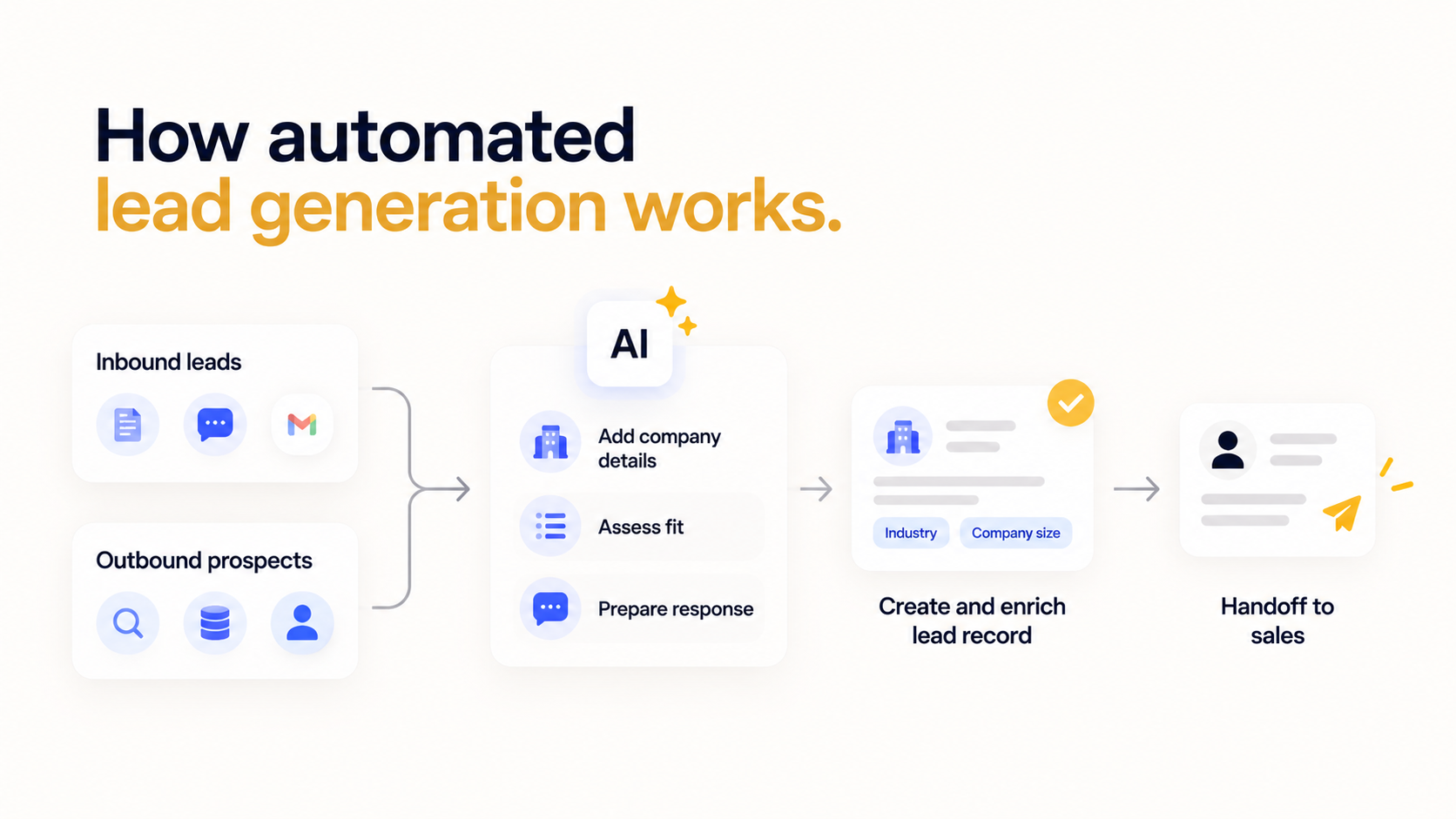
Automated lead generation uses software to handle repeatable tasks involved in finding and qualifying potential buyers. It can capture inquiries, add company details, assess buyer fit, and pass records to a salesperson. AI can help research a company or draft a relevant first message.
Inbound and outbound leads enter the process differently:
- Inbound leads arrive through forms, chat, or other channels where someone contacts the business.
- Outbound prospects come from research or a contact provider. A content download shows interest in a topic, but it does not establish that someone is ready to buy.
For example, a demo request could create a record in a customer relationship management system, or CRM. The connected tools could add the company’s industry and employee count. Rules would then assign an owner and prepare a response. If information is missing, the record would go to review.
The result depends on the tools, available data, and rules the team configures. A good setup gives the salesperson a repeatable handoff that shows who the prospect is, why the lead matters, and what happens next. It still can’t guarantee qualified buyers, accurate research, or inbox delivery.
What should a team automate?
Automate data collection, research, CRM updates, and follow-up preparation when the inputs and review rules are clear. Let a person choose markets, approve unfamiliar outreach, and handle commercial decisions.
Here is where automation helps and where a person stays in the loop:
- Data collection and CRM updates: Connect forms or approved data sources to consistent CRM fields. Configure duplicate checks and record the source. A rep should be able to see where a lead came from and whether an existing record was updated.
- Research and scoring: Add available company details and apply the team’s qualification rules. Keep the source and date beside important findings. Missing information should trigger review instead of inventing a value or automatically rejecting a genuine inquiry.
- Drafts and reminders: Prepare messages from verified facts and create follow-up tasks. Start with human review of outgoing messages. If you later let the tools send on their own, first set rules for who can be contacted, what content is approved, and when messages stop.
- Human decisions: Assign market strategy, unusual requests, negotiations, and account relationships to people. An assistant can prepare context for a call. The rep still decides how to address a buyer’s concern or commit on the company’s behalf.
Step 1: Define who you are targeting
An ideal customer profile, or ICP, describes companies the team can serve and the people involved in buying. Use facts that research can check, such as industry, employee range, and location.
Distinguish hard requirements from preferences. A company outside the service area may be ineligible, while a recent hiring announcement might simply raise its priority. Keep current customers and active opportunities out of new-customer campaigns. Review the criteria against sales results instead of assuming the first version will predict who buys.
| Set up once | Runs automatically | Passes forward |
|---|---|---|
| Define buyer criteria, exclusions, and scoring rules. | Nothing yet. A person defines the rules. | Buyer profile and filters for sourcing. |
Step 2: Source prospects automatically
Choose a lead source that matches how buyers reach the business. Inbound leads may come through demo forms or chat. Outbound prospects need a permitted data source and the buyer filters from Step 1. Keep the person’s original request visible so the response stays relevant. For outbound sourcing, Apollo is one example of a contact database you can filter against your buyer profile.
Check the exact CRM integration before relying on it. A saved search may provide alerts without exporting contacts. Sales Navigator CRM integration, for example, requires Advanced Plus. Confirm supported actions and plan restrictions before paying for a connection.
| Set up once | Runs automatically | Passes forward |
|---|---|---|
| Connect the source. Map fields, exclusions, and refresh timing. | Imports eligible records when triggered. | Contact details, source, and missing fields for verification. |
Step 3: Enrich and verify the data
Data enrichment adds context such as industry, headcount, and job title. Collect details that affect qualification, and keep a source and date beside important findings. A provider’s estimate should not overwrite information a rep recently confirmed with the buyer.
Email verification assesses whether an address is likely to be usable. Hunter’s Email Verifier is one tool for this check; review its status before adding an address to outreach. Suppress invalid addresses and mark missing facts as unknown rather than guessing. A positive result does not establish permission to send marketing or guarantee inbox delivery.
| Set up once | Runs automatically | Passes forward |
|---|---|---|
| Choose enrichment fields and rules for uncertain data. | Adds available details and checks email status. | Checked records for scoring; uncertain records for review. |
Step 4: Score leads and personalize outreach
Assess buyer fit before awarding points for interest or recent events. A hiring announcement can provide context, but it does not prove budget or buying intent. Keep the reason behind each score visible, and give demo requests a response task even when research is incomplete.
Base personalized outreach on verified facts. For inbound leads, start with what the person asked for. Avoid invented pain points or results, and have a rep review messages during the pilot. For example, ask Lindy to apply your scoring rules to sourced company details and draft a response for review.
A roundup of AI outreach tools can help you compare options for drafting and sending.
| Set up once | Runs automatically | Passes forward |
|---|---|---|
| Set scoring weights, priority thresholds, and drafting instructions. | Scores eligible leads and prepares message drafts. | Priority level, supporting research, and a draft for review. |
Step 5: Update the CRM and manage follow-up
Use duplicate checks so repeat inquiries update the correct contact. Set response deadlines around staffed hours and name a backup rep. A high-scoring contact becomes an opportunity only when the team’s sales criteria are met.
Configure follow-up stop rules for replies, opt-outs, bookings, and active conversations. Test how the tools detect each event, including replies in another channel. Keep the sent message and next action visible so a rep can continue the conversation without reconstructing its history.
| Set up once | Runs automatically | Passes forward |
|---|---|---|
| Define ownership, approvals, alerts, and stop conditions. | Updates records, assigns tasks, and sends authorized messages and alerts. | An assigned lead with a logged response and next action. |
A worked example from form submission to sales alert
A demo request can move from form submission to an approved reply, a CRM update, and a team alert through one connected process. This fictional example uses Rampwise, a sales training company, and shows a lead that meets its campaign criteria. The timings and score are illustrative settings.
In this fictional example, Marcus Lee is a VP of Sales at Fernway, a US software company with 120 employees. He requests a demo and says his team is onboarding three reps. The form connection assigns the inquiry to Omar, the rep responsible for that account.
Here is the complete handoff:
- Capture the request: The form connection searches the CRM for Marcus’s work email. It updates the existing contact or creates one if none exists, then saves the request, source, and submission time. Omar receives a response task. The inquiry does not automatically subscribe Marcus to marketing.
- Research and check the data: The enrichment connection adds Fernway’s industry and headcount. Research finds a current sales vacancy on the company’s careers page. The record stores the source and date of that finding. The email check returns a usable address; uncertain results would require review before sending.
- Score the lead: Fernway passes the campaign exclusions and earns 25 points for industry, 25 for company size, 15 for US headquarters, and 35 for the recent sales vacancy. Its total of 100 places it in the example’s high-priority tier. Marcus’s demo request also requires a direct response.
- Prepare and send the reply: Lindy drafts, “Hi Marcus, thanks for requesting a demo. You mentioned onboarding three reps. Would you like the session to focus on their first month of training?” Omar reviews the draft and sends it.
- Log the response: The CRM connection records the sent message and its timestamp on Marcus’s contact record. It keeps Omar as the owner and adds the next follow-up task. The record stays an inquiry until the team’s opportunity criteria are met; the high score alone does not create a deal.
- Alert the team: Lindy posts an alert in the team’s sales channel in Slack with the request, score explanation, sent-response status, and CRM link. If Marcus replies or books, the configured stop rules cancel pending prospecting follow-ups. Omar continues the conversation with the context already recorded.
If Fernway had 240 employees, it would fall outside this campaign’s range. The inquiry would still receive a response task, but a rep would review the exception before any campaign enrollment.
What should happen in the first hour after a demo request?
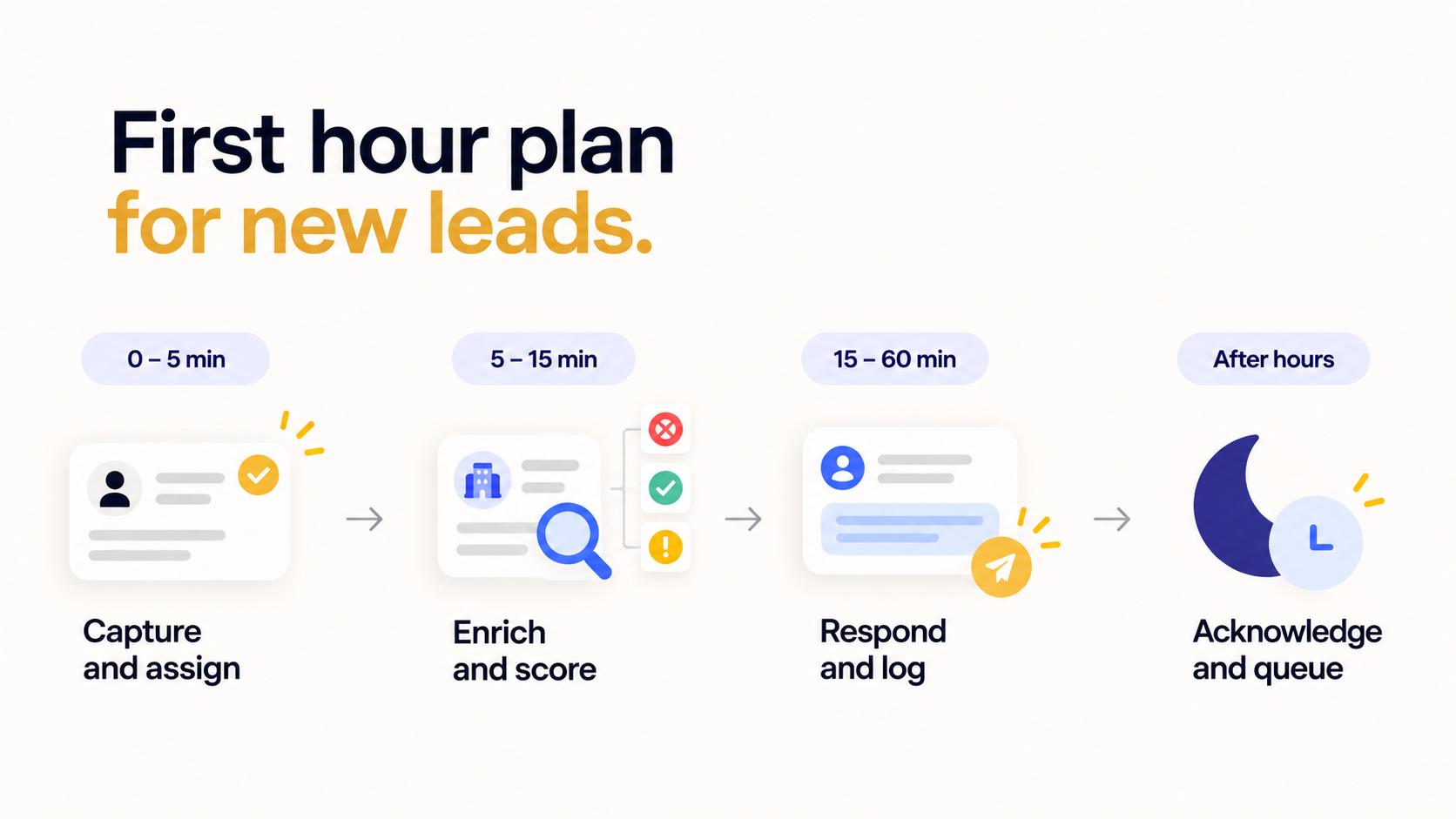
Use scoring to prioritize follow-up, then aim to give genuine demo requests a useful response within the first business hour. A missing score should not block acknowledgment of an inquiry. Set the response target around staffed hours and route overdue tasks to a backup owner. The schedule below is a suggested operating plan.
Use this first-hour plan:
- Minutes 0 to 5: Capture the request, check for an existing contact, and assign an owner. Send an approved acknowledgment if that is part of the setup. Confirm what the person requested and when a rep will respond. In your reports, count this auto-reply separately from the rep’s real answer.
- Minutes 5 to 15: Add available company details and check the contact information. Apply hard exclusions before calculating priority. Give explicit demo requests a response task even when enrichment is incomplete. Alert the owner to missing data or an account exception rather than letting the inquiry wait silently.
- Minutes 15 to 60: Have the owner review the research and send a relevant answer, a useful question, or suitable meeting options. Log the response and next action. If the owner cannot meet the target, route the task to the backup rep. Another generic acknowledgment does not count as that useful response.
- After hours: Use an approved acknowledgment that states the next staffed response window and time zone. Queue the task for that window, or route it to an on-call rep if coverage exists. Keep the same duplicate checks and contact-permission rules. Do not promise an immediate human response without staffing it.
How should a team test and measure the setup?
Run a small pilot with a valid inquiry, a duplicate, an incomplete record, and an opted-out contact. Check that each reaches the correct owner or review queue and that excluded contacts receive no campaign emails.
Track useful response times, positive replies, and qualified meetings alongside duplicates, bounces, and research corrections. Assign someone to review failed runs. Increase volume only after the handoffs work reliably and the results justify the cost.
Is automated lead generation legal?
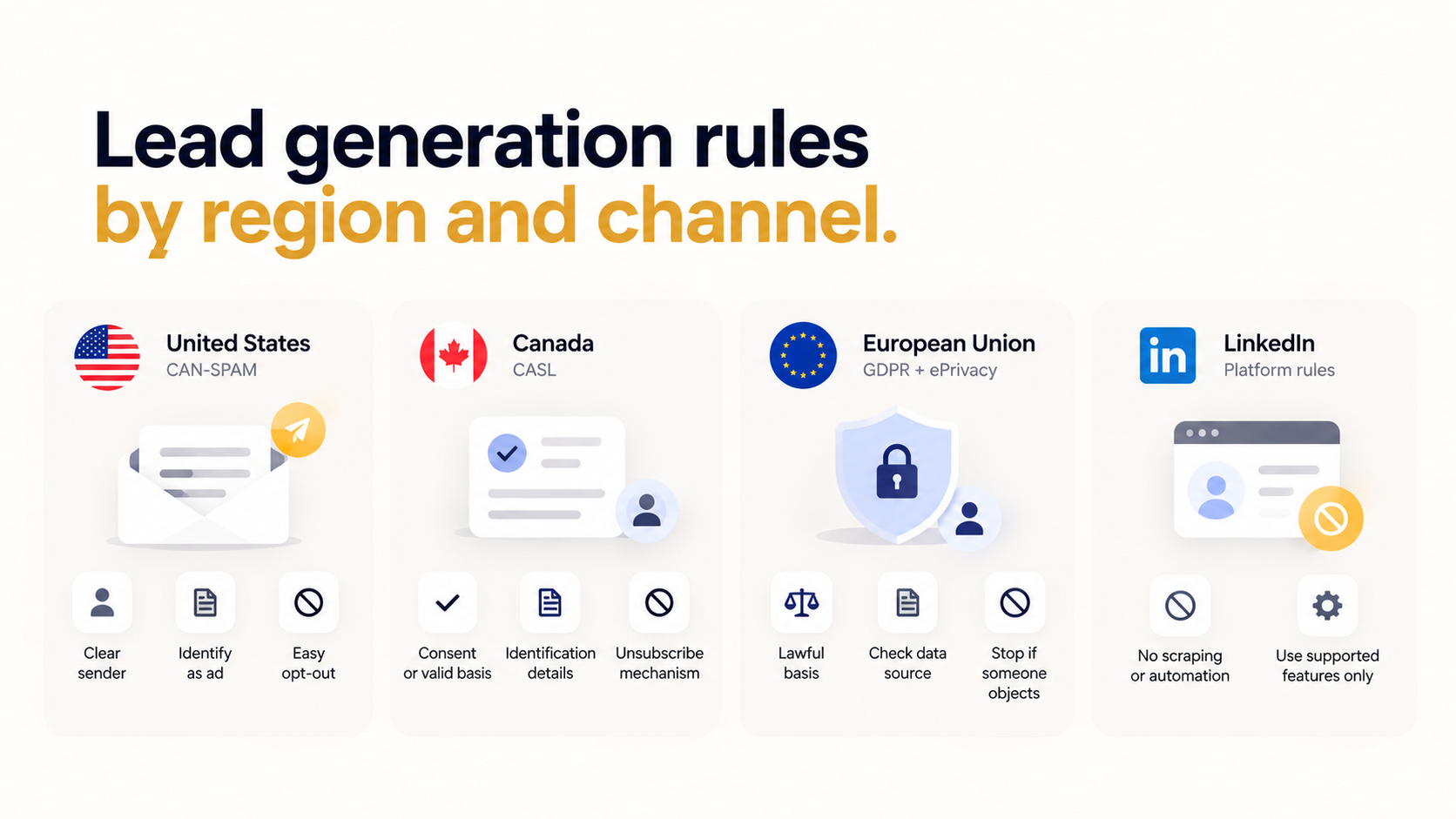
Yes, automated lead generation can be lawful, but the rules depend on the data, channel, and countries involved. A public email address or a high lead score does not provide blanket permission to contact someone. Confirm the requirements for the campaign before enabling sends.
Email requirements differ by market:
- United States: CAN-SPAM covers commercial B2B email as well as consumer email. The FTC requires accurate sender details and subject lines, identification as advertising, a valid postal address, and a clear opt-out method. Opt-out requests must be honored within 10 business days.
- Canada: CASL generally requires express consent or a valid basis for implied consent, identification details, and an unsubscribe mechanism. A published work address supports implied consent only under specific conditions. Teams relying on that basis need evidence that the message is relevant to the recipient’s business role.
- European Union: Personal-data processing needs a lawful basis. Email marketing must also comply with applicable ePrivacy rules. The European Commission says organizations using third-party contact lists must check how the data was obtained, provide the required information, and stop direct marketing when someone objects.
LinkedIn separately prohibits unauthorized scraping and automated website activity. Use supported product features and permitted integrations. Access to visible profile information does not authorize a scraping tool.
Keep the source of each contact, any required consent evidence, and opt-out status with the record. Confirm local requirements with a qualified adviser when the campaign’s legal basis is unclear.
How to choose tools to automate lead generation?
Choose lead-generation automation tools based on your lead sources, CRM, and follow-up needs. Check which tasks each integration supports, what the required plan costs, and who will maintain the setup. Start with one source and test the full handoff before adding tools. Compare qualified conversations and time saved against the total cost.
A roundup of AI lead generation tools can help build a shortlist. Confirm current capabilities in each provider’s documentation before buying. The team should be able to explain how a failed run is found and fixed.
How to use Lindy for lead generation?
Use Lindy to automate lead generation by asking the AI assistant to research prospects, apply buyer criteria, prepare outreach, and update connected CRM records. Start with one inquiry or a small shortlist. Give Lindy the qualification rules and ask for sourced findings and drafts the team can review.
Follow these steps to get started:
- Connect the relevant accounts: Open Integrations in Lindy and connect the inbox and CRM needed for the task. Google and Microsoft email accounts are supported. Confirm which account Lindy will use and what it can access. Begin with the accounts required to handle one lead, then test the connection.
- Teach the qualification rules: Ask Lindy to save the buyer profile, exclusions, and scoring instructions as a skill. Include what counts as a match and when to ask a person. For example, require sources for company size and hiring signals, and mark missing information as unknown rather than guessing.
- Ask for a researched shortlist: Give Lindy a specific request, such as “Research these five companies against our buyer profile. Show the sources and flag any missing information.” Lindy’s documented sales use cases include lead enrichment and follow-ups. Review the results before treating a company as qualified or approving contact.
- Prepare the first response: Ask Lindy to draft a reply using the prospect’s request and verified company details. For incoming email leads, the personal Email drafting routine saves replies to the connected inbox’s drafts folder. The rep reviews, edits, and sends them. Keep that personal routine separate from any team-wide follow-up process.
- Keep the CRM current: Once the relevant CRM is connected, ask Lindy to record the inquiry and next action using the available integration actions. For example, ask it to log a call’s outcome and update the next step in HubSpot. Check the record after the first task to confirm the correct contact and fields.
- Schedule useful follow-up checks: Ask Lindy for a routine such as “Every weekday at 9, summarize inquiries still waiting for a response and send me the list.” Specify when it runs and where the results go. Workspace routines require an admin.
In shared Slack threads, you can set an integration’s guardrail to Require approval, so Lindy asks before it writes to a connected tool. Guardrails don’t apply in the web app chat, Slack DMs with Lindy, or iMessage and SMS. Give draft-only instructions when preparing outreach there, and review the result before asking Lindy to send or change a record.
Frequently asked questions
Can AI automate the whole lead generation process?
AI can automate much of the process, including researching companies, checking fit, and drafting messages. Connected tools can capture records and assign follow-up tasks. A person still needs to define the target market, check uncertain findings, and approve decisions that require judgment. Test each handoff before allowing the setup to handle more leads.
What is the difference between inbound and outbound lead generation?
Inbound lead generation starts when someone contacts a business through a form, chat, or another channel, whereas outbound lead generation starts when the business identifies and approaches potential buyers. Both can use enrichment, qualification, and CRM routing. The contact source affects the appropriate first response and the permission checks needed before further outreach.
What is the biggest mistake when automating lead generation?
A common mistake is sending messages before defining who belongs in the campaign and who must be excluded. Automation can repeat a poor targeting decision across a large list. Write the customer profile first, distinguish required conditions from scoring preferences, and check contact permissions before enrolling anyone in an outreach sequence.
How much does lead generation automation cost?
The cost depends on the CRM, contact data, enrichment, and sending tools required. Some features need a higher subscription or an assigned paid seat. Compare a small pilot’s total bill with its usable leads and qualified conversations. Include the time spent reviewing drafts and correcting records when judging whether the setup saves work.
Can I use Lindy for automating lead generation?
Yes, Lindy helps automate lead generation through prospect research, qualification instructions, outreach drafts, and connected CRM tasks. Ask the AI assistant for a specific outcome and review its findings. Save repeatable instructions as a skill and use routines for scheduled checks. The available actions depend on the accounts and tools connected.
About the editorial team

Jack is GM of New Verticals at Lindy, where he’s focused on exploring how AI agents can be applied to new industries and niche problems alike.

Flo Crivello is the founder and CEO of Lindy. Before that, he founded Teamflow and was a product manager at Uber. He writes about technology, startups, and the future of work on his blog.
