Chatbase Review 2026: Features, Pros, Cons, and Pricing
Jack reviewed Chatbase, breaking down its features, pricing, and real limits alongside genuine user reviews to pinpoint when the AI chatbot builder fits a team.


People love Chatbase in 2026 for quick FAQ bots, yet complain about workflow limits and pricing jumps. I tested the platform across support use cases to see where it works and where it doesn't.
People love Chatbase in 2026 because its customer-facing AI agents now answer customer questions, take actions, follow procedures, and pass conversations to a human. Pricing and plan limits are the main things to watch as usage grows.
Chatbase review: TL;DR
What is Chatbase?
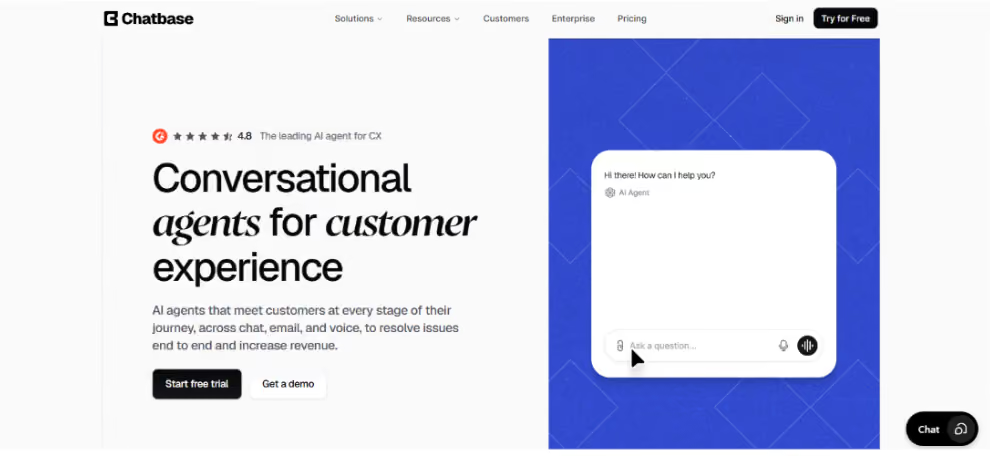
Chatbase is a platform for building and running customer-facing AI agents. Teams use it to handle customer questions, resolve support requests, take actions in connected systems, follow structured procedures, and bring in a human when needed.
Agents can work across channels such as web chat, email, WhatsApp, social messaging, and voice. Chatbase also includes a built-in Helpdesk, testing, analytics, and tools for improving agent performance over time.
The product is purpose-built for customer-facing workflows, and that is both its strength and its ceiling. If you want one AI system that handles the customer conversation and the work that follows it across your business, Lindy is the better choice.
Chatbase features
Chatbase is built around the full customer-facing support workflow. Agents can use your support knowledge, take actions, follow procedures, work across channels, and pass conversations to a human when needed.
Here are the features that matter most when you use Chatbase for customer-facing AI support.
Train the agent on your support knowledge
You start by connecting the information Chatbase should use when answering customers. That can include website pages, files, text, Q&As, and, on the Pro plan, past support tickets from Zendesk or Salesforce.
Better source material usually leads to better answers. Chatbase can automatically retrain sources as they change and flag gaps or conflicting information that may be hurting responses, which makes it easier to keep the agent’s knowledge accurate over time.
Deploy the agent across support channels
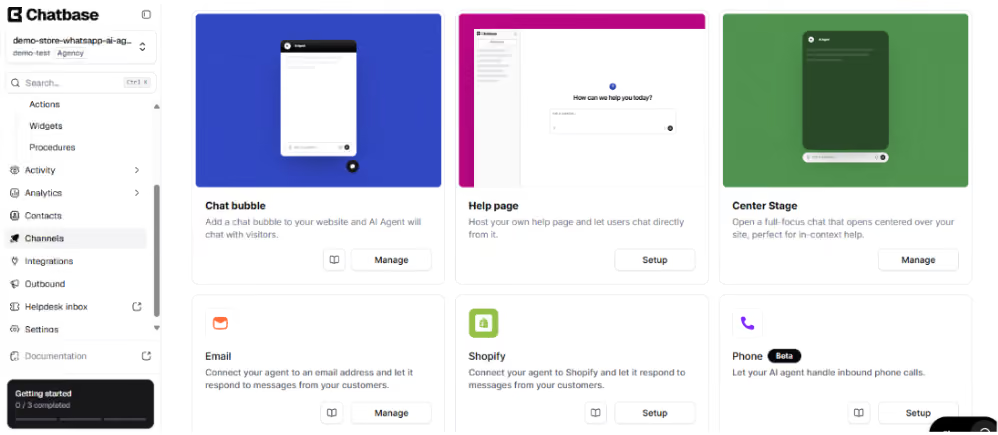
You can deploy Chatbase across web chat, email, WhatsApp, Slack, Instagram, Facebook Messenger, and voice, depending on the channels your customers use.
In practice, that means customers can reach the same support agent without being pushed back to your website every time they need help.
Control how the agent responds
You can set instructions for how the agent should answer, what it should avoid, and how it should handle missing information. That part is easy to set up, and you can give voice conversations their own instructions too.
The useful part is consistency. You can keep the agent brief, tell it when to ask a follow-up question, or set clearer rules for when it should stop and hand the issue off. It will not fix a bad support policy, but it gives you more control over how that policy is followed.
Take actions and follow procedures
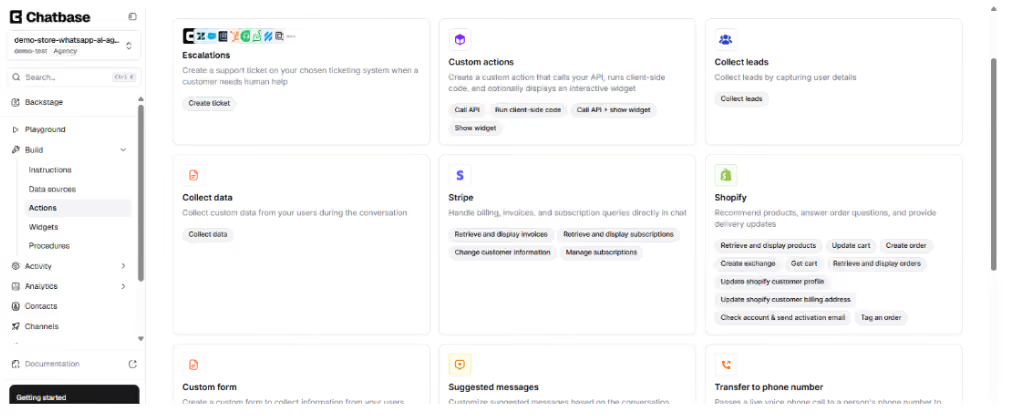
Actions let the agent collect information, create tickets, look up data, or call your own APIs when a customer needs something done.
Procedures add structure when a request needs several steps. You can define the process the agent should follow instead of relying on one prompt to handle everything. The number of Actions and Procedures you can use still depends on your plan.
Let human agents take over
Chatbase can pass a customer conversation to a human when the AI should not continue. That can happen inside Chatbase or through connected support tools such as Zendesk, Salesforce, Gorgias, and Help Scout.
Its built-in Helpdesk gives teams a place to take over conversations, route them to the right person, use saved views and statuses, and manage human support alongside the AI.
Review conversations and spot what needs fixing
You can review conversation history to see what customers ask, where the agent struggles, and which issues keep coming up. Chatbase also has analytics for its Helpdesk, so teams can track support activity without relying only on individual chat logs.
This is the part I would check regularly once the agent is live. Chat logs can show you the actual questions behind repeat support issues, while tools like Suggestions and Backstage can help surface gaps or problems worth fixing.
Connect Chatbase to your own systems
For more custom setups, Chatbase gives developers APIs and Custom Actions to connect the agent with their own systems. That can be useful when the agent needs to pull account data, trigger something in your product, or send information back to another tool.
I would treat this as an option for teams with more technical support flows, not something every team needs on day one. API V2 supports deeper integrations, while the Sources API lets teams manage the agent’s knowledge programmatically instead of updating everything by hand.
Limitations to note
- It is purpose-built for customer-facing AI agents: That focus works well for customer service and support workflows. If you want one AI system that also automates work across sales, operations, meetings, and other internal teams, that is not what Chatbase is built for.
- Actions and Procedures have plan limits: You can build structured support workflows with Actions and Procedures, but the number available depends on your plan.
- Usage and features depend on the plan: Chatbase uses message credits on its self-serve plans, and allowances increase as you move up the tiers. Hobby includes 700 monthly credits, while Enterprise offers more flexible billing options.
- Your support knowledge still affects answer quality: Outdated or conflicting source information can still affect responses. Auto-resync and Suggestions help keep the knowledge base current, but the underlying information still needs to be accurate.
Chatbase reviews: what real users are saying
Recent user feedback highlights Chatbase’s easy setup, simple interface, and ability to fit into customer support workflows.
Pros
- Easy to set up and manage: Chatbase remains straightforward to get running. Users say the dashboard is easy to manage, even when working with multiple agents, and Suggestions can help spot gaps in the knowledge base.
- Clean and simple UI: The product is still approachable for non-technical teams, with users rating it highly for ease of use. Setting up sources and making changes does not require much technical work.
- Quick to start handling support: Users report being able to get an agent running and handling support tickets without a long implementation process.
Cons
- It runs out of room past simple support: Chatbase handles knowledge-based answers well, and Actions and Procedures add structure inside a support conversation. What they are not built to do is carry a request onward into your other business tools.
- Costs can rise with usage: Credit-based pricing is still something to watch as support volume grows. Users have raised concerns about usage costs becoming harder to predict once more conversations are running through the agent.
- Your knowledge still needs upkeep: Chatbase has added tools to help keep sources current, but the underlying content still matters. Users report answers drifting outside the source material when the knowledge base is thin.
My personal take on Chatbase
Chatbase makes the most sense when the job is customer-facing support. You can ground the agent in your support knowledge, connect it to customer data, and use Actions and Procedures when a request needs something done instead of just answered.
The setup stays fairly straightforward even as you add more to it. An agent can look up information, trigger actions, follow a defined process, and pass the customer to a human when needed. The built-in Helpdesk also gives human agents a place to take over and manage those conversations.
The question I would ask is what happens after the chat ends. If the answer is “nothing, the customer just needed an answer,” Chatbase does that job well. But most support requests create work somewhere else, and that is where I would pick Lindy instead. It handles the conversation and the follow-through in one system, so the request does not stall the moment it leaves the chat window.
Here are the areas I would still watch:
- Usage and plan limits: Credits, Actions, and Procedures vary by plan, so the setup you need can affect which tier makes sense.
- Knowledge quality: Auto-resync and Suggestions help, but the agent still depends on accurate source information.
- Scope: Chatbase is purpose-built for customer-facing agents. Lindy is broader when the work extends across internal teams and business operations.
Security and enterprise controls
Chatbase includes enterprise controls for teams that need more governance around customer-facing AI agents. Enterprise customers can use SSO, role-based access control, custom roles, and audit logs to control who can access or change different parts of a workspace.
On the compliance side, Chatbase supports SOC 2 Type II and GDPR. Chatbase also lists HIPAA-eligible on its Enterprise plan.
{{templates}}
Chatbase pricing
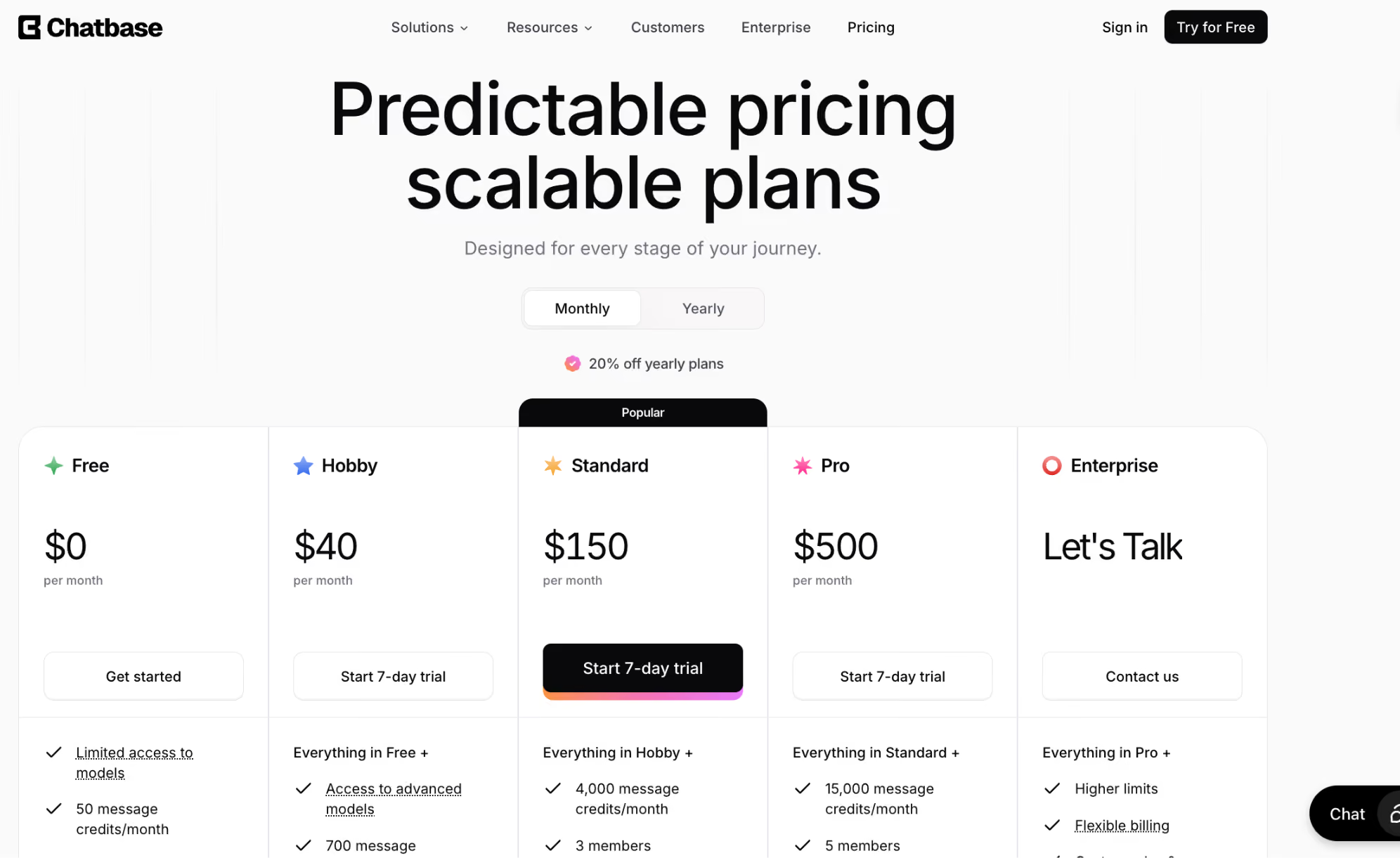
Chatbase pricing is tiered, with each plan including a set number of message credits per month. Paid plans add more usage, features, and support capabilities as you move up. As usage grows, you may need to move up a plan or add more message credits.
Note
Message credits are used when the AI agent responds, and the number of credits depends on the model used. Some models use more credits per response than others, so the same monthly allowance can cover different amounts of support depending on your setup
Pricing pros
- Easy to start without much risk: The Free plan gives you 50 message credits without requiring a paid subscription. The catch is that free agents are deleted after 14 days of inactivity, so it works better for active testing than a project you leave untouched.
- Usage is fairly easy to see upfront: Each plan tells you how many monthly message credits are included. Hobby has 700, Standard has 4,000, and Pro has 15,000, although the number of actual AI responses depends on which model you use.
- Higher plans add more than credits: Moving up also unlocks features. Standard adds Helpdesk, voice, telephony, API access, auto-resync agents, and advanced integrations, while Pro adds advanced analytics, Source Suggestions, and tickets as a source.
- You can add credits without immediately changing plans: Extra message credits are available for $40 per 1,000, and those auto-recharge credits do not expire. That can help if you only need more usage rather than everything in the next tier.
Pricing cons
- Credit usage is not always one response = one credit: Different AI models use different numbers of credits per response. That makes monthly capacity a little harder to predict if you use more expensive models.
- The jumps between plans are large: Monthly pricing goes from $40 for Hobby to $150 for Standard and $500 for Pro. If you need one feature that only appears on a higher tier, the price difference can be significant.
- The Free plan is not ideal for occasional testing: Free agents are deleted after 14 days of inactivity. If you only return to a test project every few weeks, that is worth knowing before you rely on the free tier.
Is Chatbase right for you?
Chatbase is a good fit if you:
- Need an AI customer service agent without a long setup: You can connect your support content, set instructions, and get an agent in front of customers quickly. From there, you can add Actions, Procedures, and more channels as the setup grows.
- Want the AI to handle more than questions: Chatbase can look up information, take actions, follow structured Procedures, and pass customers to a human when needed. That makes it a better fit for support flows that need an outcome, not just an answer.
- Want AI and human support in the same setup: Chatbase has its own Helpdesk and can also work with existing support tools. That is useful if you want the AI to handle the first part of a request but still give your team a clear way to step in.
You should avoid Chatbase if you:
- Want one AI tool for work across the whole business: Chatbase is focused on customer service, so you will end up buying and wiring up a second tool for everything else. Lindy runs support, sales, operations, meetings, and internal tasks from one place.
- Need every advanced feature on a lower-priced plan: Helpdesk, APIs, advanced integrations, analytics, usage limits, and other capabilities vary by tier. Check the exact features you need before choosing a plan.
- Prefer pricing that is easier to predict regardless of AI usage: Chatbase uses message credits, and different models can consume credits at different rates. If support volume changes a lot month to month, usage may take more planning.
The best Chatbase alternative: Lindy
Lindy is the best Chatbase alternative if you need AI to work across more than customer service. Chatbase is focused on customer-facing support, while Lindy is designed as a broader AI teammate that works across your company’s tools.
For support teams, Lindy can triage tickets, draft replies from past cases, route harder issues, watch escalations, track customer health, and spot recurring problems. It also connects with 1,000+ apps and MCP servers, so the same assistant can work across support and other parts of the business.
Chatbase can now take actions, follow Procedures, and pass customers to human support. Lindy makes more sense when the work needs to continue across a wider set of tools and internal processes.
In real support and ops work, Lindy can help with:
- Triaging support: Reading incoming tickets, drafting replies for repeat questions, and routing harder cases.
- Watching escalations: Keeping track of at-risk tickets and surfacing issues before an SLA is missed.
- Tracking customer health: Bringing together things like usage, tickets, NPS, renewal dates, and recent contact.
- Spotting recurring issues: Grouping tickets by root cause so teams can see patterns instead of reviewing them one by one.
Chatbase is the more specialized option when customer service is the main job. Lindy is broader when the work needs to move across support, internal tools, and other parts of the business.
Use both if: You want Chatbase focused on customer-facing support while Lindy handles broader work across your internal tools.
Choose Lindy if: You want one AI teammate that works across support and the rest of your business. You can also compare the other Chatbase alternatives before you decide.
Try Lindy free to see whether that broader approach fits your workflow.
Final verdict
Chatbase is a strong choice when customer-facing AI agents are the main job. It combines support knowledge, Actions, Procedures, multiple customer channels, human takeover, and a built-in Helpdesk in one customer service platform.
But a support request rarely ends when the customer stops typing. Lindy is our pick because it handles the conversation and the work that comes out of it, across sales, operations, meetings, and internal teams, without a second tool. Choose Chatbase if the support chat really is the whole job. Choose Lindy if it is not.
{{cta}}
FAQs
1. What is Chatbase used for?
Chatbase is an AI customer service platform for handling customer questions and support workflows. Teams can ground agents in their own knowledge, connect them to business systems, take actions, follow Procedures, and pass conversations to human support when needed.
2. Does Chatbase have a free plan?
Yes. Chatbase has a Free plan with 50 message credits per month, limited model access, and one workspace member. Free agents are deleted after 14 days of inactivity, so the plan is better suited to active testing than a project you leave unused for long periods.
3. Is Chatbase an AI agent platform?
Yes. Chatbase is purpose-built for customer-facing AI agents. Agents can use company knowledge, take actions, follow structured Procedures, work across support channels, and pass conversations to human support when needed.
4. Is Chatbase worth it?
Chatbase is worth considering if customer-facing AI support is the main job you want to automate. It combines knowledge-based answers, Actions, Procedures, human takeover, and a built-in Helpdesk. The main things to weigh are credit usage, plan limits, and the support workflows you need.
5. What is the best alternative to Chatbase?
Lindy is the best alternative if you want an AI teammate that works beyond customer service and across a wider range of business tools and workflows. Chatbase is more specialized around customer-facing support.
6. Can Chatbase replace customer support tools?
For some teams, Chatbase can handle both AI and human support in one platform through its built-in Helpdesk. It can also connect with existing support tools such as Zendesk, Freshdesk, Gorgias, Help Scout, HubSpot, and Intercom if you prefer to keep your current helpdesk.









