How to Introduce Yourself in an Email: Examples and Templates
Lindy walked through introducing yourself in an email, covering structure, subject lines, and examples for referrals, networking, and job applications.


Knowing how to introduce yourself in an email matters when you want to make a clear first impression without wasting the reader’s time. In this guide, I break down how to write one, when to send it, and what a good introduction email actually looks like.
How to introduce yourself in an email: A quick answer
A strong introduction email quickly explains who you are, why you're reaching out, and why the message is relevant to the recipient. The goal is to make the context clear early so the reader understands the purpose without having to work for it.
The strongest introduction emails are concise, specific, and easy to respond to. Clearly state who you are, the reason for your email, any relevant context, and wrap up with a simple next step.
When to introduce yourself in an email
Introduction emails work best when there is a clear reason to connect. In most professional situations, the email gives the other person quick context: who you are, why you’re reaching out, and what the conversation is about.
You might introduce yourself by email when:
- You are reaching out after a referral from a mutual contact
- You are starting a relationship with a new vendor or supplier
- You are contacting a recruiter or hiring manager about a role
- You are reaching out to a client or partner as a new point of contact
- You are joining a new team and want colleagues to understand your role
- You want to introduce yourself to a senior leader for visibility, advice, or alignment
- You are following up after a networking event and want to continue the conversation
How to structure an introduction email
Imagine you meet someone briefly at a conference and they email you the next day. The easiest emails to respond to are the ones that quickly remind you who they are, mention where you met, and explain why they’re following up.
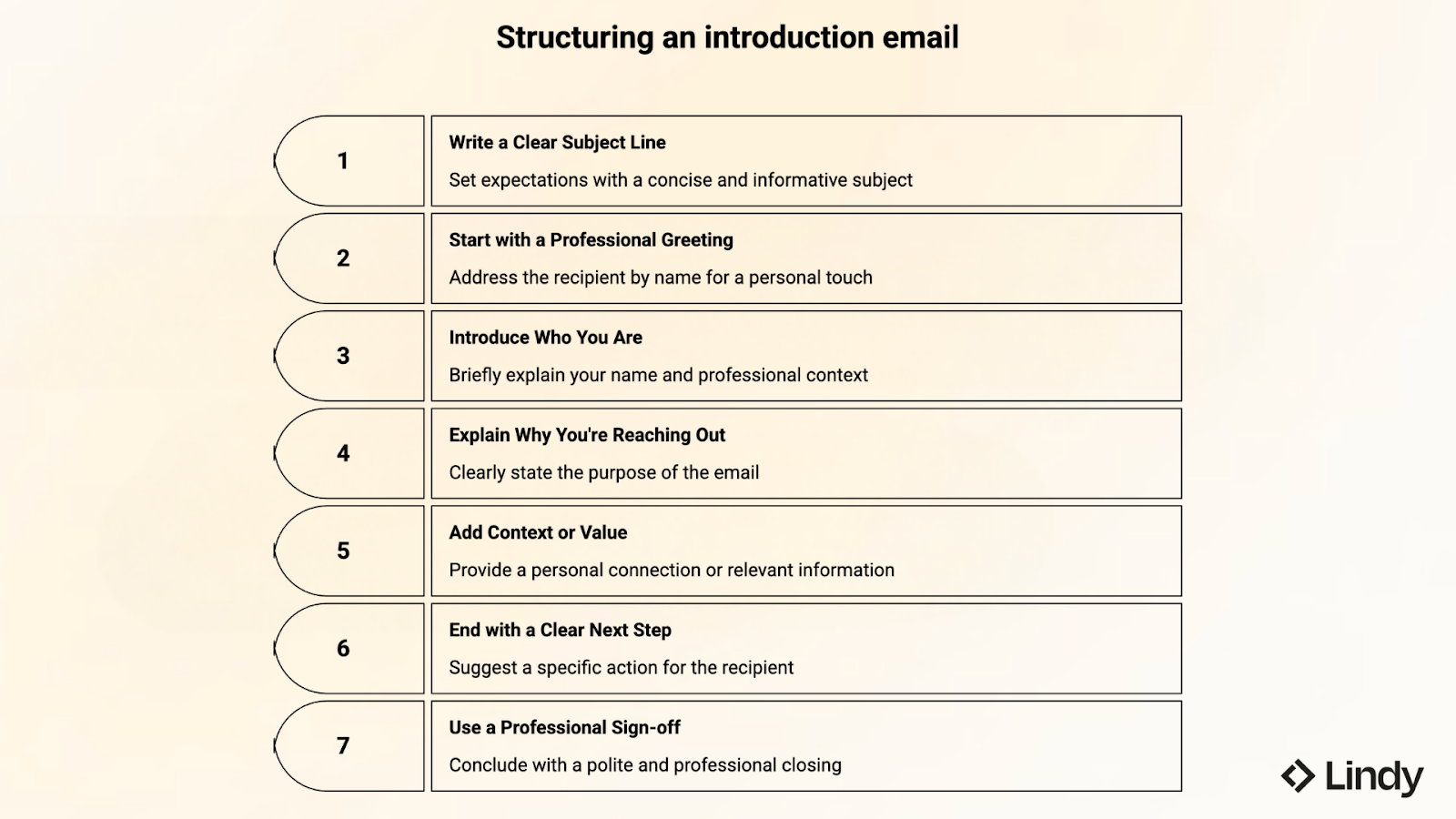
Here’s a simple structure you can follow the next time you need to introduce yourself by email:
1. Write a clear subject line
The subject line sets expectations before the email is even opened. A good subject line quickly tells the reader why you are reaching out and gives enough context for them to recognize the message.
For example:
- Introduction: Maya from BrightLabs
- Referred by David Kim - introduction
- Great meeting you at the Marketing Summit
Avoid vague subjects like “Hello” or “Quick question.” They give the reader no reason to open the email.
2. Start with a professional greeting
Begin the message with a simple greeting and use the recipient’s name whenever possible. Addressing someone directly makes the email feel intentional rather than automated.
In fact, studies on workplace communication show that people are significantly more likely to respond to emails that address them by name. It signals that the message was written for them, not sent to a list.
A simple “Hi Amanda,” “Hello Rahul,” or “Dear Ms. Lopez,” usually works well. Robotic greetings like “To whom it may concern” often feel impersonal and outdated.
3. Introduce who you are
Right after the greeting, briefly explain who you are. The reader should understand the sender’s name and professional context.
One sentence is usually enough. Mention your name, role, and company if it helps provide clarity.
Example: “My name is Alex Morgan, and I’m a data analyst at BlueRiver Labs.”
Long introductions rarely help. The goal is simply to give the reader quick context.
4. Explain why you’re reaching out
Next, explain the purpose of the email. The reader should understand your reason within the first few lines.
Be direct about what you want to discuss. Whether you’re asking for advice, following up after an event, or introducing yourself as a new contact, the purpose should be clear. For post-interview outreach, learning how to write a thank you email after an interview software tools can streamline your workflow. When emailing about compensation, learn how to ask for a raise via email or use our ai to do it for you.
Example: “I’m reaching out because I’d like to learn more about your work in product analytics.”
Avoid vague lines as they hardly explain why the message matters.
5. Add context or value
A short piece of context helps the email feel thoughtful rather than random. Mention something that connects you to the recipient. This might be a referral, a shared event, a recent article they wrote, or a project related to their role.
Example: “I recently read your article on data-driven product design and found your insights on experimentation particularly helpful.”
This small detail shows that the email is thoughtful and not generic.
6. End with a clear next step
Before ending the email, suggest what should happen next. A simple request makes it easier for the recipient to respond.
Examples include:
- “Would you be open to a short call next week?”
- “I’d appreciate your thoughts if you have a moment.”
- “Let me know if this would be worth discussing further.”
Clear requests reduce friction and help the conversation move forward.
7. Use a professional sign-off
Finish the email with a simple sign-off such as “Best regards,” “Kind regards,” or “Sincerely.”
Include your full name, and when relevant, add your role and company in the signature. A clear closing helps the recipient understand who you are and how to follow up. For more details on selecting professional sign-offs, read our guide on how to close an email.
Best subject lines for introduction emails
A good subject line helps your email stand out in a crowded inbox. That’s why clarity in what you write matters more than creativity.
Below are subject line formats that professionals commonly use when introducing:
- Introduction: [Your name] from [Company]
This format works well for first-time outreach. It immediately tells the reader who you are and where you work, which builds quick credibility.
Example: Introduction: Maya from Lindy
- Great meeting you at [Event]
This is useful after conferences, meetups, or industry events. Mentioning the event helps the recipient remember the interaction.
Example: Great meeting you at SaaStr
- Referred by [Name] — introduction
If someone suggested the connection or simply referred you, mention them directly in the subject line. It provides context and makes the message feel more trusted.
Example: Referred by Daniel Chen — introduction
- New [Job title] at [Company]
This format works when you are introducing yourself after starting a new role or taking over an account.
Example: New account manager at BrightTech
- Quick introduction regarding [topic]
When the email relates to a specific topic or project, mentioning it directly helps the recipient understand why the message matters.
Example: Quick introduction regarding your hiring needs
Example subject lines you can tweak and use
To see how these patterns work in real emails, here are a few simple examples:
- Intro from [Your Name] at [Company]
- Great meeting you at [Event]
- [Referral Name] suggested I reach out
- Reaching out about [specific topic]
- Quick intro from your new [Job Title]
- Following up after [Event or meeting]
- Intro regarding [team, role, or need]
- Nice connecting on [topic]
- Introduction from [Company]
- Reaching out after our conversation at [Event]
A strong subject line stays short, clear, and specific. When the reader immediately understands the context, they’re far more likely to open the email and continue the conversation.
Introduction email examples for different situations
Introduction emails can look quite different depending on the situation, from joining a new team to reaching out after a referral or following up after a networking event.
Introduce yourself to a new team
When joining a new team, the goal is to give colleagues quick context about who you are and what you will work on. Keep the tone friendly and collaborative.
Subject: Introduction - New Product Manager
Hello everyone,
My name is Jordan Patel, and I recently joined the product team as a Product Manager. Before this, I spent four years at NovaTech working on product analytics and growth experiments for SaaS platforms.
I’m excited to get started and learn more about the projects the team is currently working on. If there’s anything I should review or anyone I should connect with first, please feel free to point me in the right direction.
Looking forward to working together.
Best,
Jordan
Introduce yourself to a client or partner
This type of introduction usually happens when you take over an account or begin working with a partner organization. The key goal is clarity about your role moving forward.
Subject: Introduction - Your new account contact
Hello Sarah,
My name is Daniel Lee, and I’m part of the client success team at BrightWorks. I’ll be your main point of contact moving forward for the Horizon account.
My role is to make sure projects stay aligned with your goals and that our teams communicate smoothly. I’d also like to understand your priorities for the upcoming quarter so we can plan accordingly.
If you’re available, it would be great to schedule a short call next week to introduce myself and discuss current priorities.
Best regards,
Daniel
Introduce yourself after a networking event
After conferences or industry events, sending a short follow-up helps keep the connection active. Referencing a specific part of the conversation makes the email feel more personal.
Subject: Great meeting you at SaaStr
Hi Alex,
It was great meeting you at SaaStr earlier this week. I enjoyed our conversation about how SaaS companies are improving onboarding experiences as they scale.
I’d love to stay in touch and continue exchanging ideas around product-led growth and customer retention.
If you’re open to it, we could also set up a short virtual coffee sometime in the next couple of weeks.
Best,
Maya
Introduce yourself for a job opportunity
When writing to a recruiter or hiring manager, keep the message focused on your background and interest in the role.
Subject: Introduction - Product Marketing Manager role
Hello Mr. Chen,
I recently came across the Product Marketing Manager opening at BrightLabs and wanted to introduce myself. I have five years of experience in SaaS marketing, with a focus on product launches, positioning, and growth campaigns.
I’ve been following your company’s expansion into AI-driven analytics and would be excited to contribute to that direction.
I’ve attached my resume for reference. Please let me know if there may be an opportunity to discuss how my background could support your team.
Kind regards,
Riya Sharma
Introduce yourself to a potential client
Cold introductions should quickly explain who you are, what your company does, and why the message is relevant to the recipient.
Subject: Introduction from BrightWorks
Hello Amanda,
My name is Daniel Lee, and I work with BrightWorks, a consulting team that helps SaaS companies improve onboarding and product adoption.
I noticed your company recently expanded its product offering, and I thought it might be useful to connect. Many teams in a similar stage focus on improving activation and early customer engagement.
If it would be helpful, I’d be glad to introduce myself and learn more about your current priorities.
Best regards,
Daniel
Introduce yourself after a referral
Referrals create a strong context for introduction emails. Mention the mutual contact early, so the recipient immediately understands why you’re reaching out.
Subject: Referred by Daniel Chen - introduction
Hi Alex,
Daniel Chen suggested I reach out to you. He mentioned that your team is exploring ways to improve customer onboarding and retention.
I work with companies on product adoption strategies, particularly for SaaS teams that are scaling quickly. Based on Daniel’s note, it sounded like our experience might be relevant to your current work.
If you’re open to a quick conversation, I’d be happy to introduce myself and learn more about your goals.
Best,
Jordan
Introduce yourself to a senior leader
When reaching out to a senior leader or executive, the email should stay concise and respectful while clearly explaining your role and context.
Subject: Introduction - Product Operations
Hello Ms. Carter,
My name is Maya Singh, and I recently joined BrightLabs as Head of Product Operations. My role focuses on supporting the rollout of several platform initiatives planned for this year.
I’ve been following the company’s recent product strategy updates and look forward to helping move these projects forward in coordination with your team.
Please let me know if there’s a convenient time to briefly introduce myself or discuss how our teams can stay aligned.
Best regards,
Maya
{{templates}}
Professional introduction email templates
Sometimes it’s easier to start with a template than a blank page. The examples below are simple structures you can copy, personalize, and send. Just adjust the details to match your situation.
Short professional introduction email template
Subject: Introduction: [Your Name] from [Company]
Hello [Name],
My name is [Your Name], and I’m a [Role] at [Company]. I’m reaching out because [clear reason for writing].
Given your work in [industry/project/topic], I thought it could be useful to connect and briefly introduce myself.
If you’re open to it, I’d be happy to schedule a quick call or continue the conversation here.
Best regards,
[Your Name]
[Job Title]
[Company]
New employee introduction email template
Subject: Introduction - New [Job Title]
Hello everyone,
My name is [Your Name], and I recently joined [Company] as a [Job Title]. Before this role, I worked at [Previous Company], focusing on [area of expertise].
I’m excited to start working with the team and learn more about the projects currently underway. Please feel free to reach out if you’d like to connect or share anything helpful for getting started.
Best wishes,
[Your Name]
Client introduction email template
Subject: Introduction - Your contact at [Company]
Hello [Client Name],
My name is [Your Name], and I’m a [Role] at [Company]. I’ll be your main point of contact moving forward for [project/account].
My role is to make sure everything stays aligned with your priorities and that communication between our teams runs smoothly. If you’re available, I’d be glad to set up a quick call to introduce myself and discuss your current goals.
Kind regards,
[Your Name]
[Job Title]
[Company]
Networking follow-up introduction template
Subject: Great meeting you at [Event]
Hi [Name],
It was great meeting you at [event or conference]. I enjoyed our conversation about [specific topic you discussed].
I’d love to stay in touch and continue exchanging ideas around [relevant topic or industry]. If it works for you, we could also schedule a short call sometime in the coming weeks.
Best,
[Your Name]
Job application introduction email template
Subject: Introduction regarding the [Job Title] role
Hello [Hiring Manager Name],
I recently came across the [Job Title] opening at [Company] and wanted to introduce myself. I have [number] years of experience in [industry or field], with a focus on [key skill or specialization].
Your team’s work in [specific area] caught my attention, and I’d welcome the chance to contribute to that direction.
I’ve attached my resume for reference and would appreciate the opportunity to discuss the role further.
Kind regards,
[Your Name]
Referral introduction email template
Subject: Referred by [Name] - introduction
Hi [Name],
[Referral Name] suggested I reach out to you. They mentioned your team is currently working on [project or focus area].
I’m a [Role] at [Company], where we help teams with [short description of what you do]. Based on what [Referral Name] shared, I thought it could be useful to connect.
If you’re open to it, I’d be happy to introduce myself and learn more about your priorities.
Best wishes,
[Your Name]
Common mistakes to avoid in self-introduction emails
After reading and writing a lot of introduction emails in my professional life, a few mistakes show up surprisingly often. They’re usually small things, but they can make the difference between getting a reply and being ignored.
So, here are some of the most common ones to avoid:
- Being too generic: Generic openings make an email feel like it was sent to dozens of people. Lines such as “just wanted to connect” or “reaching out to introduce myself” don’t explain why the message matters. The reader should understand the reason for the email almost immediately. Instead, explain why you are contacting this person and what made you reach out now.
- Writing too much background: Another common mistake is including too much personal history. Introduction emails are not the place for a full career story. Long bios, unrelated achievements, or detailed timelines make the message harder to scan. Most readers only need a quick sense of who you are. A short line about your role or expertise is usually enough.
- Sounding too stiff or too casual: Tone can make a big difference in how an email is perceived. Overly formal language can feel distant or scripted, while slang or forced friendliness can come across as unprofessional. A good introduction usually sits somewhere in the middle. The best emails sound polite, natural, and easy to read. Plus, they don’t try too hard.
- Forgetting the recipient’s perspective: Some introduction emails focus entirely on the sender. They explain what the writer wants but never show why the message might matter to the reader. It’s a bit like reading a message that sounds like, “Here’s who I am and what I need,” without any clue why you were contacted in the first place.
- Ending without a next step: Last but not least, another mistake can be finishing the email without guiding the conversation forward. Without a clear next step, the reader may not know how to respond. A short request, such as a quick call or reply, gives the conversation direction. A straightforward ask makes it much easier for someone to respond right away.
{{cta}}
Tired of writing introduction emails from scratch? Use Lindy
Introduction emails might seem simple, but getting them right still takes time, especially if you send them regularly. When you don't want to start from scratch, just text Lindy.
Lindy is your personal assistant, ready to draft your email, double-check the context, and even handle follow-ups, all in a quick conversation.
Lindy can quickly turn a short prompt into a clear introduction email. It can also pull context from past conversations, suggest a follow-up, and retrieve useful details from tools like Gmail, Slack, or your calendar so your outreach stays accurate and organized.
For example, you can ask Lindy to:
- Pull details from tools like Gmail, Slack, or your calendar
- Summarize context from past conversations before replying
- Suggest a follow-up message if someone hasn’t responded
- Draft a quick introduction email based on a meeting, referral, or event
FAQs
1. How long should an introduction email be?
An introduction email should usually stay short and focused. In most professional settings, an effective introduction email is typically between 50 and 150 words. This length gives enough space to explain who you are and why you are writing without overwhelming the reader.
2. How do you introduce yourself in an email after a referral?
To introduce yourself in an email after a referral, start by mentioning the person who referred you. This immediately gives the recipient context and explains why you are reaching out. After that, briefly explain who you are and why the referral is relevant. Ending the email with an invitation for a short conversation helps keep the message simple and professional.
3. Should you include your job title in an introduction email?
Including your job title in an introduction email is usually helpful because it provides quick context about your role. The reader can immediately understand your professional background and why you are contacting them. In most cases, mentioning your name, role, and company in one short sentence is enough to establish credibility.
4. How do you end a self-introduction email?
To end a self-introduction email, suggest a clear and simple next step. This could be a quick call, a reply to a question, or an invitation to continue the conversation. A polite sign-off, such as “Best regards” or “Kind regards,” followed by your name and role, helps the email feel complete and professional.









