


How to Retrieve Deleted Emails Across Gmail, Outlook & More


I deleted an email once, thinking it was spam, and it turned out to be a signed contract from a client who doesn't resend things. I spent the next twenty minutes clicking around Gmail like the email would just reappear if I looked hard enough. It didn't, not until I found the Trash folder I'd forgotten even existed.
That's the thing about deleted emails: most of the time, they aren't actually gone. They're just sitting in a folder you stopped checking, or waiting out a recovery window before your provider clears them for good.
I went through the recovery process across Gmail, Outlook, Apple Mail, and a few mobile setups to figure out exactly how much time you have and where to look first.
How to retrieve deleted emails: Quick answer
Check your Trash or Deleted Items folder first.
Most providers keep deleted emails there for 30 days before permanently removing them.
If the email isn't there, some providers (like Gmail) offer a short additional recovery window through account support, but once that window closes, the email is unrecoverable through normal means.
The steps look slightly different depending on where your email lives, but the logic is the same everywhere: Check Trash → Check any secondary recovery option your provider offers → Then accept that after a certain point, it's gone.
Where to look: By provider
How to recover deleted emails in Gmail
Gmail keeps deleted messages in Trash for 30 days before wiping them for good, so your first stop is always that folder.
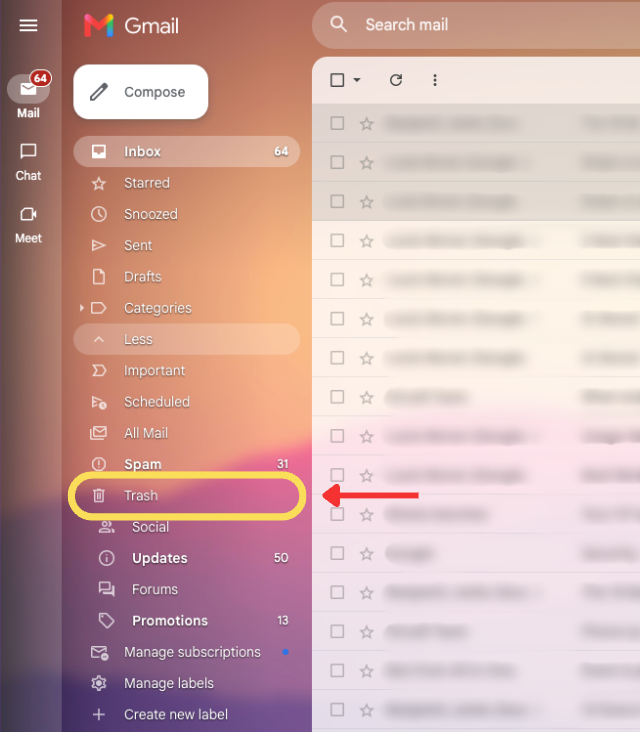
Follow these steps to recover a deleted email in Gmail:
- Open Gmail and find Trash in the left sidebar. If you don't see it listed, click "More" to expand the full folder list.
- Search or scroll to find the email. Gmail's search bar works inside Trash too, so searching by sender or subject is usually faster than scrolling.
- Select the email. Click the checkbox next to it once you've found it.
- Click "Move to Inbox." This icon sits near the top of the message list and restores the email to your inbox immediately.
- Check that it landed correctly. Confirm the email appears back in your inbox or the label it originally had.
If the email isn't in Trash, meaning it's already been permanently deleted or Trash was emptied, Gmail support can sometimes recover messages within a short window after that, but there's no guarantee, and it usually requires submitting a request through your account recovery tools.
How to recover deleted emails in Outlook
Outlook works similarly to Gmail, but it has an extra safety net most people don't know about: Recoverable Items, which holds onto emails even after they've been cleared from Deleted Items.
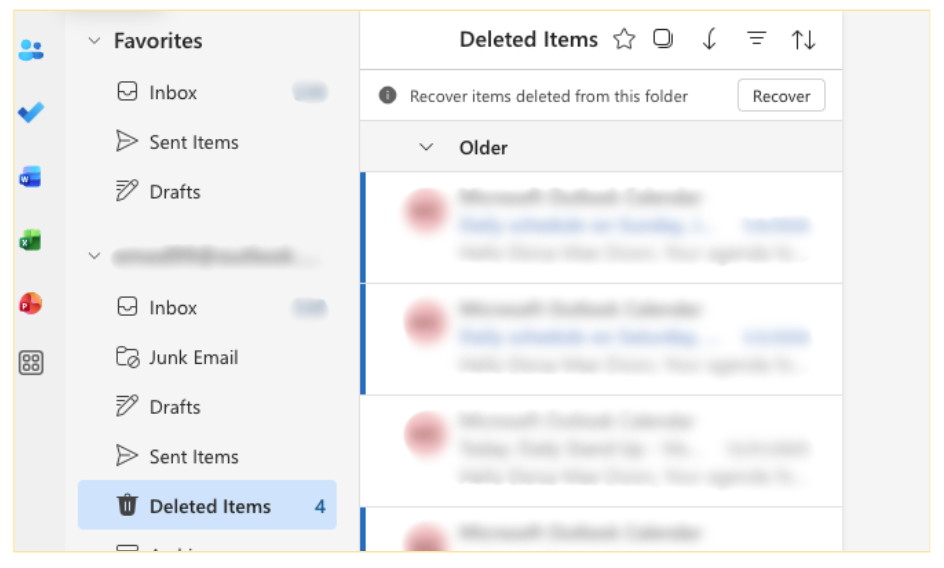
Here's how to recover a deleted email in Outlook:
- Open Deleted Items in the folder list. This is the first place to check, whether you're on desktop, web, or the new Outlook.
- Look for the email using search. Outlook's search bar searches within the folder you're in by default.
- Right-click the email and select Move, then Inbox. This restores it without needing to open it first.
- If it's not there, look for "Recover Deleted Items." This option appears under the Folder tab (desktop) or in the three-dot menu near Deleted Items (web). It surfaces emails that were removed from Deleted Items but haven't been purged from the server yet.

- Select the email and click Restore. It returns to Deleted Items, where you can move it to your inbox from there.
For example, I once cleared out my Deleted Items folder while cleaning up storage, only to realize an invoice I needed was in there. Recoverable Items still had it two weeks later, which saved me from having to ask the vendor to resend it.
How to recover deleted emails on iPhone
The Mail app on iPhone pulls from the same Trash folder as the desktop or web version of whatever email account you're using, so recovery works the same way, just on a smaller screen.
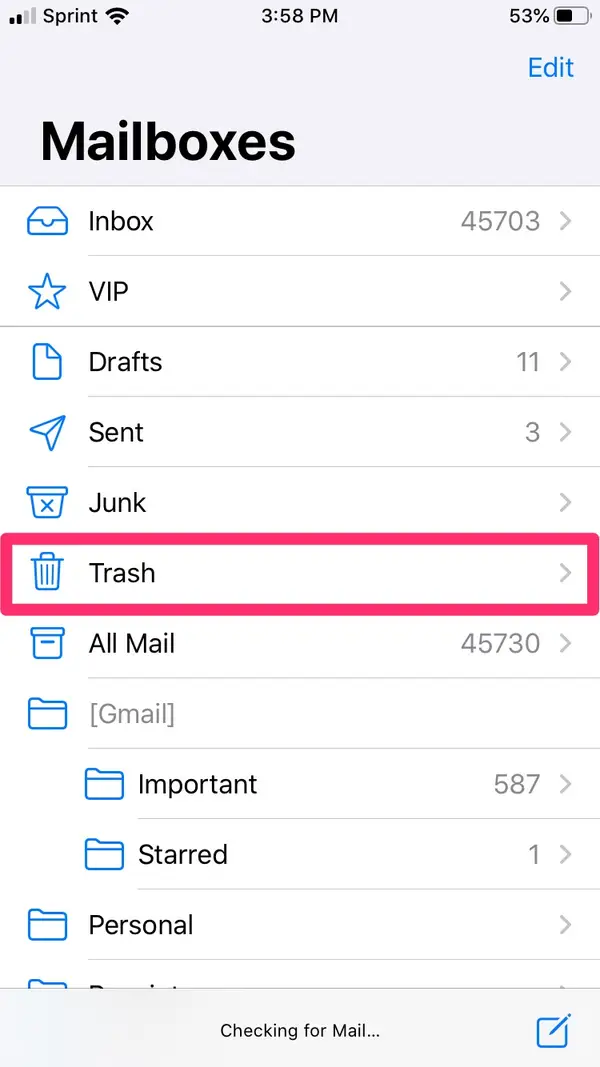
- Open the Mail app and go to your account's mailboxes. Tap the back arrow from your inbox until you see the full folder list.
- Tap Trash (or Deleted). This shows everything deleted within the recovery window.
- Find the email you're looking for. Use the search bar at the top if scrolling gets tedious.
- Swipe left on the email, then tap the folder icon. This lets you move it to your inbox or another folder.
- Confirm it's back where you need it. Check your inbox to make sure the move went through.
Say you accidentally swipe-delete a flight confirmation while walking through an airport. This is the fastest way to get it back before your gate closes.
{{templates}}
How to recover deleted emails on Android
Android's default recovery flow depends on which mail app you're using, but the Gmail app follows the same logic as on desktop.
- Open the Gmail app and tap the menu icon. This opens the folder list on the left.
- Tap Trash. Deleted emails within the last 30 days will be listed here.
- Tap and hold the email to select it. A checkbox appears once you tap and hold.
- Tap the three-dot menu, then "Move to." Choose Inbox or the original folder.
- Verify the email is back. Check your inbox to confirm the recovery worked.
How to recover deleted emails in Yahoo Mail
Yahoo Mail gives you the shortest recovery window of any major provider, just 7 days, so acting quickly matters more here than anywhere else on this list.
- Open Yahoo Mail and find Trash in the left sidebar. It sits below your other folders alongside Inbox and Sent.
- Search or scroll to find the email. Yahoo's search bar works inside Trash the same way it does in Inbox.
- Select the email. Click the checkbox next to it once you've found it.
- Click "Move," then choose Inbox. This restores the email immediately.
- Check that it landed correctly. Confirm it's back in your inbox before doing anything else with it.
If it's not in Trash, Yahoo also lets you submit a restore request for anything deleted in the last 7 days. Past that window, though, there's no equivalent to Outlook's Recoverable Items.
Common mistakes to avoid when recovering deleted emails
Even when the email is technically still recoverable, it's easy to fumble the recovery itself. Here's where that usually happens:
Most of these come down to moving too fast right after you find the email. A few extra seconds to confirm the sender, the date, and the folder saves you from recovering the wrong thing, or losing it all over again.
{{cta}}
Don't want to worry about this next time? Text Lindy
The easiest way to stop losing important emails is to stop relying on remembering to check your Trash folder in the first place.
Lindy is an AI assistant you can tell what to watch for, like a specific client or a certain type of email, so it flags and keeps track of those messages for you, and fewer things end up accidentally deleted or buried.
Instead of digging through folders after the fact, you can tell Lindy what to watch for up front, and it takes care of it without you having to check back in.
You can text Lindy to:
- Flag important emails automatically: Ask Lindy to alert you the moment something from a specific client, vendor, or contract lands in your inbox, so it never gets swept up in a delete-all moment.
- Label emails so nothing gets lost: Lindy sorts incoming mail into categories like To Respond, Invoices, or FYI, which makes it much less likely you'll accidentally delete something important.
- Find old emails without digging through folders: Instead of scrolling through Trash or Archive yourself, just ask Lindy to find the email from last month about the renewal, and it pulls it up.
- Draft replies and follow-ups: Once an email is recovered, Lindy can draft the response so you don't have to start from scratch.
- Keep a record outside your inbox: Lindy can save important emails to Google Drive, Notion, or your CRM, so losing the original message isn't the only copy you have.
If you'd rather set this up once and stop thinking about it, that's what Lindy is for.
FAQs
1. How long do deleted emails stay recoverable?
Most providers, including Gmail and Outlook, keep deleted emails recoverable for about 30 days after deletion. After that window closes, the email is typically removed from the server and can't be recovered through normal account settings.
2. Why can't I find a deleted email in Trash?
If an email isn't in Trash, it's usually because the recovery window has already passed, Trash was emptied manually, or the email was automatically archived rather than deleted in the first place. Searching your Archive or All Mail folder is worth doing before assuming it's unrecoverable.
3. Can IT recover emails that I can't?
Yes, on business or school accounts using Microsoft 365 or Google Workspace, IT admins often have access to recovery tools beyond the standard 30-day window available to individual users.
Google Workspace typically adds about 25 extra days, while Microsoft 365 setups with retention policies or litigation hold configured can extend recovery much further, depending on how the organization has it set up.
4. Does deleting an email delete it for the sender or other recipients too?
No. Deleting an email only removes it from your own mailbox. It has no effect on the sender's copy or on copies in other recipients' inboxes.
5. Can Lindy help prevent emails from being lost in the first place?
Yes. Lindy triages incoming mail, flags anything time-sensitive, and can save important emails outside your inbox entirely, so there's less chance of losing something important to an accidental delete. It's a small habit change that avoids most of these recovery scenarios altogether.











Blog
Related Articles
.png)
.png)
%20(1).png)
.avif)

%20(1).png)
.png)
The AI assistant that runs your work life
Lindy saves you two hours a day by proactively managing your inbox, meetings, and calendar, so you can focus on what actually matters.
