The 6 Best Reclaim AI Alternatives in 2026 (Tested)


My Thursday afternoon was blocked. Two hours, protected, nothing on the calendar. I had set it up in Reclaim three weeks earlier and told myself that was the hard part done.
By the time Thursday arrived, the block had moved. Not cancelled, just quietly shifted to Friday morning, then to a slot between two meetings where it sat for forty minutes before disappearing entirely. Reclaim had optimized it somewhere I never found.
That was the moment I started looking.
I tested nine scheduling tools over six weeks, across real workloads, paid accounts, and the kind of weeks where everything moves, and nothing goes where you put it. Some tools had better auto-scheduling than Reclaim. Some had mobile apps, which Reclaim still does not. One handled things that no calendar tool on this list could touch, because it was not really a calendar tool at all.
Here are the best Reclaim AI alternatives I found.
What is Reclaim?

Reclaim is an AI-powered calendar scheduling tool that sits on top of Google Calendar or Outlook and automatically blocks time for your tasks, habits, meetings, and breaks. You tell it what needs to happen and when, set your priorities, and it fills your week accordingly. As your schedule shifts, it automatically reshuffles to keep your calendar aligned with what matters most.
Reclaim acts as a scheduling layer, an always-on planner that works inside the calendar you already use. Over 600,000 users across 70,000 companies run it. Dropbox acquired the company in 2024.
Here are the five core features that define what Reclaim does:
- AI Tasks: You add a task with a due date and duration. Reclaim finds the best open slot on your calendar and books it. If a meeting is scheduled on top, it automatically moves the task to the next available time.
- AI Habits: Recurring blocks for routines like lunch, exercise, or a daily review. Reclaim places them at optimal times and flexes them around fixed commitments rather than dropping them.
- AI Focus Time: You set a weekly focus goal. Reclaim defends uninterrupted blocks throughout the week and adjusts them as your calendar fills up.
- AI Smart Meetings: Reclaim finds the best time to meet across all attendees' schedules and keeps flexible meetings from fragmenting the day.
- AI Scheduling Links: A Calendly-style booking link, but priority-aware. Lower-priority calendar events can be shown as available, and any event bumped by a booking is automatically rescheduled.
Why people look for Reclaim alternatives
Reclaim is a capable scheduling tool, and for desk-based professionals with predictable workloads, it genuinely delivers. But it has a specific failure mode: the more your schedule shifts, the more the automation works against you.
Users who need tight control over what moves and what stays put tend to hit the same walls. The rescheduling behavior, the paywalled features, and the missing mobile app are not edge cases. They show up consistently across review platforms, posted by people who gave the tool a real try.
What users said
On Trustpilot (July 2026, 1/5 stars):
"I still have to reschedule things myself... I literally spend a couple hours every single day trying to make Reclaim work as advertised."
Shawn H. completed the full free trial and decided not to pay. He said the suggested-task list mixed up what was due tomorrow with what was due a month out, and that correcting it daily cost more time than it saved.
On G2 (June 2026, 4.5/5 stars):
"The booking feature is limited on my plan and doesn't always work effectively."
Chris W., a medical doctor using Reclaim for daily schedule management, liked the multi-calendar sync but kept running into plan-level limits on the features he needed most.
On G2 (February 2026, 4.5/5 stars):
"My day is planned out by past me, so future me can just chill and follow the list of tasks in my calendar."
Jonathan O., a Marketing Chair, praised the smart booking for habits and tasks and the external calendar integration. His main frustration was API integration, which hadn't worked reliably for his team.
The pattern: Three reviewers, three separate accounts of the same friction. Reclaim's engine is good at filling a calendar. It is less good at knowing which blocks matter to you personally. And with no native iOS or Android app as of mid-2026, none of it follows you away from your desk.
That is the gap most people try to close when they look for an alternative.
Quick comparison: Reclaim alternatives at a glance
| Tool | Best for | Starting price | Key difference |
|---|---|---|---|
| Motion | Aggressive auto-scheduling for individuals | $49/month | Builds your entire day automatically |
| Morgen | Multi-calendar power users | $30/month | Confirms every change before it happens |
| Sunsama | Intentional daily planning | $22/month | Guided morning ritual, not automation |
| Akiflow | Keyboard-first power users | $34/month | Universal task inbox plus command bar |
| FlowSavvy | Free auto-scheduling | Free | Most functional free auto-scheduling tier |
| Lindy | Teams who need more than scheduling | $29.99/user/month | Handles email, meetings, and tasks |
How I tested these Reclaim alternatives
I tested nine scheduling tools over six weeks, running each through the same set of scenarios on a paid account where a trial would not show the full picture.
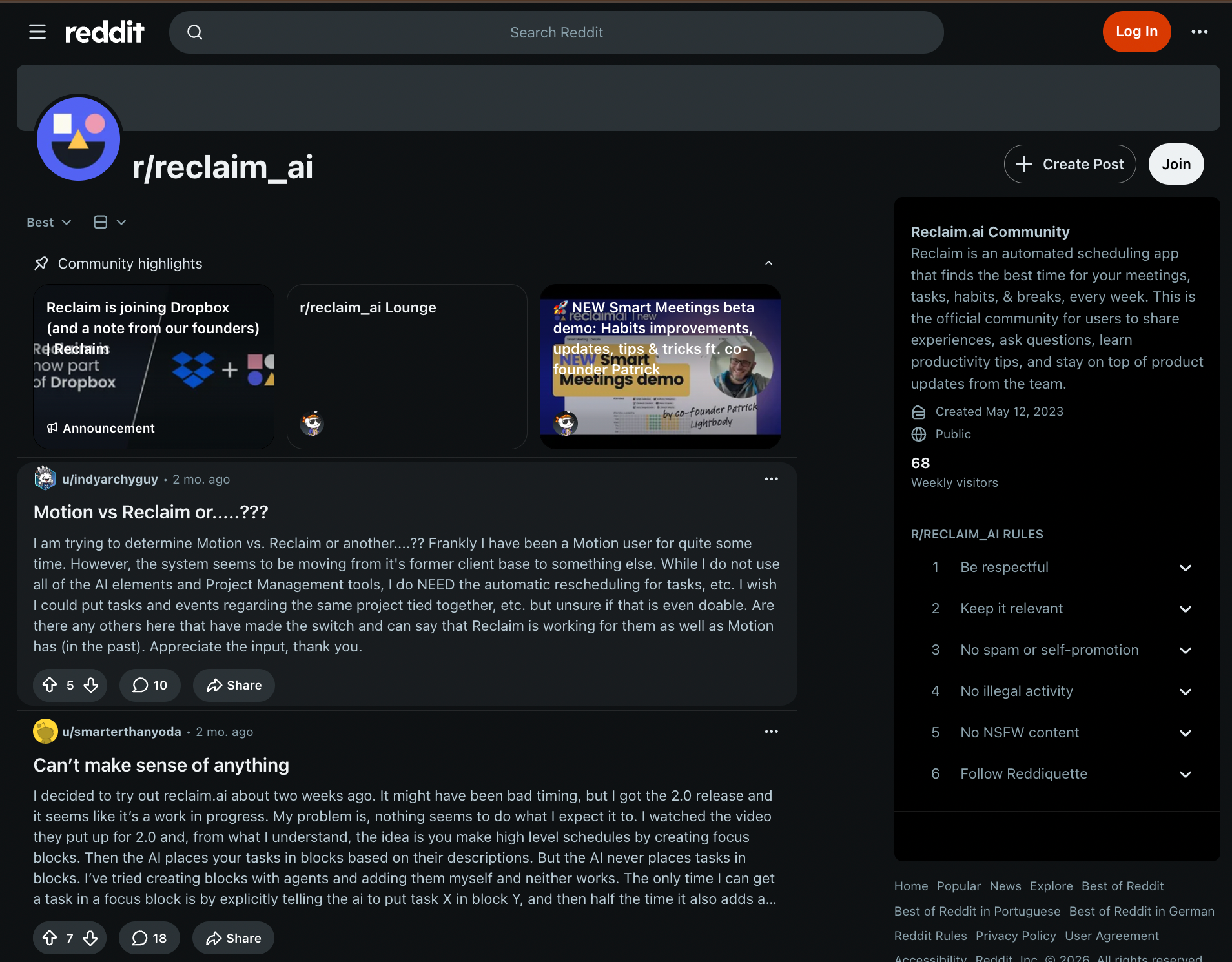
Threads on the r/reclaim_ai subreddit tell you more about a tool's real failure modes than any review site. The same complaint comes up again and again: the AI places tasks in slots that look sensible on paper, and fixing them by hand every morning eats the time the tool was supposed to save. That tension is what this article is built around.
Every tool was tested across the same five workstreams:
- Setup and onboarding: How long before the tool was doing something useful, and how much configuration did it take to get there.
- Auto-scheduling quality: Whether the AI placed tasks in slots that made sense given the day's actual shape, or whether it needed constant correction.
- Mobile experience: Whether the iOS or Android app was a real planning surface or just a read-only view of what the desktop had already decided.
- Calendar compatibility: How it handled multiple calendars across Google, Outlook, and iCloud, and whether events from all three showed up correctly.
- Pricing honesty: Whether the features that made the tool worth using were available on the entry plan or locked behind an upgrade.
SkedPal's setup is too heavy for most users to get through. Structured plans by hand and with AI prompts, but it does not auto-place tasks into open slots. TickTick syncs calendars well but has no auto-scheduling engine. Lifestack came up during research but is still too early to test.
The six tools below each solved a distinct problem well enough to recommend to a specific kind of user.
1. Motion: Best for aggressive auto-scheduling

What is Motion?
Motion is an AI task manager and calendar rolled into one. You add tasks with deadlines and priorities, and Motion's scheduling engine slots them into your calendar automatically, no drag-and-drop required.
When a meeting drops in, or a task runs long, it reshuffles the whole plan in the background and moves things to the next available slot. It connects to Google Calendar, Outlook, and Apple Calendar, and it now ships with project management views, meeting notes, AI chat, and docs alongside its core scheduler.
Why pick Motion over Reclaim?
Reclaim is a scheduling layer. You keep your task manager and your calendar, and Reclaim defends the time between them. Motion is trying to be the whole thing. That sounds like a downgrade in flexibility, but for a specific kind of user, the consolidation is exactly the point.
Picture this: You are a freelance consultant managing four clients with overlapping deadlines. You open Monday morning with 11 tasks across three projects, two calls already booked, and a standing lunch that keeps getting rescheduled. With Reclaim, you would set up habit rules, priority flags, and task integrations, and then still need to check that everything landed correctly.
With Motion, you dump the 11 tasks in, set deadlines, mark priorities, and close the window. Motion builds the day for you. When the 2 pm call gets moved to 3 pm, it shifts the task that was sitting in that slot without you touching anything.
Where it beats Reclaim is deadline intelligence. Motion analyzes dependencies and due dates, flagging at-risk tasks before they slip. Reclaim spots an at-risk task and quietly defends the time. It does not surface a warning the way Motion does. If you are the kind of person who has missed a deadline because your calendar looked fine until it suddenly did not, that difference matters.
Motion also ships mobile apps for iOS and Android, which is the single most cited gap in Reclaim's product. If you manage your day from your phone during commutes or between meetings, Motion is immediately more usable.
Limitations
Motion has spent the past year expanding into docs, sheets, AI chat, and what it now calls a "SuperApp," and long-term users are not happy about it. The UI has not kept pace with the feature additions, and its learning curve is steepest on this list. If you just want a smarter calendar, the extra surface area can feel like noise.
Pricing
Motion has two plans, Pro AI and Business AI. Pro AI starts at $49/month for individuals and $29 per seat for teams. Business AI is $49 per seat. No free plan. The 7-day trial requires a credit card and automatically converts to a subscription if you do not cancel.
2. Morgen: Best for multi-calendar control

What is Morgen?
Morgen is a calendar and task-planning app that brings everything you work on into a single interface. Google Calendar, Outlook, iCloud, Fastmail, and most CalDAV providers connect natively.
Tasks from Notion, Todoist, ClickUp, Linear, Apple Reminders, Obsidian, and more all land in the same view alongside your calendar events. From there, Morgen's AI Planner suggests when to schedule your tasks based on your availability and priorities. You review the suggestion, adjust if needed, and confirm. Nothing moves without your sign-off.
Why pick Morgen over Reclaim?
Reclaim's engine reschedules things behind your back. That is its feature, and plenty of users love it. But a meaningful number of users hate it, and those are exactly the people Morgen is built for. The AI Planner in Morgen reads your calendar, looks at your task list, and puts a suggested daily plan in front of you. You drag, accept, or ignore.
Let's say you are a founder splitting your time among a personal Gmail account, a company Workspace account, and a shared team Outlook calendar. Open Morgen, and all three show up in a single timeline, color-coded, with your Notion tasks sitting in a panel next to them.
You run the AI Planner, and it suggests blocking 10 to 11:30 am for a high-priority task that has been sitting on your list for three days. You accept it. That block goes on your calendar. Nothing else moved. That is the Morgen experience, and it is a fundamentally different philosophy from Reclaim's autopilot.
Morgen also ships native apps for every platform, including Linux, which almost no competitors bother with. The mobile app is functional for checking your day and quick adds. The desktop app is where most planning happens.
Limitations
Morgen does not auto-schedule your tasks. The AI suggests; you confirm every time. It will add travel and buffer time around meetings on its own, but only after you set those rules.
Pricing
Individuals pay $30/month, or $15/month, billed yearly. Teams pay $25 per seat monthly, or $10 per seat billed yearly, with a minimum of two seats. There is no free plan. Both tiers include a 14-day free trial with no credit card required and a 30-day money-back guarantee.
3. Sunsama: Best for intentional daily planning
What is Sunsama?
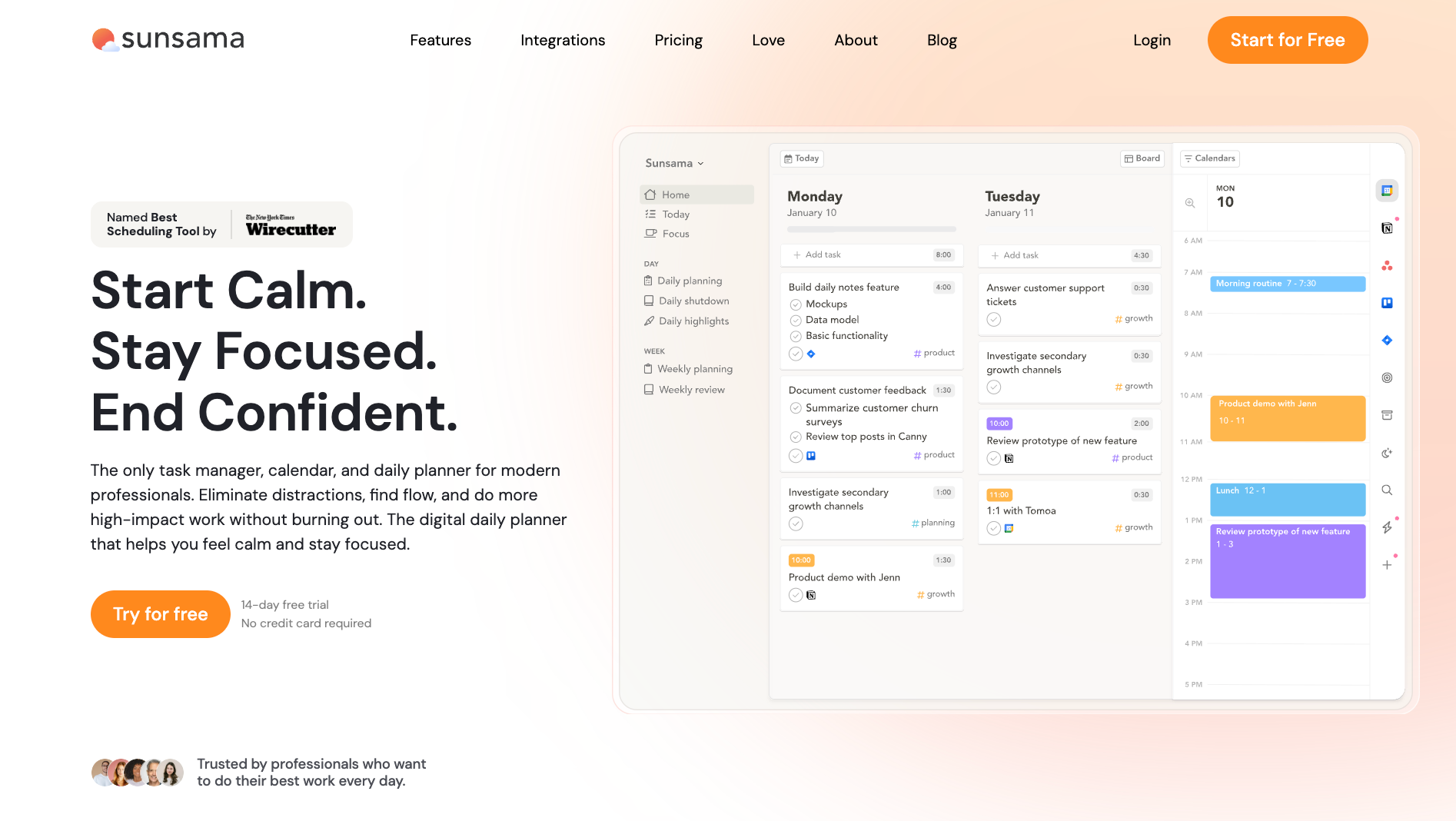
Sunsama is a guided daily planner built on one conviction: the problem with most people's calendars is that they never stop to decide what matters today. Every morning, Sunsama walks you through a structured planning ritual.
Why pick Sunsama over Reclaim?
Sunsama’s daily planning ritual takes around 10 to 15 minutes. You open Sunsama; it shows you what you didn't finish yesterday, asks you to pull in the tasks you want to work on today, prompts you to estimate how long each will take, and then shows you a predicted workload.
If you have planned six hours of work and you have four hours of meetings, Sunsama flags the math. You cut the list or adjust your shutdown time. When you are done, you have a realistic calendar for the day.
Reclaim can look at your calendar and defend focus time. It cannot tell you whether the tasks filling that focus time are the right ones. Sunsama makes you answer that question every morning. The forced intentionality is the whole product. Users who get the most out of it are the ones who felt like Reclaim was scheduling their days on their behalf, producing calendars that looked full but never felt aligned.
The shutdown ritual deserves a mention too. At the end of the day, Sunsama asks you to mark what you did and did not finish, write a brief reflection, and draft a note for tomorrow.
Sunsama connects to Google Calendar, Outlook, and iCloud for calendar sync, and integrates with Asana, ClickUp, GitHub, Jira, Linear, Notion, Slack, Teams, Todoist, Trello, and Gmail for task import.
Limitations
Sunsama does not build your day for you. You decide what makes the list, then a keystroke drops each task into the next open slot, and Sunsama reshuffles the rest when things run long. Its AI assistant, Sunny, can suggest time estimates and organize your backlog, but the priorities stay yours. If your schedule is unpredictable and shifts hourly, the ritual that makes Sunsama valuable will also be the one that breaks down most often.
Pricing
Sunsama runs $22/month. One plan covers everything. The 14-day free trial requires no credit card. Enterprise pricing is custom with SSO, SCIM, and audit logs.
4. Akiflow: Best for keyboard-first power users

What is Akiflow?
Akiflow is a time-blocking planner and universal task inbox built for professionals who move fast and hate touching the mouse. It pulls tasks from Gmail, Slack, Notion, Asana, Linear, ClickUp, Jira, Todoist, and more into a single view alongside your calendar.
From there, everything runs through a command bar. You schedule, snooze, prioritize, and reschedule tasks with keyboard shortcuts, never having to drag through menus. Its June 2026 release added an MCP server that lets Claude and other AI tools manage your Akiflow directly in natural language.
Why pick Akiflow over Reclaim?
Reclaim optimizes in the background. Akiflow puts the controls in your hands and makes them as fast as possible to use.
The command bar is the product. Press CMD+E on a Mac, or Ctrl+E on Windows, and Akiflow opens. Type a task name, hit Enter, and it lands in your inbox. Hit P to plan it, type "tomorrow 10 am," hit Enter. Done. The whole thing takes four seconds without touching the mouse.
For people who live in keyboard shortcuts across their entire stack, this speed compounds through the day in a way that Reclaim's background engine cannot replicate. Reclaim makes smart decisions for you. Akiflow makes your own decisions faster.
The universal inbox is the second piece. Every Slack message you star, every Gmail thread you flag, every Asana task assigned to you lands in one place. You process it once, plan it once, and move on. With Reclaim, those tasks still live in their original tools. Akiflow removes the context-switching entirely.
Akiflow also now ships AI Autopilot, its closest equivalent to what Reclaim does natively. Autopilot reads your task list, your priorities, and your calendar, and builds the schedule for you.
Copilot, the lighter version, suggests slots for individual tasks and lets you confirm each one. If you want Reclaim-style automation with Akiflow's capture speed underneath, Autopilot is now close enough to compete directly. It comes with Pro, so there is no upgrade to weigh.
Limitations
Akiflow is desktop-first in a real sense. The mobile app exists and received a Daily Dashboard view in the summer 2026 update, but the full planning experience requires a desktop. Akiflow sells a Teams plan, but it is thin. There are still no shared projects, no shared task views, and no visibility into colleagues' workloads.
Pricing
Akiflow Pro Monthly is $34/month. The 7-day free trial requires no credit card.
5. FlowSavvy: Best free auto-scheduling option
What is FlowSavvy?
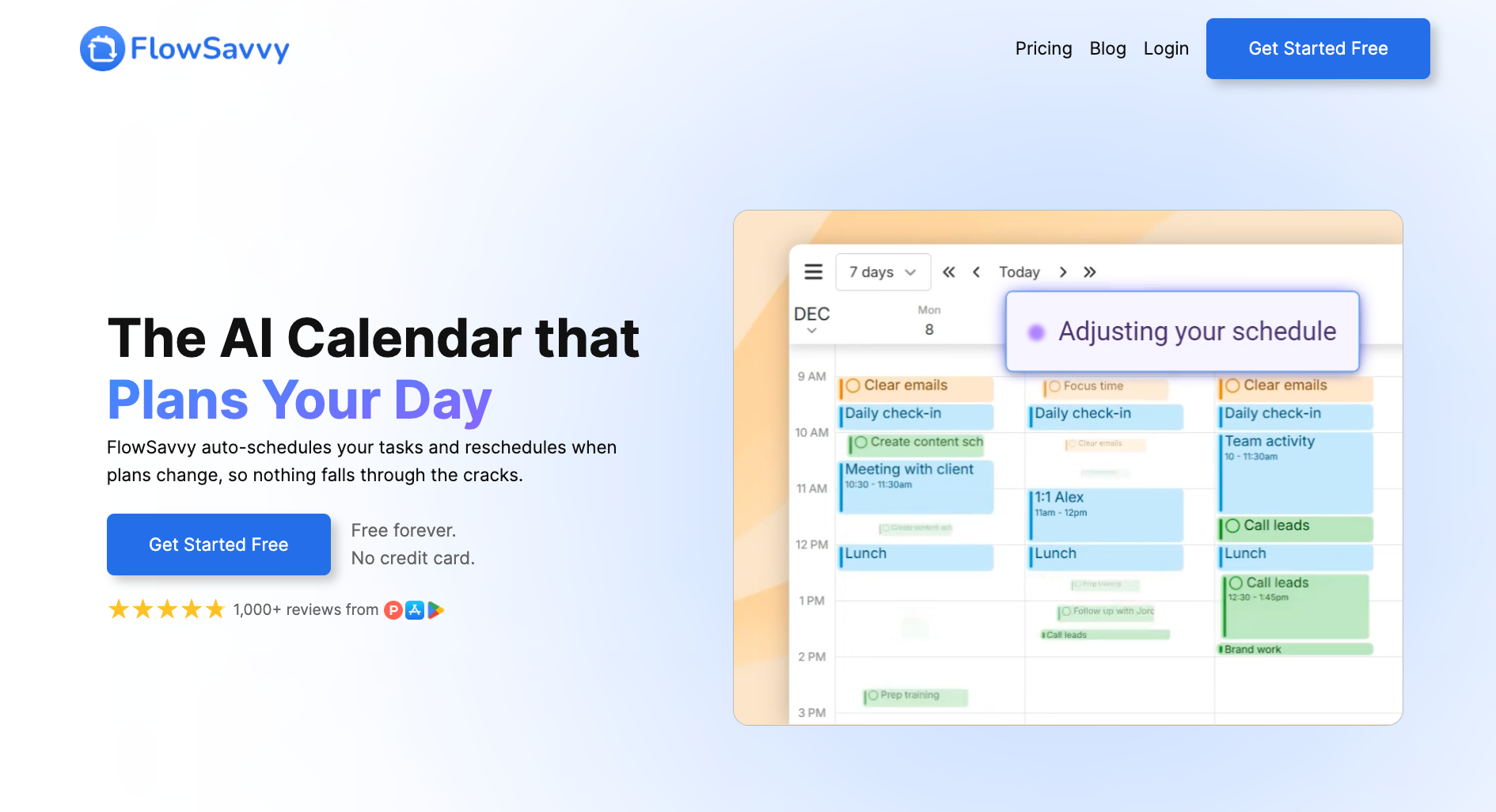
FlowSavvy is a focused auto-scheduling app built by a small founding team who wanted a tool that would plan their college assignment load without constant manual adjustments. That origin story is still visible in the product. You give FlowSavvy tasks with deadlines and durations, and it finds the best time for them in your calendar.
When something changes, FlowSavvy instantly rebuilds the schedule. It syncs with Google Calendar, Outlook, and iCloud, and runs on the web, iOS, and Android. There is no project management, team layer, or meeting assistant.
Why pick FlowSavvy over Reclaim?
Reclaim's free Lite tier exists, but it is limited enough that most users hit its ceiling fast. FlowSavvy's free plan gives you unlimited auto-reschedules, scheduling up to two weeks out, full iOS and Android apps, Google, Outlook, and iCloud sync, two-way Todoist sync, and up to three repeating auto-scheduled tasks. The catch is one set of scheduling hours, so work and personal time share a single profile.
For a solo professional testing whether auto-scheduling changes how their week feels, that is enough to find out without paying anything.
The mobile piece matters more than it sounds. Reclaim has no native mobile app. FlowSavvy has had fully featured iOS and Android apps since launch. If you check your schedule on your phone in the morning, want to add a task during your commute, or need to recalculate after a meeting runs long, FlowSavvy handles it all from your phone. Reclaim cannot.
The one-click recalculation is also worth mentioning specifically. One of the core frustrations Reclaim users flag is that auto-rescheduling does things you did not ask it to.
FlowSavvy takes a slightly different approach: it auto-schedules by default, but recalculation is also available on demand. If your afternoon fell apart, you hit Recalculate, and it rebuilds the rest of the week from the current moment. That manual trigger gives you more predictability over when the schedule changes.
Limitations
There is no team functionality, meeting scheduling, or AI layer beyond the scheduling algorithm itself. Todoist syncs both ways, even on the free plan. Anything living in Notion, Asana, or Linear you re-enter by hand.
Pricing
FlowSavvy Basic is free forever, no credit card required. Pro is $14/month, or $10/month billed yearly, and adds scheduling up to 8 weeks out.
6. Lindy: Best for teams who need more than scheduling

What is Lindy?
Lindy is an AI teammate that lives in your Slack, connects to all your tools, knows everything about your company, and does real work for the whole team.
@mention Lindy in any channel, and it responds in the thread with information sourced from your meetings, files, and connected tools. DM it, and it works as a personal assistant with access to your email, calendar, and private memory.
The primary interface is Slack. Secondary surfaces include iMessage and SMS, a Gmail Chrome Extension, and the web app at chat.lindy.ai.
Why pick Lindy over Reclaim?
Every tool on this list defends your calendar time. Lindy handles what happens inside it.
Protect two hours of focus time on Thursday, and you still have to triage the inbox, write the follow-up from Tuesday's call, and pull the client brief before the next meeting. Those tasks are what consume the time you blocked. Lindy manages all three before you sit down.
Lindy handles calendar coordination across your team. Ask it to set up the client review and it finds the times that work, shows you the invite, and sends it once you say go. Ask it to move something and it moves it.
Lindy also triages, drafts replies in your voice, and flags what needs your attention. The pile that was waiting for your Thursday block is already smaller by the time you open it. After meetings, Lindy catches you up on anything you missed. You start each day knowing exactly where things stand, without spending the first thirty minutes of your focus block figuring it out.
For teams, the gap widens further. Reclaim's team features are calendar features: OOO visibility, meeting load analytics, delegated scheduling links. Lindy's team features are operational. One @mention in a shared channel and the whole team has context on a client, a deal, or an open question. The knowledge lives in the workspace.
Limitations
There is no drag-and-drop time blocking, habit streak tracking, or color-coded task timeline. If a visual daily planner is what you are looking for, Morgen, Akiflow, or Sunsama are better fits. Lindy is for teams who want an AI that handles the work around the calendar.
Pricing
Lindy starts at $29.99/user/month on the Plus plan. Pro is $99.99/user/month. Max is $199.99/user/month. Enterprise is custom. New teammates who join through a Slack workspace get a 7-day free trial. Direct signups are billed immediately.
{{templates}}
How to choose the right Reclaim alternative
The right Reclaim alternative depends on where the tool is breaking down for you. Most people hit one of three walls: auto-rescheduling moves things they need to stay fixed, the missing mobile app makes it useless away from a desk, or the team has outgrown a tool built for individual calendars. The options below cover all three, but they are not interchangeable.
Here is what matters when you are comparing options:
- Your primary frustration with Reclaim: Auto-rescheduling without warning points to Morgen, which confirms every change before it happens. No mobile app points to FlowSavvy or Morgen, both of which ship full iOS and Android apps. Team features behind a paywall point to Lindy, which operates at the workspace level from day one.
- Whether you work alone or with a team: Motion, Sunsama, Akiflow, and FlowSavvy are all built for individuals. Lindy is built for teams. The distinction matters more than any feature comparison: a great solo tool will not give you workspace-level context, and a team tool will feel heavy if you are the only one using it.
- How much control you want over your own schedule: Reclaim and Motion run on autopilot. Morgen and Sunsama put the decisions back in your hands. Akiflow sits in the middle, letting you move fast with keyboard shortcuts while keeping you in control of what goes where. Pick the philosophy that matches how you think about your day.
- What your calendar runs on: Reclaim works fully with Google Calendar and Outlook. If your week is split across Google, Outlook, as well as iCloud, Morgen handles all three natively. If everything is in Google, that distinction does not matter.
- Your budget: FlowSavvy's free plan is the most functional free auto-scheduling tier in this category. If cost is the constraint, start there. If you are a team and the budget is per-seat, Lindy's Plus plan at $29.99/user/month covers scheduling, inbox management, and daily briefs in one place.
{{cta}}
Frequently asked questions about Reclaim AI alternatives
What is the best Reclaim alternative?
Lindy is the best Reclaim AI alternative for teams who need more than calendar optimization. Motion is the closest direct replacement for individuals with heavy task loads. Morgen is the pick for multi-calendar users who want control over what moves. The right answer depends on your setup, but those three cover most cases.
Is Motion better than Reclaim?
For individuals, yes. Motion auto-schedules personal task loads more aggressively and ships native iOS and Android apps, which Reclaim still lacks as of 2026. Reclaim's best features, including Team OOO Calendar and Workforce Analytics, are team-focused and sit on the Business plan or above. Solo users with heavy workloads tend to get more out of Motion.
What happened to Clockwise?
Clockwise shut down in March 2026 after Salesforce completed an acquihire of the team. The product is no longer available. Clockwise partnered with Reclaim to give teams a migration path, and Reclaim offered a 12-month price match to anyone who moved across. That offer closed on 30 June 2026. Users landing from Clockwise tend to end up on Morgen, Reclaim, or Lindy depending on whether they need multi-calendar sync, individual scheduling, or team-level operations.
Is there a free alternative to Reclaim?
Yes. FlowSavvy has the most functional free auto-scheduling tier in 2026. The free plan includes unlimited auto-reschedules, scheduling up to two weeks out, and full iOS and Android apps. Reclaim also has a free Lite plan, but it is limited enough that most users hit the ceiling fast. FlowSavvy is the better starting point if cost is the primary constraint.
Can Reclaim replace a calendar app?
No, Reclaim sits atop Google Calendar or Outlook as a scheduling layer. It optimizes when things happen but does not replace the calendar itself. Motion goes further by combining task management and calendar into one interface. Lindy goes further still, handling the email, meeting prep, and follow-up work that scheduling creates, on top of the calendar you already use.









