


Business Management Software Solutions: 8 Options Tested


Last quarter, our ops lead spent most of a Friday reconciling three separate spreadsheets for inventory, payroll hours, and project timelines. When a client asked for an update, the answer took longer than it should have because the information lived in too many places.
That is often the point where a growing business needs better business management software solutions. These bring finance, inventory, HR, and project work into one platform, or a connected set of tools, so teams can work from the same information without manually syncing spreadsheets.
Below are 8 solutions worth considering, plus category-specific picks below if your real bottleneck is inventory, HR, project management, or you're specifically shopping for a true ERP.
Here's what made the cut:
- Zoho One: Best for bundling finance, HR, and CRM under one login
- Odoo: Best for customizing exactly which modules you need
- NetSuite: Best for scaling toward a full ERP as you grow
- Microsoft Dynamics 365 Business Central: Best for teams already living in Microsoft 365
- Sage Intacct: Best for finance-heavy operations with complex reporting
- QuickBooks Enterprise: Best for accounting-first small businesses
- monday.com: Best for flexible project and task tracking across departments
- HoneyBook: Best for service-based businesses managing clients and contracts
What is business management software?
Business management software helps companies run daily operations from one connected system. It can bring finance, inventory, HR, project work, and client work into the same place, so teams can see the right information without checking separate tools.
The right fit depends on which part of the business is slowing the team down most.
Some companies need a finance-first system. Others need better project tracking, inventory control, HR workflows, or a connected set of tools that keeps information moving between teams.
Types of business management software
The right fit depends more on the strained function than company size. Start with the area creating the most friction, whether that is finance, inventory, projects, or client work. Here's how the main categories break down:
- All-in-one suites bundle finance, HR, inventory, and CRM into one connected platform, allowing data to move between departments without manual re-entry. Zoho One and Odoo are the clearest examples.
- ERP platforms go further, connecting financials, inventory, and operations into a single system of record built to scale as a company grows. NetSuite, Microsoft Dynamics 365 Business Central, and Sage Intacct fall here.
- Work and project management tools center on tasks, timelines, and team collaboration, with finance and HR usually handled by separate connected apps. monday.com is the clearest example on this list.
- Finance-first platforms are built around accounting and bookkeeping first, with other functions layered on top. QuickBooks Enterprise fits here.
- Client and service management tools are built for service-based businesses managing client relationships, contracts, and invoicing rather than physical inventory. HoneyBook is the example here.
8 business management software solutions: At a glance
How I researched these business management software solutions
I looked at each platform against a real small-business scenario: a team of 15-30 people juggling finance, some physical inventory, and a handful of active projects, the stage where spreadsheets stop working but a six-figure ERP rollout isn't justified yet.
For each tool, I looked at:
- What it actually consolidates: Whether finance, inventory, HR, and projects live in one system or still require separate connected tools.
- Setup time versus depth: How much configuration it takes before the platform is useful, and what you give up by choosing the faster option.
- Pricing at small-team scale: What the cost looks like at 15-20 users specifically, not just the entry-tier price.
- Where the category actually splits: All-in-one suite, true ERP, work management, or finance-first, since these solve different problems even when they're marketed the same way.
How to choose the right business management software
Start with the department causing the most friction. Inventory falling out of sync with sales points to a different tool than payroll errors, delayed invoices, or projects missing deadlines.
Decide how much you want to consolidate at once. An all-in-one suite or ERP can replace several tools in one move, but it usually takes more setup time. A narrower tool solves one problem faster, while the rest of your stack stays in place.
Check whether finance should lead the decision. If accounting accuracy, reporting, and cash flow visibility matter most, look for a finance-first platform or ERP with strong accounting roots. A project-first tool may work better when the main issue is task ownership, deadlines, or client delivery.
Be honest about customization. A modular platform like Odoo works well when your processes are unusual and you only want to turn on the pieces you need. A more fixed all-in-one suite is often faster to launch, but harder to shape around a non-standard workflow.
Look at the cost of scaling. Entry pricing can look reasonable, then climb quickly once you add 15 or 20 users. Check how pricing changes with headcount, modules, storage, automation, and support before you commit.
1. Zoho One
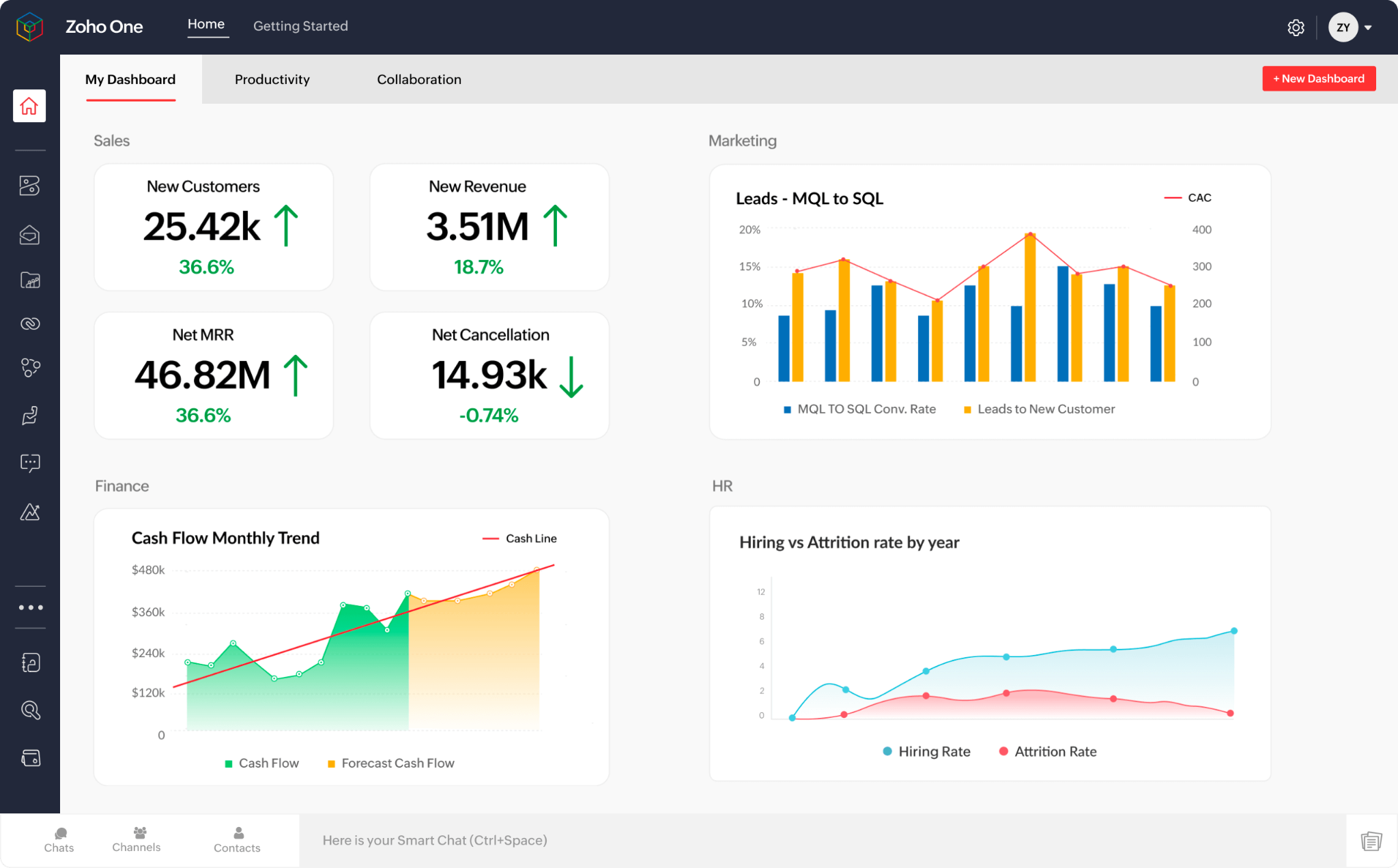
What it is: Zoho One bundles more than 50 Zoho apps into one subscription and one login. The suite covers CRM, accounting, HR, inventory, and other core business functions.
Best for: Small businesses that want most of their operational software under one vendor without paying for each app separately.
Key features
- Unified suite across departments: CRM, HR, finance, and inventory apps all connect under one login, so data flows between them instead of living in separate systems.
- Cross-app data flow: Interoperable apps mean information entered once, like a closed deal, updates related records elsewhere, like an invoice, without manual re-entry.
- Financial tools built in: Invoicing, billing, expenses, and accounting are covered natively, with custom permissions for sensitive financial data.
- Inventory and delivery tracking: CRM, inventory, and order fulfillment connect directly, so sales and delivery teams work off the same stock and order data.
- Low-code customization: A built-in low-code platform lets you build custom forms, workflows, or functionality specific to your business without needing separate development tools.
What stood out for me
This was the clearest example of a handoff happening without extra admin. A deal closed in Zoho CRM can trigger an invoice in Zoho Books, using the same customer and deal data. That directly solves the reconciliation problem from the intro because the work moves across apps inside the same suite.
What could improve
With 50+ apps bundled together, the depth of each app may not match a dedicated best-in-class tool. Zoho One is stronger as a broad business suite than as the deepest option for one specific function.
During a trial, I would test the app you plan to rely on most, such as inventory, HR, or accounting, before committing to the full suite.
Pricing
Starting at $45/employee/month (billed monthly), Zoho One requires licensing all employees on payroll, or businesses can opt for flexible pricing at $105/user/month with no full-team commitment.
2. Odoo
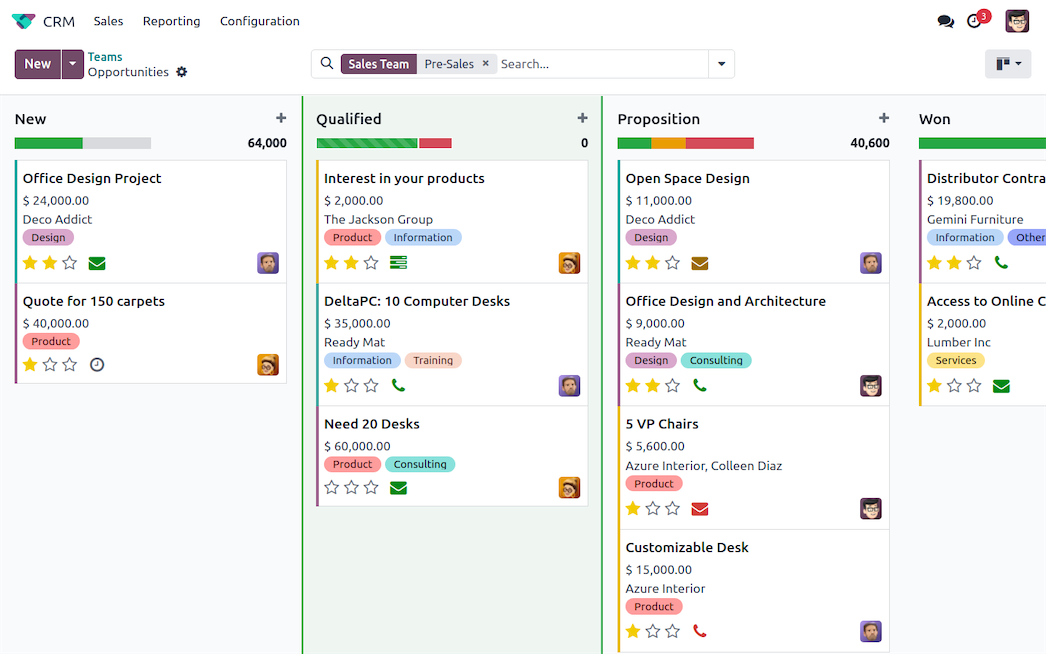
What it is: Odoo is a modular business platform that lets you start with the apps you need, such as accounting, inventory, HR, manufacturing, CRM, or project management, then add more as the business grows.
Best for: Businesses with a specific or unusual operational process who don't want to pay for modules they'll never use.
Key features
- Modular app selection: Choose the apps your business needs, such as accounting, CRM, inventory, HR, and project management, then add more as you grow instead of paying for a fixed bundle.
- One-click installs: Add new capabilities with a single app install, without turning each module into a separate implementation project.
- Native AI across the platform: AI features work across connected apps rather than being bolted onto one, automating work and surfacing insights from data that's already unified.
- Open-source core with no lock-in: Built on PostgreSQL with full source code access, so you're not tied to a proprietary data format if you ever need to migrate.
- Single all-inclusive pricing: One price per user with no usage-based fees or feature upselling, making cost easier to predict as you add apps.
What stood out for me
The one-click installs paired with modular selection mean you're not paying for capabilities you'll never touch, and adding a new one later doesn't mean a new implementation project. It's the kind of setup that fits a growing team figuring out what it actually needs as it goes.
What could improve
A few modules take real time to configure properly at the start, and new users often need extra time to get comfortable, especially when customizing workflows or setting up reports.
With so many features available, it can feel overwhelming at first just figuring out which ones you actually need.
Pricing
Odoo's Standard plan is $31.10/user/month billed monthly, with Custom at $61.10/user/month billed monthly. A free plan is also available for one app with unlimited users.
3. NetSuite
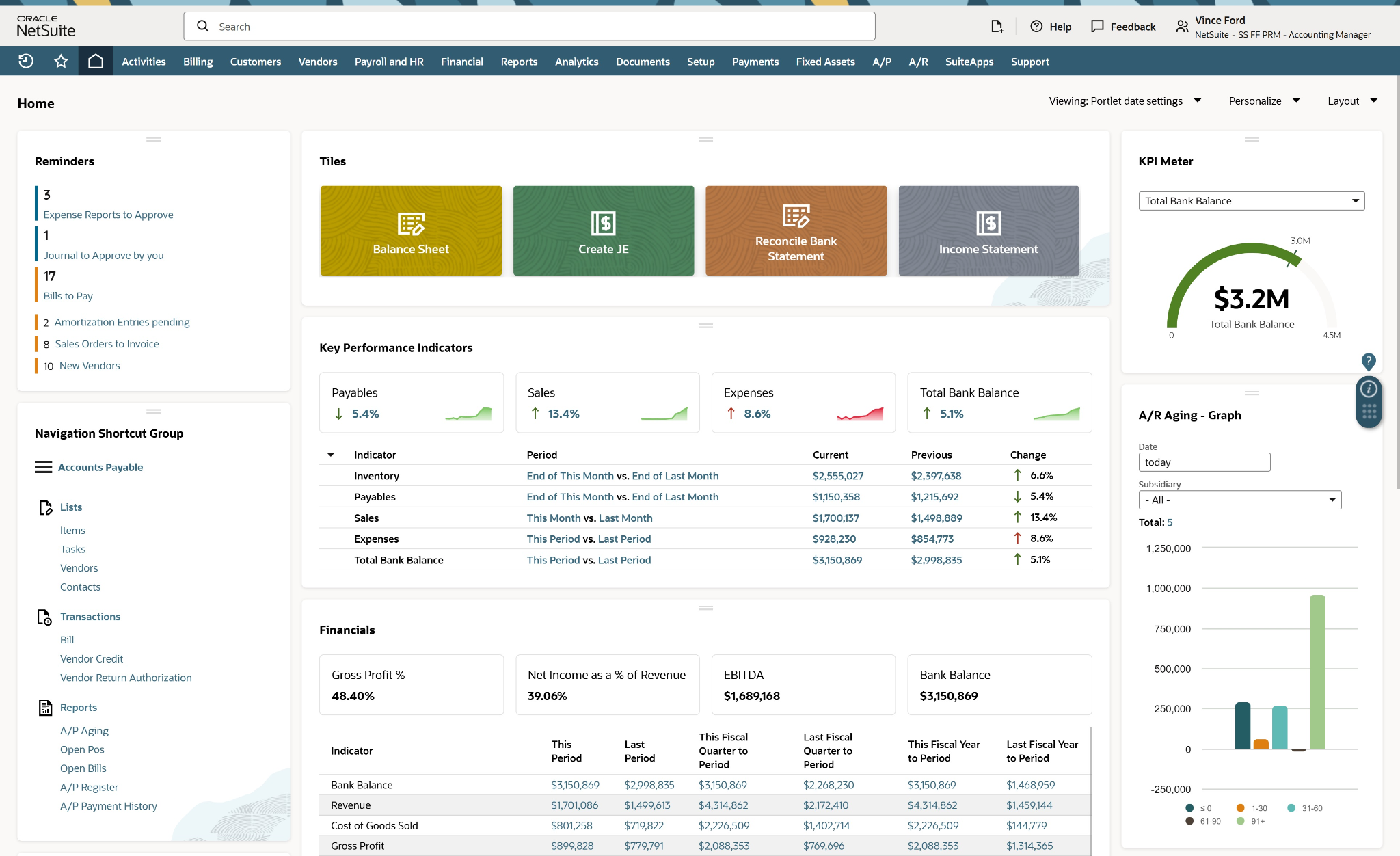
What it is: NetSuite is Oracle's cloud ERP, covering financials, inventory, order management, and reporting for businesses that expect to keep growing.
Best for: Growing teams that expect to outgrow a simpler platform within a couple of years and want to avoid a second migration.
Key features
- Real-time financial dashboards: A unified view of cash flow and financial performance across the business, built on a single general ledger instead of disconnected reports.
- Financial insights surfaced automatically: AI reviews data across every module in real time, flagging trends and suggesting next steps, so insights show up in the dashboard instead of requiring someone to run a separate analysis.
- Inventory and order management: Real-time inventory visibility paired with order management built to reduce errors and keep deliveries on time.
- Supply chain and warehouse optimization: Controls the flow of goods from suppliers to customers, with warehouse tools built to cut picking errors and improve efficiency.
- Modular scaling as you grow: Activate new modules and add users as the business expands, without a separate platform migration.
What stood out for me
NetSuite’s AI made the most sense once I thought about the data it can access. Because the AI works across financials, inventory, orders, and reporting, it can surface patterns from the full system instead of one isolated workflow.
That matters for businesses dealing with the exact problem from the intro, where numbers live in too many places and take too long to reconcile.
What could improve
Reporting is the biggest hurdle. To get real value from saved searches, custom records, and system settings, someone on the team needs more than casual familiarity with the platform.
Data can also get messy without standardized processes, and tracing one transaction across inventory, purchasing, and accounting can take more troubleshooting than expected.
Pricing
NetSuite doesn't publish public pricing. Cost depends on your specific modules, user count, and implementation needs, so you'll need to contact Oracle for a custom quote.
4. Microsoft Dynamics 365 Business Central
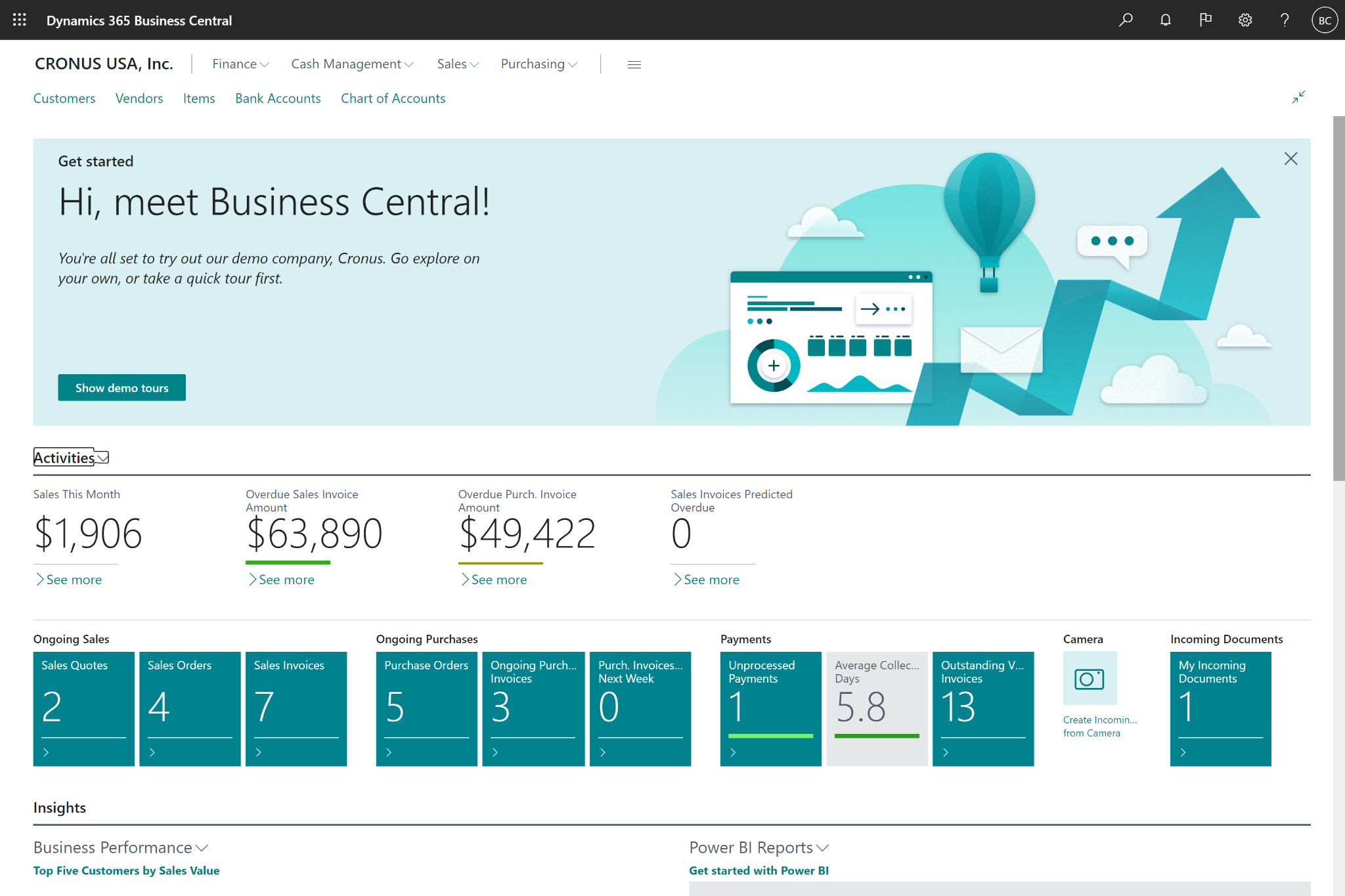
What it is: Business Central is Microsoft's ERP for small and mid-sized businesses, built to integrate directly with Outlook, Excel, and Teams.
Best for: Businesses already standardized on Microsoft 365 who want an ERP that feels native to tools employees already use daily.
Key features
- Native Microsoft 365 and Teams integration: Business Central data can be shared and viewed directly inside Teams for employees with supported Microsoft 365 licenses, giving teams access to key financial and operational records in the tools they already use.
- Rapid deployment with role-based dashboards: Built to implement in weeks rather than months, with role-based dashboards, guided tours, and 200+ training courses to get users up to speed quickly.
- Custom workflows with Power Automate and Copilot: Built-in workflow templates, or fully custom ones built through Power Automate and Copilot, without needing separate automation software.
- Open architecture for existing systems: Connects with other business systems you already run, like payroll, rather than requiring a full replacement of your stack.
- Multi-device, multi-region access: Full functionality across desktop, tablet, and mobile, available in 47 languages across 242 countries for businesses operating beyond one market.
What stood out for me
For teams already working in Microsoft 365, Business Central’s Teams integration is the practical advantage.
Business data can appear inside chats and calls while people are already discussing the work, which cuts down on tool switching and report requests. It makes key context easier to access without pulling someone out of the conversation to find it.
What could improve
The interface still feels dated in some areas, and moving between modules can take more clicks than expected. Setup also needs real expertise.
A small team will likely need a partner or consultant to get it configured properly, especially when customization requires AL development instead of simple setting changes.
Pricing
Business Central offers a 30-day free trial, with paid plans starting at $80/user/month (Essentials, paid yearly), Premium at $110/user/month, and a limited-access Team Members tier at $8/user/month.
{{templates}}
5. Sage Intacct
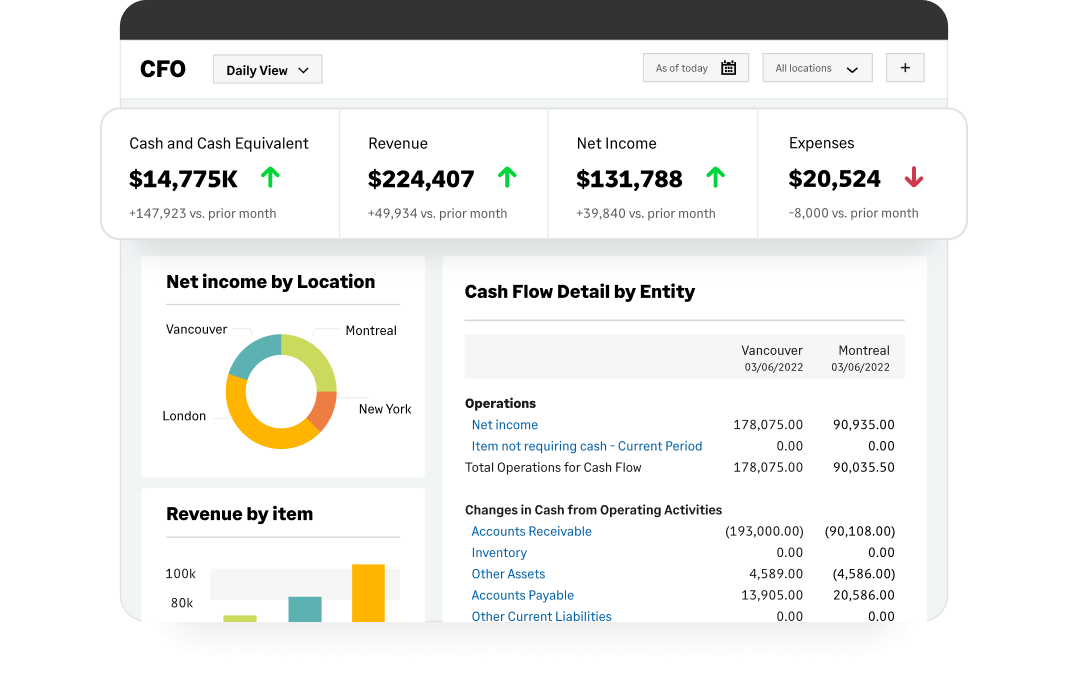
What it is: Sage Intacct is a cloud financial management platform built around accounting depth, multi-entity consolidation, and detailed reporting.
Best for: Businesses where financial reporting complexity is the main driver, especially teams managing multiple entities, grant tracking, or project-based accounting. It is a stronger fit for finance-heavy operations than inventory or HR-led workflows.
Key features
- AI finance agents built into the workflow: Purpose-built agents (Close, AP, Financial Assurance, Time, Finance Intelligence) automate specific finance tasks and let you ask questions about your financial data and get auditable answers directly.
- Automated multi-entity accounting: Built to scale operations with real-time visibility across multiple entities, rather than reconciling each one separately.
- Built-in audit trails and controls: Every automated action carries a traceable record, keeping financial data transparent and auditable.
- Faster close cycles: Built specifically to compress how long the accounting close takes, one of the most repetitive, time-consuming parts of running finance.
- Industry-specific configurations: Tailored setups for construction, healthcare, nonprofit, SaaS, manufacturing, and other verticals rather than one generic finance template.
What stood out for me
Sage Intacct’s AI finance agents feel useful because each one maps to a specific finance job. One helps with close management, another handles accounts payable, and a final option answers questions about financial data.
For finance teams, that matters because the platform can help trace numbers and explain what changed without making someone dig through records manually.
What could improve
Navigating the menus is the roughest part early on. Expect a real learning curve before you can move through the software quickly, and the interface can still feel cumbersome after that.
Reports are the bigger issue. They are hard to parse, and getting comfortable with them can take hours of trial and error.
Pricing
There's no public pricing for Sage Intacct. Costs are built around your specific industry and company size, available only by contacting sales directly.
6. QuickBooks Enterprise
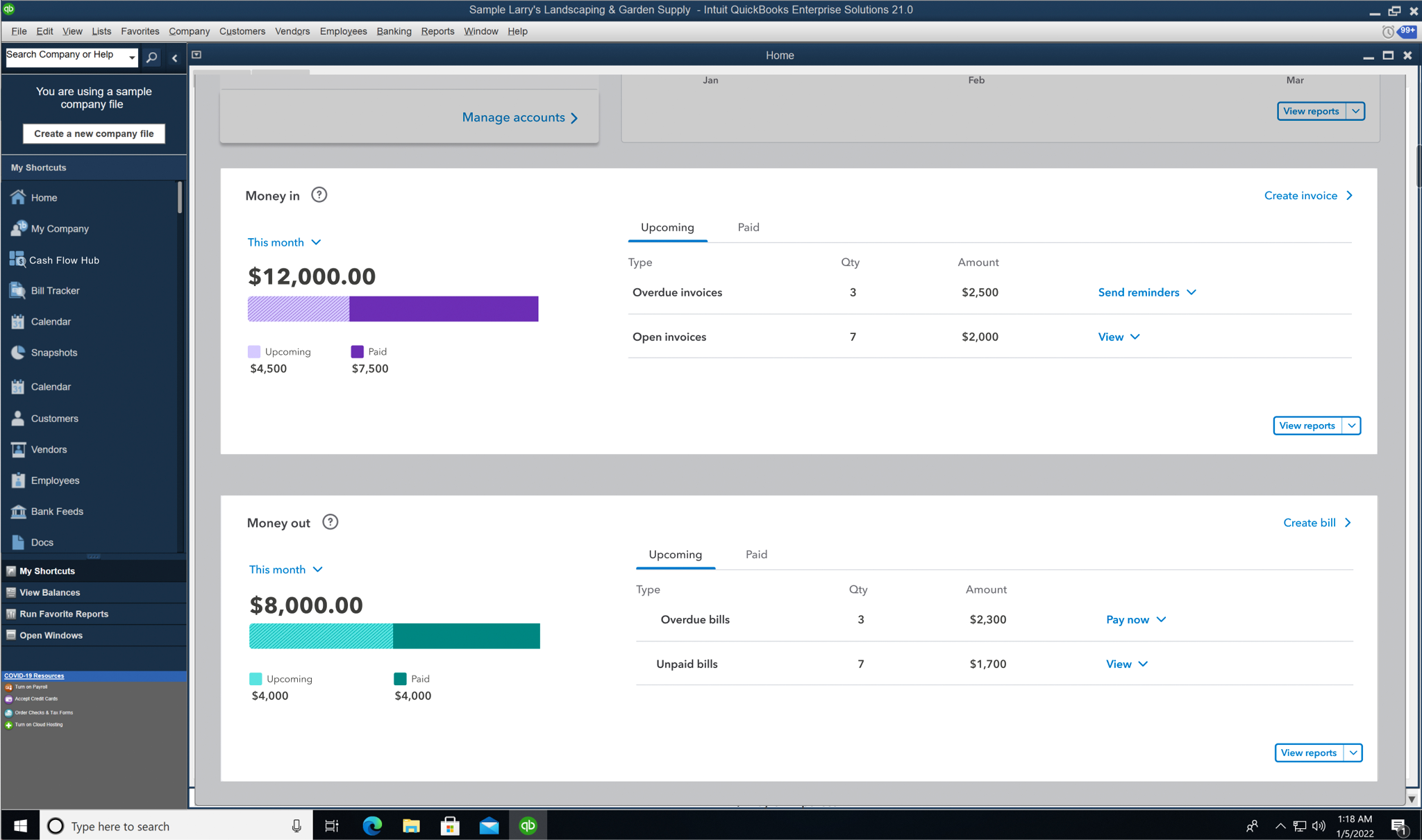
What it is: QuickBooks Enterprise extends QuickBooks' accounting core with inventory, reporting, and up to 40 simultaneous users.
Best for: Small businesses that are fundamentally finance-first and want to stay inside the QuickBooks ecosystem as they add inventory and reporting needs.
Key features
- Multi-entity management with expanded capacity: 6x the capacity of QuickBooks Pro or Premier, up to 1 million customers, vendors, and inventory items, in an interface that stays familiar to existing QuickBooks users.
- Industry-specific editions: Tailored charts of accounts, reports, and tools for manufacturing, wholesale and distribution, construction, retail, and professional services.
- Advanced inventory and order management: Real-time stock visibility across locations, with tools built specifically for tracking turnover and demand.
- Powerful, customizable reporting: Industry-specific reporting plus custom fields to search, sort, and filter data for deeper visibility into what's actually happening.
- 200+ connected apps and integrations: Real-time syncing across a broad app ecosystem keeps QuickBooks connected to the rest of your stack.
What stood out for me
The industry editions make QuickBooks Desktop Enterprise feel practical for teams with specific accounting needs. Construction, manufacturing, and retail businesses can start with reports and charts of accounts that already match how the business works.
The QuickBooks ecosystem also helps, because edge cases are easier to solve when other users have already documented fixes.
What could improve
The mobile experience is thin compared with the desktop product. That may be fine for office-based teams, but it is a real limitation for anyone who needs to check data or take action while out in the field.
Pricing
Starting at $2,210/year (Gold, annual subscription), QuickBooks Enterprise scales up to $2,717/year for Platinum and $5,363/year for Diamond, with final pricing customized per business.
7. monday.com
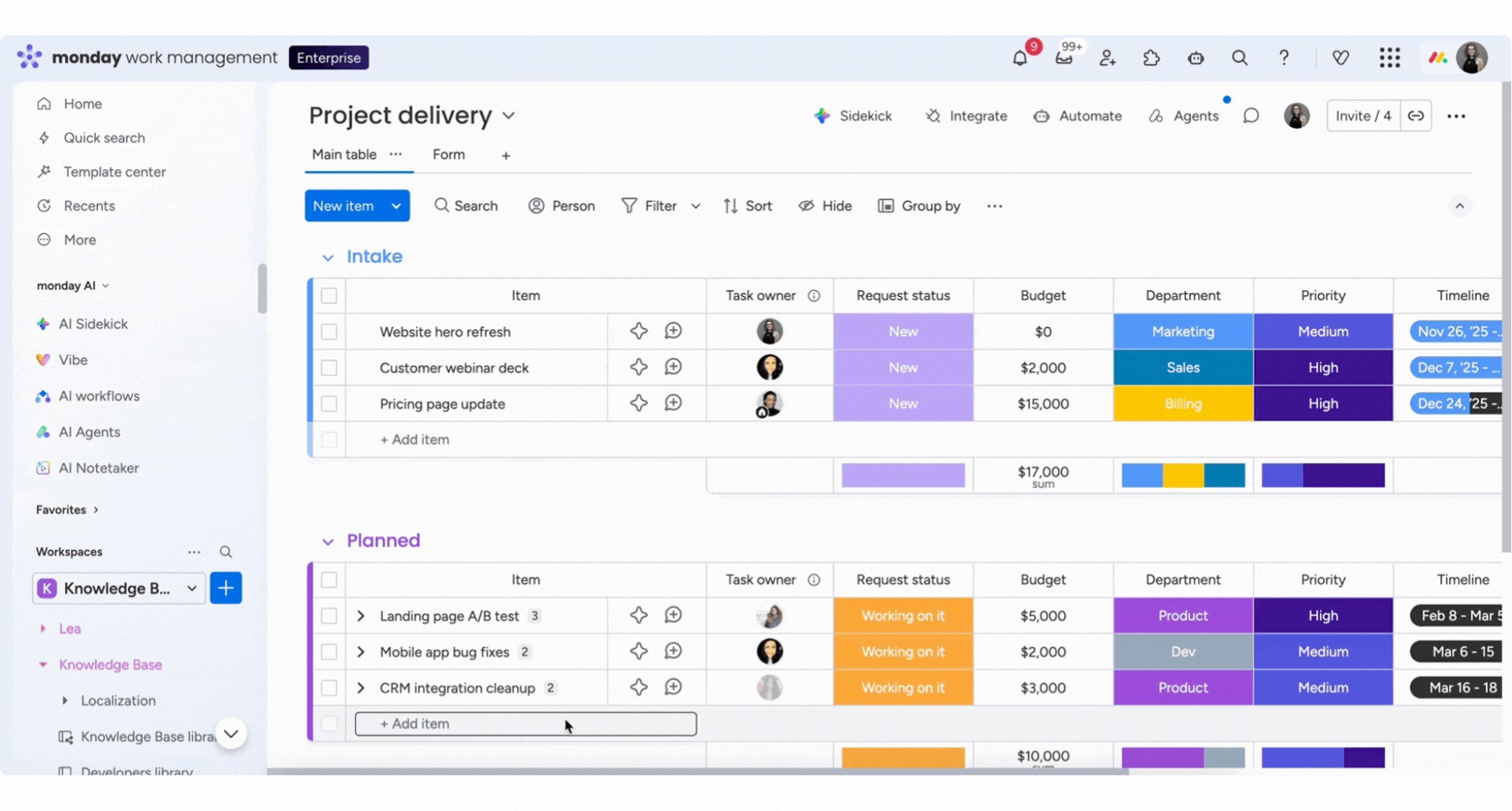
What it is: monday.com is a work management platform built around customizable boards, used for everything from project tracking to CRM to HR workflows.
Best for: Teams whose bottleneck is project and task visibility more than finance or inventory, and who want one flexible platform that adapts to different departments' workflows.
Key features
- Custom, live dashboards: Turns work data into real-time, customizable dashboards rather than static reports.
- Automated and scheduled reporting: Reports update automatically and can be scheduled for regular delivery, cutting down on manual work.
- Consolidated view across teams and tools: Rolls up data from across departments into one source of truth, giving every team the same view of the business.
- AI-generated summaries and alerts: Surfaces what needs attention through AI-generated summaries and alerts, reducing the time spent reviewing dashboards.
- 850+ integrations with two-way sync: Connects with the tools a team already uses, syncing data both ways instead of a one-directional push.
What stood out for me
Updates appeared across the workspace right away, which made it easier to keep everyone working from the same version.
The AI summaries helped most when a board had a lot of recent changes. Instead of reading through every update, I could get a quick recap of what changed, what was blocked, and what needed attention next.
What could improve
I found the budgeting side less automatic than I wanted. Linked receipts did not update the remaining total on the board, which meant I still had to do some of the math myself.
The advanced dashboards and integrations are useful, but new users will need time to get comfortable with them.
Pricing
monday.com plans start at $9/seat/month (Basic, billed annually, based on 3 seats), with Standard at $12/seat/month and Pro at $19/seat/month, plus custom Enterprise pricing. Seat counts are adjustable from 3 up to 50, and a free plan is available for up to 2 seats.
8. HoneyBook
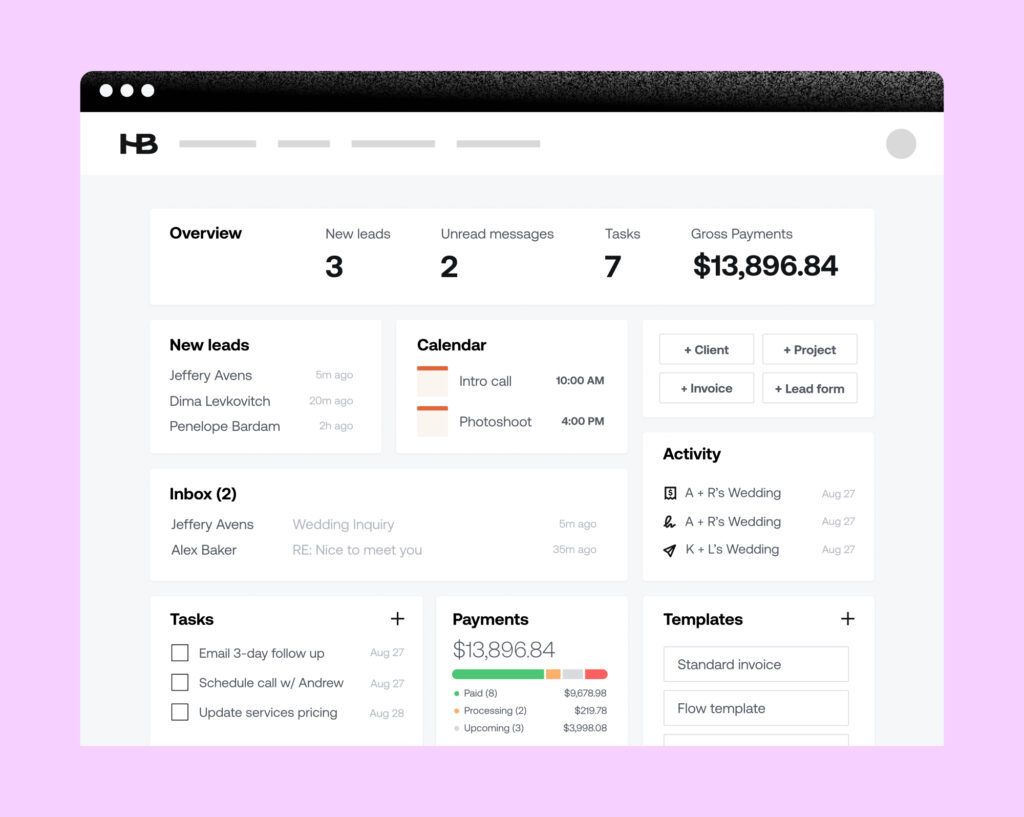
What it is: HoneyBook is a client management platform built for service-based small businesses, covering proposals, contracts, invoicing, and client communication in one place.
Best for: Freelancers and small service businesses (photographers, consultants, agencies) whose core operational need is managing clients and getting paid, not inventory or HR.
Key features
- Proposals, contracts, and invoices in one flow: Book clients and get paid through a single connected sequence, rather than separate tools for each step.
- Client portal with automations: Clients can view and sign documents, pay invoices, and message directly, while automations handle recurring steps like sending a contract after a booking.
- Lead capture and scheduling built in: Lead forms, a meeting scheduler, and questionnaires keep inquiries organized from first contact.
- AI email drafts: Generates personalized email responses based on your tone, industry, and context.
- AI meeting notetaker and project recaps: Takes meeting notes and summarizes to-dos, plus prepares project summaries ahead of meetings or due dates.
What stood out for me
The onboarding was smooth, and the contact form autofill saved more time than I expected.
When a client came in through a HoneyBook contact form, the project was created automatically with the key details already filled in. That cut down the manual setup work at the start of each client project.
What could improve
The time tracker is useful, but invoicing has limits. It can create a basic invoice, though teams that care about branded, polished client-facing invoices may find it too simple.
Recurring appointments are the bigger constraint, since HoneyBook doesn't support repeating bookings; you may still need a separate scheduling tool for that part of the workflow.
Pricing
HoneyBook's tiers start at $36/month (Starter, billed monthly) and go up to $59/month for Essentials and $129/month for Premium, each with a free trial included.
Category-specific picks
If you already know your bottleneck is one specific area, like inventory, HR, or project tracking, a focused answer is faster than sifting through all 8 tools above. The same applies if you are comparing true ERPs specifically.
Here’s where to look for each:
Inventory software for small business
If inventory tracking specifically is the actual bottleneck, a dedicated tool is often faster to set up than a full ERP. Here are a few worth a look:
- Zoho Inventory: The natural fit if you're already using other Zoho apps, with shared data across the suite.
- inFlow Inventory: Built specifically for small businesses with straightforward stock tracking and barcode scanning needs.
- Cin7: A stronger fit once you're managing inventory across multiple sales channels or warehouses.
HR software for small business
If your bottleneck is HR specifically, not finance or inventory, these are worth a dedicated look. A few options to consider:
- Gusto: Payroll and benefits built for small teams with straightforward compliance needs.
- BambooHR: Stronger for teams that want a dedicated HR system of record alongside payroll.
- Rippling: The best fit once IT provisioning and device management need to be handled alongside HR and payroll.
Small business ERP
Of the tools above, Odoo, NetSuite, and Microsoft Dynamics 365 Business Central are the ones that function as a true small business ERP, connecting financials, inventory, and operations as one system of record.
Zoho One and monday.com are closer to all-in-one suites and flexible work management, respectively; they connect departments but don't function as a single ERP system of record the way the three above do.
{{cta}}
Best project management software for small teams
Project management alone deserves its own deeper comparison than fits here; we've covered that ground in a dedicated roundup of the best task management software for small teams.
For a quick read: If project tracking is the whole problem and finance or inventory aren't part of it, monday.com, Asana, and ClickUp are worth starting with before considering a broader business management platform.
What business management software can't do for you
Even after you choose one of the platforms above, follow-through still needs an owner. Someone has to catch the client who needs a reply, write the call update, or send the invoice once a deal closes in the CRM.
The software holds the data, but the next step still depends on a person noticing what needs to happen.
That is less a business management software issue and more a daily workflow issue. Once the underlying system is in place, AI assistants like Lindy can sit on top of those tools and handle the work around them, including inbox follow-ups, meeting notes, call updates, and reminders.
Lindy is useful here because you can text it in plain English, then have it draft the follow-up, update the CRM, or send the next reminder using context from your existing tools.
FAQs
1. What's the difference between business management software and an ERP?
Business management software is the broader category. It includes any tool that centralizes operational functions like finance, HR, inventory, projects, or client work.
An ERP is a specific type of business management software that connects financials, inventory, and operations as one unified system of record, typically built to scale further than an all-in-one suite.
2. Do small businesses really need business management software, or are spreadsheets enough?
No, small businesses do not always need business management software. Spreadsheets are enough when data is simple, ownership is clear, and updates stay manageable.
Once inventory, payroll, projects, and invoicing start depending on the same data, business management software becomes a better fit.
3. Is it better to buy one all-in-one platform or several specialized tools?
It is better to buy one all-in-one platform when your finance, inventory, HR, and project data need to stay connected every day. Several specialized tools are better when one function needs deeper features, and your team can manage the integrations between systems.
4. How much does business management software typically cost for a small team?
Business management software typically starts around $9 to $45 per month for lighter small-business tools, but higher-tier platforms can run closer to $80 to $129 per month depending on the plan.
monday.com starts around $9/seat/month, while Zoho One ranges from $45 to $105/employee/month depending on billing and plan type.
Full ERPs like NetSuite and Sage Intacct are usually quote-based and cost more because setup, modules, and support vary by business.
5. Can business management software replace an accountant or HR person?
No, business management software cannot replace an accountant or HR person. It can centralize financial, employee, and operational data, but an accountant still handles judgment around reporting, tax, and financial strategy.
An HR person still makes decisions around hiring, compliance, employee issues, and workplace policies.











Blog
Related Articles
.avif)
.png)
.png)
.png)
.png)

.png)
The AI assistant that runs your work life
Lindy saves you two hours a day by proactively managing your inbox, meetings, and calendar, so you can focus on what actually matters.
