


How to Find Someone's Email Address (10 Ways That Work)


I once tried to reach a candidate before an interview slot closed, but their company did not list a direct email anywhere.
I guessed every format I could think of: firstname.lastname@, firstname@, flastname@.
When I finally found the right one, someone else had already scheduled the call.
Below are the 10 methods that have worked best for me, starting with the fastest ones.
How to find someone's email address: The quick answer
Check the company's website first; most list a contact or team page.
If that doesn't work, search LinkedIn for the person's current role and company, then try the standard email format for that company (usually firstname.lastname@ or firstinitiallastname@).
Verify any guess with a free email checker before you send anything.
1. Check the company website
Start here before anywhere else. Most companies list a general contact address, and many include a full staff directory or "About" page with individual emails, especially smaller businesses, law firms, and agencies.
Pro tip: If there's no direct listing, check the press or media page. Companies often publish a PR contact email there that can point you toward the right department, even if it's not the exact person.
2. Search Google directly with operators
A plain Google search often finds a published email fast, no tool or sign-up needed.
Put the person's name in quotes along with "email" or "contact," for example "Jane Doe" "email", to catch any page where their address already appears publicly.
To narrow the search to one company, add a site restriction: site:company.com "Jane Doe" searches only that domain for a match.
Pro tip: Try a few different phrasings such as "contact," "email," and "reach me at"; each turns up different pages, since not every site uses the same wording.
3. Use the standard email format pattern
Most companies use one consistent email format across their whole team. Once you know it, you can apply it to anyone at that company.
Common formats include:
- firstname.lastname@company.com
- firstinitiallastname@company.com
- firstname@company.com
Pro tip: Find one confirmed email from the company (a press contact, a LinkedIn post, a public byline), and you'll usually be able to infer the format for everyone else there.
4. Search LinkedIn
LinkedIn confirms the person's current employer and role, which narrows down which email format to try.
Some profiles list a contact email directly under "Contact info." A LinkedIn Sales Navigator subscription (or a free trial of one) can confirm the person’s current role and company fast, which tells you exactly which email format to try.
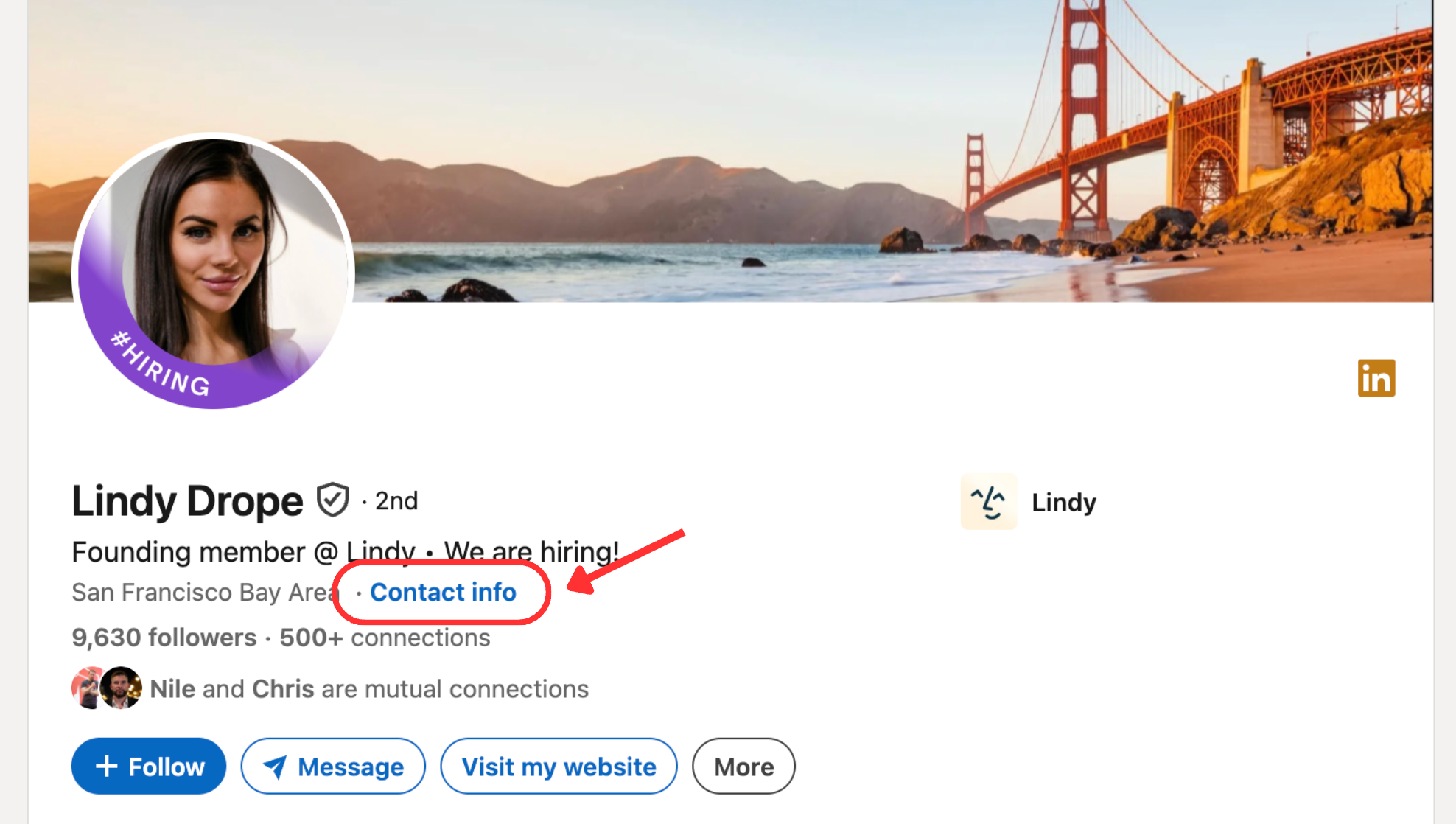
Pro tip: If you're connected to the person or share a mutual connection, sending a direct message asking for their email is faster and more reliable than guessing.
5. Use an email finder tool
Tools like Hunter.io, Apollo, RocketReach, and Voila Norbert search a person's name against a company domain and return likely email matches, often with a confidence score. Most offer a limited number of free searches per month before requiring a paid plan.
Pro tip: Cross-check results from two different finder tools before you rely on one. They don't always agree, and a second source catches false positives.
6. Check social media bios and posts
Twitter/X, Instagram, and personal websites may list a contact email directly in the bio or in a pinned post, especially for people who use social channels for client work, partnerships, bookings, or media requests.
7. Look at press releases and published articles
If the person has been quoted in an article, named in a company announcement, or listed on a press release, check the byline, quote attribution, and media contact section. Press releases often include a PR contact email near the bottom, while articles may link the person’s profile or company page.
Pro tip: Search the person’s name with terms like “press release,” “interview,” “media contact,” or “quoted” to find pages where their email may appear alongside their title.
8. Ask a mutual connection
If you share a colleague, client, or contact with the person, a direct ask, "Do you have Sarah's email? I wanted to reach out about X," is often faster than any tool and comes with an implicit introduction that improves your odds of a reply.
9. Use a WHOIS lookup for domain owners
If you're trying to reach whoever owns a specific website or domain, a WHOIS lookup (available through sites like whois.net) can surface the registrant's contact email, though many domains now use privacy protection that masks this information.
10. Verify the email before you send
Once you have an address, whether guessed, found, or inferred, run it through a free tool like NeverBounce or ZeroBounce. It checks whether the address is active and correctly formatted before you send anything.
{{templates}}
Common mistakes to avoid when finding someone's email address
A wrong or unverified email costs more than the time it took to find it. Here's what trips people up most:
Most of these come down to one habit: verify before you send. Get that right, and the rest of the list mostly takes care of itself.
What to do if you can't find the email at all
If none of the methods above turn anything up, a few fallback options are still worth trying before giving up. Here's what to try next:
- Contact the company's general inbox. A message to info@ or hello@ asking to be forwarded to the right person often works, especially at smaller companies where someone actually reads that inbox.
- Use the company's contact form. Slower than email, but it reaches someone, and many forms route directly to the person or team you're trying to reach.
- Try a direct message on social media. LinkedIn, X, or Instagram DMs work well when you can't find an email at all, especially for freelancers, creators, or smaller businesses without a listed directory.
- Escalate to a warm introduction. If a direct ask for the email has not worked, ask the mutual connection to make the intro themselves. In some cases, the fastest path is a trusted person opening the door for you.
How to find a personal (not work) email address
The methods above mostly assume you're looking for someone at a company, where a domain and email format exist to guess against. Finding a personal email works differently:
- Use the contact route they already point people toward. For personal outreach, a booking page, newsletter reply address, creator inbox, or website contact form is often safer than guessing a private email.
- Look for a personal website or portfolio. A "Contact" page is common even outside a business context, particularly for anyone with public-facing work.
- Ask a mutual friend or contact directly. Without a company directory to search, a direct ask is often faster and more reliable than guessing at a personal address.
- Be more cautious with finder tools here. Tools like Hunter.io are built around company domains and are far less reliable, or simply won't return results, for personal, non-work addresses.
{{cta}}
What to do once you've found the email
Finding the address is only the first step. Next comes the outreach itself, including the first draft, the follow-up, and a simple way to track who you have already contacted.
Lindy picks up right where the search leaves off. Text it the email you found and what you want said, and it can draft the message, help you manage the next step, and remind you to follow up if the thread goes quiet.
For recruiters, sales reps, or founders doing any real volume of outreach, that follow-up tracking is usually the first thing to slip.
FAQs
1. Is it legal to find someone's email address?
Finding a publicly available business email address is generally legal. What matters is how you use it afterward.
In the US, CAN-SPAM applies to commercial email and requires accurate sender information, honest subject lines, a physical mailing address, and a clear opt-out method.
In the EU, GDPR requires a valid legal basis for using someone’s personal data, which can include a work email address.
2. Can you find someone's email address for free?
Yes. Checking a company website, searching LinkedIn, and trying the standard email format pattern all cost nothing. Most email finder tools also offer a small number of free searches per month before requiring a paid plan.
3. How accurate are email finder tools?
Accuracy varies by tool and by company size; established tools tend to perform well on common business domains, but results get less reliable for smaller or newer companies.
Vendor-advertised accuracy claims are worth treating skeptically. Whatever the tool, verify any result before sending anything that matters.
4. What's the best way to find someone's email if they work at a large company?
Large companies almost always use one consistent email format across the whole organization. Once you've confirmed it from a single known employee, that same format typically works for anyone else at the company, from executives to new hires.
5. Can I find an email address from just a phone number or username?
Sometimes, reverse-lookup tools exist for both, but success rates are lower than name-and-company searches, and personal privacy settings often block results entirely. A direct ask through a mutual connection is usually more reliable than either.










Blog
Related Articles
.avif)
.png)
.png)
.png)
.png)

.png)
The AI assistant that runs your work life
Lindy saves you two hours a day by proactively managing your inbox, meetings, and calendar, so you can focus on what actually matters.
