How to Write a Cover Letter That Gets Interviews: 6 Easy Steps


I’ve analyzed hiring manager insights and real application examples to see what separates strong cover letters from the ones that get skipped. Here’s the exact step-by-step process that works in 2026.
What is a cover letter?
A cover letter is a short, tailored document you submit with your resume that explains why you’re a strong fit for a specific role. It connects your experience to the company’s needs and provides hiring managers with context that a resume alone cannot offer.
Unlike a resume, which lists your skills and experience, a cover letter tells the story behind them. It explains why you’re applying, what you can contribute, and how your background aligns with the job.
Do employers still read cover letters?
Yes, employers still read cover letters, but not always.
Large companies often rely on applicant tracking systems and structured resume reviews. Recruiters skim through the letters and focus on experience, job titles, and keywords first. In those cases, a cover letter may get a quick scan or no attention at all.
Smaller companies tend to read them more carefully. Founders and hiring managers often review applications themselves. They use the cover letter to understand motivation, communication skills, and fit.
Certain situations make cover letters more important:
- You are changing careers
- You have an employment gap
- You apply to a mission-driven organization
- The job posting requires one
In competitive roles, a strong cover letter can create separation, while a weak or generic one can hurt you. So while writing a cover letter, focus on, “If they read it, does it add value?”
What you need before writing a cover letter
You should aim for clarity before writing a single sentence of your cover letter. Gather the right inputs. Here’s what you need:
- The job description: Read it closely. Highlight repeated skills, required qualifications, and specific responsibilities. These clues tell you what the employer values most.
- Your resume: Your cover letter should support your resume, not repeat it. Identify two or three achievements that directly match the job requirements.
- Measurable results: Numbers strengthen credibility. Revenue growth, cost savings, engagement increases, and process improvements. Concrete results make your claims believable.
- Basic company research: Review the company’s website. Look at their mission, recent announcements, product launches, or areas of growth. This research helps you explain why you want that specific role at that specific company.
- 30 to 45 minutes of focused time: Writing one tailored letter takes effort. Plan enough time to draft, edit, and tighten it.
Once you have these ready, the writing process becomes structured and much easier to manage.
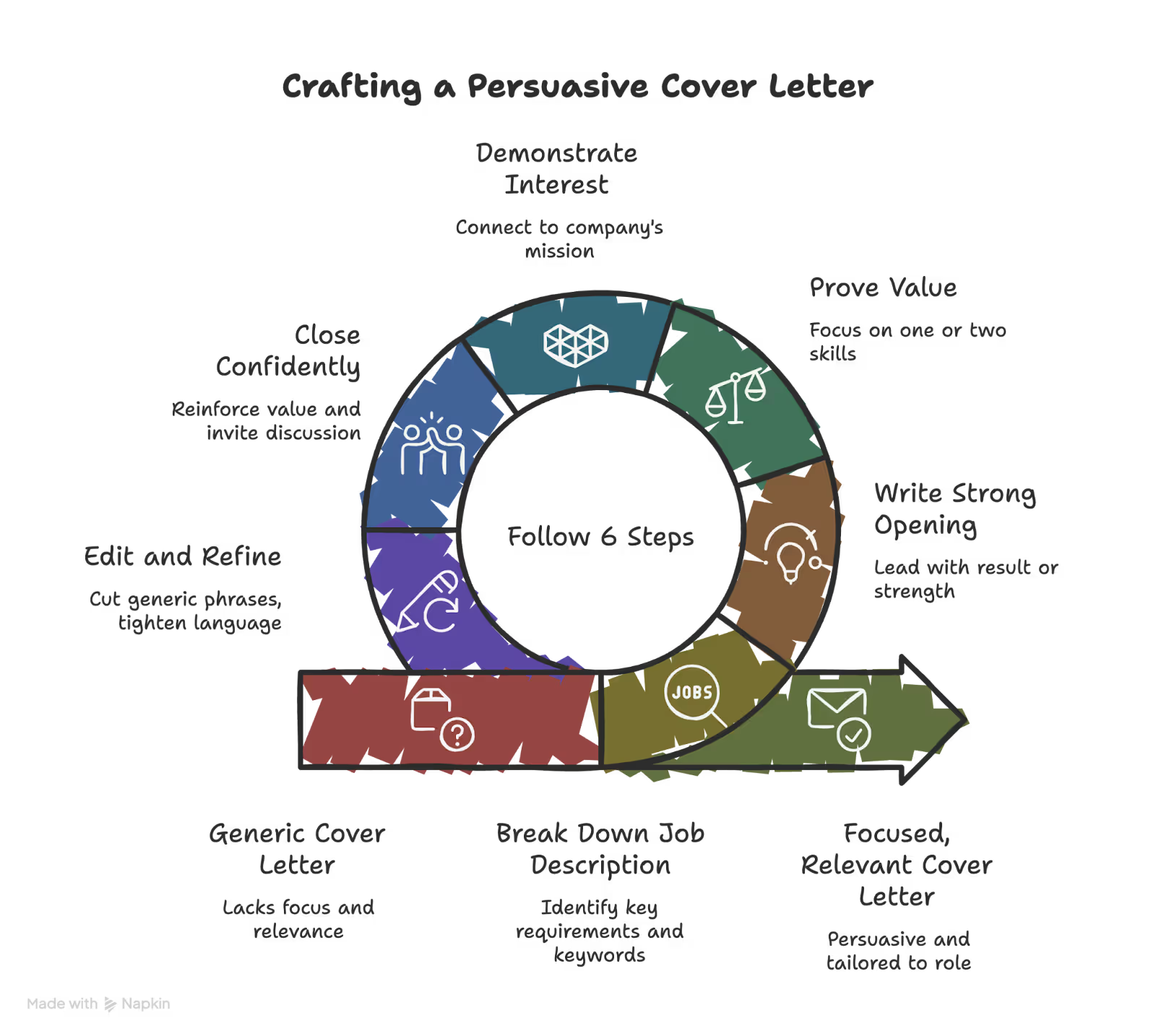
How to write a cover letter: 6 steps to follow
The cover letter must be focused, relevant, and persuasive. To do that, you’ll need to follow a process. These are the steps to help you write a good cover letter:
Step 1: Break down the job description
Most people skim the job post and start writing. That leads to generic letters. Instead, treat the job description like a checklist.
Start by identifying the top three requirements. Look for:
- Skills that appear more than once
- Responsibilities listed near the top
- Required qualifications
- Keywords in bold or repeated language
For example, if the posting emphasizes:
- Cross-functional collaboration
- Project management
- Data analysis
These tell you that the employer cares about these areas. Next, match each requirement with proof from your experience. Use this simple structure:
Requirement → Your action → Measurable result
Example:
- Requirement: Improve internal processes
- Your action: Redesigned onboarding workflow
- Result: Reduced training time by 30 percent
Doing this exercise prevents vague statements like “I have strong leadership skills.” Instead, you show evidence.
Also, mirror the employer’s language when appropriate. If they say “stakeholder communication,” use that phrase instead of “working with others.” Alignment makes your letter feel tailored.
Once you’ve identified your strongest matches, you’re ready to write your opening paragraph.
Step 2: Write a strong opening paragraph
Your opening paragraph decides whether someone keeps reading. Most candidates start with: “I’m excited to apply for the Marketing Manager position at…”
That line adds no value. It tells the employer nothing about your ability. Start with impact instead. Lead with a result, a strength, or a clear alignment with the role. Then connect it to the position.
Weak example: I am excited to apply for the Project Manager role at your company. I believe my background makes me a strong candidate.
Stronger example: In my current role, I led cross-functional projects that reduced delivery timelines by 25 percent while improving client satisfaction scores. I am applying for the Project Manager position because your team focuses on scalable process improvements, which aligns with the work I already do.
Notice the difference:
- It starts with proof.
- It shows relevance immediately.
- It signals value in the first sentence.
Your opening paragraph should state the role clearly, show one strong qualification, and connect your experience to the company’s focus. Keep it short. Two to four sentences work best.
Once you establish credibility, move into the body paragraphs where you prove it.
Step 3: Prove your value in one or two focused body paragraphs
These paragraphs indicate whether you can effectively address the problems outlined in the job description. Do not try to cover everything.
Pick one or two requirements from Step 1 and build each paragraph around one clear theme. Use this structure:
- State the relevant skill
- Describe the action you took
- Show the measurable result
- Tie it back to the employer’s needs
Here’s an example: In my current role, I manage cross-functional product launches across marketing, design, and engineering teams. I built a structured rollout plan, created weekly stakeholder updates, and tracked risks early in the process.
As a result, we reduced launch delays by 20 percent over two quarters. Your job description highlights the need for strong coordination across departments, and this experience aligns directly with that priority.
Notice what these two paragraphs do. They:
- Stay focused on one strength
- Show action, not personality traits
- Use numbers to build credibility
- Connect back to the role
Avoid listing every accomplishment. Avoid copying bullet points from your resume. The goal is to show how you think and how you create results. If you include a second skill, follow the same structure and keep it purposeful.
Step 4: Demonstrate why you want to work with the company
Candidates usually write generic praise that could apply to any company. Avoid statements like: “I admire your innovative culture and commitment to excellence.”
That line sounds safe, but it says nothing specific. Instead, show that you did your research. Connect your interest to something concrete. Focus on one of these angles:
- The company’s mission
- A recent product launch or expansion
- Their industry direction
- A public initiative or value they promote
Here’s an example: I am particularly interested in your recent expansion into sustainable packaging solutions. Your commitment to reducing environmental impact while maintaining product quality reflects the type of long-term thinking I value. I would welcome the opportunity to contribute to initiatives that balance growth with responsible innovation.
The paragraph above works because it:
- References something specific
- Explains why it matters to you
- Aligns your values with theirs
Step 5: Close with confidence
Your closing paragraph should feel professional and direct. It should not sound desperate or overly formal. Keep it short and express your interest in the next steps.
Here’s a weak example: I hope you will consider my application. I look forward to hearing from you soon.
Let’s look at a strong example: I believe my experience leading cross-functional initiatives and improving operational efficiency would add value to your team. I look forward to discussing how I can contribute to your upcoming projects. Thank you for your time and consideration.
Try to close like the paragraph above. It works because it:
- Reinforces your value
- Signals confidence
- Invites further conversation
After this paragraph, use a simple sign-off, such as sincerely or best regards. Then include your full name.
Step 6: Edit and refine
You can transform a good cover letter into a great cover letter by editing and refining it. Here’s how you can do it:
- Cut anything generic: Remove phrases that could apply to any company. Each sentence should connect to the specific role.
- Check for repetition: Your cover letter should not mirror your resume bullet points word-for-word.
- Tighten the language: Aim for 250 to 400 words total. If a sentence does not add value, remove it.
- Read it out loud: It helps you catch awkward phrasing and unnecessary words.
Submit the letter once you believe the letter is focused, specific, and easy to skim.
{{templates}}
When a cover letter matters most
Some applications benefit more from a strong cover letter than others. In certain situations, it can influence whether you move forward. Here’s when you shouldn’t miss writing a cover letter, even if it’s optional:
Career change
If you move into a new field, your resume alone may not explain the transition. A cover letter gives you space to clarify your direction. Here’s what to explain:
- Why you are making the change
- Which transferable skills apply
- How your experience supports this move
Keep it direct and focus on the value you bring to the role.
Resume gaps
If you have a gap in employment, address it briefly. Do not overexplain. State what you did during that time and what you learned.
For example: During a six-month career break, I completed a data analytics certification and built independent projects to strengthen my technical skills.
Entry-level roles
If you lack formal work experience, use your cover letter to highlight the skills you’ve developed. These can be:
- Academic projects
- Internships
- Volunteer work
- Leadership roles
Show initiative and measurable outcomes wherever possible.
Mission-driven organizations
Nonprofits, research institutions, and purpose-driven companies often value alignment. Your cover letter can demonstrate that you understand their mission and want to contribute to it.
Generic applications stand out in the wrong way in these settings.
Competitive roles
When many candidates meet the technical requirements, the way you communicate can be the differentiator. A well-structured cover letter shows clarity of thought and professionalism.
Common cover letter mistakes
Even strong candidates weaken their applications with avoidable mistakes. Most issues fall into a few predictable patterns. Here’s what not to do:
- Repeating your resume: A cover letter should add context, not copy bullet points. If your resume lists an achievement, expand on it and explain why it matters for this role.
- Using one generic version for every job: Hiring managers spot templates immediately. Mention the company, the role, and at least one specific priority from the job description.
- Being vague: Claims like “I am a hard worker” or “I am passionate” carry no weight without proof. Replace adjectives with measurable results.
- Focusing only on yourself: A cover letter should center on the employer's needs. Shift from “what I want” to “what I can contribute.”
- Writing too much: Long letters reduce impact. Aim for 250 to 400 words. Keep paragraphs short and easy to scan.
- Using outdated or overly formal language: Avoid phrases like “To whom it may concern” or “I humbly submit.” Use direct, modern business language instead.
Cover letter example & why it works
The cover letter below belongs to a member of my team and it helped him get the interview. Let’s see how he approached the task:
Role: Content Marketing Manager/SEO Content Lead
Dear [Hiring Manager],
In the past six months, I increased organic clicks by 489% and non-brand clicks by 550% for a B2B IT solutions company by building and executing a structured SEO content strategy.
I am applying for the Content Marketing role because your team focuses on measurable growth, and that is the lens I use for every piece of content I create.
At [previous company], I led organic reach and lead generation initiatives across cybersecurity, cloud, and infrastructure domains. I wrote more than 60 SEO-optimized blogs and 30 case studies, each aligned with bottom-of-the-funnel intent.
Instead of writing generic case studies, I structured them around customer pain points first, then demonstrated how our solutions resolved them. Within six months, total organic impressions increased by 422%, and total keywords ranking grew from 806 to 1010.
I also managed end-to-end content projects, including scripting product videos, running LinkedIn campaigns, launching webinar promotions, and hosting a five-episode podcast with subject matter experts.
I collaborate closely with sales, pre-sales, and technical teams to ensure content reflects real customer challenges and supports revenue goals.
I am particularly interested in your company’s focus on data-driven marketing and long-term organic growth. I would welcome the opportunity to contribute a disciplined SEO process and performance-focused content strategy to your team.
Thank you for your time and consideration. I look forward to discussing how I can support your growth initiatives.
Sincerely,
[Name]
—
Here’s why this cover letter works:
The opening leads with results
“Increased organic clicks by 489%...”
The letter starts with proof, not enthusiasm. It immediately establishes credibility and follows our framework of “Requirement → Action → Measurable result.”
The body focuses on impact
The letter did not list everything from the portfolio or the resume. It highlighted:
- SEO blogs
- Case studies
- Measurable growth
- Cross-functional collaboration
Each paragraph ties back to business outcomes, not personality traits.
Avoids repetition
There’s no copying of portfolio bullets. The letter:
- Added context
- Explained strategy
- Connected actions to results
Shows alignment with the company
The “why this company” section is short and specific. It does not use vague praise. Instead, it says “Focus on data-driven marketing and long-term organic growth.”
Confident close
There’s no desperation or outdated language. The writing shows a clear interest in the next steps.
{{cta}}
Try Lindy to simplify your job search and write better cover letters
Lindy can help you research companies and draft strong cover letters in minutes. If you plan to apply to multiple roles, Lindy can help you move faster without sending generic applications.
Simply ask Lindy to handle the grunt work while you focus on refining your message. It offers ready-to-use, customizable templates, and connects with 4,000+ business apps. That way, it can pull relevant context from your documents, email, and calendar when needed.
Lindy can support your job search with capabilities like:
- Job description breakdown: Text Lindy a job post, and it pulls out the top requirements, repeated keywords, and priority skills.
- Company research summaries: Ask Lindy to summarize a company’s mission, recent announcements, leadership priorities, and areas of growth so you can write a sharper “why this company” paragraph.
- Resume-to-role comparison: Lindy can compare your resume to the job description and highlight your strongest matches and potential gaps.
- Tailored cover letter drafts: Share your resume and the job description, and Lindy drafts a structured 250 to 400-word cover letter focused on measurable impact.
- Stronger openings: Ask Lindy to rewrite your first paragraph to lead with results instead of generic statements.
- Language tightening: Lindy can remove vague claims, shorten long sentences, and make your writing clearer and more direct.
- Application tracking and reminders: Lindy can help you track where you applied and text you reminders to follow up so nothing slips through the cracks.
- Proactive updates: If something changes in your calendar or inbox related to an application, Lindy can notify you so you stay ahead.
Try Lindy’s free trial and see how much time you save on your next application.
Frequently asked questions
How long should a cover letter be?
A cover letter should be 250 to 400 words and no longer than one page. Keep it to three or four short paragraphs. Hiring managers skim, so focus on clarity and relevance.
How do you start a cover letter?
Start a cover letter with a measurable result or strong qualification that matches the role. Avoid generic lines like “I am excited to apply.” Lead with proof, then connect it to the job.
How do you write a cover letter with no experience?
If you have no experience, focus on transferable skills, academic projects, internships, or volunteer work. Show initiative and measurable outcomes. Employers look for potential and effort.
How do you write a cover letter for a career change?
When writing a cover letter for a career change, explain the transition clearly and highlight transferable skills. Keep the explanation brief and focus on how your experience supports the new role.
Is a cover letter necessary if it’s optional?
A cover letter is not always required, but it can strengthen your application. Submit one if the role is competitive or if you want to stand out. If it is required, always include it.
How do you address a cover letter without a name?
If you cannot find the hiring manager’s name, use “Dear Hiring Manager” or “Dear [Department] Team.” Avoid “To whom it may concern.”
Can you use AI to write a cover letter?
Yes, you can use AI to draft a cover letter. Always review and personalize it before submitting. You can use AI for structure and research, but not to create the final copy.
What should you not include in a cover letter?
Do not include salary expectations unless requested. Avoid personal details, generic statements, resume repetition, and long paragraphs. Keep the focus on relevant value.