What is BCC in Email? How it Works and When to Use it
Lindy broke down how BCC works in email, comparing it to CC, walking through real-life examples, and flagging situations where using it protects professionalism.


I’ve noticed BCC is one of those email features everyone has seen, but very few actually feel confident about using. Here’s what it actually does, how it functions behind the scenes, and when it’s the smarter move.
What is BCC in email?
BCC stands for “Blind Carbon Copy.” It lets you send an email to someone without showing their email address to the other recipients. People in the “To” and “CC” fields won’t be able to see who was added in BCC.
This is most useful when you’re emailing multiple people who don’t know each other, like clients, customers, subscribers, or event attendees. It helps protect their contact details and keeps the email from turning into a messy reply-all thread.
Key features of BCC include:
- Recipient privacy: When someone is added to the BCC field, their email address stays hidden from everyone else on the email.
- Reply-all control: Since BCC recipients are hidden from other recipients, replies to the email generally go only to the sender, not to the full group. This helps prevent unnecessary reply-all chains and keeps inbox clutter to a minimum.
- Cleaner group emails: BCC keeps large emails from feeling crowded by hiding long recipient lists from view.
In simple terms, use BCC when you want to send the same email to multiple people without exposing the full recipient list.
How does BCC in email work?
BCC works like any other recipient field, with one key difference: the people you add there stay hidden from everyone else on the email. They still receive the message, but their addresses won’t appear to anyone in the “To” or “CC” fields.
Here’s how it usually works:
- Add the main recipient in the “To” field.
- Add any visible recipients in “CC” if others should openly stay in the loop.
- Add hidden recipients in “BCC” if you want them to receive the email privately.
- Send the email as usual.
For example, if you’re sending a monthly update to 50 clients, putting all their addresses in the “To” field would expose the full list. A cleaner option is to put your own email in the “To” field and add the clients in BCC. Everyone gets the same message, but no one sees the other recipients.
Real-life examples of using BCC in email
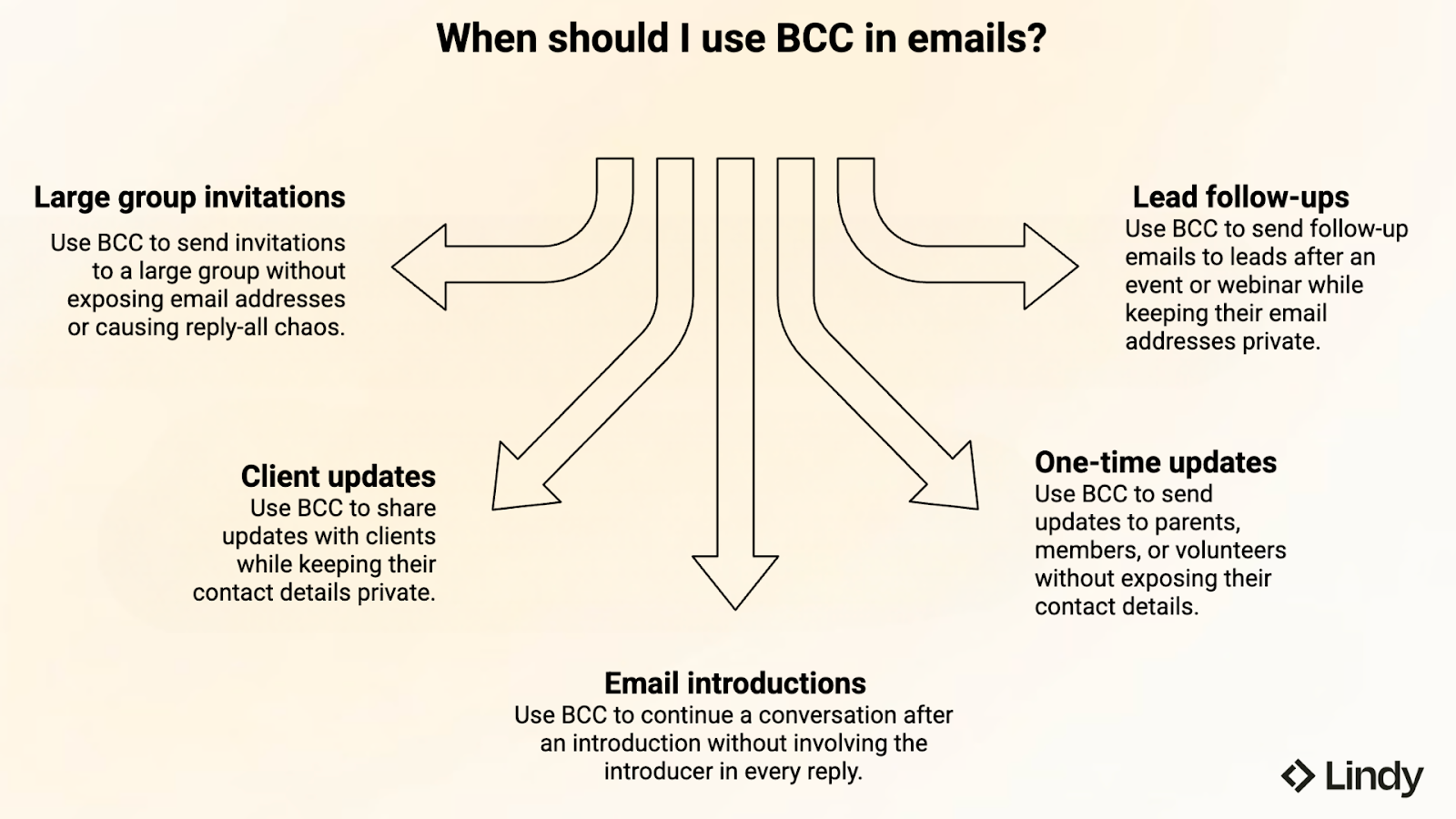
You can use BCC in all kinds of professional email situations. From event invites and client updates to webinar follow-ups and email introductions, it helps when you need to reach people without exposing the full recipient list.
1. Sending invitations to a large group
If you're inviting 40 business owners to a networking breakfast, use BCC so no one sees each other's emails. Put yourself in the "To" field, guests in "BCC," send one message, and everyone's privacy stays protected. You also avoid inbox clutter from reply-all mishaps.
2. Sharing an update with clients or customers
Imagine you run a small consulting firm and need to send a holiday schedule update to all active clients. The message is the same for everyone, but clients should not see who else you work with. Using BCC lets you send one clean email while keeping each client’s contact details private. It feels more professional and saves you from sending the same note over and over. For teams looking to automate personalized campaigns further, modern ai email outreach software can handle large-scale communication efficiently.
3. Following up after an email introduction
Let’s say a coworker introduces you to a freelance designer over email. Once the introduction is made, you want to continue the conversation directly without filling your coworker’s inbox with every reply. One option is to move the coworker to BCC on your response, so they stay in the loop without staying fully involved in the thread. That way, the conversation becomes cleaner while still keeping the handoff smooth. If you are reaching out first instead, read our guide for the best how to introduce yourself in an email strategies.
4. Sending a one-time update to parents, members, or volunteers
Say you run a school club, community group, or nonprofit event and need to send the same update to 60 people at once. Maybe it’s a schedule change, a venue reminder, or a last-minute cancellation.
BCC lets you send one email without exposing everyone’s contact details to the full group. It feels more organized, and it avoids the mess of replies from people who were never meant to email each other.
5. Emailing a list of leads after an event or webinar
Imagine you hosted a webinar and want to follow up with everyone who signed up. The message is mostly the same, but these recipients don’t know each other and shouldn’t see one another’s email addresses. Using BCC helps you send a clean follow-up in one go while keeping the list private. It’s a simple option when you want something more personal than a newsletter but still need to reach multiple people at once. For larger lead lists, implementing tools for outbound email automation can help streamline outreach while personalizing your follow-ups.
{{templates}}
BCC vs CC in email: What’s the difference?
Many people confuse CC and BCC in email, but choosing the right one affects who can see recipients and how transparent the conversation is. Understanding the difference helps you avoid privacy issues, reply-all clutter, and awkward email situations.
Basically, CC is for transparency, while BCC is for privacy. Both features send a copy of the email to additional recipients, but they handle recipient visibility differently.
Here’s a clear breakdown:
| Criteria | BCC | CC |
|---|---|---|
| Visibility | Email addresses are hidden from other recipients. Only the sender can see them. | Email addresses are visible to everyone on the email. |
| Primary use | Used when privacy or private inclusion is important. | Used for open communication and transparency. |
| Reply-all risk | Lower, since recipients usually reply only to the sender. | Higher, especially in large group emails. |
| Best for | Mass emails, newsletters, and announcements. | Team discussions and collaborative emails. |
| When to avoid | When people need to collaborate openly or see who else is included. | When recipients should stay private from one another. |
In simple terms, use BCC when privacy matters more than visibility. If people need to collaborate openly or see who else is included, CC is usually the better choice.
Don’t want to think about any of this? Ask Lindy
Forget the hassle of figuring out who belongs in "To," "CC," or "BCC." Just text Lindy. Your personal assistant will help make your group emails easy, private, and stress-free.
Lindy helps you draft cleaner group emails, keep recipient lists private, and take care of the follow-up work, too. So instead of managing every step yourself, you can just ask Lindy to get it done.

Lindy works across 4,000+ integrations, so it can do a lot more than help with one email. You can ask Lindy to manage your inbox, prep you for meetings, track follow-ups, and keep important updates moving across the tools you already use.
Here’s what else Lindy can do for you:
- Triage emails and draft replies in your voice
- Prep you for meetings with a quick briefing beforehand
- Record meeting notes and turn them into searchable summaries
- Lindy helps you track action items and send follow-ups automatically
- Send daily briefings with your calendar, important emails, and news
{{cta}}
FAQs
1. When should you use BCC in an email?
BCC in email is best used when you’re sending the same message to a group of people who don’t know each other, like clients, subscribers, parents, or event attendees. It helps protect everyone’s email addresses, keeps the recipient list private, and reduces the chances of messy reply-all threads filling up inboxes.
2. Can CC recipients see BCC recipients?
CC recipients cannot see BCC recipients in an email thread. Only the sender can see who was added in BCC, which is why the feature is commonly used for private group emails where recipients should receive the message without seeing who else got it.
3. Is using BCC unprofessional?
Using BCC is not unprofessional when it’s done for the right reason. It’s a normal and professional choice for announcements, newsletters, client updates, and other messages where privacy matters. It only starts to feel inappropriate when it’s used to quietly monitor conversations that should be open.
4. What happens if someone replies to a BCC email?
If someone replies to a BCC email, that response only goes back to the original sender by default and not to the rest of the original recipients. Other people in the conversation won’t know that the BCC recipient was included, which is exactly why BCC is helpful for maintaining privacy and avoiding messy reply-all threads.
5. What should you put in the “To” field when using BCC?
You should put your own email address in the “To” field and add the rest of the recipients in BCC. This setup keeps your email professional, ensures delivery, and protects everyone’s privacy by keeping the recipient list hidden.