What is an AI Teammate? A Simple Guide for 2026
Lindy broke down how AI teammates differ from chatbots and agents, covering Asana, Salesforce Agentforce, and DevRev on memory, tool access, and setup friction.


Last Tuesday, I needed one simple answer. A prospect had replied to my follow-up email, and getting that context meant opening my inbox, searching a name, pulling up a spreadsheet, and sending myself a Slack reminder to update the CRM afterward. Four steps for something a good AI teammate should have handled on its own.
I used to think better AI meant better answers. Ask a question, get a sharper response, then go do the work myself.
That changed when I noticed which tools were finishing tasks versus which ones were only responding to prompts. The ones that saved me real time cut out the steps between the ask and the completed task.
The term "AI teammate" is used loosely, and most tools that use it don't quite fit the definition. This guide explains what an AI teammate is, how it differs from a chatbot or an AI agent, and what to look for before you start using one.
What is an AI teammate?
An AI teammate is software that works alongside you inside the tools you already use. It holds context from previous conversations, connects across your inbox, calendar, and CRM, and takes action without waiting for a prompt at every step. Where a chatbot responds when you ask, an AI teammate moves on its own. It picks up the thread without needing every next step spelled out.
Four things make the difference:
- Persistent memory: An AI teammate carries context between sessions. It knows what happened last week, which leads went quiet, and what you last decided, so it can act on that history instead of asking you to recap.
- Cross-tool access: It reads your inbox, checks your calendar, and updates your CRM in a single pass. The information lives in separate tools; the AI teammate works across all of them.
- Proactive action: It acts without waiting for a prompt. When an important email lands or a lead hasn't replied in three days, it flags it or follows up on its own.
- Shared team context: An AI teammate isn't just for one person. The whole team can ask it the same question and get an answer grounded in the same meetings, files, and decisions. When a teammate updates the CRM or logs a call, everyone else benefits from that context the next time they ask.
How an AI teammate compares to chatbots and AI agents
Most AI tools are described as doing roughly the same job, but they don't. The gap comes down to two questions. How much context does the AI hold? And how much of the task does it finish before the work bounces back to you?
The short version: a chatbot waits for you, an agent finishes one job and forgets it, and an AI teammate keeps the thread going across your tools. Where that matters most is the handoff, which is where work usually stalls.
| | Chatbot | AI agent | AI teammate |
|---|---|---|---|
| What it can see | This chat, plus your past chats | One task's inputs | Your tools, history, context |
| Who finishes the work | You, every step | AI runs, then exits | AI acts, you approve or redirect |
| Memory | Yes, across chats, but not across your tools | Varies, often per-task only | Persistent across tasks and tools |
| Proactive? | No | No | Yes |
| Example | ChatGPT for a quick question | A singlezapier.com automation | Lindy |
Some tools go a step further and position themselves as an AI coworker or AI employee, with a defined role and ongoing accountability, closer to a permanent hire than a collaborator. Most people who say "I need a teammate" want something in between, which is where tools like Lindy and Asana's AI Teammates sit.
Who's building AI teammates?
AI teammates are being built by companies across project management, CRM, and enterprise software, and the implementations vary a lot in what they actually cover. Some are thin AI layers on top of existing tools. Others are designed as a primary interface for team coordination. The common thread is a shared AI the whole team uses, not a personal assistant for one person.
Here's who's showing up most in the category right now:
- Asana AI Teammates: Task and project management platform that added an AI layer handling assignments, status updates, and reporting. The AI works across the team's shared workspace, so everyone sees the same context. Best known for structured project work and goal tracking.
- Salesforce Agentforce: Enterprise-grade AI built into Salesforce's CRM and service stack. Focused on sales and support workflows at scale, with the AI acting on customer data that already lives in Salesforce. Strongest fit for large teams with an existing Salesforce setup.
- Teamwork.com: Project management tool with AI features aimed at client-facing teams and agencies. The AI helps with task creation, time tracking, and visibility into workload across team members.
- DevRev: Connects support, product, and engineering context into one AI layer, so a customer issue and the product decision behind it stay linked. Designed for technical teams that want their support and development work in the same place.
- Lindy: Slack-first AI teammate the whole team shares. @mention it in any channel, and it responds in a thread with context sourced from meetings, tools, and files. Starts at $29.99 per user, per month on the Plus plan.
What can AI teammates do for you?
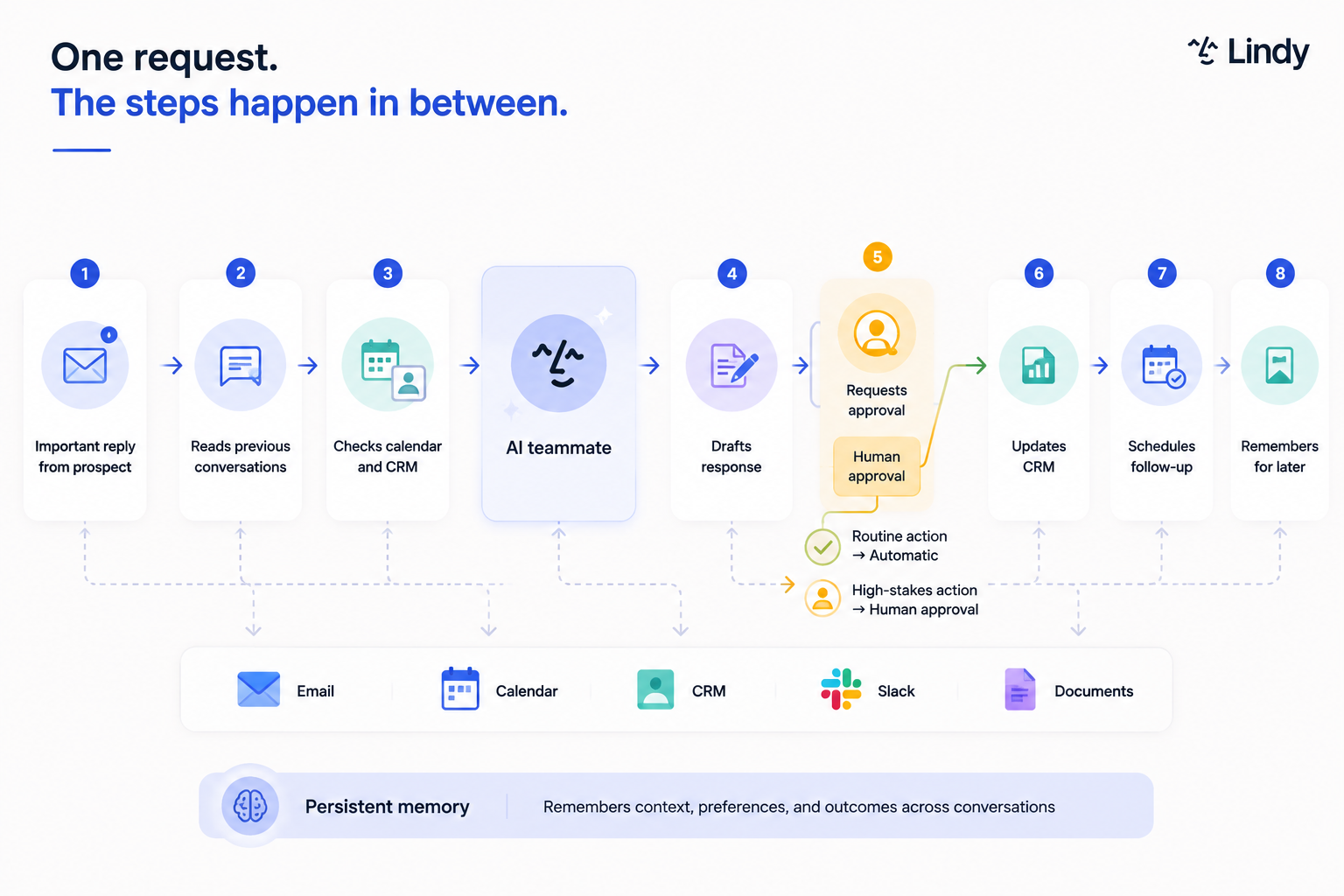
An AI teammate handles the multi-step coordination that normally lives in your head. The thinking stays yours. It picks up the tab-switching, the manual entry, and the follow-up you almost forgot. The more tools your work runs across, the more ground it covers.
Here's what that looks like across the most common work areas:
- Inbox management: Reads incoming emails and sorts them by urgency. Drafts replies in your voice instead of a generic template and flags anything from a key client before it sits unread. If you sent a message and got no response, it follows up without waiting for you to remember.
- Meetings: Joins the call and takes structured notes so you're not scrambling to type while listening. Afterward, it sends a summary with action items to everyone who attended. If a follow-up meeting is needed, it schedules that too, working around everyone's calendar.
- Sales and CRM: Researches a prospect before your call so you walk in knowing their recent funding and team size. After the call, it logs the interaction in Salesforce or HubSpot without you touching a keyboard and follows up with leads who went quiet.
- Customer support: Triages incoming tickets by urgency and topic before a human opens the queue. Answers common questions straight from your knowledge base, drafts responses for the rest, and escalates anything too complex or sensitive to a human instead of guessing.
- Research and documents: Summarizes long PDFs so you get the two paragraphs that matter instead of forty pages. Pulls key terms out of contracts, things like renewal dates and payment schedules, and compiles data from several sources into a single briefing you can read in five minutes.
What makes a good AI teammate?
The best AI teammates reduce the work that ends up back on your desk. What separates a useful one from a tool you stop opening after two weeks comes down to a handful of concrete traits.
Here's what to look for:
- Tool access: It should connect to the tools you already use, like email, calendar, CRM, and Slack, and read and write across all of them. When an AI can only see its own interface, you end up copying information over by hand, which is where most tools quietly turn back into manual work.
- Proactive updates: Your AI teammate should flag urgent emails, remind you before meetings, and follow up with leads who stopped replying, without you setting a reminder first. The difference between a reactive tool and a good teammate is whether it pays attention when you're not watching.
- Human-in-the-loop controls: You should be able to choose which actions need your sign-off. High-stakes work, such as sending a client email or updating a deal value, should be reviewed in draft before anything goes out. Control should be a default setting.
- Low setup friction: If getting started means building workflows or writing code, it's an automation tool wearing a teammate's name. A good one works from the moment you describe what you need, with no configuration phase between you and the first result.
- Honest limitations: A good AI teammate escalates when it's not confident and flags the parts of a task it couldn't finish, rather than guessing and moving on. Any tool that claims to handle everything without error is overstating what it can do.
- Persistent memory: It should carry context from previous sessions rather than resetting each time you open a new one. If you have to re-explain your preferences or recap last week's work every session, the tool is costing you the time it was supposed to save. Look for one that remembers what you've told it and builds on it.
How to get started with an AI teammate
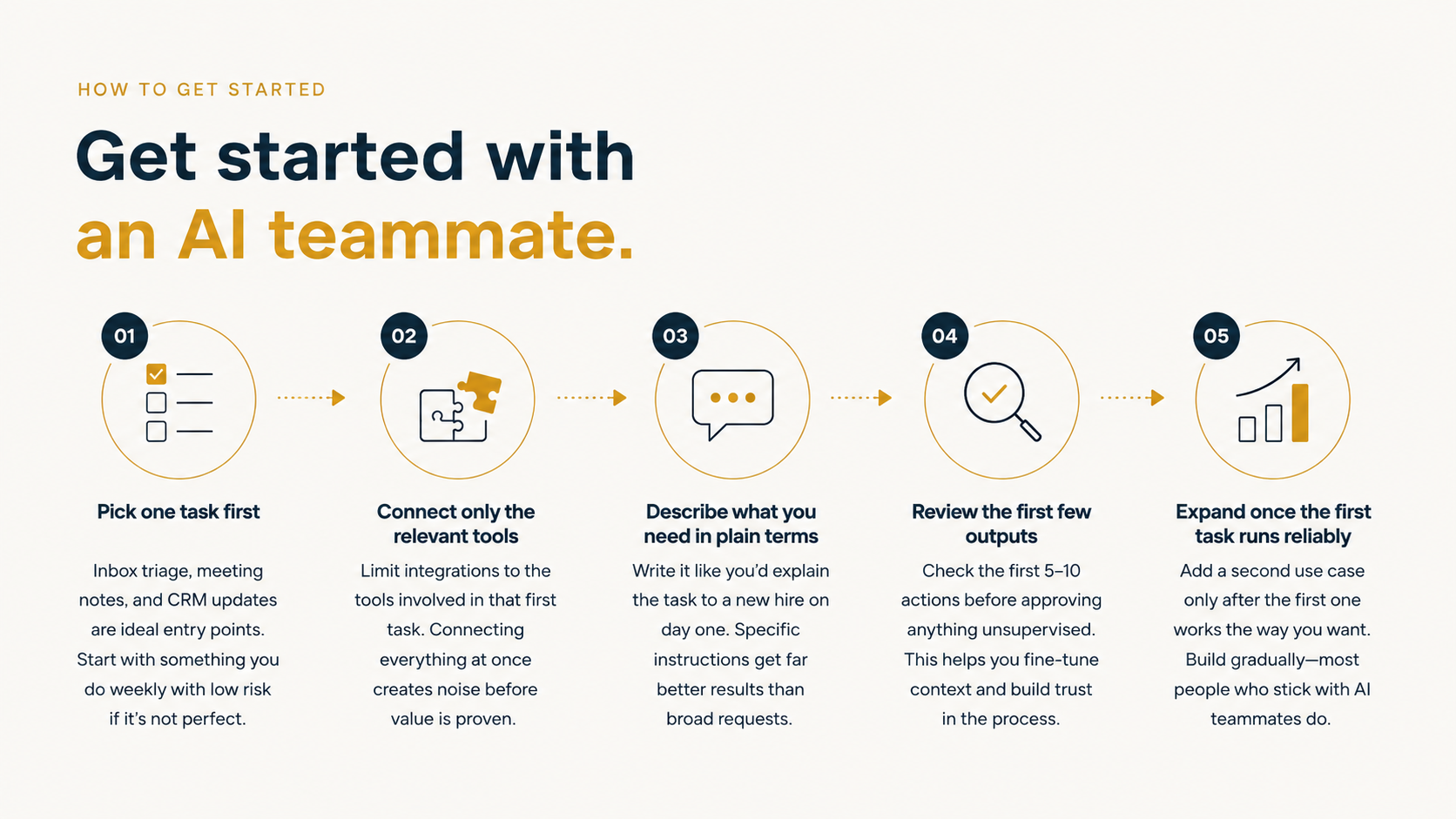
Starting doesn't require building anything or running a lengthy setup. The most common mistake is trying to delegate everything at once. Pick one area where the back-and-forth costs you the most time, get a result there, then widen it.
Here's how to do it:
- Pick one task first: Inbox triage, meeting notes, and CRM updates are the most common entry points because the feedback loop is short and the cost of an early mistake is low. Start with something you do at least weekly and where a small error won't cause damage before you catch it.
- Connect only the relevant tools: Most AI teammates ask which apps to integrate during setup. Limit this to the tools involved in that first task. Connecting everything at once creates noise before you've seen enough value to know what the tool needs access to.
- Describe what you need in plain terms: Write it the way you'd explain a task to a new hire on their first day. Specific instructions get better results than broad ones. "Flag any email from a prospect I haven't replied to in three days" works better than "manage my inbox."
- Review the initial outputs yourself: Check the first five to ten actions the AI takes before approving anything unsupervised. This is how you spot where it needs more context and where it can run on its own without you checking.
- Expand once the first task runs reliably: Add a second use case only after the first one works the way you want. Most people who stick with an AI teammate build up gradually rather than delegating everything in week one.
When an AI teammate isn't the right fit
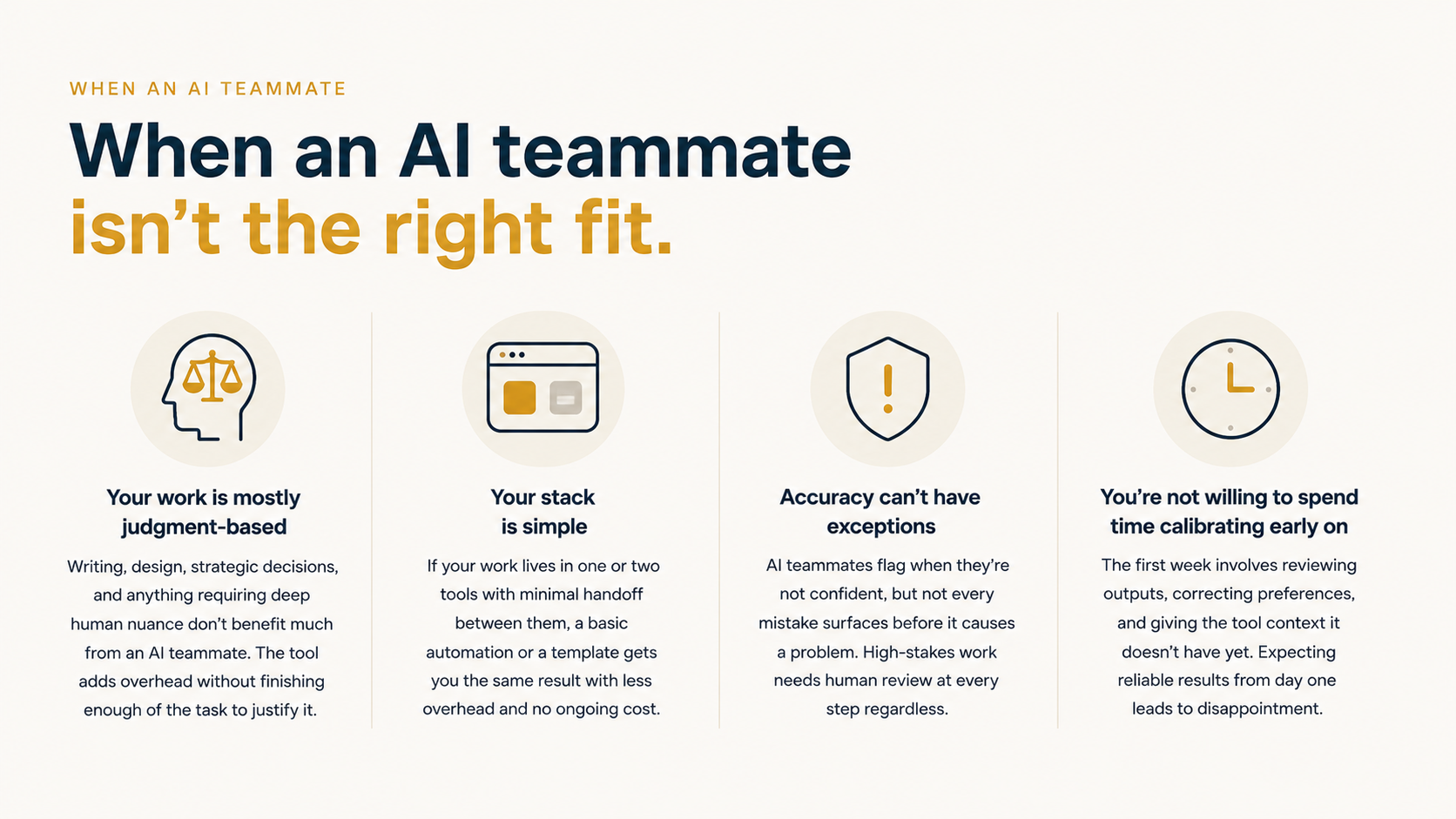
An AI teammate works best on high-volume, repetitive work that runs across multiple tools. Outside that shape, the setup rarely pays off.
Skip one when:
- Your work is mostly judgment-based: Writing, design, strategic decisions, and anything requiring deep human nuance don't benefit much from an AI teammate. The tool adds overhead without finishing enough of the task to justify it.
- Your stack is simple: If your work lives in one or two tools with minimal handoff between them, a basic automation or a template gets you the same result with less overhead and no ongoing cost.
- Accuracy can't have exceptions: AI teammates flag when they're not confident, but not every mistake surfaces before it causes a problem. Anything with serious consequences, like legal filings, medical documentation, or financial reporting, needs human review at every step, regardless of how well the tool performs.
- You're not willing to spend time calibrating early on: The first week involves reviewing outputs, adjusting preferences, and giving the tool context it doesn't yet have. If you need reliable results from day one with no setup time, the tool will disappoint before it delivers.
{{templates}}
Is an AI teammate worth it?
An AI teammate is worth considering when the same handoff runs across three or more tools, and the overhead of managing it is costing you real time. The category is still early, and plenty of tools use the word without doing the job. The traits above are the fastest way to tell them apart.
One week is usually enough to know. If the tool has taken over a task you no longer think about, it's working. If you're still checking every action on day seven, that's the answer too.
Lindy is an AI teammate that connects to all your tools, knows your company, and does real work for the whole team, across your inbox, calendar, CRM, and customer support. The Plus plan starts at $29.99 per user, per month.
{{cta}}
FAQs
What is an AI teammate in simple terms?
An AI teammate is software that connects to your tools, carries context from past conversations, and takes action without waiting for you to prompt it at every step. Ask it for last quarter's numbers, and it pulls them; it will also flag the client email you haven't answered in three days.
How is an AI teammate different from a chatbot?
An AI teammate differs from a chatbot because it acts instead of just responding. Day to day, that means the CRM is updated before you think to open it, and the follow-up you forgot has already gone out. A chatbot answers questions. An AI teammate does the work.
What is the difference between an AI teammate and an AI agent?
The difference between an AI teammate and an AI agent comes down to scope and memory. An agent handles one narrow task and exits once done. An AI teammate holds context across your work and operates like a collaborator.
Do I need to build or configure an AI teammate?
No. The best AI teammates work from a plain description of what you need. You tell it what needs to happen, and it handles the steps from there. Any tool that asks you to map out logic, connect triggers, or build workflows before it does anything useful is an automation platform.
Can a solo founder or small team use an AI teammate?
Yes, a solo founder or small team can use an AI teammate, and this is often where it delivers the most value. Solo operators get the most back when they delegate inbox triage, meeting follow-up, and CRM updates to an AI that works around the clock.









