


How to Write a Resignation Letter Without Burning Bridges [2026]
Lindy walked through writing a resignation letter, covering notice periods, letter versus email format, downloadable templates, and tone for a professional exit.
.avif)

A resignation letter doesn’t need to be long or complicated; it just needs to be clear. After reviewing dozens of examples and HR guidelines, I break down how to write a clear and professional resignation letter.
Disclaimer: The information in this article, including resignation letter examples and employment guidance, is for general informational purposes only. Before making employment decisions, review your employment contract and consult HR or a qualified professional.
What is a resignation letter?
A resignation letter is a formal document that notifies your employer that you’re leaving your job. It confirms your intention to resign, your final working day, and creates a written record of your departure.
You’d have already told your manager in person first, but the resignation letter makes everything official. It protects both you and your employer by documenting your notice period, your last day, and the timeline of your exit.
What to prepare before writing your resignation letter
Before you start drafting, take 10–15 minutes to gather the right information. Here’s what you should confirm first:
Notice period
Check your employment contract to confirm how much notice you’re required to give. Two weeks is common, but some roles require 30 days or more. Don’t guess. Your final working day should align with what you’ve agreed to in writing.
Final working day
Once you know your notice period, calculate your exact last day. Be precise. Avoid vague phrasing like “in two weeks.” Instead, state the full date to prevent confusion.
Exit clauses in your contract
Your contract may or may not have exit clauses. Review your agreement for:
- Non-compete clauses
- Non-solicitation terms
- Confidentiality agreements
- Garden leave terms
- Bonus or commission payout conditions
It helps you avoid any surprise actions from your employer later.
Intellectual property and company assets
In most traditional employment contracts, the intellectual property you create for work is owned by the employer. But it can vary, especially for freelancers, contractors, or startup teams. Check your agreement to confirm ownership details.
Also, make a list of:
- Company devices
- Software accounts
- Access credentials
- Physical assets
Reason for leaving (optional)
You don’t need to explain why you’re resigning in detail. If you choose to include a reason, keep it brief and professional. Doing this groundwork prevents rushed decisions and awkward follow-up conversations.
How to write a resignation letter in 7 simple steps
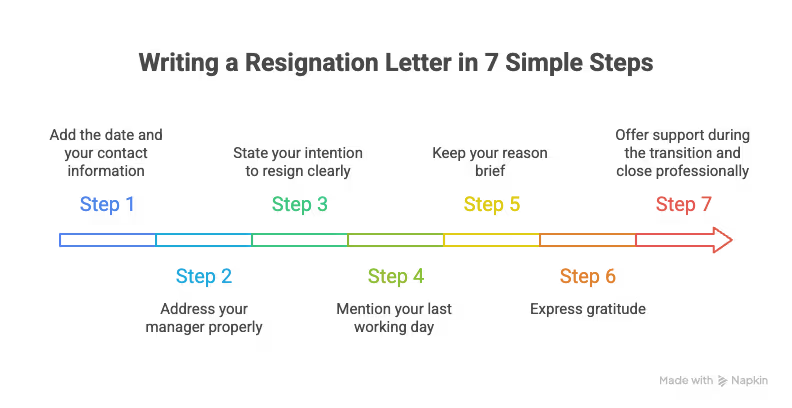
Once you’ve confirmed your notice period and final working day, writing the letter itself is straightforward. Follow these 7 steps:
Step 1: Add the date and your contact information
Start with the date at the top of the letter. It keeps the document formal and time-stamped. If you’re submitting a printed version, include your name and contact details as well.
Example: June 15, 2025
If you’re sending it by email, you can skip your address, but keep the date clear in the body.
Step 2: Address your manager properly
Direct the letter to your immediate supervisor or manager. Keep it professional and simple. Avoid generic greetings like “To whom it may concern.” Instead, use their name.
Example: Dear Sarah or Dear Mr. Patel
Step 3: State your intention to resign clearly
It’s an important statement as it’s essential for ensuring there’s no confusion about your intention to leave and helps maintain a clear, professional process.
Be direct, as clarity prevents misunderstandings. Don’t soften it with unnecessary language and avoid vague phrases like “I’ve been considering a change.”
Example: I am writing to formally resign from my position as Marketing Manager at XYZ Company.
Step 4: Mention your last working day
Always include your exact final day of employment. It should align with your contract and notice period. Don’t just say “two weeks from today.” Mention dates as they remove confusion.
Example: My final working day will be July 15, 2025.
Step 5: Keep your reason brief
You don’t need to explain why you’re leaving. If you choose to include a reason, keep it short and neutral. Prefer not to delve into emotional explanations or detailed complaints. You don’t need to justify your decision.
Example: I have decided to pursue another opportunity that aligns with my long-term goals.
Step 6: Express gratitude
Even if your experience wasn’t perfect, it’s wise to end on a professional note. A short thank-you maintains goodwill.
Example: I appreciate the opportunities I’ve had during my time here and the support from the team.
Step 7: Offer support during the transition and close professionally
You don’t need to commit to anything specific, just show willingness. Offering help shows professionalism and maturity. Close with a professional sign-off, like sincerely, best regards, or kind regards, and include your name.
Example: I am happy to assist with the transition process and ensure a smooth handover of my responsibilities.
Downloadable resignation letter templates
When you combine the 7 steps above, you get a template that works well for most scenarios. Use the templates below and draft your own resignation letter.
{{templates}}
How to format a resignation letter properly
The format of your resignation letter depends on how you’re submitting it. The structure stays mostly the same, but there are small differences between a printed letter and a resignation email. Here’s how to handle both:
How to format a printed resignation letter
Use a standard business letter format. It includes:
- Date
- Your name and contact details (optional but professional)
- Manager’s name and title
- Company name
- Formal greeting
- Body of the letter
- Professional closing
- Your signature
- Your typed name
Use a simple font like Arial or Times New Roman, stick to 11 or 12 pt font size, and keep it to one page. Print it, sign it, and keep a copy for your records.
How to format a resignation email
For a resignation email, the content stays the same, but the structure is simpler. You can skip your address, the company’s address, and printed formatting elements.
Use a clear subject line. Your subject line should be direct and professional.
Here are a few examples:
- Resignation – [Your Name]
- Notice of Resignation Effective [Date]
- Formal Resignation – [Your Name]
Should you attach a PDF of your resignation letter or write it in the email body?
Attaching a PDF of your resignation letter to the email depends on your organization. Here’s how to look at it:
- If your company is formal or policy-driven, attach a signed PDF and keep the email short.
- If your company is more informal, writing the resignation directly in the email body is usually acceptable.
Who should you CC?
You should send your resignation letter to your direct manager and CC HR if company policy requires it. Avoid copying unnecessary people. Your manager should hear the news from you first, not through a group email.
Resignation letter vs resignation email: What’s the difference?
A resignation letter is formal, printed, or hand-delivered in companies with strict HR processes, while a resignation email is less formal in structure, but still professional in tone. Here’s how they differ:
Which one should you use?
If your workplace is formal, attach a signed resignation letter as a PDF. If your company is informal or remote, a resignation email is usually fine. When in doubt, consult your HR policy or handbook to follow protocol.
Most modern workplaces accept a resignation email, but if you work in a highly regulated or traditional industry, check if a printed letter is still required.
Resignation letter examples for different situations
Not every resignation looks the same. Your notice period, workplace culture, and reason for leaving all influence how you write your resignation letter. Here are a few examples you can adapt based on your situation:
Two weeks’ notice resignation letter example
June 15, 2024
Dear Patrick Smith,
I am writing to formally resign from my position as Marketing Manager at Horizon Digital. My final working day will be June 29, 2024.
Over the past three years, I’ve appreciated the opportunity to work with such a talented team and to contribute to several meaningful campaigns. The experience and mentorship I’ve received here have been invaluable.
Over the next two weeks, I will ensure all active projects are documented and transferred smoothly to the team.
Sincerely,
Amanda Lee
Immediate resignation letter example
June 10, 2024
Dear Michael Carter,
Please accept this letter as formal notice of my resignation from my position as Customer Support Specialist at Nova Systems, effective immediately.
Due to personal circumstances, I am unable to continue in my role. I understand the inconvenience this may cause and sincerely apologize for the short notice.
I appreciate the opportunity to have been part of the team and wish the company continued success.
Sincerely,
Daniel Brooks
Short notice resignation letter example
May 22, 2024
Dear Rachel Green,
I am writing to formally resign from my position as Account Executive at Silverline Executive Consulting. My final working day will be May 31, 2024.
While my contract outlines a longer notice period, unforeseen circumstances require me to shorten my time here. I appreciate your understanding and will do my best to assist with the transition during my remaining days.
Thank you for the support and opportunities provided during my time at the company.
Best regards,
Jason Miller
Resignation letter example when leaving without another job lined up
July 2, 2024
Dear David Patel,
I am writing to formally resign from my position as Product Designer at Elevate Consulting Labs. My final working day will be July 16, 2024.
After careful consideration, I’ve decided to step away from my role to reassess my next professional direction and focus on long-term career goals.
I appreciate the opportunity to work with such a supportive team and am grateful for the experiences gained during my time here. I’m happy to assist with the transition process over the coming weeks.
Sincerely,
Emily Chen
What not to include in a resignation letter
A resignation letter is not the place to vent, negotiate, or explain every detail behind your decision. Its purpose is to confirm your resignation and your last working day. Here’s what to leave out:
Detailed complaints
Even if you’re leaving because of poor management, burnout, or internal politics, your resignation letter is not the place to document grievances. Avoid statements like:
- I’ve been unhappy for months.
- Management decisions have been frustrating.
- The culture isn’t supportive.
If you want to give feedback, do it during your exit interview, but not in writing.
Emotional or reactive language
Resignation letters should be calm and professional. Avoid sounding defensive, sarcastic, or overly emotional. For example:
- I can’t continue working under these conditions.
- This role hasn’t been fair to me.
Even if your reasons are valid, keep the tone steady and neutral.
Long explanations about why you’re leaving
You are not required to justify your decision. A brief, professional reason is enough. If you choose not to disclose your reason, that’s fine too. Over-explaining can:
- Invite unnecessary debate
- Create awkward follow-up questions
- Open the door to negotiation that you don’t want
Keep it short.
Salary negotiations or counteroffer discussions
Your resignation letter is not a bargaining tool. If you’re open to a counteroffer, that conversation should happen verbally, not inside the letter. The letter should confirm your decision, not complicate it.
Threats or legal language, unless necessary
Avoid legal framing unless you’ve been advised to include it. A resignation letter shouldn’t sound like a dispute notice. If your exit involves legal issues, speak to a professional before submitting anything.
Vague last working dates
It is one of the most common mistakes. Always include the exact date to prevent confusion. Avoid phrases like:
- Two weeks from now
- End of the month
- Soon
Resignation letter checklist before you send it
I’ve prepared a resignation letter checklist before you hit send or hand it over. Here’s what you should tick off:
- I clearly stated that I am resigning
- I included my exact final working day (full date)
- My notice period aligns with my contract
- The tone is professional and neutral
- I removed emotional or negative language
- I kept my explanation brief (or omitted it entirely)
- I expressed appreciation appropriately
- I offered support for the transition
- The subject line is clear (if sending by email)
- I proofread for spelling and grammar errors
- I spoke to my manager before sending it (if possible)
If you tick off all these items, your resignation letter is ready.
{{cta}}
How AI assistants can help you resign professionally and plan your next move
AI assistants can help you with tasks like reviewing your contract, planning conversations, organizing handovers, and preparing for what comes next.
You can use an AI assistant to:
- Review your employment contract and summarize notice requirements
- Identify non-compete or intellectual property clauses
- Draft and refine your resignation letter
- Adjust the tone to make it more professional
- Prepare talking points for your resignation conversation
- Create a handover checklist
- Draft follow-up emails
- Update your resume
- Search and organize job opportunities
Instead of handling everything manually, you can delegate parts of the process and stay focused on making a clean, professional exit.
Try Lindy to handle your resignation and next career move
Lindy is an AI assistant you can text to manage professional tasks like reviewing contracts, drafting resignation letters, and organizing your job search. Lindy connects with 4,000+ business tools and offers ready-to-use customizable templates for everyday tasks.
Instead of juggling documents, emails, and deadlines manually, you can simply tell Lindy what you need, and it’ll do the work for you. Here’s how Lindy can help during your transition:
- Understand your working terms in minutes: Lindy summarizes key clauses so you can quickly understand the main terms in your contract before deciding your next steps.
- Draft and refine your resignation letter: Tell Lindy about your organization and if it’s a long notice period, immediate resignation, small team, or corporate environment. It will draft a professional resignation letter that suits these situations and matches your tone. You can ask it to make it more formal, shorter, or more neutral.
- Prepare for the resignation conversation: If you are unsure what to say when your manager asks why you’re leaving, ask Lindy to outline talking points that keep things professional and calm.
- Create a smooth exit plan: Lindy can generate a handover checklist, organize your ongoing tasks, and help you plan the transition so nothing slips through the cracks.
- Know the legal obligations around intellectual property and company assets: If you’re unsure what belongs to you versus the company, Lindy can review the relevant clauses and help you prepare a clean return plan for devices, documents, and access credentials.
- Kick-start your job search: After you resign, Lindy can help update your resume, draft outreach messages, find relevant opportunities, and organize your applications, all from one place.
Try Lindy’s free trial and see how much easier your next career move can be.
Frequently asked questions
How do you write a resignation email?
To write a resignation email, clearly state that you are resigning and include your exact final working day. Keep the tone professional and brief. Add a short thank-you and offer to help with the transition. Use a clear subject line like “Resignation – Your Name.”
What is the best subject line for a resignation email?
The best subject line for a resignation email is direct and professional. Use formats like “Resignation – [Your Name, Job Title],” “Notice of Resignation – [Department/Team],” or “Notice of Resignation Effective [Date].” Avoid vague subjects like “Update” or “Important.”
How do you end a resignation email professionally?
End a resignation email with a polite closing such as “Sincerely,” “Best regards,” or “Kind regards.” Include your full name below the sign-off. Keep it simple and professional, and don’t use casual closings.
Can you resign by email instead of a letter?
Yes, you can resign by email, especially in remote or informal workplaces. However, speak to your manager first whenever possible. In formal organizations, attaching a signed resignation letter as a PDF may be preferred.
Do you have to give a reason in a resignation letter?
No, you are not usually required to provide a reason in your resignation letter. All you need is a clear statement and your final working day. Some companies or countries may request a basic reason for HR purposes, but you can keep it brief and neutral.
How much notice should you give when resigning?
Two weeks’ notice is standard in many industries, especially in the US, but some positions or regions may require 30, 60, or even 90 days. Always confirm your contractual obligations before finalizing your last working day.
What do you write in a short resignation email?
In a short resignation email, state that you are resigning, include your final working day, thank your employer, and offer transition support. Keep it under 5–6 sentences and avoid long explanations.
Can you withdraw your resignation after submitting it?
Yes, you can request to withdraw your resignation, but approval depends on your employer. Speak to your manager as soon as possible and follow up in writing. However, there is no guarantee your position will remain available.











Blog
Related Articles


.png)
%20(1).png)

%20(1).png)
%20(1).png)
.png)
The AI assistant that runs your work life
Lindy saves you two hours a day by proactively managing your inbox, meetings, and calendar, so you can focus on what actually matters.
