


What Is a Lead List? How to Make One Using AI
Jack walked through building AI-powered lead lists, reviewing tools like Clay, Apollo.io, and ZoomInfo alongside ICP targeting, data enrichment, and CRM-sync steps.


A lead list is your starting line. Without it, there’s no outreach, no pipeline, no sales.
But building one manually is slow, messy, and outdated.
AI flips the script. It finds the right people, pulls the right data, and builds ready-to-use lists in minutes.
This guide breaks down what a lead list really is, and how to build smarter ones with AI.
What Is a Lead List?
A lead list is a curated list of potential customers (leads) who match your target audience and are likely to be interested in your product or service. It typically includes:
- Name
- Job title
- Company
- Email or phone
- LinkedIn or website
- Industry and company size
- Custom fields (like tech stack, location, buying intent, etc.)
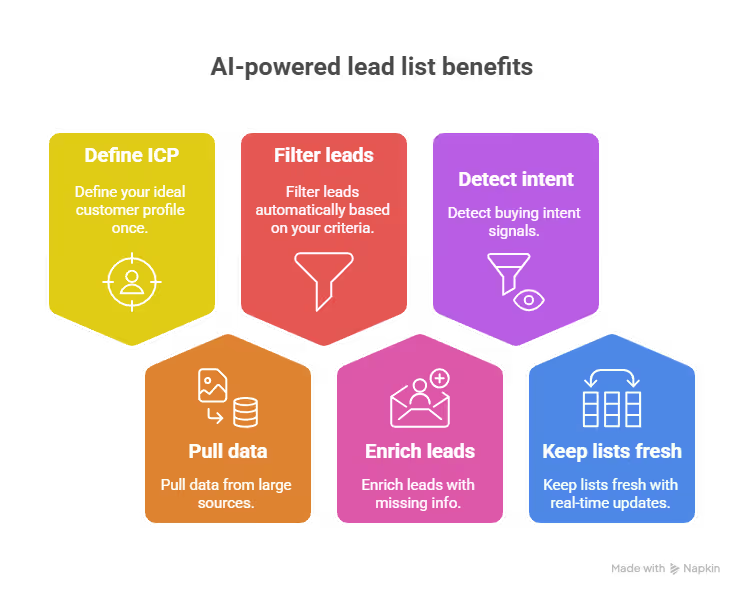
Sales and marketing teams use lead lists to:
- Run cold outreach campaigns (email, LinkedIn, calls)
- Feed CRMs or sales automation tools
- Prioritize high-fit accounts
- Nurture leads over time
The better the lead list, the better your chances of getting replies, demos, or conversions.
How to Make a Lead List Using AI (Step by Step)
Creating a lead list with AI isn’t just about pulling contact details. It’s about building a high-fit, well-enriched database of leads that match your ideal customer profile, and doing it in a way that’s scalable, repeatable, and precise.
Let’s walk through the process from scratch.
Step 1: Define Your Ideal Customer Profile (ICP)
Before you touch any tool, get crystal clear on who your perfect customer is. This will determine every filter and enrichment field you use later.
Start by identifying the company characteristics that matter most:
- Industry: Are you targeting SaaS companies? E-commerce stores? Agencies?
- Size: Do you sell to startups, SMBs, or enterprises? Use employee count or revenue to define this.
- Location: Are you focusing on North America, Europe, or specific cities?
Then, map out the decision-makers inside those companies:
- Roles and Titles: Who’s most likely to buy from you? Marketing Directors, HR Heads, Sales VPs?
- Seniority Level: Are you selling to executives or individual contributors?
- Responsibilities and Pain Points: What are their day-to-day problems that your product solves?
Finally, include any qualifying criteria like:
- Tech Stack: Do they use HubSpot, Salesforce, Shopify, or other platforms your tool integrates with?
- Hiring or Growth Signals: Are they hiring for related roles or recently funded?
Lindy’s Lead Generator helps you zero in on leads that match your criteria with its integration with the People Data Labs API, weeding out mismatches automatically. So, your list stays focused on real prospects.
Step 2: Choose an AI Lead Generation Tool That Matches Your Needs
To build your lead list efficiently, you need an AI tool that doesn’t just pull contact data but helps you build a complete, usable system around it. While there are many tools in the market, Lindy offers the best flexibility, depth, and automation.
Here’s how Lindy compares to other popular options:
Lindy lets you create custom AI agents that handle every step of lead generation, from identifying ideal prospects to enriching data and syncing with your CRM.
You can build logic-based workflows that filter by job titles, industries, tech stack, or growth signals, and automatically trigger actions like lead scoring or outreach. It's fully no-code and highly customizable, making it perfect whether you're just starting or scaling fast.
If you want full control, automation, and AI-driven decision-making, all in one place, start with Lindy. You can even integrate your favorite tools with it.
Step 3: Set Your Filters and Build the List
Once you’re inside your chosen tool, start building the actual list by setting filters that reflect your ICP.
For example, you might set:
- Job Titles: Marketing Manager, VP of Growth, Head of Demand Gen
- Industries: SaaS and E-commerce
- Company Size: 11 to 200 employees
- Geography: United States or Canada
- Tech Used: Must be using HubSpot and Salesforce
If your tool supports advanced filtering (like Clay or ZoomInfo), you can also add:
- Hiring activity: Companies currently hiring for marketing roles
- Funding rounds: Recently raised a Series A or B
- Website keywords: Pages that mention “customer acquisition” or “inbound leads”
These filters narrow your list to only those leads most likely to convert.
{{templates}}
Step 4: Auto-Enrich Each Lead with Missing Data
Once your filtered list is ready, AI can fill in the blanks automatically.
The AI engine pulls in:
- Verified email addresses (validated in real-time or batch)
- LinkedIn profile links for easy prospecting
- Phone numbers, if available and compliant
- Company info like headcount, revenue, funding stage
- Technographic data, such as CRM or ad platforms in use
- Job tenure, seniority, and other insights that affect buying power
This turns your basic contact list into a sales-ready, fully enriched dataset; no need to manually cross-check or research.
Step 5: Sync With Your CRM or Outreach Tool
With your enriched lead list in hand, it’s time to put it to work.
You can:
- Export the list as a CSV to review or import manually
- Sync it directly to your CRM (like HubSpot, Salesforce, or Pipedrive)
- Push it to outbound platforms like Lemlist, Mailshake, or Outreach for immediate sequencing
Some platforms like Apollo or Clay even allow you to trigger personalized outreach sequences based on enriched data, automatically assigning tags, stages, or follow-up tasks as soon as the lead is created.
How to Optimize Your Lead List Using AI (Once It's Built)
Building a lead list is just the first step. The real results come from what you do after the list is ready, how you score, prioritize, segment, personalize, and continuously improve that list using AI.
Let me show you how to turn a static lead list into a dynamic, conversion-ready asset.
1. Prioritize the Right Leads Using Sentiment and Engagement Signals
Once your list is populated and enriched, not all leads should be treated equally. Some are eager to engage. Others are indifferent. Instead of guessing who’s who, use AI to prioritize based on how leads actually behave.
Tools like Lindy integrate with your CRM (HubSpot, Salesforce) to surface sentiment and engagement signals, like how they respond to emails, what they click, or how they interact with your brand across channels.
These insights help you:
- Identify high-intent leads and move them to the front of your outreach
- Spot colder leads early and adjust your messaging or wait before following up
- Route leads automatically into different workflows based on their real behavior
Think of it as letting your lead list self-organize around actual buyer signals, without manual input.
2. Add Contextual Data That Improves Segmentation and Timing
Basic lead enrichment is done. But now it's time to go further. Use AI to continuously layer in contextual data that helps you create smarter segments and better-timed campaigns.
Lindy can enhance each lead profile with data like:
- Industry news relevant to their company
- Hiring trends that signal internal changes
- Website activity that hints at intent
- Seasonality or timing trends based on past interactions
These data points help you move beyond static targeting and create dynamic campaigns.
For example, if a lead’s company just hired a growth team or updated their pricing page, that’s your window to reach out.
This level of awareness gives you a timing edge, and AI keeps it up to date automatically.
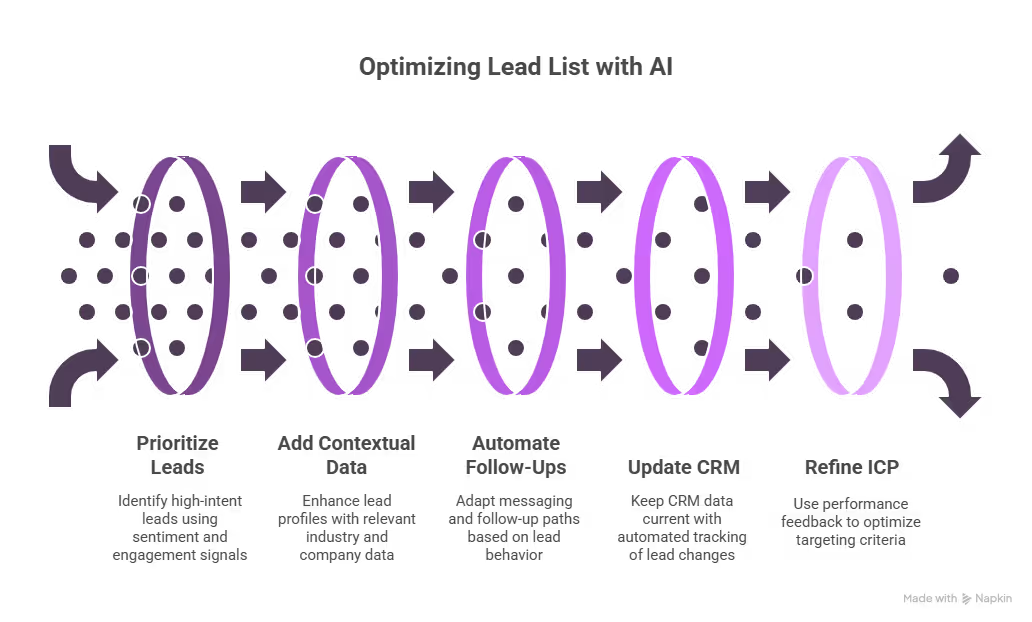
3. Automate Follow-Up Sequences That Adapt to Each Lead
Your lead list becomes much more powerful when follow-ups are handled with precision and without manual work.
Lindy’s automation engine doesn’t just send fixed email sequences. It allows you to:
- Adjust messaging based on previous replies or engagement signals
- Branch into different follow-up paths depending on sentiment or CRM data
- Combine channels like email, LinkedIn, and calendar nudges into one cohesive sequence
This creates outreach that adapts in real time, not one-size-fits-all drip campaigns.
For example, if a lead clicks your pricing page but doesn’t reply, Lindy can automatically trigger a soft-touch follow-up with a helpful resource. If someone hasn’t engaged in weeks, Lindy can pause outreach or shift tone without you lifting a finger.
4. Keep Your CRM Updated and Clean without Manual Work
Lead lists decay fast. People change jobs, roles evolve, and contact details go stale. Instead of doing routine cleanup manually, use AI to keep everything in sync.
Lindy tracks:
- Title and role changes on LinkedIn
- Company size or funding shifts
- New decision-makers entering the org
- Unsubscribes, bouncebacks, or spam signals
When something changes, your CRM is updated instantly. No spreadsheets. No team reminders. No lag time between insight and action.
And if you rely on team collaboration, Lindy’s agents can auto-assign lead owners, update statuses, or even leave notes summarizing changes, so your team always knows what’s happening in the background.
5. Use Performance Feedback to Continuously Refine Your ICP
One of the biggest advantages of using AI isn’t just speed, it’s learning. As your campaigns run and data flows in, use that feedback loop to improve your targeting.
Lindy tracks which lead segments are converting, which titles get more replies, which industries engage more, and what types of outreach fall flat. It then surfaces this data so you can:
- Adjust your filters and criteria in future list builds
- Refine your email copy and call-to-actions
- Focus budget and effort on the segments that actually perform
Think of it as real-time ICP optimization, powered by your own results, not guesswork.
How to Get the Most Out of Your AI-Generated Lead Lists
Creating a lead list is just the beginning. To actually turn those leads into replies, demos, and deals, you need to handle that list the right way.
Here’s how I make sure my AI-generated leads deliver real results:
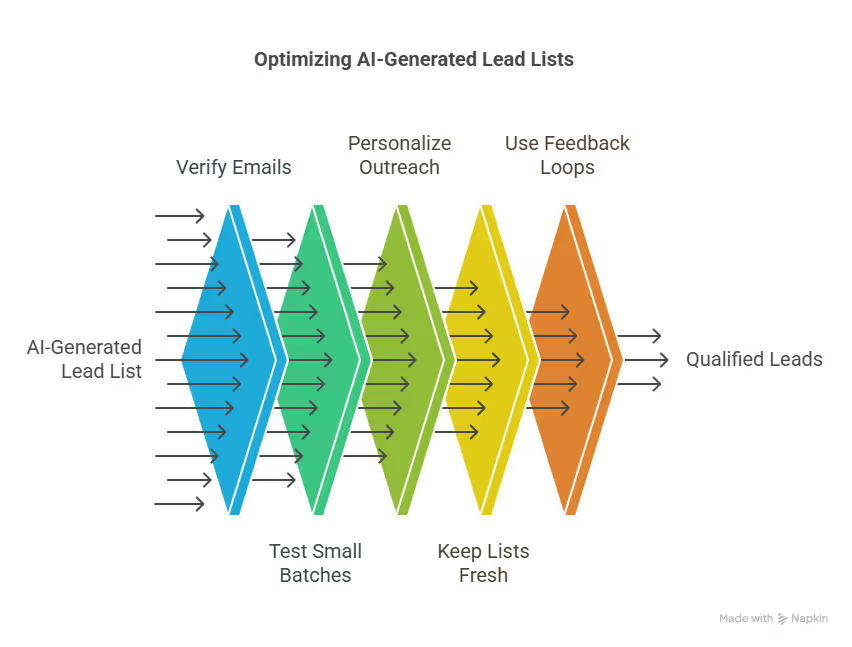
1. Always verify emails before sending anything
Even if the AI tool says an email is valid, run it through a verification tool like NeverBounce or ZeroBounce. This helps you avoid bouncebacks, protects your domain reputation, and keeps your outreach deliverability high.
2. Don’t blast, test small batches first
Before you send a campaign to hundreds of leads, test a smaller group. This helps you gauge response rates, subject line performance, and message fit. Use that data to optimize the next round.
3. Personalize your outreach using enriched data
Generic emails get ignored. Use the enriched fields like job title, tech stack, location, or recent funding to tailor your messaging. A quick line that shows you understand their company goes a long way.
4. Keep your lead lists fresh and up to date
People change jobs. Companies pivot. Make sure you're either pulling live data or refreshing your lists regularly. Stale data leads to bad targeting and wasted effort.
5. Use feedback loops to improve your ICP
AI tools like Lindy or Clay can help you track what types of leads are converting. Feed that performance data back into your criteria. Over time, you’ll get sharper targeting and better results.
Treat your lead list like a live asset, not a one-time task. The more feedback and refinement you build into your process, the more consistently it will generate qualified leads.
Build Smarter Lead Lists With Lindy
If you’re serious about scaling outreach and want a system that doesn’t just build lead lists, but builds qualified lists that actually convert, Lindy is the tool to start with.
You can create fully automated AI agents that:
- Find leads that match your exact ICP
- Enrich every record with up-to-date data
- Sync leads into your CRM or outreach tool
- Trigger personalized sequences based on custom logic
No spreadsheets. No manual research. No wasted time.
Try Lindy for FREE today and turn your outbound workflow into a self-running machine that delivers sales-ready leads on autopilot.
{{cta}}
Frequently Asked Questions
1. What’s the difference between a lead list and a contact list?
A contact list is usually just a collection of names and emails. A lead list, on the other hand, includes qualified prospects who match your ideal customer profile. It contains richer data like job titles, company size, tech stack, and buying signals, making it far more useful for targeted outreach and sales.
2. How often should I update my lead list?
At a minimum, review your lead list every 30–60 days. For active campaigns, use AI tools like Lindy to keep your CRM and lead data fresh in real time. Roles change, companies grow, and outdated leads reduce deliverability and conversion rates, so automation helps maintain accuracy without constant manual cleanup.
3. How many leads should I start with?
Start with 100 to 200 leads for your initial outreach. It’s enough to test messaging, segmentation, and workflows without overwhelming your systems. From there, you can scale based on what converts. AI tools make it easy to expand later with higher precision, once your ICP and sequences are dialed in.
4. Can I use a lead list for both inbound and outbound marketing?
Yes. For outbound, your list drives cold email, LinkedIn, or phone outreach. For inbound, you can use it for retargeting, nurturing, or lookalike audiences. A good lead list helps you personalize communication across both strategies and move prospects smoothly through your pipeline, regardless of how they were acquired.
5. What should I do if I don’t get responses from my lead list?
First, verify your emails are valid. Then, test new subject lines, shorter copy, or different sending times. You can also segment and personalize better using enriched fields. AI tools like Lindy help track opens, clicks, and sentiment so you know whether to tweak your message or your targeting.
6. How do I know if my lead list matches my ICP?
Track metrics like response rate, meeting booked rate, and conversion-to-opportunity. If results are weak, revisit your filters, especially industry, job title, and company size. Lindy helps refine your ICP over time by analyzing what’s working and automatically adjusting your criteria for future lead generation.
7. Do I need separate lists for different campaigns?
Yes, especially if your messaging, product offer, or buyer persona varies. Use AI to segment leads by industry, behavior, or stage in the funnel. Lindy can automatically assign leads to different workflows or agents based on enriched fields, saving you from juggling lists manually.
8. Can AI really personalize outreach at scale?
Absolutely. AI tools like Lindy can insert variables like job title, company name, and recent activity into emails or messages. They can also change tone, timing, and follow-up based on behavior. It’s like writing custom outreach without spending hours doing it by hand, personalization without the bottleneck.
9. What makes Lindy different from other lead generation tools?
Lindy doesn’t just give you lead data. It lets you build AI agents that handle the full process, lead sourcing, enrichment, scoring, outreach, and CRM syncing. You can automate complex workflows with no code, personalize outreach at scale, and optimize your ICP continuously based on what’s working.
10. What’s the best next step if I’m just getting started?
Start by clearly defining your ICP using the steps in the guide. Then, sign up for Lindy’s free plan and build your first agent to generate leads that match that profile. Run a small test campaign, monitor performance, and optimize your filters and messaging as results come in.











Blog
Related Articles
.png)
.png)

%20(1).png)
.avif)

%20(1).png)
.png)
The AI assistant that runs your work life
Lindy saves you two hours a day by proactively managing your inbox, meetings, and calendar, so you can focus on what actually matters.
