


Pipedrive Review: Pros, Cons, and Top-Rated Features For 2026
Marvin reviewed Pipedrive after using it for 16 months, weighing its visual pipeline, automation depth, add-on pricing, and reporting features against growing sales teams' needs.


I’ve used Pipedrive for more than a year across different sales workflows, from simple deal tracking to light automation. Here’s an honest breakdown of what it does well, where it falls short, and whether it’s worth the cost in 2026.
Quick verdict
Pipedrive works well if you want a simple, visual way to track deals and keep sales activity organized. The pipeline view is clean, onboarding is fast, and most reps can start using it with little guidance.
However, automation isn’t very capable, reporting depth depends on higher plans, and many capabilities sit behind paid add-ons. As teams grow or workflows become more complex, Pipedrive becomes restrictive and more expensive than it first appears.
If your sales process is straightforward, Pipedrive does the job. If you need flexible automation or fewer tools stitched together, you’ll likely outgrow it.
What is Pipedrive?
Pipedrive is a sales-focused CRM that offers a visual pipeline. It helps teams track deals, log activities, and follow up with leads using a drag-and-drop board instead of complex dashboards.
The product suits small to mid-sized sales teams that want clarity without a complex setup. You can create pipelines, move deals through stages, and tie emails, tasks, and notes directly to each opportunity. Most teams can get started in under an hour.
Pipedrive is not an all-in-one platform. Sales execution is its core strength, and not marketing automation, customer support, or complex cross-team workflows.
Pipedrive features
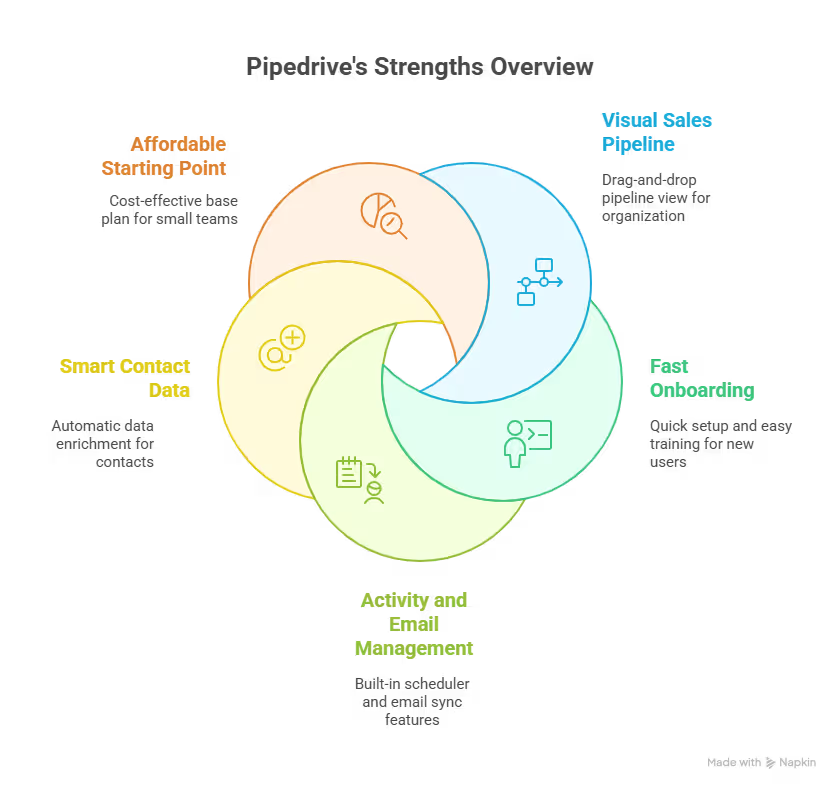
Pipedrive focuses on making sales activity visible and easy to manage. Most features help reps move deals forward without getting lost in admin work. Here are the top features that matter:
Visual sales pipelines
Deals sit in cards and move across stages with drag-and-drop actions. You can create multiple pipelines for different motions, such as inbound, outbound, or partnerships. Each stage can trigger reminders or basic automation, which helps reps stay on top of follow-ups.
Deal and contact management
Every deal stores context in one place. You see the deal value, contacts, emails, notes, files, and tasks on a single screen. This reduces tab switching and makes handoffs between reps easier. Custom fields let teams track details that matter to their process, though extensive customizations require higher plans.
Activity and task tracking
Pipedrive includes built-in scheduling for calls, meetings, and tasks. Activities appear in a daily agenda, which helps reps plan outreach without relying on external tools. It also clearly highlights overdue tasks, which reduces missed follow-ups in busy pipelines.
Email sync and templates
Pipedrive supports two-way email sync with Gmail and Outlook. Emails attach automatically to the right deals and contacts. Teams can save templates, personalize messages using contact fields, track opens, and schedule emails.
Contact and company enrichment
Smart contact data fills in fields like job title, company size, industry, and social profiles when possible. It saves time during lead import and outbound setup. However, accuracy varies and often needs review for high-value accounts.
Reporting and insights
Pipedrive offers standard sales reports such as win rates, deal duration, and activity volume. You need to pay for the higher tier to unlock forecasting and advanced reports. For complex analysis, teams often need exports or external tools.
Pipedrive pricing: TL;DR
Pipedrive has 4 pricing plans that look straightforward at first. But the cost depends on how much functionality you need beyond basic deal tracking. Here’s what each plan costs and offers:
Many teams also end up paying for add-ons to cover lead capture, documents, or basic marketing.
Here’s what they cost, along with their capabilities:
Let’s assume you’re a 3-person team. You need the Growth plan and two add-ons, LeadBooster and Smart Docs. Let’s break down how much you’ll pay:
- Pipedrive CRM Growth ($49/user/month) for 3 users = $147
- LeadBoster ($39/month) + Smart Docs ($32/month) = $71
- Total: $218/month
That high price is the trade-off with Pipedrive. The core plans work, but many essential workflows live outside the base plans. As needs grow, so does the monthly bill.
{{templates}}
Pipedrive reviews: What users have to say
Users have praised Pipedrive for usability and day-one clarity. They’ve also criticized it for being too basic as teams grow and expect more than just sales tracking. I scoured through dozens of reviews across G2, Capterra, Reddit, and Trustpilot to validate my experience with the tool.
Here are the pros and cons that users have highlighted:
Pros
- Easy to use and intuitive interface: Many reviewers say Pipedrive feels simple and familiar right away, which reduces onboarding friction.
- Clear visual pipeline: Users frequently mention that the drag-and-drop deal board helps them instantly understand where deals stand.
- Fast onboarding: Teams report they can import data and start tracking deals quickly, with minimal training.
- Helpful support and community resources: Several Trustpilot reviewers highlight responsive support and thorough documentation.
- Improves organization: Users across platforms note that Pipedrive brings structure to sales activity and follow-ups, reducing lost deals.
Cons
- Limited automation depth: While simple automation exists, users often struggle when building complex workflows or branching logic.
- Pricing surprises once you scale: Many reviews point out that add-ons and higher-tier plans are needed for features teams expect to be included, pushing costs higher.
- Basic marketing and reporting: Users say built-in marketing tools and advanced analytics feel shallow compared with dedicated platforms.
- Integration gaps: Some reviewers mention needing third-party tools like Zapier for email or SMS campaigns because native integrations don’t cover every workflow.
- Scalability concerns: In community discussions, teams switching from Pipedrive mention frustration with support quality or limited tools as they grow.
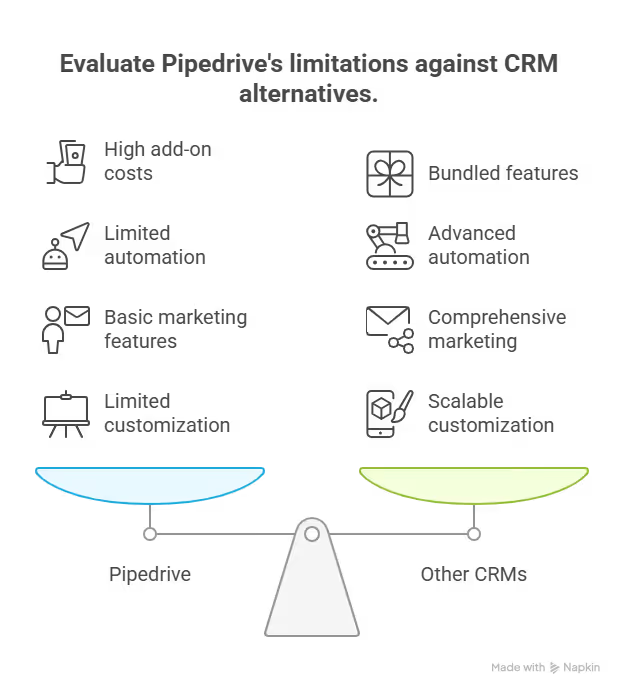
Users consistently praise Pipedrive’s simplicity and visual deal tracking. But they point out that the tool comes with trade-offs in depth, automation, and long-term total cost.
My personal take after using Pipedrive for 16+ months
Pipedrive worked well for me at the start. I needed a clean way to track deals, schedule follow-ups, and keep sales activity visible. It delivered on that. The pipeline view kept everyone aligned, and reps adopted it without pushback. For simple outbound workflows, it was reliable and predictable.
But as my workflows grew, automation became the first friction point. I wanted routing based on deal value, region, and engagement. Pipedrive handled parts of that, but I had to build multiple parallel workflows to get close. Managing those took time and introduced mistakes.
Add-ons created the next issue. Features that felt essential for a complete workflow lived outside the core plans. Document tracking, lead capture, and marketing tools all add cost. What started as a reasonable monthly bill grew quickly, even with a small team.
Reporting is also basic. I could see surface-level metrics, but deeper insights required upgrades or exports. As soon as more than one team shared the CRM, consistency became harder to maintain.
Pipedrive stayed dependable for basic sales execution, but it couldn’t adapt to how the business evolved.
Is Pipedrive right for you?
Pipedrive is the right choice for small sales teams with simple processes, but not for those needing advanced automation or complex workflows.
Use the scenarios or use cases below to make a decision:
Who will love it
- Teams with a simple, linear sales process: If your deals move through clear stages without many exceptions, Pipedrive’s visual pipeline works well and stays easy to manage.
- Small or early-stage sales teams: Teams that want quick setup and fast adoption will appreciate how little training is needed to get reps productive.
- Outbound-focused sales motions: If your process relies on manual outreach, reminders, and follow-ups rather than behavior-based triggers, Pipedrive covers the essentials without adding friction.
Who should avoid it
- Teams that need advanced automation: If your workflows depend on branching logic, engagement-based routing, or complex conditions, Pipedrive will feel limited.
- Inbound or lifecycle-driven teams: Sales motions that require lead scoring, nurture flows, or tight coordination with marketing will outgrow Pipedrive quickly.
- Growing teams that want fewer add-ons: As more teams and use cases enter the CRM, the need for paid add-ons and higher plans becomes harder to justify, especially when consistency and reporting start to matter more.
Final verdict
Pipedrive is a good CRM for teams that want a clear, visual way to manage deals without much setup. It keeps sales activity organized, helps reps stay consistent with follow-ups, and works well for simple processes.
Where it falls short is flexibility. Automation capabilities are basic, reporting depth depends on higher plans, and essential workflows often rely on paid add-ons. As sales workflows become complex or teams need smarter routing and follow-ups, those limits become harder to ignore.
For teams that want automation to adapt to how they sell instead of forcing workarounds, tools like Lindy step in more naturally. Pipedrive handles structure well, but Lindy covers the gaps when flexibility and AI automation start to matter more.
{{cta}}
Try Lindy, the Pipedrive alternative to automate sales pipelines
Lindy beats Pipedrive as it adds AI in CRMs and handles other sales tasks. It’s an AI assistant that you can text to handle repetitive and tedious tasks across emails, meetings, sales, and more.
You get 4,000+ app integrations and hundreds of ready-to-use templates that you can customize without writing code, ideal for non-technical users.
Lindy helps automate your workflows with features like:
- Just tell it what you need: You don’t need technical skills or a complicated setup. Just text Lindy in plain English, and it handles the task, whether that’s sending a follow-up, updating your CRM, or organizing notes from a meeting.
- Set up tasks for Lindy: Describe the task you want to automate in everyday language. For instance, ask Lindy to find leads from websites and sources like People Data Labs, send emails to each lead, and schedule meetings with members of your sales team.
- Update CRM fields without manual entry: Instead of just logging a transcript, you can text Lindy to update CRM fields and fill in missing data in Salesforce and HubSpot without manual input.
- Send follow-up emails and keep everyone in sync: Lindy can send follow-up emails, schedule meetings, and keep everyone in the loop by triggering Slack notifications in Slack.
- Automated sales outreach: Ask Lindy to run multi-touch email campaigns, follow up on leads, and write follow-up replies using open rates, clicks, and prior messages.
- Supports tasks across different workflows: Lindy can handle meeting notes, website chat, and content creation. It’s an AI assistant that can help reduce manual work in training, content, and CRM updates.
- Cost-effective: You can try Lindy’s 7-day free trial to see how it fits your workflows. The paid version starts from $49.99/month and offers a ton of functionality.
Try Lindy’s free trial and automate your first workflow.
Frequently asked questions
How much does Pipedrive cost?
Pipedrive pricing starts at $24/user/month on the Lite plan and goes up to $99/user/month on the Ultimate plan. Most sales teams choose the Growth or Premium plans for email sync, automation, and reporting. Add-ons like LeadBooster and Smart Docs increase the monthly cost.
How do you buy Pipedrive?
You buy Pipedrive by signing up on its website and starting a 14-day free trial. After the trial, you select a plan, choose any add-ons, and enter payment details from the billing settings. Pipedrive accepts major credit cards and supports annual billing discounts.
Is Pipedrive free?
No, Pipedrive does not offer a free plan. It provides a 14-day free trial that gives access to most features. After the trial ends, you must upgrade to a paid plan to keep using the CRM.
Does Pipedrive work well for B2B sales teams?
Yes, Pipedrive works well for B2B sales teams with simple or moderately complex pipelines. It supports long deal cycles, relationship tracking, and outbound sales workflows. Teams that rely on advanced automation or multi-touch journeys may find it limiting.
Can Pipedrive replace marketing automation tools?
No, Pipedrive cannot replace full marketing automation tools. Its Campaigns add-on supports basic email sends and engagement tracking, but it lacks behavioral triggers, lead scoring, and nurture flows. Teams that run inbound programs may need a separate marketing platform.
What integrations does Pipedrive support?
Pipedrive integrates with tools like Gmail, Outlook, Slack, Zoom, Google Workspace, Asana, and QuickBooks. It also offers an app marketplace with hundreds of integrations and API access. Some advanced workflows require third-party automation tools.
Can you build custom reports in Pipedrive?
Yes, you can build custom reports on the Premium plan and higher. Pipedrive supports filters, visual dashboards, and standard sales metrics. Teams that need role-based views or deeper analysis often export data to external reporting tools.
Is Pipedrive good for teams outside of sales?
No, Pipedrive isn’t good for teams outside of sales as it lacks cross-functional workflows and advanced task management. Marketing, support, and onboarding teams often need separate tools because of this.
How long does it take to implement Pipedrive?
Most teams set up Pipedrive in under an hour. You can import contacts, create pipelines, and start tracking deals quickly. Full setup with automation, templates, and integrations usually takes one to two days.
What’s the best alternative to Pipedrive if you want built-in automation?
Lindy is the best Pipedrive alternative if you want built-in automation. It’s an AI assistant that you can text what you need to automate, from sales follow-ups to CRM updates, and it’ll take care of the busywork without a complex setup.











Blog
Related Articles

.png)
%20(1).png)

%20(1).png)
%20(1).png)
.png)

The AI assistant that runs your work life
Lindy saves you two hours a day by proactively managing your inbox, meetings, and calendar, so you can focus on what actually matters.
