Best SaneBox Alternatives: 10 Picks From 17 Tested in 2026
Marvin tested the leading SaneBox alternatives using real email workflows, evaluating how well each tool reduces inbox overload, automates repetitive tasks, and saves time.


I gave SaneBox two months. By the end of it, my inbox looked cleaner, but I still had to read and respond to everything myself. When an important email from a new client landed, SaneBox filed it away because it had never seen that sender before.
That's the problem. SaneBox learns from behavior patterns, so an urgent message from an unfamiliar sender gets treated the same as a newsletter. It sees a new contact and moves the email out of the way, regardless of what's inside.
I spent the next few weeks testing 17 alternatives. Some solve the filtering problem better, others go further and handle the email work itself. These are the 10 best SaneBox alternatives I’d recommend.
10 Best SaneBox Alternatives: TL;DR
- Lindy: Best for teams that want inbox triage and workflow automation in one place. If you are looking to delegate broader admin tasks, exploring athena executive assistant alternatives can help you find the right support.
- Shortwave: Best for Gmail users who want AI to read their email. If you prefer building custom AI email solutions instead, exploring langchain alternatives can help you find the right framework.
- Fyxer: Best for AI triage plus draft replies without switching apps.
- Clean Email: Best for bulk inbox cleanup and rule-based automation. If you want to build custom AI workflows, checking buildship pricing can help you compare visual automation costs.
- Superhuman: Best for high-volume email users who want faster triage. If you also need to organize personal notes alongside your inbox, reviewing workflowy alternatives can help simplify task management.
- Mailstrom: Best for clearing large historical inbox backlogs.
- Spark Mail: Best for smart inbox sorting at a low price point.
- Leave Me Alone: Best for stopping subscriptions at the source.
- Gmail Filters: Best for zero-cost rule-based triage inside Gmail.
- Unroll.me: Best for quick newsletter cleanup on Gmail.
How I researched and tested these 17 email tools
I connected each tool to a working Gmail or Outlook inbox that handles a normal week of client emails, newsletters, and internal threads, then ran it for at least several days to see how it handled real-world volume.
For AI-native clients like Shortwave and Lindy, I tested content-aware triage directly by sending test emails from unfamiliar senders to see how each tool assessed urgency without prior pattern data.
For bulk cleanup tools like Clean Email and Mailstrom, I started from an inbox with over a thousand unread messages and timed how long it took to reach a manageable state.
Seven tools I tested didn't make this list, mostly single-purpose Chrome extensions that duplicated what Gmail Filters already does for free. I scored every tool that made the cut on five things:
- Features: How well each tool handles triage accuracy, content awareness, and follow-through beyond sorting.
- Usability: Whether the setup is fast and the tool fits into an existing workflow without a steep learning curve.
- Integrations: How well each tool connects to the email clients, calendars, and CRM tools people already use.
- Pricing: What you actually get at the free or entry tier versus what's gated behind higher plans.
- Use cases: How each tool performs for the specific problem it claims to solve, whether that's triage, cleanup, or unsubscribing.
This hands-on approach helped me see which SaneBox alternatives reduce email workload, and which ones just move the same problem elsewhere.
10 SaneBox Alternatives at a glance
| Tool | Best for | Starting price | Key advantage vs SaneBox |
|---|---|---|---|
| Lindy | Inbox triage with full workflow automation | $49.99/month | Triages, drafts, follows up, and acts across connected tools |
| Shortwave | Gmail users who want AI that reads email content | $18/seat/month | Triages on what the email says over who sent it |
| Fyxer | Triage plus draft replies without switching apps | $30/user/month | Pre-writes replies alongside sorting |
| Clean Email | Bulk inbox cleanup and rule-based automation | $9.99/month | Bulk cleanup and real unsubscribes in one tool |
| Superhuman | High-volume email users who want faster triage | $30/member/month | Keyboard-first speed with Auto Labels from day one |
| Mailstrom | Clearing large historical inbox backlogs | $9/month | Bulk actions on thousands of emails grouped by sender |
| Spark Mail | Smart inbox sorting at a lower price point | $10/user/month | Smart Inbox categorization is baked into the email client |
| Leave Me Alone | Stopping subscriptions at the source | $9/month | Real unsubscribes, not folder-based hiding |
| Gmail Filters | Zero-cost rule-based triage inside Gmail | Free | Built-in, no third party, full control |
| Unroll.me | Quick newsletter cleanup for Gmail users | Free | Fast subscription scan with one-click unsubscribes |
What is SaneBox?
SaneBox is an email filtering service that runs in the background of any email client, learning which senders you engage with and routing the rest into smart folders. It has been around since 2010 and does that specific job reliably.
Why look for SaneBox alternatives?
SaneBox does one job well, and that's background triage. Most users start looking for alternatives when they hit one of these walls.
Globally, an estimated 392.5 billion emails are sent and received every day in 2026, a figure that continues to climb year over year. Any tool that gets triage wrong is missing a meaningful share of what actually lands in your inbox.
- It sorts by sender patterns, leaving content blind spots. SaneBox studies who you engage with and sorts accordingly. That works for obvious noise, but misses context. An urgent email from a vendor you've never emailed gets buried just like a newsletter.
- It moves email out of sight, but the work stays. SaneBlackHole and SaneLater keep your inbox cleaner, but those senders still have your address and keep sending. The backlog keeps growing underneath.
- After sorting, everything else is still on you. Writing replies, tracking follow-ups, and managing downstream effects of emails all fall back to you once SaneBox has done its filtering.
- The learning period takes time. The AI needs a week or two of corrections before it reliably reflects your priorities. New senders, edge cases, and anything outside your usual patterns get misrouted during that period.
- The pricing adds up. There is no free tier, and the per-inbox cost climbs if you manage multiple accounts.
1. Lindy: Best for teams that want inbox triage and workflow automation in one place
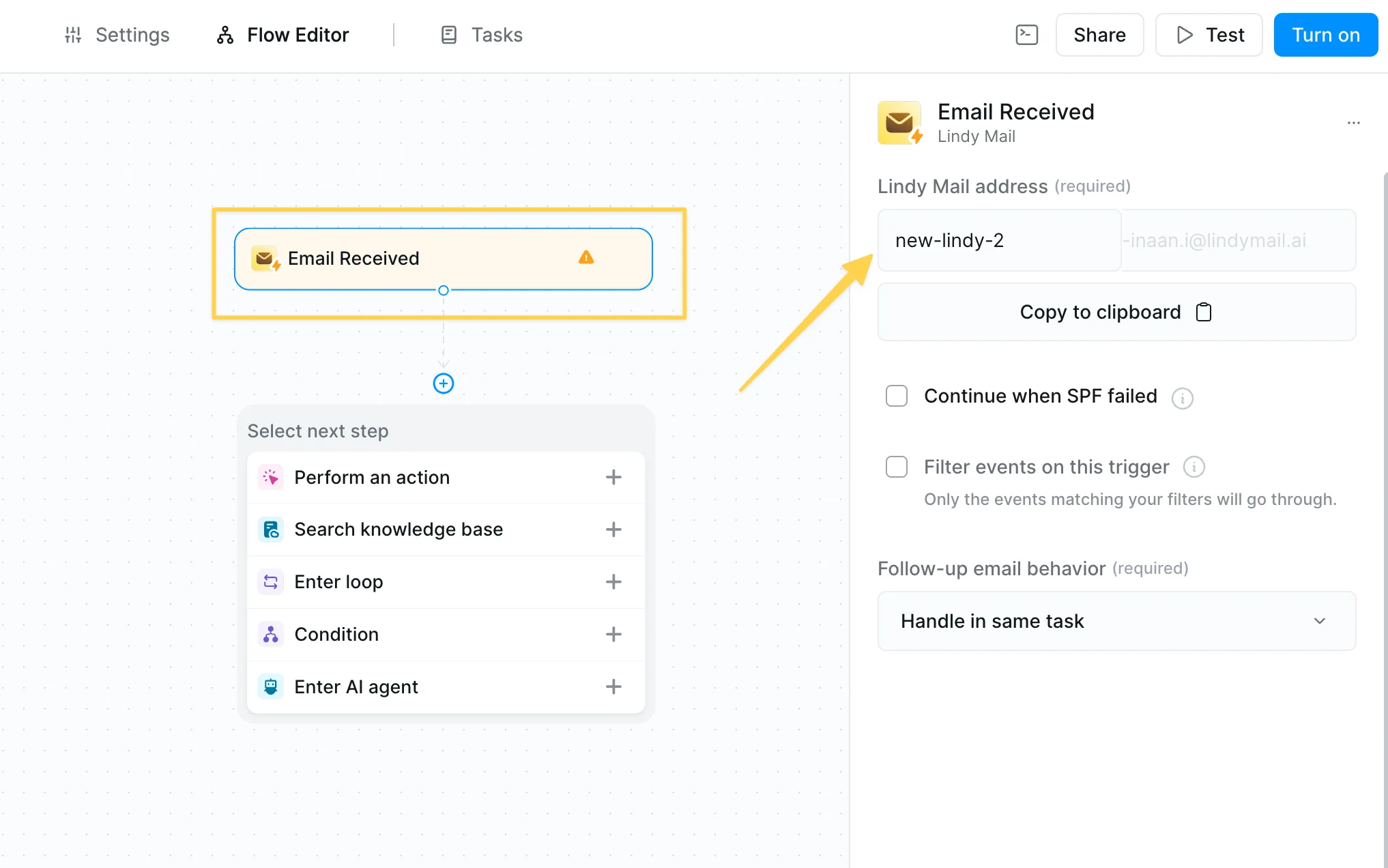
What it does: Lindy is an AI assistant that automatically triages your inbox, drafts replies in your voice, and tracks follow-ups. You text it what you need in plain English, and it handles the execution across your email, CRM, calendar, and Slack.
Who it's for: Professionals whose inbox creates work beyond just reading and replying. If email generates follow-ups, meeting prep, CRM updates, or Slack notifications that you're currently handling manually, Lindy is built to take those off your plate.
Key features of Lindy
- Automatic inbox triage and labeling from the moment you connect
- Reply drafts in your voice, saved for review before anything sends
- Meeting prep briefings delivered before every call
- Meeting recording and structured summaries for Google Meet, Zoom, and Teams
- Smart scheduling via plain-English text
- Follow-up tracking and draft follow-ups for unresponded sent emails
- Custom agents for multi-step workflows across any connected apps
- SOC 2 Type II and GDPR compliant (HIPAA and a signed BAA available on Enterprise)
Why it beats SaneBox
SaneBox sorts your mail and stops there. Lindy sorts it, drafts replies, tracks what hasn't been answered, preps you for meetings, updates your CRM after calls, and connects to hundreds of apps so your work email doesn't get stuck in your inbox.
With SaneBox you still triage, reply, and follow up by hand. With Lindy, a chunk of that is done before you open the tab.
What stood out
The first morning I used it, I opened my inbox to find everything already sorted into labeled categories. Urgent emails had triggered a text to my phone, and drafts were sitting in my folder for the messages that needed replies. Instead of an hour of triage, I spent only about ten minutes reviewing and approving.
What surprised me more was the downstream automation. After a sales call, Lindy transcribed the meeting, pulled action items, updated Salesforce, drafted a follow-up email, and posted a summary to Slack. If you are evaluating visual AI workflow builders, exploring popular langflow alternatives can help you compare no-code AI automation options.
What could improve
Lindy takes a few days to calibrate. You'll spend some time at the beginning setting preferences, working hours, and communication style before it feels fully dialed in. iMessage is also iPhone-only, so Android users use the web app instead.
Pricing
Lindy plans start at $49.99/month (Plus, 2 connected inboxes), with Pro at $99.99/month and Max at $199.99/month. A 7-day free trial with full access is available.
{{templates}}
2. Shortwave: Best for Gmail users who want AI that reads their email
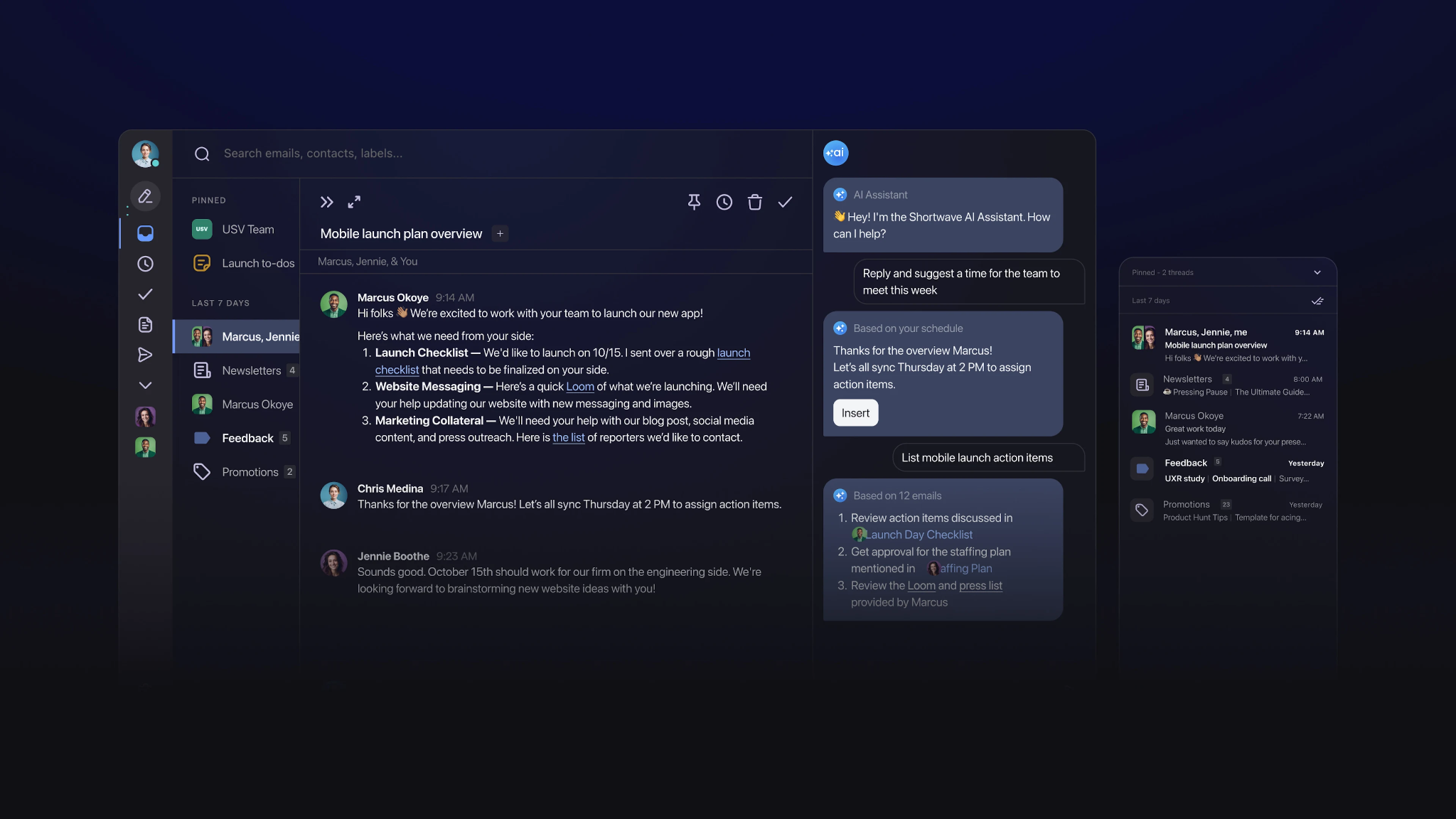
What it does: Shortwave is an AI-native email client built by ex-Googlers that replaces your Gmail interface with a smarter AI-powered inbox. It handles triage, thread summaries, natural language search, and content-aware reply drafting.
Who it's for: Gmail users frustrated by SaneBox's sorting based on sender history. If important emails from new senders keep getting filed away because SaneBox has no pattern data, Shortwave is built to solve that problem by analyzing email content.
Key features of Shortwave
- AI summaries on every email thread
- Natural language inbox search across full email history
- Smart Bundles that auto-group emails by topic and sender
- Custom AI filters that label, star, archive, and organize emails automatically
- Tasklet automation for drafting replies, adding comments, and organizing todos
- Team comments and assignments for collaborative email triage
- Available on Mac, Windows, iOS, and Android
Why it beats SaneBox
SaneBox avoids reading email content for privacy reasons. Shortwave analyzes message content to triage emails based on what they contain. You can also ask questions about your inbox in natural language and get direct answers.
What stood out
The AI search was the biggest shift for me. I typed "find the pricing proposal from Acme in October," and Shortwave returned the correct email in seconds without me needing to remember a single detail about the sender or the subject line.
Thread summaries at the top of each conversation also changed how fast I could get through my inbox. Two to four sentences covering key decisions, what's pending, and who owns what. I read it in fifteen seconds and knew exactly where a thread stood.
What could improve
Shortwave is Gmail-only. Outlook and Microsoft 365 users are out of luck. It's also a full client replacement, which means a learning curve and some adjustment time. SaneBox runs invisibly in the background; Shortwave asks you to move in.
Pricing
Shortwave plans start at $18/seat/month (Pro, billed monthly). A free personal plan is available with limited AI features.
3. Fyxer: Best for AI triage plus draft replies without switching apps
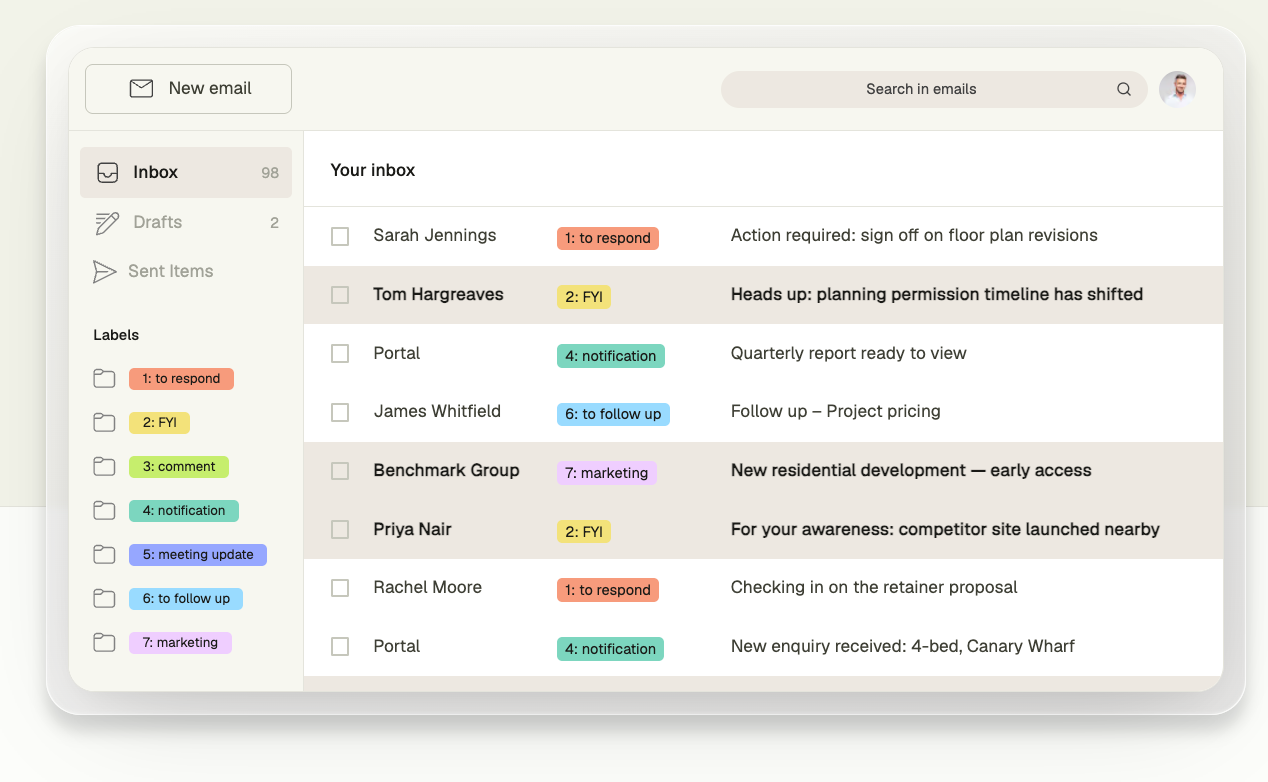
What it does: Fyxer is an AI inbox assistant that sits on top of Gmail or Outlook, sorting your email into categories and pre-writing replies in your tone before you open each message.
Who it's for: Professionals who want the triage that SaneBox offers, plus draft replies, without switching to a new email interface or building automation workflows. Popular with founders and account managers moving through high email volume.
Key features of Fyxer
- AI inbox categorization into needs-a-reply, FYI, and marketing buckets
- Pre-written reply drafts in your tone, ready before you open the email
- Meeting note-taking across Zoom, Google Meet, and Microsoft Teams
- Follow-up email drafted and ready after every meeting
- Smart scheduling link to remove back-and-forth calendar coordination
- Works natively inside Gmail and Outlook with no interface switch
Why it beats SaneBox
SaneBox sorts your inbox. Fyxer sorts it and has a draft reply waiting when you open the email. For anyone whose email consists mostly of acknowledgment replies and routine communication, that combination cuts processing time in half.
What stood out
The drafting is what made Fyxer stick. Most of my email is simple acknowledgment replies, just letting someone know I received their message. With Fyxer, the draft is usually already written well by the time I open the email. I read it, agree with it, and hit send.
The setup was also easier than expected. I didn't have to configure much. It got to work right away, which made the whole thing feel low-effort from day one.
What could improve
The number of folders and filters can get out of hand. I found myself occasionally hunting for which one something landed in. The categories also aren't as flexible as I'd like; they're fine and do their job, but more customization would help with workflows that don't fit the default buckets.
Pricing
Fyxer plans start at $30/user/month (Starter, billed monthly), with Professional at $50/user/month. A 7-day free trial is available.
4. Clean Email: Best for bulk inbox cleanup and rule-based automation
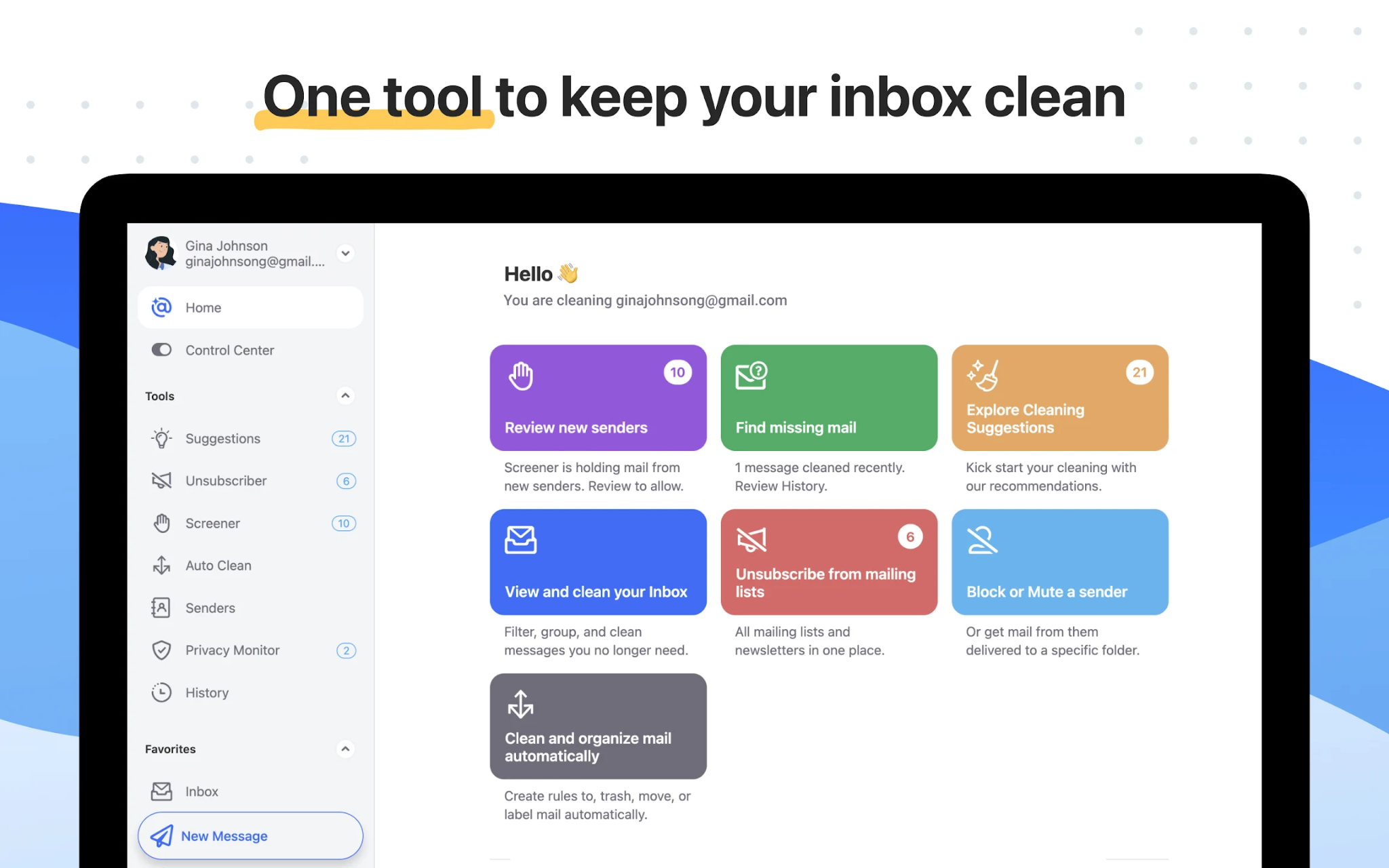
What it does: Clean Email is an inbox cleanup and management tool that groups your emails by sender, subject, date, and size, lets you take bulk actions on thousands of messages at once, and sets up automated rules to keep your inbox clean going forward.
Who it's for: Anyone whose inbox is a disaster zone right now and needs to get to a manageable state before thinking about ongoing filtering. It's also a good fit for people who prefer static rule-based filtering with real unsubscribes and permanent cleanup.
Key features of Clean Email
- Smart Folders that group similar emails for faster review
- Cleaning Suggestions for finding emails users are likely to delete or archive
- Bulk actions to remove, archive, move, or label groups of emails at once
- Unsubscriber for removing newsletters and unwanted subscriptions
- Daily summaries for reviewing emails skipped by automation
- Works across Gmail, Outlook, Yahoo, iCloud, and IMAP
- Available on web, iOS, Android, and Mac
Why it beats SaneBox
SaneBox moves mail into folders. Clean Email deletes, archives, moves, and unsubscribes based on rules you set. It handles the cleanup you need today and the automation you want running tomorrow. Unlike SaneBox, the unsubscribe feature cancels subscriptions instead of just hiding them.
What stood out
I ran Clean Email on an inbox I'd let pile up to 1,200+ unread messages. Within an hour, I had grouped everything by sender, bulk-archived thousands of old newsletters, and set up Auto Clean rules to handle incoming mail automatically. With SaneBox, those unread messages would still be sitting there, but Clean Email had it under control the same afternoon.
What could improve
Clean Email runs on rules you set yourself, which means the filtering stays exactly as you configure it, without adapting over time the way SaneBox eventually does.
It's excellent for catching up, but requires manual rule-building for ongoing filtering. It also processes email through cloud servers, which some users handling sensitive correspondence find uncomfortable.
Pricing
Clean Email plans start at $9.99/month (1 account, billed monthly), with 5 accounts at $19.99/month and 10 accounts at $29.99/month. You can clean up to 1,000 emails free before subscribing.
5. Superhuman: Best for high-volume email users who want faster triage
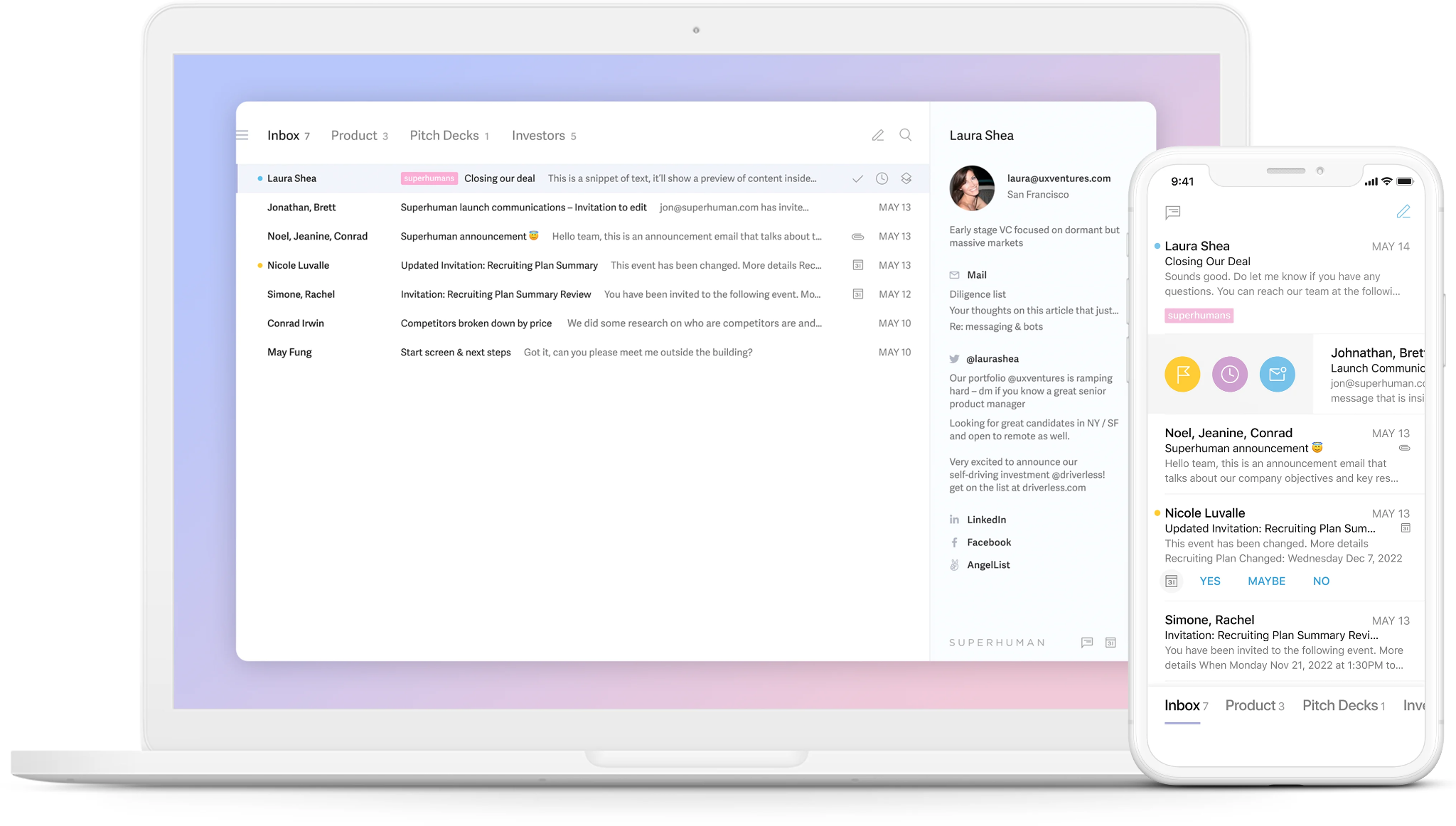
What it does: Superhuman is a premium email client that replaces your Gmail or Outlook interface with a keyboard-first design built entirely around inbox speed, with AI drafting, Auto Labels for automatic categorization, and split inbox views.
Who it's for: Professionals processing 100 or more emails per day who want to make triage decisions faster while staying in control. Built for people who want to move through email quickly while maintaining full control over every decision.
Key features of Superhuman
- Split Inbox that separates important emails, VIP contacts, newsletters, and notifications
- AI reply drafting that learns your tone over time
- Auto Labels for automated inbox categorization
- 100+ keyboard shortcuts for near-zero-mouse email processing
- Thread summarization for long email chains
- CRM integration with HubSpot, Salesforce, and Pipedrive (Business plan)
Why it beats SaneBox
SaneBox filters passively and takes weeks to calibrate. Superhuman gives you control and speed from day one. Auto Labels categorize incoming email immediately without a training period. The interface is designed to process high volumes quickly, something SaneBox was never built to do.
What stood out
Once I clicked the keyboard shortcuts, working through my inbox felt different. Every email action is mapped to a key. Auto Labels meant every email arrived pre-categorized as "response needed," "waiting on," or "marketing," so I knew what needed attention before I opened anything.
What could improve
Superhuman makes you faster at email, but doesn't take anything off your plate. You still read, decide, and respond to everything. For someone looking to escape email work rather than do it faster, this won't scratch that itch. The learning curve for shortcuts also takes up most of the 30-day trial.
Pricing
Superhuman plans start at $30/member/month (Starter, billed monthly), with Business at $40/member/month. Advanced AI features like Auto Drafts and Ask AI require the Business plan. Note that Superhuman Mail is only included in the Business plan.
6. Mailstrom: Best for clearing large historical inbox backlogs
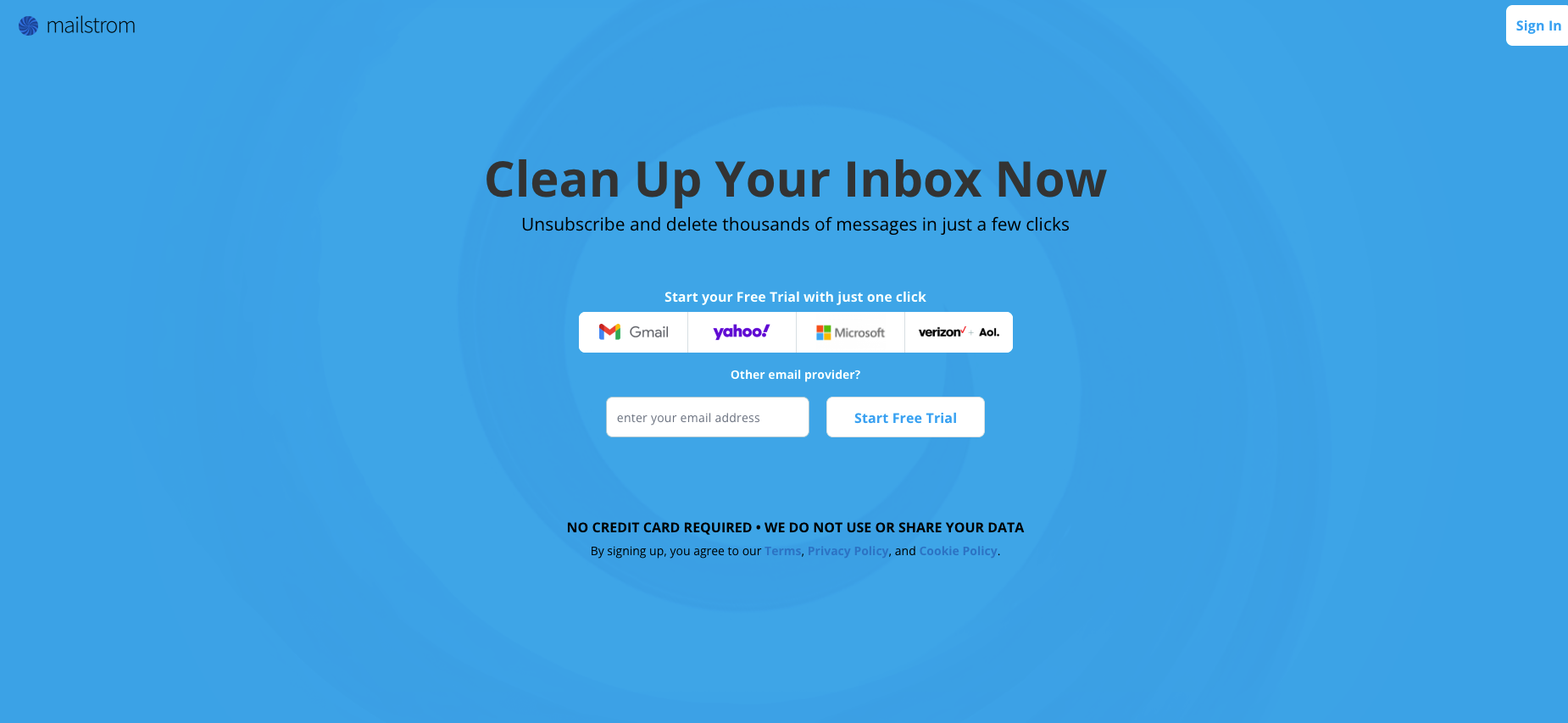
What it does: Mailstrom is a bulk email management tool that groups your inbox into visual bundles by sender, subject, mailing list, and other attributes, letting you delete or archive thousands of messages at once.
Who it's for: Anyone sitting on tens of thousands of unread emails who needs to clear the historical backlog before any ongoing filtering makes sense. Mailstrom is more of a one-time cleanup tool than a persistent triage solution.
Key features of Mailstrom
- Email bundling for grouping related messages
- Bulk delete, archive, and move actions for cleaning thousands of emails quickly
- One-click unsubscribe for removing unwanted mailing lists
- Manual control over what stays and what gets removed
- Spam protection through sender and subject blocking
- OAuth2 login for Gmail, Outlook, and Yahoo without sharing passwords
- Works with Google, Yahoo, Microsoft, AOL, and other email providers
Why it beats SaneBox
SaneBox manages incoming mail going forward, but won't help with the 30,000 unread messages already in your inbox. Mailstrom is built exactly for that: group everything by sender, review the bundle, and delete in bulk. What might take days manually takes an afternoon.
What stood out
The visual bundle interface made the scale of my inbox feel manageable for the first time. Every sender is grouped together, showing how many emails they've sent and how much space they've taken up. I deleted months of accumulated newsletters and notifications in about an hour.
What could improve
The interface looks its age. Mailstrom has been around since 2011, and the UI reflects it. It's also a subscription service for a tool most people only need once or twice. The ongoing cost is harder to justify after the initial cleanup is done.
Pricing
Mailstrom plans start at $9/month (Basic, billed monthly), with Plus at $14/month and Pro at $29.95/month. A free trial is available.
7. Spark Mail: Best for smart inbox sorting at a low price point
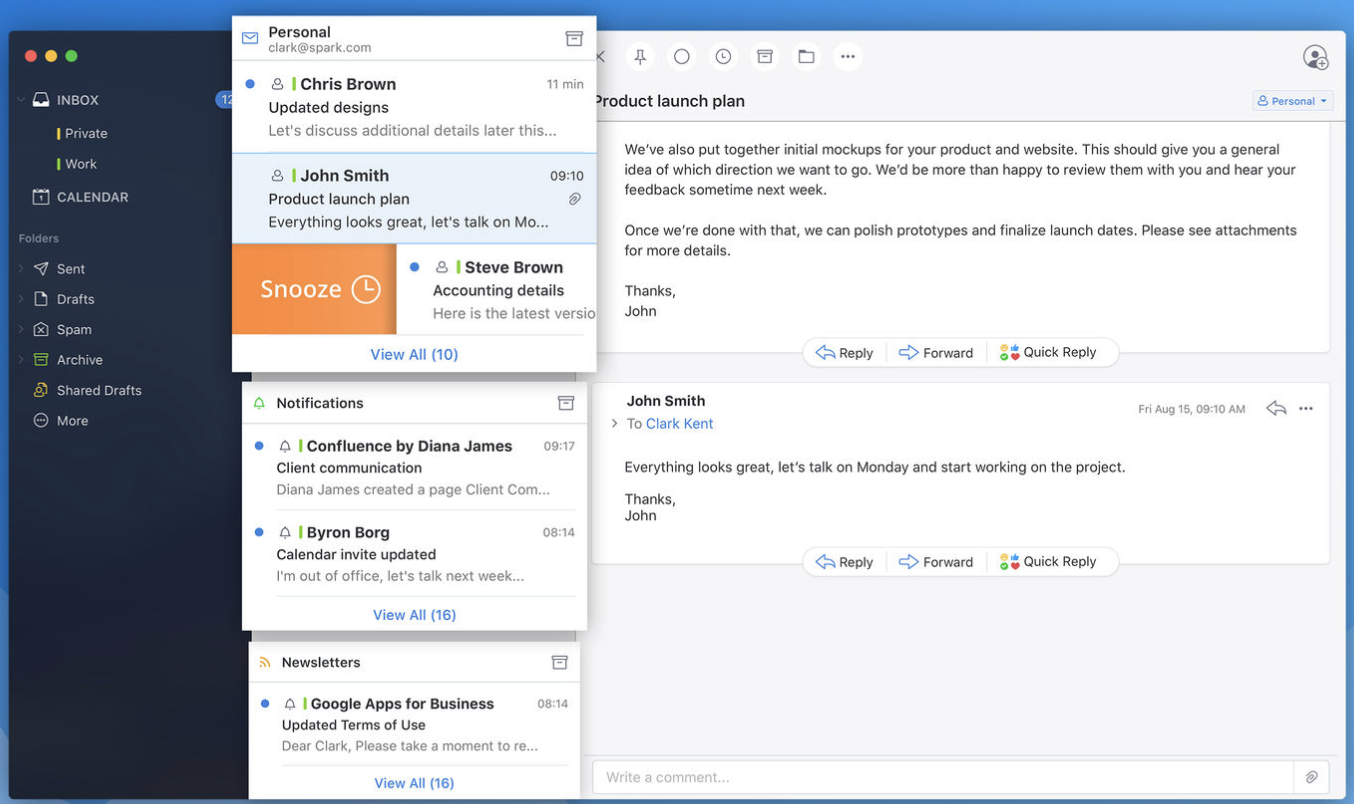
What it does: Spark Mail is an email client for Apple, Android, and Windows devices with a Smart Inbox that automatically pins important emails, groups newsletters separately, and categorizes incoming mail without a subscription fee.
Who it's for: Anyone who wants SaneBox-style inbox categorization built directly into their email client. Spark Mail's Smart Inbox provides basic triage at a fraction of the cost.
Key features of Spark Mail
- Smart Inbox that separates priority emails from non-priority emails
- Unified Inbox for managing multiple email accounts in one place
- Smart Search for filtering emails with natural language
- Newsletters and Notifications folders for bundling non-priority emails
- Shared Inbox for managing team email addresses together
- Labels for organizing emails into categories
- Available on iOS, Android, macOS, and Windows
Why it beats SaneBox
Spark Mail's Smart Inbox pins emails that need attention and automatically pushes notifications, newsletters, and low-priority messages below the fold. There's no separate subscription, no two-week training period, and no configuration required.
For basic sorting, it covers the same ground as SaneBox at a fraction of the price.
What stood out
The zero-setup experience was the main appeal. I installed Spark Mail, connected my Gmail account, and the Smart Inbox was already categorizing correctly. It's not as sophisticated as SaneBox's training-based system, but it covers most of the day-to-day use cases without requiring anything from me.
What could improve
Spark Mail is a full email client, so if you want triage to work invisibly inside Gmail or Outlook without switching apps, it won't work.
Pricing
Spark Mail plans start at $10/month per user (Plus, billed monthly), with Pro at $20/month per user. A free tier is available.
8. Leave Me Alone: Best for stopping subscriptions at the source
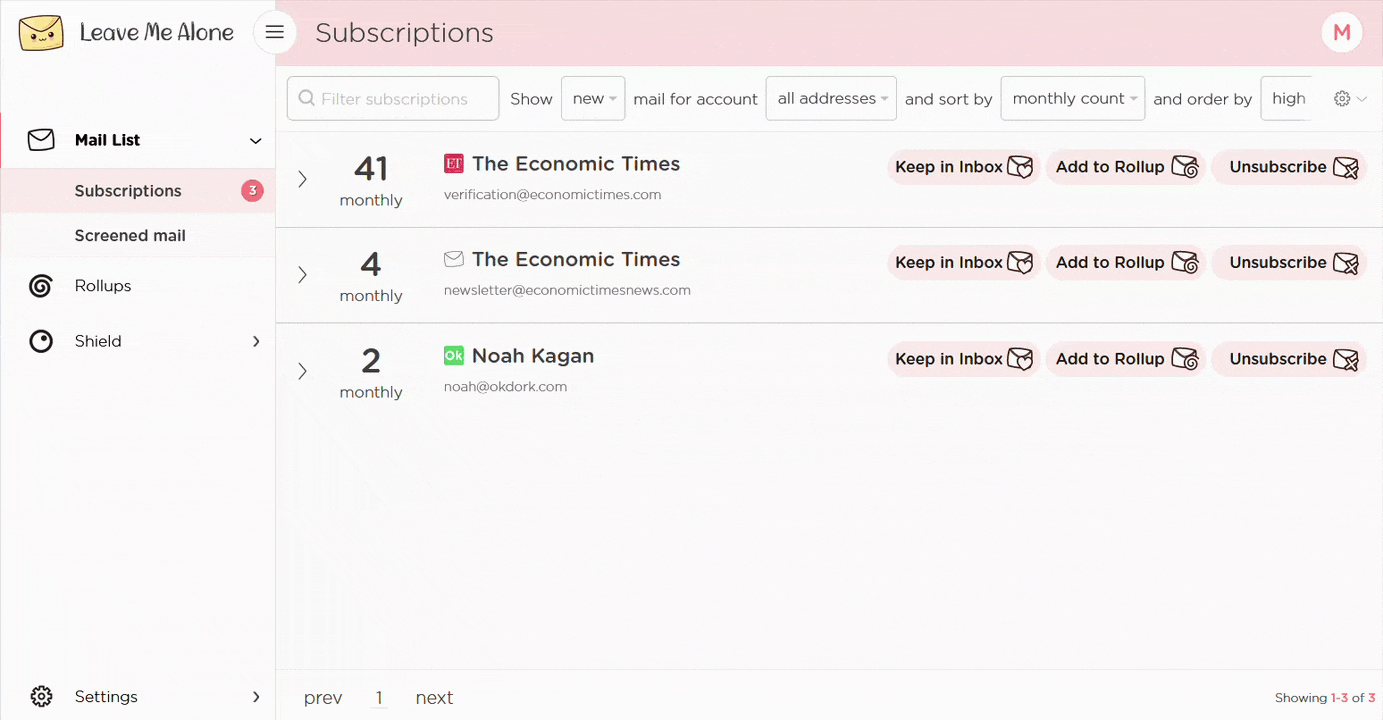
What it does: Leave Me Alone is a privacy-focused email subscription management tool that scans your inbox for active subscriptions, shows open rates and frequency data for each, and handles real unsubscribes across Gmail, Outlook, and IMAP providers.
Who it's for: Anyone whose real inbox problem is the number of lists still emailing them, not the clutter itself. SaneBox hides subscription emails; Leave Me Alone cancels the subscriptions.
Key features of Leave Me Alone
- Automatic subscription discovery across Gmail, Outlook, and IMAP
- Subscription scores based on open rate and frequency data
- One-click real unsubscribes (not filter rules that hide emails)
- Inbox Shield for blocking first-contact emails from unknown senders
- Privacy-first: indie team, no data monetization
- Available in the EU with GDPR compliance
Why it beats SaneBox
SaneBox routes newsletters into SaneLater, but those senders still have your address and continue emailing you. Leave Me Alone removes you from the lists. Over time, fewer unwanted emails arrive in the first place, which prevents a growing pile of hidden messages.
What stood out
The subscription score feature changed how I thought about cleaning up. Leave Me Alone shows you the open rate for each subscription, so you can keep the ones you actually read and drop the rest. I ended up unsubscribing from about 30 senders and keeping 15 that I open regularly.
What could improve
Leave Me Alone is only a subscription management tool. It cannot delete, archive, or move emails in bulk, and it won't help with the existing backlog of non-subscription emails. For ongoing triage and filtering, you'll still need another tool.
Pricing
Leave Me Alone plans start at $9/month (Casual Emailer, billed monthly), with Inbox Zero Hero at $16/month. A one-off Seven Day Pass is also available for $19, with 7 days of unlimited unsubscribes.
9. Gmail Filters: Best for zero-cost rule-based triage inside Gmail
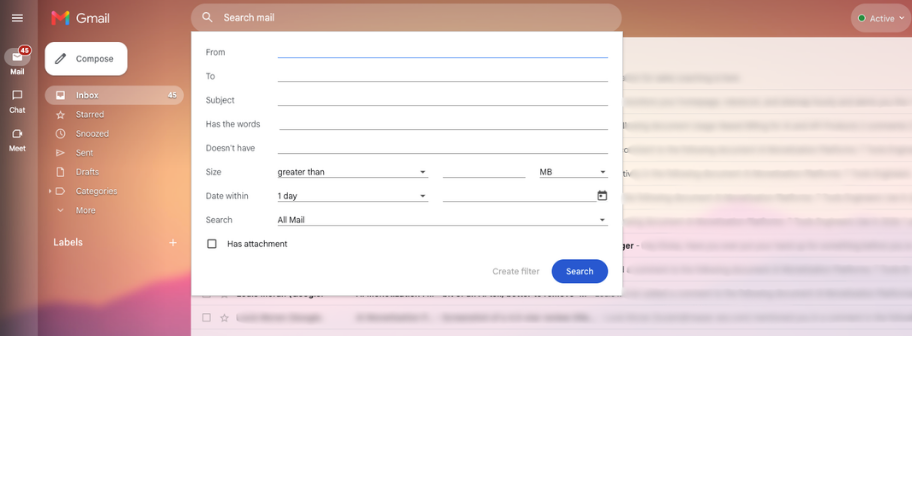
What it does: Gmail's native filter system lets you create rules based on sender, subject, keywords, size, and other criteria to automatically label, archive, delete, or forward incoming email without any third-party tool.
Who it's for: Gmail users who want basic triage without paying for anything, handing data to a third party, or installing additional software. If your filtering needs are consistent and predictable, Gmail Filters cover a lot of ground for free.
Key features of Gmail Filters
- Rule-based filtering by sender, subject, keywords, size, and date
- Automatic labeling, archiving, deleting, forwarding, and starring
- Works natively inside Gmail with no third-party access required
- Import and export filter sets
- No cost, no subscription, no data sharing
Why it beats SaneBox
Gmail Filters are free, require no training period, and don't route your email through a third-party service. For users with clearly defined categories (client emails, newsletters, internal notifications), building a filter set takes an afternoon and works indefinitely without a subscription.
What stood out
The control was the appeal. SaneBox makes decisions based on behavioral patterns you can't fully inspect. Gmail Filters run exactly the rules you write, transparently, with no learning period and no unexpected behavior. For a law firm or medical practice handling sensitive correspondence, that predictability has real value.
What could improve
Gmail Filters are static and require manual maintenance. They don't learn or adapt, so any new sender pattern you want to handle requires a new rule. Building a comprehensive filter set takes meaningful upfront time, and managing dozens of rules can get unwieldy. There are no analytics, no daily digest, and no follow-up tracking built in.
Pricing
Free, included with all Gmail and Google Workspace accounts.
10. Unroll.me: Best for quick newsletter cleanup on Gmail
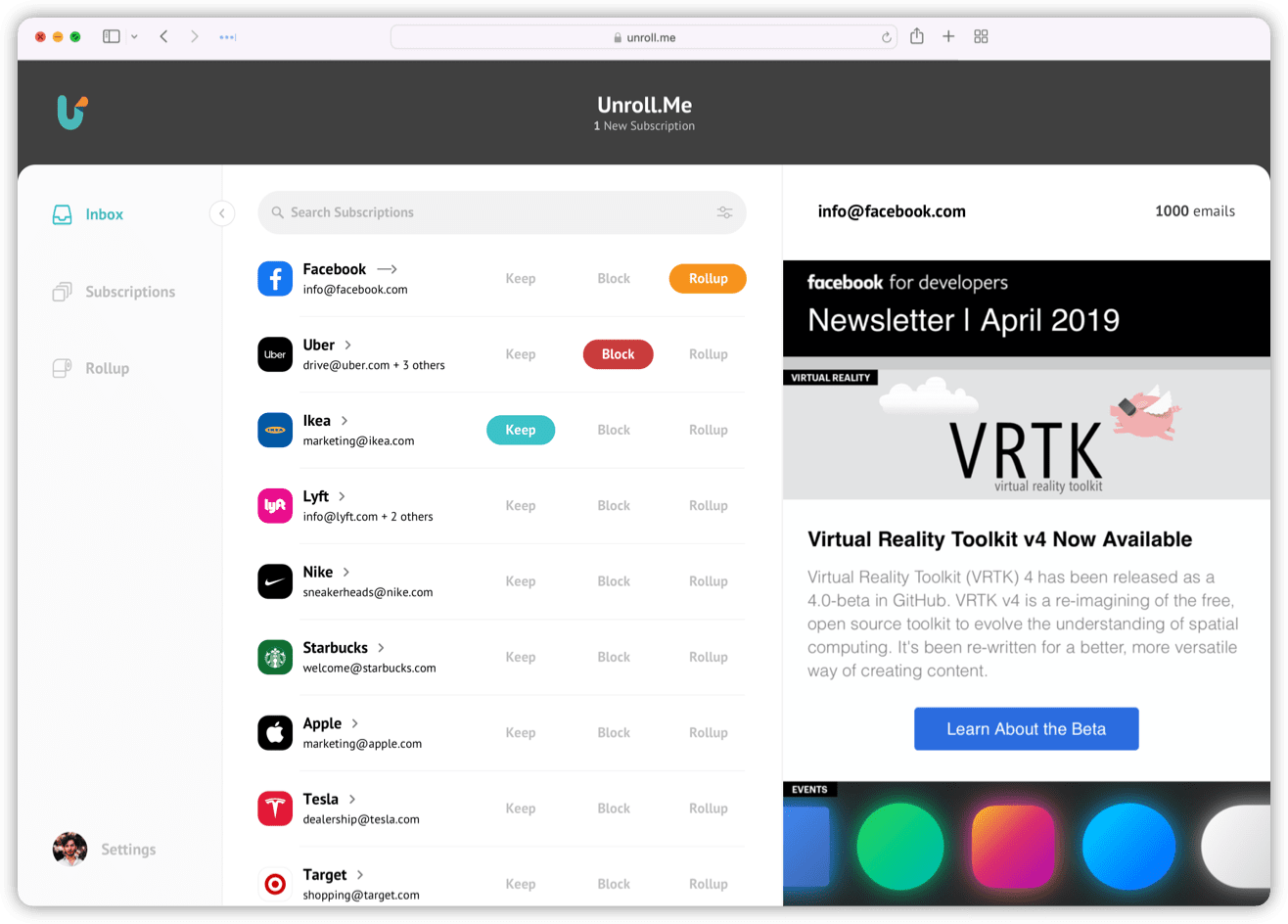
What it does: Unroll.me scans your Gmail inbox for email subscriptions and lets you unsubscribe from them individually or group multiple subscriptions into a single daily digest email.
Who it's for: Gmail users who want a fast, free way to identify and unsubscribe from newsletters without paying for a tool. It's the easiest entry point in this category.
Key features of Unroll.me
- Automatic subscription detection across Gmail
- One-click unsubscribes from individual senders
- Rollup feature to bundle multiple newsletters into one daily digest
- Free to use
Why it beats SaneBox
Unroll.me is free and handles subscriptions directly by removing unwanted newsletters. For casual users who mainly want to cut newsletter clutter without spending anything, it covers the basics with minimal setup.
What stood out
The subscription scan was fast, and it caught things I'd forgotten I ever signed up for, old newsletters from a conference two years back, and a store I ordered from once.
The Rollup feature was the most useful part in practice. A dozen newsletters arrived as a single digest each morning, which cut the noise without forcing me to unsubscribe from everything at once.
What could improve
Unroll.me is free because it reads your commercial emails and sells insights from that data to businesses and advertisers. They're upfront about it on their website. If that works for you, the tool does its job. If it doesn't, Leave Me Alone handles the same thing without selling your data.
The tool handles subscriptions only, and does nothing for non-subscription email clutter or ongoing triage.
Pricing
Free for Gmail, Yahoo!, Outlook, iCloud, and AOL users.
{{cta}}
How to choose the right SaneBox alternative
The right tool depends on what SaneBox is failing to do for you. Here's how to match each alternative to your specific problem.
| If you want... | Use this |
|---|---|
| AI triage inside your existing inbox without switching apps | Fyxer or Lindy |
| AI that reads email content beyond sender patterns | Shortwave (Gmail) or Lindy (Gmail and Outlook) |
| One-time bulk cleanup of a messy inbox | Clean Email or Mailstrom |
| To cancel subscriptions at the source | Leave Me Alone or Unroll.me |
| Faster triage while staying in control yourself | Superhuman |
| Free basic sorting with no third-party access | Gmail Filters |
Common mistakes when switching from SaneBox
- Check email client compatibility first: Several alternatives only work with Gmail. Confirm provider support before investing time in setup.
- Clear the backlog before switching: A new tool sorting through years of accumulated email takes longer to work correctly. Use Mailstrom or Clean Email to get to a clean state first.
- Know whether the tool replaces your client or layers on top: Shortwave and Superhuman replace your email interface entirely. SaneBox, Fyxer, and Lindy work alongside the client you already use.
- Match the tool to the actual problem: Filtering hides newsletters, but they keep arriving. If subscriptions are the root issue, unsubscribe tools solve it at the source.
- Unsubscribing and SaneBlackHole are different things: SaneBlackHole hides a sender, and unsubscribing removes you from their list. Over time, one keeps growing quietly while the other shrinks the problem.
Try Lindy: The SaneBox alternative that goes beyond sorting
A cleaner inbox is a good start. But the reply that still needs writing, the follow-up three days overdue, the meeting notes that never got done, the CRM record nobody updated after the last call, none of that goes away on its own.
Lindy picks up where SaneBox stops. Connect your inbox, tell it what you need in plain English, and it takes care of the rest.
Here is what it takes off your plate:
- Email triage that starts before you open your inbox: Lindy labels every incoming message, flags what needs a reply, and archives the rest, giving you a prioritized inbox from the moment you open it.
- Drafts written in your voice: Lindy writes replies in your voice and saves them for your review before sending.
- Proactive follow-up tracking: Lindy monitors sent emails that haven't received a reply and drafts a follow-up after a set number of days. Nothing goes out without your approval.
- Daily briefings delivered by text or email: Get a personalized morning summary covering your schedule, open threads, and anything that needs attention before the day starts.
- Multi-model AI: Lindy uses Claude for writing, Gemini for large datasets, or GPT's latest models, depending on the task, or leave it on Auto and Lindy picks the right model for you.
- Delegate from anywhere: Text Lindy by iMessage or SMS to handle tasks between meetings without opening a dashboard.
FAQs
1. What is the best SaneBox alternative?
The best SaneBox alternative depends on what you need beyond basic filtering. Lindy is the strongest option for professionals who want inbox triage plus automated drafting, follow-up tracking, and cross-tool workflows. Shortwave is the best Gmail-specific AI alternative for reading email content. Clean Email is the best option for bulk cleanup with real unsubscribes.
2. Is there a free SaneBox alternative?
Yes. Gmail Filters are free and built into every Gmail account. Spark Mail has a free tier with Smart Inbox categorization. Unroll.me is free for Gmail newsletter management. Shortwave also has a free personal tier with limited AI features.
3. Does SaneBox unsubscribe you from emails?
No. SaneBox moves emails from unwanted senders into folders like SaneLater or SaneBlackHole, but those senders still have your email address and keep sending. For real unsubscribes that remove you from sender lists, Leave Me Alone or Clean Email are the better options.
4. Which SaneBox alternative works with Outlook?
Lindy, Fyxer, Clean Email, Mailstrom, Superhuman, Unroll.me, and Spark Mail all support Outlook. Shortwave is Gmail-only and does not support Outlook at all.
5. Can AI fully replace SaneBox for email triage?
Yes. Most modern SaneBox alternatives offer broader AI features. Lindy and Shortwave read email content to prioritize messages based on meaning and urgency. Lindy also drafts replies and manages follow-ups.










