Slack Pricing: Which Plan I’d Pick (and When to Upgrade)


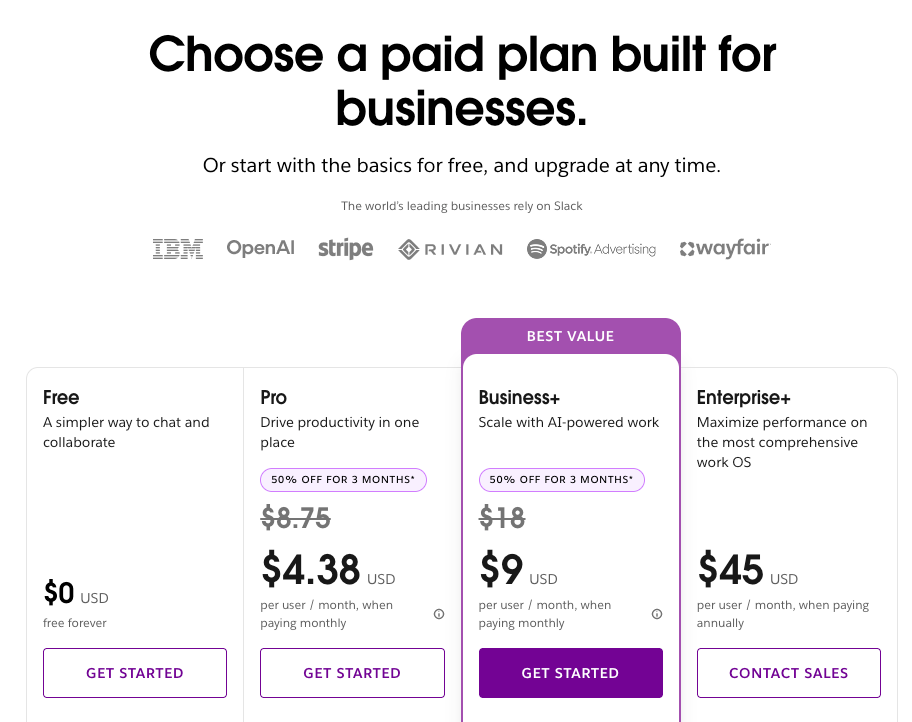
Slack costs $0 on the Free plan, $8.75 per user per month on Pro, and $18 per user per month on Business+ when you pay monthly. Enterprise+ starts at $45 per user per month on an annual plan, and you still have to talk to sales to buy it.
I spent a day going through Slack’s pricing page, its plan comparison, and its help articles, then priced out three team sizes with a calculator and a lot of patience. Two things stood out. The Free plan’s real limit is its 90-day memory, and most of what separates Pro from Business+ pays for AI features.
By the end of this guide, you'll know what each plan costs per user, what the Free plan leaves out, which AI features come with which tier, and what a 10, 50, or 500-person team will really pay. You'll also know when to upgrade and when to leave your credit card alone.
Slack pricing plans at a glance
Slack offers four plans, starting with Free and going up to Enterprise+. Paid plans charge per active user, with lower rates when you pay annually.
Annual billing saves about 17% on Pro and Business+. Slack also adjusts billing based on active members, which can help control costs as your team changes. I'll cover how those adjustments work in the savings section.
Slack pricing plans breakdown
Free: $0/month
What you get: The basics are all here, including channels, search, audio and video clips, and one-to-one huddles. You can connect up to 10 apps, message people outside your company one-to-one through Slack Connect, and scroll back through 90 days of history.
Best for: Side projects, small teams, and anyone who wants to try Slack before paying for it.
Pros
- Free for as long as you want, with no credit card to sign up
- Handles everyday team chat just fine
- Ten integrations is plenty for testing your setup
Cons
- You can only look back 90 days
- No AI features at all
- No standard customer support if you get stuck
My take: Free is a good way to find out whether your team will actually stick with Slack. The 90-day limit is the catch. You won’t notice it at first, then one day you’ll need a decision from four months ago and it won’t be there.
Pro: $8.75 per user per month
What you get: This is where Slack starts to feel like a proper work tool. History and integrations are unlimited, and huddles and Slack Connect messages work with groups. You also get Canvases, Lists, Workflow Builder, custom retention policies, 24/7 support, and AI summaries, huddle notes, and assistant apps.
Best for: Small and midsize teams that want full history, more integrations, and a little automation.
Pros
- Search your entire message history, with no 90-day cutoff
- Connect as many apps as you need
- Workflow Builder takes care of the repetitive stuff
- AI summaries and huddle notes make catching up faster
- Support is there around the clock
Cons
- Slackbot, AI search, and daily recaps are locked behind Business+
- SAML single sign-on needs Business+ or higher
- The bill grows with every active user you add
My take: This is the plan I’d start most teams on. Unlimited history is reason enough to leave Free. Workflow Builder is a nice extra if people keep posting the same update every week. I’d wait on Business+ until you catch yourself wanting Slackbot or AI search.
Business+: $18 per user per month
What you get: Everything in Pro, plus Slackbot, AI search, daily recaps, file summaries, translations, AI workflow generation, and AI writing in Canvas. You also get SAML-based SSO, data exports, data residency, channel posting permissions, and a 4-hour first response from support.
Best for: Teams that use AI every day, need tighter security, or can’t wait around for support.
Pros
- Slackbot, AI search, and daily recaps all in one plan
- SAML SSO, data residency, and data exports
- Message activity analytics and extra admin controls
- A 4-hour first response from support
Cons
- It costs $9.25 more per user per month than Pro on monthly billing
- Slackbot is capped at 15 messages per user per week
- Everyone on the plan pays the higher rate, whether they use the AI features or not
My take: Business+ only pays off if most of your team will use Slackbot and AI search. Since everyone pays the higher rate and Slackbot has a weekly cap, I’d try the Slackbot trial on Pro first. Then decide whether it’s worth moving the whole team up.
Enterprise+: Contact sales
What's included: Everything in Business+, plus enterprise search across connected apps, audit logs, legal holds, native data loss prevention, information barriers, HIPAA support, custom roles, multiple SAML configurations, and unlimited workspaces. Enterprise Key Management is available as a paid add-on.
Best for: Large organizations with strict security, compliance, and multi-workspace requirements.
Pros
- HIPAA support, audit logs, and legal holds for regulated industries
- Enterprise search across connected apps and databases
- Advanced security controls, including data loss prevention
- Unlimited workspaces and 24/7 priority support
Cons
- Annual billing only, and you have to go through sales
- Enterprise Key Management costs extra
- Advanced features may be unnecessary for smaller teams
My take: Enterprise+ makes sense when compliance requires it. If nobody is asking for audit logs, legal holds, or HIPAA support, Business+ is probably enough. If someone is, get a quote before you plan your budget.
Slack Free plan limits you should know
Slack Free costs $0, but five limits can become frustrating once your team relies on it for daily communication. Here's what to watch for:
- 90-day message history: You can only search messages and files from the past 90 days. Upgrading can restore older content that Slack still retains.
- One-year data retention: Slack permanently deletes messages and files older than one year on Free.
- 10 app integrations: You can connect up to 10 apps from Slack's App Directory.
- One-to-one calls and external messaging: Group huddles and group Slack Connect conversations require a paid plan.
- Limited collaboration tools: Workflow Builder and Lists are unavailable, Canvases are limited to channels and DMs, and standard customer support isn't included.
Slack Free has no stated member limit, which makes it appealing for growing teams. The restrictions become more noticeable when you need older conversations or more advanced features.
I ran into the 90-day history limit when I needed to check a contract term discussed in a thread 140 days earlier. The conversation had disappeared from search, and upgrading was the only way to recover it.
If your team uses Slack to record decisions, unlimited message history is one of the strongest reasons to upgrade to Pro.
Which AI features are included in each Slack plan?
Slack includes AI features in its paid plans, with Pro covering basic summaries and Business+ adding Slackbot, AI search, and workflow automation. Enterprise+ adds AI-powered search across connected apps.
Here's how AI features compare across Slack's four plans:
Pro covers everyday AI assistance, including conversation summaries and huddle notes. If your team wants Slackbot to answer questions, AI search to find information, or AI-generated workflows, you’ll need Business+.
Free and Pro users can try Slackbot through a limited trial, but ongoing access requires Business+ or Enterprise+. On Business+, Slackbot is capped at 15 messages per user per week. Enterprise+ has no weekly cap.
What changed in Slack pricing in 2025?
Slack bundled AI features into its paid plans in June 2025, ending sales of the separate Slack AI add-on. Existing customers could keep the add-on until their first renewal after August 17, 2025.
The update also changed Business+ pricing and introduced Enterprise+. Advanced AI features, including Slackbot, AI search, recaps, and translations, now come with Business+ and higher tiers.
Pro still includes AI summaries, huddle notes, and third-party AI assistant apps, allowing teams to use AI teammates like Lindy without upgrading. Our Viktor review looks at another option.
One catch: Turning off Slack’s AI features won’t lower your bill. You’ll pay the same subscription rate whether your team uses them or leaves them disabled.
What Slack costs for your team size
Slack charges per user, which means costs increase as your team grows. Here's what teams of different sizes would pay each month at the rates shown below:
Monthly columns use the regular monthly rates: $8.75/user for Pro and $18/user for Business+. Annual columns use $7.25 and $15 per user per month, billed annually.
For a 50-person team, moving from Pro to Business+ adds $462.50 per month on monthly billing and $387.50 on annual billing. At 500 users, the difference grows to $4,625 and $3,875.
Before upgrading, check who will use Slackbot and the other advanced AI features. Every paid member gets the higher rate, even when only a handful regularly use those tools.
How to pay less for Slack
You can save on Slack with four options, from introductory discounts to credits for inactive users. Here's where to look:
- Claim the new-team discount: Get 50% off Pro ($4.38/user/month) or Business+ ($9/user/month) for three months when you subscribe online within seven days of creating your workspace. Annual plans and Enterprise+ are excluded. After three months, regular rates apply: $8.75 for Pro and $18 for Business+.
- Apply for nonprofit or education pricing: Eligible nonprofits get Pro free for up to 250 members and 85% off for larger teams. Business+ also offers an 85% nonprofit discount, while educational institutions have separate offers.
- Take advantage of fair billing: Slack checks activity over a 28-day period and issues prorated credits when paid members become inactive. Review your member list regularly to keep costs under control.
- Check your Salesforce benefits: Eligible Salesforce customers may receive ongoing Slackbot access. Confirm your benefits with your account team before upgrading to Business+ for Slackbot alone. If you only need Slackbot for a single job, you can also build a custom Slack bot instead.
My tip: If you're starting a new workspace, the introductory offer is worth checking first. A 10-person team on Business+ saves $270 over three months, giving you time to test its AI features before paying full price.
Which Slack plan should you choose?
Slack Pro is the best starting point for most teams because it includes unlimited message history, integrations, group huddles, and basic AI features. Business+ is worth considering when your team regularly needs Slackbot or advanced AI search.
Here's how I'd choose based on your needs:
Choose Free if you:
- Run a small team that rarely needs conversations older than 90 days.
- Use fewer than 10 app integrations.
- Only need basic messaging and one-to-one huddles.
Choose Pro if you:
- Need unlimited searchable message history and app integrations.
- Want group huddles, Workflow Builder, Canvases, and Lists.
- Can get by with AI summaries and huddle notes.
Choose Business+ if you:
- Want Slackbot, AI search, daily recaps, and translations.
- Need SAML SSO, data exports, or data residency.
- Expect most team members to use advanced AI features regularly.
Choose Enterprise+ if you:
- Need HIPAA support, audit logs, legal holds, or data loss prevention.
- Manage multiple workspaces with complex security requirements.
- Want enterprise search across connected apps and databases.
My recommendation: Start with Pro and measure how often your team needs the AI features exclusive to Business+.
Is Slack worth the cost?
Slack is worth paying for when your team relies on message history, integrations, and automation to get work done. Pro offers the strongest value for everyday collaboration, while Business+ is better suited to teams that regularly use advanced AI features.
Slack is worth it if you:
- Make important decisions in channels and need to find them months later.
- Use integrations and Workflow Builder to automate repetitive tasks.
- Rely on Slackbot or AI search to find answers throughout the day.
A paid Slack plan may be unnecessary if you:
- Already have Microsoft Teams or Google Chat through an existing subscription.
- Can work within Free's 90-day history and 10-app limits.
- Only need basic AI summaries, which Pro already includes.
When to upgrade
I'd follow three simple rules:
- Free to Pro: Upgrade when missing message history, app limits, or one-to-one huddles slow your team down.
- Pro to Business+: Upgrade when Slackbot, AI search, or advanced admin controls become regular needs.
- Business+ to Enterprise+: Upgrade when compliance, security, or multi-workspace requirements demand it.
Before upgrading, check what's slowing your team down and whether the next tier will solve it. A higher price is easier to justify when you can point to the time or effort it saves.
Slack alternatives and pricing comparison
Microsoft Teams, Google Chat, and Pumble are three alternatives worth comparing before committing to Slack. Each offers a different balance of pricing, integrations, and collaboration features.
If your company already pays for Microsoft 365 or Google Workspace, check which chat features you already have before adding another subscription. Our guide to Slack alternatives covers more options if you're considering switching.
My bottom line on Slack pricing
If I were setting up a team today, I’d start with Pro, unless the team is small enough to live with 90 days of history. In that case, start on Free and make Slack earn the upgrade.
Once old conversations disappear from search or 10 integrations aren’t enough, Pro becomes an easy choice. You get unlimited history, more ways to automate work, and fewer restrictions on daily collaboration.
I’d be more careful with Business+. Slackbot and AI search sound great, but how often will your team use them? I’d test those features before committing to a higher price for every member.
One last tip: Calculate your bill at today’s headcount and your expected headcount six months from now. Check what happens when introductory discounts expire, too.
FAQs
1. How much does a Slack subscription cost?
Slack costs $0 on Free, $8.75 per user per month on Pro, and $18 on Business+. Enterprise+ starts at $45 per user per month, billed annually, through sales. Eligible new teams can get 50% off Pro and Business+ for their first three months, bringing prices to $4.38 and $9 per user.
2. Why is Slack so expensive?
Slack gets expensive because it charges per user and bundles advanced features into higher-priced plans. Business+ includes Slackbot, AI search, automation, and security controls. Your subscription price stays the same even if you disable its AI features.
3. Which is cheaper, Slack or Microsoft Teams?
Microsoft Teams is usually cheaper. Teams Essentials starts at $4 per user per month on an annual plan, while Slack Pro costs $7.25 per user per month billed annually, or $8.75 monthly. Both offer free plans.
4. What are the disadvantages of using Slack?
Slack’s biggest disadvantages are its per-user pricing, limited free message history, and expensive advanced AI features. Free workspaces only provide 90 days of searchable history, while Slackbot and AI search require Business+ or higher for ongoing access.
5. How many people can use Slack for free?
Slack Free has no stated member limit, allowing teams to invite users without paying for seats. However, searchable history is limited to 90 days, integrations are capped at 10 apps, and group huddles require a paid plan.
6. Does Slack offer nonprofit pricing?
Yes, Slack offers Pro free to eligible nonprofits with up to 250 members. Larger nonprofits receive 85% off Pro, while qualifying organizations of any size can receive 85% off Business+. Educational institutions can also apply for separate discounts.









