


What is AI Customer Engagement: Use Cases, Benefits & Setup


If you want to attract, convert, and retain more customers without burning out your team, AI-powered customer engagement is no longer optional.
It helps you connect with users at the right time, on the right channel, with the right message, automatically.
In this guide, you’ll learn what AI customer engagement really means, how it works, and how to start using it to improve your customer experience and business results.
What Is AI Customer Engagement?
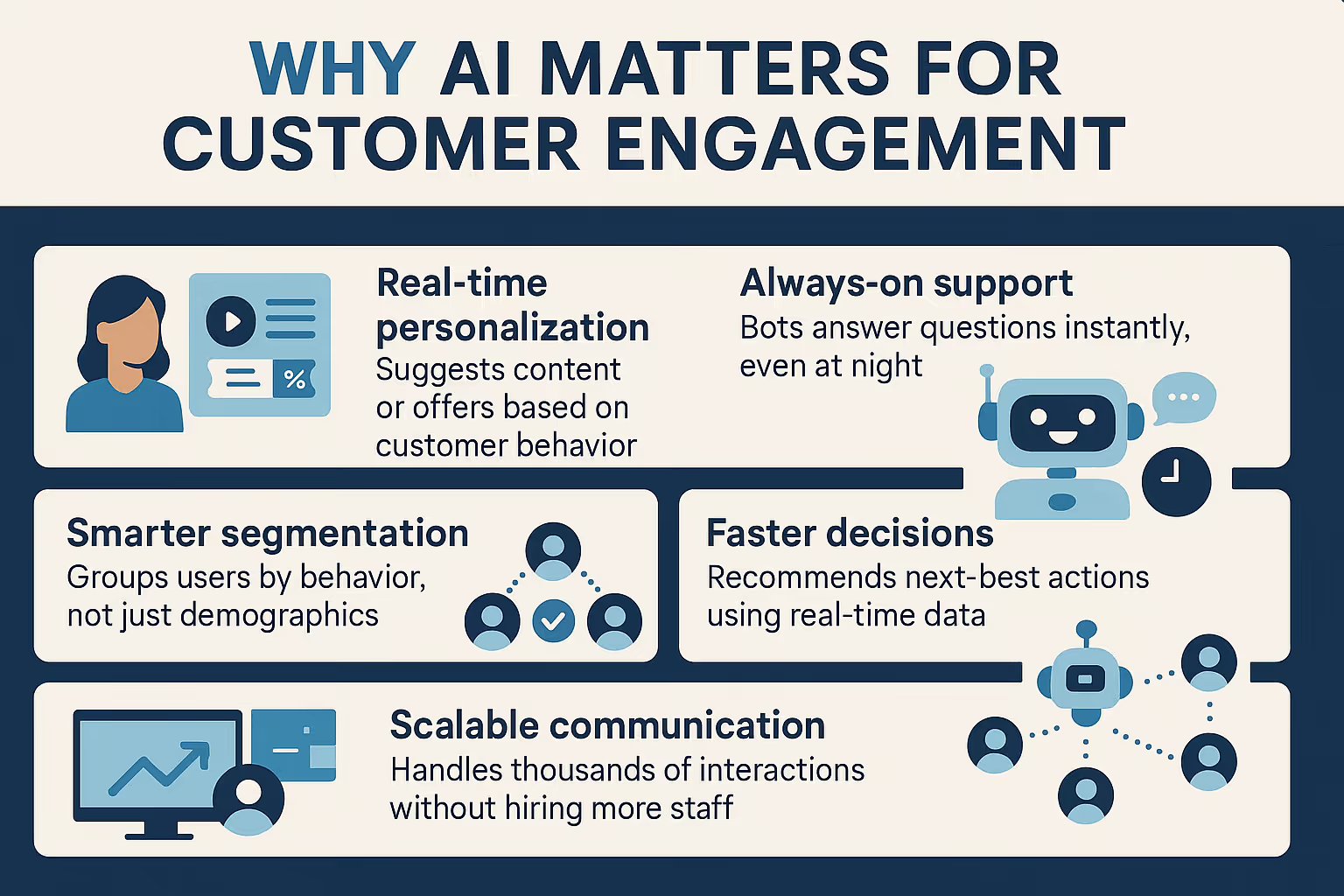
AI customer engagement means using artificial intelligence to personalize, automate, and improve how your business interacts with customers across channels like chat, email, social media, and product interfaces.
It helps you:
- Understand customer behavior and intent
- Send messages that feel personal
- Trigger actions based on user data
- Respond instantly and consistently
Instead of reacting to what customers say or do, AI helps you proactively engage them with relevant content, offers, or support.
5 Real Use Cases of AI in Customer Engagement
Here are five practical and high-impact ways companies are using AI to drive better engagement, with real-world examples.
1. AI Chatbots for Instant, Human-Like Support
AI chatbots do more than just reply with canned answers. With natural language processing (NLP), they understand full questions, even with typos, slang, or incomplete phrasing.
When you use Lindy with tools like Intercom, it can:
- Answer FAQs with contextual understanding
- Handle first-line support 24/7
- Collect user info and qualify leads before handing off to humans
- Route queries to the right department instantly
For example, a customer asks, “Where’s my refund?”
Instead of sharing a generic link, the bot pulls up the order, checks refund progress, and responds with the exact status. If something looks off or the issue seems sensitive, it automatically escalates to a human agent. This cuts wait time and boosts satisfaction.
As a result, customers get quick, helpful answers. Your team avoids repetitive work and focuses on issues that need human attention.
2. Behavior-Based Email and SMS Campaigns
AI-powered engagement tools like Klaviyo and Customer.io track user behavior across your website or product and use it to personalize communication.
They can:
- Send reminders for abandoned carts
- Re-engage inactive users with helpful nudges
- Offer discounts or content based on feature usage
- Tailor frequency and timing based on user responsiveness
Let’s say a user signed up for your SaaS product but hasn’t used a key feature after 5 days. AI notices the inactivity and sends an email titled, “Most users start with this feature– here’s how.” The message includes a quick tip and video walkthrough.
This way, you’re not blasting the same email to everyone. You're helping users based on what they actually do (or don’t do), which drives better engagement and conversions.
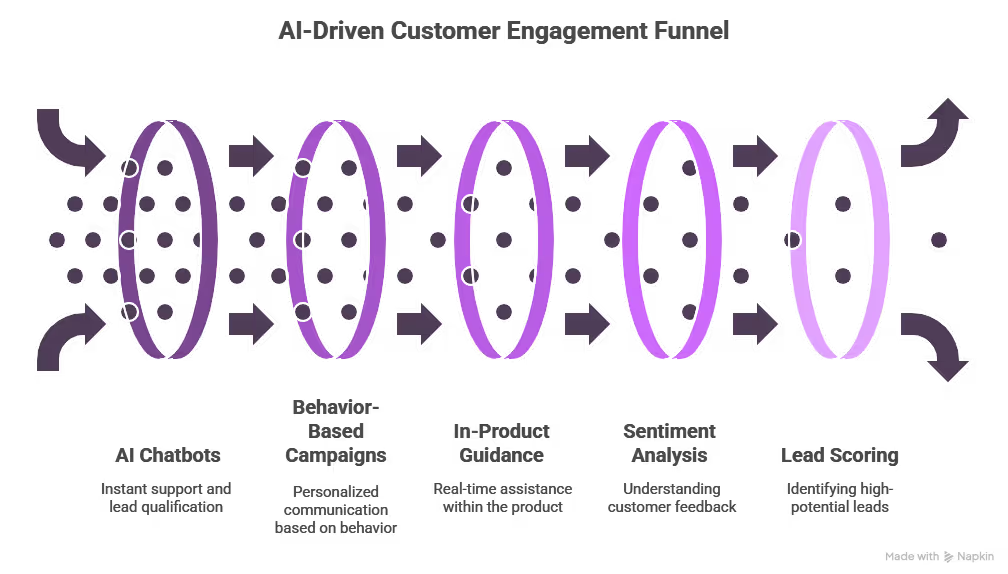
3. In-Product Guidance at the Right Moment
AI doesn’t just help outside your app, it works inside it too. With real-time behavior tracking, AI tools can improve how users experience your product by offering:
- Contextual tooltips
- Guided walkthroughs
- Smart feature recommendations
- Real-time nudges to reduce friction
When a new user logs into your dashboard but skips the “Upload Data” step. Based on that pattern, AI triggers a non-intrusive tooltip that says, “Most users start by uploading a file. Want help with that?” A click opens a 30-second how-to video.
It prevents users from getting stuck or lost. Instead of waiting for support, they get instant help, exactly when they need it.
4. Sentiment and Intent Detection from Feedback
AI can read between the lines in customer feedback, whether it’s a survey, review, support ticket, or social media post.
With tools that do sentiment analysis and intent detection, you can:
- Spot negative trends early
- Identify high-intent or at-risk users
- Discover new feature requests or usability issues
- Improve communication tone across teams
For instance, you run NPS surveys and feed responses into an AI tool. It finds that 35% of detractors mention “confusing setup.” You now know onboarding is a bottleneck, and you prioritize improving it.
This helps you stop guessing what’s wrong. AI surfaces real issues directly from customer language, helping you fix problems before they escalate.
5. Lead Scoring and Smart Qualification
Not all leads are equal. Some are ready to buy. Others just downloaded a free guide. AI helps you tell the difference, fast.
Platforms like Lindy analyze:
- Website behavior (like pricing page visits)
- Email replies or chatbot interactions
- Form data and company size
- Past engagement across channels
For example, a lead views your pricing page, opens your email twice, and asks a product question via chat. Lindy scores them as “hot,” updates their CRM status, and routes them to sales with a summary of key actions.
As a result, your sales team talks to the right people at the right time. You reduce wasted outreach and close more deals faster.
Benefits of AI-Driven Engagement
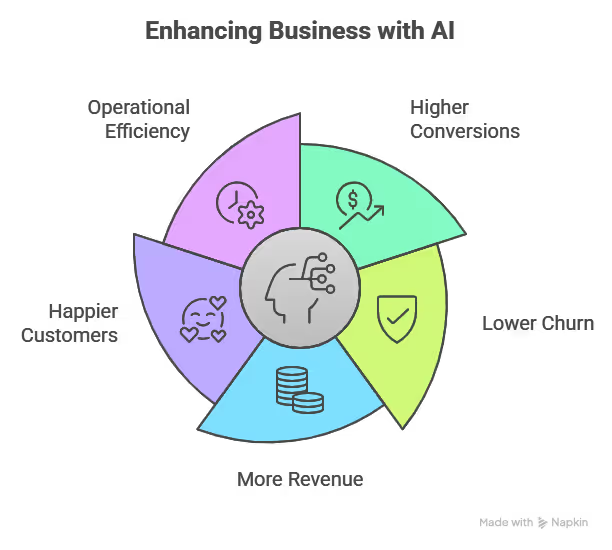
1. Higher conversions
AI helps you engage customers exactly when they’re most likely to act. Whether it’s recommending the right product, sending a timely reminder, or answering a question in real time, AI ensures you never miss that critical moment.
That precision turns more visits, clicks, and interactions into actual conversions, without relying on guesswork.
2. Lower churn
Customer churn usually starts with warning signs, like missed logins, unresolved issues, or negative feedback. AI tracks these behaviors and alerts your team before it’s too late.
It can trigger re-engagement messages, flag support tickets with negative sentiment, or offer help automatically. That proactive response keeps customers around longer and reduces loss.
3. More revenue
When AI understands what a customer wants or needs next, it makes smarter upsell and cross-sell suggestions. Instead of blasting generic offers, you’re recommending the right add-on at the right time.
This leads to more purchases, higher average order values, and a stronger long-term relationship with every customer.
4. Happier customers
Nobody likes waiting for support or receiving irrelevant messages. AI makes interactions faster, more personal, and more useful. From instantly answering questions to recommending helpful content or products, every touchpoint feels smoother.
Customers feel understood, supported, and respected, which drives satisfaction and loyalty.
5. Operational efficiency
AI doesn’t just help customers, it helps your team. It takes over repetitive tasks like tagging feedback, qualifying leads, and routing tickets. That means fewer delays, fewer manual handoffs, and fewer mistakes.
Your team gets to focus on strategic work, while AI keeps the wheels turning behind the scenes.
{{templates}}
How to Do AI Customer Engagement (Step-by-Step)
The key is to start simple, stay focused on real user behavior, and use a tool that handles the heavy lifting.
Here’s how to do it, broken down into five clear steps:
1. Map Your Customer Journey
Before adding any AI, understand your current customer flow. Look at how people discover you, convert, use your product, and ask for support. Identify points where customers drop off, go silent, or get confused.
Lindy connects with your CRM, helpdesk, and website tools to pull behavioral data into one place. It helps you visualize key engagement points, like inactive users, frequent support touchpoints, or bottlenecks in onboarding. You don’t need a data team to map this out.
2. Choose One Key Area to Start
Don’t try to automate everything at once. Start with one high-impact area, like onboarding emails, website chat, or lead qualification. Focus on where AI can save the most time or improve results quickly.
You can build a single automation with Lindy in minutes. For example, set up a bot that engages new signups with onboarding tips or creates a workflow to follow up with users who didn’t complete a form. Each workflow is visual and editable without coding.
3. Train AI With Real Data
AI is only as good as the data it learns from. Feed it real customer conversations, past support tickets, email logs, or behavioral patterns. This helps it understand your tone, user intent, and pain points.
Lindy lets you upload chat logs, ticket transcripts, or documents. This knowledge lets your assistant respond naturally about your product in your brand voice. You can even highlight which phrases or scenarios matter most for training.
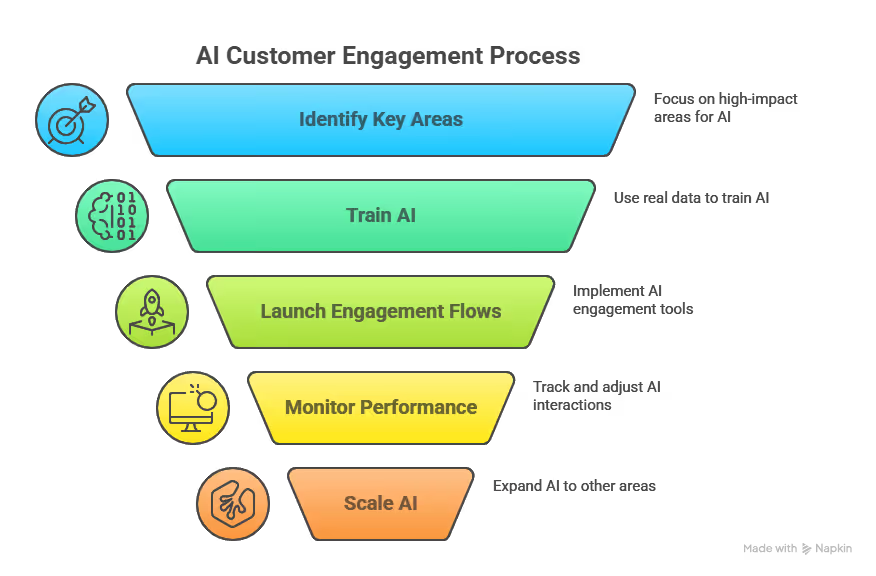
4. Launch and Monitor Engagement Flows
Go live with your AI engagement, whether it’s a chatbot, triggered message, or lead scoring system. Watch how users interact with it. Look for signs that it’s helping (or hurting) your flow, and tweak as needed.
Lindy tracks every interaction automatically. You can see how many leads were qualified, how fast questions were answered, or how many workflows triggered in real-time. If a message underperforms, Lindy shows where it dropped off so you can fix it fast.
5. Scale What Works
Once your first automation delivers results, expand to other parts of the journey. Add more workflows, plug into more tools (like your email or CRM), and create connected experiences across marketing, support, and sales.
Lindy grows with you. You can add chat on your site, create custom lead scoring, auto-update records in your CRM, and route support queries, all from one dashboard. It acts as a central AI brain for your engagement stack without needing multiple tools.
Don’t Make These Mistakes When Adding AI to Customer Engagement
- Over-automation: Not every interaction should be handled by AI. Customers still value the human touch.
- Poor training data: If your data is outdated or biased, your AI will make wrong assumptions.
- No fallback: Always offer a path to reach a human, especially for complex or emotional issues.
- Ignoring feedback: Use AI to gather feedback, not just push messages.
Start Engaging Smarter with Lindy
AI customer engagement doesn’t need to be complex or overwhelming. With Lindy, you can automate meaningful conversations, personalize touchpoints, and scale your support and sales without extra headcount.
Here’s what you can do with Lindy:
- Set up chatbots that qualify leads, resolve support queries, and route tickets instantly
- Trigger personalized workflows based on real customer behavior across your website, product, or CRM
- Score leads and automate follow-ups so your team always talks to the right people
- Analyze customer feedback and turn it into clear, actionable insights
- Work across marketing, sales, and support from one unified platform
{{cta}}
Frequently Asked Questions
1. Is AI customer engagement only for large companies?
No. Small teams can use AI effectively. With tools like Lindy, you can automate support, personalize outreach, and qualify leads without building a big team. AI helps you scale smartly while staying lean and focused on growth.
2. How do I know if AI engagement is working?
Track clear metrics like response times, conversion rates, churn, and user actions inside emails or your product. When engagement improves across these areas, your AI setup is on the right path. Use data to refine workflows and increase impact over time.
3. Can AI handle complex customer problems?
AI works best with structured or repetitive tasks. It can answer common questions and route issues efficiently. For complex, emotional, or high-stakes problems, your system should escalate quickly to a human without losing the context of the conversation.
4. What data do I need to start?
You need your CRM activity, product usage logs, past support tickets, and email interactions. This gives AI enough context to personalize messages, score leads accurately, and engage customers based on real behavior, not just guesswork.
5. What makes Lindy different from other tools?
Lindy unifies chatbot support, lead scoring, automated workflows, and CRM integration in one platform. It connects marketing, sales, and support so your customer engagement stays consistent and efficient without switching between tools or writing custom code.
6. How can AI improve customer engagement?
AI improves engagement by making it faster and more personal. It can respond instantly, recommend content or products based on behavior, and follow up without delays. This creates smoother experiences and stronger relationships with less manual effort.
7. What are the main benefits of using Lindy.ai for customer support?
Lindy automates routine support, qualifies tickets, and gives instant answers to common questions. It reduces backlog, shortens resolution time, and routes complex cases to humans with full context. Your team spends less time on repetitive tasks and more on real customer needs.
8. What are the top use cases for AI in customer engagement platforms?
Top use cases include AI chatbots for instant support, behavior-triggered emails, in-product tips, lead scoring, and feedback analysis. These use cases help you improve every stage of the customer journey, from onboarding and support to upselling and retention.











Blog
Related Articles


.avif)

.avif)

.avif)
.avif)
.avif)
The AI assistant that runs your work life
Lindy saves you two hours a day by proactively managing your inbox, meetings, and calendar, so you can focus on what actually matters.
