Fyxer vs Superhuman vs Lindy: Which Email Assistant to Choose
Everett compared Fyxer, Superhuman, and Lindy for email management, testing inbox cleanup, drafting speed, and scheduling to see which fit different teams.

I was fed up with my cluttered inbox with 50k+ unread emails. I’d miss important emails, forget to reply, and avoid sorting the mess. That’s when a friend asked me to try Fyxer. So, while researching Fyxer and similar tools, I came across Superhuman and Lindy.
These three tools intrigued me, as they solve different problems around email. Do you want to move through your inbox faster, clean up the inbox you already use, or text an AI assistant to handle the work your emails create?
So, I decided to test them on my email accounts. Here's where each one wins, where they fall short, and which one I'd pick for different teams.
Fyxer vs Superhuman vs Lindy: At a glance
Fyxer cleans up the inbox you already use. Superhuman Mail lets you move through email faster. Lindy helps when an email turns into a task, follow-up, meeting, or reminder you don’t want to handle manually.
Here’s how they compare when solving three different versions of the same problem:
| Tool | Best for | Starting price (billed monthly) | Key strength | Biggest trade-off |
|---|---|---|---|---|
| Fyxer | Inbox cleanup inside Gmail or Outlook | $30/user/month | Email sorting, draft replies, scheduling, and meeting notes | Sorting accuracy may need manual review |
| Superhuman Mail | Faster email client | $30/user/month | Speed, shortcuts, and inbox control | You need to move to a different email client app |
| Lindy | An AI assistant for email and daily tasks | $49.99/month | Text Lindy to draft replies, schedule meetings, follow up, and handle next steps | Works best when you give clear instructions |
TL;DR
Choose Fyxer if you want to stay inside Gmail or Outlook while getting help with sorting, drafts, scheduling, and meeting notes. Comparing these tools helps highlight how top superhuman email alternatives handle inbox speed and automation differently.
Choose Superhuman if you spend hours in your inbox and want a cleaner, faster email experience.
Choose Lindy if email is only the start of the work. You can text Lindy to handle the reply, suggest calendar slots, remind you to follow up, or take the next step across your day. If you want to evaluate similar email tools, consider reviewing other top fyxer alternatives. For a detailed breakdown against Microsoft's built-in assistant, see the best Fyxer vs Copilot vs Lindy: I Tested All Three (2026) | Lindy.
How I tested Fyxer, Superhuman, and Lindy
I tested Fyxer, Superhuman, and Lindy using my email account. My inbox is a mess, so that’d give me a fair comparison of how each tool handles a business inbox.
I looked at the parts that matter in day-to-day email work, like setup, inbox cleanup, AI drafting, search, scheduling, follow-ups, and the amount of manual effort each tool removed. If you specifically need help writing emails from scratch, Lindy also has a standalone email writer.
For the hands-on testing, I focused on a few practical checks:
- Fyxer: I connected Outlook and calendar, set my email sorting preferences, and checked whether it moved the right messages into the right folders. I also tested its chat feature by asking it to find emails that needed a reply.
- Superhuman: I connected Outlook, went through the onboarding, learned the shortcuts, and used its split inbox setup for a few days. I wanted to see whether the speed gains held up after the first “this looks slick” impression.
- Lindy: I tested a meeting-request workflow. I sent a meeting request from my personal email address, then asked Lindy to help draft the reply and suggest calendar slots. I also checked how much instruction Lindy needed before it gave me a reply I’d feel comfortable sending.
Faster inbox, cleaner inbox, or less inbox work: What is your pain point?
These three tools tackle different pain points that come with a busy, cluttered inbox. Some users may find the default Gmail or Outlook inbox limiting. Others want an assistant to achieve a cleaner inbox. A few need an AI assistant that handles it for them.
I put Fyxer, Superhuman, and Lindy into distinct categories depending on what they do best:
Fyxer gives you a cleaner inbox
Fyxer stays inside Gmail or Outlook and helps sort the mess.
You tell Fyxer what kind of emails should stay in your inbox and what should move into folders. It can draft replies, help with scheduling, take meeting notes, and let you chat with your inbox when you need context.
That makes it useful if you don’t want a new email client but still want help keeping things organized.
Superhuman gives you a faster inbox
Superhuman is the easiest to understand. It replaces the way you use Gmail or Outlook with a faster, cleaner email client.
You get keyboard shortcuts, a split inbox, reminders, snoozing, AI search, and quick drafting. If you like learning shortcuts and moving through email without touching your mouse, Superhuman feels great after a few days.
It makes you better at email, with speed, shortcuts, and control, rather than trying to get you out of it.
Lindy helps when email creates more work
Lindy fits a different job. You text Lindy when you want an AI assistant that handles email and other related tasks, like replying, scheduling meetings, sending reminders, following up, or any other task across your day.
It handles email, scheduling, and meeting tasks with ease, along with complex recurring, multi-step tasks without any setup headache. Exploring how a dedicated ai email assistant operates can help you decide which level of automation fits your workflow.
Meet the contenders
Fyxer, Superhuman, and Lindy all help with email, but the comparison needs a bit more context. So, let’s first understand these tools:
Fyxer: The inbox assistant for cleanup, drafts, and meeting notes
Fyxer works inside Gmail or Outlook instead of replacing them. You connect your inbox and calendar, pick your sorting preferences, and Fyxer starts organizing emails into folders.
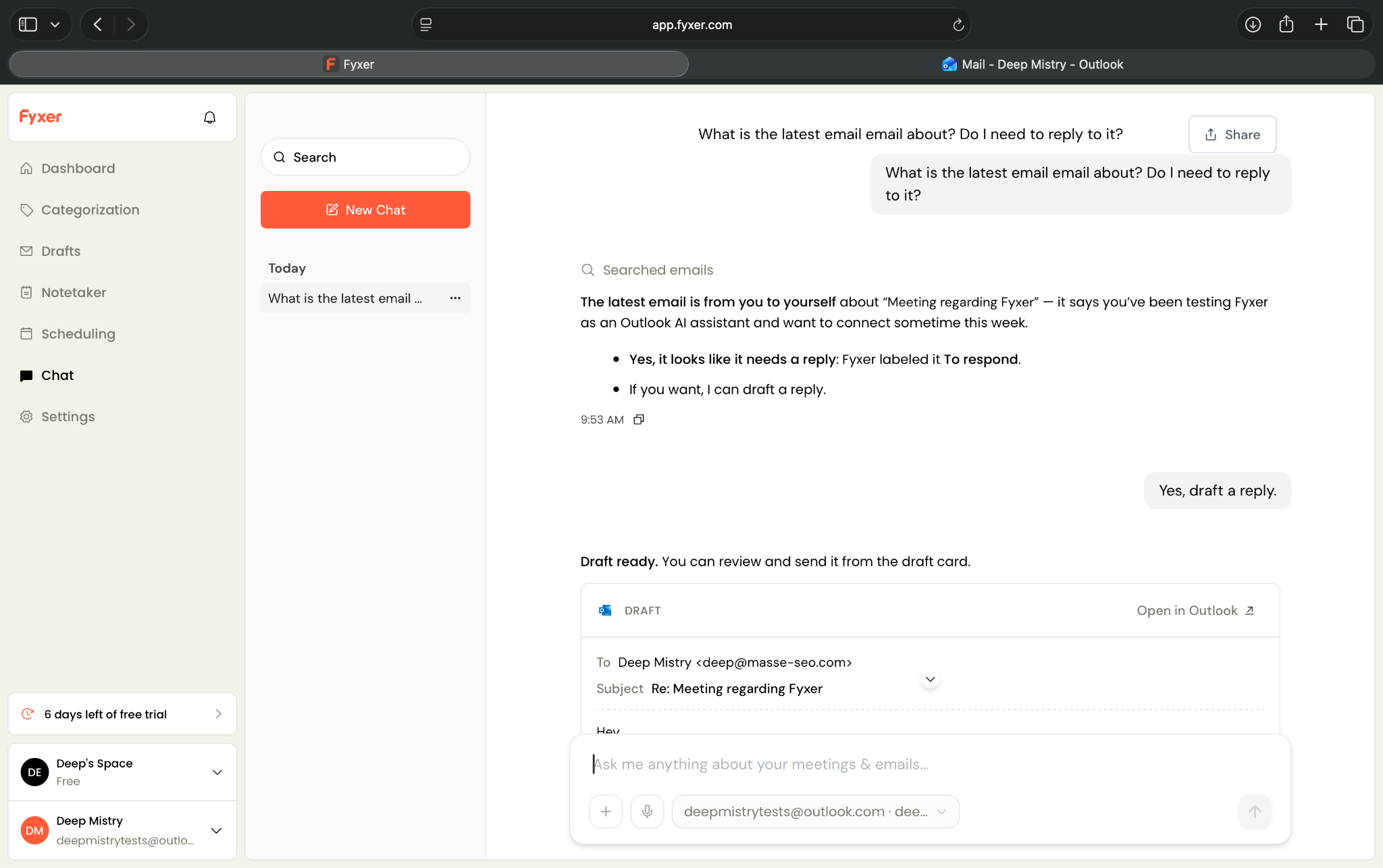
It can also draft replies, help with scheduling, take meeting notes, and answer questions through chat. I liked the chat feature most during testing. When Fyxer sent a meeting request to the wrong folder, I asked chat to find recent emails that needed a reply. It found the missed message and offered to draft a response.
That sums up Fyxer well. It feels easy to start with, and the assistant layer can help. But the sorting has to earn your trust. If Fyxer mislabels important emails, you’ll still need to check folders manually.
Superhuman: The premium email client for speed
Superhuman is a full email client. You connect Gmail or Outlook, then manage email inside Superhuman’s app instead of your native inbox.
Its biggest strength is speed. The app pushes you toward a keyboard-first workflow with shortcuts for archiving, snoozing, replying, jumping between inbox views, and setting reminders.
It also gives you AI writing, AI search, summaries, scheduled send, read statuses, snippets, and a split inbox.
When I tested it, the shortcuts felt quick and natural after a few days. Pressing E to move a finished email to “Done” sounds small, but those tiny actions add up fast when you process a lot of messages.
However, Superhuman makes the most sense if email takes up a serious part of your day. If you only need basic AI drafting or light inbox help, $30/user/month can feel steep.
Lindy: The AI assistant you text to get things done
Lindy takes a different approach. Instead of treating it as your new inbox, you text Lindy what you need, and it helps with email, scheduling, follow-ups, reminders, and daily tasks.
While testing, I asked Lindy to help respond to a meeting request. After I gave clearer instructions, Lindy created a ready-to-send draft, matched my writing style well, and suggested calendar slots.
Text Lindy 'remind me if Sarah doesn't reply by Friday' and it watches the thread, then pings you (no setup screen involved).
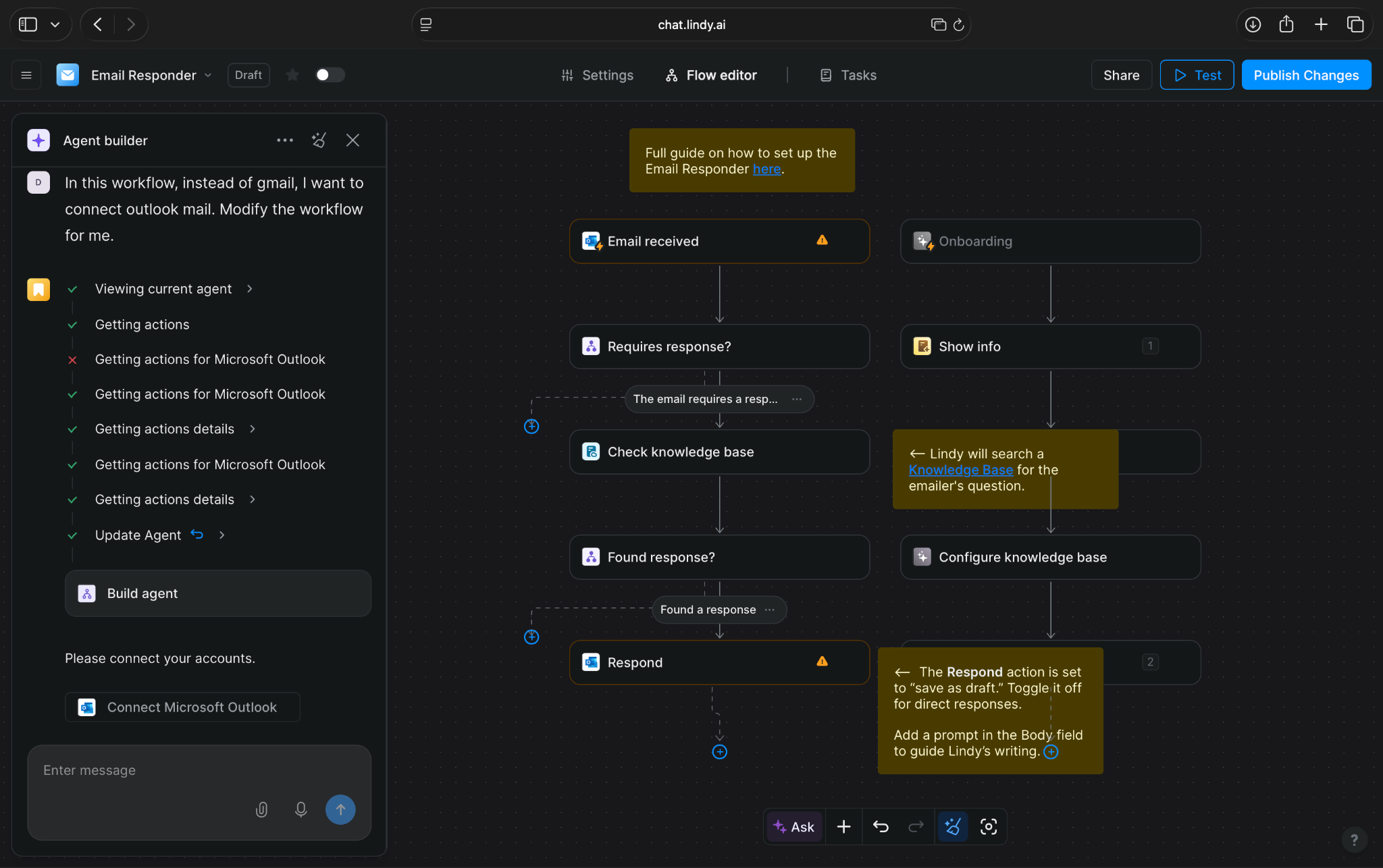
That’s where Lindy fits best. It helps when email turns into something else, like a meeting to schedule, a reply to approve, a follow-up to remember, or a task that needs attention later
Lindy does need clear instructions. Vague requests can lead to weak results. But once you tell Lindy what you want, it feels more like texting an assistant than managing another email tool.
Fyxer vs Superhuman vs Lindy: Feature breakdown
All three tools can help you write faster and manage email better, but they save time in different ways. Here’s where each tool wins:
Setup and learning curve
Winner: Tie between Lindy and Fyxer
Fyxer had the simplest setup. I signed up, connected Outlook and my calendar, chose what kind of emails I wanted to keep in my inbox, and let Fyxer create folders for everything else.
That’s the main appeal. You don’t have to leave Outlook or Gmail. You also don’t need to learn a new email app.
Lindy also lets you set it up within minutes. You can text Lindy in plain English, which feels simple. But you need to explain what you want clearly. In my test, I had to spend some time getting the email response instructions right before Lindy drafted the kind of reply I’d send.
With Lindy, you also get hundreds of ready-to-use skills. You can pick a skill and put Lindy to work in a couple of minutes without a complex setup process.
Superhuman took more effort because it changes the way you work. You connect your inbox, download the app, and go through a detailed onboarding flow. The shortcuts felt useful quickly, but you still need a few days before the keyboard-first flow feels natural.
So, Fyxer and Lindy tie for first-day setup.
Inbox speed and control
Winner: Superhuman
Superhuman wins this category clearly. The app makes email feel faster. Shortcuts handle almost everything: archive, snooze, reply, jump between inbox sections, set reminders, and move emails to “Done.”
The split inbox also helps separate calendar invites, shared emails, and important messages without much effort. After a few days, I understood why people like it. Superhuman makes every small email action quicker.
Fyxer helps with control in a different way. It sorts emails into folders so your main inbox feels less crowded.
Lindy doesn’t try to beat Superhuman on raw inbox speed. You use Lindy when you want to text your assistant to handle the next step, not when you want a faster email client.
If you want a tool that helps process your email the fastest, the answer is Superhuman.
Inbox cleanup and sorting
Winner: Fyxer, with one important caveat
Fyxer focuses heavily on inbox cleanup. You tell it what matters, and it moves less important emails out of your main inbox into dedicated folders.
That’s useful if you open Outlook or Gmail and instantly feel behind. You can keep emails that need your response in one place, push lower-priority messages elsewhere, and use chat when you need to find something.
While using Fyxer, it moved a meeting request into the wrong folder, which weakened my trust in the setup. If I still need to check every folder to make sure nothing important slipped through, the assistant creates a new habit instead of removing one.
Superhuman handles cleanup through speed and structure. You use Split Inbox, shortcuts, snooze, reminders, and “Done” to keep the inbox under control. It works well, but you still drive the process.
Lindy can help with inbox triage too, but it works best when your instructions are specific. For example, you can ask Lindy to flag messages that need a reply, draft responses for certain senders, or remind you when something needs attention.
Fyxer wins this category because cleanup sits at the center of the product. But I’d only trust it after testing how well it labels my own inbox.
AI drafting and tone
Winner: Lindy for assistant-style drafting
I found Lindy to be the strongest when the email needed more than a generic reply. I asked Lindy to respond to a meeting request, and after I tightened the instructions, it drafted a reply in my writing style, suggested calendar slots, and waited for my OK before anything went out.
That human approval step is important for teams dealing with sensitive information. You can ask Lindy to prepare drafts for review, or let it handle simpler replies without asking you every time. That makes it feel more like texting an assistant than clicking an AI writing button.
Superhuman helps you write faster while you stay inside the email client. Its AI features can draft replies, summarize emails, and help you search your inbox. It feels useful when you want a quick head start, but you still depend on the keyboard shortcuts.
Fyxer can draft replies too, and its chat feature made that process feel more natural. I asked Fyxer to check recent emails that needed a reply. It found the message and offered to draft a response. That was one of the better moments in my test.
All three tools can help you draft emails, but the experience feels different in each one.
Superhuman works best for fast drafting. Fyxer works well when you want chat-assisted replies inside your inbox. Lindy excels when the draft needs context, timing, and a next step.
Scheduling, meetings, and follow-ups
Winner: Lindy for follow-through, Fyxer for simple meeting support
Email rarely ends with the email itself. Someone asks for a call, sends a doc, follows up on a proposal, or asks you to check dates. Lindy suits these tasks the best.
You can text Lindy to draft a response, suggest times, remind you to follow up, or handle the next step. In my test, it suggested calendar slots inside a ready-to-send draft, which saved the back-and-forth that usually follows a meeting request.
However, Lindy works better when you tell it exactly what kind of meeting requests to handle, when to ask for approval, and what tone to use.
Superhuman handles scheduling and follow-ups inside the inbox. It gives you reminders, snooze, scheduled send, and calendar-related features. That’s helpful if you already manage everything yourself and want faster controls.
Fyxer goes a little further. It supports scheduling links, meeting notes, and follow-up drafts. That makes it more useful than a basic email assistant if your inbox and calendar constantly overlap.
So Fyxer works well for simple scheduling and meeting support. Lindy wins when follow-through matters more than the first reply.
Cross-tool task handling
Winner: Lindy
This category creates the clearest separation.
Lindy becomes more useful when your email connects to the rest of your workday. You can text Lindy to help with a reply, meeting, reminder, CRM update, or other task across the tools you use. It connects with hundreds of apps, which gives it more room to help outside the inbox.
If an email creates work in another app, Lindy has the strongest case. It helps when you don’t want to keep switching tabs, copying details, checking calendars, and reminding yourself to follow up later.
Superhuman focuses on email. That’s the point. It gives you a faster inbox, cleaner views, better shortcuts, and AI help inside your email experience.
Fyxer expands a bit beyond email with scheduling and meeting notes, but it still centers on your inbox. That works well if your main pain is email clutter.
Fyxer vs Superhuman vs Lindy: Quick feature comparison
Fyxer gives you the easiest inbox assistant, Superhuman is a slick email client, and Lindy offers an AI assistant you can text when email turns into more work. Here’s the simpler way to compare the three:
| Feature | Fyxer | Superhuman | Lindy |
|---|---|---|---|
| Product type | AI email assistant | Email client | AI assistant you text |
| Works with Gmail | Yes | Yes | Yes |
| Works with Outlook | Yes | Yes | Yes |
| Replaces your inbox UI | No | Yes | No |
| Setup effort | Low | Medium | Low |
| Learning curve | Low | Medium | Low |
| Best strength | Inbox cleanup and drafts | Speed and inbox control | Handling email-related tasks |
| AI drafting | Yes | Yes | Yes |
| AI search or chat | Yes | Yes | Yes |
| Inbox sorting | Folder-based sorting | Split Inbox and shortcuts | Ask Lindy to triage and prioritize |
| Scheduling help | Yes | Yes | Yes |
| Meeting notes | Yes | Limited | Yes |
| Follow-ups | Yes | Yes | Yes |
| Approval before sending | Limited | Limited | Yes |
| Works across other apps | Limited | Limited | Yes, hundreds of integrations |
| Best fit | Busy inbox users | Power email users | People who want an assistant for email and daily tasks |
What real users say
My testing gave me clarity on how these tools behave with Outlook and Gmail. But user reviews help show whether those findings hold up for other teams too. I looked at review patterns from G2, Trustpilot, and third-party reviews, then compared them with what I saw during testing.
Here’s what users have to say about these apps:
Fyxer reviews
Fyxer reviewers consistently say it eases email overload. Users on Trustpilot say that Fyxer reduces inbox pressure, saves time, and improves draft replies as it learns their writing style.
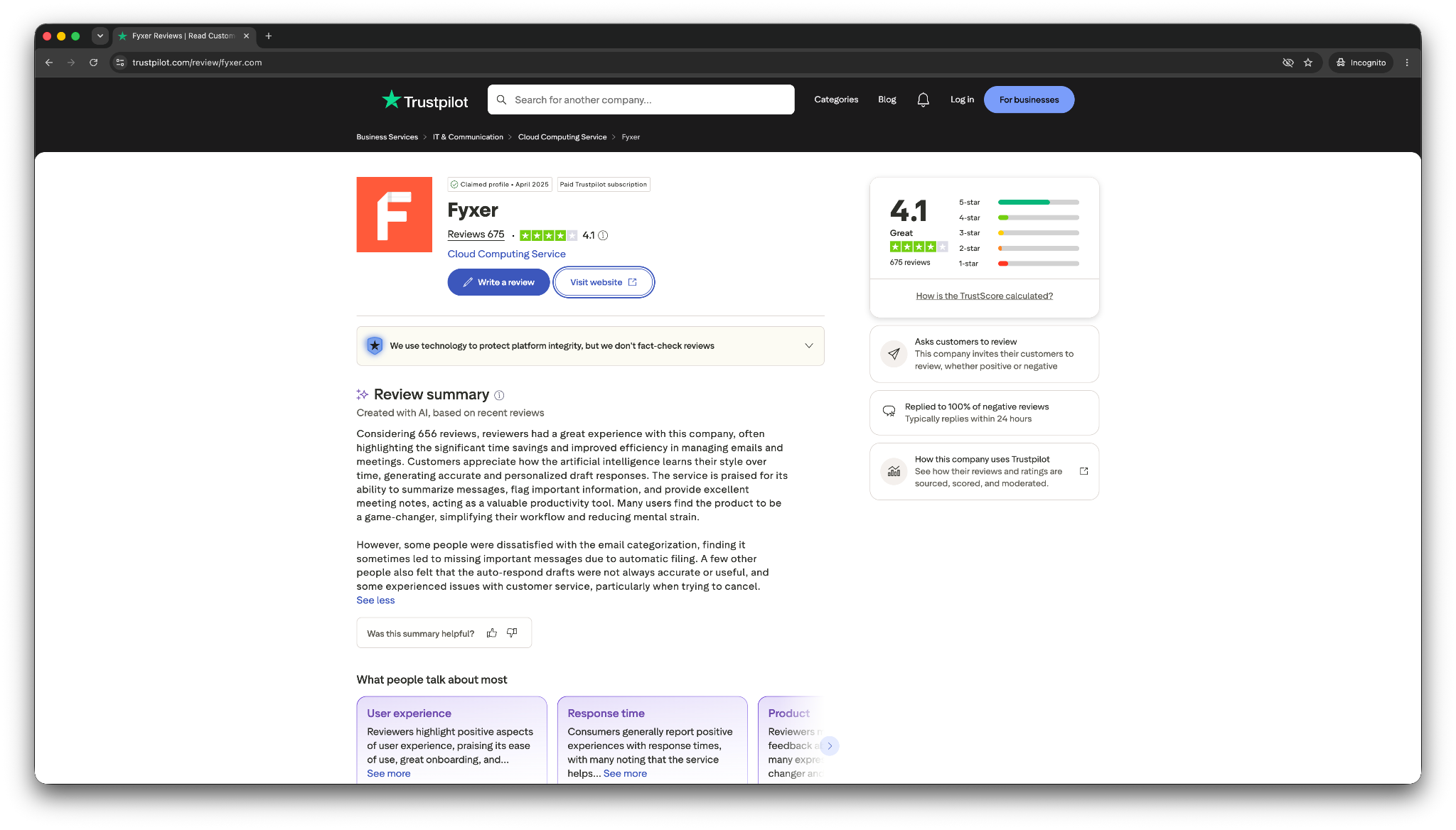
That lines up with the product’s main pitch. Fyxer wants to act like an email assistant inside Gmail or Outlook, rather than a new email client.
What users like:
- Helpful inbox organization
- Draft replies that improve over time
- Meeting notes and follow-up support
- Easy setup inside the inbox they already use
What users don’t like:
- Sorting still needs human oversight
- Meeting features can have hiccups
- Limited usefulness outside email and meetings
This matches my testing, too. I liked Fyxer’s chat feature, especially when I asked it to find emails that needed a reply.
Superhuman reviews
Users love Superhuman for the same reason I did. It makes email feel fast. G2 reviews highlight time-saving shortcuts and email efficiency as major advantages, with many users praising how quickly they can manage a busy inbox. That matches my experience.
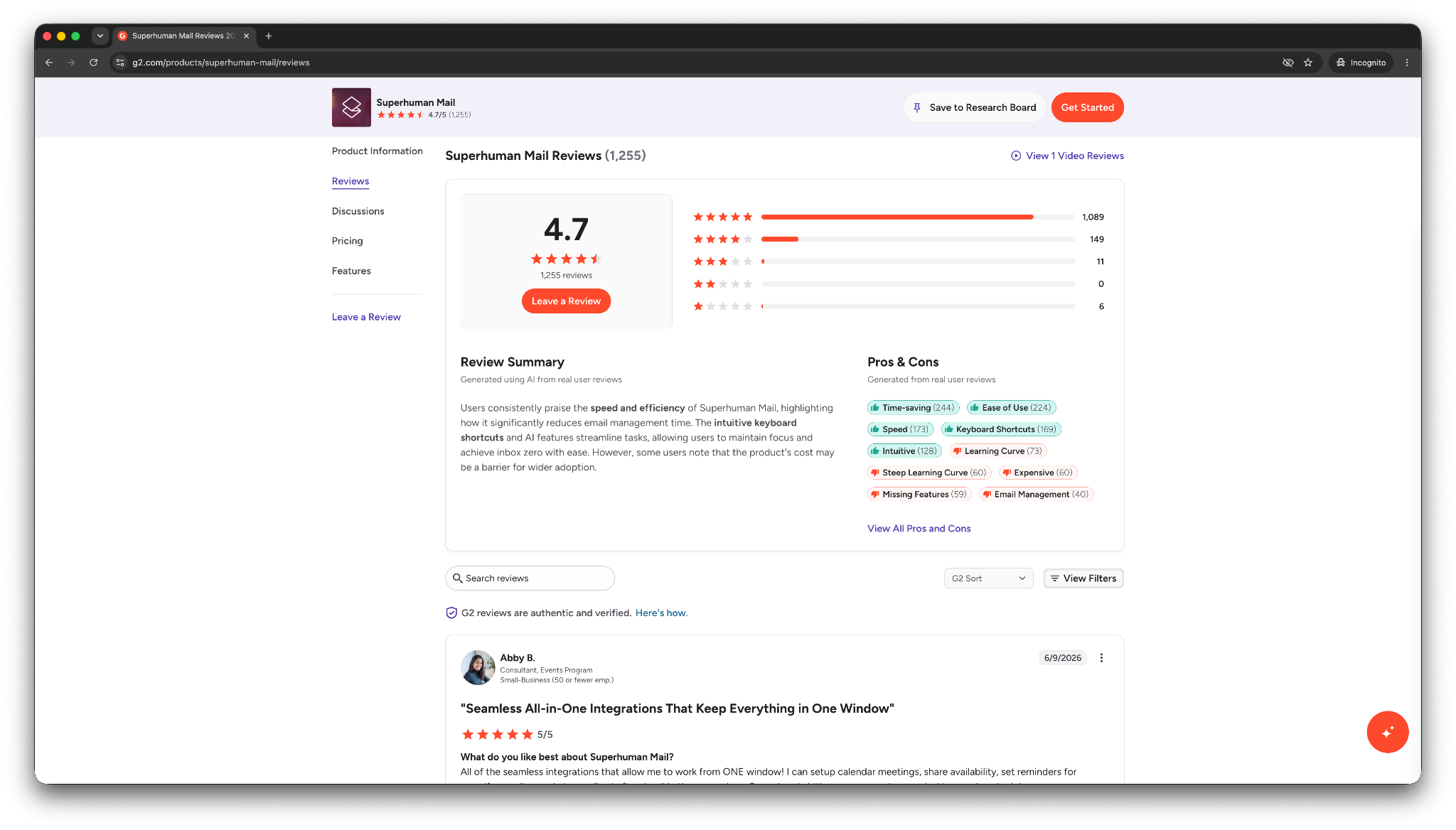
Once I got used to the keyboard shortcuts, moving through email felt much quicker.
What users like:
- Fast keyboard shortcuts
- Clean inbox experience
- Helpful AI summaries and writing support
- Strong fit for people who live in email
What users don’t like:
- High price compared to regular email apps
- Less useful for people with light email volume
- Some users want better handling for bounced or failed messages
Superhuman feels worth it when speed has clear value. If email only takes up a small part of your day, the price becomes harder to justify.
Lindy reviews
On G2, Lindy has strong user satisfaction, and most users describe it as an AI assistant for daily tasks and executive-assistant-style work. They find the text-based interaction, skills, and Lindy Docs helpful in getting started quickly.
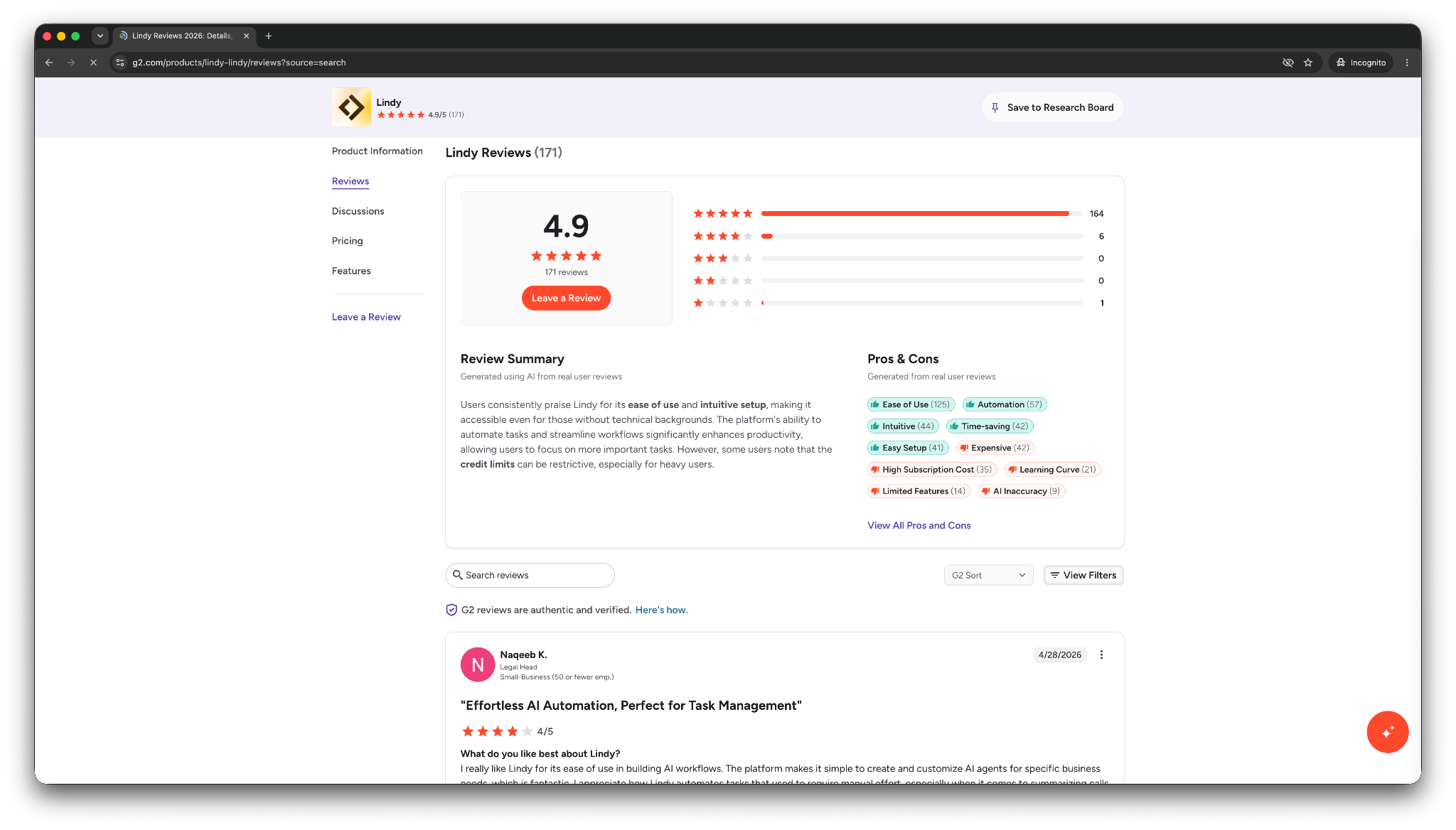
That fits what I saw in testing. For me, Lindy was more useful when I needed help with the next step after an email came in.
What users like:
- Plain-English instructions
- Help with email, scheduling, and everyday tasks
- Ability to work across business apps
- Strong fit for busy operators and small teams
What users don’t like:
- Needs clear instructions
- Takes a few attempts for more specific tasks
- Credit usage can add up when tasks get complex
Lindy can handle more than inbox cleanup, but you need to tell it what you want clearly. Once I tightened the instructions, Lindy drafted the reply, matched my tone, and suggested calendar slots without seeking constant input or back-and-forth from my end.
{{templates}}
Which email assistant should you choose?
Choose Superhuman for speed, Fyxer for cleanup inside Gmail or Outlook, and Lindy when emails turn into tasks. These use cases will help you decide which one fits you: If you want native integration, learning about a dedicated gmail ai assistant can clarify how automated tools manage Google messages.
Choose Fyxer if you want inbox cleanup without switching apps
Choose Fyxer if you want help inside Gmail or Outlook without learning a new email client. It’ll work best if you: Exploring a dedicated outlook ai email assistant can help you optimize your setup directly within Microsoft's ecosystem.
- Want your inbox sorted into cleaner folders
- Need help spotting emails that need replies
- Want AI-drafted responses
- Need simple scheduling help
- Want meeting notes alongside inbox support
- Prefer a low-friction setup
Fyxer works best if inbox clutter causes the main problem. You must test the sorting carefully before you rely on it.
Choose Superhuman if you want speed and control
Choose Superhuman if you want a better email client and you’re happy to move your inbox into a new app. It makes the most sense if you: If you manage messages on mobile, evaluating a dedicated android email app can help you compare mobile features before switching.
- Spend hours in email every week
- Like keyboard shortcuts
- Want a cleaner inbox layout
- Need quick search, snooze, reminders, and scheduled send
- Prefer to stay hands-on with every message
- Don’t need much help outside your inbox
Superhuman works best for people who enjoy getting good at their tools. If that sounds like you, the learning curve can pay off quickly.
{{cta}}
Choose Lindy if the email creates more work than the reply itself
Lindy makes sense if your emails often turn into meetings, follow-ups, reminders, updates, or tasks across other apps. Pick Lindy if you:
- Want to text an AI assistant instead of managing another email app
- Need help drafting replies in your tone Comparing features across each ai email generator can help you pick the best tool for writing messages.
- Want calendar slots suggested inside replies
- Need reminders when people don’t respond
- Want to review sensitive drafts before they go out
- Need help across your inbox, calendar, CRM, and other tools
Lindy works best when email creates follow-through. You can ask Lindy to draft the reply, suggest meeting times, remind you later, or handle the next step.
My final verdict
If I only wanted the fastest inbox, I’d choose Superhuman. It feels polished, focused, and genuinely quick once the shortcuts click. For people who treat email like a command center, Superhuman makes sense.
If I wanted the easiest assistant for inbox cleanup, I’d choose Fyxer. It lets you stay in Gmail or Outlook, lowering the friction right away. The chat feature also helped more than I expected. But I won’t trust its sorting straightaway.
My overall pick is Lindy because most emails don’t end with a reply. They turn into meetings, follow-ups, reminders, approvals, CRM updates, and small tasks that steal attention throughout the day.
That’s where Lindy feels more useful. You can text Lindy what you need, review the draft when the email matters, and let it help with the next step instead of keeping everything in your head.
Here’s what I recommend: Choose Superhuman for speed, Fyxer for inbox cleanup, and Lindy when you want an AI assistant to help with the work your inbox creates.
If your main pain is the tasks that come with emails, try the Lindy free trial and see how much of those tasks it can take off your plate.
Frequently asked questions
Is Fyxer better than Superhuman?
Yes, Fyxer is better than Superhuman if you want inbox cleanup, AI drafts, scheduling, and meeting notes inside Gmail or Outlook. Superhuman, on the other hand, is better if you want a faster email client with shortcuts, AI search, Split Inbox, reminders, and a cleaner interface.
Is Superhuman worth $30/user/month?
Yes, Superhuman is worth $30/user/month if you spend hours in email and want to process messages faster. The price makes less sense if you only need basic AI drafting or don’t receive enough email to benefit from shortcuts and inbox controls.
Does Fyxer work with Outlook?
Yes, Fyxer works with Outlook and Gmail. In my test, Fyxer connected quickly with both inboxes, created folders, and helped me chat with my inbox.
Does Lindy work with Outlook?
Yes, Lindy works with Outlook and Gmail. In my test, I asked Lindy to help respond to an Outlook meeting request. Lindy drafted the reply, matched my tone, and suggested calendar slots after I gave clearer instructions.
Which tool is best for AI email drafting?
Lindy is best for AI email drafting when the reply needs context, calendar slots, approval, or follow-up. Superhuman works better for quick drafts inside a fast email client. Fyxer works well if you want chat-assisted drafts inside your existing inbox.
Which tool is better for teams: Fyxer, Superhuman, or Lindy?
Lindy is the best tool for teams that want an AI assistant they can text to handle email, scheduling, follow-ups, and daily tasks. Superhuman works for teams that want a faster shared email experience and don’t mind using a new app. Fyxer suits teams that want inbox help inside Gmail or Outlook.









