

You can use Grok for free, get it bundled with an $8 X subscription, or pay up to $300 a month for it. The confusing part begins when you try to work out which payment gives you the features you need.
A $30 SuperGrok plan covers chat, images, video, voice, and coding, but they all draw from one weekly allowance. A few 1080p videos or a long Grok Build session can use far more of it than a week of ordinary questions.
X Premium and Premium+ add another choice because they bundle Grok with X features. I compared every route, the shared usage limits, coding access, and API rates to show how Grok pricing works, what each price buys, and where extra costs appear.
Grok pricing at a glance
Grok has five individual tiers, from Free at $0 to SuperGrok Heavy at $300/month. The annual options shown below reduce the effective cost to ten months of monthly billing.
| Plan | Monthly price | Annual price | What it includes |
|---|---|---|---|
| Free | $0 | $0 | Real-time web and X search, voice mode, and connectors within free limits |
| SuperGrok Lite | $10 | $100 | A larger allowance than Free, plus Expert mode (deeper reasoning), Grok Build, and image and video creation |
| SuperGrok | $30 | $300 | Grok Bot, more powerful coding tools, higher limits, Expert mode, images, and video |
| SuperGrok Plus | $100 | $1,000 | Higher usage, 1080p video, faster replies, and priority access |
| SuperGrok Heavy | $300 | $3,000 | The largest individual weekly usage allowance |
The prices come from the Grok pricing page by SpaceXSI (formerly xAI) and the current grok.com plan options. Mobile prices can differ, so compare them with the web price before you pay.
Lite is the cheapest paid plan, while SuperGrok is the first tier whose card lists more powerful coding tools. Plus and Heavy mainly buy more room inside the shared weekly allowance.
Recent changes to Grok pricing
Grok’s plan structure and API lineup changed several times in 2026. Here are the updates most likely to affect what you pay:
- Paid usage moved into one weekly pool: Chat, Imagine (image and video generation), Voice, and Build now draw from the same allowance.
- SuperGrok Plus joined the plan ladder: The $100 tier sits between SuperGrok and Heavy.
- Grok 4.7 became the main API model: It costs $2 input, $0.50 cached input, and $6 output per million tokens below the long-context threshold.
- Grok Studio is no longer supported: SpaceXSI now directs coding users toward Grok Build.
- Extra Usage Credits became the overflow option: Web purchases start at $5 and expire after one year.
Older guides may still quote Grok 4, 4.1, or 4.6 rates. Our Grok 4.7 guide covers the model changes and benchmarks, while this article stays focused on the bill.
Grok’s free plan
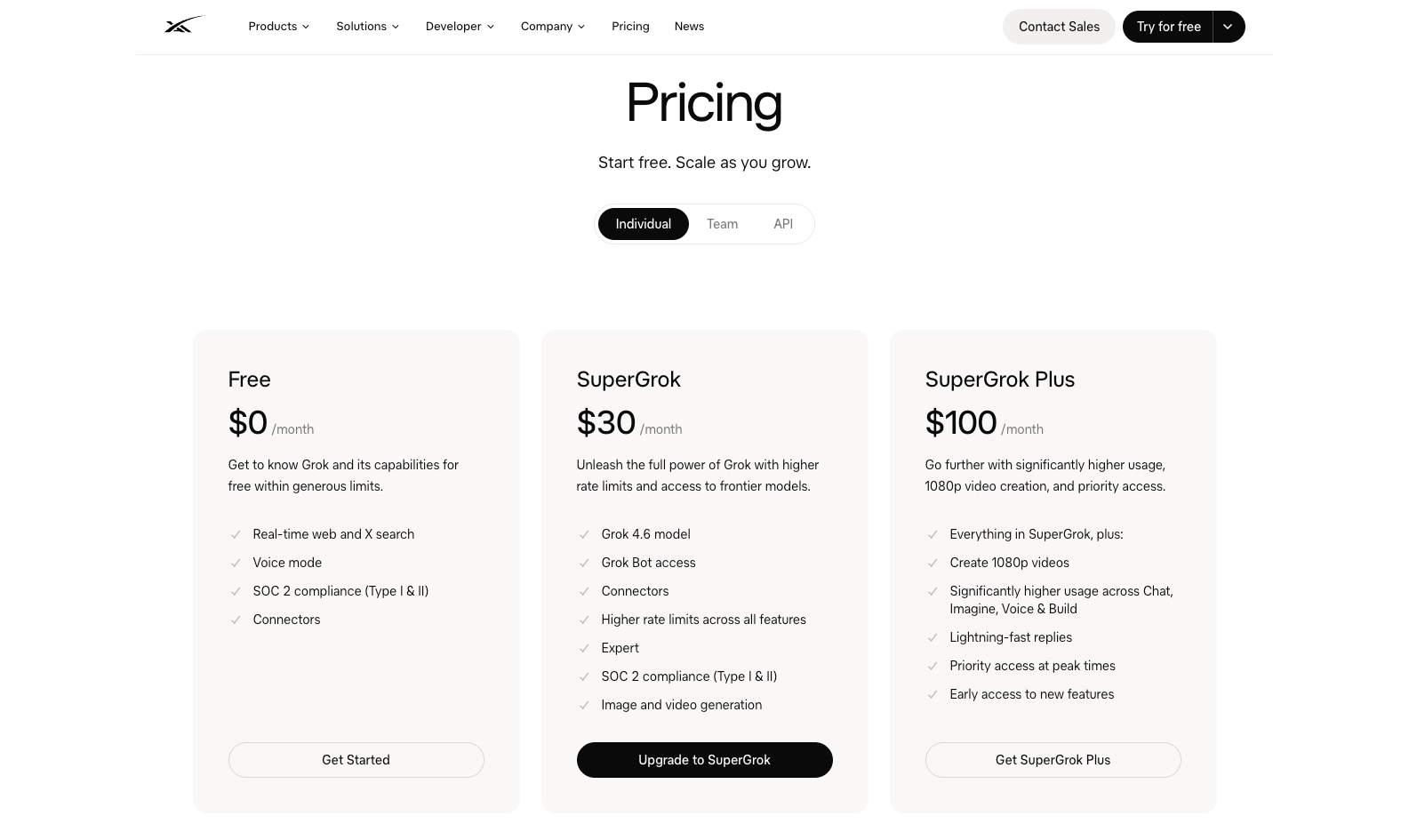
Yes, Grok is free to use. The $0 plan includes real-time web and X search, voice mode, and connectors within SpaceXSI’s free limits.
Free works well when you open Grok a few times each week for current-event questions, X research, or voice chats. SpaceXSI does not publish a fixed message count because each action uses a different amount of compute.
The limits become more noticeable with image generation, video, and longer sessions. After a paid weekly allowance runs out, the separate free Chat and Voice limits remain available on their own reset schedule.
I’d stay on Free until you hit the limit during the same kind of work every week, then pay for the tier that covers it.
SuperGrok plans from Lite to Heavy
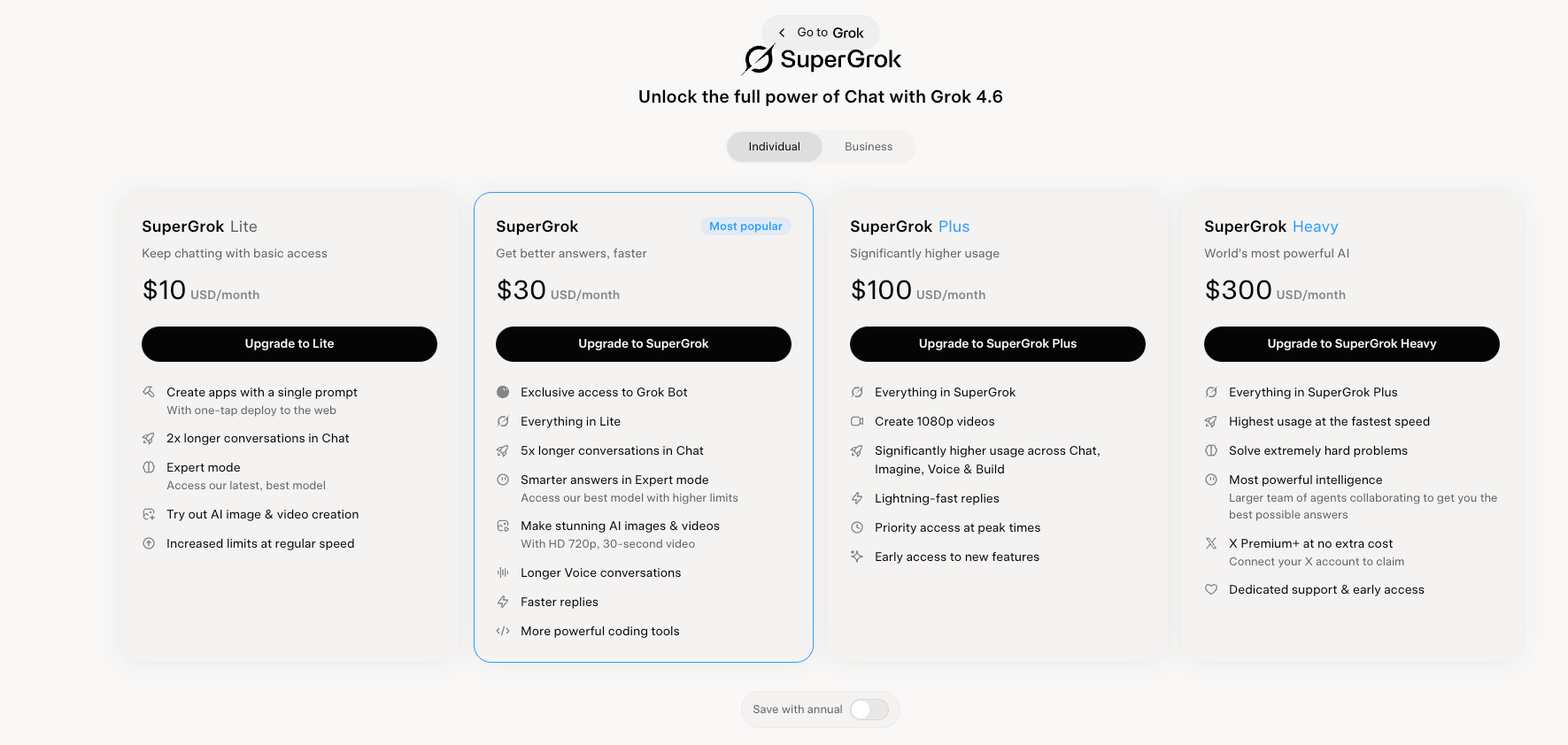
SuperGrok has four paid tiers, with each upgrade buying more weekly usage. Lite covers regular chat and creative work, SuperGrok adds more powerful coding tools, Plus raises limits and video quality, and Heavy gives frequent users the largest allowance.
SuperGrok Lite
What you get: More usage than the Free plan for $10/month or $100/year, covering chat, voice, and light creative work.
Who it fits: People who enjoy Grok and hit the free limits often enough to pay, but don’t need SuperGrok’s more powerful coding tools.
What to consider: Lite is a capacity upgrade with a smaller feature set. It includes Grok Build, but SuperGrok’s card adds “more powerful coding tools,” making the $30 tier the stronger starting point for developers.
SuperGrok
What you get: Grok Bot, SpaceXSI’s app for running always-on AI teammates, plus more powerful coding tools, Expert mode, connectors, image and video generation, and higher usage for $30/month or $300/year.
Who it fits: Daily users who want access to Grok’s main products without paying for the higher limits in Plus.
What to consider: This is the first tier I’d treat as the complete Grok subscription. Chat, Imagine, Voice, and Build all draw from one weekly pool, though, which means a coding project or several video generations can reduce what remains for ordinary chat.
SuperGrok Plus
What you get: Higher usage across Chat, Imagine, Voice, and Build, along with 1080p video, faster replies, priority access, and early features for $100/month or $1,000/year.
Who it fits: People who repeatedly exhaust SuperGrok during paid work, especially video creators and frequent Grok Build users.
What to consider: Plus costs $70 more each month, so check your usage history first. Open Settings, then Usage to see which product consumes the allowance. If one unusually busy week caused the limit, the upgrade may sit unused during the rest of the month.
SuperGrok Heavy
What you get: Grok’s largest individual weekly allowance, plus X Premium+ at no extra cost once you connect your X account, for $300/month or $3,000/year.
Who it fits: People who use several Grok products throughout the day and continue reaching the Plus limit.
What to consider: At this price, compare Heavy with the API cost of your repeatable workloads. The API may give automated jobs clearer usage tracking, while Heavy works better when one person moves between chat, voice, media, and coding throughout the week.
Monthly or annual billing
Annual billing saves the equivalent of two monthly payments on every tier. I’d still pay monthly at first, watch the usage breakdown for a full billing cycle, and move to annual billing once the right tier becomes clear.
X Premium and Premium+ compared with SuperGrok
X Premium and Premium+ bundle Grok with features for the X platform. A standalone SuperGrok subscription focuses on Grok itself.
| X plan | Monthly web price | Annual web price | Grok access |
|---|---|---|---|
| Basic | $3 | $32 | No Grok benefit listed |
| Premium | $8 | $84 | Increased Grok usage limits |
| Premium+ | $40 | $395 | SuperGrok access and higher Grok limits |
X Premium+ costs $10 more per month than standalone SuperGrok. The extra spend buys X features such as no ads, Articles, and X Pro. Choose Premium+ when those X benefits already matter to you. Choose standalone SuperGrok when Grok is the only product you want.
If Grok still asks you to upgrade after you’ve paid through X, the accounts may need to be linked. On grok.com, open Settings, choose Account, and connect the X account with the active subscription. Grok can then recognize the plan and apply its benefits.
Your original seller continues to manage the payment. X bills X Premium subscriptions, Apple handles App Store purchases, Google handles Play Store purchases, and SpaceXSI bills plans purchased through grok.com.
How Grok’s weekly usage limits work
Paid Grok plans use one weekly allowance across Chat, Imagine, Voice, Build, and API activity shown in the product breakdown. SpaceXSI measures compute usage, which means there is no universal message count.
A chat reply uses little of the pool. High-resolution video and long coding jobs use much more. In Settings, then Usage, you can view:
- Your percentage used
- Usage by product
- The weekly reset date and time
- Any Extra Usage Credits remaining
Once the included pool runs out, paid features pause until the reset. Free Chat and Voice limits remain available, and you can buy Extra Usage Credits, enable Auto Top Up, or move to a higher plan.
Top-ups start at $5 on the web, expire after one year, and cost more per action than usage bundled with a plan. A top-up works for an unusually busy week. Repeated top-ups are a sign to compare the next tier.
Video has additional resolution limits. Plus includes 1080p creation, and 720p videos fall back to 480p once you hit your tier’s 720p cap.
Grok Build pricing for coding
SuperGrok at $30/month is the cheapest plan whose card lists “more powerful coding tools.” Grok Build itself appears on every plan in SpaceXSI’s comparison table, including Free and Lite.
Grok Build also has a free tier, while paid coding sessions draw from the same weekly pool as Chat, Imagine, and Voice. For API billing, grok-build-0.1 costs $1 per million input tokens, $0.20 per million cached input tokens, and $2 per million output tokens below 200,000 prompt tokens.
Our Grok Build explainer covers installation, setup, and day-to-day use. The Grok Build vs Claude Code and Codex comparison helps if the coding agent matters more than the rest of the Grok subscription.
Grok Business and Enterprise pricing
Grok Business costs $30/user/month, or $25/seat/month billed annually, while Enterprise uses custom pricing. Ten Business seats cost $300/month before any separate API usage.
- Business adds team seat management, consolidated billing, role-based access, domain verification, user analytics, custom retention, and a commitment that company data is not used for training.
- Enterprise adds SSO, SCIM, custom roles, customer-managed encryption keys, a dedicated data plane, advanced audit controls, and dedicated onboarding. The final quote depends on seats, throughput, infrastructure, support, and data requirements.
The individual SuperGrok plan and Business seat share the same $30 starting price, but the purchase solves a different problem. Personal SuperGrok buys individual features and limits. Business buys company administration, security, and centralized billing.
Grok API pricing
The Grok API charges separately for input, cached input, and output tokens. Requests below 200,000 input tokens use the standard rates, while requests at or above the threshold move entirely to the higher long-context rates.
Grok API rates by model
The model determines both the token price and the amount of context available in one request. All prices below are per million tokens:
| Model | Context | Below 200K input / cached / output | At 200K and above |
|---|---|---|---|
| grok-4.7 | 500K | $2.00 / $0.50 / $6.00 | $4.00 / $1.00 / $12.00 |
| grok-build-0.1 | 256K | $1.00 / $0.20 / $2.00 | $2.00 / $0.40 / $4.00 |
| grok-4.5 | 500K | $2.00 / $0.30 / $6.00 | $4.00 / $0.60 / $12.00 |
| grok-4.3 | 1M | $1.25 / $0.20 / $2.50 | $2.50 / $0.40 / $5.00 |
| grok-4.20 (all variants) | 1M | $1.25 / $0.20 / $2.50 | $2.50 / $0.40 / $5.00 |
SpaceXSI recommends Grok 4.7 for most work, including code, and calls it its most capable model. Our Grok 4.7 pricing and benchmark breakdown compares its cost and performance with Grok 4.6.
Watch the 200,000-token threshold when you send long documents, codebases, or growing conversation histories. A request containing 199,000 input tokens uses the standard rate, while adding another 1,000 moves the full request to long-context pricing. Retrieving only the relevant material can keep a job below the threshold.
Charges beyond model tokens
Model tokens are only one part of some API bills. Searches, code execution, stored files, regional processing, and faster scheduling can appear as separate charges. Here’s what each additional service costs:
| Charge | Price |
|---|---|
| Priority processing | 2x standard token rates |
| Batch API | 20% off Grok 4.3 and Grok 4.20 models |
| US regional endpoint | 1.1x standard token rates |
| Web Search | $5 per 1,000 calls |
| X Search | $5 per 1,000 posts and $10 per 1,000 profiles |
| Code execution | $5 per 1,000 calls |
| File attachment search | $5 per 1,000 calls |
| Collections search | $2.50 per 1,000 calls |
| File storage | $0.025 per GiB per day |
| Collection storage | $0.10 per GiB per day |
The Batch API discount doesn’t cover Grok 4.7, which stays at its standard rate. Priority processing doubles token costs when faster responses matter enough to justify the premium.
Grok 4.7 Fast follows a separate rate structure. It costs twice the standard rate below 200,000 input tokens and 1.5 times the long-context rate above the threshold. Access runs through Cursor and Grok Build, with the platform handling the bill.
Media workloads use different units from text. Image generation starts at $0.02 per image, video at $0.02 per second, and speech-to-speech voice at $0.08 per minute.
Budget by cost per completed task. A research answer may involve several model calls, two web searches, a file lookup, and a code execution step before it reaches the user. Add every component together when forecasting the cost of a report, coding job, or agent run. Automation platforms count usage differently, and our n8n pricing guide explains how n8n bills per workflow execution.
What Grok API costs in practice
Token rates are easier to judge once they’re attached to a complete job. The estimates below cover a coding session, long-report review, and daily chat assistant, with each assumption shown. Search, code execution, retries, and storage would add to these totals.
A 100-step coding session
Picture a coding agent fixing a feature across 100 steps. The session sends six million input tokens, serves 90% from cache, and generates 80,000 output tokens. Every request stays below the 200,000-token threshold.
| Line item | Tokens | Grok 4.7 cost |
|---|---|---|
| Cached input | 5.4M | $2.70 |
| Uncached input | 0.6M | $1.20 |
| Output and reasoning | 80K | $0.48 |
| Estimated total | ㅤ | $4.38 |
Caching has more influence than the headline input rate in a long agent run. If the cache hit rate falls from 90% to 70%, the estimate rises to $6.18. If every request crosses 200,000 input tokens, the same session reaches about $8.76 under the long-context rates.
Ten questions about one report
Suppose you ask ten questions about the same report and resend the entire document each time. Each answer contains 1,500 output tokens, with no caching applied.
| Report size | Input cost | Output cost | Estimated total |
|---|---|---|---|
| 150K tokens | $3.00 | $0.09 | $3.09 |
| 250K tokens | $10.00 | $0.18 | $10.18 |
The second report contains 67% more text but costs over three times as much because every request crosses the long-context threshold. Caching the report after the first request brings the 250,000-token example down to about $3.43, assuming questions two through ten reuse the cached input.
A daily chat assistant handling 50 messages a day
Now consider an assistant handling 50 messages a day. Each message sends 6,000 input tokens, serves 80% from cache, and returns 1,500 output tokens.
| Line item | Cost per message |
|---|---|
| Cached input | $0.0024 |
| Uncached input | $0.0024 |
| Output | $0.0090 |
| Estimated total | About $0.014 |
Across 1,500 monthly messages, the API estimate comes to $20.70 with caching or about $31.50 without it. SuperGrok costs $30 and includes chat, images, voice, video, and Grok Bot, though its shared weekly allowance can interrupt heavier use.
The API becomes easier to compare with a subscription once you know the workload. Use the API for predictable jobs you can meter, while a SuperGrok plan may offer better value when one person regularly moves between several Grok products.
7 easy ways to lower your Grok bill
The easiest way to spend less on Grok is to match the payment method to the work you run. Subscription limits, Extra Usage Credits, and API billing solve different problems, and paying through the wrong route can turn a short burst of activity into a larger recurring bill.
Start with these checks:
- Stay on Free until the same limit interrupts you more than once. A single busy afternoon gives you little evidence about the capacity you need each month.
- Compare the web price before paying through a mobile app. App Store and Play Store pricing can differ from grok.com, while purchases made on the web remain easier to compare with the published plan rates.
- Link your X and grok.com accounts. Grok can then recognize the Premium+ benefits you already purchased through X, preventing an unnecessary second subscription.
- Use Extra Usage Credits for occasional spikes. A top-up can cost less than carrying a higher plan all year, though frequent purchases are a sign to compare the next tier.
- Keep API requests below 200,000 input tokens when possible. Crossing the threshold moves the entire request to higher long-context rates, making selective retrieval cheaper than sending every available file.
- Cache instructions, documents, and tools you reuse. Grok 4.7 cached input costs one quarter of regular input, which can cut the price of long agent sessions and repeated document questions.
- Test grok-build-0.1 on coding workloads. Its input and output rates are lower than Grok 4.7, giving coding agents a cheaper option when it meets your quality requirements.
I’d review one month of usage before committing to annual billing or a higher tier. Look for the feature consuming the allowance, count any top-ups, and compare the total with the API cost of the same work.
The cheapest route may be a lower subscription for interactive use plus API billing for predictable, repeatable jobs.
Choosing the right Grok plan
The right Grok plan depends on which product drains your allowance and how often it happens. Here’s the simplest place to start:
| Your situation | Start with | Why |
|---|---|---|
| You ask occasional questions or use X search | Free | Enough access to learn where the limits affect you |
| You want a low-cost paid allowance | SuperGrok Lite | The cheapest standalone paid plan |
| You use chat, media, voice, or coding most days | SuperGrok | First plan with more powerful coding tools and Grok Bot |
| SuperGrok repeatedly runs out | SuperGrok Plus | Higher limits and 1080p video |
| Plus still interrupts all-day use | SuperGrok Heavy | Largest individual weekly allowance |
| You already pay for X features | X Premium+ | SuperGrok bundled with X benefits |
| Your company needs central controls | Grok Business | Seat management, security, and consolidated billing |
| You are building software with Grok | API | Usage billing and model-level control |
I would begin with Free or SuperGrok, then check the Usage breakdown after a normal week. Upgrade only when you can name the feature causing the limit and it keeps happening.
Grok pricing compared with ChatGPT and GPT-6
| Plan | Monthly price | What stands out |
|---|---|---|
| SuperGrok | $30 | Real-time X search, media tools, Grok Build, and Grok Bot |
| ChatGPT Plus | $20 | ChatGPT tools, apps, and broader OpenAI model access |
| SuperGrok Plus | $100 | Higher shared usage and 1080p video |
| ChatGPT Pro 100 | $100 | Higher ChatGPT limits and eligible advanced features |
SuperGrok costs $10 more per month than ChatGPT Plus, while their higher individual tiers overlap at $100. The bundles and usage rules matter more than the difference in the entry price.
Our ChatGPT pricing guide compares every OpenAI subscription, and our Claude pricing guide covers Anthropic’s plans, API rates, and Claude Code, while our Claude Tag guide explains how Anthropic bills its Slack teammate by usage on top of a Team or Enterprise plan.
At the API level, Grok 4.7 charges $2 input and $6 output per million tokens below 200,000 prompt tokens. GPT-6.1 Sol charges $2 input and $10 output, while GPT-6 Astra sits at $10 and $50.
Grok has the lower output rate in those examples. Run the same representative tasks before choosing, then compare accuracy, retries, latency, and cost per accepted result. Cheap output loses its advantage when the task needs several attempts.
My verdict on Grok pricing
I’d start with SuperGrok at $30/month. It is the first tier with Grok Bot and more powerful coding tools, and it covers Grok’s main products, including X research, media generation, and Grok Build.
Lite fits regular chat and light creative use. I’d consider Plus only after the Usage page shows repeated limits, since Extra Usage Credits may cost less for an occasional spike.
For API work, budget by completed task. Long-context rates, searches, and code execution can push the bill above the headline token price. SuperGrok suits mixed hands-on use, while the API fits repeatable workloads you can measure.
FAQs
1. How much is Grok per month?
Grok is free on the $0 plan, and paid plans start at $10/month with SuperGrok Lite. SuperGrok costs $30/month, Plus costs $100/month, and Heavy costs $300/month. X Premium starts at $8/month, Premium+ starts at $40/month, and Grok Business costs $30/user/month.
2. Is Grok free?
Yes. Grok’s Free plan includes real-time web and X search, voice mode, and connectors within free usage limits. Paid plans increase the allowance and add more access across Chat, Imagine, Voice, Build, and Grok Bot.
3. How is SuperGrok different from Grok?
SuperGrok is the standalone paid subscription that raises Grok’s usage limits and adds models and features. Grok is the AI assistant itself, available free on grok.com, its apps, and X. X Premium+ includes SuperGrok access alongside X platform benefits.
4. How do I cancel a Grok subscription?
Cancel through the platform where you subscribed. For grok.com, open Settings, Billing, then Manage Subscription. Apple, Google Play, and X subscriptions must be managed through those services. Cancel at least 24 hours before renewal when the platform requires it.
5. How much does the Grok API cost?
Grok 4.7 costs $2 per million input tokens, $0.50 per million cached input tokens, and $6 per million output tokens below 200,000 prompt tokens. At 200,000 tokens and above, the rates rise to $4, $1, and $12. Tools, storage, regional processing, and priority inference can add separate charges.
About the editorial team

Marvin is a Growth Engineer at Lindy focused on AI agents, automation, and product-led growth.

Lindy leads GTM at Lindy and is the team’s most prolific automation builder. She publishes weekly educational videos and articles on building AI assistants – And yes, she’s a real person!
