

Claude and Perplexity can both help you write, research, code, and analyze documents. But which one should you choose, especially when both offer paid plans with similar starting prices?
I tested both tools across four tasks: B2B writing, live research with citations, JavaScript debugging, and analyzing an 88-page PDF report.
I used Pro subscriptions for both, with Claude running Opus 5.5 (Medium thinking) and Perplexity using its default Best model setting. Both received identical prompts and source material.
The results were close in some areas, but each tool had its strengths. Here's what I found and which one I'd recommend for different tasks.
Claude vs Perplexity: Quick verdict
Claude is my pick for writing and long-document analysis, while Perplexity is better for researching current information with citations. The coding test was close. Perplexity handled one more input format, but I’d still pick Claude for coding work because of Claude Code.
Here's how I'd choose:
- Choose Claude for writing, coding, and document-heavy work. It produced a more natural B2B blog section, executed its JavaScript tests, and offered deeper financial analysis of Microsoft's annual report.
- Choose Perplexity for live research. It made sources easier to verify and flagged an important research update Claude missed. It also performed slightly better in the coding test and caught an edge case.
- Use both if your work involves frequent research and content creation. You can gather sources in Perplexity, then use Claude to write, edit, or analyze the findings.
These recommendations reflect my four tests, not every capability of either platform. Both have strengths beyond the tasks I evaluated.
What is Claude?
Claude is an AI assistant developed by Anthropic. It helps users write content, generate and debug code, analyze documents, conduct research, and solve complex problems through natural language conversations.
Claude supports web search, file uploads, and long-document analysis. Its Artifacts feature lets users create and work with documents, code, and interactive content alongside conversations.
It also offers Claude Code for software development and agent capabilities for handling multi-step tasks involving files and connected applications.
Claude's latest models include:
- Fable 5.2: For complex reasoning and long-running AI agents
- Opus 5.5: For advanced coding and knowledge work
- Sonnet 5.5: For balancing speed and performance
- Haiku 5.5: For faster, simpler tasks
Free users can access Sonnet and Haiku, while Opus requires a paid plan. Fable has additional usage restrictions.
Claude is particularly useful for professionals who need help with writing, coding, document analysis, and tasks that require detailed reasoning.
What is Perplexity?
Perplexity is an AI-powered search and research platform that combines web search with conversational AI. It searches online sources, summarizes findings, and provides citations so users can verify the information.
Unlike AI assistants that primarily focus on conversations, Perplexity puts research and source discovery at the center of its experience.
Perplexity Pro offers several AI models, such as:
- GPT-6.1 Sol
- Gemini 3.8 Flash
- Claude Sonnet 5.5
- Kimi K3
- GLM 5.3
- Grok 4.7
Perplexity Max adds access to more advanced models, including GPT-6 Astra, Claude Opus 5.5, and Claude Fable 5.2.
It's particularly useful for researchers, analysts, students, and professionals who frequently need current information backed by sources.
Claude vs Perplexity: At a glance
Claude excels at writing, coding, and complex document analysis, while Perplexity focuses on research and finding information from the web. Both offer advanced AI models and tools for handling more involved tasks.
Here's a quick comparison before I show you the individual test results:
| Feature | Claude | Perplexity |
|---|---|---|
| Best suited for | Writing, coding, and document analysis | Research and answers backed by web sources |
| Writing | More conversational explanations, detailed examples, and stronger narrative flow | Concise, structured writing that gets to the point |
| Research | Explains findings in depth, including context, limitations, and statistical nuances | Finds current information, provides easy-to-check citations, and surfaces research updates |
| Coding | Detailed debugging, working code fixes, and test execution | Clear code fixes, test cases, and attention to input edge cases |
| Long-document analysis | Connects information across sections and explains broader business implications | Extracts key information accurately and provides clear page references |
| Web search | Available | Core feature |
| AI agents | Claude's agent and computer-use capabilities | Perplexity Computer |
| Model selection | Anthropic's Claude models | Claude, GPT, Gemini, and other models |
| Starting paid price | Pro: $20/month | Pro: $20/month |
The biggest differences are how they approach information. Claude tends to provide more detailed explanations and analysis, while Perplexity makes finding and checking sources easier.
Let’s now see how they performed in my tests.
Note: The test results reflect Claude Opus 5.5 (Medium) and Perplexity's Best setting on their Pro plans.
Claude vs Perplexity for writing: Which is better?
Claude wins for B2B writing, especially when you need clear explanations, specific examples, and a conversational tone.
I gave both tools the same assignment: Write a 200–250-word blog section explaining automated lead routing to B2B sales managers. The prompt included five source facts and instructions about tone, structure, and formatting.
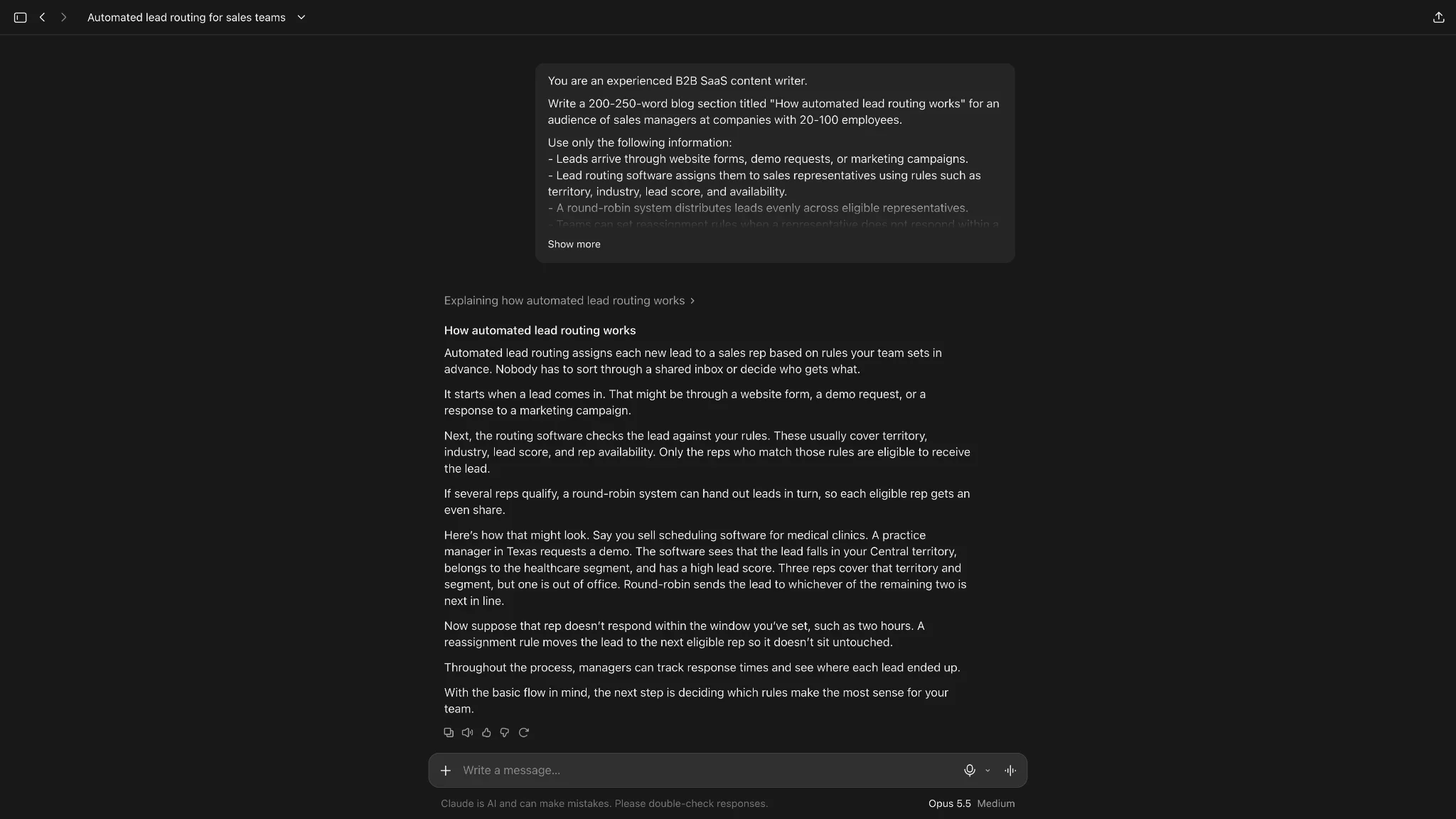
Both followed the brief, but their approaches differed.
Claude produced a more engaging explanation. It used a medical-clinic scheduling company to explain how a demo request gets assigned to a sales rep. It also showed what happens when one rep is unavailable and another fails to respond.
The example helped explain the routing process without making the writing unnecessarily technical.
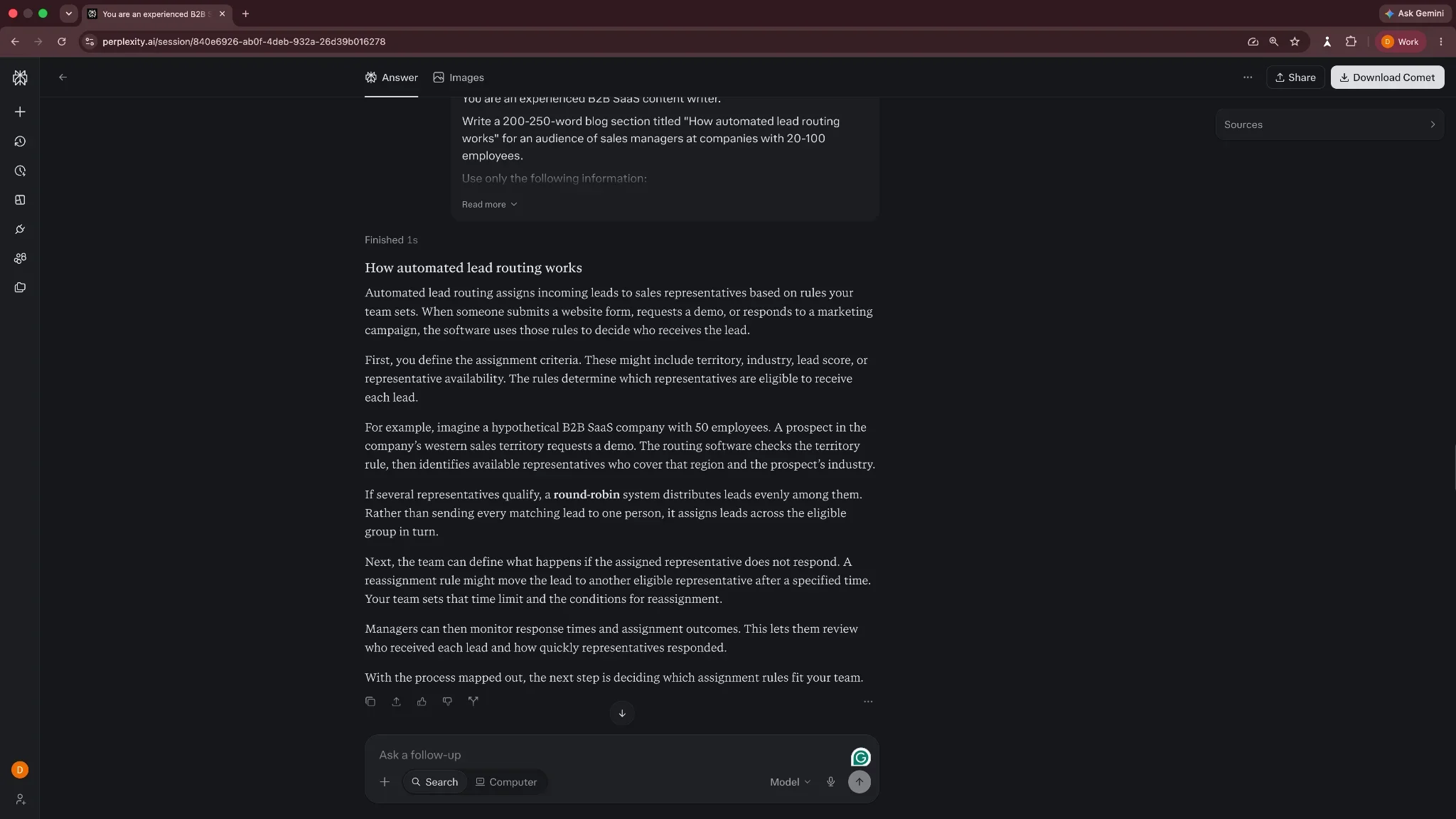
Perplexity was more concise. It delivered a clear explanation in 217 words, compared to Claude's 246. However, its example of a 50-person SaaS company felt generic and offered less detail about the lead assignment process.
Neither tool invented statistics or made unsupported claims. Both outputs needed minimal editing.
Winner: Claude. I'd choose Claude for blog writing where tone, storytelling, and practical examples matter. Perplexity works well for shorter, straightforward explanations.
Claude vs Perplexity: Research and citations test
Perplexity wins for live research with citations. It made finding and checking sources easier, although Claude handled the research well, too.
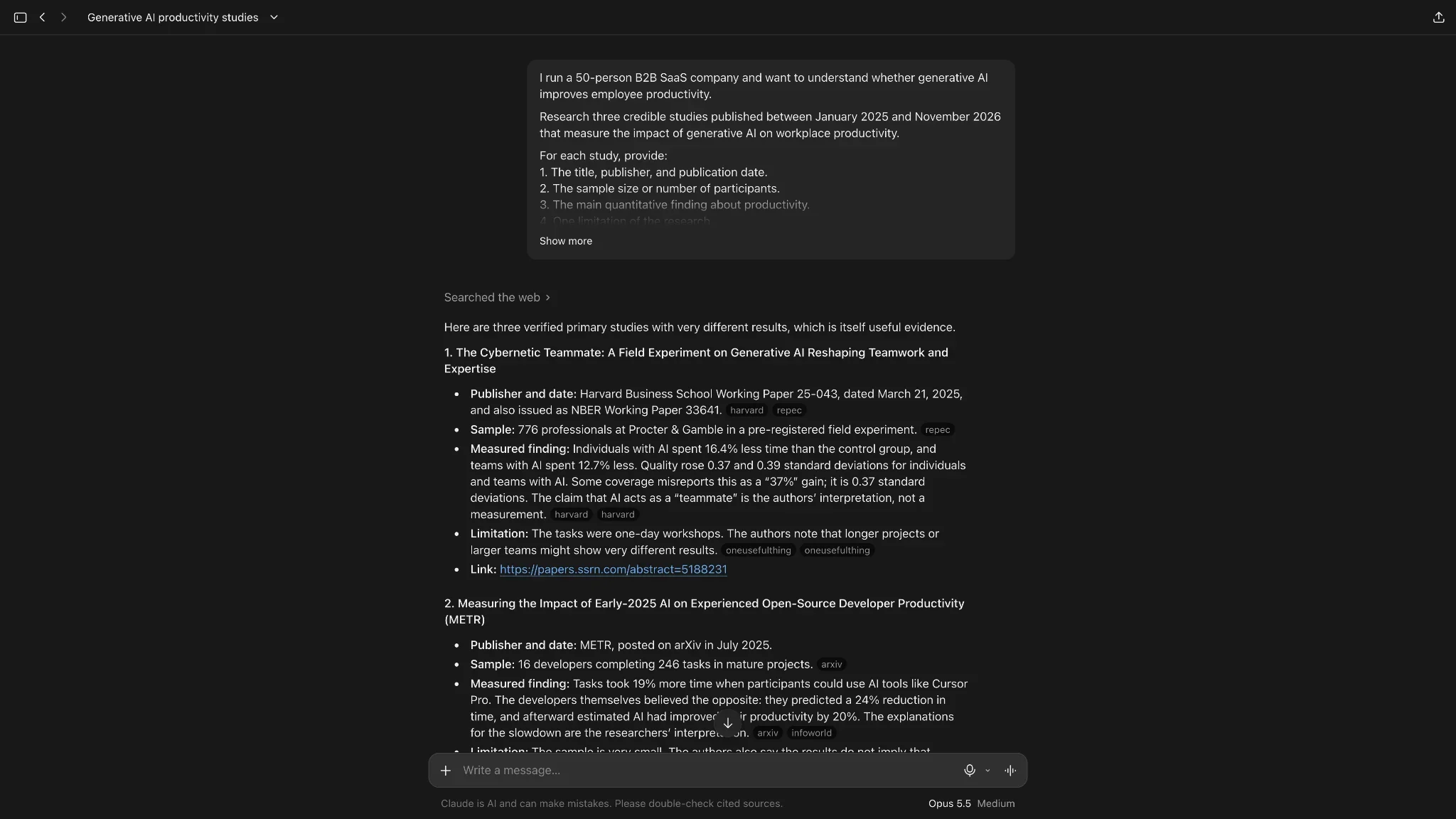
I asked both tools to find three studies published between 2025 and 2026 measuring AI's impact on workplace productivity. Each needed sample sizes, quantitative findings, limitations, and links to the original research.
Claude researched the topic thoroughly. It found a Procter & Gamble experiment involving 776 professionals, a Danish labor-market study, and METR’s 2025 study showing that some developers were slower when using AI.
I liked how Claude distinguished a 0.37-standard-deviation improvement from a 37% gain. That's an easy mistake to make when summarizing research.
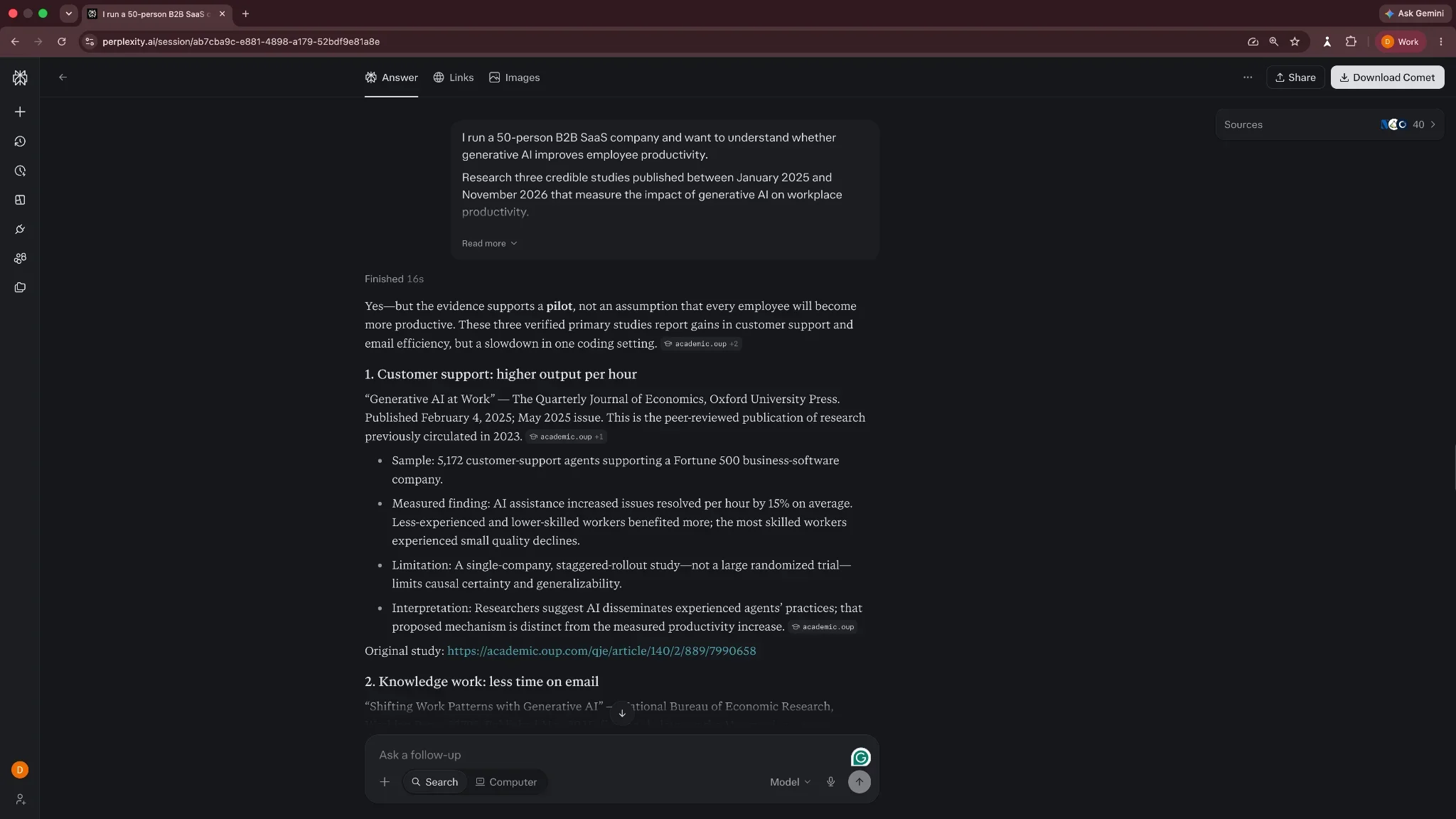
Perplexity made the findings easier to verify. It found studies covering customer support, email productivity, and software development. Its inline citations linked directly to supporting sources, with original paper links included in each summary.
Perplexity also flagged that METR considers its 2025 developer-productivity findings outdated for evaluating newer AI tools. Claude missed that update.
I checked the main statistics against the original studies, and both tools reported them accurately.
Winner: Perplexity. I'd choose it for researching current topics and gathering sources. Claude remains useful for interpreting research and developing recommendations from the findings.
Claude vs Perplexity for coding: Which one suits developers?
Perplexity won the coding test because it handled one additional input format better in my JavaScript test.
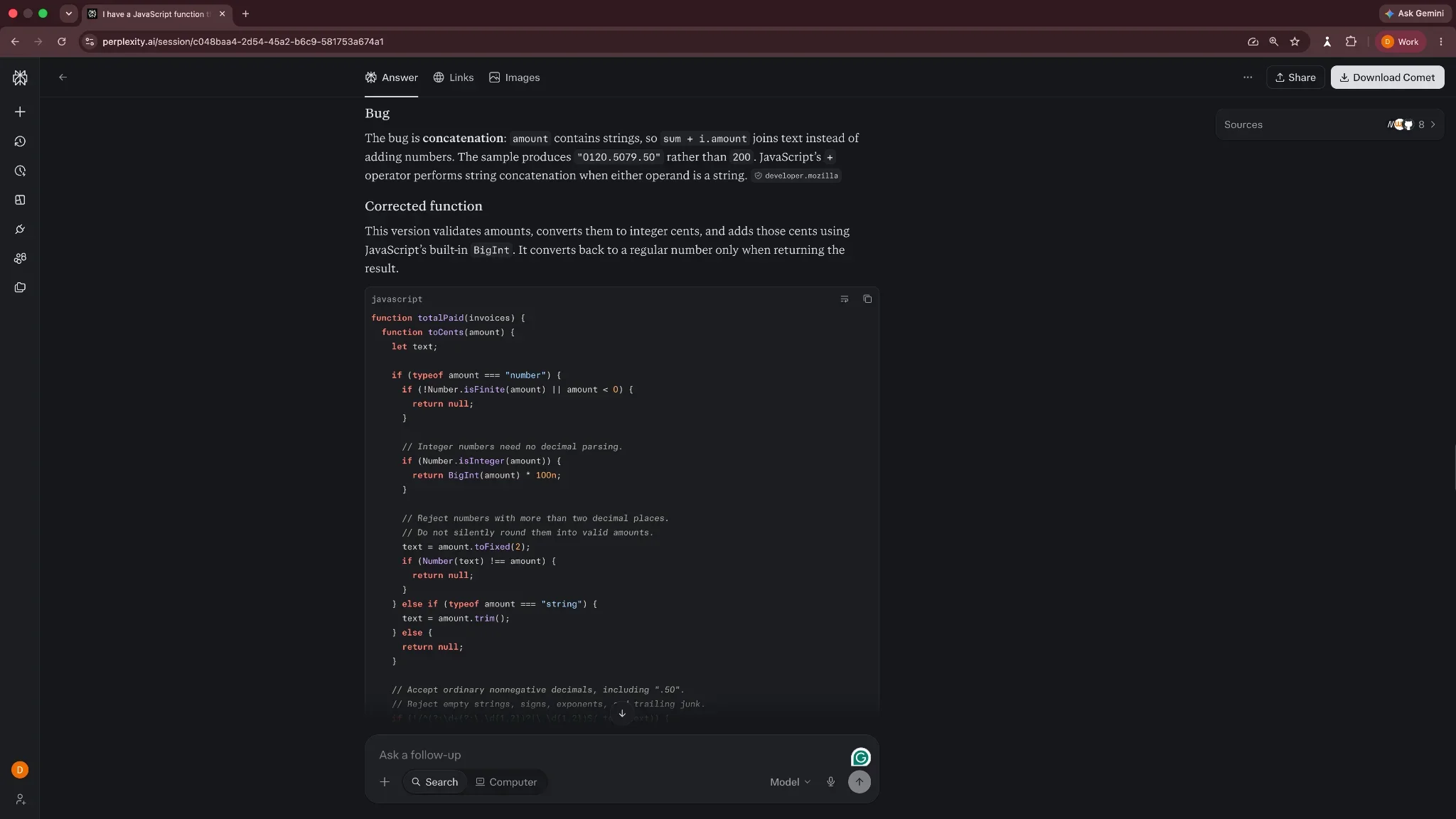
I gave both tools a buggy function that calculated paid invoice totals incorrectly. They needed to fix the calculation, handle invalid amounts, avoid floating-point errors, and write five tests.
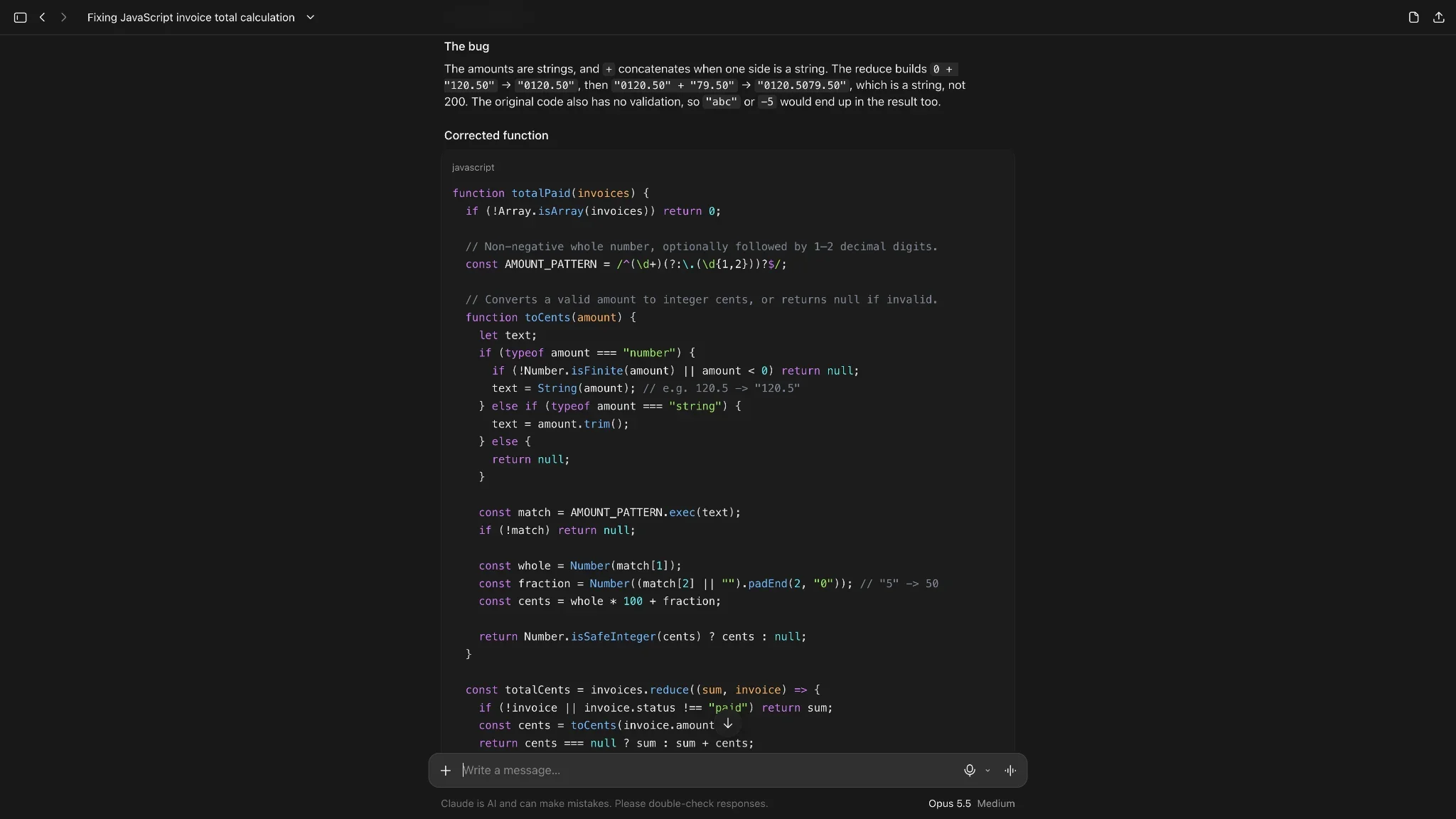
Both fixed the main bug and produced working solutions. Claude also executed its tests and confirmed they passed. I also confirmed that the tests passed. Perplexity supplied test cases but didn't run them.
However, Perplexity caught an edge case Claude missed. When I tested an additional amount formatted as .50, Perplexity included the 50 cents correctly. Claude rejected the input, returning $12.50 instead of $13.
That format wasn't explicitly specified in the prompt, but it's a valid numeric string. So Perplexity deserves credit for the more flexible input handling.
Claude has an advantage beyond generating code snippets. Claude Code lets developers work directly in their codebases, edit files, run tests, and manage changes through terminals and IDEs.
Perplexity Computer can also build and debug applications, but I didn't compare these development environments firsthand.
Winner: Perplexity. It handled the extra input case better. However, I'd choose Claude for ongoing debugging and development work because it offers Claude Code.
Long-document analysis: Perplexity vs Claude
Claude wins narrowly for detailed financial analysis, although Perplexity performed almost as well.
I uploaded Microsoft's 88-page 2025 Annual Report to both tools and asked them to extract financial results, compare business segments, identify growth drivers, and explain AI infrastructure costs. Both also had to check for a 2026 revenue forecast and prepare an executive summary.
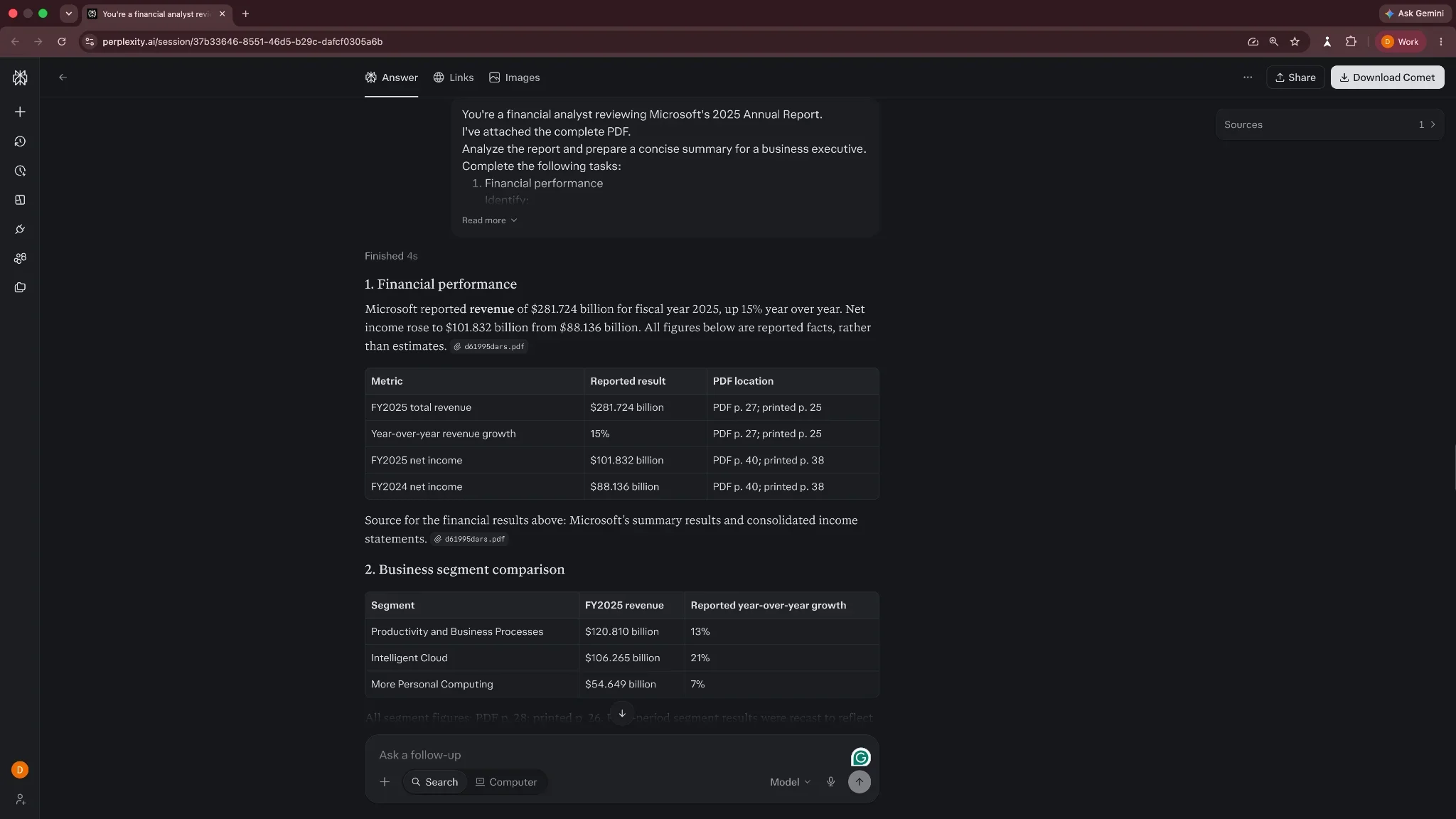
Both handled information retrieval well. They found the correct financial results, identified the fastest-growing segment, and confirmed that the report contained no explicit 2026 revenue forecast. If you need to extract key facts from a lengthy PDF, either tool can help.
Perplexity made verification easier. It cited both PDF and printed page numbers and noted Microsoft's revised segment reporting structure, making its findings easier to trace back to the document.
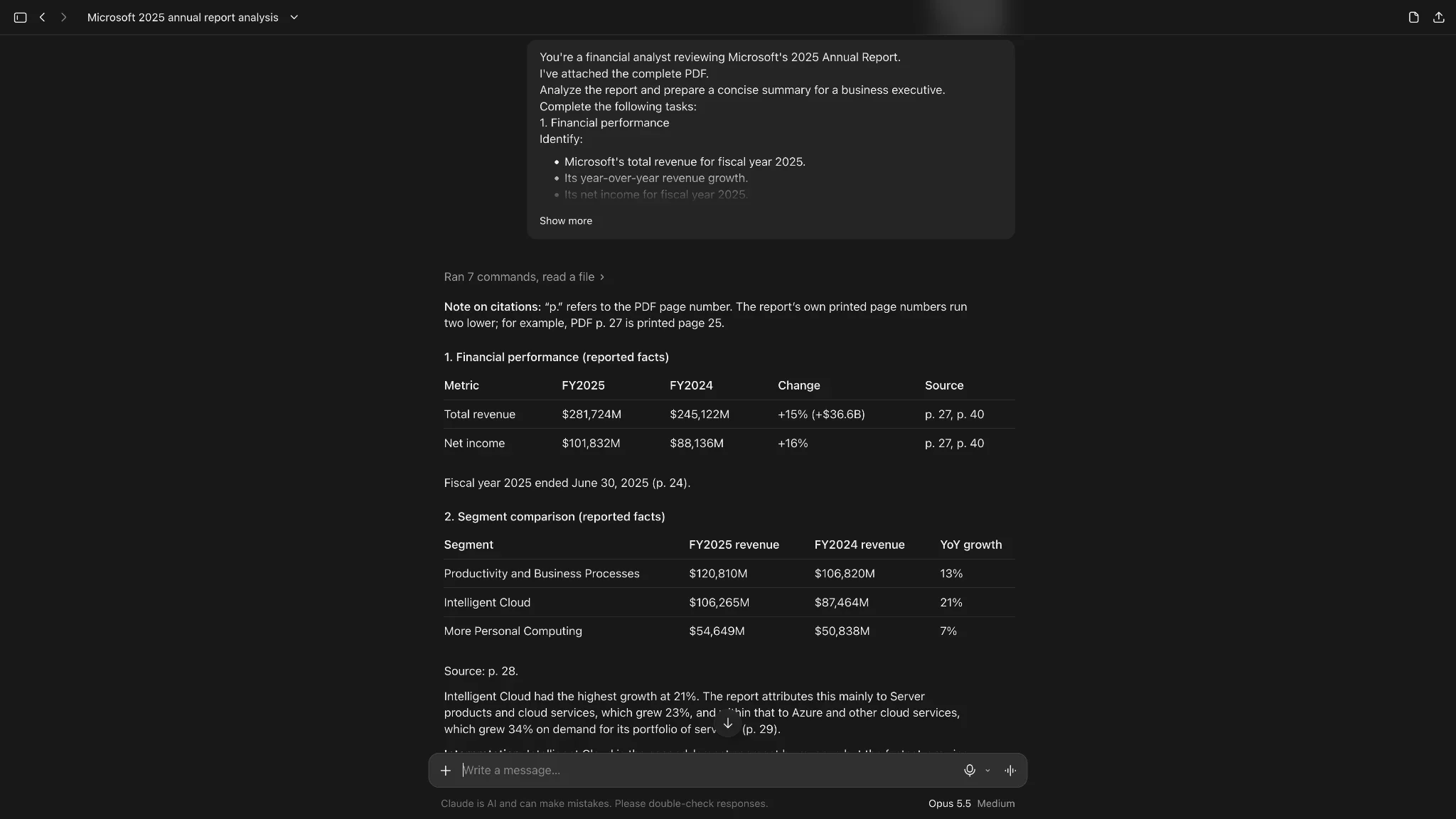
Claude did more to explain why the numbers mattered. It connected Microsoft's cloud growth to the costs of expanding AI infrastructure and explained how those investments could put pressure on profitability. That context would be useful when preparing an executive briefing or assessing a company's financial risks.
However, Claude cited the wrong PDF page for one spending figure.
Winner: Claude, narrowly. I'd choose Claude to interpret a lengthy report and explain its business implications. Perplexity is a strong choice when extracting information and verifying sources matter more.
Claude vs Perplexity agents: What can they do?
You can use Claude and Perplexity to handle multi-step tasks involving research, files, and connected apps. Their agent features overlap considerably, although they offer different ways to manage work. Here’s how they differ:
Claude
You can give Claude a task, grant access to selected folders and apps, and let it work through the steps. It can organize files, research topics, create spreadsheets and presentations, and schedule recurring tasks.
Claude also supports browser automation and direct interaction with desktop apps. Computer use is currently in beta and requires the Claude Desktop app.
Perplexity Computer
Perplexity Computer can research websites, run browser tasks, write code, create reports, and build applications. It uses specialized AI agents to handle different parts of a task and supports recurring work.
You can connect tools like Gmail and Slack. Perplexity's Personal Computer feature also supports local file and desktop workflows.
If I had to choose between them:
- Claude: Worth considering for tasks involving local documents, spreadsheets, and desktop applications.
- Perplexity Computer: Worth considering for recurring research, monitoring, and creating reports from current web information.
Both support broader workflows, and I haven't tested their agent modes firsthand. I'd run a small trial with your preferred apps before committing to either platform.
Claude vs Perplexity cost: How much do they charge?
Both Claude and Perplexity offer free plans, and both Pro plans cost $20/month. The differences become clearer when you compare their higher tiers and included features. Let’s see what they offer on each of their monthly plans:
Claude pricing
| Plan | Price | What you get |
|---|---|---|
| Free | $0 | Limited chat, web search, Projects, file creation, and Artifacts |
| Pro | $20/month or $17/month billed yearly | Claude Code, Research, unlimited Projects, and higher usage limits |
| Max | $100/month | Five times Pro's usage limits |
| Ultra | $200/month | Higher weekly limits and no five-hour limit for verified accounts |
| Team Standard | $25/user/month or $20/user/month billed yearly | Team collaboration and administration features |
| Team Premium | $125/user/month or $100/user/month billed yearly | Higher usage limits for team members |
Perplexity pricing
| Plan | Price | What you get |
|---|---|---|
| Free | $0 | Basic searches with citations and limited advanced searches |
| Pro | $20/month or $17/month billed yearly | Advanced AI models, Research, and Computer access |
| Max | $200/month or $167/month billed yearly | Higher Computer and Research limits, plus access to frontier models |
| Enterprise | From $34/seat/month, billed yearly | Business plans with organizational features and controls |
Both platforms apply usage limits. Perplexity Computer also uses credits, so check your expected workload before choosing a higher tier.







Does Perplexity Pro include Claude?
Yes, Perplexity Pro includes access to Claude Sonnet 5.5 through its model selector. Perplexity Max also offers higher-tier models, including Claude Opus 5.5.
However, accessing a Claude model through Perplexity gives you Perplexity's interface, research features, and usage limits. It doesn't activate Claude's native tools, such as Claude Code or its dedicated desktop task capabilities.
A direct Claude Pro subscription includes these features, along with Claude Projects, Artifacts, and other tools.
This distinction also comes up in a Reddit discussion comparing Claude through Perplexity with a direct subscription. Users questioned whether Perplexity could offer the same project folders, memory, and document workflows. It doesn’t.
Perplexity now has Projects with persistent files and supports memory features, including Brain in its Max-tier preview. The experience still differs from Claude's native workspace.
My recommendation: If you want Claude-generated answers alongside web research and access to other AI models, Perplexity Pro may be enough.
If you regularly use Claude Code, work with Claude-specific Projects, or want its full desktop experience, subscribing directly to Claude makes more sense.
Which should you choose: Claude, Perplexity, or both?
After testing both tools across four tasks, I'd lean toward Claude for writing, coding, and detailed document analysis.
Perplexity was my pick for live research. Its citations were easier to verify, and it identified an important research update Claude missed.
Here's how I'd choose:
- Choose Claude if you regularly write professional content, code in an IDE, or analyze lengthy documents and need detailed explanations.
- Choose Perplexity if you frequently research current topics, vibe-code programs, compare information from multiple sources, or need answers backed by citations.
- Use both if your work involves research and content creation. I'd gather and verify sources in Perplexity, then use Claude to turn those findings into polished content.
For me, it’s a tie between Claude and Perplexity based on these four tests. But if research takes up most of your workday, I'd recommend Perplexity.
Try Lindy to use multiple AI models across your work apps
Claude and Perplexity can help you write, research, code, and analyze documents. But there's often more work to do after getting an answer, like sending follow-ups, updating your CRM, or coordinating tasks across apps.
That's where Lindy comes in. It's an AI teammate you can work with through Slack or the web. You can ask it to prepare client updates, organize meeting follow-ups, or update HubSpot without switching between apps.
Lindy also supports AI models from Anthropic (Claude), OpenAI (ChatGPT), and Google (Gemini), so you can use different models for different tasks while offloading work across your connected apps.
If you want an AI teammate that helps you get work done, try Lindy for free.
Frequently asked questions
What is so special about Perplexity AI?
Perplexity AI is special because it combines AI-generated answers with web research and source citations. You can explore current topics, check references, and compare information from multiple sources. It also lets paid users choose between AI models, including Claude and OpenAI’s GPT models.
What are the downsides of Claude AI?
Claude has usage limits, even on paid plans. Long conversations and complex tasks can consume those limits faster.
Why is everyone using Claude?
Claude is popular for writing, coding, and document analysis. My Claude vs Perplexity review found that Claude produced more natural B2B writing and provided deeper financial analysis of Microsoft’s annual report.
Which AI is better than Claude AI?
Perplexity is a better alternative to Claude for researching current information with citations. In my research test, Perplexity made sources easier to verify and identified an important research update Claude missed. Claude performed better in my writing and document-analysis tests.
Is Claude the best AI right now?
No, Claude isn’t the definitive best AI right now. In my separate Claude vs ChatGPT comparison, ChatGPT performed better in more of my tests. However, the best AI tool depends on your role and use cases. Claude is a good option if you code, process long documents, or frequently need writing assistance.
Can Claude search the web like Perplexity?
Yes, Claude supports web search and provides citations for information it finds online. Paid users can also use its Research feature for more detailed investigations. However, Perplexity puts web search at the center of its experience, making it more convenient for source discovery.
Which tool has the better free tier: Claude or Perplexity?
Perplexity has the better free tier for research, offering practically unlimited basic searches with citations. Claude's free plan is useful for writing and document analysis, but usage limits reset every five hours. I'd choose based on which tasks I perform most often.
Can Perplexity replace Claude?
For web research, summarizing information, casual coding, and general writing, Perplexity can replace Claude for many users. It even offers access to Claude models on paid plans. However, if you rely on Claude Code, Artifacts, or Claude's native desktop workflows, you'll still benefit from a direct Claude subscription.
Is Claude or Perplexity more accurate?
Perplexity was slightly more accurate in my tests. Both correctly extracted key figures from Microsoft’s annual report, but Claude cited one wrong page, missed a research update, and rejected a valid currency amount. Accuracy depends on the task, source material, and model.
How does Perplexity AI make money?
Perplexity earns revenue primarily through paid subscriptions and enterprise services. It previously experimented with advertising but phased out those placements over concerns about user trust. Its paid plans provide access to advanced models, research features, and AI agents.
About the editorial team

Marvin is a Growth Engineer at Lindy focused on AI agents, automation, and product-led growth.

Lindy leads GTM at Lindy and is the team’s most prolific automation builder. She publishes weekly educational videos and articles on building AI assistants – And yes, she’s a real person!
