
I pitted ChatGPT vs Perplexity and conducted hands-on tests to see whether their paid subscriptions are worth it in 2026.
ChatGPT and Perplexity can both research topics, answer questions, write content, and help you make decisions. So, I wondered: if you're already paying $20/month for one, is there any reason to pay for the other?
I use ChatGPT daily, especially for writing. I've customized it around my preferred tone, style, and instructions. But Perplexity has an appealing research experience, with citations and access to AI models from different providers.
To see how the ChatGPT vs Perplexity comparison pans out, I gave both tools the same prompts in four tests: recent news, research, writing, and reasoning. For the writing test, I also compared personalized drafts using identical instructions and reference material.
ChatGPT vs Perplexity: TL;DR
I'd choose ChatGPT if I could pay for only one AI assistant. It's a strong fit for writing, coding, and ongoing projects, especially when you customize it to your work.
I'd choose Perplexity for research-heavy work. It makes finding and comparing sources convenient, and it lets paid users choose between models from different providers.
Our four hands-on tests ended in a 2-2 tie:
- ChatGPT won recent news and writing. It provided independent sources for all three news announcements and produced a final writing draft that needed fewer factual edits.
- Perplexity won research and reasoning. Its answers included more detailed citations, limitations, and alternative scenarios.
All four wins were narrow. ChatGPT gave clearer, easier-to-share answers in every test. Perplexity dug deeper, with more citations, caveats, and what-if scenarios.
ChatGPT vs Perplexity at a glance
| Feature | ChatGPT | Perplexity |
|---|---|---|
| Best for | Writing, coding, varied work | Research, source discovery |
| AI models | OpenAI GPT models | Models from multiple providers |
| Web search and citations | Yes | Yes, search-focused |
| Deep research | Yes | Yes |
| Creative writing | Strong customization | Strong first drafts |
| Coding | Codex | Coding and Computer |
| Multimodal | Files, images, voice | Files, images, voice, video |
| Personalization | Projects, memory, plugins | Projects, Skills, plugins |
| AI agents | ChatGPT Work | Perplexity Computer |
| Browser experience | ChatGPT browser tools | Comet browser |
| Paid plans | From $8/month | From $20/month |
What is ChatGPT?
ChatGPT is OpenAI's general-purpose AI assistant. You can use it to write emails, analyze documents, research topics, solve problems, generate images, and work through code.
One of its biggest strengths is customization. Projects let you organize conversations, upload reference material, and set instructions for recurring work. Plugins can combine instructions with connected apps, while Codex handles dedicated software development tasks.
ChatGPT Work can take on longer assignments, including research, analysis, and creating documents or presentations.
I find ChatGPT particularly useful for writing because I can give it editorial guidelines and examples, then refine the output over several conversations.
It also has limitations. Responses still need fact-checking, and advanced models or longer agent tasks may require higher subscription tiers.
What is Perplexity?
Perplexity is an AI-powered search and research platform that combines information from the web into conversational answers with citations.
You can ask questions, compare products, investigate topics, and follow links to the sources behind its claims. Paid plans also let you choose AI models from different providers.
Perplexity has expanded beyond search. Its Computer agent can perform multi-step tasks, while Projects, Skills, and plugins let you customize instructions and connect tools. Comet adds an AI assistant directly to your browser.
Its biggest appeal is the research experience. You can quickly gather sources, compare findings, and ask follow-up questions.
However, the citations still need checking. Sources can be outdated, incomplete, or poorly matched to a claim. The advanced features also come with usage limits.
How I tested ChatGPT and Perplexity
I tested ChatGPT and Perplexity across four tasks to see how they performed in different situations. Here's how I approached the testing:
- Testing scenarios: I tested both tools for recent AI news, CRM research, creative writing, and reasoning and decision-making.
- Models used: I used GPT-6 with High thinking effort in ChatGPT and Perplexity's Best model mode.
- Identical prompts: I gave both tools the same prompts in fresh conversations to keep the comparison consistent.
- Personalized writing: I created separate Projects with identical editorial instructions, reference samples, and revision prompts. Perplexity used its Computer-1 model with Medium reasoning effort for the writing test’s personalized round.
- Evaluation criteria: I compared accuracy, completeness, clarity, source quality, and how well each tool followed instructions.
- Fact-checking: I independently verified important claims, sources, pricing information, and calculations.
These results reflect the specific configurations I tested. Different models, settings, or prompts may produce different outcomes.
Recent news test: ChatGPT vs Perplexity
I asked ChatGPT and Perplexity to find three significant AI announcements from the past 48 hours, explain their business impact, and provide original and independent sources.
ChatGPT, running GPT-6 with High thinking effort, took 41 seconds. It covered Anthropic's Claude Fable and Mythos 5.2, Google's Gemini 4 Carbon, and OpenAI's Business Agents. All three announcements were verifiable, and ChatGPT linked to original announcements and independent reporting for each.
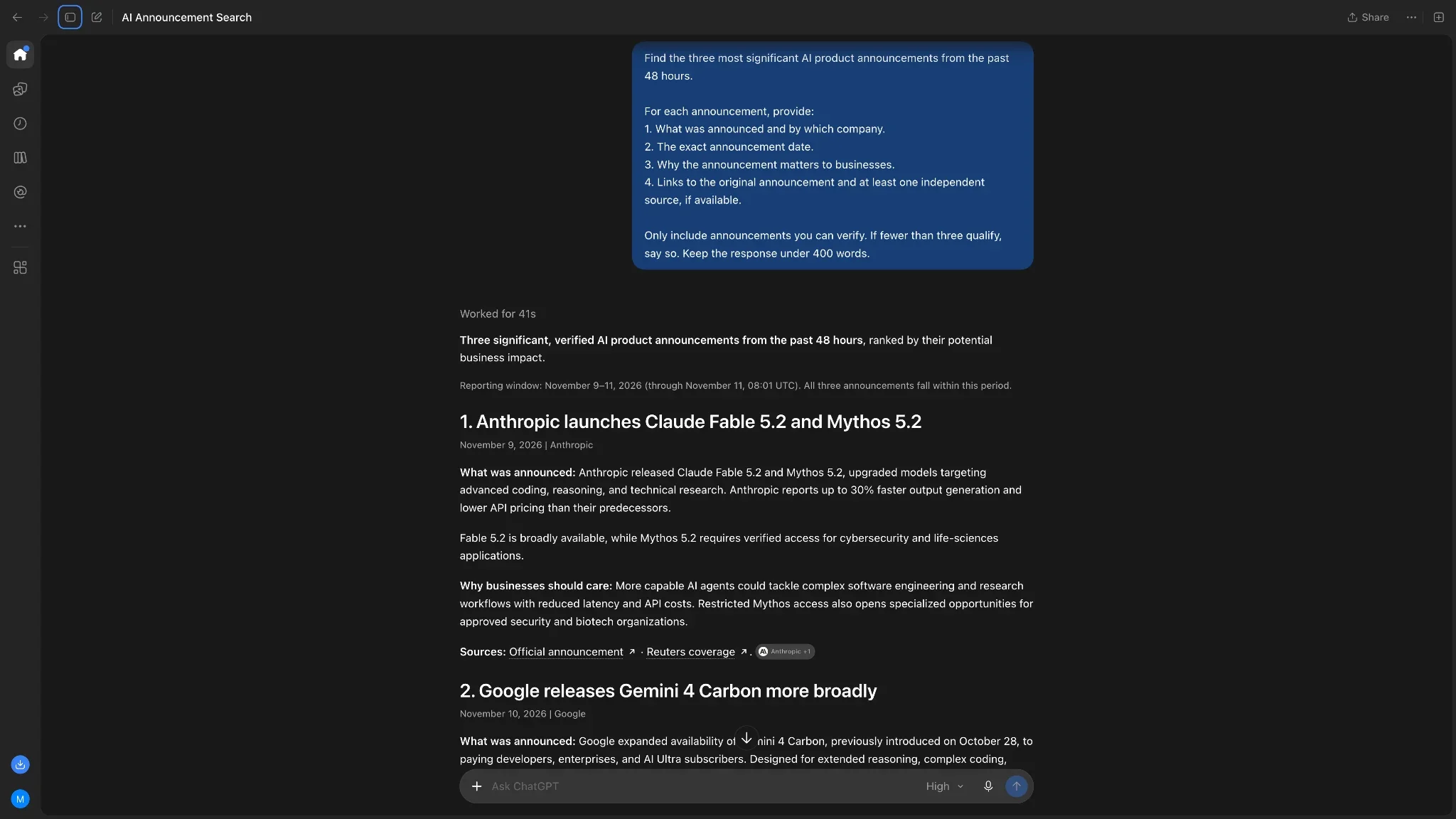
Perplexity, using Best model mode, finished in 22 seconds. It selected Adobe's expanded creative AI agents, Google's Gemini for healthcare, and IBM and Microsoft's Imagine Enterprise.
I liked how Perplexity handled uncertainty. It acknowledged that it couldn't find independent reporting for the IBM announcement and avoided presenting potential productivity gains as established results.
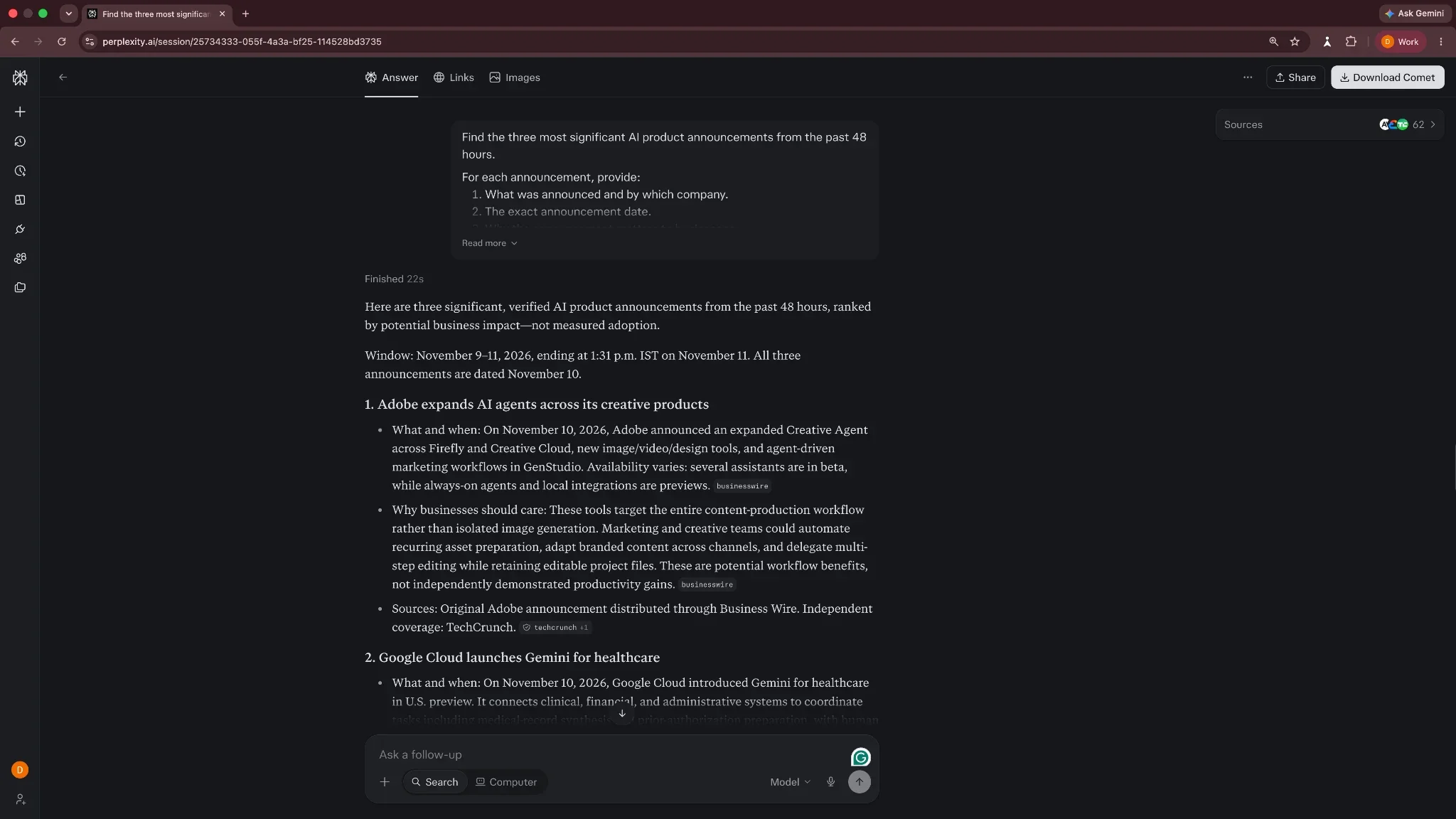
Both tools delivered useful, well-sourced summaries.
Winner: ChatGPT, by a small margin. I'd give Perplexity the edge for speed, but ChatGPT did a slightly better job fulfilling my request for independently verified announcements.
Research test: ChatGPT vs Perplexity
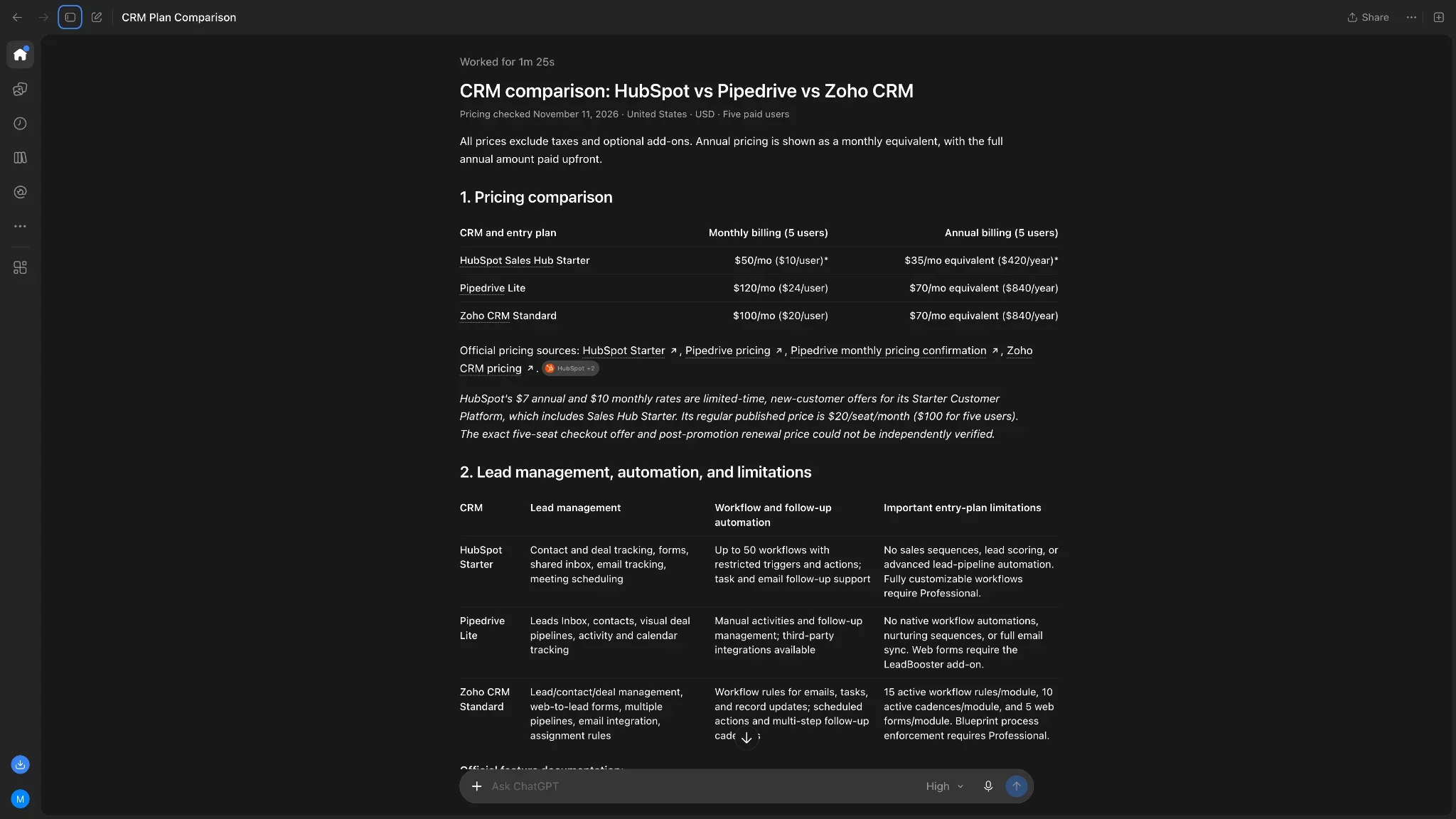
I asked both tools to compare HubSpot Sales Hub, Pipedrive, and Zoho CRM for a five-person sales team. The task was to research pricing, lead management features, automation limits, and recommend the best option.
ChatGPT took 1 minute and 25 seconds. It organized the findings into two tables, calculated monthly and annual costs, and recommended Zoho CRM Standard. I liked how easily I could compare the plans and understand the recommendation.
Perplexity provided a more detailed report, with citations throughout its comparison table. It identified specific automation limits, additional costs, and features that require higher-tier subscriptions.
It also flagged pricing information it couldn't fully verify. For example, Perplexity treated Zoho's $20 monthly price as provisional, while ChatGPT presented it as confirmed. I subsequently found the price in Zoho's official documentation.
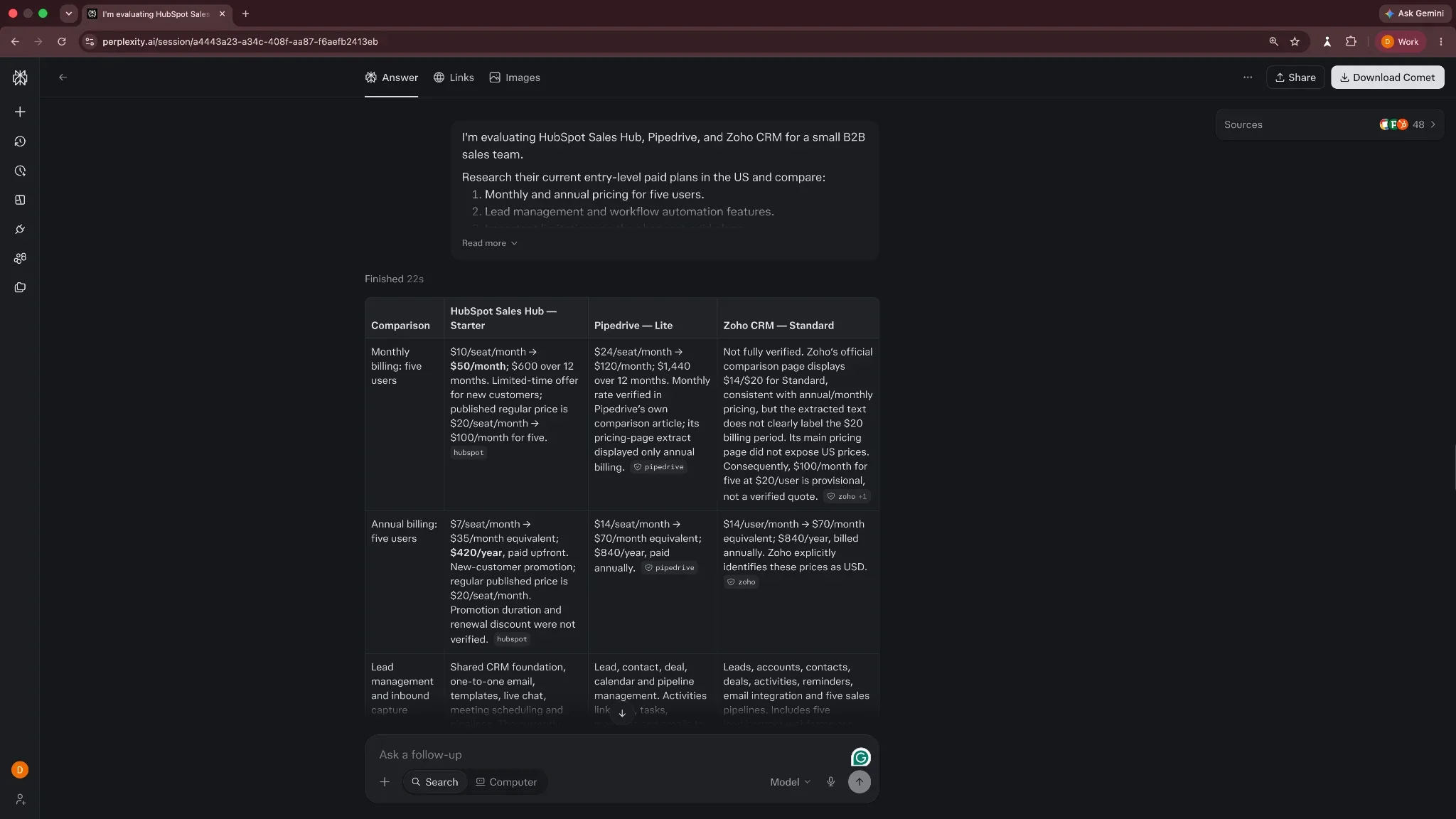
The final recommendation ChatGPT and Perplexity offered was Zoho CRM Standard, and their main pricing calculations checked out.
Winner: Perplexity. Its detailed source references and careful handling of uncertain information gave it a slight advantage for research. I'd choose ChatGPT if I needed a shorter summary to share with my team.
Writing test: ChatGPT vs Perplexity
I asked both tools to write a product launch email for RelayDesk, a fictional B2B customer support platform. The brief specified the audience, product benefits, pricing, word count, and tone.
In the first test, Perplexity produced the stronger draft. Its writing felt more conversational, while ChatGPT used generic phrases like "Sound familiar?" and "And there's more."
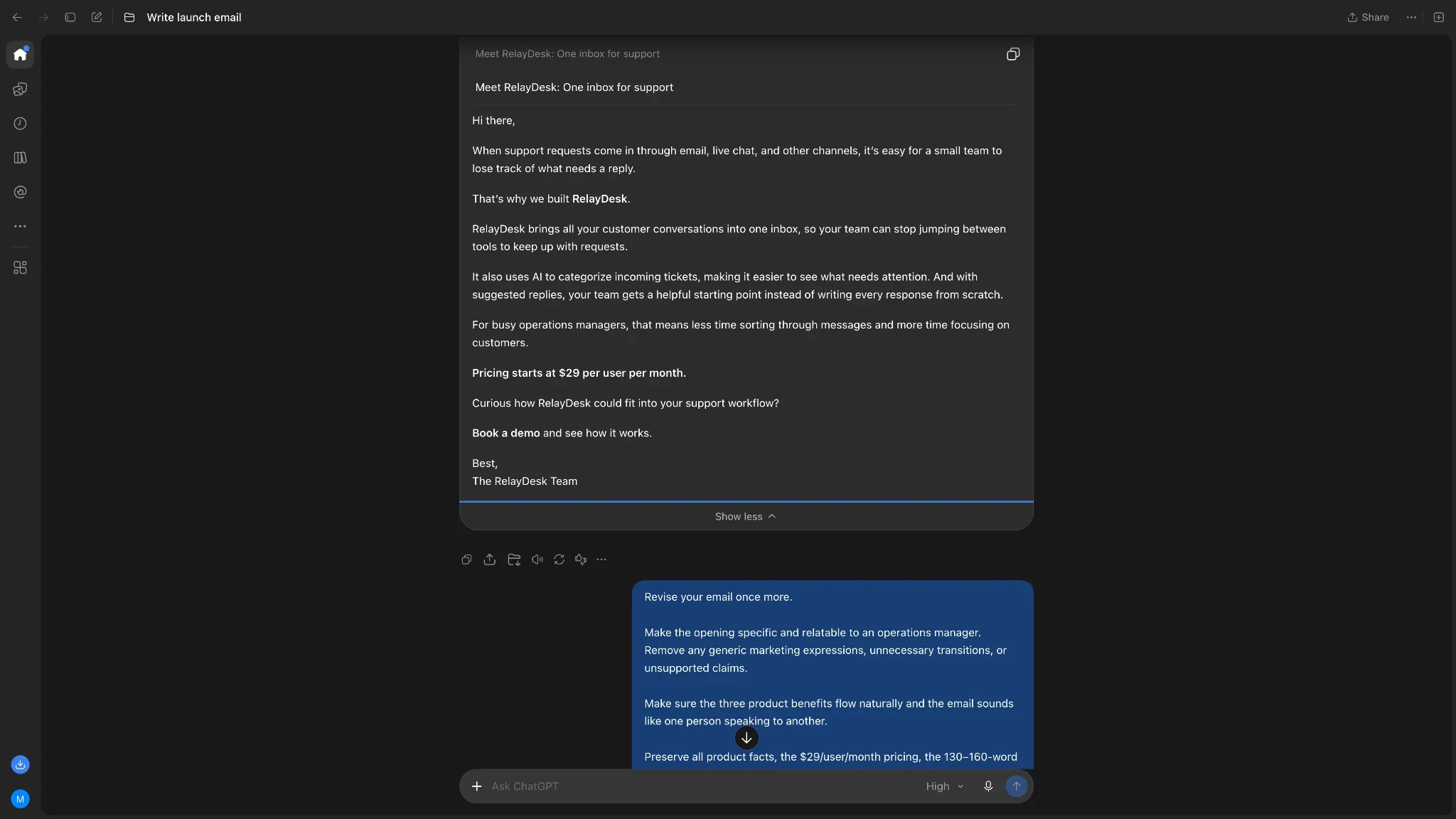
I then created separate writing projects with identical style instructions and a reference sample. Both tools rewrote the email and revised it using the same feedback.
ChatGPT's revised email was clearer and more grounded. It described a customer contacting support through two channels, explained RelayDesk's features, and preserved the pricing and demo CTA.
Perplexity produced a more memorable opening about a lost support ticket on Friday afternoon. However, it introduced a few assumptions about product capabilities that weren't established in the brief.
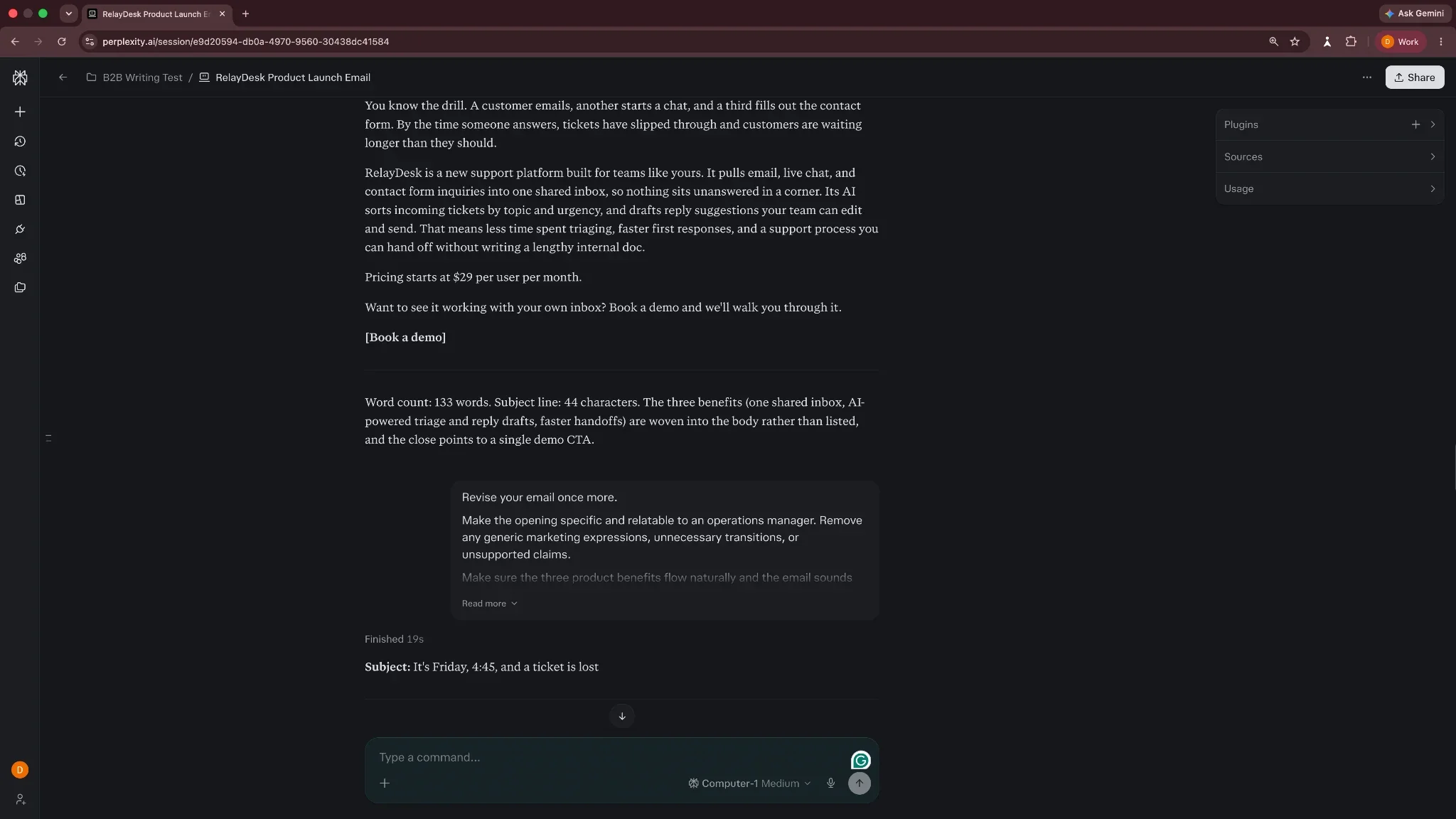
Both tools handled the customization instructions well. ChatGPT's final draft required fewer factual edits, while Perplexity offered more creative phrasing.
Winner: ChatGPT, narrowly. I'd prefer it for repeatable B2B writing where accuracy and consistency matter. Perplexity remains competitive for generating engaging first drafts.
Reasoning and decision-making test: ChatGPT vs Perplexity
I gave both tools a fictional CRM purchasing scenario involving six salespeople, three vendors, and a strict $150 monthly budget.
The task was to calculate costs, account for mandatory features and add-ons, eliminate unsuitable plans, and recommend the best option.
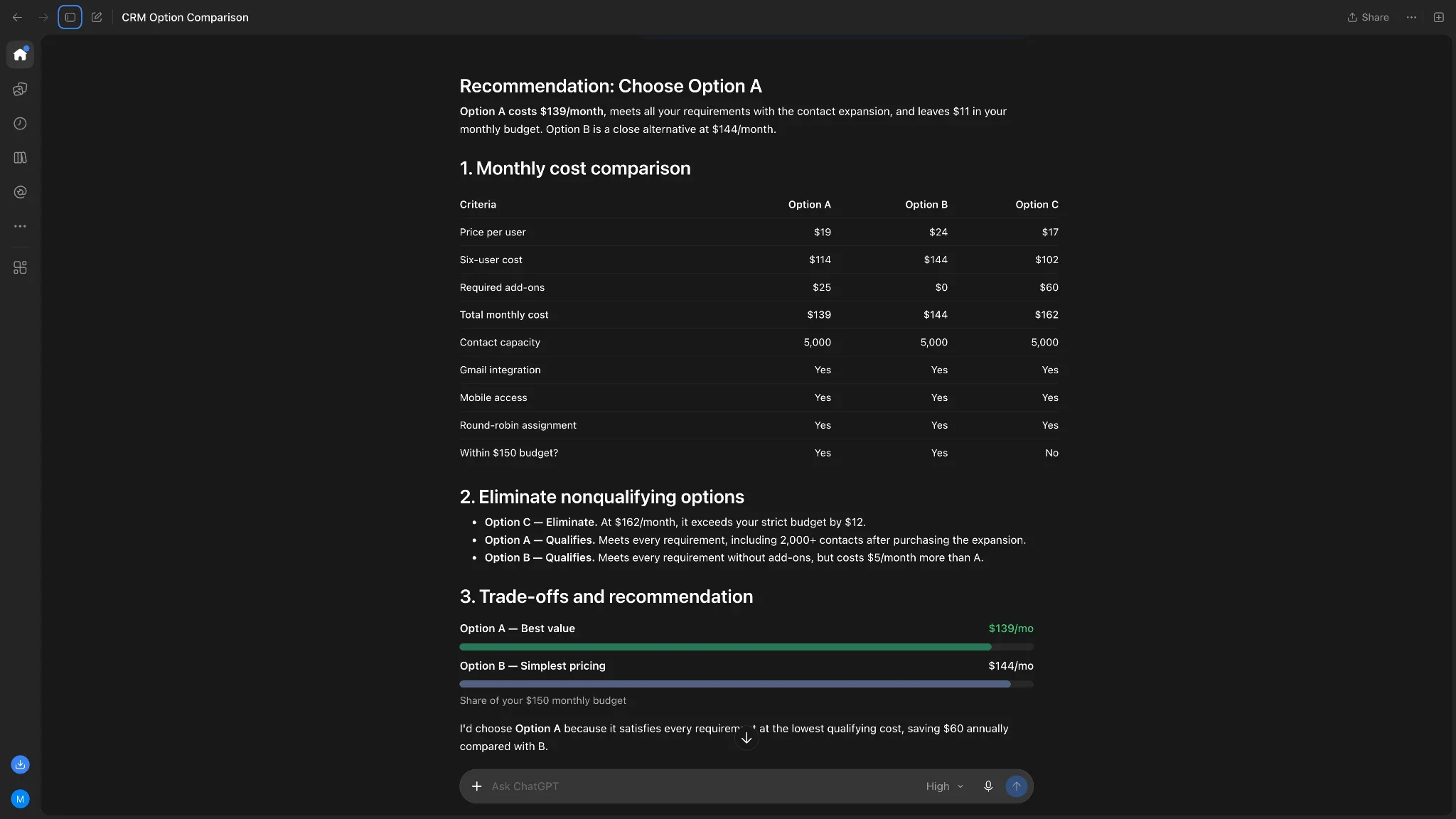
ChatGPT, using GPT-6 with High thinking effort, recommended Option A at $139/month. It correctly eliminated Option C at $162/month and identified Option B as a reasonable alternative at $144/month.
I liked ChatGPT's presentation. Its comparison table covered the requirements, and the recommendation was easy to follow.
Perplexity reached the same conclusion but explored more scenarios. It calculated how much Option A's add-on could increase before Option B became cheaper. It also checked the cost of adding a seventh user and identified the discount Option C would need to become competitive.
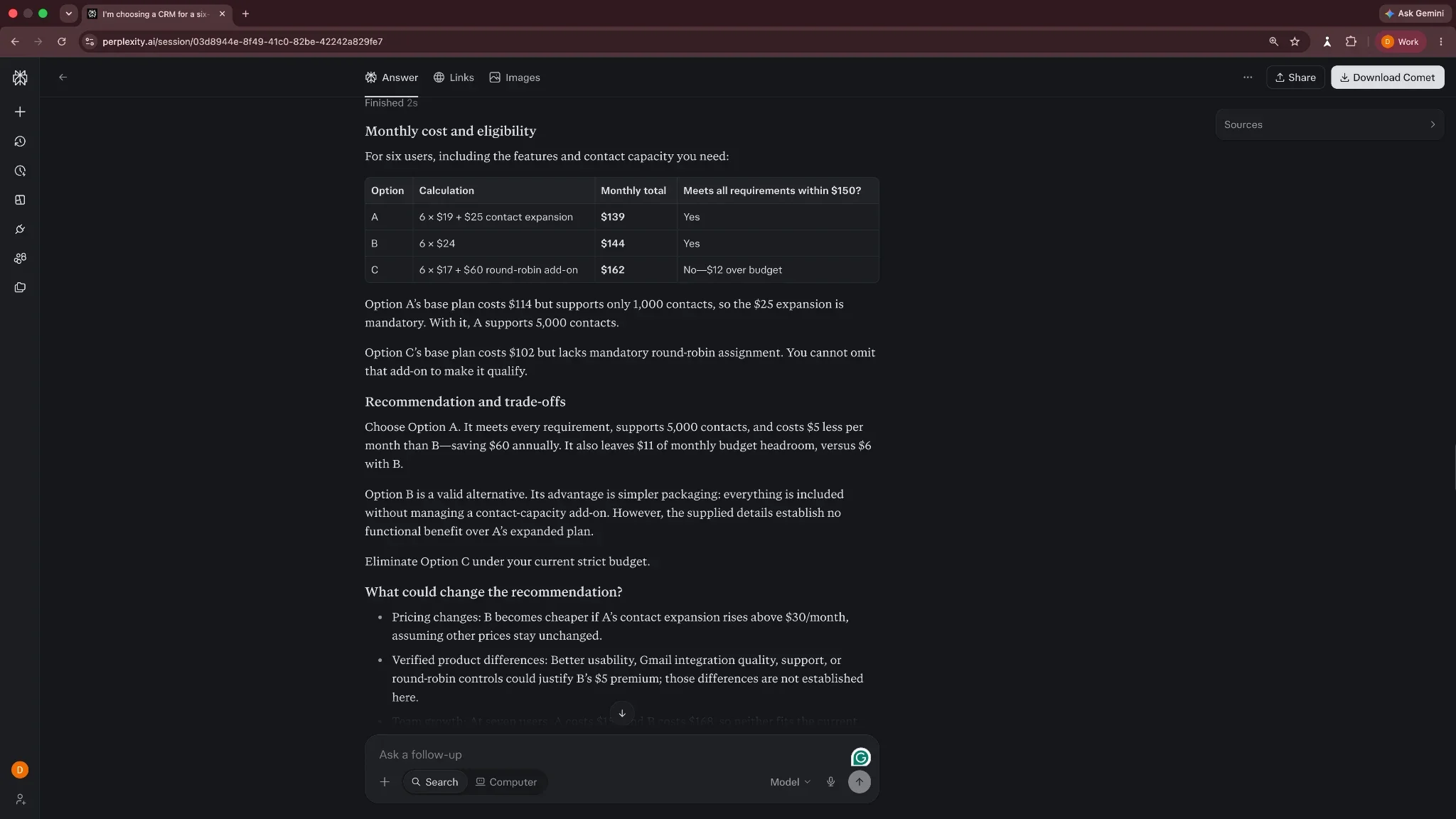
Both tools handled the calculations correctly.
Winner: Perplexity, narrowly. I'd prefer its response when evaluating several possible outcomes. ChatGPT was equally capable of solving the original problem and presented its answer more clearly.
ChatGPT vs Perplexity: Feature-by-feature comparison
Our tests covered four common tasks, but there's more to consider when choosing an AI assistant you'll use every day. Here are all the features worth knowing:
AI models, web search, and citations
ChatGPT primarily uses OpenAI's models, with GPT-6 reasoning available on eligible paid plans. Perplexity lets paid users choose from models by OpenAI, Anthropic, Google, and others.
Both support web searches, citations, and deep research.
Perplexity focuses on source-backed answers, with citations attached to individual claims. ChatGPT offers similar research capabilities, alongside a wider range of conversational and work tools.
I'd still verify important claims in either tool. A citation can lead to a legitimate source that doesn't fully support the answer.
Coding, files, and multimodal capabilities
ChatGPT supports file analysis, image generation, voice conversations, and coding. Its dedicated Codex agent can work with codebases, debug problems, review changes, and help build applications.
Perplexity also supports file uploads, image and video generation, and coding. Its Computer agent can create websites, applications, and other deliverables.
ChatGPT has an advantage for dedicated software development workflows through Codex. Perplexity remains a capable option for coding questions, technical research, and building projects through Computer.
Personalization, memory, and custom assistants
ChatGPT Projects let you store instructions, files, and related conversations. You can use them to develop a consistent writing style or keep project-specific context available.
ChatGPT also supports custom GPTs, although OpenAI plans to retire them on December 11, 2026, and migrate workflows to plugins.
Perplexity offers Projects with persistent files, memory, and connected tools. Its Skills and plugins support reusable instructions and customized workflows.
Both handled our personalized writing test well. The differences came down to the quality and accuracy of their final drafts.
Integrations and platforms
Both tools work across web, desktop, and mobile.
ChatGPT connects to business applications through plugins and brings chat, Work, and Codex into one desktop application.
Perplexity offers hundreds of connectors, shared Projects, and its Comet browser. Its Computer agent can also work with local files on supported Macs.
For choosing between them, I'd focus on the integrations and working environment you need rather than comparing connector counts alone.
ChatGPT Work vs Perplexity Computer: Which is better for AI agents?
ChatGPT and Perplexity offer agents that can research, browse websites, use connected apps, and complete multi-step tasks.
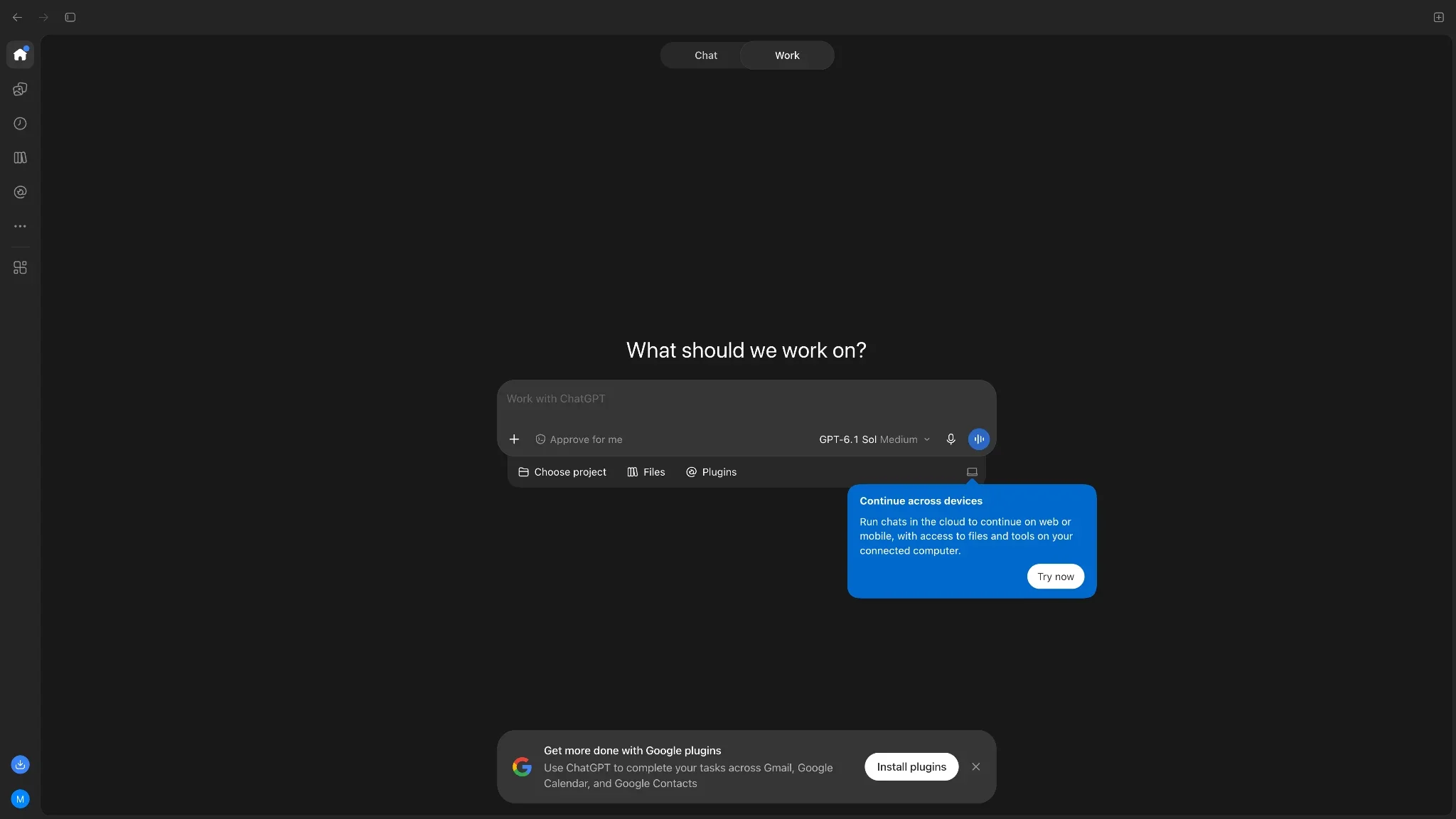
ChatGPT Work can gather information from documents, business applications, and websites to create presentations, spreadsheets, reports, and other deliverables. It also supports scheduled tasks and lets users review plans or approve important actions.
Perplexity Computer takes a similar approach but can assign different parts of a task to specialized subagents. It supports recurring monitoring, connected applications, reusable Skills, and project memory. It can also run locally on supported Macs.
Their browser approaches now differ.
Perplexity's Comet browser works on Mac, Windows, iOS, and Android. Its assistant can help with research and tasks across websites.
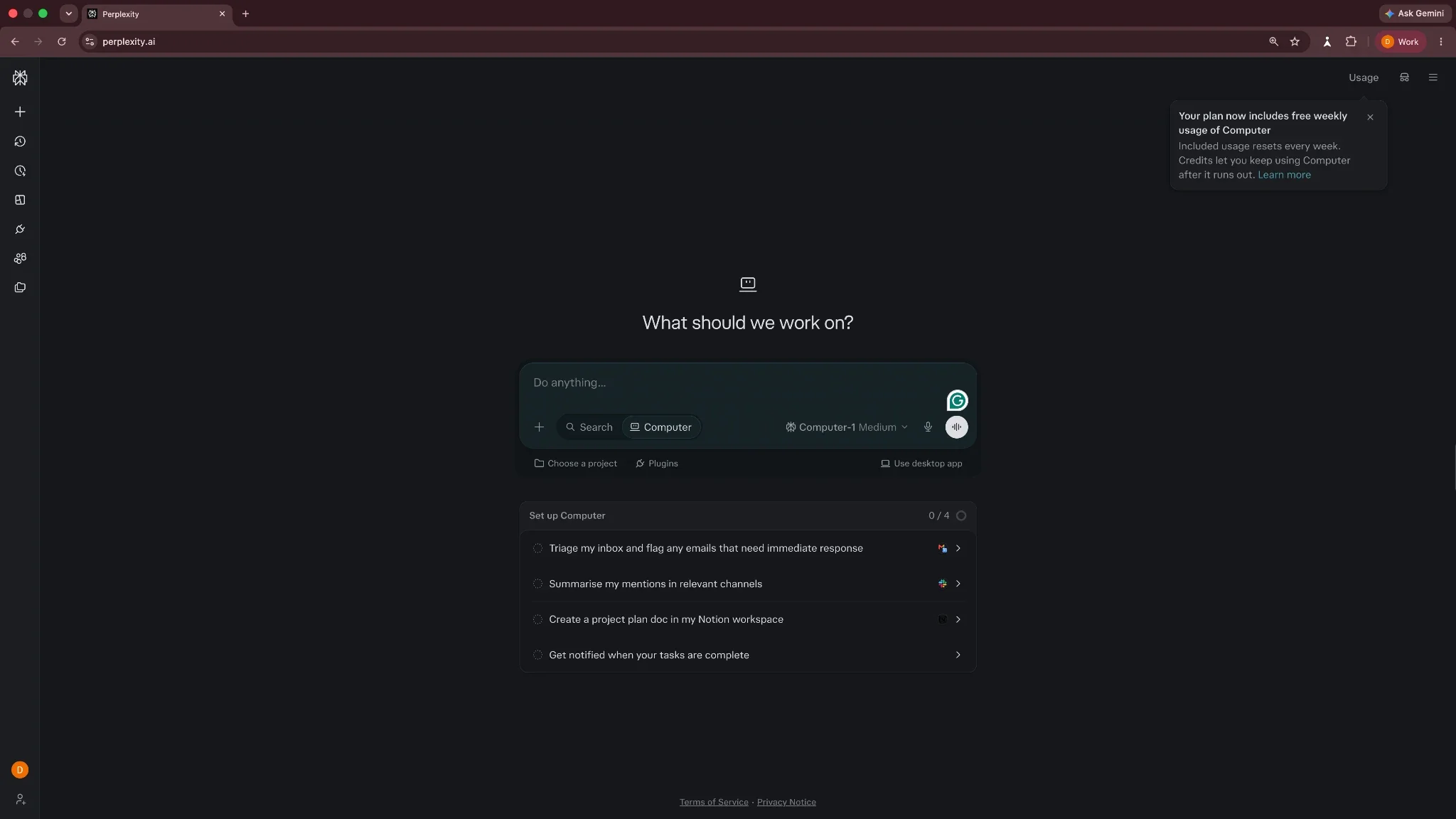
OpenAI retired ChatGPT Atlas in August 2026. Browser-based agent features now live within ChatGPT, including its desktop application.
The choice depends on your workflow. ChatGPT Work fits naturally alongside ChatGPT's document creation and coding tools. Perplexity Computer offers flexible model selection, customizable Skills, and its dedicated Comet browser.
ChatGPT vs Perplexity pricing: Which offers better value?
Both tools have free plans. ChatGPT’s paid plans start from $8/month, while Perplexity’s start from $20/month. The differences become clearer when you compare the features, usage limits, and higher tiers.
ChatGPT pricing
ChatGPT has four main plan categories, with three pricing levels under Pro. Here’s how these plans compare:
| Plan | Monthly price | Key features |
|---|---|---|
| Free | $0 | Everyday chat, limited research, file uploads, images, and voice |
| Go | $8 | Higher tool limits, more uploads, and longer memory |
| Plus | $20 | GPT-6 reasoning, expanded research, Projects, Work, and Codex |
| Pro 100 | $100 | GPT-6 Astra, higher limits, and longer agent sessions |
| Pro 200 | $200 | More usage for Work, Codex, and demanding tasks |
| Pro 500 | $500 | Highest usage allowances and Ultrafast model access |
ChatGPT Plus is the most relevant comparison with Perplexity Pro for individual subscribers.
Perplexity pricing
Perplexity offers three individual subscription tiers. Here’s a quick comparison:
| Plan | Monthly price | Key features |
|---|---|---|
| Free | $0 | Basic AI search, citations, limited usage |
| Pro | $20 | Model selection, deep research, expanded Computer access |
| Max | $200 | Advanced models, higher limits, 10,000 monthly Computer credits |
Perplexity also advertises annual billing equivalents of $17/month for Pro and $167/month for Max. Check current offers before purchasing.
What about team pricing?
ChatGPT Business offers Standard seats from $20/user/month and Premium seats from $100/user/month, billed annually. Perplexity Enterprise Pro starts at $34/seat/month and Enterprise Max at $271/seat/month, also billed annually.
So, which one offers better value?
At $20/month, I'd lean toward ChatGPT Plus for writing, coding, and varied daily work. Consider Perplexity Pro if you primarily research topics, compare sources, or want access to multiple model providers.







What users like and dislike about ChatGPT and Perplexity
I also checked G2 reviews and Reddit discussions to see how other users feel about both tools.
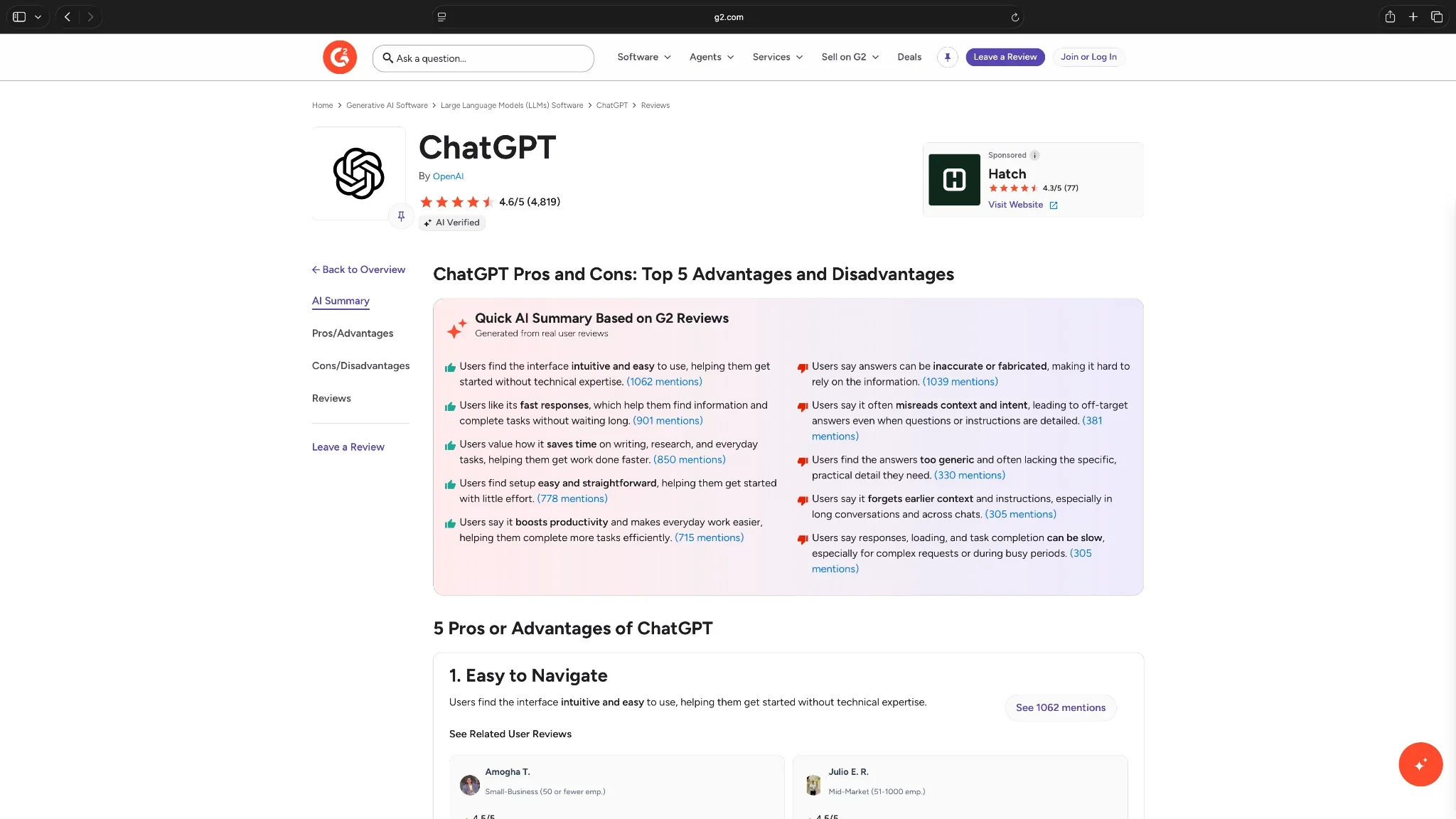
ChatGPT users frequently praise its flexibility for writing, brainstorming, coding, and everyday tasks. However, one G2 reviewer working in digital marketing complained about generic first drafts and having to verify confident but incorrect answers.
That could be a reason to look for ChatGPT alternatives.
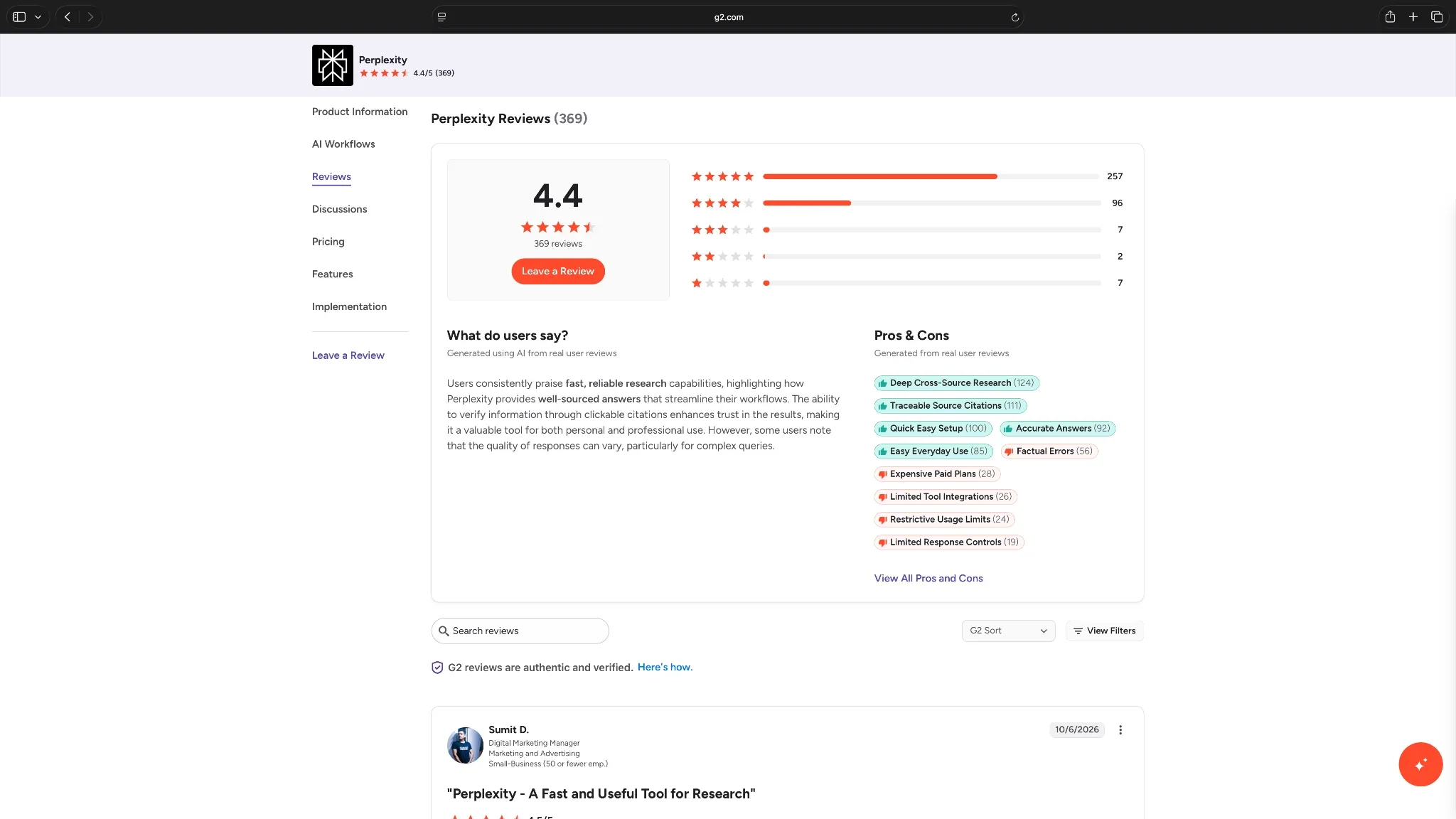
Perplexity users appreciate its fast research and clickable citations. A G2 research analyst praised its source-backed answers but noted that different reports can use conflicting definitions, requiring manual verification.
A Reddit discussion captured the difference well. One user preferred Perplexity for quickly finding sources and ChatGPT for analyzing information and developing ideas.
These experiences broadly match our tests. Both tools are useful, but neither eliminates the need to review important outputs.
Should you choose ChatGPT or Perplexity?
Our hands-on tests ended in a 2–2 tie, and both tools have their strengths. Here's how I'd decide based on the type of work you do most often:
Choose ChatGPT if:
- You write or edit content regularly: ChatGPT's Projects, memory, and customization options help you maintain a consistent writing style across tasks
- You work with code: Codex can help you write, debug, review, and manage code across projects
- You need an all-purpose AI assistant: ChatGPT is a good fit for writing, research, file analysis, planning, and multi-step tasks
Choose Perplexity if:
- You spend hours researching: Perplexity makes it easy to find sources, compare information, and investigate topics using follow-up questions
- You want access to multiple AI models: Perplexity Pro lets you choose models from different providers within one subscription
- You want fast, cautious news summaries: Perplexity finished the news test faster and flagged what it couldn’t verify, though ChatGPT won that test on independent sources
Use both if:
- You research and write extensively: Use Perplexity to gather and verify sources, then ChatGPT to develop articles, reports, or presentations
- You want a second opinion: Compare their answers when researching complex topics or making important decisions, and verify claims against primary sources
- You can justify two subscriptions: At $20/month each for ChatGPT Plus and Perplexity Pro, using both costs $40/month before taxes
Try Lindy to turn AI research into completed work
ChatGPT and Perplexity can help you research, write, and make decisions. But you may still need to send follow-ups, update your CRM, and coordinate tasks across your work apps.
That's where Lindy comes in. It's an AI teammate that works inside Slack. You can @mention it to prepare client updates, manage meeting follow-ups, or update HubSpot.
Lindy supports all major AI models, including ones from OpenAI, Anthropic, and Google. It can also handle recurring tasks and request approvals before taking important actions.
If your team already works in Slack, you can try Lindy for free.
Frequently asked questions
Is Perplexity better than ChatGPT?
No, Perplexity isn’t objectively better than ChatGPT for every single task. Perplexity fits users who need quick, source-backed research, while ChatGPT offers more dedicated tools for writing, coding, and ongoing projects.
What are the disadvantages of Perplexity AI?
Inaccurate citations and usage limits are a few disadvantages of Perplexity. Its answers still require fact-checking, especially for complex research. Advanced models and agent features also come with subscription limits.
Is Perplexity better than Claude?
No, Perplexity isn’t objectively better than Claude at every single task.
During my one-on-one comparison, I found Perplexity better for web research, finding sources, and tracking recent information. Claude is better suited to long-form writing, coding, and analyzing complex documents.
Is ChatGPT or Perplexity better for coding?
ChatGPT can be better for dedicated coding workflows because Codex supports working with codebases, debugging, and code reviews. Perplexity can explain code, research technical problems, and build applications using Perplexity Computer.
You can also consider Claude if coding is your core work. I’ve compared Claude and ChatGPT in detail, including an elaborate coding test.
How much does Perplexity Pro cost per month?
Perplexity Pro costs $20/month, with an advertised annual billing option equivalent to approximately $17 per month. It includes advanced AI models, deep research, expanded Computer access, and higher usage limits.
What is the controversy with Perplexity?
Perplexity has faced copyright lawsuits and accusations concerning website crawling. In May 2026, CNN sued Perplexity over alleged unauthorized use of its content. Perplexity has disputed the allegations, and they remain unproven.
Does Perplexity AI track you?
Yes, Perplexity AI tracks some of your information. According to its privacy notice, Perplexity collects prompts, device information, IP addresses, and usage data. Its Comet browser can also collect browsing activity depending on your settings. Users have access to certain privacy and data controls.
Is Perplexity better than ChatGPT for research?
Yes, Perplexity is marginally better than ChatGPT for research as it provides detailed citations and discloses uncertainty. ChatGPT, in my testing, delivered a clearer summary and is useful for research that requires further analysis, writing, or document creation.
Is Perplexity Pro worth it if you already have ChatGPT Plus?
Perplexity Pro is worth considering if you research frequently, compare multiple AI models, or need its specialized research features. If ChatGPT Plus already meets those needs, try Perplexity's free plan before purchasing another subscription.
About the editorial team

Marvin is a Growth Engineer at Lindy focused on AI agents, automation, and product-led growth.

Lindy leads GTM at Lindy and is the team’s most prolific automation builder. She publishes weekly educational videos and articles on building AI assistants – And yes, she’s a real person!
