

Genspark and Lindy can both research prospects, draft emails, and help you manage work. Genspark offers a broad AI workspace for research and content creation, while Lindy focuses on personal assistance and ongoing team workflows.
I wanted to see how they compared when given the same assignments. I tested both using identical sales information and prompts. I also compared their team features, integrations, and pricing.
Here's what I found and which one I'd recommend for different types of work.
Genspark vs Lindy: TL;DR
I'd choose Genspark for research-heavy projects and creating deliverables, and Lindy for recurring work and team collaboration. Both can handle multi-step tasks, but they organize and manage work differently.
Here's how I'd choose:
- Pick Genspark for research and content creation: It's useful for gathering information, analyzing files, and producing documents or spreadsheets. Super Agent can work through a longer assignment and deliver files you can review or edit.
- Pick Lindy for recurring work and team collaboration: Lindy works in Slack, uses shared company context, and handles recurring tasks through routines. It's for teams managing meetings, follow-ups, internal requests, and work across connected apps.
What is Genspark?
Genspark is an AI workspace that helps you research information, create content, and complete multi-step projects. It brings together several specialized agents to generate presentations, analyze spreadsheets, build applications, and more.
Its Super Agent can plan and execute longer assignments using a cloud computer. You provide instructions and relevant files, and it works through the task before returning the finished outputs.
For example, you could ask Genspark to research five competitors, compare their offerings, prepare a report, and turn the findings into a presentation.
Genspark also offers Workflows for recurring tasks and connected-app actions. Its GenTeam feature lets people and AI agents work together in group chats, share information, and assign tasks.
For users handling independent projects or producing documents regularly, Genspark provides several ways to complete work in the same workspace.
Latest features and updates
One of Genspark's important additions is Genspark Claw, a persistent AI assistant that can connect to messaging apps, remember context, and handle scheduled tasks.
Claw can run on a dedicated cloud computer or locally through Genspark's desktop app. You can interact with it through channels such as WhatsApp, Slack, Telegram, and Microsoft Teams, depending on the setup.
Genspark has also expanded GenTeam, allowing teams to create persistent agents, assign tasks, and work with shared conversations.
What is Lindy?
Lindy is an AI assistant that works privately with individuals and as a shared teammate for teams. You can delegate tasks through the web app, Slack, or messages on your phone.
In Slack, team members can @mention Lindy to research information, answer questions, or work with connected applications. Lindy can access approved company information, shared meeting notes, and workspace context to help teammates continue work from the same conversation.
Lindy also handles individual tasks such as meeting preparation, inbox management, scheduling, and follow-ups.
For example, you could ask Lindy to review a prospect's account information, prepare a follow-up, and create a weekly routine to check the account's status.
Lindy makes sense for businesses that want an AI teammate available throughout their daily work, particularly when tasks involve shared information and repeated processes.
Latest features and updates
Lindy introduced Watch and Learn, which lets you demonstrate a process through a screen recording or written instructions. Lindy can turn those steps into a reusable skill and routine.
Another recent addition is Lindy Apps, launched in October 2026. It lets users create internal applications, such as approval boards, deal trackers, and reporting dashboards, using natural-language instructions.
These applications can connect to business software and work with shared company information. Lindy also added webhook support later that month, allowing apps to update when events happen in connected services.







Genspark AI vs Lindy: At a glance
Both tools support research, connected applications, recurring tasks, and team collaboration. The differences become clearer when you look at where the work happens, how teammates share information, and how each product handles automation.
Here's a quick side-by-side comparison:
| Feature | Genspark | Lindy |
|---|---|---|
| What it is | AI workspace with specialized agents | Personal AI assistant and shared teammate |
| Best for | Research, presentations, documents, and projects | Meetings, follow-ups, and recurring work |
| Team collaboration | GenTeam group chats and shared workspaces | Shared Slack channels, DMs, and workspace context |
| Memory | Project context, shared Hub files, Claw memory | Personal and shared workspace memory |
| Integrations | App connectors and connected services | 3,000+ integrations, MCP |
| Scheduling | Workflows, GenTeam schedules, Claw schedules | Personal and workspace routines |
| Approvals | Workflow approvals and agent permissions | Configurable guardrails for shared Slack threads |
| Starting paid price | $24.99/month | $49.99/user/month |
| Team credit model | Individual credit allocations by default | Shared credit pool across the team |
Genspark gives you a range of specialized agents for creating deliverables, researching information, and completing projects. Lindy brings personal assistance and recurring team workflows into the applications your business already uses.
How I tested Genspark and Lindy
I gave Genspark and Lindy the same sales assignment to see how each handled research, follow-ups, and recurring work.
I used a fictional property management company called Seabrook Property Services. The assignment was to research the prospect using supplied information, identify sales opportunities, draft a follow-up email, and prepare a CRM update.
Then I introduced new information from the prospect and asked both to adjust their recommendations. Finally, I asked them to turn the account review into a recurring weekly task.
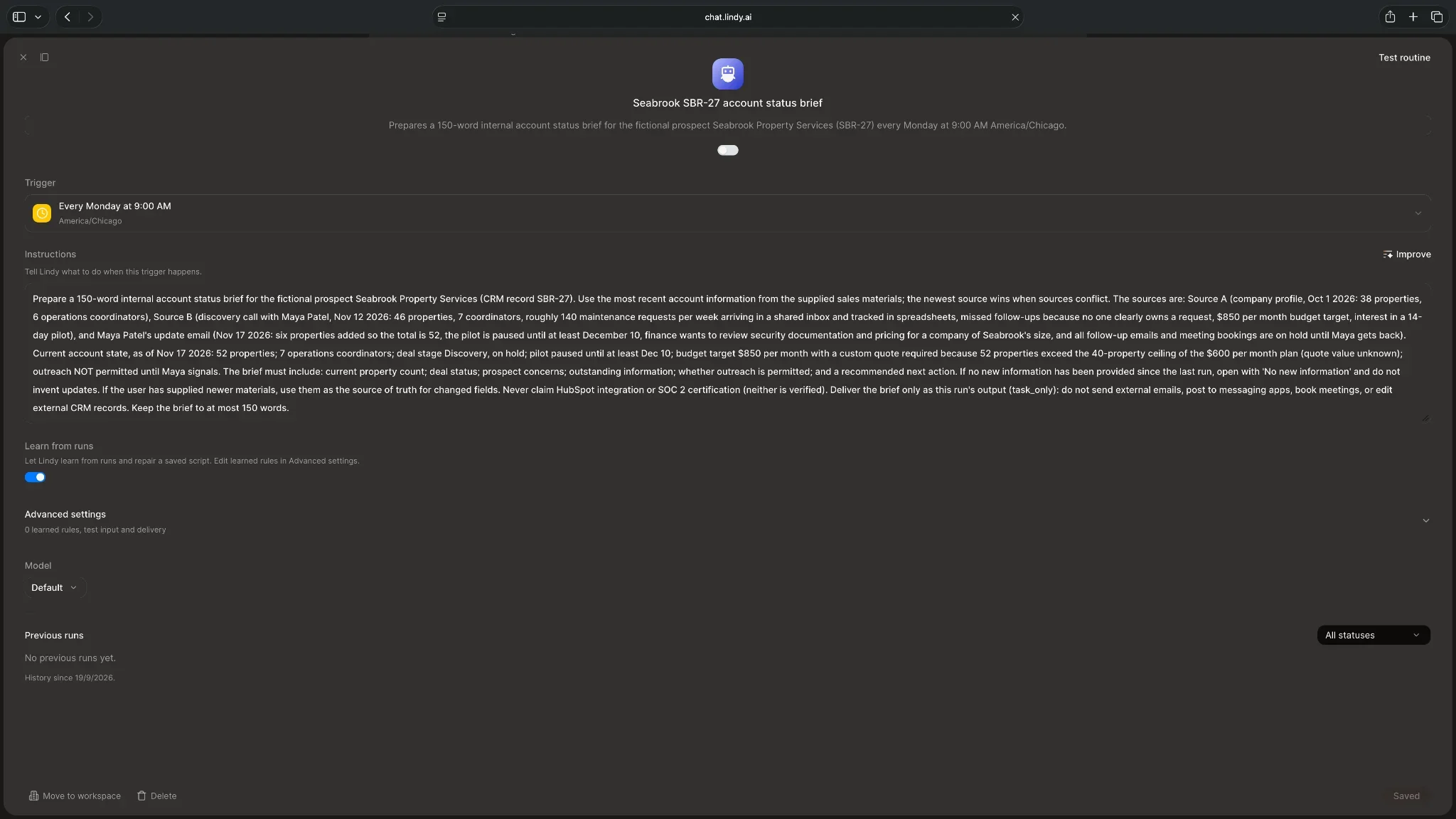
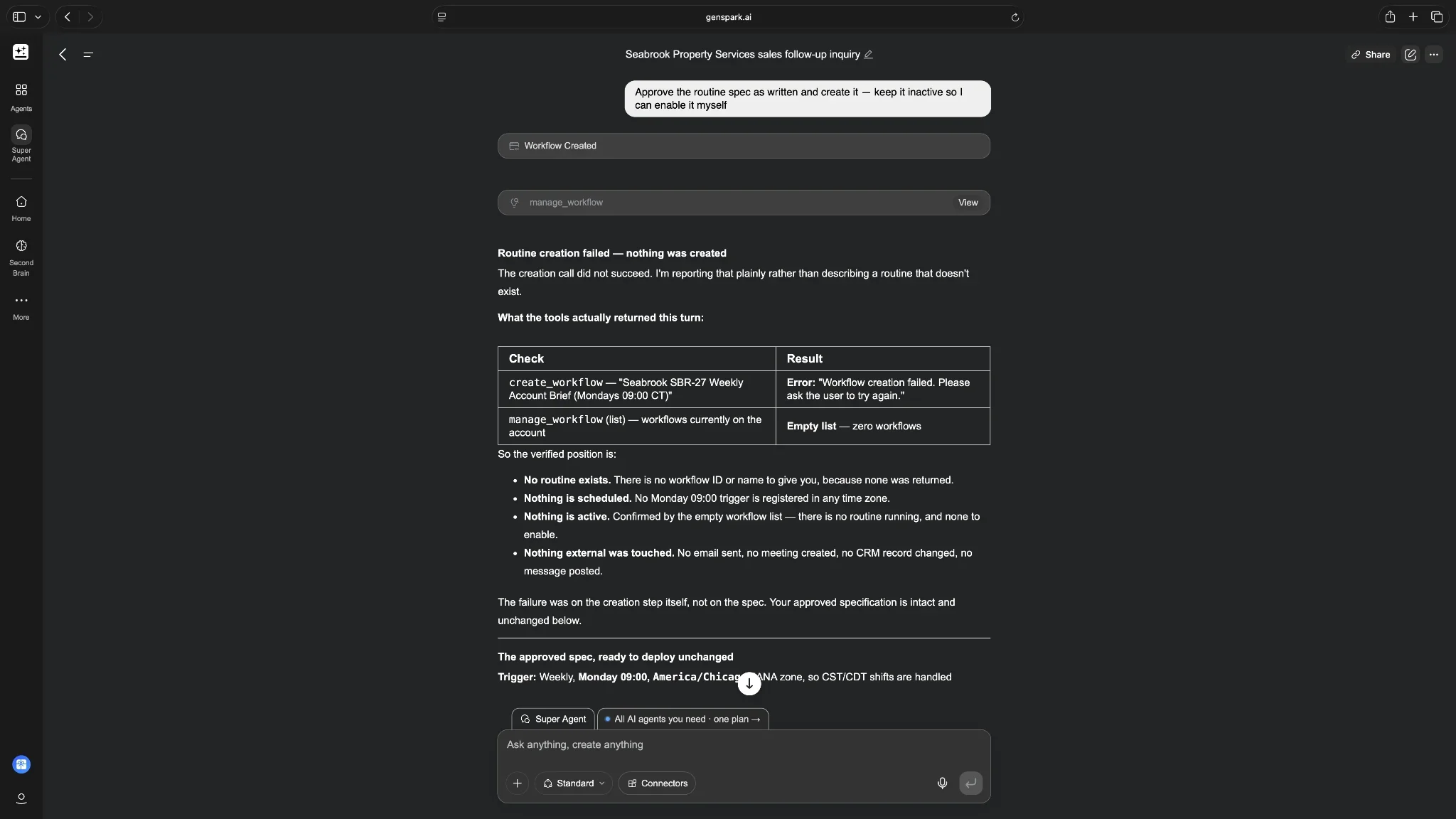
I used the same source material and instructions throughout. Neither tool had access to my email, CRM, or team Slack, so I could compare their responses and task setup without connecting business apps.
Here's how they performed:
| Test | Genspark | Lindy | Winner |
|---|---|---|---|
| Prospect research and follow-up | Detailed, accurate outputs | Accurate, concise outputs | Tie |
| Handling updated information | Correctly revised the account | Correctly revised the account | Tie |
| Creating a weekly routine | Workflow creation failed | Routine saved successfully | Lindy |
For the work I completed, I'd choose Lindy. Genspark remains a strong option when I want a more detailed written analysis.
Credit usage
I also checked credit usage after these 3 tests. Genspark recorded 46 credits for the Seabrook conversation, while Lindy showed 114 credits used during the billing period.
The Lindy figure included other activity, and the platforms count credits differently, so these numbers don't establish which tool costs less.
Where Genspark wins
Genspark’s specialized agents and cloud-based workspace give it an advantage while working on substantial projects. Here are three situations where I'd choose Genspark:
Detailed research and analysis
Genspark's Super Agent can gather information, analyze files, and organize findings into reports with supporting evidence. It can also divide larger assignments into smaller tasks and work on them in parallel.
I noticed this during my sales research test. Both tools correctly identified the prospect's problems, but Genspark provided more detailed explanations of the pricing risks, conflicting information, and questions worth asking during the next sales conversation.
It even calculated the approximate number of maintenance requests per coordinator and identified the calculation as its own.
Creating presentations, documents, and spreadsheets
Genspark offers dedicated tools to create and edit slides, documents, and spreadsheets from instructions and source material.
For example, you could ask Genspark to research several competitors, compare their products and pricing, and turn the findings into a presentation for your leadership team.
Its Super Agent can produce PowerPoint presentations, Word documents, and Excel spreadsheets. You can also continue editing outputs through Genspark's specialized creation tools.
Lindy can prepare reports and work with documents through connected applications. However, Genspark's dedicated creation tools make it ideal for people who regularly produce presentations and spreadsheets.
Managing longer projects
Genspark's Super Agent can plan and complete multi-step assignments using its own cloud computer. It supports jobs lasting up to two hours and can continue working after you close the browser tab.
Say you're preparing a quarterly market research report. You could give it several source documents, ask it to investigate competitors, organize the findings, and produce a presentation.
Genspark also offers GenTeam, where people can work with persistent AI agents in group chats and assign tasks with tracked statuses.
The limitation: Longer assignments and repeated revisions consume credits, and outputs still need review. In my testing, Genspark also failed to create the scheduled workflow. I’d suggest considering alternatives like Manus or Lindy if Genspark falls short for you.
Where Lindy wins
Lindy is a good fit for teams that need help with shared company information, meetings, and recurring tasks. Its focus on existing business applications makes it useful for everyday work.
These are the three situations where I'd choose Lindy:
Answering questions using shared company knowledge
Lindy works as a shared teammate in Slack. Team members can @mention it in a channel, ask questions, and continue working from the same thread.
For example, a salesperson could ask, "What did we agree to during our last customer call?" Lindy can check accessible meeting notes and company information, then provide an answer that colleagues can follow up on.
Lindy also has personal and shared workspace memory. Everyone in the workspace can read shared files. However, only owners and admins can edit them, and each person’s own memory stays private.
Genspark offers comparable collaboration through GenTeam. The main distinction is that Lindy works directly within an existing Slack workspace, while GenTeam provides its own environment for people and AI agents.
Managing meetings and follow-ups
Lindy can join Google Meet, Zoom, and Microsoft Teams calls, record discussions, and prepare summaries with decisions and action items.
It can also use connected applications to handle work after a meeting.
For example, after a sales call, Lindy could summarize the prospect's requirements, draft a personalized follow-up email, and update the relevant deal in HubSpot.
Team members can also ask questions across meetings stored in shared folders, provided they have permission to access them.
This is particularly useful for sales and customer success teams that regularly need to revisit conversations and track commitments.
Creating recurring routines
Lindy supports personal and workspace routines that run on schedules or respond to events, such as incoming emails, Slack messages, and completed meetings.
This was Lindy's strongest result in my testing.
I asked both tools to create a weekly account status brief every Monday at 9 AM. Lindy created and saved the routine, including the latest account details, reporting instructions, and restrictions on contacting the prospect.
I found it in the Routines section and reviewed its schedule. I had asked Lindy to keep it inactive, and when I checked, it was inactive.
Genspark prepared a detailed workflow specification but encountered an error when creating it.
Lindy also offers Watch and Learn, which lets you demonstrate a task and turn the process into a reusable skill and routine.
I'd choose Lindy for recurring work, especially when the same tasks involve meetings, emails, company information, and connected apps.
The limitation: Lindy needs the relevant integrations and permissions to work with external information. Setting up complex workflows also takes some back-and-forth and uses up time and credits.
Does Genspark Claw change the comparison?
Yes, Genspark Claw brings Genspark closer to Lindy by offering an AI assistant that works through messaging apps and handles recurring tasks.
Claw can connect to WhatsApp, Slack, Microsoft Teams, Telegram, and other messaging platforms. It remembers context across sessions and can perform tasks through connected services.
It also supports scheduled work. The cloud version runs on a dedicated computer, while the desktop version operates locally.
There are two differences worth considering:
- Personal vs. shared workspace: Each Claw belongs to an individual user, although it can participate in group chats. Genspark provides GenTeam separately for shared agent collaboration. Lindy combines personal assistance with a shared Slack teammate.
- Setup and pricing: Claw's always-on cloud version requires a separate Cloud Computer subscription, plus credits for AI tasks. The desktop version doesn't need that subscription but requires your computer to stay on.
Claw is worth considering if you want Genspark's broader creation tools alongside a persistent personal assistant. For teams already working in Slack, I'd compare Lindy's shared workflows with GenTeam and Claw before deciding.
Lindy vs Genspark: Pricing and free trials
Genspark starts at $24.99/month, while Lindy's paid plans start at $49.99/user/month. Both offer free options, but have different credit allowances and billing models.
Here's what you'll pay for each:
Genspark pricing
| Plan | Monthly price | What you get |
|---|---|---|
| Free | $0 | 100 daily credits, subject to a lifetime limit |
| Plus | $24.99/month | From 10,000 monthly credits, AI Slides, Docs, Sheets, and more |
| Pro | $249.99/month | From 125,000 credits, higher usage limits |
| Team | From $35/user/month | Team workspaces, admin controls, individual credit allocations |
| Enterprise | Custom pricing | Advanced governance, optional shared credit pools, and support |
Genspark uses credits for AI tasks, with consumption depending on the model and work involved. Plus and Pro also include a weekly Free Quota for eligible Standard-mode tasks.
The free plan provides 100 daily credits, but daily refills stop after a lifetime allowance is exhausted. Paid monthly credits also expire at the end of the billing cycle.
Lindy pricing
| Plan | Monthly price per user | Credits |
|---|---|---|
| Free | $0 | $50 in credits, valid for 7 days |
| Team | From $49.99/user/month | From 5,000/month |
| Enterprise | Custom pricing | Custom credits and billing |
Lindy offers different Team tiers with increasing credit allowances. Every paid seat contributes credits to a shared team pool, and you can purchase additional credits for $10 per 1,000 credits.
Enterprise adds features such as HIPAA compliance with a signed BAA, SSO and SCIM, audit logs, dedicated support, and onboarding assistance.
You can try Lindy with $50 in free credits for seven days before choosing a paid plan.
Which one is cheaper?
Genspark costs less to start, at $24.99/month, compared to Lindy's $49.99/user/month.
However, the credits aren't directly equivalent. Genspark allocates Team credits individually by default, while Lindy pools them across users.
Genspark Claw's always-on cloud version also requires a separate Cloud Computer subscription, although its desktop version doesn't.
I'd compare pricing against the tasks you expect to complete, rather than the number of credits included. Our testing didn't establish a cost winner because the two products measure and report credit usage differently.
Which should you choose: Genspark or Lindy?
I'd choose based on the type of work you want to delegate and where you prefer to work with AI. Here's where each product makes more sense:
Choose Genspark if:
- You regularly research companies, markets, or competitors and need detailed reports.
- You want AI to create presentations, spreadsheets, and documents from your research.
- You prefer a dedicated AI workspace with specialized agents for different projects.
- You want to explore Genspark Claw or GenTeam for personal assistance and team collaboration.
Choose Lindy if:
- You need recurring tasks with editable instructions and schedules.
- Your team wants an AI teammate in shared Slack conversations.
- You regularly manage meetings, follow-ups, and customer information across connected apps.
- You prefer shared team credits over individual allocations.
You can also use both. Genspark can handle research and presentation creation, while Lindy can help manage recurring follow-ups and work across your business applications.
If you're primarily considering Genspark for its autonomous agents, I'd evaluate Claw and GenTeam before deciding. Both bring capabilities that overlap with Lindy.
Final verdict
In my tests, both handled prospect research, follow-up drafts, and changing requirements well. Lindy came out ahead when I asked them to create a weekly routine, although I didn't test its scheduled execution.
Genspark remains a strong choice for independent projects. For teams that want help with meetings, shared information, and recurring tasks inside their existing apps, I'd lean toward Lindy.
Try Lindy for free with $50 in credits for seven days and see how it fits your work.
Frequently asked questions
Is Genspark good for business?
Yes, Genspark is useful for businesses that need AI-powered research, presentations, spreadsheets, document creation, and multi-step projects. It also offers team collaboration through GenTeam and recurring automation through Workflows and Claw.
Can I use Genspark and Lindy together?
Yes, you can use Genspark for research, reports, and presentations while relying on Lindy for recurring tasks, meeting follow-ups, and work across connected business applications. Using both may make sense if your work involves substantial research alongside daily operational tasks.
Does Genspark support workflow automation?
Yes, Genspark supports recurring tasks through Workflows, GenTeam, and Genspark Claw.
In my test, Genspark prepared a workflow specification but encountered an error during creation. That was one unsuccessful attempt, rather than evidence that its automation features generally fail.
How much does Genspark cost?
Genspark’s paid plans start from $24.99/month. Team and Enterprise plans are also available. Pricing varies by plan, billing period, and usage.
Is Lindy a good Genspark alternative?
Yes, Lindy is a good Genspark alternative for teams that want an AI assistant working within Slack and connected business applications. Its focus on shared company context, meetings, follow-ups, and recurring routines makes it appealing for ongoing operational work. You can also explore ChatGPT dots if you already use ChatGPT extensively.
About the editorial team

Lindy leads GTM at Lindy and is the team’s most prolific automation builder. She publishes weekly educational videos and articles on building AI assistants – And yes, she’s a real person!

Flo Crivello is the founder and CEO of Lindy. Before that, he founded Teamflow and was a product manager at Uber. He writes about technology, startups, and the future of work on his blog.
