


What is AI Customer Journey? Stages, Benefits & How to Set Up
Everett walked through building an AI-driven customer journey, from predictive advertising and lead scoring to churn prediction, weighing personalization, automation, and conversion impact.


The customer journey isn’t a straight line anymore. People switch channels, compare options, and make decisions in unpredictable ways. Traditional marketing methods can’t keep up, but AI can.
In this guide, I’ll break down how AI fits into each stage and helps businesses grow faster while delivering better customer experiences.
What Is the AI Customer Journey?
The AI customer journey is the application of artificial intelligence to understand, guide, and optimize each phase of a customer’s interaction with your business. This includes awareness, consideration, decision, retention, and advocacy. AI helps by:
- Predicting customer behavior
- Automating communication
- Personalizing content and offers
- Resolving issues instantly
- Guiding users toward high-conversion actions
It’s not just about automation, it’s about delivering smarter, faster, and more relevant experiences.
How AI Helps in the Customer Journey
Traditional customer journeys rely on guesswork and historical segmentation. AI uses real-time data and predictive models to:
- Identify what a customer needs before they ask
- Trigger the right message at the right time
- Adapt based on behavior, not just demographics
- Scale personalized experiences for thousands of users
This turns your funnel into a responsive system that guides every user more effectively.
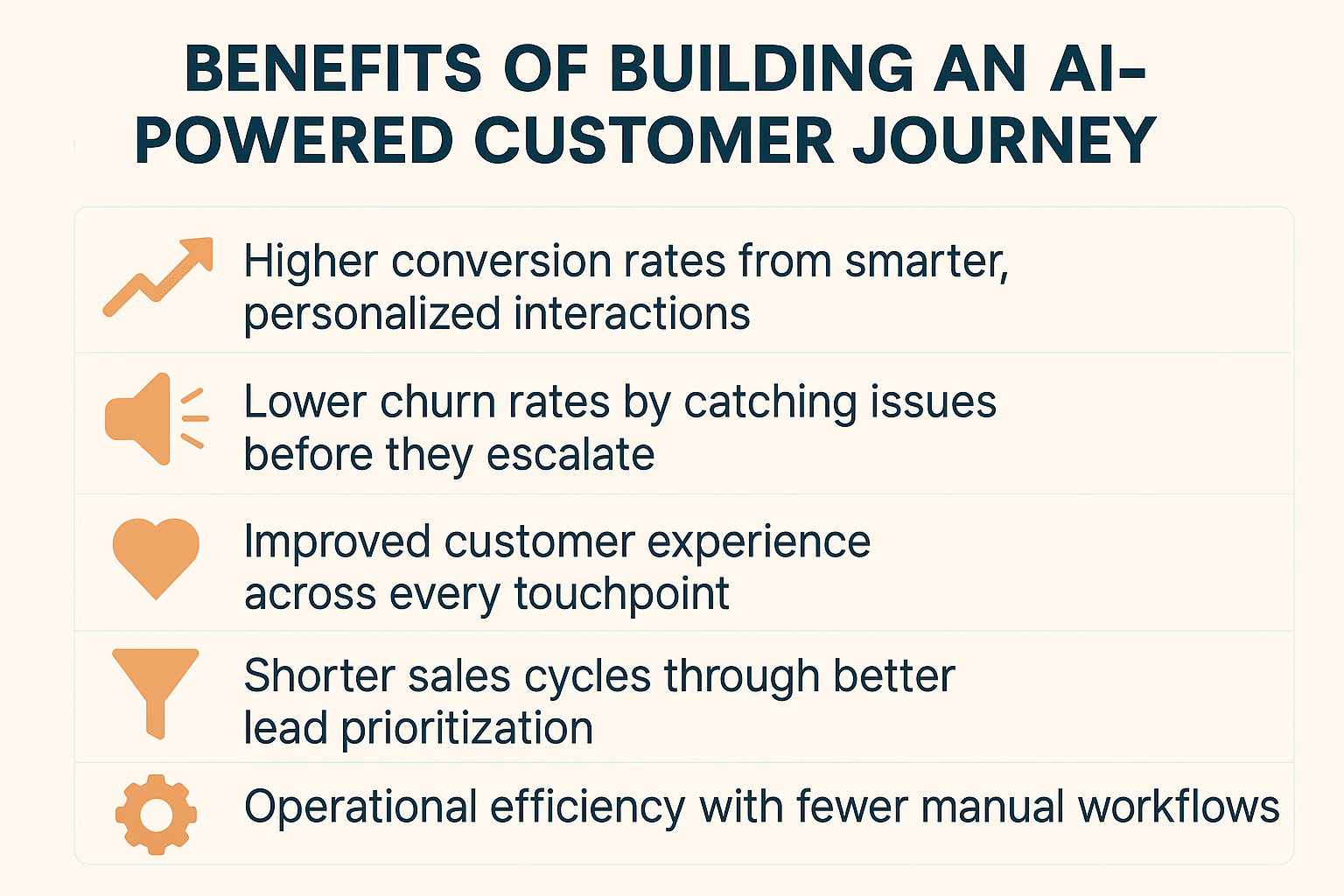
How AI Powers Each Stage of the Customer Journey
AI doesn’t just automate tasks; it actively shapes how customers discover, understand, buy from, and stay loyal to your brand.
Let’s walk through each stage of the customer journey and see exactly how AI fits in, what tools you can use, and how it changes the game.
1. Awareness: Attracting the Right Audience from Day One
In the awareness stage, the goal is to get in front of people who might need your product, but don’t know you exist yet. This is where AI gives you a serious edge by replacing guesswork with precision.
Here’s how it helps:
- Predictive advertising tools (like Google Ads’ Performance Max or Meta’s Advantage+ campaigns) use machine learning to identify people who behave like your highest-converting customers. Instead of targeting based on generic interests, you’re reaching audiences that already show buying signals elsewhere.
- SEO content generation tools like Jasper, MarketMuse, and SurferSEO help you write content that’s optimized to rank. But more importantly, AI helps you uncover exactly what questions people are asking, so your content meets intent, not just keywords.
- Audience intelligence platforms like SparkToro go deeper. They analyze where your ideal buyers spend time online, what podcasts they listen to, which influencers they follow, and what topics they care about, so you can show up in the right places with the right message.
For example, a B2B SaaS company uses AI to scan its CRM and discover that healthcare startups convert 3x more than other industries.
It then runs predictive ads only targeting decision-makers in health tech, slashing ad spend and doubling qualified leads.
2. Consideration: Guiding and Educating Visitors
Once you’ve got attention, the next step is helping people understand why your product is right for them. This stage is all about guidance, relevance, and engagement, and AI makes all of that feel personal.
AI shows up in a few powerful ways:
- AI chatbots like Lindy and Intercom engage visitors in real time. Instead of waiting for a contact form submission, they ask smart questions, qualify leads, suggest content, and route them to the right page or person, all without any human delay.
- Recommendation engines personalize the experience based on behavior. If someone reads a product comparison page, AI might suggest a case study next. If they scroll through pricing but don’t act, it might highlight a feature that justifies the cost.
- Behavioral intent tracking watches signals like time on page, exit intent, or repeated visits to specific content. Based on this, AI can trigger follow-ups, like a targeted email or chatbot message, to keep the lead warm.
Imagine a visitor lands on your pricing page, scrolls halfway, and hesitates. Your AI chatbot notices the drop-off, jumps in with a message offering a relevant case study or a time-limited free trial.
That nudge could be what turns curiosity into conversion.
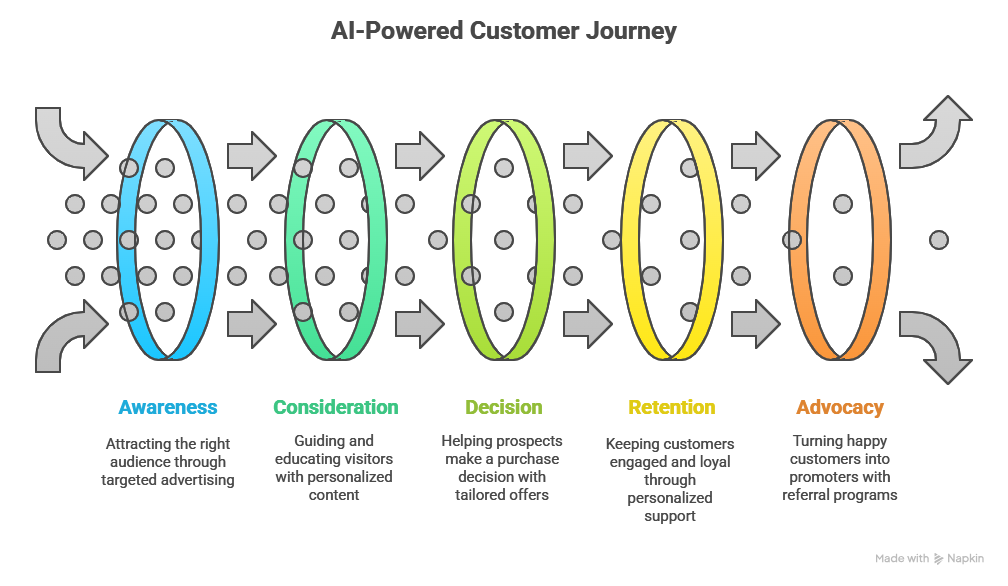
3. Decision: Helping Them Say Yes
Now the prospect is close to making a decision. At this point, even small delays or friction can lead to drop-offs. AI helps you remove those blocks and give your sales team everything they need to close the deal faster.
Here’s where AI steps in:
- Lead scoring models use AI to automatically rank leads based on criteria like company size, past engagement, job role, or behavior patterns. This tells your sales team who to follow up with now and who to nurture later.
- Personalized email automation tools like Lindy craft sales outreach messages that feel written just for the recipient. They pull in social data, CRM insights, and previous interactions to build context-aware messages that convert better.
- Predictive forecasting in CRMs (like HubSpot or Salesforce) helps you see which deals are most likely to close and when, so you can focus on the right opportunities and avoid wasting time on stalled prospects.
For instance, a sales rep sees that a prospect opened the pricing PDF three times in the last 48 hours.AI nudges the rep to send a tailored message and even suggests a subject line based on what worked with similar deals.
The deal closes 4 days later.
4. Retention: Keeping Your Customers Engaged and Loyal
Once someone becomes a customer, the job isn’t done. AI helps you make sure they’re successful, engaged, and getting value, so they stick around longer.
AI helps in three key ways:
- Customer support automation tools like Lindy and Zendesk answer questions instantly, escalate complex issues to human reps, and learn over time to get even better.
- Churn prediction models watch for early signs of disengagement, like fewer logins, low feature usage, or delayed replies. AI flags these accounts and suggests actions you can take to re-engage them before they cancel.
- Personalized onboarding ensures that every new customer gets an experience tailored to their goals. AI adapts in-app walkthroughs, sends targeted emails, or recommends next steps based on what features the user has explored so far.
Let’s say a user signs up but doesn’t activate a key feature within a week. AI sends them a tailored video walkthrough and notifies the customer success team to offer help. The user activates the feature and sticks with the product long-term.
5. Advocacy: Turning Happy Customers Into Promoters
Your best customers aren’t just repeat buyers, they’re your biggest advocates. AI helps identify and activate them at just the right time.
Here’s how AI makes it happen:
- Sentiment analysis tools scan reviews, support chats, and surveys to spot your happiest users. This helps you find promoters without having to dig manually through feedback.
- Referral automation means you don’t need to guess when to ask for a referral. AI identifies moments of peak satisfaction (like right after a successful support resolution or onboarding) and triggers the invite then.
- Testimonial generation tools automatically pull out great quotes from user feedback, structure them for marketing use, and even suggest where to use them, on your homepage, case studies, or social ads.
For example, a user leaves glowing feedback in a support chat. AI extracts the best line, formats it for the website, and notifies the marketing team to review and publish.
At the same time, the customer gets invited to join the referral program.
{{templates}}
How to Build an AI Customer Journey with Lindy (Step-by-Step)
If you're serious about building a smart, automated customer journey without needing a team of developers, Lindy makes it possible.
You can create AI agents for each stage of the journey like awareness, consideration, decision, retention, and advocacy, all from a single interface.
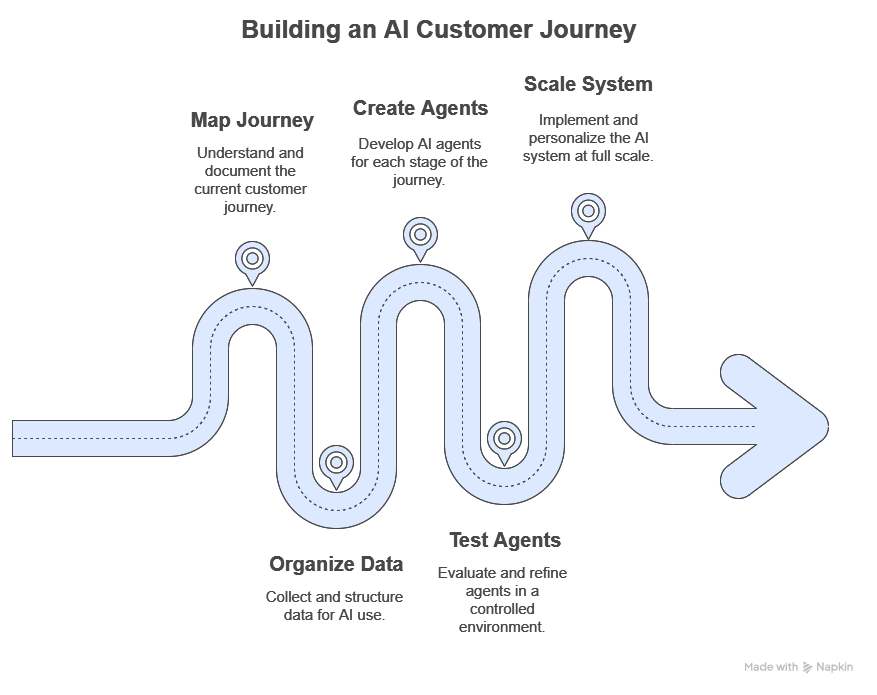
Here’s exactly how to do it with Lindy:
Step 1: Map Out Your Existing Customer Journey
Before you set up anything in Lindy, understand what your customer journey looks like right now.
- List key stages: Where do people first hear about you? When do they convert? What support do they need post-sale?
- Spot friction points: Are you getting drop-offs on the pricing page? Are you taking too long to respond to leads?
- Decide where automation could help: For example, do you need an AI agent to answer FAQs, qualify leads, or re-engage inactive users?
Use Lindy's CRM integration to centralize this info and turn it into actionable triggers.
Step 2: Organize Your Data So Lindy Can Use It
Lindy works best when it has clean, useful data from across your tools.
- Connect your sources: Plug in your CRM (like HubSpot or Salesforce), support inbox, website forms, or calendar.
- Tag important data points: Mark key fields like lead source, product interest, last contact, or user actions.
- Feed in examples: Share sample support conversations, successful cold emails, or onboarding flows. Lindy learns fast when you show, not just tell.
Lindy pulls from your tools using integrations or APIs. You don’t need to set up complex rules, just connect and go.
Step 3: Create Lindy Agents for Each Stage of the Journey
Now it’s time to build your AI customer journey using Lindy agents. Each agent handles one task, but together, they cover the full lifecycle.
1. Awareness
Create a Lead Capture Agent that pops up when someone lands on your homepage or blog.
- Ask qualifying questions
- Offer a lead magnet or free guide
- Push leads to your CRM with tags like “High intent” or “Needs nurturing”
2. Consideration
Build a Website Chat Agent that helps visitors navigate your features or compare pricing plans.
- Handle FAQs automatically
- Suggest blog posts, demos, or case studies based on their questions
- Escalate to human reps when needed
3. Decision
Launch a Sales Assistant Agent that watches for hot signals like repeat visits or form abandonment.
- Send personalized follow-ups based on behavior
- Recommend a 1:1 call or time-limited offer
- Alert your sales rep in Slack or email
4. Retention
Set up a Customer Success Agent that checks in after onboarding or monitors product usage.
- Share helpful tutorials if a feature hasn’t been used
- Answer support questions instantly via chat or email
- Identify potential churn and flag your success team
5. Advocacy
Create a Loyalty & Referral Agent that runs behind the scenes and activates promoters.
- Monitor NPS responses, chats, or reviews
- Invite happy users to leave testimonials or join referral programs
- Auto-publish approved testimonials on your site or landing pages
You can build all of these inside Lindy, using natural language prompts. No coding needed. Just tell Lindy what you want each agent to do.
Step 4: Test Each Agent in a Controlled Workflow
Don’t launch everything at once. Test one agent, measure results, and improve.
- Use Lindy’s built-in playground to simulate conversations
- Launch a single agent to a small segment (e.g., leads from LinkedIn)
- Check analytics: Which messages worked? Where did users drop off?
Refine the agent’s behavior with examples, fallback options, or adjusted prompts. Lindy learns quickly and gets smarter over time.
Step 5: Scale the System and Personalize in Real-Time
Once your agents are working well, it’s time to go full scale.
- Trigger different agents for different audiences (e.g., trial users vs. paid customers)
- Connect more tools, like email, Slack, Intercom, or your product analytics
- Use Lindy’s logic conditions and workflows to automate smart decisions (e.g., “If lead viewed pricing and hasn’t booked demo → send follow-up from sales agent.”)
Lindy gives you a visual overview of agent activity and lets you tweak workflows on the fly. You can personalize messages, change logic paths, or launch new agents anytime.
Final Tip: Think in Agents, Not Automations
Instead of building rigid, rule-based automation flows, you’re building smart AI agents that adapt, learn, and respond to your customers in real-time. That’s the power of Lindy.
- Start with the part of your journey that’s leaking the most revenue
- Build one agent, get results, then add more
- Keep improving based on feedback and real behavior
{{cta}}
Ready to Build a Smarter Customer Journey?
If your customer journey still relies on static funnels and manual workflows, you're missing out on what AI can really do.
With Lindy, you don’t just automate a few tasks; you build intelligent agents that understand context, take action, and improve the customer experience at every stage.
Here’s what you can do with Lindy today:
- Capture and qualify leads automatically as soon as they land on your site
- Guide prospects through consideration with AI-powered recommendations and live assistance
- Personalize follow-ups and close deals faster using real-time buyer signals
- Onboard and support customers 24/7 with agents trained on your product and processes
- Identify happy users and turn them into advocates without manual outreach
You don’t need a dev team. You don’t need to build everything at once. Just start with one agent, launch it, and expand as you grow.
Frequently Asked Questions
1. What does the AI customer journey mean?
The AI customer journey means using artificial intelligence to improve every stage of the customer lifecycle. AI helps you understand behavior, automate actions, and deliver personalized experiences. It lets you guide each user through awareness, consideration, purchase, retention, and advocacy with real-time data and intelligent decision-making.
2. Do I need a big team to build an AI customer journey?
You can build an AI customer journey with a small team. Tools like Lindy handle most of the setup, automation, and logic. You just need a clear goal, connected data sources, and a few test cases to start. Once live, the system improves itself without requiring constant manual work.
3. Is the AI customer journey only for ecommerce?
No. The AI customer journey applies to SaaS, B2B services, education, healthcare, and offline businesses. Any company with leads, customers, and support touchpoints can use AI to improve targeting, automate engagement, personalize communication, and drive loyalty. It works across industries, not just online stores.
4. What’s the first step to using AI in the customer journey?
Begin by mapping your current customer journey and identifying areas with drop-offs or inefficiencies. Focus on one key stage like lead qualification or onboarding. Choose an AI platform like Lindy to automate that part, connect your tools, and test the agent’s performance before expanding to other stages.
5. How does Lindy help with the AI customer journey?
Lindy helps you build no-code AI agents for each stage of the customer journey. You can set up lead capture bots, sales assistants, onboarding guides, and loyalty agents. These agents connect with your CRM, website, and email tools to automate and personalize user experiences across the entire funnel.
6. How do I personalize experiences with AI?
Use AI tools that track customer behavior, segment users dynamically, and respond with context-aware content. These systems analyze clicks, visits, timing, and past actions to deliver the right message or trigger at the right moment. This helps every user feel like the experience was designed just for them.
7. Can AI reduce churn?
Yes. AI monitors behavior signals like feature drop-off, slow response time, or reduced engagement. When it detects risk, it can trigger emails, offer help, or notify your team. This early action helps you solve issues before customers cancel, improving retention and customer satisfaction over time.
8. How to generate insights about AI-driven customer journeys?
Use analytics tools within your AI platform to track agent performance, conversation paths, drop-offs, and conversion events. Look at heatmaps, engagement flows, and churn triggers. Combine those metrics with CRM and support data to uncover patterns and improve each stage of the journey through better decisions.











Blog
Related Articles
.png)

.png)

%20(1).png)
.avif)
%20(1).png)
.png)
The AI assistant that runs your work life
Lindy saves you two hours a day by proactively managing your inbox, meetings, and calendar, so you can focus on what actually matters.
