

Claude Cowork and Lindy promise to take work off your plate, from analyzing documents to handling recurring tasks. But Cowork focuses on completing individual projects, while Lindy also works as a shared AI teammate.
I wanted to see how they compared when given the same assignments. I tested both tools on three common tasks and gave them identical prompts. I also compared their pricing, integrations, memory, and team collaboration features.
My Claude Cowork vs Lindy testing showed that each one suits a different kind of user. Here's what I found in this comparison, and which one I'd recommend for different types of work.
Claude Cowork vs Lindy: TL;DR
I'd choose Claude Cowork for individual projects and Lindy for recurring work and team collaboration. Both are capable AI coworkers, but they offer different ways to delegate and manage work.
Here's how I'd choose:
- Pick Claude Cowork for individual work: It's particularly useful for research, analyzing documents, organizing files, and preparing detailed reports. You can give it an assignment, review its progress, and return to the finished output.
- Pick Lindy for ongoing team workflows: Lindy works in Slack channels, remembers shared company context, and handles recurring tasks. It makes sense if your team regularly needs help with meetings, follow-ups, internal questions, and work across connected apps.
- Use both if your needs overlap: Cowork can handle document-heavy projects, while Lindy can help your team manage recurring work and shared information.
So both tools can work in Slack with shared context. Lindy puts personal help, shared memory, meetings, and routines in one assistant, while Claude splits them across Cowork and Claude Tag.
What is Claude Cowork?
Claude Cowork is Anthropic's AI agent for completing multi-step tasks across files, browsers, and connected apps. You describe what you need, and Claude plans the work, uses the available tools, and produces outputs you can review.
For example, you can ask Cowork to analyze customer feedback from several PDFs, prepare a report, create a spreadsheet, or organize files on your computer.
Cowork also supports scheduled tasks, project memory, and cloud execution. Tasks can continue after you close your laptop, but accessing local files and desktop applications requires the desktop app.
Anthropic is gradually combining Claude Chat and Cowork into one Claude experience, so the interface may differ depending on your plan and rollout status.
For individual research and document-heavy work, Cowork offers a practical way to delegate an assignment and receive a finished deliverable.
Latest models and updates
Anthropic released Claude Fable 5.2 on November 9, 2026, its latest model for demanding reasoning and long-running tasks. The lineup also includes Opus 5.5, Sonnet 5.5, and Haiku 5.5.
Fable 5.2 is available in Cowork on eligible paid plans, although Pro and Team Standard users need usage credits to access it. For most tasks, Anthropic recommends starting with Opus 5.5.
Another major update arrived in September 2026, when Anthropic began bringing Cowork's capabilities into regular Claude conversations. Where the update is available, you can now hand Claude a longer assignment without switching modes.
What is Lindy?
Lindy is an AI assistant that works privately with individuals and as a shared teammate for teams. You can ask it to complete tasks through the web app, Slack, or messages on your phone.
In Slack, team members can @mention Lindy to ask questions, research information, or work with connected company tools. Lindy can use shared meetings, files, and workspace context to answer questions and help people continue work from the same conversation.
It also handles personal tasks such as meeting preparation, inbox management, follow-ups, and recurring routines.
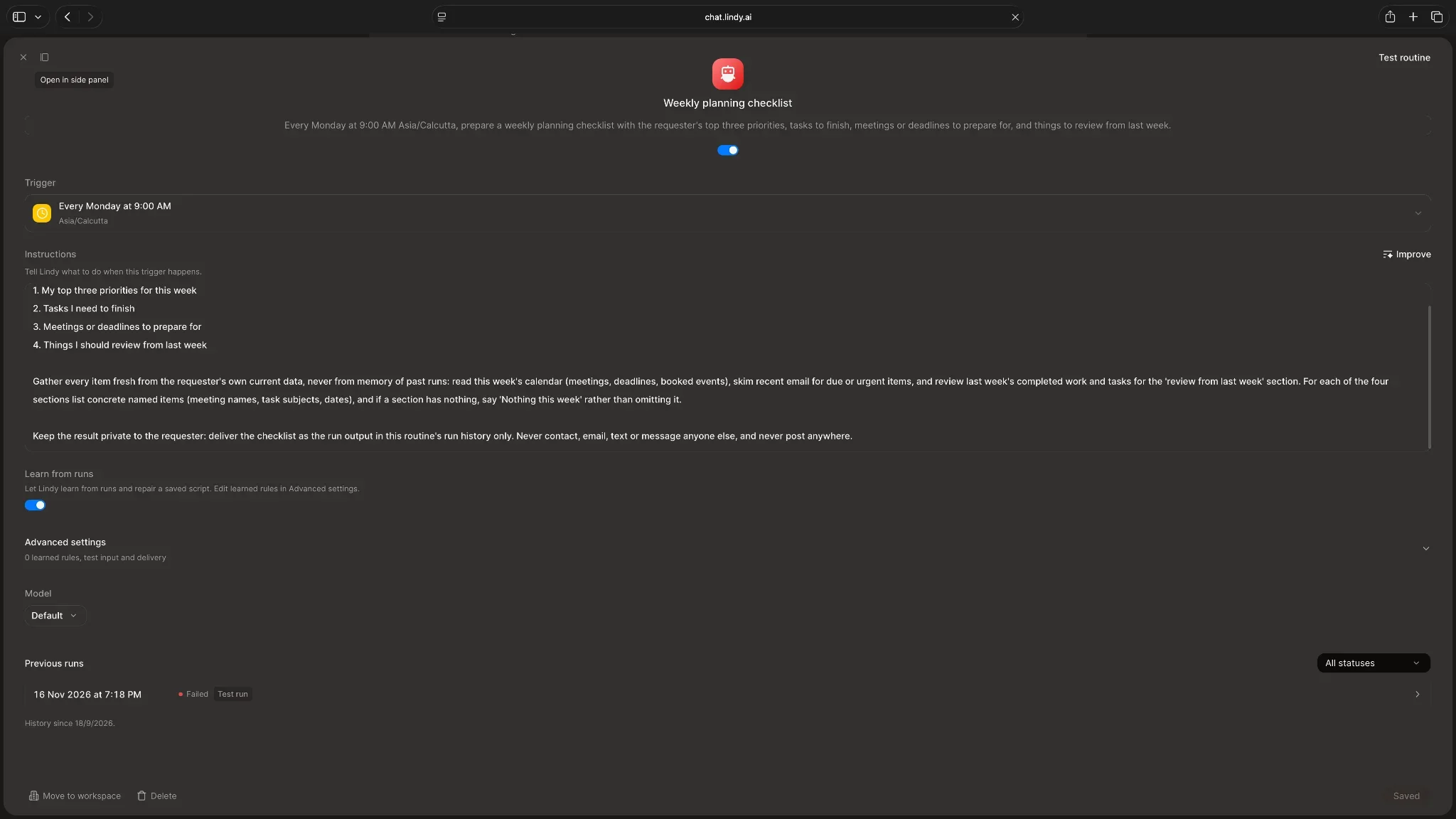
For example, you could ask Lindy to prepare a weekly work checklist, review available task history, and run the same process every Monday. You can inspect and edit the routine's schedule, instructions, and settings.
Lindy makes sense for teams that want an AI coworker available throughout their daily work, particularly when tasks involve shared information and repeated follow-ups.
Latest models and updates
Lindy supports multiple AI models, including Claude Opus 5.5 and Sonnet 5.5, which were added in September 2026. Paid users can choose a model or use the automatic selection options.
Recent updates have also expanded what Lindy can do. In October 2026, Lindy introduced Watch and Learn (now called Teach a task), which lets you demonstrate a task for Lindy to repeat later.
It also launched Lindy Apps, allowing teams to create internal tools such as approval boards and trackers through natural-language instructions. These apps can connect to existing business software, with webhook support added later that month.







Lindy vs Claude Cowork: At a glance
Both tools can research information, use connected apps, and run scheduled tasks. The differences become clearer when we compare where they work, how they remember information, and how teammates access their output.
Here’s a quick side-by-side comparison:
| Feature | Claude Cowork | Lindy |
|---|---|---|
| What it is | AI agent for multi-step knowledge work | Personal AI assistant and shared teammate |
| Best for | Research, files, documents, and projects | Team questions, meetings, and recurring work |
| Where it runs | Desktop, web, mobile, Chrome | Slack, web, iMessage, SMS |
| Team collaboration | Shared projects; Claude Tag for Slack | Shared Slack channels and DMs |
| Memory | Account and project memory | Personal and shared workspace memory |
| Integrations | Connectors, plugins, MCP | 3,000+ integrations, MCP |
| Scheduling | Cloud-based scheduled tasks | Personal and workspace routines |
| Approvals | Manual and automatic permission modes | Approval controls for consequential actions |
| Starting paid price | $20/month | $49.99/user/month |
| Trial | No separate Cowork trial listed | $50 in credits for 7 days |
The most useful distinction is how you expect to work with the AI. Cowork is well suited to handing over substantial assignments, while Lindy is designed to participate in ongoing personal and team workflows.
How I tested Claude Cowork and Lindy
I gave Claude Cowork and Lindy three assignments to see how they handled document analysis and recurring work.
First, I uploaded a PDF containing feedback from five fictional SaaS customers. I asked both tools to identify the most common complaints, name the customers who raised them, and recommend improvements.
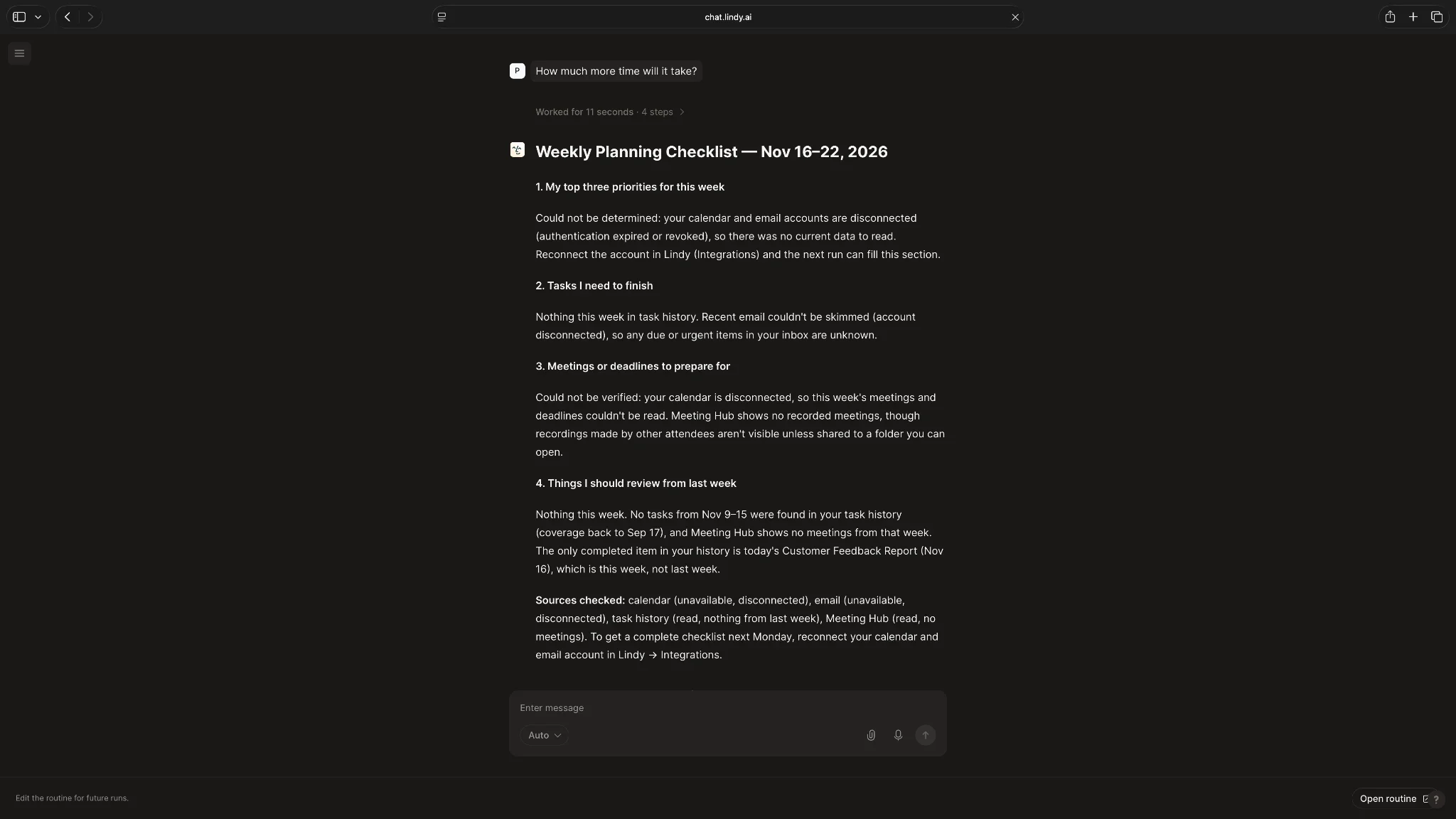
Then I asked them to create a recurring weekly planning checklist covering priorities, unfinished tasks, upcoming meetings, and work to review from the previous week.
The third test was to run both scheduled tasks manually to check their outputs.
I used Claude Cowork with Opus 5.5 (Medium effort) and Lindy with its Auto model setting. Both received identical prompts. Neither had connected business apps, so I could compare their analysis, task setup, and handling of unavailable information.
Here's how they performed:
| Test | Claude Cowork | Lindy | Winner |
|---|---|---|---|
| Customer feedback analysis | Accurate, detailed report with supporting excerpts | Accurate, concise report with practical recommendations | Claude Cowork |
| Creating a weekly routine | Guided setup with scheduling and permission controls | Direct setup with more visible customization options | Lindy |
| Running the weekly routine | Finished in ~3 minutes; returned a blank template | Finished in ~5 minutes; checked available task history and explained missing data | Tie |
Both tools created and executed the recurring tasks, although neither could retrieve information from disconnected apps.
Lindy also let me queue another message while it was working and responded after completing the task. I couldn't do the same in my Cowork session.
My takeaway: I'd choose Lindy for daily routines, customizations, and shared context across tasks. Claude Cowork suits detailed document analysis and was slightly faster than Lindy.
Where Claude Cowork wins
Claude Cowork is particularly useful for research, working with files, and producing detailed deliverables. Its ability to handle long assignments and work directly with folders on your computer gives it an advantage in several situations.
Here are three tasks where I'd choose Cowork:
Document analysis and report preparation
Cowork can read information from multiple documents, identify patterns, and turn its findings into reports with supporting evidence.
This was also its strongest performance in my testing. I gave both tools the same five customer complaints and asked them to identify recurring issues. Both got the counts right, but Cowork provided better explanations, supporting excerpts, and more detailed recommendations.
I'd choose Cowork when the quality and depth of the final report matter, especially for research or stakeholder presentations.
Local file work and organization
Cowork can access folders you authorize on your computer, read their contents, and make changes within those folders.
For example, you could give it a folder containing invoices, contracts, and receipts. Ask it to sort the files by type, rename them consistently, and prepare an index of what's available.
It can also create spreadsheets with formulas, formatted documents, and presentations from the information you provide.
Lindy can process documents through connected tools, but Cowork's direct access to local folders makes it particularly useful for desktop-based work.
Complex, multi-step projects
Cowork can divide larger assignments into smaller tasks, coordinate work across sub-agents, and continue working while you focus on something else.
Say you're preparing a competitor research report. You could ask it to review several websites, compare product capabilities, organize the findings, and prepare a presentation.
Cowork also supports scheduled cloud tasks, so you can run recurring research without keeping your computer open.
The limitation: Complex assignments consume more of your Claude plan's usage allowance. You'll also need to review its work carefully, particularly when granting access to local files or websites.
Where Lindy wins
Lindy is a good fit for teams that regularly need help with shared information, meetings, and follow-ups. It also gives you more ways to set up and edit recurring routines, which stood out during my testing.
These are the three situations where I'd lean toward Lindy:
Answer questions using shared company knowledge
Lindy works as a shared teammate in Slack. Team members can @mention it in a channel, ask questions, and continue the conversation in the same thread.
For example, someone from sales could ask, "What did we promise this customer during our last meeting?" Lindy can check accessible meeting notes and shared company information, then provide an answer that colleagues can follow up on.
Its team memory is also inspectable and editable by workspace administrators.
Claude Tag offers similar Slack collaboration on eligible plans. I'd compare both options closely if Slack is your team's main workspace.
Meeting management and follow-ups
Lindy can join Google Meet, Zoom, and Microsoft Teams calls, record discussions, and prepare summaries with action items.
For example, after a customer meeting, you could ask Lindy to identify agreed next steps, prepare a follow-up email, and update the relevant CRM record using connected apps.
Team members can also ask questions across meetings in shared folders, provided they have access.
This is particularly useful for sales and customer success teams that regularly need to revisit conversations and track commitments.
Create and customize recurring routines
Lindy lets you create personal and workspace routines that run on a schedule or respond to events, such as incoming emails or completed meetings.
I found its routine editor more convenient during testing. After creating a weekly planning checklist, I could inspect the schedule, edit instructions, adjust settings, and review execution history.
Lindy also checked its available task history during the manual run, even though my calendar and email weren't connected.
For teams, workspace routines can post recurring updates into Slack, and administrators control their setup.
The limitation: Lindy needs the appropriate integrations and permissions to work with company data. Routines also consume credits, so frequent or complex tasks can increase usage costs.
Claude Cowork vs Lindy: Memory, integrations, and approvals
Claude Cowork and Lindy can remember information, work with connected apps, and ask for permission before taking certain actions. However, they manage these capabilities differently:
Memory and shared context
Claude Cowork uses account and project memory to retain context across tasks. Each project can have its own files, instructions, and memory. Team and Enterprise users can also share projects with colleagues and control who can view or edit them.
Lindy keeps personal and team memory in files you can inspect and edit. Personal memory stays private, while shared files are available to workspace members. Admins can edit team memory, and every saved change has version history.
I'd prefer Lindy's approach for managing shared company knowledge, particularly when several people need to review or correct the information an AI uses.
Integrations and connected apps
Claude Cowork connects to services such as Google Drive, Slack, and other business apps through connectors and MCP. It also supports browser interaction and local file access.
Lindy supports over 3,000 integrations, including Gmail, HubSpot, Slack, and Notion, along with MCP servers and API connections. You can keep connections private or share them with your workspace.
Both offer plenty of flexibility. I'd check whether your essential apps support the specific actions you need before choosing either.
Approvals and permissions
Claude Cowork offers Manual and Auto permission modes. Manual mode asks before actions requiring approval. Auto mode evaluates actions and can proceed without interrupting you, although organizational policies may require additional approval.
Lindy lets you configure guardrails for connected apps. In shared Slack threads, you can allow write actions, require approval, or block writes. Approval requests appear directly in the conversation.
One limitation: These integration guardrails apply to shared Slack threads, not private DMs, SMS, or Lindy's web app.
My takeaway: Both offer meaningful controls. Cowork gives you flexible permission modes and organization-level policies, while Lindy's shared Slack approvals are useful when teammates need to review proposed actions together.
Claude Cowork vs Claude Code vs Claude Tag vs Claude Duet
Anthropic offers several AI agents under the Claude name. They share some capabilities but serve different purposes. Here's how to tell them apart:
- Claude Cowork: Handles research, document creation, file management, and other multi-step assignments. It's designed for general knowledge work and doesn't require coding skills.
- Claude Code: Focuses on software development. Developers can use it to understand codebases, fix bugs, write tests, and make changes through a terminal, IDE, or web interface.
- Claude Tag: Brings Claude into Slack as a shared teammate. It can answer questions, use connected tools, and remember channel context. It's available in beta on Team and Enterprise plans.
- Claude Duet: A proactive personal assistant that checks connected apps, prepares morning briefs, and completes delegated tasks. It's currently a research preview available through a US waitlist for eligible Pro, Max, and Ultra subscribers.
For most individual research and document tasks, Cowork is the relevant option. If you're evaluating Claude for shared company workflows, Claude Tag deserves a closer look alongside Lindy.
Claude Cowork vs Lindy: Pricing and free trials
Claude Cowork starts at $20/month, while Lindy's paid plans start at $49.99/user/month. Both offer higher-priced options, but their usage limits work differently.
Here's what you'll pay for each:
Claude Cowork pricing
| Plan | Price (billed monthly) | What you get |
|---|---|---|
| Free | $0 | Claude chat; no Cowork task handoffs |
| Pro | $20/month | Cowork tasks, scheduling, projects, and more models |
| Max | $100/month | 5x Pro usage, priority access |
| Ultra | $200/month | 10x Pro usage, no 5-hour limit |
| Team | From $25/user/month | All the Claude features, with more usage than Pro |
| Enterprise | Sales-assisted custom pricing | Advanced controls, audit logs, and custom retention |
Claude applies usage limits based on your plan, model, and workload. Long research tasks and large files can consume your allowance faster. Eligible plans also support purchasing additional usage credits.
Lindy pricing
| Plan | Monthly price per user | Credits |
|---|---|---|
| Free | $0 | $50 in credits, valid for 7 days |
| Team | From $49.99/month | From 5,000/month |
| Enterprise | Custom pricing | Custom credits and billing |
Different Team tiers offer the same core plan, with increasing monthly credit allowances. You can also purchase additional credits for $10 per 1,000 credits.
Enterprise adds features such as HIPAA compliance with a signed BAA, SSO and SCIM, audit logs, shared usage with bonus credits, dedicated support, and onboarding assistance.
Lindy lets you test the product with $50 in free credits for seven days before choosing a paid plan.
Which one is cheaper?
Claude Cowork is cheaper to start at $20/month compared with Lindy's $49.99/user/month.
I'd compare the cost against your expected workload before deciding. Claude's usage limits and Lindy's credits aren't directly equivalent, so the lower subscription price doesn't necessarily mean you'll be able to offload more work.
Which should you choose: Claude Cowork or Lindy?
Choose Claude Cowork for document-heavy solo work and Lindy for recurring team work in Slack. Here's where each product makes more sense:
Choose Claude Cowork if:
- You regularly analyze documents and prepare detailed reports
- You want AI to organize files on your computer
- You already use Claude Team and want shared projects
Choose Lindy if:
- You need recurring work with editable instructions and schedules
- Your team needs an AI coworker in shared Slack conversations
- You want help with meetings, follow-ups, and shared company knowledge
If you need individual research and team-wide workflows, you can consider using both simultaneously.
And if your organization already pays for Claude Team, I'd evaluate Claude Tag before purchasing another product for Slack collaboration.
Final verdict: Claude Cowork or Lindy?
After testing both, I'd choose Claude Cowork for detailed research and document-heavy assignments. Its output was more thorough, and it completed the analysis test faster.
Lindy impressed me more with its recurring routines. I found the editor easier to customize, and it checked available task history even when my external accounts were disconnected.
For teams, the decision depends on where work happens. Claude offers shared projects and Slack collaboration through Claude Tag, while Lindy brings personal assistance, shared company context, meetings, and routines into one workspace.
If your team needs help with recurring work and shared knowledge, try Lindy with $50 in free credits. You can test a workflow before committing to a paid plan.
Frequently asked questions
What compares to Claude Cowork?
Lindy is a Claude Cowork alternative for individuals and teams that need recurring routines, meeting assistance, and shared company knowledge. Other AI coworker options include OpenAI's ChatGPT Work or dots for multi-step assignments and Claude Tag for Slack collaboration.
Is Claude Cowork more expensive?
No, Claude Cowork costs $20/month with Claude Pro, making it cheaper to start than Lindy's 5,000-credit Team option at $49.99/user/month. However, Cowork uses plan-based limits, while Lindy charges credits based on the work performed.
Is Cowork going away?
No, Cowork isn’t going away. Anthropic is combining Cowork's capabilities with the main Claude experience. The rollout began on September 16, 2026, allowing users to handle quick conversations and longer assignments in the same interface.
Is it worth getting Claude Cowork?
Yes, Claude Cowork is worth it if you frequently analyze documents, organize files, research topics, or prepare detailed reports.
It performed well in my customer feedback analysis test, producing thorough explanations and supporting evidence. If your main priority is shared company knowledge, meetings, and recurring team workflows, I'd also evaluate Lindy.
Can I use Claude Cowork and Lindy together?
Yes, you can use Claude Cowork for research, document creation, and file organization while Lindy handles recurring tasks, meeting follow-ups, and shared team questions. You don't need to connect the two products to use them for different assignments.
Does Claude Cowork work in Slack?
Yes, Claude Cowork can access Slack through supported connectors. Anthropic also offers Claude Tag, a Slack-based teammate. It lets colleagues @mention Claude, ask questions in shared threads, and work with connected tools.
About the editorial team

Lindy leads GTM at Lindy and is the team’s most prolific automation builder. She publishes weekly educational videos and articles on building AI assistants – And yes, she’s a real person!

Flo Crivello is the founder and CEO of Lindy. Before that, he founded Teamflow and was a product manager at Uber. He writes about technology, startups, and the future of work on his blog.
