

Granola pricing covers three plans: Basic at $0/month with 30 days of note history, Business at $14/user/month, and Enterprise at $35/user/month.
Granola is a meeting notes app that transcribes your calls without a bot joining them. Its free plan has no meeting cap, and the paid plans start at $14/user/month.
This guide is the full picture on Granola pricing. It covers what each of its three plans includes, the exact limit that would push me to upgrade, and whether paying for it is worth it.
I used Granola to record four real meetings over five days on the free plan. My goal was to find the moment the free plan stops being enough.
Granola pricing: TL;DR
- Basic: $0/month for unlimited meetings, but only the last 30 days of notes stay visible in the app.
- Business: $14/user/month for unlimited meeting history plus Attio, Notion, HubSpot, Affinity, and Zapier connections.
- Enterprise: $35/user/month, no seat minimum, adding an audit log right away, HIPAA-compliant workspaces once sales signs a BAA, and SSO once you have 50 seats.
Granola pricing plans: At a glance
Price aside, the plans differ on how far back your notes stay visible, what they connect to, and whether you get admin controls.
How the three plans stack up:
| Plan | Price | Best For |
|---|---|---|
| Basic | $0/month | Trying Granola's notes before paying anything |
| Business | $14/user/month | Small teams needing history and integrations |
| Enterprise | $35/user/month | Teams needing compliance or SSO at 50+ seats |
Granola has been SOC 2 Type II certified since July 2025.
Free plan versus free trial: The Granola free plan is a genuine free plan that never expires and covers as many meetings as you want to record.
Separately, Granola's billing docs note that some new sign-ups also get a short trial of Business or Enterprise. That trial turns on full paid features for a limited window, then drops you back to Basic if you never subscribe. The two are easy to confuse, and only one of them, the free plan, is actually permanent.
Granola pricing plans breakdown
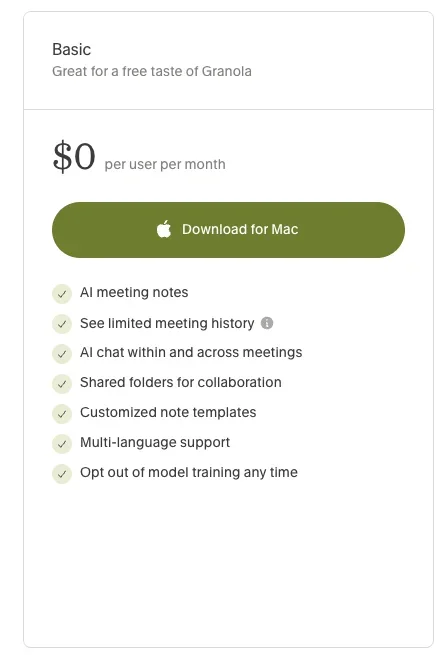
Basic: $0/month
Signing in only took a Google login, letting Granola connect to my calendar. It didn't ask for a credit card at any step. There's no web version for recording meetings, so every meeting ran through the desktop app.
Granola then built a structured note after every meeting, regardless of the video tool used.
No bot joined any of them. Granola captured my laptop's mic and system audio in the background while I stayed in the conversation.
Within a minute or two of each call ending, Granola combined my rough notes with the transcript into the finished note. I barely typed during meetings, and it still had enough to work with. The note itself is identical on all three plans. Separate features like pre-meeting briefs and follow-up emails start on Business.
Basic's limits:
- Meeting history: Basic shows only the last 30 days of notes in the app. Older ones aren't deleted, only hidden until you upgrade, and you can still request a CSV of their titles and summaries, which Granola emails a few hours later.
- Integrations: Basic only connects to Slack, which can post a note's link and summary to a channel. Attio, Notion, HubSpot, Affinity, and Zapier all sit behind Business.
The 30-day window rarely gets in the way if you record a few times a week and only want recent notes. For anyone searching back through a quarter of customer calls, it's the limit that would push me to upgrade first.
What's included: Cleaned-up AI meeting notes, AI chat within and across meetings inside the 30-day window, shared folders, customizable note templates, and multi-language support. You can opt out of AI model training at any time.
Best for: Testing whether Granola's note quality is good enough before paying, or anyone who rarely needs to review meeting notes older than a few weeks.
Pros:
- Basic is free permanently and never asks for a credit card
- You can record as many meetings as you want each month
Cons:
- Reaching anything older than 30 days means requesting a CSV export and waiting hours for it
- Sending a note anywhere other than Slack means copying and pasting it by hand
Business: $14/user/month
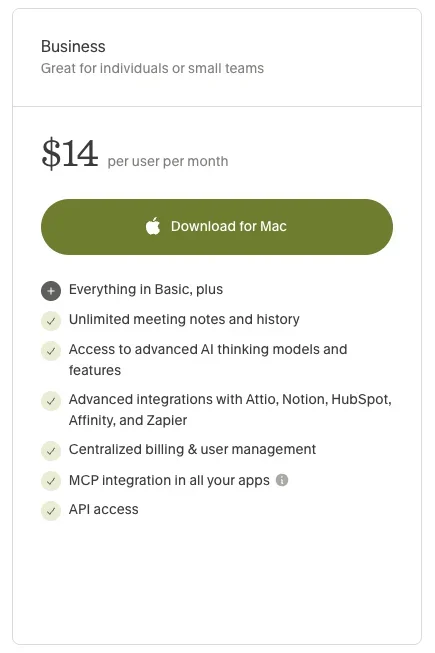
Business connects natively to Attio, Notion, HubSpot, Affinity, and Zapier, sending meeting notes straight into the records you're already working from.
Business's main upgrade over Basic is unlimited meeting history. That's what makes $14/user/month worth paying for anyone who regularly needs older notes.
Four other upgrades come with Business:
- AI chat model selection: Business lets you manually pick which AI model handles cross-meeting chat. Basic uses an automatic default.
- API access: Lets you pull Granola's own data into other tools you build or connect.
- Wider MCP (Model Context Protocol) reach: Basic's connection to it only reaches notes from the last 30 days, and transcript tools and tools that edit notes or folders are paid-only. Business removes the 30-day limit.
- Centralized billing: One invoice covers every seat, under one account.
Business is billed monthly only, so the price stays at $14/user/month however long you keep it.
What's included: Everything in Basic, plus unlimited meeting history, pre-meeting briefs, follow-up emails, a workspace-wide dictionary, AI chat model selection, centralized billing, API access, and integrations with Attio, Notion, HubSpot, Affinity, and Zapier.
Best for: A small team that lives in back-to-back meetings and needs last month's notes to stay searchable next quarter.
Pros:
- Old calls stay searchable in the app instead of arriving as a CSV export
- You can upgrade yourself without talking to sales
Cons:
- There's no annual plan on Business, so you can't lock in a lower rate
- Single sign-on and the other compliance settings sit one tier up, so Business alone won’t pass a security review that requires them
Enterprise: $35/user/month
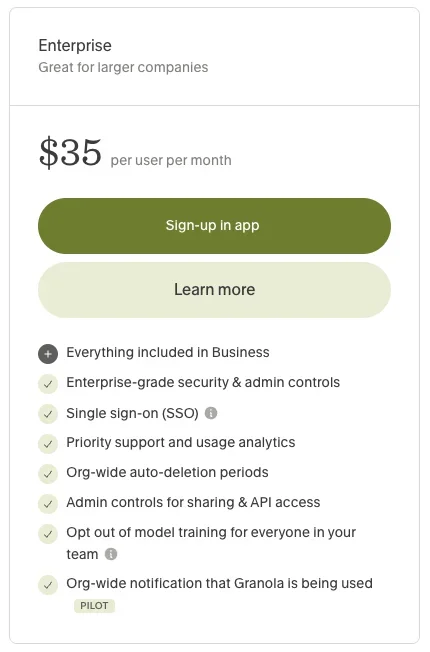
Enterprise is where the admin features live. A dashboard gives IT org-wide visibility and usage analytics. Domain management lets admins bring the free accounts people may already be running into the company workspace.
Enterprise costs $35/user/month, with no minimum seat count, and you can buy it in the app at any size. Granola's sales team still handles seat counts, annual contracts, and specific security needs.
Enterprise adds these controls:
- Single sign-on (SSO): Lets employees log in through the company's existing account system. It needs a company email domain and an identity-provider connection, plus at least 50 active workspace members or an Enterprise commitment for 50 seats.
- SCIM (automatic user provisioning): Auto-creates and removes employee accounts as people join or leave, once SSO is connected. The same 50-seat floor applies.
- HIPAA-compliant workspaces: Need a signed Business Associate Agreement, which sales arranges, so you can't switch it on yourself.
- Audit API: Pulls workspace audit events into your security and compliance tools.
- Org-wide transcript auto-deletion: A workspace admin sets one retention window, like 90 days, in Settings, and it covers every transcript in the workspace. Notes stay. Switching it on starts a one-week cooldown, and after that, transcripts older than the window start being deleted.
What's included: Everything in Business, plus a direct Salesforce integration, SSO, SCIM, HIPAA-compliant workspaces, an audit API, org-wide transcript auto-deletion policies, usage analytics, an admin dashboard, domain management, and priority support with a dedicated contact.
Best for: A company that needs Enterprise admin and compliance controls and is ready to work with Granola's team to set them up.
Pros:
- Add or remove seats any time from Settings
- SSO, HIPAA-compliant workspaces, and the rest of Enterprise’s compliance controls come with the per-seat price, though SSO needs 50 members or a 50-seat commitment
Cons:
- Admin controls still need IT setup before they pay off
- Annual billing still requires a sales conversation
What Granola costs a team
Granola bills per seat, so your monthly cost is the plan price times the number of people using it.
| Team size | Business | Enterprise |
|---|---|---|
| 10 seats | $140/month ($1,680/year) | $350/month ($4,200/year) |
Three programs cut that bill. Pre-seed and seed startups under 30 employees get a free year of Business through Granola's startup program. Students at accredited universities in the US, UK, and Canada get 12 months of Business free. Registered nonprofits can apply for 50% off Business.
Which Granola plan should you choose?
Basic fits if you:
- Want to try Granola's note quality before paying anything
- Only need meeting notes from the last few weeks
- Are the only person on your team who would use it
Business fits if you:
- Run meetings every week and need to search back further than 30 days
- Want to send meeting notes to Notion, HubSpot, or Zapier
- Are a small team who all need the same access
- Run a pre-seed or seed startup under 30 employees, since Granola’s startup program gives a free year of Business
Enterprise fits if you:
- Need SSO, HIPAA-compliant workspaces, or an audit trail for compliance
- Have 50 or more people on the team, or will commit to 50 seats, so you can switch on SSO and SCIM
- Want org-wide transcript auto-deletion policies set up through Granola’s team
Is Granola worth the cost?
Granola earns its price the moment your team needs to search meeting notes older than a month. The free plan works, but the 30-day history limit is a hard limit for anyone who searches back through old calls regularly. The Business plan removes it and adds integrations for $14/user/month, a fair trade for a meeting-heavy team.
Granola only captures audio from desktop, iOS, Android, and Apple Watch, has no web recorder, and doesn’t record video.
Granola is worth it if you:
- Spend most of your week in meetings and want notes without a bot in the call
- Already use Notion, Slack, or HubSpot and want notes sent there without copying and pasting
- Need Enterprise security controls and are ready to work with Granola's team to set them up
Skip Granola if you:
- Need to save and play back audio recordings of in-person conversations or lectures. Otter keeps the recording, while Granola keeps the transcript and AI notes.
- Need an AI teammate that takes the follow-up email and CRM update all the way to done, so your only step is tapping approve before anything goes out.
Check out 12 more meeting minutes apps if Granola isn't the right fit.
Granola alternatives and pricing comparison
Granola is one of many AI note-taking apps, and the four alternatives below each handle something it doesn't.
Where Granola lands on cost:
| Tool | Starting price | Billed annually | Best For |
|---|---|---|---|
| Granola | $14/user/month | None | Bot-free meeting notes with searchable history |
| Lindy | $49.99/user/month | None | Turning meetings into finished follow-up work |
| Fireflies | $18/seat/month | $10/seat/month | Pushing action items into a CRM or task tool |
| Otter | $16.99/user/month | $8.33/user/month | In-person recording and mobile transcription |
| Jamie | $29/month | $24/month | Remembering speakers across meetings once you name them |
Lindy is the one I'd pick for my own week. It turns a meeting into a drafted email and an updated CRM record, both waiting on my approval. At $49.99/user/month, it's the priciest here with no annual discount, and still what I'd pay, since it clears the work after the call instead of the typing during it.
Fireflies prices itself differently from Granola. It runs $18/seat/month, and the Pro plan includes a one-time pool of 20 AI credits for advanced AI features, shared across the team no matter how many seats you add. If a credit system sounds like the wrong kind of complexity for your team, our Fireflies pricing breakdown walks through exactly when that pool tends to run dry.
Lindy vs Granola: Which should you choose?
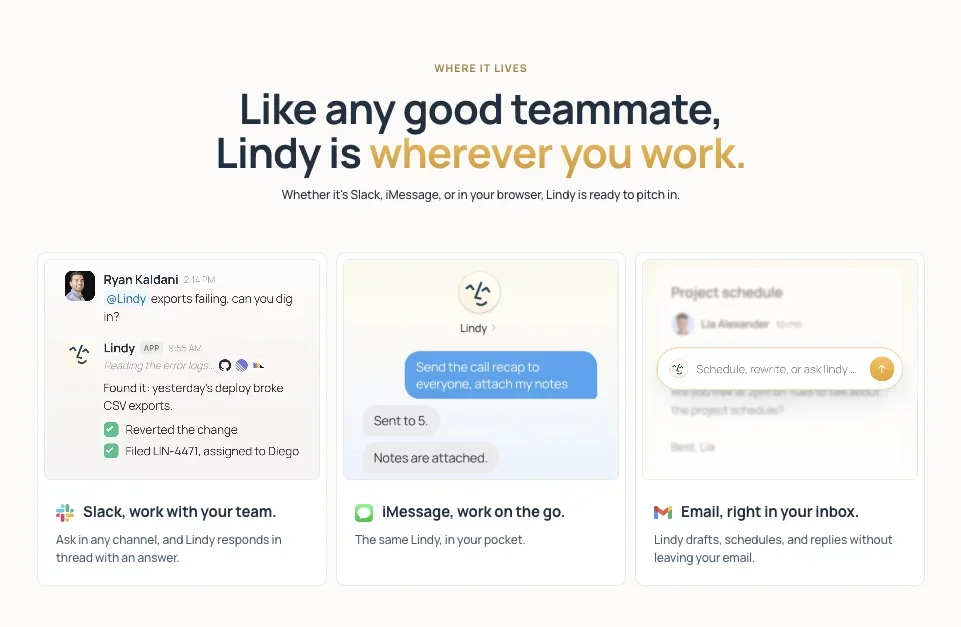
Lindy is better for: Teams that want an AI teammate in Slack and email to handle everything after the meeting, from the follow-up email to the CRM update. Lindy pulls the call details, drafts both, and waits for your approval before sending or saving anything.
Granola is better for: Teams that want notes without a bot in the call and a free way to start. Basic costs nothing and has no meeting cap, and Business adds full history and CRM connections for $14/user/month, less than half Lindy’s price.
Use both if: You want Granola's bot-free capture for sensitive or client-facing calls and Lindy for the follow-up work afterward. On Granola, a direct Salesforce sync needs the $35 Enterprise plan, so Business teams route it through Zapier, while Lindy connects to Salesforce directly.







My bottom line on Granola pricing
Stay on Basic if you rarely need notes older than a month. Move to Business once you do, since it lifts the 30-day cap that otherwise leaves a CSV export as the only way back.
Enterprise can make sense even for a small team that needs HIPAA, one transcript-deletion window for everyone, or the direct Salesforce sync. You can add seats yourself at any size, and sales comes in for an annual contract, the HIPAA agreement, or SSO and SCIM at the 50-seat mark.
Frequently asked questions
Is Granola free?
Yes, Granola's free plan, called Basic, never expires, needs no credit card, and has no meeting cap. Granola stores notes older than 30 days but hides them from the app until you upgrade, though you can still export their titles and summaries as a CSV.
Does Granola offer a free trial?
Yes, Granola offers a free trial separate from its permanent free plan. Some new sign-ups receive a short trial window with full Business or Enterprise access, which drops back to Basic on its own if you never subscribe.
How much does Granola cost?
Granola costs $0/month for Basic, $14/user/month for Business, and $35/user/month for Enterprise. Business is billed monthly only. Enterprise can be bought in the app with no seat minimum, and sales handles annual contracts.
How do I cancel my Granola subscription?
Cancel from Settings, then Billing, then Manage subscription, which opens Stripe's billing portal. Select Cancel subscription there. Your plan stays active until the end of the current billing cycle, then moves automatically to the free Basic plan.
What are the best Granola alternatives?
Fireflies, Otter, and Jamie are the strongest Granola alternatives, each for a different need. Fireflies and Otter focus on transcription and search, and Jamie leans on persistent speaker memory across meetings.
tl;dv, Read AI, Avoma, and Grain are the other names worth knowing, and our Fathom alternatives roundup covers each one.
About the editorial team

Marvin is a Growth Engineer at Lindy focused on AI agents, automation, and product-led growth.

Flo Crivello is the founder and CEO of Lindy. Before that, he founded Teamflow and was a product manager at Uber. He writes about technology, startups, and the future of work on his blog.
